Just Simple Planner

by David Hurt
5
4
3
2
1
Score: 50/100

Description

The Just Simple Planner plugin arranges Markdown notes on a timeline with threads as rows and days as columns. Its Bases layout supports separate planners with their own queries and property mappings, alongside a retained deprecated classic view. Cards connect through wikilinks and connected flows can move together while preserving date gaps. Notebook presents a thread chronologically, while a task rail gathers pending checkboxes and writes completion back to the original notes. Bases planners support date ranges, repeating appearances and additional dates without duplicating files. Card editing, thread folding, native hover previews and Spotlight provide different ways to navigate the same content. Changes support undo and conflict checks. Data stays local, with no accounts or network requests. External calendar connections, background reminders and Tasks plugin deadline parsing are not supported.

Reviews

No reviews yet.

Stats

18
stars
182
downloads
0
forks
5
days
1
days
1
days
5
total PRs
0
open PRs
0
closed PRs
5
merged PRs
0
total issues
0
open issues
0
closed issues
26
commits

Latest Version

2 days ago

Changelog

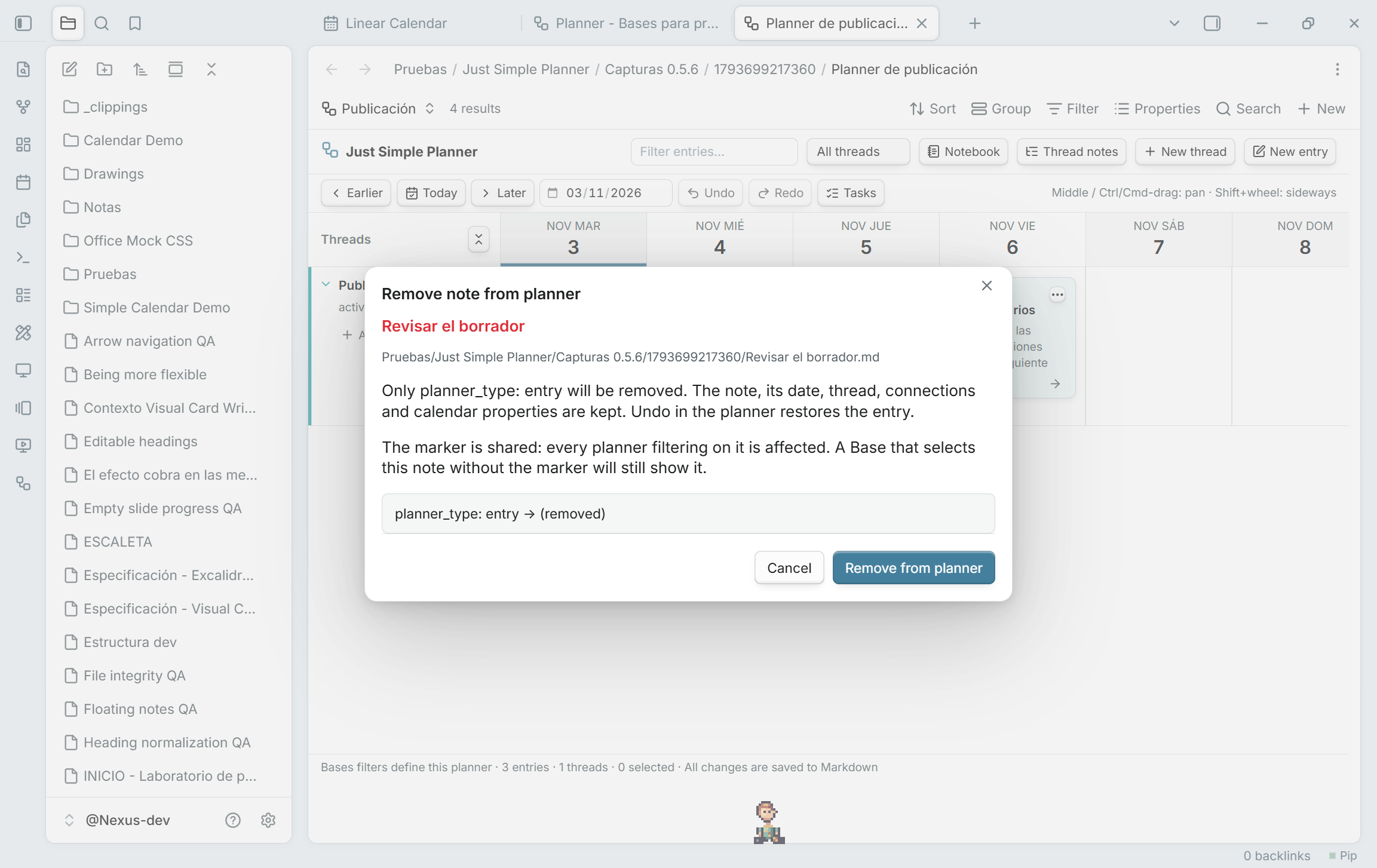
Remove from planner, keep the note

Remove note from planner… is now available from the right-click and three-dot card menus in Bases, as well as the retained classic view. The review removes only planner_type: entry. Your file, Markdown content, dates, thread, connections and scheduling properties remain. Undo/Redo restore or repeat the operation, even after the card leaves the current Base's results.

The usual Base filter is planner_type is entry OR planner_type is thread, under All views → Any of the following are true. Migration creates it automatically. With that filter, removing the entry marker removes the card from the planner. The marker belongs to the shared note, so other planners filtering on it are affected too. A custom Base query can still select the unmarked note; its filters decide membership. Removal is disabled for cards without the entry marker.

Removal review in Obsidian: keep the note and its other data

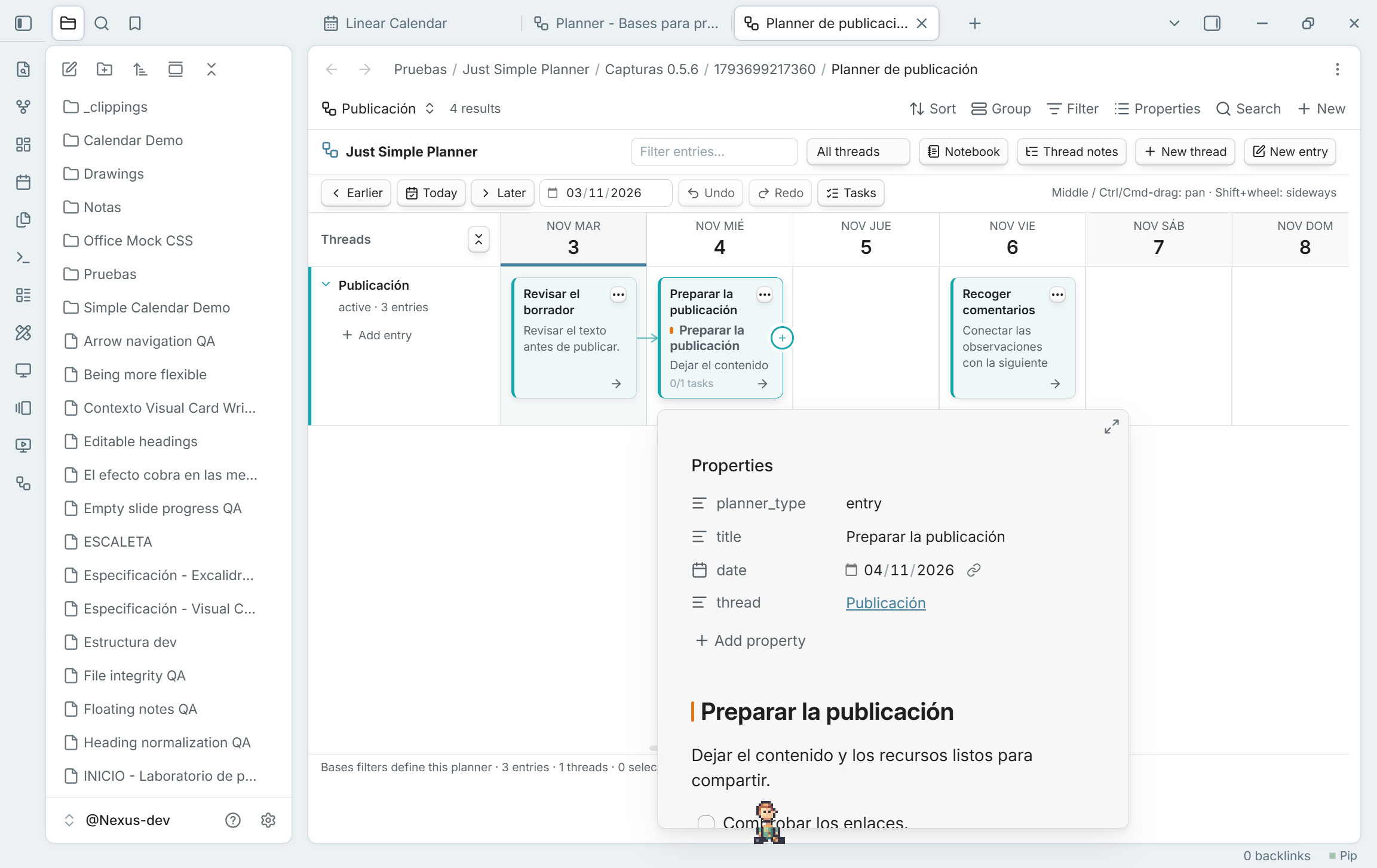
Preview notes on hover

Hover a card to see Obsidian's native note preview, including properties and Markdown content. No click or Ctrl/Cmd is required by default. It works in board and Notebook, classic and Bases, including folded cards and repeated appearances of the same note.

Enable the Page preview core plugin. Its Just Simple Planner source setting controls whether a modifier key is required. Moving onto card buttons/links closes the card preview and keeps those controls' own actions. Starting a drag, pan or connection also closes the preview. Previews close when their cards are rebuilt, and a preview that finishes loading late cannot cover an active gesture or a closed view.

Native card hover preview with source properties and Markdown content

Updating and the Bases transition

Update the same Just Simple Planner plugin to 0.5.6. GitHub-based installers can detect it as a newer stable version. For a manual update, replace main.js, manifest.json and styles.css with the three assets below and reload the plugin or restart Obsidian. Keep data.json, your notes and existing .base files. Existing Bases planners do not need another migration.

The classic view remains deprecated and available; no removal date is set. The plugin itself is not deprecated. Migration creates a new Base reading the same Markdown notes, without moving or rewriting them. The migration-button, hidden-position and keyboard-priority fixes from 0.5.3–0.5.5 are included.

Validated with 63 unit tests and 177 native checks across 14 suites in the development vault. Original notes/settings are preserved. The validation document records the native popup resize warning separately from unexpected errors and describes platform limits.

Migration guide · Guía en español · Validation

README file from

Github

Just Simple Planner

New here? Start with the illustrated tutorial · Download the ready-to-open example

See the story of your work. Keep it in your notes.

A visual timeline for Obsidian: projects in rows, days in columns, and every card an ordinary Markdown note.

Check plugin Version Obsidian License: MIT Runtime dependencies

Tutorial · Migration guide · Guía en español · Visual tour · Install · Settings · Try the examples · Markdown format · The story and the credit
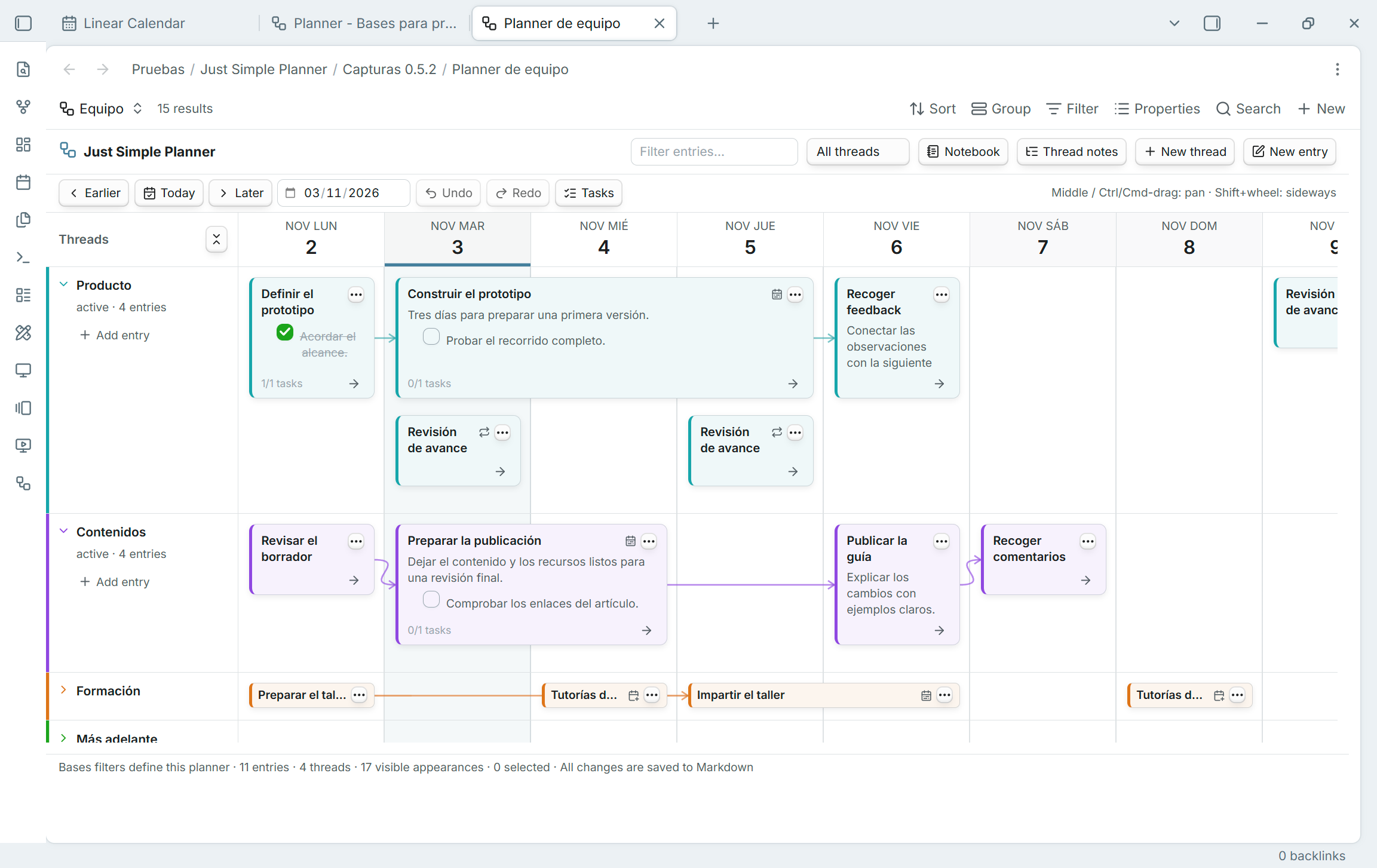
Simple Planner inside Bases: native note selection, threads, connections, short cards, repeated notes and multi-day ranges

Your notes, several planners. Open a Base and choose the Simple Planner layout. Each planner uses its own query and view configuration; its cards, threads and arrows remain ordinary Markdown notes and links.

Your work has a past, an unfinished middle, and a next step. Just Simple Planner puts them on one continuous board. Capture a meeting, connect it to a draft, follow a branch into another project, or move the next few steps together when plans change.

Every card reads an ordinary Markdown note. Repeated appearances share that same file. You choose where files live. The thread property places them on the board; next links them together. Your notes remain readable in Obsidian, other editors, and Bases when the plugin is disabled.

Cards with only a title and frontmatter use a shorter height, keeping the two-line title, note menu and continuation arrow. Add Markdown content to return to the normal preview height; blank lines alone do not count as content. Entries on the same day stack using their actual heights.

Inspired by Haftio. The original deserves clear credit. This is an independent Obsidian implementation. Read the thank-you, the apology, and the story.

New in 0.5.6: remove a note from the planner through its right-click or three-dot menu while keeping the file and its other data, with Undo/Redo. Hover a card to see Obsidian's native preview of its properties and content. Both features work in Bases and the retained classic view. Update the same plugin; existing notes, settings and Base files are retained.

Bases planners and the classic-view transition

0.5.2 introduces Simple Planner as a native Bases layout. You can keep several planners in separate Base files or views, select notes with Bases filters, and choose date/title/thread/connections properties per view. Enable Obsidian's built-in Bases plugin; Just Simple Calendar remains independent and is not required.

Upgrading from 0.4.x: read this first

The standalone classic view is deprecated, but remains available in this release. No removal date has been set. The plugin is not deprecated. This is an update to the same plugin ID, with the same Markdown notes; you do not need another plugin or a note-format conversion.

Existing classic tabs, command IDs and settings remain. The ribbon icon opens Open classic planner. For a new planner, create/open a Base, add a view and choose Simple Planner. To bring an existing classic planner across:

  1. Enable Bases, then run Just Simple Planner: Create Bases planner from classic notes (also available from the classic banner or Review migration in settings).
  2. Review the counts, property mapping and classic creation destinations. Choose a new vault-relative Base path and click Create Base.
  3. Wait for Migration verified in the new view. The initial comparison checks entry titles/dates, thread membership, connections and thread metadata, retaining empty thread rows.
  4. Compare your normal workflow, then tailor the Base filters or add other planners. Select optional scheduling properties explicitly in Configure view.

Migration creates a Base that reads your existing files. It does not move, rename, duplicate or rewrite them, or replace classic settings. Classic creation folders do not become search filters. Notes remain shared: editing a note in one planner changes that same note elsewhere.

Read the complete migration guide or guía en español for the differences between views, troubleshooting, new-note locations, returning to classic and scheduling limits.

Several planners, selected by Bases

For the usual marker-based planner, the Base's filters determine membership. In All views, choose Any of the following are true and add planner_type is entry or planner_type is thread. Migration creates this filter automatically. Its .base representation is:

filters:
  or:
    - note.planner_type == "entry"
    - note.planner_type == "thread"

With that filter, planner_type: entry includes a note as a card, provided it has a valid selected date; planner_type: thread supplies a thread row. Removing the entry marker excludes the note from this query. The property is named planner_type, not planner_entry.

Custom Base queries can deliberately select unmarked notes with a valid date. The layout does not add a hidden marker requirement or change those filters. Same-day cards follow the Base's sorting; dates stay chronological and thread rows retain their status/order. Native Bases grouping does not replace the Thread property. The Base's result limit and filters still apply.

Different views can choose different properties and display settings. Shared filters in the same Base still apply to all its views; use separate Base files for independent root queries. Use Thread notes to retain empty rows even outside the query.
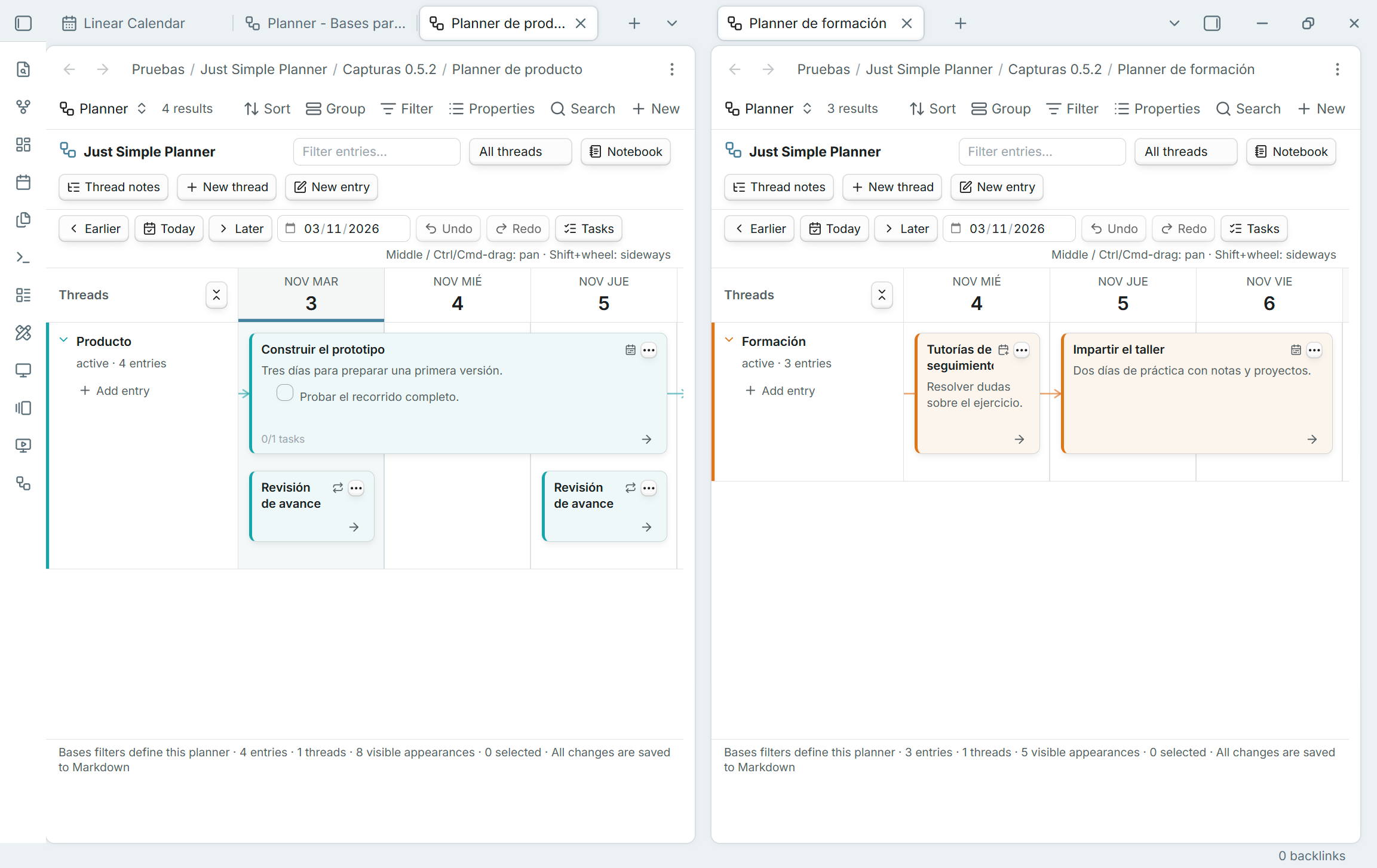
Two independent Base files show different planners over the same fictional note collection

Multi-day cards and real scheduling

Select End date property to extend cards through their inclusive final day. Overlapping ranges stack without covering one another. Dragging an ordinary range preserves both ends, written times/offsets and duration, even when grabbed from its second day. Short title-only cards keep their shorter height.
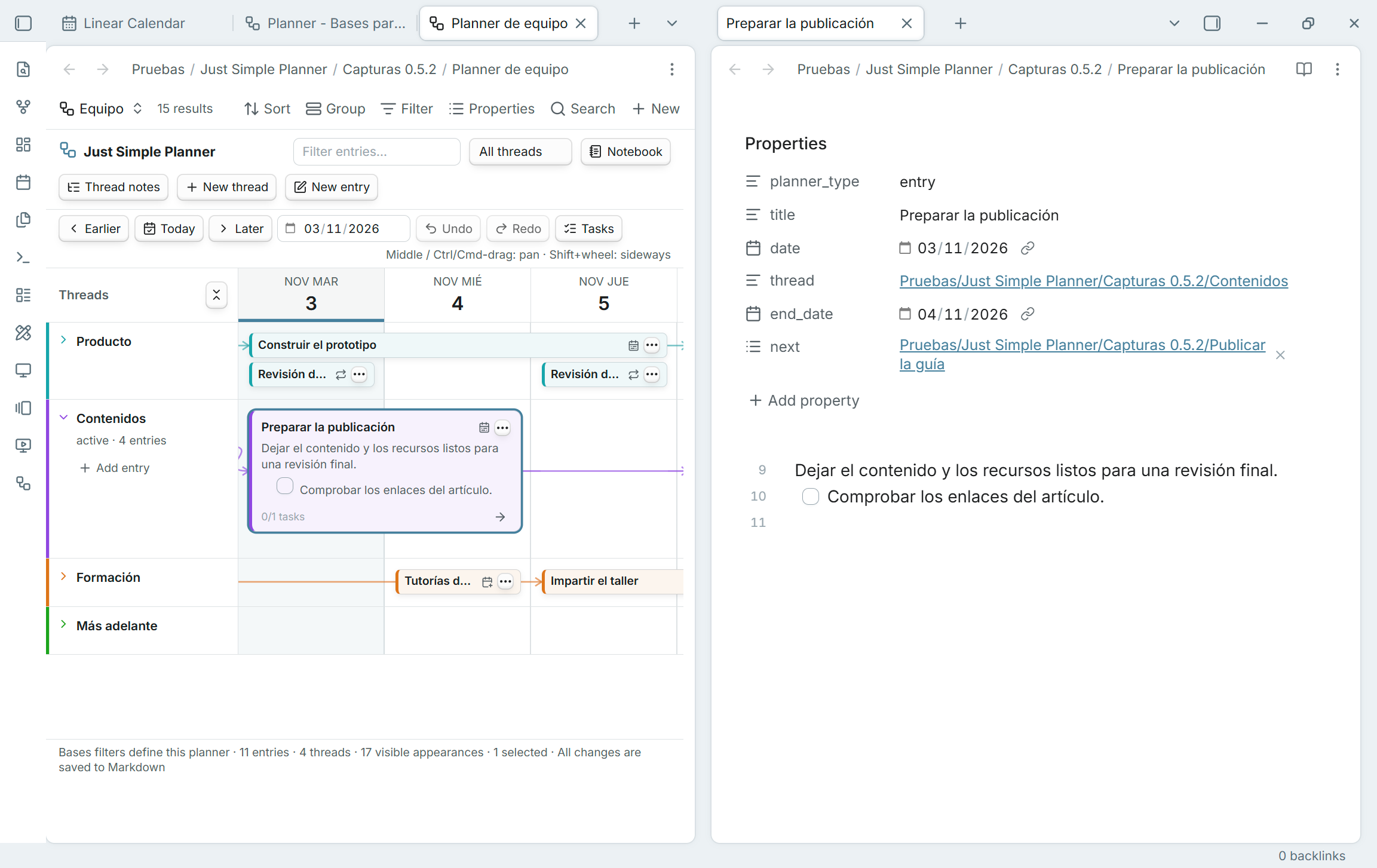
A card spans November 3 and 4, matching the original note's date and end_date properties

Optional scheduling provides repeat, repeat-until, skipped-day and additional-date selectors. For example, a note with repeat: weekly appears each week without duplicating the file. The card menu provides date-list editors for configured writable properties. Tasks and connections remain attached to the note once; scheduled appearances do not have separate completion records or graph nodes.
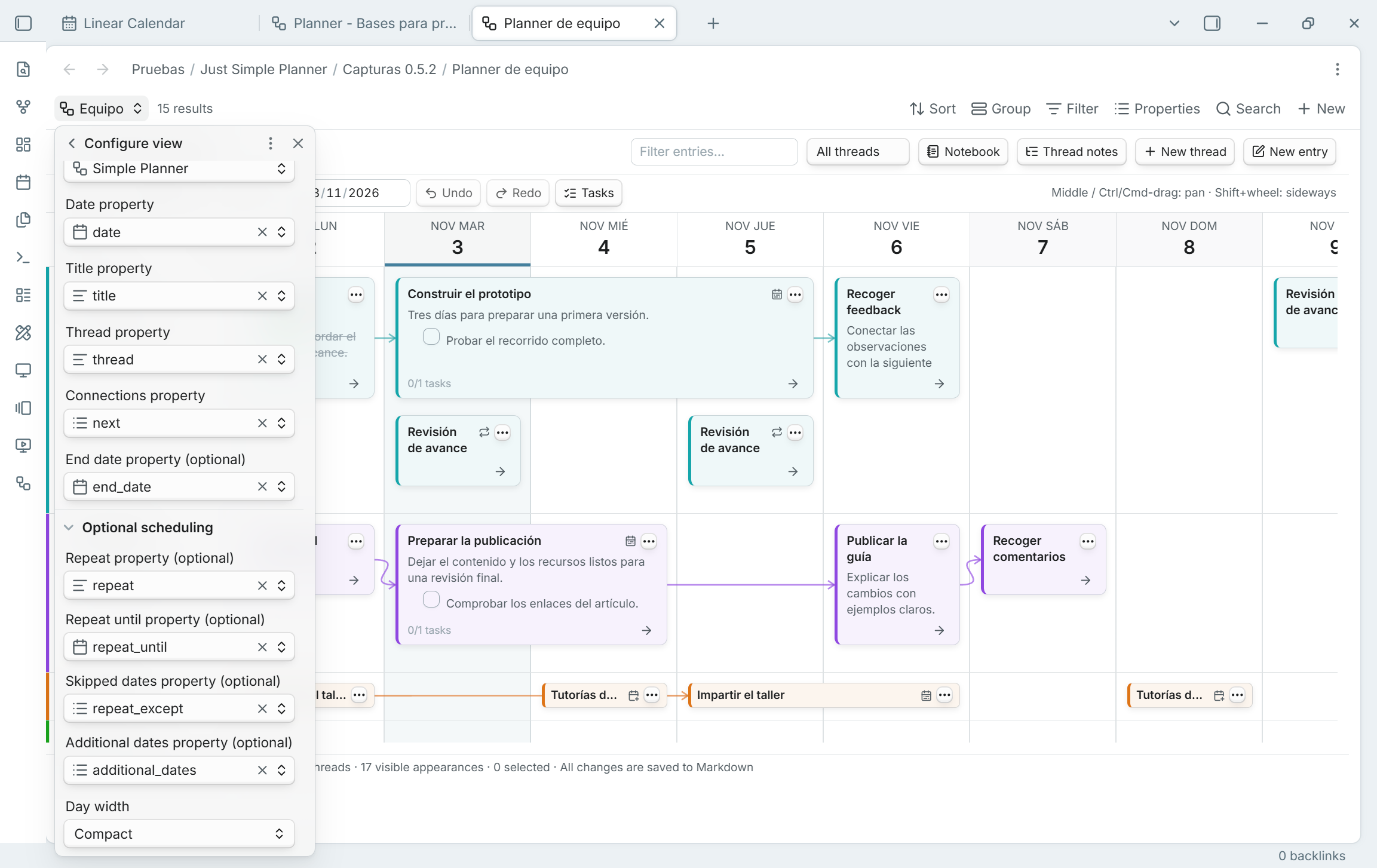
Optional scheduling in the native Bases view configuration

Notebook, tasks and the same Markdown

Board and Notebook share the existing editor, previews, links, selection, Spotlight and undo/redo. Notebook displays full date ranges; the task rail lists each source note's tasks once. The planner's text filter includes Markdown bodies, while native Bases search searches the displayed properties.
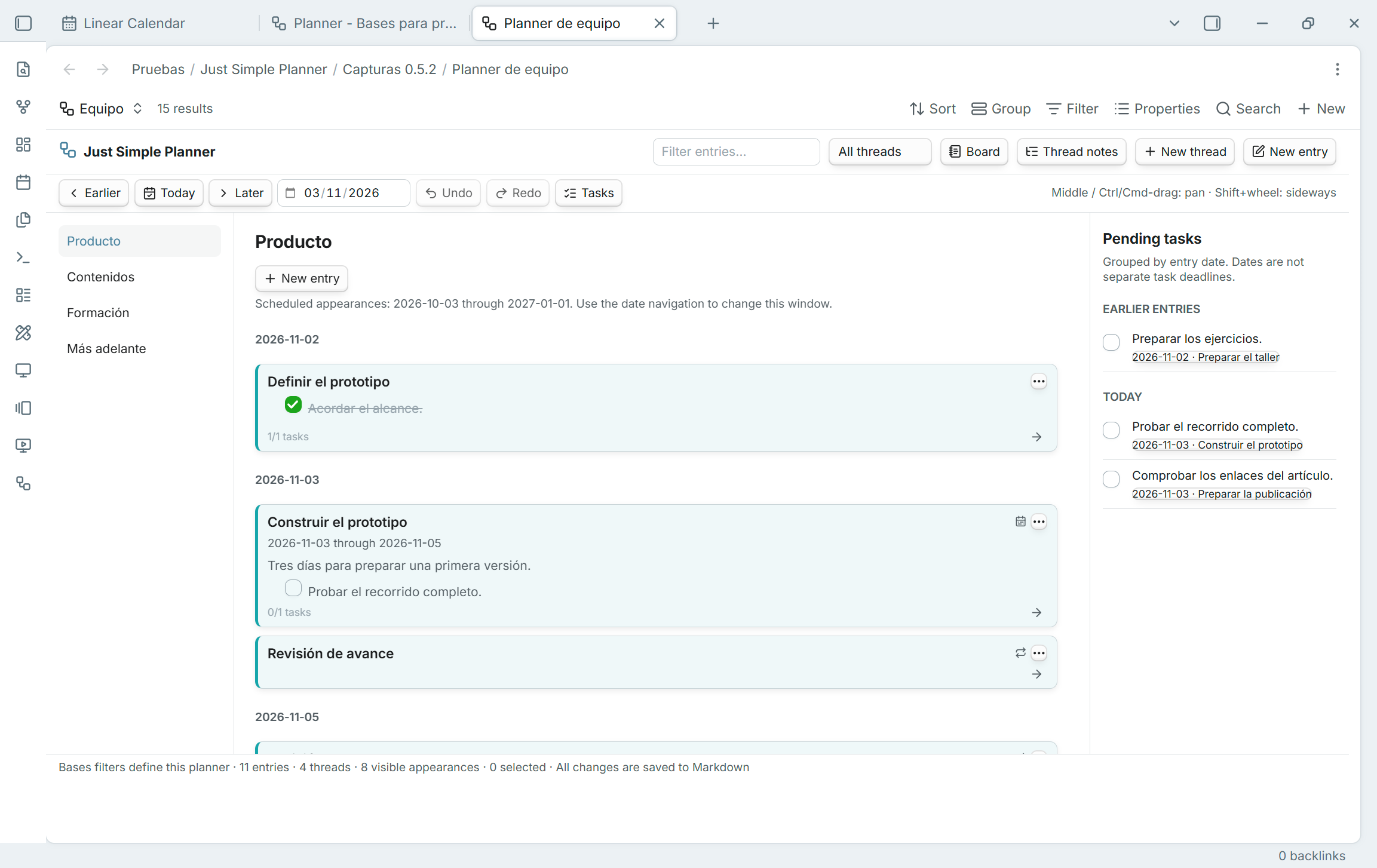
Notebook shows full date ranges and scheduled appearances beside the task rail

Creation, scope and careful writes

  • Use the planner's New entry and New thread actions for its editor and connected continuations. These create files through native Bases creation, which chooses the folder/name and applies the Base's creation context. There are no planner-specific creation-folder settings for Bases. A restrictive filter can still exclude a newly created note; the plugin does not override the query. The native Bases New action keeps its own normal behavior and may need a date to be filled in.
  • New entries retain planner_type: entry. Existing unmarked notes are not marked merely by viewing them. Remove note from planner… is available from a card's right-click and three-dot menus in both layouts. It removes only that entry marker and supports Undo/Redo. Every planner filtering on the shared marker is affected; a Base selecting the note by other criteria can still show it. The action is disabled for cards without planner_type: entry. File-explorer membership actions remain explicitly labeled classic.
  • Linked thread notes are resolved directly. Thread notes manages explicit empty rows for this view, including notes outside its filters. Removing a row reference never deletes the note. Editing a shared thread's status/order affects that same note wherever it is used.
  • An indicator identifies connections outside the current Base results. A whole-flow move is refused until all resolved successors are included. Individual edits stay within the current query; there is no hidden global graph traversal.
  • Datetime cards use their written main day. Select End date property to extend each card through its inclusive final day. Overlapping date ranges stack without covering one another, retaining the short/full card heights and Base sort. Ongoing notes remain visible if they start before the loaded window; dashed edges mark ranges continuing beyond it. Notebook displays the full date range.
  • Moving a range shifts both dates and preserves the written times/offsets and duration. Dragging from a later day keeps that grabbed day under the pointer. A computed date or end date can be displayed but is not writable; invalid end dates show a warning and a one-day card.
  • Select Repeat property or Additional dates property under Optional scheduling to show the same note on its scheduled days. Repeat supports daily, weekly, monthly, yearly, every 2 weeks and compact forms such as w2, matching Just Simple Calendar. Optional Repeat until includes that last start day; Skipped dates omits starts on selected ISO dates. Additional dates are individual YYYY-MM-DD values for a single-day note without repetition. Nothing is generated on disk.
  • Scheduled appearances share the note's selection, editor, body, tasks and connections. Editing a later appearance edits the original note and main date. Connections remain one relation per note, anchored at its main appearance when loaded, otherwise its first appearance in the window. Tasks are listed once per note. Dragging or moving a flow containing scheduled notes is disabled; edit the original date/rule in the note, and use Repeat options… or Additional dates… in the card menu for configured writable limits/date lists.
  • The board loads a 91-day window; Notebook uses that window for scheduled appearances while retaining ordinary historical entries. Date navigation changes the window. Invalid schedules display warning badges and explanations in the footer tooltip. These scheduling options belong to each Bases view; the classic view keeps its original behavior.
  • Each open view has its own history. Concurrent changes from another planner or editor cause a conflict instead of being overwritten. Mapping changes invalidate old editor saves while retaining their drafts. Closing a view releases its session and refuses new stale edits. Creating a note is not undone by deleting it.

Bases supplies discovery and query updates; the new session reads bodies only for its selected Markdown notes and uses small view-scoped caches. The classic global discovery runs when the classic view or a classic/migration action needs it and stops monitoring when no classic view/action remains. Existing global settings below apply to the classic view only.

Visual tour

The controls below are shared with the classic view. These earlier screenshots illustrate the same card editor, links and task workflow; classic membership/settings are labeled separately below.
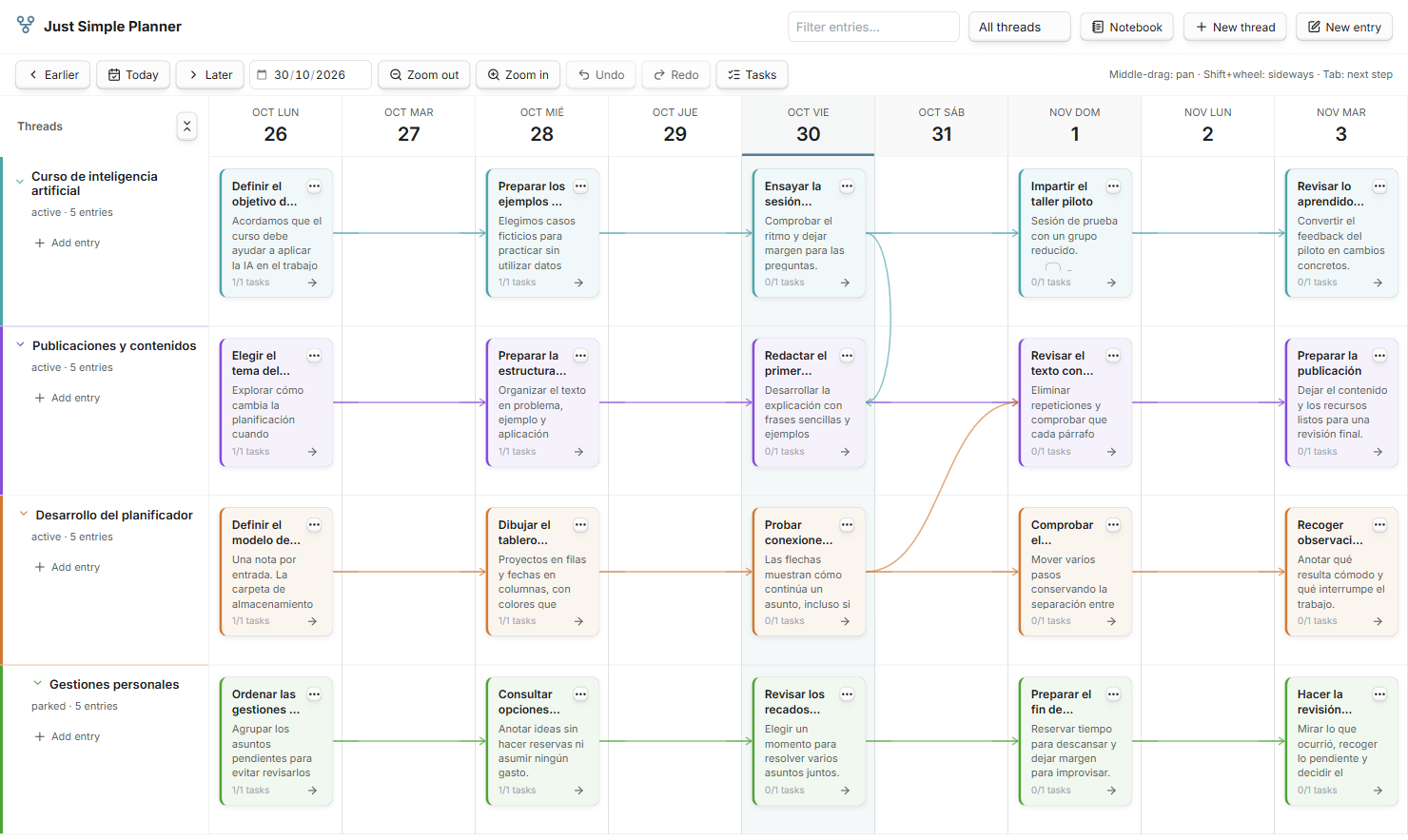
Twenty Spanish example notes arranged in four threads, with dated cards and connections across projects

The three dots: a small menu with the whole workflow

This is the menu you will use to turn individual notes into a connected story:

Action What it does
Edit entry Change the title, date, thread and Markdown body in a focused editor.
Open note to the right Open the actual Markdown file beside the board.
Add connected entry Start a new entry on the following day, in the same thread, linked from this one. Tab does the same when a card is selected.
Connect to… Choose an existing entry to continue the story, including one in another thread.
Disconnect… Remove a particular outgoing connection. The two notes remain.
Select connected flow Select the entry and its connected successors, including branches. Drag them together to preserve the gaps between their dates.
Spotlight Highlight this path through the work and dim unrelated entries.
Remove note from planner… Remove only planner_type: entry, keeping the file and all its other data. Available from right-click and three-dot card menus in both layouts, with Undo/Redo. Bases filters determine whether the note disappears.

Draw connections with your mouse

Hover a card to reveal the + on its right edge. Drag it onto another card: the arrow follows your pointer and the destination lights up. Release to save the connection as a normal wikilink in next.
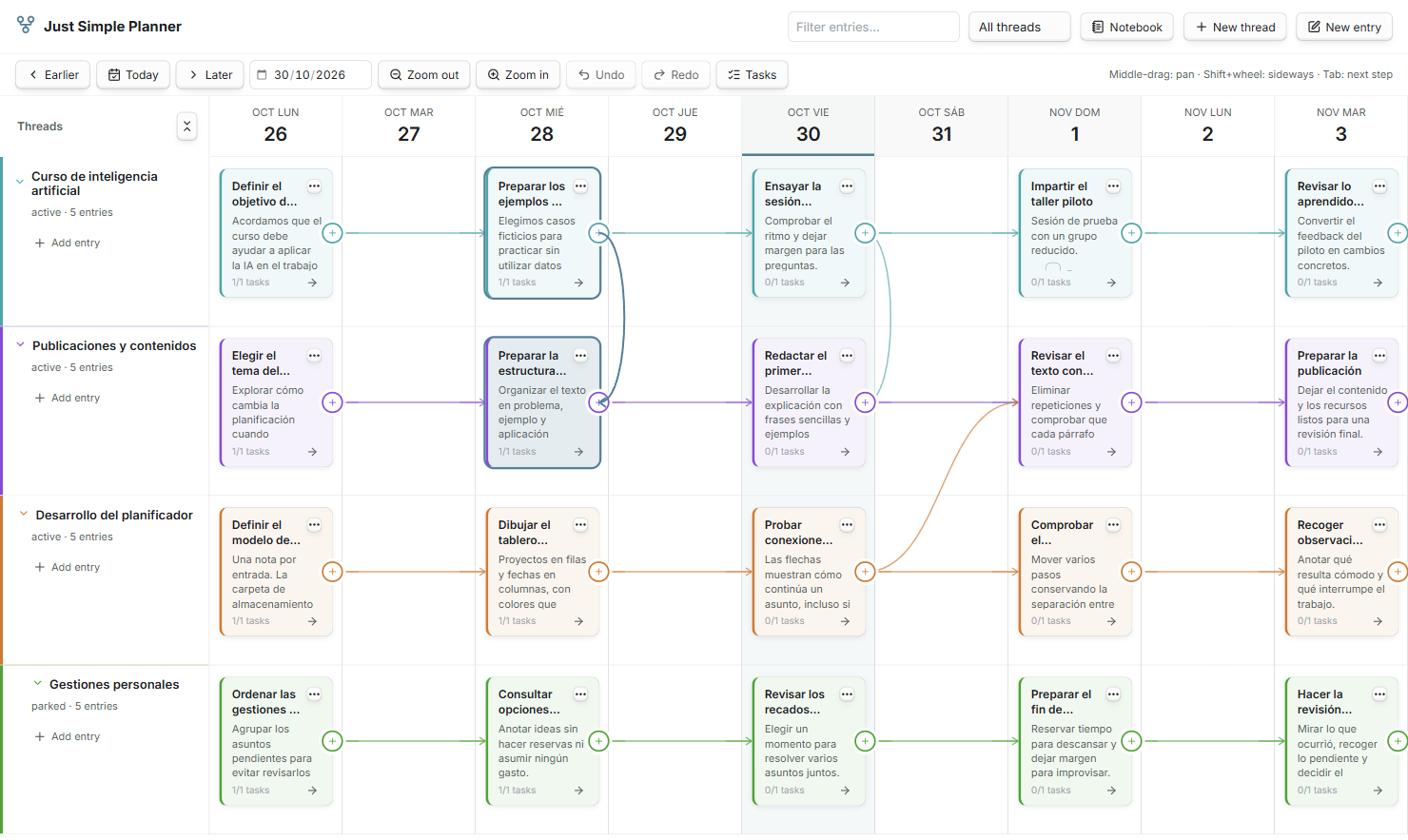
Dragging a live connection from one thread to another, with a highlighted destination

Hover an existing line to reveal × and disconnect it directly. The three-dot menu remains available. Escape or a drop on empty space cancels the gesture; holding the pointer near the edge scrolls the board. Repeated drops do not create duplicate links. Creation and disconnection both support Undo/Redo.

Preview a card's note on hover

Hover a card to open Obsidian's native note preview, including its properties and Markdown content, without clicking or holding Ctrl/Cmd by default. It works in the board and Notebook, in classic and Bases, including folded cards and repeated appearances of the same note. Enable the Page preview core plugin; its Just Simple Planner source controls whether a modifier key is required.

Moving onto card buttons or Markdown links closes the card preview and keeps those controls' own actions. Starting a card drag, a pan or a connection also closes the note preview so it does not cover the gesture. Closing the planner closes its preview. Touch devices keep their existing behavior.
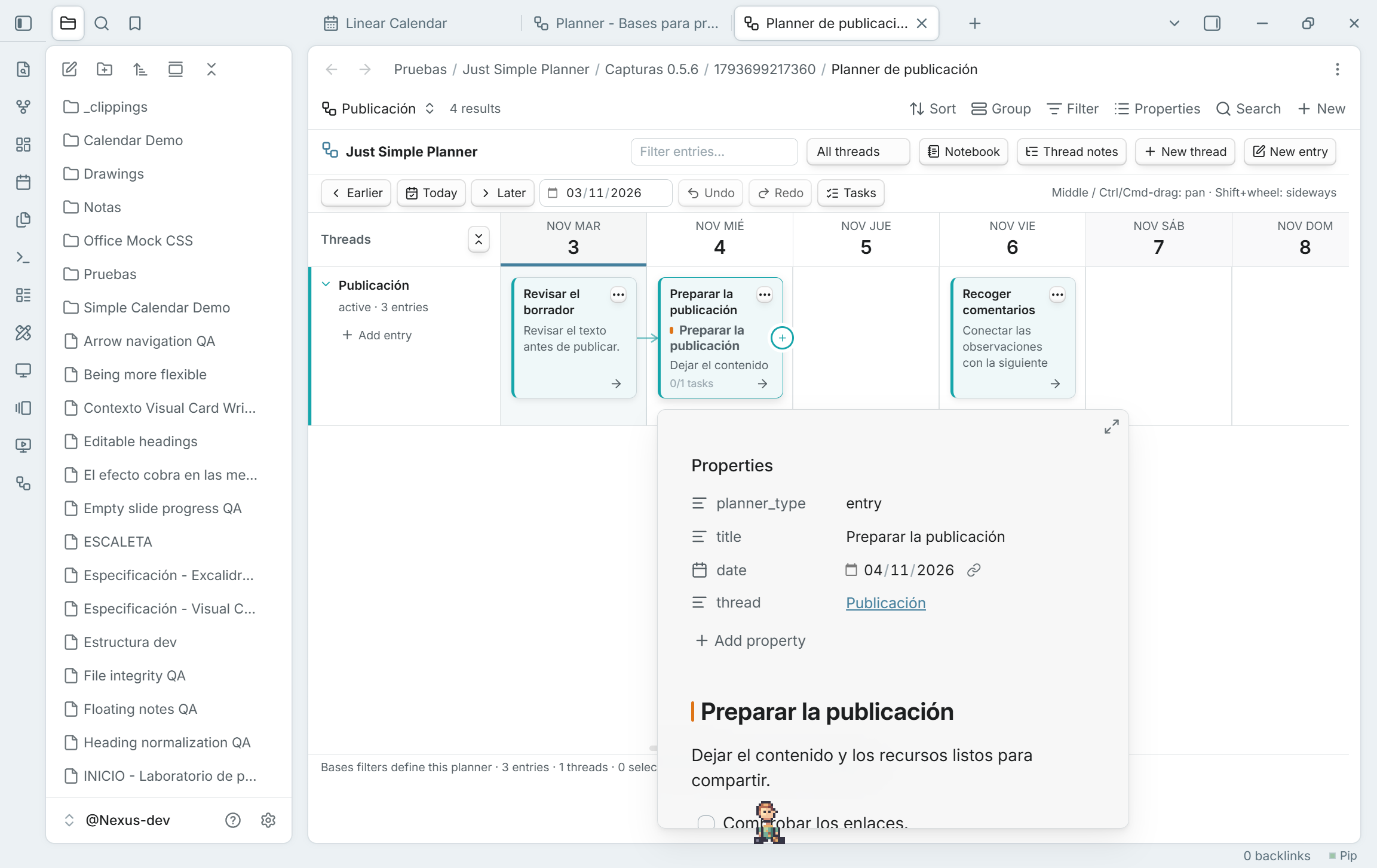
Native note preview on card hover, showing the source properties and Markdown content

Fold a thread without losing its history

A folded thread keeps a row of small, colored cards with single-line titles at their dates. Long titles use an ellipsis and can be read in full on hover. Entries on the same day stack rather than cover one another.
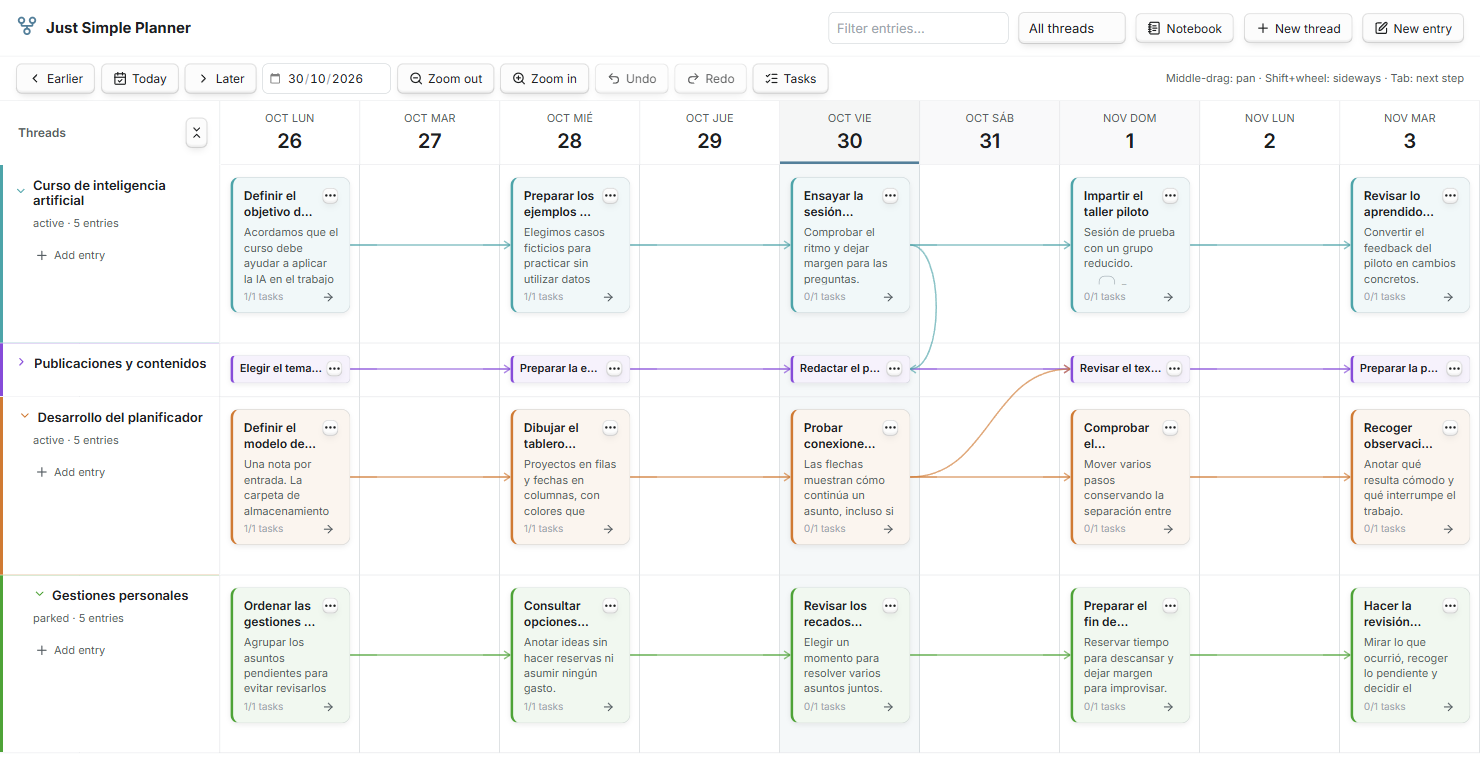
The publications thread folded into a compact row, preserving its dated cards and connections

The compact cards keep their note menu, selection, dragging and connection handles. Expand the thread to return to full Markdown previews. Folding is a view choice; active, parked and closed are separate thread statuses.

Follow one path with Spotlight

A busy board can hold many parallel stories. Spotlight keeps the selected entry, its ancestors and its following branches visible while dimming unrelated work.
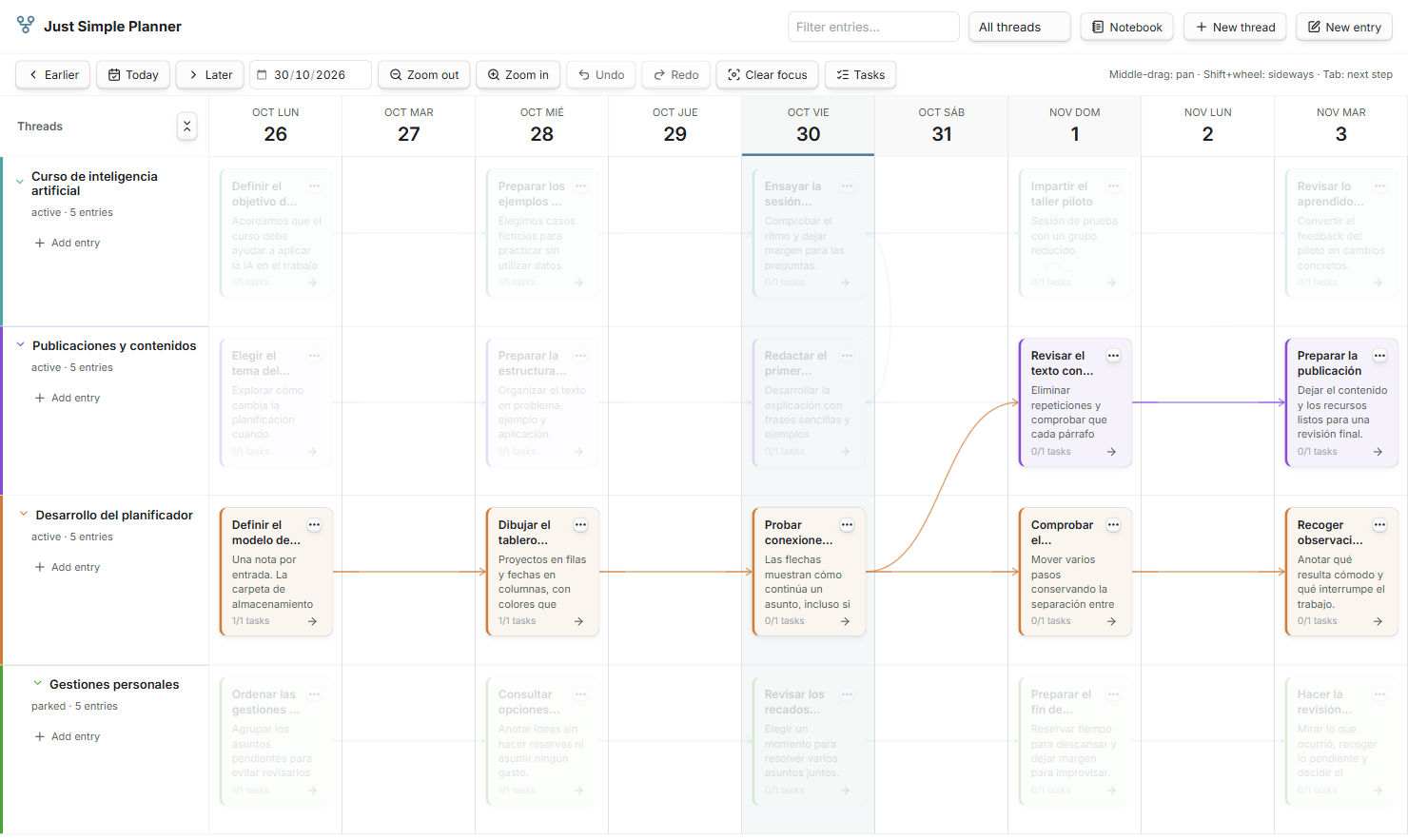
Spotlight highlights a selected development path and its connection to a publication

Press Escape or Clear focus to return to the full board.

Read a thread as a notebook. Gather its tasks.

Switch to Notebook to read one thread in date order. The same notes become a vertical journal. The Tasks rail collects pending Markdown checkboxes from the current filters; completing one updates the source file.
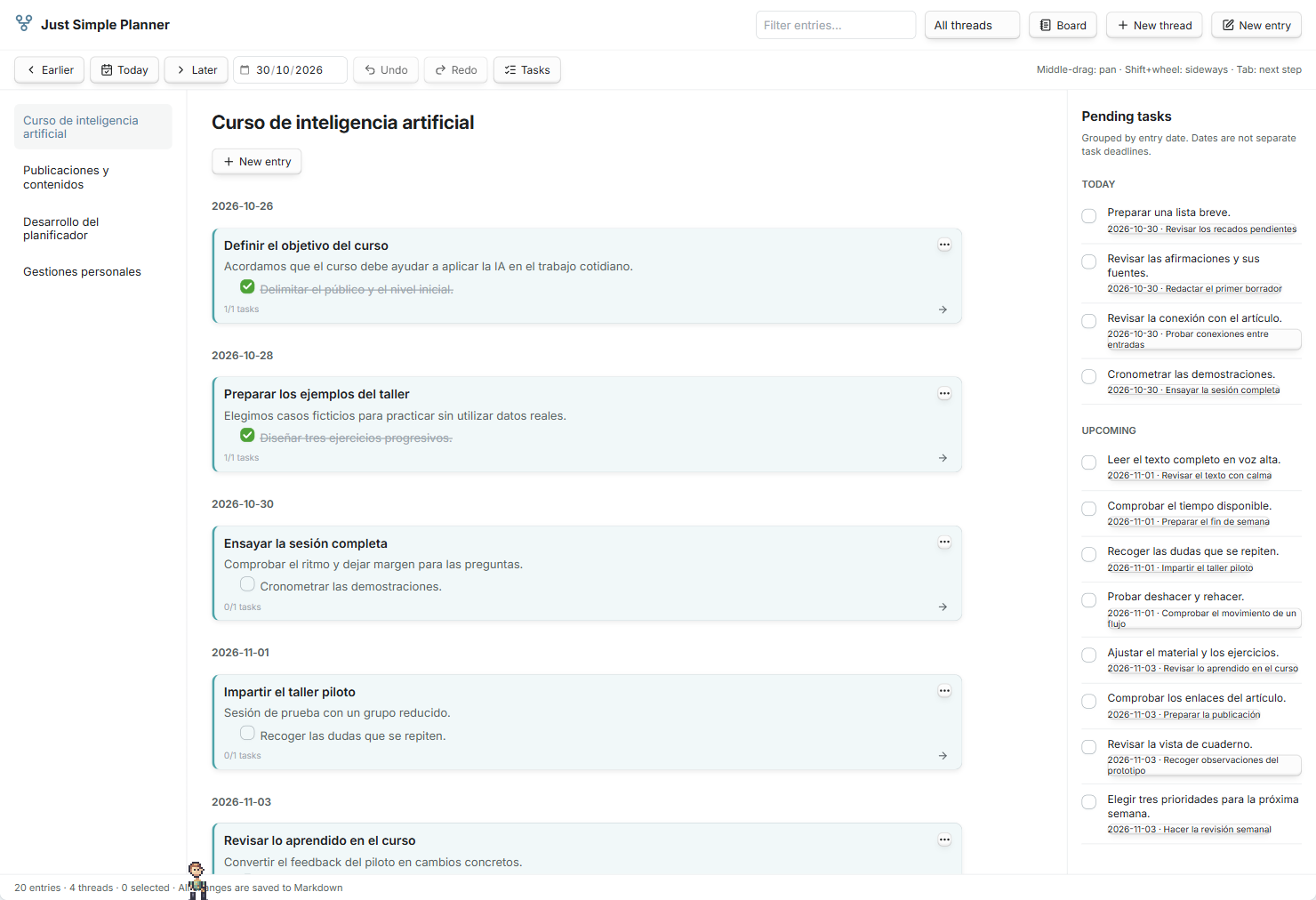
A chronological notebook beside a pending-task rail, both using the original Markdown notes

Tasks are grouped by the date of their entry. That date is not an independent deadline for each checkbox. Fenced-code examples are ignored when gathering tasks.

Write in Markdown

Double-click a card, or select it and press Enter / F2, to edit. The editor changes the normal note file; the body supports Markdown, links, attachments and checkbox tasks.
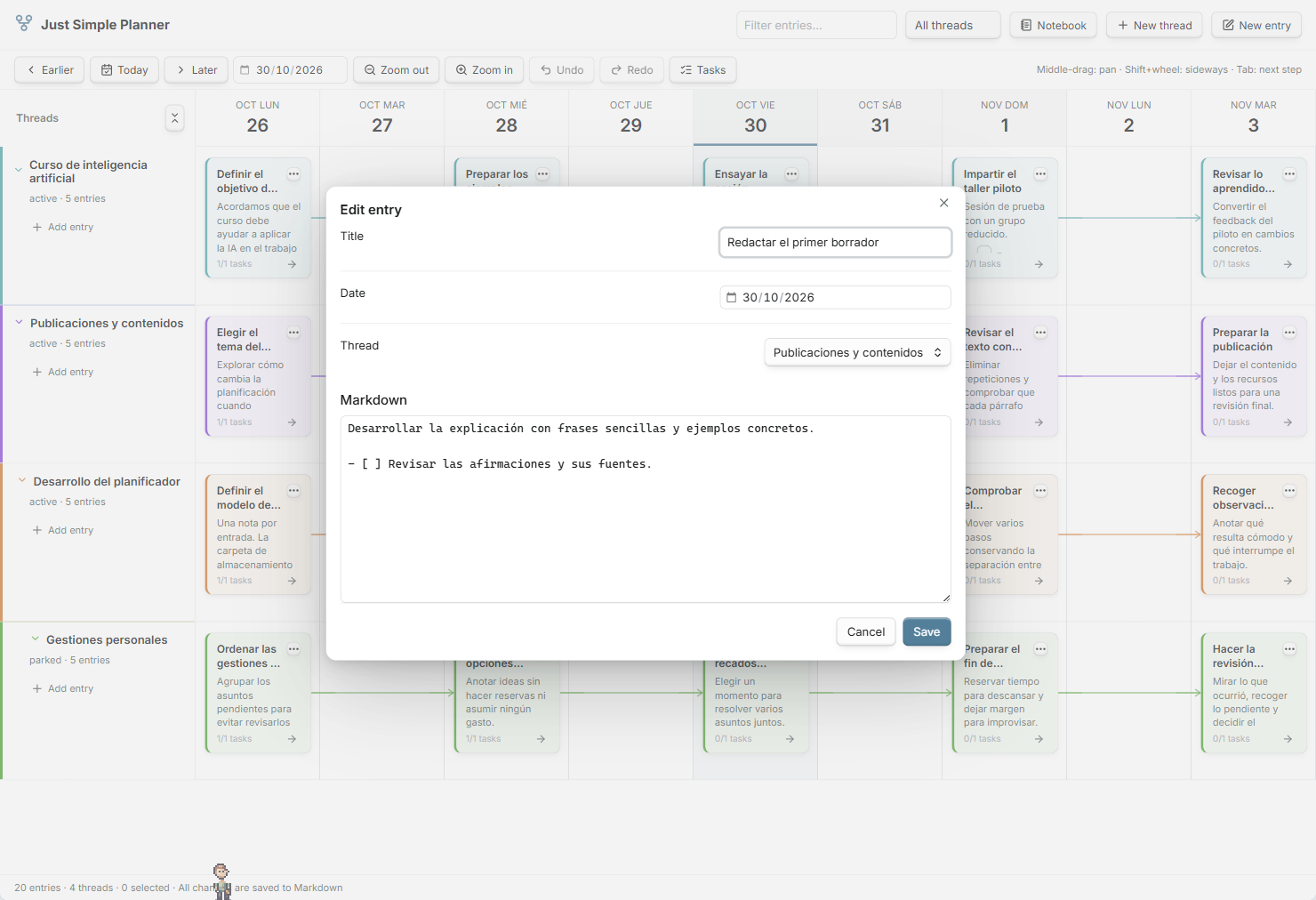
The entry editor with English field labels and a Spanish Markdown note

The interface and property names are English. Notes, filenames and thread names can use your language. All notes shown here are fictional Spanish examples, captured in the actual Obsidian plugin.

Mouse and keyboard

Gesture Action
Left-drag a card Reschedule it; drag a single card into another thread to change its membership.
Middle-button drag Pan: the content follows your hand, matching Visual Card Writer.
Ctrl/Cmd + left-button drag Pan the board from empty space or a card. A small movement threshold keeps Ctrl/Cmd-click available for selection. Buttons and links keep their normal actions.
Mouse wheel / Shift + wheel Scroll vertically / horizontally.
Ctrl/Cmd-click Add or remove a card from the selection.
Shift-drag a card Include its connected successors in the move.
Ctrl/Cmd + left/right Move the selected entries by one day.
Tab on a selected card Create the following day's connected entry.
Enter / F2 Edit the selected entry.
Ctrl/Cmd-Z / Ctrl/Cmd-Shift-Z Undo / redo while the board has focus. Ctrl/Cmd-Y also redoes.
Escape Cancel a connection, or clear selection and Spotlight.

The board extends into the past and future as you scroll, rendering a bounded 91-day window. Use Today, the date picker and Earlier / Later to navigate. Choose the column width in plugin settings under Day width. Filter by text and thread status; right-click a thread label to change its status or order.

Install

Download the installable files from the latest GitHub release. The plugin requires Obsidian 1.10.2 or later.

  1. Download main.js, manifest.json and styles.css from the release's Assets section.
  2. Create a just-simple-planner folder under your vault's configuration directory, normally .obsidian/plugins/.
  3. Put the three files directly inside that folder, reload Obsidian and enable Just Simple Planner in Community plugins.
  4. Enable Bases in Core plugins. If it was previously disabled, reload Just Simple Planner. Create or open a Base, add a view and choose Simple Planner.
  5. Set the Base filters and view properties, then use New thread and New entry inside the planner. Existing users can run Create Bases planner from classic notes instead; follow the migration guide.

Updating an existing installation: replace the three release files and keep your notes and plugin data. Both the deprecated classic view and the Bases layout are included.

From 0.1.2, release files are built, checked and published by GitHub Actions with cryptographic build-provenance attestations. After downloading the three files, verify each with GitHub CLI:

gh attestation verify main.js --repo DavidHurtadoAI/just-simple-planner
gh attestation verify manifest.json --repo DavidHurtadoAI/just-simple-planner
gh attestation verify styles.css --repo DavidHurtadoAI/just-simple-planner

Settings

The global controls below apply to the deprecated classic view. Bases planners choose properties and day width in Configure view and use native Bases creation, with no planner-specific folder settings.

Classic settings use English labels and defaults and save automatically. Dropdowns save immediately. Text fields save when you press Enter or leave the field, including when you close settings. Each field shows save feedback or a validation error. Invalid changes leave the last valid configuration active; a dropdown that cannot be saved returns to its active value. Folder settings from older versions are adapted as described below; zoom and property mapping are retained.

Storage folders: notes can live anywhere

Setting Default Meaning
Threads folder Planner/Threads Vault-relative destination for new thread notes. Thread notes hold each row's color, status and order.
New entries folder Planner/Entries Vault-relative destination for notes created with New entry. Existing notes added to the planner keep their original location.

These are storage locations, not search filters. Leave either path empty to create that kind of note in the vault root. Missing folders are created when the first new note is saved; absolute paths, parent traversal and paths through files are rejected.

A card can be Clientes/Acme/Reunión.md while its thread note lives in Planner/Threads/Acme.md. Moving the entry or changing a creation folder never changes its membership. Marked threads are also retained if moved elsewhere in the vault.

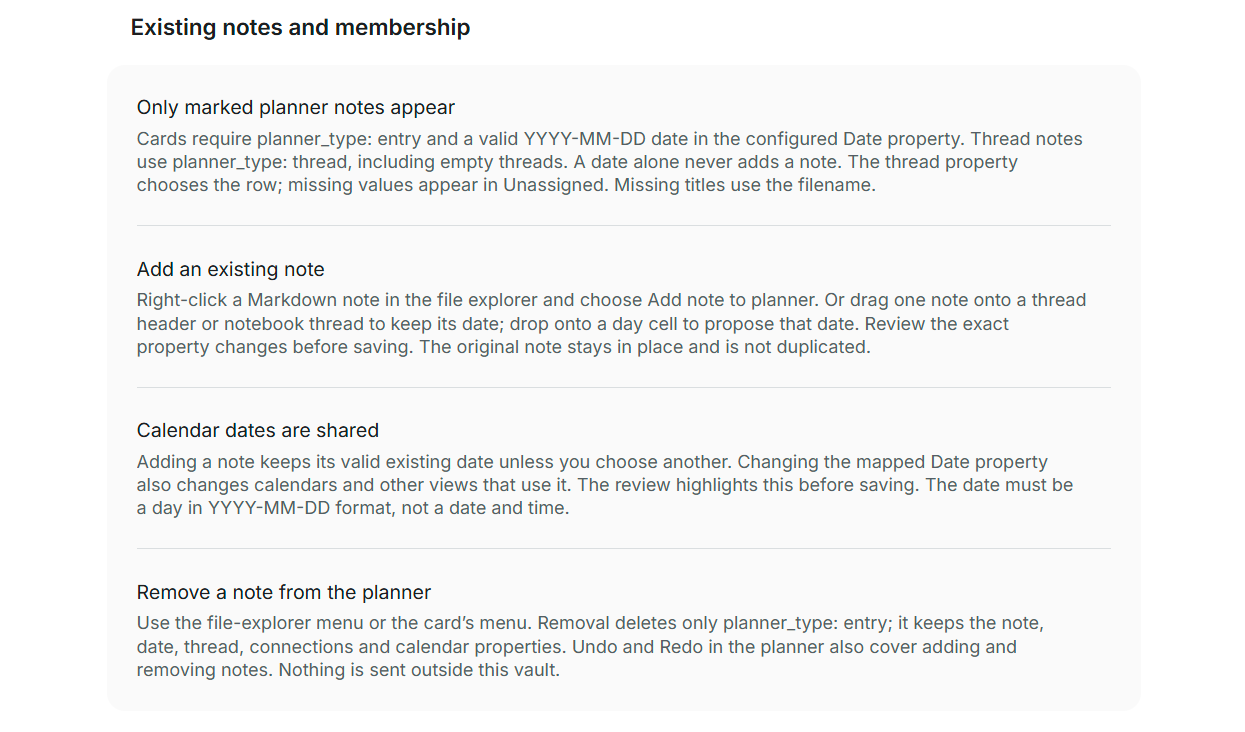
Only notes you include become entries

In the classic view, cards require planner_type: entry and a valid YYYY-MM-DD date in the configured Date property, wherever the note lives. Rows use planner_type: thread, including empty threads. A date alone never adds a classic card; Show all dated notes remains removed. Bases uses its query instead; the entry OR thread filter above gives it the same explicit membership rule.

The thread property determines the row. Missing thread values appear under Unassigned. The configured title property takes precedence; an empty or missing title uses the complete filename without .md, including any date prefix. There is no duplicate copy and no separate membership list hidden in plugin settings.

Add an existing note — keep its calendar date or review a new one

Right-click one Markdown note in Obsidian's file explorer and choose Add note to classic planner…. The review shows its current path, date and thread, and the exact properties that will change. Existing titles, connections, calendar properties and Markdown content are kept. Cancel writes nothing.
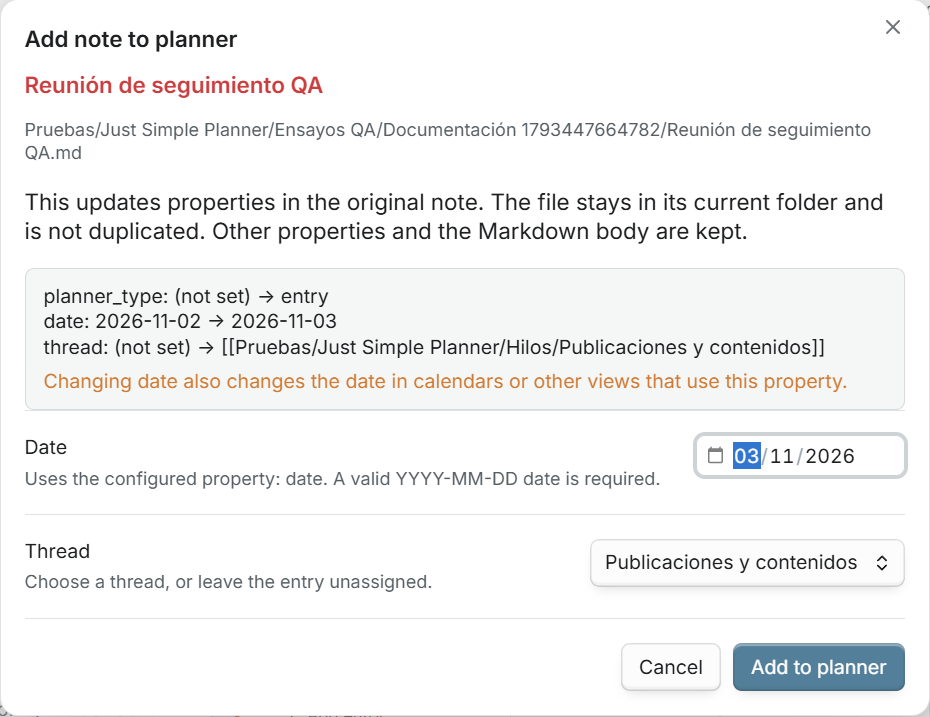
Reviewing an existing Spanish note: exact property changes, original path, date and thread, with a warning about shared calendar dates

You can also drag one note from the file explorer:

Drop destination Proposed result
A thread header on the board Select that thread and keep the note's valid existing date.
A day cell on the board Select that thread and propose the day you dropped onto.
A thread or its content in Notebook Select that thread and keep the existing date.
An empty planner Review a date and thread, with Unassigned available.

Every external-note drop opens the same review before saving. Hover feedback explains the destination and that the file stays in place. One note at a time is supported; folders, files from other vaults and external filesystem imports are rejected. Dropping an already included note updates the same entry instead of creating another card.

Calendar dates are shared. If the note already has a valid date under the configured key, it is reused. Choosing a different date updates that property in the original note, which can also move the note in a calendar or another view using the same key. The review highlights the old and new values and warns before saving. A datetime is not accepted as a planner day: choose a property containing YYYY-MM-DD.

Dragging a card that is already on the board still reschedules it directly, as before. Dragging a file from the explorer always opens a review.

Remove from planner — keep the note and its calendar entry

Use Remove note from planner… from the right-click or three-dot menu of a classic or Bases card. The review removes only planner_type: entry. The file, date, title, thread, connections, calendar properties and note body are retained. Existing wikilinks are kept; an excluded note's arrows are not drawn. Undo / Redo cover removal, including restoring a note that has disappeared from the Base results.

The marker belongs to the shared note. Removing it affects classic and every Base whose filters require it. With the entry OR thread filter above, the card disappears. If a custom Base query still selects the unmarked note, it remains visible there; adjust that Base's filters to exclude it. Cards without the entry marker have the removal action disabled. The file explorer also offers Remove note from classic planner… for the same marker operation.
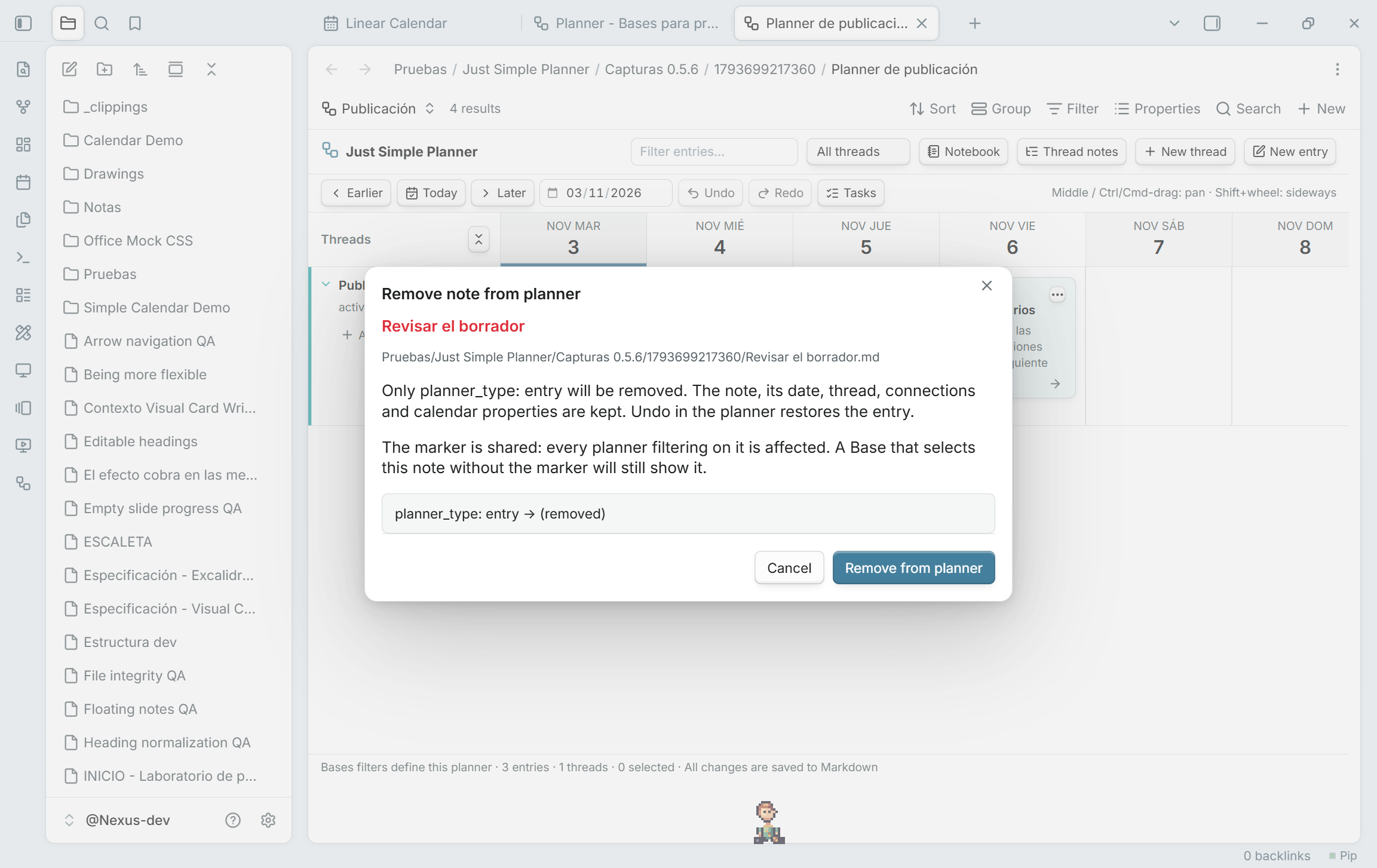
Remove note from planner review: only the entry marker is removed, with shared-filter behavior explained

The command palette also provides Add active note to classic planner and Remove active note from classic planner. An included note's file menu offers Show in classic planner, which clears filters and reveals its card.
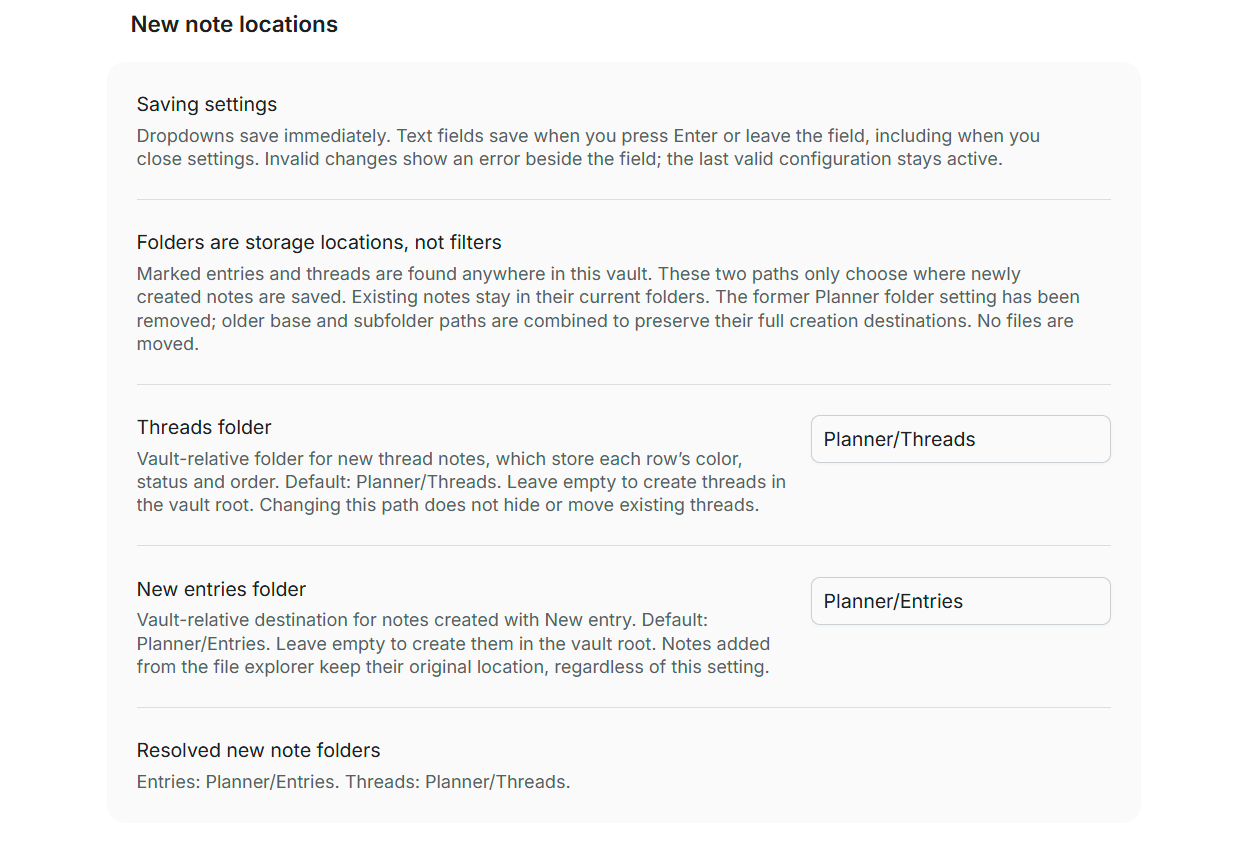
Vault-relative creation folders and the storage-only folder model

Explicit enrollment, shared calendar dates and removal explained in settings

Property mapping: use your existing frontmatter names

Setting Default key Value
Date property date Calendar date in YYYY-MM-DD format. Required for a card to appear.
Title property title Card title. An empty or missing value uses the filename.
Thread property thread A wikilink to a thread note, or a plain-text group name.
Connections property next A YAML list of wikilinks to following entries.

For example, select scheduled, headline, project and following if those are the keys you already use. The mapping applies to reading, creating, editing, moving and connecting entries, including task edits. Keys must be non-empty and different; planner_type stays fixed and is reserved. Thread notes keep status, color and order.

Changing the mapping does not migrate notes. Existing properties are not renamed or rewritten. Marked entries without a valid mapped date are counted as invalid and excluded. Missing title values use the filename; missing thread values are unassigned; missing connections produce no arrows. Restore the previous mapping to read the previous schema again, or deliberately update your notes yourself. Changes to property mapping clear session undo/redo so old actions cannot modify notes under a different configuration.

Day width chooses the default zoom. Changes to creation folders or day width keep the current note schema and undo history.
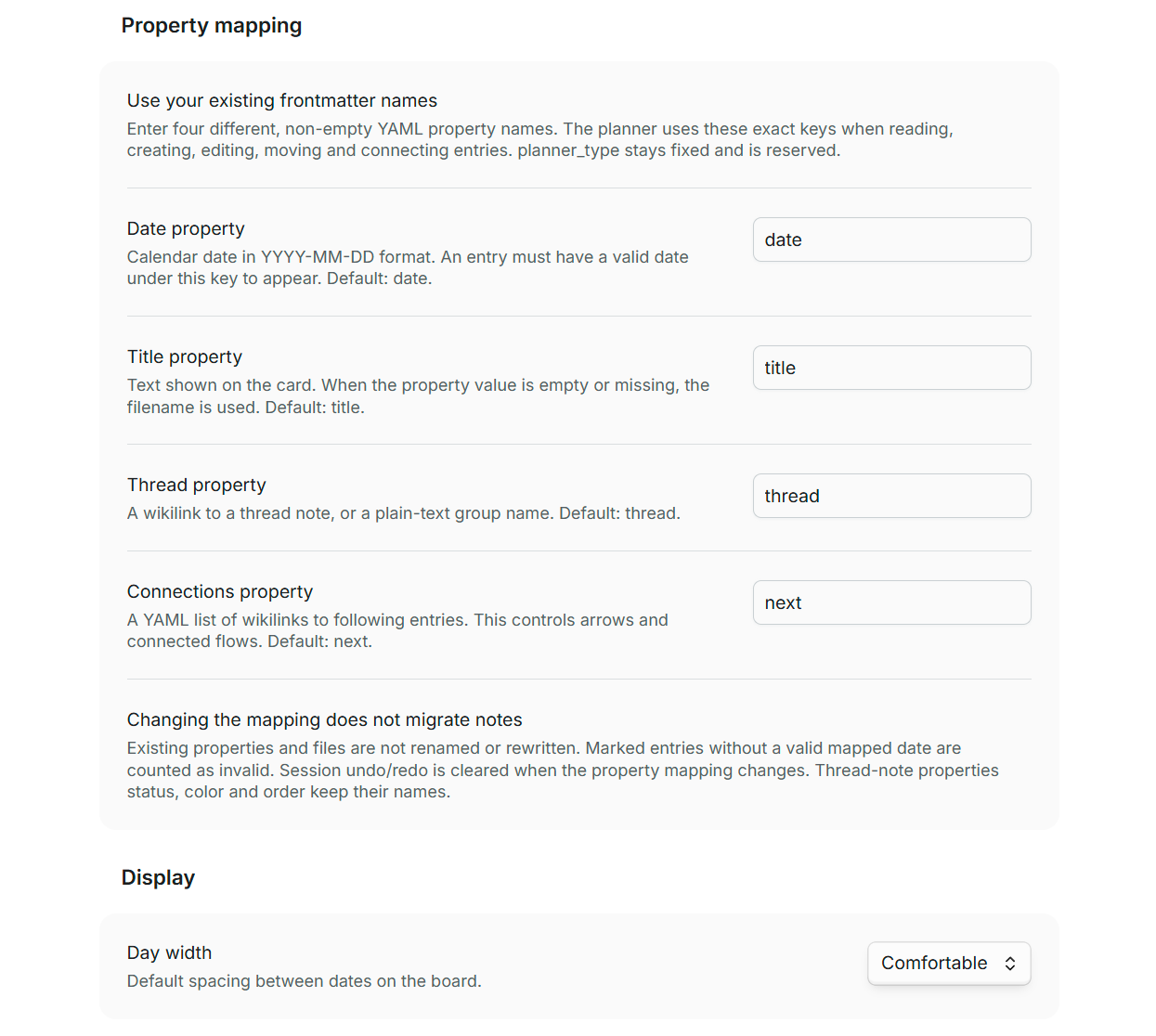
Configurable property names and English defaults, saved automatically when editing ends

Updating from 0.3.x and older versions

Planner folder has been removed as a search scope. On update, its old base is combined with each relative child path to preserve the full creation destinations. For example, base Cursos/IA, entries Entradas and threads Hilos become Cursos/IA/Entradas and Cursos/IA/Hilos. Empty children keep the old base; an empty base keeps the old vault-relative child. Older configurations that already stored full paths retain them.

No files are moved or rewritten by this migration. Folder paths, property mappings and day width are retained. Previously marked entries and threads outside the old search folder now appear too. Unmarked dated notes remain excluded. The obsolete dated-note flag is ignored.

Try the examples

For your first Bases planner, use the illustrated tutorial and its ready-to-open starter pack. It includes a five-entry beginner planner and a separate example of date ranges, repetition and additional dates.

For the original, larger classic-view demo, copy only examples/Entradas and examples/Hilos into any folder in your vault, preserving those two subfolder names. Run Just Simple Planner: Open classic planner and navigate to 30 October 2026. You can then use the migration guide to view that collection through Bases.

You get 20 entries, four threads, 18 connections and 12 pending tasks covering a course, publications, plugin development and personal errands. Their wikilinks use note names, so the containing folder can have any name. All sample content is fictional.

Markdown format

An entry is a file like 2026-10-30 - Revisar la propuesta.md:

---
planner_type: entry
title: Revisar la propuesta
date: 2026-10-30
thread: "[[Proyecto Aurora]]"
next:
  - "[[Enviar el borrador]]"
---
Revisamos el planteamiento con el equipo.

- [ ] Preparar el borrador
Entry property Meaning
planner_type: entry Include this note in classic and in Bases that filter on this marker. Custom Base queries may also select unmarked notes.
title Card title; falls back to the filename. Editing it does not rename the file.
date Calendar day in YYYY-MM-DD format. Bases also accepts datetimes and uses their written day.
thread Wikilink to the thread note. A plain-text group is also accepted.
next A list of wikilinks to following entries. Connections are optional and can branch.

A thread is another ordinary note:

---
planner_type: thread
status: active
color: cyan
order: 0
---

Its filename is the thread title. status accepts active, parked or closed; active threads appear first. color accepts Obsidian's eight palette names or a quoted six-digit hex value. order controls the order within a status. Thread notes allow empty threads to exist before their first entry.

Moving an entry to another folder does not change its thread. Use Obsidian's normal move/rename commands and link-update behavior when relocating notes. Unresolved thread links appear under Unassigned. Unresolved next links remain in the source but cannot be drawn. Invalid dates or frontmatter are counted in the footer.

Local data and careful writes

The plugin has zero runtime package dependencies and makes no network requests of its own. It has no account, telemetry, analytics or remote database. Bodies, dates, thread membership and connections live in Markdown. Classic settings hold its property names, creation folders and day width. Each Base view stores its own configuration; Obsidian's workspace holds the open layout.

Bases discovery: the Base supplies the query results. Each view reads selected Markdown bodies and directly linked/explicit thread notes, with its own small cache and history. It does not start the classic global index.

Classic discovery: when requested by a classic view or action, the plugin makes one initial pass over Markdown paths and cached frontmatter throughout this vault to find explicit entry/thread markers. The cache check yields periodically to keep the UI responsive. Only marked notes have their bodies read. Subsequent metadata events discover newly included notes without another whole-vault enumeration; link resolution uses existing in-memory snapshots. Manual refreshes revisit known paths. Unrelated notes are not parsed or opened on edit/rename. The community scanner can report Vault Enumeration, which is intentional for scattered, explicitly included notes. Nothing is uploaded or shared.

Writes compare the note with its snapshot before saving. A concurrent edit causes a conflict instead of being silently overwritten. Multi-note operations try to roll back earlier writes if a later write fails; a rollback conflict is reported for review. This is optimistic conflict protection, not a filesystem-wide transaction.

Undo history is in memory, capped at 40 operations and cleared on plugin reload or when property mapping changes. It covers enrollment, removal, edits, moves, connections and task completion. Creating a note is not undone by deleting it; the plugin never deletes your notes. YAML values and Markdown content are retained, although YAML formatting and comments may be normalized when properties are edited.

The story and the credit

This started with Haftio, a visual planner I discovered through a Reddit post by u/lalatfe, whose post is shown in my account of the experiment.

To Haftio's creator and team: thank you — and sorry for borrowing such a good idea so quickly. I liked what you had built, asked Máquina, my AI assistant to explore it, and came back from breakfast to a working Obsidian prototype. The speed of that experiment does not diminish the thought, design and work behind the original.

Haftio deserves clear credit for the inspiration: the continuous timeline, threads and connected entries. This repository contains an independent implementation for local Markdown notes inside Obsidian. There is no affiliation or endorsement implied.

Please try Haftio, explore its guide, read how it began on a physical whiteboard, and support its makers. The credit belongs near the product, not hidden in a footnote.

I wrote about the excitement and the discomfort of this in He copiado una app mientras desayunaba, published on 30 October 2026.

Development and current scope

git clone https://github.com/DavidHurtadoAI/just-simple-planner.git
cd just-simple-planner
npm ci
npm run check

Use Node.js 24 for the documented build. The check runs the official Obsidian ESLint rules with zero warnings, strict TypeScript validation, unit tests, the production build and a package audit. GitHub Actions runs the same command. The documented in-app checks include connection dragging, hover controls, cancellation, undo, task completion and the independence of file location from thread membership. See TESTING.md for the exact methods and limits, and the Obsidian review notes for the release audit.

Publishing a version tag triggers the release workflow. It builds and checks the source, attests all three installable files, verifies their attestations, and uploads those exact bytes to GitHub Releases. Release tags must exactly match manifest.json and have a matching notes file in .github/release-notes/. The workflow's actions are pinned by commit SHA; permissions for publishing and signing are limited to the release job.

The scripts that drive Obsidian's CLI are maintainer tools for the dedicated @Nexus-dev development vault. They guard its exact path. The public examples above can be used in your own vault without running those scripts.

This version focuses on local planning. It does not connect external calendars, send background reminders, provide real-time collaboration or parse Tasks-plugin deadline syntax. Repeated appearances and additional dates are supported in Bases through Optional scheduling; classic retains its previous scheduling behavior. Physical phones/tablets, touch dragging, very large vaults and simultaneous multi-device editing have not been validated.

Found a bug or have a useful workflow to suggest? Open an issue. Include your Obsidian version, the gesture you tried, and what you expected to happen.

License

MIT. Copyright 2026 David Hurtado. An independent community plugin for Obsidian.

Similar Plugins

info
• Similar plugins are suggested based on the common tags between the plugins.
Quoth
5 years ago by Eric Rykwalder
Multi-Column Markdown
5 years ago by Cameron Robinson
A plugin for the Obsidian markdown note application, adding functionality to render markdown documents with multiple columns of text.
Copy as HTML
5 years ago by Bailey Jennings
A simple plugin that copies the selected text to your clipboard as HTML
Excel to Markdown Table
5 years ago by Ganessh Kumar R P
An Obsidian plugin to paste data from Microsoft Excel, Google Sheets, Apple Numbers and LibreOffice Calc as Markdown tables in Obsidian editor.
Big Calendar
5 years ago by Boninall
Big Calendar in Obsidian, for manage your events in a day/week/month and see agenda too!
Things Link
5 years ago by @gavmn
Marjdown shortcuts
5 years ago by Jules Guesnon
🪨 Obsidian plugin that allows to write markdown from commands
Creases
5 years ago by Liam Cain
👕 Tools for effectively folding markdown sections in Obsidian
Quiet Outline
5 years ago by the_tree
Improving experience of outline in Obsidian
Obsidian Google Tasks
5 years ago by YukiGasai
Add Google Tasks inside Obsidian
Enveloppe
5 years ago by Mara-Li
Enveloppe helps you to publish your notes on a GitHub repository from your Obsidian Vault, for free!
Filename Emoji Remover
4 years ago by Yüksel Tolun
A simple plugin for the note taking app Obsidian that will rename your files to remove emojis in their names.
Release Timeline
4 years ago by cakechaser
ExcaliBrain
4 years ago by Zsolt Viczian
A graph view to navigate your Obsidian vault
Obsidian GoLinks
4 years ago by David Brownman (@xavdid)
Turn go/links into clickable elements in Obsidian
Hard Breaks
4 years ago by Börge Kiss
↩ A plugin for Obsidian that adds functionality to force hard line breaks
Heading Shifter
4 years ago by kasahala
Easily Shift and Change markdown headings.
Literate Haskell
4 years ago by James Jensen
An obsidian plugin for integrating .lhc files into your PKM.
Agile Task Notes
4 years ago by BoxThatBeat
This Obsidian plugin integrates your TFS data from either Jira or Azure Devops
Blockquote Levels
4 years ago by Carlo Zottmann
A plugin for Obsidian (https://obsidian.md) that adds commands for increasing/decreasing the blockquote level of the current line or selection(s).
Table Generator
4 years ago by Boninall
A plugin for generate markdown table quickly like Typora.
Chronology
4 years ago by Gabriele Cannata
Week Planner
4 years ago by Ralf Wirdemann
Checkbox 3 states
4 years ago by Renaud Héluin @ NovaGaïa
This is a simple plugin for add a third state to checkbox list.
qmd as md
4 years ago by Daniel Borek
A plugin for Obsidian that enables editing and compiling `qmd` Quarto files.
Awesome Flashcard
4 years ago by AwesomeDog
Handy Anki integration for Obsidian.
Dirtreeist
4 years ago by kasahala
Render a directory Structure Diagram from a markdown lists in codeblock.
Obsidian Handlebars Template Plugin
4 years ago by Sean Quinlan
This is a plugin for Obsidian adding support for the Handlebars template engine in Obsidian notes
Markdown to Jira Converter
4 years ago by muckmuck
An obsidian.md plugin, which provides a markdown to jira markup converter
Obsidian markdown export
4 years ago by bingryan
This plugin allows to export directory/single markdown to a folder. support output format(html/markdown/text)
Obsidian Clipper
4 years ago by John Christopher
Obsidian plugin that allows users to clip parts of a website into their obsidian daily note (or new note)
Checklist Reset
4 years ago by Luke Hansford
Add a command to reset the state of any checklists in a document in Obsidian
Order List
4 years ago by Henry Gustafson
Task Marker
4 years ago by wenlzhang
An Obsidian plugin to change task status and append text with hotkeys and right-click context menu.
Pending notes
4 years ago by Ulises Santana
Obsidian plugin for searching links without notes in your vault.
Email Block
4 years ago by joleaf
An email block for obsidian notes.
Image Captions
4 years ago by Alan Grainger
Add captions to images with inline Markdown and link support. The caption format is compatible with the CommonMark spec and other Markdown applications.
Console Markdown Plugin
4 years ago by Daniel Ellermann
An Obsidian plugin which renders console commands and their output.
Advanced Slides
4 years ago by MSzturc
Create markdown-based reveal.js presentations in Obsidian
Marp
4 years ago by JichouP
Plugin to use Marp with Obsidian
ChatGPT MD
4 years ago by Bram Adams
A (nearly) seamless integration of ChatGPT into Obsidian.
Tasks Calendar Wrapper
4 years ago by zhuwenq
This plugin currently provides a timeline view to display your tasks from your obsidian valut, with customizable filters and renderring options.
Image Upload Toolkit
4 years ago by Addo Zhang
An obsidian plugin for uploading local images embedded in markdown to remote store and export markdown for publishing to static site.
Brainframe
4 years ago by pedersen
Prioritize
4 years ago by EloiMusk
Obsidian Plugin, to prioritize stuff in Obsidian
Avatar
4 years ago by froehlichA
An obsidian plugin for displaying an avatar image in front of your notes.
Dynamic Timetable
4 years ago by L7Cy
Calculate the estimated completion time from the estimated task time and dynamically create a timetable.
Pivotal Tracker Integration
4 years ago by jondeates
Links
4 years ago by MiiKey
manipulate & manage obisidian links
Custom State for Task List
3 years ago by Okami Wong
A plugin for Obsidian to define your own states for task items.
PubScale
3 years ago by piriwata
An obsidian plugin for insert your note into a PlanetScale table
TodoTxt
3 years ago by Mark Grimes
Obsidian plugin to manage todotxt files
Confluence to Obsidian
3 years ago by K
import confluence space into obsidian
Recipe Grabber
3 years ago by seethroughdev
File Include
3 years ago by Till Hoffmann
Importer
3 years ago by Obsidian
Convert your data to Markdown files you can use in Obsidian. Works with Apple Notes, OneNote, Evernote, Notion, Google Keep, and many other formats.
Markdown Link Space Encoder
3 years ago by Ron Kosova
Obsidian plugin to automatically encode spaces to %20 in Markdown-style links
Markdown Blogger
3 years ago by Alexa Fazio
Allows developers to push markdown notes to their local blog, portfolio, or static site. Works with Astro.js, Next.js, and any other framework configured to render markdown pages.
Markdown Tree
3 years ago by carvah
Introducing a powerful plugin that revolutionizes directory tree creation. With its intuitive Markdown-inspired coding style, this plugin empowers users to effortlessly and swiftly construct intricate directory trees.
Auto Front Matter
3 years ago by conorzhong
Due When
3 years ago by Andy Baxter
An Obsidian plugin which gives shortcuts to insert set due dates
Markdown to Slack Message
3 years ago by Woongshik Choi
GTD No Next Step
3 years ago by Tobias Davis
Obsidian plugin for GTD workflow, badge projects with no next step.
Uncheck All
3 years ago by Shahar Har-Shuv
Obsidian plugin to uncheck all checkboxes in a file with one action
Postfix
3 years ago by Bhagya Nirmaan Silva (@bhagyas)
A postfix plugin for Obsidian
Floccus Bookmarks to Markdown
3 years ago by mddevils
Sheets Extended
3 years ago by NicoNekoru
Plugin that adds features to tables in obsidian including merging, vertical headers, and custom css
Pickly PageBlend
3 years ago by Dmitrii Mitrichev
The easiest way to share your Obsidian notes
TODO Wrangler
3 years ago by Jeel Shah
An obsidian plugin to wrangle your Todos and put them in their place.
Recipe view
3 years ago by lachholden
View your Obsidian notes as interactive recipe cards while you cook.
Markdown table checkboxes
3 years ago by DylanGiesberts
Obsidian plugin. Allows for the usage of checkboxes inside markdown tables.
Homework Manager
3 years ago by Kadison McLellan
An Obsidian plugin that keeps track of homework through a to-do list.
MagicCalendar
3 years ago by Vaccarini Lorenzo
An obsidian plugin that exploit a natural language processing engine to find potential events and sync them with iCalendar
Timeline View
3 years ago by b.camphart
Obsidian plugin for viewing your notes linearly based on a given property
Discord Message Formatter
3 years ago by Emile Durkheim
Obsidian.md plugin that lets you copy Discord conversations and perfectly formats them to Obsidian Markdown!
Markdown Image Caption
3 years ago by Hananoshika Yomaru
Generate image caption easily. Completely markdown-based.
Global Markdown Encryption
3 years ago by shlemiel
a plugin for encrypting obsidian markdowns in-memory, single password based.
Slackify Note
3 years ago by Jeremy Overman
File Cleaner Redux
3 years ago by husjon
A plugin for Obsidian to help clean up files in your vault
iCal
3 years ago by Andrew Brereton
This is a plugin for Obsidian that searches your vault for tasks that contain dates, and generates a calendar in iCal format that can be imported into your preferred calendar application.
Autocorrect Formatter
3 years ago by b-yp
A plugin running on Obsidian that utilizes autocorrect to format Markdown content.
Highlight Helper
3 years ago by Chongmyung Park
Helper to collect highlight in Obsidian
Strip Internal Links
3 years ago by Adi Ron
A simple Obsidian plugin to strip internal links from files
Timeline Schedule
3 years ago by Evan Bonsignori
Inline timelines generated from human-readable time strings, e.g. 'Walk dog (30min)' in a ```schedule codeblock.
Markline
3 years ago by 闲耘
Markline: Markdown timeline view in Obsidian.
Reason
3 years ago by Joshua Pham
Digest your Obsidian notes
My Bible
3 years ago by GsLogimaker
Your own customization bible in your personal vault!
Task list
3 years ago by Ted Marozzi
A simple obsidian plugin enabling better task management via lists.
GitHub Sync
3 years ago by Kevin Chin
Sync Obsidian vault to personal GitHub
Simple File Push
3 years ago by Kim Hudaya
Simple file push blog plugin
MemoryLane
3 years ago by BangCa
Relive and celebrate your life's milestones on a personal, interactive timeline. A nostalgic journey through your history with anniversary reminders and cherished memories.
Track-a-Lot
3 years ago by Iulian Onofrei
This is a tracker plugin for Obsidian
Ego Rock
3 years ago by Ashton Eby
An obsidian plugin that implements a basic taskwarrior UI for listing and modifying tasks.
Quadro
3 years ago by Chris Grieser (aka pseudometa)
Obsidian Plugin for social-scientific Qualitative Data Analysis (QDA). An open alternative to MAXQDA and atlas.ti, using Markdown to store data and research codes.
Yesterday
3 years ago by Dominik Mayer
Obsidian plugin providing Yesterday journaling support
Pomodoro Planner
3 years ago by Onur Nesvat
Cooklang
3 years ago by Roger Veciana i Rovira
Things3 Today
3 years ago by wudanyang6
Foodiary
3 years ago by vkostyanetsky
Food tracker plugin for Obsidian
Mehrmaid
3 years ago by huterguier
Rendering Obsidian Markdown inside Mermaid diagrams.
Slurp
3 years ago by inhumantsar
Slurps webpages and saves them as clean, uncluttered Markdown. Think Pocket, but better.
Grind Manager
3 years ago by dromse
Gamify your task management with rewards system, craft your tasks by tags.
Amazing Marvin Integration
3 years ago by Cloud Atlas
Interoperability between Obsidian and Amazing Marvin
Enhanced Copy
3 years ago by Mara-Li
A obsidian plugin that allows to copy in markdown in reading view or canvas read-only view, creating profile and transform the text during copy.
Slides Extended
3 years ago by Erin Schnabel (original: MSzturc)
Create markdown-based reveal.js presentations in Obsidian
Personal OS
3 years ago by A.Buot
Checkbox Sounds
3 years ago by yasd251
Adds a nice completion sound for checkboxes when ticked in Obsidian
Timekeep
2 years ago by Jacobtread
Obsidian task time tracking
Focus Tracker
2 years ago by Jeet Sukumaran
ii
2 years ago by Wilson
The main feature of this plugin is to quickly insert common Markdown code and HTML code, including Sup, Sub, Audio, Video, Iframe, Left-Center-Right Alignment, Variables, Footnotes, Callout, Anchor Points, HTML Comments and so on.
Checkbox Time Tracker
2 years ago by UD
Checkbox Time Tracker for Obsidian
Docxer
2 years ago by Developer-Mike
🚀 Boost your productivity by previewing and converting Word files easily to markdown.
Prettier
2 years ago by GoodbyeNJN
Task List Kanban
2 years ago by Chris Kerr
Interactive Code Blocks
2 years ago by Student Assistenten Team Deeltaken
Spoilers
2 years ago by Jacobtread
Spoiler blocks for Obsidian
Asciidoc Reader
2 years ago by voidgrown
Obsidian plugin for reading AsciiDoc files
doing
2 years ago by rooyca
What was I doing?
Dataview Serializer
2 years ago by Sébastien Dubois
Obsidian plugin that gives you the power of Dataview, but generates Markdown, making it compatible with Obsidian Publish, and making the links appear on the Graph.
Dataview Publisher
2 years ago by UD
Output markdown from your Dataview queries and keep them up to date. You can also be able to publish them.
AI Chat as Markdown
2 years ago by Charl P. Botha
Better Markdown Links
2 years ago by mnaoumov
Obsidian plugin that adds support for angle bracket links and manages relative links properly
Vikunja Sync
2 years ago by Peter Heiss
Manage your tasks in vikunja.
Note Linker with Previewer
2 years ago by Nick Allison
Obsidian Plugin to find and Link notes
Marker PDF to MD
2 years ago by L3N0X
Make use of different AI models to convert your pdfs into markdown with perfect ocr, latex formulas, tables, images and more! Supports Mistral AI OCR (free) and self hosted variants!
Recursive Copy
2 years ago by datawitch
Import GitHub Readme
2 years ago by Chasebank87
Morgen Tasks
2 years ago by Morgen AG
Markdown prettifier
6 years ago by pelao
A markdown prettifier for obsidian
Mind Map
6 years ago by James Lynch
An Obsidian plugin for displaying markdown notes as mind maps using Markmap.
Markdown Formatting Assistant
6 years ago by Reocin
This Plugin provides a simple WYSIWYG Editor for Markdown and in addition a command line interface. The command line interface facilitate a faster workflow.
Mochi Cards Exporter
6 years ago by kalbetre
Mochi Cards Exporter Plugin for Obsidian
Extract url content
6 years ago by Stephen Solka
Plugin to extract markdown out of urls
Table Extended
6 years ago by AidenLx
Extend basic table in Obsidian with MultiMarkdown table syntax
mdx as md
6 years ago by Nikolay Kozhukharenko
Edit mdx files in Obsidian.md as if they were markdown
Kanban
6 years ago by mgmeyers
Create markdown-backed Kanban boards in Obsidian.
Markdown Furigana
5 years ago by Steven Kraft
Simple Markdown to Furigana Rendering Plugin for Obsidian
Org Mode
5 years ago by ryanpcmcquen
Add Org Mode support to Obsidian.
Tasks
5 years ago by Clare Macrae and Ilyas Landikov (created by Martin Schenck)
Task management for the Obsidian knowledge base.
Amazing Marvin
5 years ago by Shirayuki Nekomata
Simple plugin for Amazing Marvin
Timeline
5 years ago by George Butco
Obisdian.md plugin for creating timelines
Enhancing Mindmap
5 years ago by Mark
obsidian plugin editable mindmap,you can edit mindmap on markdown file
Paste Mode
5 years ago by Jacob Levernier
Obsidian Notes plugin for pasting text and blockquotes to the cursor's current level of indentation.
Random To-Do
5 years ago by NatiAris
Pick a random todo item or a file with todo items
Markdown Attributes
5 years ago by Jeremy Valentine
Add attributes to elements in Obsidian
Emoji Shortcodes
5 years ago by phibr0
Emoji Shortcodes - Obsidian Plugin | Adds Support for Emoji Shortcodes to Obsidian
Trello
5 years ago by Nathonius
An Obsidian Plugin that connects Trello cards to Obsidian notes.
Carry-Forward
5 years ago by Jacob Levernier
An Obsidian Notes plugin for generating and copying block IDs, and copying lines with a link to the copied line
Archiver
5 years ago by ivan-lednev
Archive completed tasks in your Obsidian vault (plus other org-mode-like features)
ReadItLater
5 years ago by Dominik Pieper
OzanShare Publish
5 years ago by Ozan Tellioglu
This plugin allows you to publish your markdown notes with a single click directly from your Obsidian vault.
Tweet to Markdown
5 years ago by kbravh
An Obsidian.md plugin to save tweets as Markdown files.
Habitica Sync
5 years ago by Leoh and Ran
This is a under-development Obsidian Plugin for Habitica
Copy as LaTeX
5 years ago by mo-seph
Quick plugin to be able to copy/paste from Obsidian/Markdown into a Latex document
CardBoard
5 years ago by roovo
An Obsidian plugin to make working with tasks a pleasure (hopefully anyway).
CookLang Editor
5 years ago by death_au/cooklang
Edit and display Cooklang recipes in Obsidian
Remove HTML Tag
2 years ago by ChenPengyuan
Immersive Translate
2 years ago by imfenghuang
Immersive Translate For Obsidian
Flow
2 years ago by Ben Phillips
Implements key processes in David Allen's Getting Things Done (GTD) methodology
Quarto Exporter
2 years ago by Andreas Varotsis
Export Obsidian notes to Quarto-compatible QMD files.
Copy Section
2 years ago by skztr
Obsidian.md plugin adding a Copy button to the top of Headed sections
Advanced Copy
2 years ago by leschuster
An Obsidian plugin to copy Markdown and transform it into HTML, Anki, or any custom format. Create custom profiles with versatile templates tailored to your workflow.
Another Simple Todoist Sync
2 years ago by eudennis
Obsidian.md plugin to integrate with Todoist app.
Arweave Uploader
2 years ago by makesimple
Hexo Toolkit
2 years ago by Xiangru
An Obsidian plugin for maintaining Hexo posts.
Markdown Timeline
2 years ago by Jiaheng Zhang
An Obsidian plugin to record the events in a Flashback timeline
Proletarian Wizard Task Manager
2 years ago by Charles Feval
Obsidian plugin ot manage todos and projects directly from your notes.
Markdown Tags
2 years ago by John Smith III
Enhance your Markdown documents with custom tags. Use predefined or custom labels, customizable colors, and arrow indicators to visually track tasks and statuses.
Insta TOC
2 years ago by Nick C.
Generate, update, and maintain a table of contents for your notes while typing in real time.
Simple Todo
2 years ago by elliotxx
A minimalist text-based todo manager (Text-Based GTD) for efficient task management in Obsidian.
Chronos Timeline
2 years ago by Claire Froelich
Render interactive timelines in your Obsidian notes from simple Markdown.
Easy Timeline
2 years ago by Romeliun
The Easy Timeline plugin for Obsidian allows you to create timelines easily.
Recent Notes
2 years ago by Kamil Rudnicki
Recent Notes Plugin for Obsidian
Cooksync
2 years ago by Cooksync
This is the official Obsidian plugin for Cooksync, maintained by the Cooksync team. It enables automatic import of recipe data from your Cooksync account. Note that this plugin requires a Cooksync account - a paid service that makes it easy to collect recipes from almost any recipe website.
Goal Tracker
2 years ago by Ben Rotholtz
Kikijiki Habit Tracker
2 years ago by KIKIJIKI
Kikijiki Habit Tracker Plugin for Obsidian
WhatsApp export note
2 years ago by JoaoEmanuell
Obsidian plugin to export notes for whatsapp
Callout Copy Buttons
2 years ago by Aly Thobani
An Obsidian plugin that adds copy buttons to callout blocks in your notes.
Attachments MD Indexer
2 years ago by Ian Inkov
Converts Obsidian canvas files to markdown index files, making canvas content searchable and graph-viewable within Obsidian.
Automatic Linker
2 years ago by Kodai Nakamura
Extended Markdown Syntax
2 years ago by Kotaindah55
Extend your Markdown syntax using delimiters instead of HTML tags, such as underlining, superscript, subscript, highlighting, and spoiler.
Title As Link Text
2 years ago by Lex Toumbourou
An Obsidian plugin to set the Link Text using the document title
Asana
2 years ago by Ryan Bantz
Obsidan plugin that creates tasks in Asana for highlighted text or the current line
Content Cards
2 years ago by leo
Insert content cards in Markdown, such as timeline, highlightblock, target card, book information card, music information card, movie information card, photoes ablum, business card, content subfield, countdown, SWOT,BCG.
Chat clips
2 years ago by sleepingraven
Record chat in ordinary markdown list.
Student Repo
2 years ago by Feirong.zfr
学生知识库助手(Student Repository Helper)是一个面向学生或学生家长的Obsidian 插件,这款插件旨在解决学生在学习阶段面临的资料管理难题,将学习过程中产生的各类重要资料,如试卷、笔记、关键文档、绘画手工作品等,进行系统性的数字化整合与管理,并利用 AI 助手定期进行学习分析总结。随着时间的推移,它将助力你逐步搭建起一座专属你自己的知识宝库,这座宝库将伴随你一生,成为你知识成长与积累的见证。
Advanced Progress Bars
2 years ago by cactuzhead
Obsidian plugin to create custom progress bars
Generate Timeline
2 years ago by Shanshuimei
An obsidian plugin to generate timelines from tags, folders, files or metadata automatically. 根据标签,文件夹,文件或者属性自动生成时间轴的插件。
PDF Folder to Markdowns
2 years ago by CrisHood
Convert a folder of PDFs into a folder of Markdown files with embedded PDFs. This plugin is useful for users who want to migrate their PDF notes from different apps (e.g., Boox) or organize their reference materials inside Obsidian.
ProgressTracker
2 years ago by Van Nam
A plugin that helps you track progress and manage tasks in your notes.
Date Range Expander
2 years ago by Mil
Obsidian plugin - Date Range Expander
Limitless Lifelogs
a year ago by Maclean Dunkin
Sync your Limitless AI lifelog entries directly into Obsidian markdown files.
Vertical Timeline List
a year ago by Jalad
Utilizes task lists to create a timeline... or something like a timeline.
Inboxer
a year ago by Eoin Hurrell
Obsidian plugin to add an inbox to notes
Markwhen File Sync
a year ago by rouvenjahnke
Synchronize properties from your Obsidian notes with a Markwhen timeline file.
Timelive
a year ago by aNNiMON
Turn a list of dates into a timeline
Markdown Calendar Generator
a year ago by Zach Russell
An intentionally simple obsidian markdown table calendar generator
Timeline Canvas Creator
a year ago by chris-codes1
Quickly create timeline structured canvases in Obsidian.
Send to Canvas
a year ago by wenlzhang
An Obsidian plugin that allows you to send tasks, blocks, and notes to Canvas files as plain text, links, and embeds.
Storyteller Suite
a year ago by Maws
Simple Columns
a year ago by Josie
An Obsidian plugin that lets you create easily resizable and customizable columns in your notes.
Keyboard Formatter
a year ago by Lauloque
Formats keyboard text (kbd) in your Obsidian notes quickly and consistently.
Note Minimap
a year ago by Yair Segel
Add a minimap to your Obsidian notes.
Maps
a year ago by Obsidian
Map layout for Obsidian Bases. Display your notes as an interactive map view.
Horizontal Blocks
a year ago by iCodeAlchemy
Bring Notion-style layouts to Obsidian — with side-by-side, resizable markdown blocks that support full Obsidian syntax including images, embeds, and internal links.
GH Links Shortener
a year ago by David Barnett
Obsidian plugin to set shortened link text for pasted GitHub URLs
Table Checkbox Renderer
a year ago by Daniel Aguerrevere
Interactive checkboxes for Markdown tables in Obsidian. Toggle checkboxes in Reading Mode and instantly update your Markdown file. Supports multiple checkboxes per cell and any table layout.
SlashComplete
a year ago by Spiderpig86
Notion-style Markdown autocompletion for Obsidian.
Archivist Importer
8 months ago by Archivist AI
An Obsidian Plugin to Imort Your Vaults into Archivist
Kanban Bases View
8 months ago by I. Welch Canavan
A kanban-style drag-and-drop custom view for Obsidian Bases that allows you to organize your notes into columns based on any property.
Calendar Bases
7 months ago by Edrick Leong
Simplest Todo
6 months ago by kintolayli
Markdown Cleaner
6 months ago by gao-qian-long
Obsidian格式化markdown插件
Yori Task
6 months ago by yorigo77
task manager, week planner, year planner
Project Manager
6 months ago by stepankropachev
Project management inside Obsidian. Table, Gantt and Kanban over plain Markdown notes, with a local API for agents and scripts.
Feed Bases
6 months ago by edrickleong
Bases Charts
6 months ago by Moritz Jung
Task Collector
5 months ago by ebullient
Manage tasks and logs within an Obsidian note.
Day Planner OG
5 months ago by ebullient
An Obsidian plugin for day planning and managing pomodoro timers from a markdown task list.
Timelines (Revamped)
5 months ago by seanlowe
Create a timeline view of all notes with the specified combination of tags
Fountain Editor
5 months ago by Chuang Caleb
Obsidian plugin for Fountain screenplay syntax formatting.
Base Board
5 months ago by mderazon
Kanban Plugin For Obsidian
April Automatic Timelines
5 months ago by april-gras
Simple timeline generator plugin for story tellers using obsidian
TaskNotes
4 months ago by callumalpass
Task and time-tracking management with calendar integration for Obsidian
Apex Dashboard
4 months ago by PandoraReads
Stop switching between Obsidian notes. One page. Everything you need. Memo your thoughts, crush your todos, track your projects — and make it look incredible doing it.
基于第二大脑理念的Obsidian工作台,一站式管理笔记、待办、备忘录、项目和你的日常工作流
Gantt Calendar
4 months ago by Sugar
obsidian-gantt-calendar
Live Life Recording
4 months ago by goryugocast
Operate tasks directly in Markdown with start/finish records, routine insertion, and a lightweight daily summary for Obsidian.
StoryLine
4 months ago by Jan Sandström
StoryLine transforms your Obsidian vault into a complete book planning and writing tool. Organize scenes, build characters, manage locations, track plotlines, and monitor your progress, all inside Obsidian.
ReverySky Map
4 months ago by MoonSkorch Studio
Obsidian plugin rendering the vault graph as an interactive 3D star map with Unity WebGL
GTD Tasks
4 months ago by unpreditable
Bases Paginator
3 months ago by sean2077
A plugin for Obsidian that adds a paginated table view with column filtering capabilities to Obsidian Bases.
Square
3 months ago by Jiao Yingxing
用小方块追踪习惯与项目,周月视图纵览进度。Track habits and projects with a grid of small squares, plus weekly and monthly progress views.
Budget Planner
3 months ago by kalinichenko88
A minimalist budget planning tool for Obsidian. Create, track, and manage budgets using markdown code blocks directly in your notes.
Bases Toolbox
3 months ago by Grub Basket
Adds Quality of Life features to Obsidian Bases
Day Planner
3 months ago by ivan-lednev
An Obsidian plugin for day planning with a clean UI and a simple task format
Side-Notes
3 months ago by Fried Fishsticks
Tufte-style sidenotes for Obsidian
Tabsdown
3 months ago by grafanakibana
Create accessible, theme-native tabbed blocks for Markdown-renderable content in Obsidian.
Yuhanbo Task
3 months ago by yuhanbo
Obsidian 智能任务管理与番茄时钟插件,集成 AI 智能拆分的任务管理系统,配备专业番茄时钟,提升工作效率。
Power Bases
3 months ago by Power Plugins
Add board, calendar, timeline, chart, gallery, and table views to Bases, with inline editing, colors, rollups, field types, formulas, and CSV import.
Power Editor
3 months ago by Power Plugins
Format any note from a toolbar, selection bubble, or slash menu: WYSIWYG editing, block drag handles, image resizing, dictation, and AI edits, all staying plain Markdown.
Journal View
3 months ago by RUverse
A journal view for Obsidian
BeautyTasks
3 months ago by Avni Bilgin
Todoist-style task & project manager for Obsidian — one markdown note per task, native UI, no plugin dependencies.
TODOseq
3 months ago by Stephen Cross
TODOseq ("to-do-seek") is a lightweight, keyword-based task tracker for Obsidian
Canvas Bases
3 months ago by callumalpass
Canvas-style layouts and JSON Canvas materialization for Obsidian Bases.
Operon
3 months ago by Hasan Yılmaz
Task management system for humans and agents in Obsidian.
Visual Card Writer
3 months ago by David Hurt
A visual, card-based Markdown writing interface for Obsidian.
Xboard
3 months ago by wrbin
一款易上手、已美化、更适合AI工作流的obsidian工作台
TaskChute Plus
3 months ago by hiroyaiizuka
Execute Taskchute for Obsidian
Gantt this
3 months ago by Altarok
Obsidian plugin showing multiple TTRPG calendars at once in one gantt chart.
Link Structure
3 months ago by Dmitry Fert
Obsidian plugin that adds a Structure view for Bases, displaying notes as a hierarchical tree based on the up property. Supports drag-and-drop reorganization with automatic link updates, multi-select, and Templater integration.
PDF to Markdown Native
3 months ago by Andres Herle Lang
rumdl
3 months ago by rvben
Obsidian plugin for markdown linting with rumdl
WorkLife Calendar
2 months ago by RavenLife
Say goodbye to chaos. A smart calendar, task tracker, time tracking, habit tracking, and finance management — all in one beautiful, connected space.
Abele
2 months ago by dudaanton
An Obsidian plugin that adds a lot of functionality I personally find missing.
Xove Dashboard
2 months ago by ty
Obsidian 个人工作台插件:把任务管理 / 项目管理 / 灵感收集 / 笔记统计 收进一个首页,数据全留在本地的。
Sectionals
2 months ago by Aaron Bell
Edit Markdown by structure
Wiki Companion
2 months ago by Mo A
A minimalist, read-only calendar for Obsidian, built on the frontmatter you already have.
Simple Editorial
2 months ago by Beppe
A minimal editorial markup plugin for writers using Obsidian.
Rollover Plus
2 months ago by Wren
Roll unfinished tasks between daily notes.
Table Resize
2 months ago by lishuai1993
调整obsidian中表格宽度的插件
Format Convert Copy
2 months ago by shallow1992
Obsidian plugin to convert Markdown text or active notes into Slack, Discord, and WhatsApp formats, or copy as raw Markdown with one tap.
Simple Reminder
2 months ago by Dmitry
Напоминалка
OsyC
2 months ago by 3yesore
BrainCore LifeOS
2 months ago by 囍樂
BrainCore 侧边栏不仅是一个展示面板,更是你整个 Obsidian 知识库的“核心呼吸机”。它由 6 大模块组成,涵盖了时间感知、极速收集、工作流转、习惯养成与知识内化。一切信息从这里输入,最终也会在这里沉淀。
Base Source Editor
a month ago by fronglemog
Edit the YAML source of a Base without leaving Obsidian.
Split Groups
a month ago by Fuad Laguda
Obsidian Bases view that puts a note in every group its list property names
Mappy
a month ago by hiroyaiizuka
An Obsidian plugin to view and edit Markdown notes as linked, illustrated mind maps.
Bases Timeline View
a month ago by xjiaxiang
timeline view for obsidian bases
Routine Timeline
a month ago by Arsalan Amin
The Routine Timeline plugin is built and sent as main.js, manifest.json and styles.css. It type-checks and bundles cleanly, but I couldn't run it inside Obsidian, so test it before relying on it.
Abyss Tasks
a month ago by flowing-abyss
Task management for Markdown tasks in Obsidian.
Genkan
25 days ago by Kenroy Harrison
A dashboard for Obsidian. Can also display notes from Pebble index-01 ring if configured.
Magical Cards
25 days ago by FF Barry
Interactive book and film cover cards for Obsidian, with draggable modules and note embeds.
gogoga Mind Map
22 days ago by jackweigogoga
Obsidian plugin: edit Markdown notes as XMind-style mind maps.
Home Cards
21 days ago by ttangents
Home Cards plugin for Obsidian. Show a start page of note cards, in sections drawn from recent activity, properties, tags and links, styled by your active theme.
Cool Bases
18 days ago by pattgue
Design cool card views for Obsidian Bases.
Masonry
18 days ago by Mario Miletta
A visual masonry browser for Obsidian notes and filtered Bases.
Horizon
18 days ago by Mario Miletta
Horizon — calendar for your Obsidian vault: daily and periodic notes, tasks, and dated notes in one place.
Markdown Tasks
14 days ago by jsmorabito
Note Player
10 days ago by xia-ataraxia
Obsidian plugin that plays note-backed playlists with YouTube (via yt-dlp), cached audio, and local files.
InventTasks
9 days ago by solidinvent
