Personal OS

by A.Buot
5
4
3
2
1
Score: 57/100

Description

Category: Task Management

The Personal OS plugin transforms Obsidian into a comprehensive task and workflow management system inspired by GTD (Getting Things Done) principles. It automates task prioritization, file processing, and review scheduling while integrating features like random snooze, task failure tracking, and workspace automation. Users can define workflows using properties such as start, scheduled, and due dates, making task management intuitive and dynamic. With commands like Engage for actionable files and Process for reviewing pending tasks, the plugin optimizes efficiency and maintains focus. Its flexible setup supports various use cases, from daily task management to long-term planning.

Reviews

No reviews yet.

Stats

37
stars
2,095
downloads
0
forks
759
days
355
days
355
days
4
total PRs
0
open PRs
0
closed PRs
4
merged PRs
2
total issues
0
open issues
2
closed issues
15
commits

Latest Version

README file from

Github

Obsidian Personal OS

Introduction

The Obsidian Personal OS plugin is a powerful addition to Obsidian, designed to optimize your workflow by automating the management of tasks, reviews, and focus areas within your Obsidian environment. By alleviating the burden of decision-making regarding which file to prioritize, the plugin employs an automated selection process to direct your attention efficiently, drawing inspiration from the GTD (Getting Things Done) methodology. However, strict adherence to GTD principles is not mandatory for benefiting from this tool.

⚠️ Prerequisites

This plugin leverages functionality from three community plugins:

  • Dataview: Essential for database queries.
  • Tasks: Necessary for task management.

Features Overview

  1. Engage Command: Automatically selects the next file that requires an action:
    • Can bring Random Events
    • Automatically opens the appropriate workspace.
  2. Process Command: Identifies the next file in need of processing or task creation.
  3. Random Snooze: Allows for effortless planning by randomly snoozing a file within a specified date range.
  4. Auto Fail Tasks: Marks tasks as failed for items not completed, useful for recurring tasks during periods of absence.
    • Applicable to the current file or across the entire vault.

Key Concepts

Vault Structure

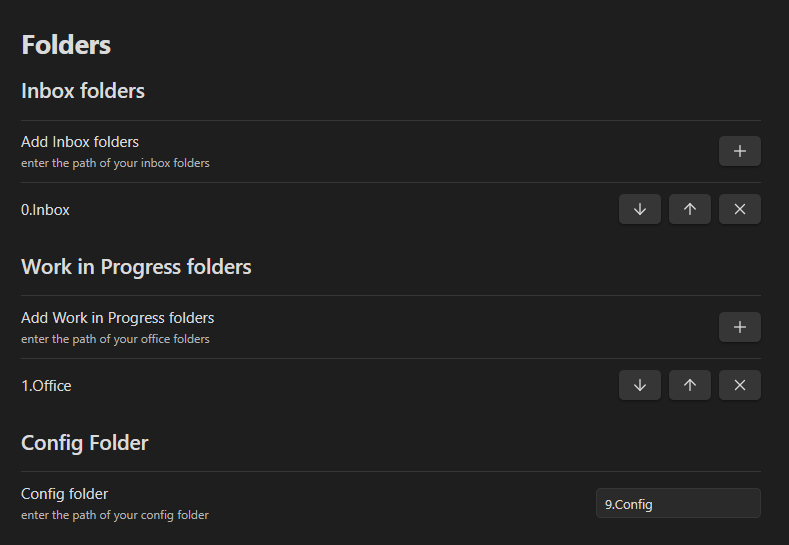
It is recommended that your vault contains at least one "Inbox" folder for new files and a "Work In Progress" folder for items requiring attention. These folder names are customizable and are specified within the plugin settings.

Example :
PersOsReadme01.png

Inbox Folders

Serve as initial holding areas for unprocessed items. Files in these folders need to be moved elsewhere to be excluded from the "start process" feature. An empty setting implies the entire vault functions as an "Inbox".

Work in Progress Folders

Represent areas for active items that are not archived. Items without a "Handled By" property or not marked as "Archived" with at least one next action are considered active (see file anatomy). The "Engage" command also only look into the "Work in progress" folders to find actionable files. An empty setting designates the entire vault as a "Work in Progress" area.

File Anatomy

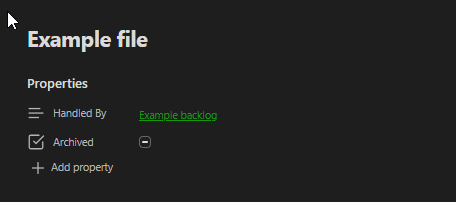
The plugin uses 2 major properties in your files, we advise using the core obsidian "Properties view" plugin :

  • "Archived" Property: (Optional) A True/False flag.
  • "Handled By" Property: (Optional) Text property linking to another file.

Here is an example :
PersOsReadme02.png

Rules for "Work in progress" files:
  • Non-archived files are active and require at least one task.
  • Archived files are inactive and excluded from automatic prioritization.
  • A "Handled By" file is active and still requires at least one task, but it's excluded from automatic prioritization.

Task Anatomy

Understanding dates within tasks is crucial, as they dictate the task's visibility and priority:

  • Start Date: The earliest date a task becomes relevant.
  • Scheduled Date: The planned date for task execution.
  • Due Date: The final deadline for task completion.
🛫Start Date

This date represents the date when you CAN "Start" doing this task. Before that date there is no need for the system to bring the file to your attention, but after that date it will in the "Start Work" command.

⏳Scheduled Date (or Do Date)

This date represent the date when you SCHEDULED to work on this task. Before that date there is no need for the system to bring the file to your attention, but at the desired date it needs to be brought to attention! A task having a start date AND a scheduled date will not come before the schedule date. A task having a scheduled date in the past is considered late but not failed.

📅Due Date

This date represent the ultimate possible date where this task should be finished. Before that date, the file can be brought to your attention if it has a start date or a scheduled date. A task having a Due date in the past is considered late and failed.

⌚ Time

It's possible to add a time to a task (before the date and the recurrence). by using the "⌚" emoji (Windows + . on windows). A timed task will only be brought to attention after the dedicated time and with a high priority. Time is in 24h format, here is an example : ⌚15:00 for 3pm. See Engage feature for more info.

Tasks example
  • Study for exam 🛫 2024-03-05 📅 2024-03-15

This task means that you "can" study between the 05th and the 15th of March.

  • It will show starting on the 05th and until the 15th

  • It will be considered late and failed on the 16th

  • Study for exam⌚15:00 🛫 2024-03-05 ⏳ 2024-03-11 📅 2024-03-15

This task means that you "Can" study between the 05th and the 15th of March. You've scheduled to actually study on the 11th.

  • It won't show before the 11th at 15:00.
  • It will be considered late on the 12th.
  • It will be considered late and failed on the 16th

Types for files

Some concepts are useful to understand :

  • A due file has at least 1 task with a scheduled or due date on the current day.
  • A Next file has at least 1 task with a start date in the past OR a file with only non dated tasks.
  • A late file is a file with at least 1 task that is scheduled or Due in the past.

Those concepts are used very often in all the algorithms of the plugin features.

Features

Engage Command

This feature brings forward files requiring immediate action, prioritizing based on dates, time and priority. Engage only brings files that are not archived, not "Handled By" another file, and in a "Work in progress" folder. The command uses a very specific algorithm to prioritize files to bring to your attention.

  • Due files with a time (⌚) in the past, ordered by time.
  • Random due file with no time (Random groups are created by priority, the high priority tasks will come first)
  • Random next file
Engage Random Event

It is possible to configure "Random Events" tags in the settings.
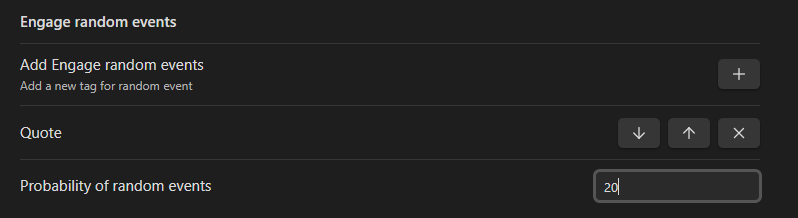
PersOsReadme03.png

Here the Engage feature has a 20% chance to bring a random file from those random events and this value can be configured. By default this value is 0%.

Engage Automatic Workspace opening

If a file can contain a "Workspace" property containing a Workspace name, when start work brings this file to your attention it will automatically open the referenced workspace. Note that when automatically opening a workspace, the previous state of your obsidian is saved in the "OSPrevious" Workspace. Also note that on Mobile, this feature only works if a workspace exists with the mention "Mobile" in the name.

As an example, if a file has the "Workspace" property filled with the value "Work" :

  • On Desktop, the "Work" Workspace will be opened automatically if it exists.
  • On mobile the "Work Mobile" Workspace will be opened automatically if it exists.

This because workspaces between desktop and Mobile still present some issue in Obsidian currently (the left pane is empty for example).

Process Command

Facilitates vault organization by highlighting files needing review or task assignment, prioritizing late tasks and inbox items.

The priority system for Start process works as follow :

  • Late files
  • Files in 1 of your Inboxes
  • Files "In progress without a task ", meaning non archived files in one of your "work in progress" folders that does not have a task defined.

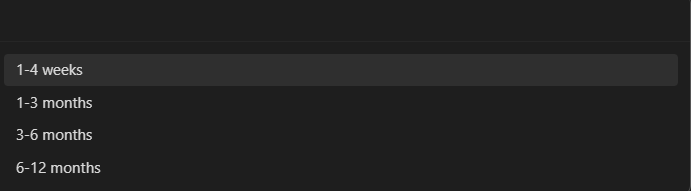
Random snooze a file command

Simplifies planning by allowing random postponement of tasks within a chosen timeframe.
PersOsReadme05.png

It will replace in the current file any start date or scheduled date by a random future date in the chosen interval.

Auto failing tasks command

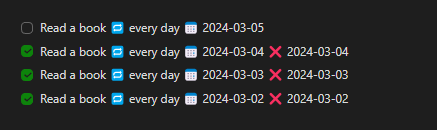
Automates the marking of tasks as failed past their due date, maintaining accountability for recurring obligations. If the task was a recurring task, the command will generate failed task until a current or future date is found. If the task was not a recurring task. The due date will be replaced by a scheduled date in the past. The idea is to keep a record of "not doing" the action but the file will still show in your "Late" files while processing so you can choose what to do with it.

For example this task :

PersOsReadme06.png

Will become like this :

PersOsReadme07.png

And this task :

PersOsReadme08.png

Will become like this :

PersOsReadme09.png

It's possible to launch the Auto fail task command either in the current file Or in your whole vault.

Engage current file command

Added a command to use the "Engage" algorithm in the context of the current file. Meaning that this algorithm will only look fore files that are referencing the current file in a "Handled By" property.

Add time emoji command

Added a command to add the "⌚" emoji used to declare time on tasks.

Calendar Widget

Thanks 702573N for providing the baseline for it ! Check Obsidian-Tasks-Calendar for more documentation.

Main change : The calendar widget is now declared in the following form in a "Calendar" code block :

```Calendar
pages: ""
view: month
firstDayOfWeek: 1
options: style1
```

Instead of the folowing in a "dataviewjs" code block:

```dataviewjs
await dv.view("9.Archives/z.Obsidian Settings/CalendarView", {pages:"", view: "week", firstDayOfWeek: "1", options: "style4 noProcess noLayer filter"})
```
Added options
taskCountOnly
taskCountOnly: true

This parameter displays only the number of tasks on each days

disableRecurrence
disableRecurrence: true

Now you can see the recurring tasks every days they will appear in the future, not only the current day, if you want to disable this new feature set this parameter to true

hideFileWithProps
hideFileWithProps: Archived, Handled By

This filter will remove the tasks that are not checked and present in a file with a mentioned property, as Archived or Handled By in this example

Calendar block example
```Calendar
view: week
firstDayOfWeek: 1
options: style4 noProcess noLayer filter noDailyNote noCellNameEvent
pages: "2.Activities"
hideArchived: true 
hideHandled: true
```

Timeline Widget

Thanks 702573N for providing the baseline for it ! Check Obsidian-Tasks-Timeline for more documentation

Main change : The calendar widget is now declared in the following form in a "Taskido" code block Instead of a "dataviewjs" codeblock :

```Taskido
parameter: "value"
parameter: "value"
parameter: true
parameter: "value value value value"
```
Added options
taskCountOnly
taskCountOnly: true

This parameter displays only the number of tasks on each days

disableRecurrence
disableRecurrence: true

Now you can see the recurring tasks every days they will appear in the future, not only the current day, if you want to disable this new feature set this parameter to true

hideFileWithProps
hideFileWithProps: Archived, Handled By

This filter will remove the tasks that are not checked and present in a file with a mentioned property, as Archived or Handled By in this example

numberOfDays
numberOfDays: 5

Choose the number of days you want to view in the future in your timeline

Timeline block example
```Taskido  
pages: "2.Activities"  
disableRecurrence: false  
hideFileWithProps: Archived, Handled By
options: noCounters
options: noQuickEntry
```

Releases

3.0.0 : Release update

Info :

  • Completely reviewed New Vault Template with Datacore ! Faster, cleaner, easier to learn and integrate into you vault, use the discord link to check it out using the above link !

Breaking changes :

  • Engage feature now works with an exclusion list, update your plugin settings !

New :

  • Mind-sweep Feature : Unload what's on your mind in minutes with a guided trigger list ! (config file needed !)
  • Full plugin documentation (work in progress ) on https://docs.pers-os.com/
  • Engage now take "Due actions" for the day before schedules actions
  • Engage now take "Future due Actions" first before started action in the "Next" category
  • Overhauled plugin settings for usability

Beta-feature :

  • Profile view now use Datacore instead of Dataview.
  • 28+ Datacore components that can be used across your vault (used in the Vault template !)
  • Instrumental folders with added rules for processing
  • Automatically move files to folders based on a property value
  • Automatically apply a template to a file based on a property value

Incoming :

  • Finished Plugin documentation
  • New mission download feature for plugin Vault.
  • Improve and document beta features

2.1.0 : Release update

Bug fix :

  • Fixed Console "Display missing" error when completing a task.

New features :

  • Process Feature upgrade : Process feature now also take into account a configuration for "Instrumental" folders. Instrumental notes need to "Support" another note to be considered processed.
  • Auto move notes to folders based on a property value, inspired by Auto-Note-Mover plugin, but using a property instead of a tag.

2.0.2 : Release update

Info :

  • Changed links to new vault template, find it in the official obsidian community or in the Personal OS discord New features :
  • Added function support for Xp and progress calculation.
  • Added Simple profile view (to be improved on)
  • Added Command to launch profile view

2.0.1 : Release update

Bug fix :

  • Fixed auto-fail not working in certain timezones.
  • Added fail-safe to auto-fail to prevent infinite loop.

Old Releases

2.0.0 : Release update

Info :

  • Changed link to New vault template, you can buy it from the site or find it free in the official Obsidian community ! New features :
  • Added Calendar and Timeline supports ! Thanks 702573N !
  • Added "Engage current file" command
  • Added "Clock emoji" command Changes :
  • Improved auto-fail using rrule, all types of recurrences managed by the task plugin now work with auto fail ! (try every monday, tuesday for example)
  • Improved auto delay, now 2 commands are available, one to generate a date, and one to delay "All dates" in the current file. Bug fix :
  • Fixed unexpected behavior on "Done" and "Due done" pages.

1.1.0 : Release update

Info :

  • Link added in the setting to a New vault template ! filled with dashboards, plugins and tutorials on how to use the Personal OS method !
  • Link added in the setting to a discord community if you need any help or want to talk about the Personal OS Vault !
  • Link added in the setting to the plugin Github if you notice any bug or have a feature request ! New features :
  • Added Progress Bar in plugin, preventing the need to use external services.
  • Added an Engage current file to apply Engage logic to all files "Handled" by the current file
  • Added a "Random date" feature to generate a random date between the usual snooze categories.
  • Added a Feedback XP notice when finishing tasks, this can be disabled in the plugin config.
  • Added a changelog modal when updating the plugin , this can be disable in the plugin config. Changes :
  • Changed command names for Start Work and Start Process : Engage + Process
  • Improved auto-change workspace by saving previous workspace
  • Improved auto-change workspace by selecting a "Mobile" version of the workspace on mobile. Bug fix :
  • Fix Engage feature to work properly with all tasks priorities
  • Fix Random Snooze for due dates
  • Fix auto fail current file to include current day. No change on failing all work in progress files.
  • Fix done file showing when there were still files later

1.0.0: Initial Release

The first release of Personal OS !

  • New : Start Work Command
  • New : Start Process Command
  • New : Random Snooze
  • New : Auto Fail Tasks²

Similar Plugins

info
• Similar plugins are suggested based on the common tags between the plugins.
Big Calendar
4 years ago by Boninall
Big Calendar in Obsidian, for manage your events in a day/week/month and see agenda too!
Things Link
4 years ago by @gavmn
Obsidian Google Tasks
4 years ago by YukiGasai
Add Google Tasks inside Obsidian
Execute Code
4 years ago by twibiral
Obsidian Plugin to execute code in a note.
Enveloppe
4 years ago by Mara-Li
Enveloppe helps you to publish your notes on a GitHub repository from your Obsidian Vault, for free!
Sequence Hotkeys
4 years ago by Ruan Moolman
Obsidian plugin to support a sequenced of keyboard shortcuts to run commands.
Packrat
4 years ago by Thomas Herden
Process completed instances of recurring items created by the Obsidian Tasks plugin
Linkify
4 years ago by Matthew Chan
Task Genius
4 years ago by Boninall
Comprehensive task management plugin for Obsidian
Text Expander JS
4 years ago by Jonathan Heard
Obsidian plugin: Type text shortcuts that expand into javascript generated text.
Open File by Magic Date
4 years ago by simplgy
Note Linker
4 years ago by Alexander Weichart
🔗 Automatically link your Obsidian notes.
Agile Task Notes
4 years ago by BoxThatBeat
This Obsidian plugin integrates your TFS data from either Jira or Azure Devops
Auto Hide
4 years ago by skelato1
This Obsidian plugin enables you to collapse (and expand) the sidebar easier.
Day and Night
4 years ago by Kevin Patel
An Obsidian plugin to automatically switch between day and night themes based on a set schedule
ToggleList
4 years ago by Lite C
This is a simple plugin for Obsidian to overwrite the default behavior of toggle checkbox status. Also, it offers a simple way to toggle through frequently used attributes: task states, task tags, highlighted list, etc.
Week Planner
4 years ago by Ralf Wirdemann
Checkbox 3 states
4 years ago by Renaud Héluin @ NovaGaïa
This is a simple plugin for add a third state to checkbox list.
Rapid Notes
3 years ago by valteriomon
Checklist Reset
3 years ago by Luke Hansford
Add a command to reset the state of any checklists in a document in Obsidian
File chucker
3 years ago by Ken Lim
Order List
3 years ago by Henry Gustafson
Task Marker
3 years ago by wenlzhang
An Obsidian plugin to change task status and append text with hotkeys and right-click context menu.
Weekly Review
3 years ago by Brandon Boswell
Pending notes
3 years ago by Ulises Santana
Obsidian plugin for searching links without notes in your vault.
Khoj
3 years ago by Debanjum Singh Solanky
Your AI second brain. Self-hostable. Get answers from the web or your docs. Build custom agents, schedule automations, do deep research. Turn any online or local LLM into your personal, autonomous AI (gpt, claude, gemini, llama, qwen, mistral). Get started - free.
Babashka
3 years ago by Filipe Silva
Run Obsidian Clojure(Script) codeblocks in Babashka.
Brainframe
3 years ago by pedersen
Prioritize
3 years ago by EloiMusk
Obsidian Plugin, to prioritize stuff in Obsidian
Tab Rotator
3 years ago by Steven Jin
Obsidian Rotate opened tabs with a specified time interval
Vim Toggle
3 years ago by Conner Ohnesorge
This is a plugin that adds the ability to toggle on and off vim into obsidian with a nice notice to let you know when you switched.
Cron
3 years ago by Callum Loh
Obsidian cron / schedular plugin to schedule automatic execution of commands
Dynamic Timetable
3 years ago by L7Cy
Calculate the estimated completion time from the estimated task time and dynamically create a timetable.
Pivotal Tracker Integration
3 years ago by jondeates
Personal Assistant
3 years ago by edony
A plugin that harnesses AI agents and streamlining techniques to help you automatically manage Obsidian.
Custom State for Task List
3 years ago by Okami Wong
A plugin for Obsidian to define your own states for task items.
Auto Template Trigger
3 years ago by Numeroflip
An obsidian.md plugin, to automatically trigger a template on new file creation
Pieces for Developers
3 years ago by Pieces For Developers
Pieces' powerful extension for Obsidian-MD that allows users to access their code snippets directly within the Obsidian workspace
TodoTxt
3 years ago by Mark Grimes
Obsidian plugin to manage todotxt files
Arcana
3 years ago by A-F-V
Supercharge your Obsidian note-taking through AI-powered insights and suggestions
Auto Front Matter
3 years ago by conorzhong
Due When
3 years ago by Andy Baxter
An Obsidian plugin which gives shortcuts to insert set due dates
Auto Hyperlink
3 years ago by take6
Syncthing Integration
3 years ago by LBF38
Obsidian plugin for Syncthing integration
RunJS
3 years ago by eoureo
Let's run JavaScript easily and simply in Obsidian.
GTD No Next Step
3 years ago by Tobias Davis
Obsidian plugin for GTD workflow, badge projects with no next step.
Uncheck All
3 years ago by Shahar Har-Shuv
Obsidian plugin to uncheck all checkboxes in a file with one action
Attachment Manager
3 years ago by chenfeicqq
Attachment folder name binding note name, automatically rename, automatically delete, show/hide.
YouVersion Linker
3 years ago by Jaanonim
Obsidian plugin that automatically link bible verses to YouVersion bible.
Gnome Terminal Loader
3 years ago by David Carmichael
Local Backup
3 years ago by GC Chen
Automatically creates a local backup of the vault.
Codeblock Template
3 years ago by Super10
A template plugin that allows for the reuse of content within Code Blocks!一个可以把Code Block的内容重复利用模板插件!
Day Planner (OG)
3 years ago by James Lynch (continued by Erin Schnabel)
An Obsidian plugin for day planning and managing pomodoro timers from a markdown task list.
Swiss army knife
3 years ago by mwoz123
ZettelFlow
3 years ago by RafaelGB
ZettelFlow is a plugin for Obsidian that helps you to create and manage your notes in a Zettelkasten way.
Next Link
3 years ago by Juan Luque
TODO Wrangler
3 years ago by Jeel Shah
An obsidian plugin to wrangle your Todos and put them in their place.
Modal forms
3 years ago by Danielo Rodriguez
Define forms for filling data that you will be able to open from anywhere you can run JS
Tag Breakdown Generator
3 years ago by Hananoshika Yomaru
Break down nested tags into multiple parent tags
Homework Manager
3 years ago by Kadison McLellan
An Obsidian plugin that keeps track of homework through a to-do list.
Auto Filename
3 years ago by rcsaquino
Auto Filename is an Obsidian.md plugin that automatically renames files in Obsidian based on the first x characters of the file, saving you time and effort.
Frontmatter generator
3 years ago by Hananoshika Yomaru
A plugin for Obsidian that generates frontmatter for notes
Tag Project
3 years ago by Odaimoko
Editor Autofocus
3 years ago by Mgussekloo
Run
2 years ago by Hananoshika Yomaru
Generate markdown from dataview query and javascript.
iCal
2 years ago by Andrew Brereton
This is a plugin for Obsidian that searches your vault for tasks that contain dates, and generates a calendar in iCal format that can be imported into your preferred calendar application.
Tag Buddy
2 years ago by David Fasullo
Unlock powerful tag editing features in Reading Mode. Add, remove and edit tags across your vault. Use tag inboxes to level up any workflow with a powerful idea assembly line.
Slash Commander
2 years ago by alephpiece
Customizable slash command list for Obsidian.md
Custom save
2 years ago by Hananoshika Yomaru
add custom save action to your save command
R.E.L.A.X.
2 years ago by Syr
Regex Obsidian Plugin
open-as-md
2 years ago by kursad-k
open and edit preferred formats as markdown in Obsidian
Task Status
2 years ago by Valerie Burzynski
Quickly change any task status in Obsidian. The searchable modal enables a more dynamic and indiscriminate workflow when you need to change your checkbox markers.
Extended Task Lists
2 years ago by joeriddles
Extended Markdown support for task lists in Obsidian.
RSS Copyist
2 years ago by aoout
Get the RSS articles as notes.
Orgmode (CM6)
2 years ago by Benoit Bazard
Orgmode plugin for Obsidian
Daily note creator
2 years ago by Mario Holubar
Automatically creates missing daily notes.
Templated daily notes
2 years ago by digitorum
Allow to create templayted daily note in specific folder
Task list
2 years ago by Ted Marozzi
A simple obsidian plugin enabling better task management via lists.
AI Tagger
2 years ago by Luca Grippa
Simplify tagging in Obsidian. Instantly analyze and tag your document with one click for efficient note organization.
Filtered Opener
2 years ago by Roman Kubiv
Sets of notes defined by filters to open notes.
Track-a-Lot
2 years ago by Iulian Onofrei
This is a tracker plugin for Obsidian
Ego Rock
2 years ago by Ashton Eby
An obsidian plugin that implements a basic taskwarrior UI for listing and modifying tasks.
Prompt ChatGPT
2 years ago by Coduhuey
Pomodoro Planner
2 years ago by Onur Nesvat
Differential ZIP Backup
2 years ago by vorotamoroz
Things3 Today
2 years ago by wudanyang6
New Tab +
2 years ago by Raphaël Le Carval
Allow to open markdown files, graph and canvas in new tab as the default behavior.
Notice logger
2 years ago by @gapmiss
An Obsidian.md plugin for logging all notices to the developer console, with optional prefix & timestamp.
Note Toolbar
2 years ago by Chris Gurney
Flexible, context-aware toolbars for your notes in Obsidian.
Cloud Atlas
2 years ago by Cloud Atlas
Cloud Atlas Obsidian Client
Automation
2 years ago by Benature
Grind Manager
2 years ago by dromse
Gamify your task management with rewards system, craft your tasks by tags.
Amazing Marvin Integration
2 years ago by Cloud Atlas
Interoperability between Obsidian and Amazing Marvin
Alias Picker
2 years ago by rostunic
Outline to task list
2 years ago by alexandrerbb
A simple Obsidian plugin to convert a note's outline to a task list
SystemSculpt AI
2 years ago by SystemSculpt.com
Enhance your Obsidian App experience with AI-powered tools for note-taking, task management, and much, MUCH more.
LinkMagic
2 years ago by AndyReifman
Checkbox Sounds
2 years ago by yasd251
Adds a nice completion sound for checkboxes when ticked in Obsidian
Canvas Blocks
2 years ago by Kay606
Timekeep
2 years ago by Jacobtread
Obsidian task time tracking
Note Chain
2 years ago by ZigHolding
Package my frequently used tools, highly personal plugins.
Notes 2 Tweets
2 years ago by Tejas Sharma
Generate and schedule tweets automatically from your notes on Obsidian
Checkbox Time Tracker
2 years ago by UD
Checkbox Time Tracker for Obsidian
Rapid AI
2 years ago by Rapid AI
AI Assistant for selected text and generating content with Markdown. Shortcuts and quick action buttons provide instant AI assistance. It provides a high availability API for unlimited Chat GPT request rates, so you can ensure smooth work for any workload.
Substitutions
2 years ago by BambusControl
Automatic text replacer for Obsidian.md
Close Window When Empty
2 years ago by Taylor Jadin
Watched-Metadata
2 years ago by Nail Ahmed
Watches for changes in metadata and updates the note content accordingly.
Task List Kanban
2 years ago by Chris Kerr
doing
2 years ago by rooyca
What was I doing?
Daily Note Structure
2 years ago by db-developer
This obsidian plugin creates a structure for your daily notes
Vikunja Sync
2 years ago by Peter Heiss
Manage your tasks in vikunja.
Note Linker with Previewer
2 years ago by Nick Allison
Obsidian Plugin to find and Link notes
Paste as Embed
2 years ago by Matt Laporte
Obsidian plugin to paste contents of clipboard into a new note, and embed it in the active note.
Note 2 Tag Generator
2 years ago by Augustin
Fast Image Auto Uploader
2 years ago by Longtao Wu
upload images from your clipboard by gopic
Quick Open
2 years ago by James Alexandre
Quickly select items in any modal using keyboard shortcuts. Supercharge your workflow with fast, efficient item selection in Obsidian modals.
Current File
2 years ago by Mark Fowler
An Obsidian plugin to allows external applications to know what file Obsidian is currently viewing
Todoist Project sync
2 years ago by Jonas Dam
Snippets Manager
2 years ago by Venkatraman Dhamodaran
Snippets Manager (Text Expander) For Obsidian
Auto Periodic Notes
2 years ago by Jamie Hurst
Obsidian plugin to create new periodic notes automatically in the background and allow these to be pinned in your open tabs. Requires the "Periodic Notes" plugin.
Morgen Tasks
2 years ago by Morgen AG
Snippets
5 years ago by Pelao
Custom window title
5 years ago by Joost Plattel
Small Obsidian plugin that updates the window title with the current open note
TODO | Text-based GTD
5 years ago by Lars Lockefeer
Hotkeys for specific files
5 years ago by Vinzent
Regex Pipeline
5 years ago by No3371
An Obsidian plugin that allows users to setup custom regex rules to automatically format notes.
Org Mode
5 years ago by ryanpcmcquen
Add Org Mode support to Obsidian.
Zoottelkeeper
5 years ago by Akos Balasko
Obsidian plugin of Zoottelkeeper: An automated folder-level index file generator and maintainer.
Amazing Marvin
5 years ago by Shirayuki Nekomata
Simple plugin for Amazing Marvin
Homepage
5 years ago by mirnovov
An Obsidian plugin that opens a specified note, canvas, or workspace on startup, instead of the most recent one.
Random To-Do
5 years ago by NatiAris
Pick a random todo item or a file with todo items
Apply Patterns
5 years ago by Jacob Levernier
An Obsidian plugin for applying patterns of find and replace in succession.
Open with
5 years ago by phibr0
Command Alias
5 years ago by @Yajamon
Obsidianのコマンドに対してエイリアスを設定するプラグイン
Shell commands
5 years ago by Jarkko Linnanvirta
Execute system commands via hotkeys or command palette in Obsidian (https://obsidian.md). Some automated events are also supported, and execution via URI links.
Trello
5 years ago by Nathonius
An Obsidian Plugin that connects Trello cards to Obsidian notes.
CustomJS
5 years ago by Sam Lewis
An Obsidian plugin to allow users to reuse code blocks across all devices and OSes
Carry-Forward
5 years ago by Jacob Levernier
An Obsidian Notes plugin for generating and copying block IDs, and copying lines with a link to the copied line
Archiver
5 years ago by ivan-lednev
Archive completed tasks in your Obsidian vault (plus other org-mode-like features)
JavaScript Init
5 years ago by ryanpcmcquen
Run custom JavaScript in Obsidian.
Webhooks
5 years ago by Stephen Solka
Connect obsidian to the internet of things via webhooks
Habitica Sync
5 years ago by Leoh and Ran
This is a under-development Obsidian Plugin for Habitica
Overdue
4 years ago by Peter Parente
Obsidian plugin that marks items as [[Overdue]] if they are not checked off by their due date
Flow
2 years ago by Ben Phillips
Implements key processes in David Allen's Getting Things Done (GTD) methodology
Jura Links
2 years ago by Lukas Collier & Emi Le
Verlinke deine Normangaben, Aktenzeichen oder Fundstellen in deiner Obsidian Notiz mit Gesetzesanbietern.
Metadata Auto Classifier
2 years ago by Beomsu Koh
AI-powered Obsidian plugin that automatically classifies and generates metadata (tags, frontmatter) for your notes.
Another Simple Todoist Sync
2 years ago by eudennis
Obsidian.md plugin to integrate with Todoist app.
Smart Composer
2 years ago by Heesu Suh
AI chat assistant for Obsidian with contextual awareness, smart writing assistance, and one-click edits. Features vault-aware conversations, semantic search, and local model support.
Peekaboo
2 years ago by Wang Guoshi
An Obsidian plugin protects your privacy by setting a password to hide notes.
NeuroVox
2 years ago by Synaptic Labs
Obsidian plugin for transcription and generation
Todos sort
2 years ago by Jiri Sifalda
A plugin for Obsidian that sorts todos within a note
Bottom to Top
a year ago by Henry Gustafson
BlazeJump
a year ago by henryco
Plugin for Obsidian that makes text navigation blazingly fast.
Simple Todo
a year ago by elliotxx
A minimalist text-based todo manager (Text-Based GTD) for efficient task management in Obsidian.
Note From Form
a year ago by Sergei Kosivchenko
Obsidian plugin that adds support to define input form and generate notes based on it
NodeFlow
a year ago by LincZero
Render node streams like `ComfyUi`, `UE`, `Houdini`, `Blender`, etc., to make it easy to write relevant notes. json describes the chart, compared to screenshots, making it easier to modify later. The plugin is also compatible with blogs.",
Better Plugins Manager
a year ago by zero
pycalc
a year ago by pycalc
Hanko
a year ago by Telehakke
Obsidian plugin.
Sentinel
a year ago by Giorgos Sarigiannidis
A plugin for Obsidian that allows you to update properties or run commands based on document visibility changes.
Missing Link File Creator
a year ago by Lemon695
The plugin creates both missing links and the corresponding files.
Goal Tracker
a year ago by Ben Rotholtz
Kikijiki Habit Tracker
a year ago by KIKIJIKI
Kikijiki Habit Tracker Plugin for Obsidian
Context Command Hider
a year ago by Mara-Li
This plugin allows you to hide every command from the Obsidian's right-click context menu.
Plugin REPL
a year ago by readwithai
An in-note Read Evaluate Print Loop to execute JavaScript within Obsidian
InlineAI
a year ago by FBarrca
Spacekeys
a year ago by Jared Lumpe
Obsidian plugin to define hotkeys based on sequences of keypresses.
New Note Fixer
a year ago by mnaoumov
Obsidian Plugin that unifies the way non-existing notes are created when clicking on their links
AI Providers
a year ago by Pavel Frankov
This plugin is a hub for setting AI providers (OpenAI-like, Ollama and more) in one place.
Enhanced Canvas
a year ago by RobertttBS
When editing on Canvas, properties and Markdown links to notes are automatically updated, enabling backlinks in Canvas.
Varinote
a year ago by Giorgos Sarigiannidis
A plugin for Obsidian that allows you to add variables in Templates and set their values during the Note creation.
Mastodon Threading
a year ago by El Pamplina de Cai
Obsidian plugin to compose and post threads to Mastodon
AI integration Hub
a year ago by Hishmat Salehi
A modular AI integration hub for Obsidian
Organized daily notes
a year ago by duchangkim
Automatically organizes your daily notes into customizable folder structures for better organization and easier navigation.
Hotstrings
a year ago by wakywayne
Runsh
a year ago by Ddone
A simple plugin that allows to run shell commands from obsidian.
EUpload
a year ago by Appleex
Obsidian 插件,专用于上传文件到存储仓库。目前支持 Lskypro(兰空图床),后续有需求会引入其它存储方式,如:Github/Gitee等等。
Inkporter
a year ago by Ayush Kumar Saroj
Inkporter is an Obsidian plugin that digitizes handwritten notes with smart ink isolation, adaptive theming, and seamless import workflows.
Task Board
a year ago by Atmanand Gauns
An Obsidian plugin to view and manage your tasks from whole vault using much efficient boards using various methodologies.
Automatic Linker
a year ago by Kodai Nakamura
Last Position
a year ago by saktawdi
Automatically scroll to the last viewed position when opening the markdown document.
Vault File Renamer
a year ago by Louan Fontenele
Vault File Renamer: Automatically standardizes file names to GitHub style (lowercase, no accents, only -, ., _) while preserving folder structure and file contents.
Hide Commands in Menu
a year ago by bomian98
Obsidian Plugin, hide different commands in different menus.
Rsync
a year ago by Ganapathy Raman
An Obsidian plugin to perform sync files between machines using Rsync
Task Mover
a year ago by Mariia Nebesnaia
A plugin for obsidian to move unfinished tasks to the daily note automatically
Title As Link Text
a year ago by Lex Toumbourou
An Obsidian plugin to set the Link Text using the document title
Cursor Position History
a year ago by Florian Gubler
A Plugin to remember (and make accessible) the cursor history in Obsidian. Both within a file and across files.
Asana
a year ago by Ryan Bantz
Obsidan plugin that creates tasks in Asana for highlighted text or the current line
KOI Sync
a year ago by Luke Miller
AI Tagger Universe
a year ago by Hu Nie
An intelligent Obsidian plugin that leverages AI to automatically analyze note content and suggest relevant tags, supporting both local and cloud-based LLM services.
Memos AI Sync
a year ago by leoleelxh
obsidian-memos-sync-plugin,将 Memos 内容同步到 Obsidian 的插件,提供无缝集成体验。
Blog AI Generator
a year ago by Gareth Ng
Obsidian Plugin: generate blog via AI based on the current note.
Previous Daily Note
a year ago by Marcos Talau
Plugin for Obsidian that opens the previous daily note
tidit
a year ago by codingthings.com
tidit is an Obsidian - https://obsidian.md - plugin that adds timestamps to your document as you type — when you want it, how you want it, where you want it.
Copy Local Graph Paths
a year ago by Amy Z
copy-local-graph-paths is a simple Obsidian plugin that copies the paths of notes linked to your current page.
IMSwitch in Math Block
a year ago by XXM
URI Converter
a year ago by wenlzhang
An Obsidian plugin to convert Obsidian URIs to Obsidian internal links.
One Step Wiki Link
a year ago by Busyo
用于 Obsidian 一步插入当前界面匹配到的所有外链(维基链接)
AI Note Tagger
a year ago by Jasper Mayone
Auto tagging obsidian notes w/ AI
Jira Issue Manager
a year ago by Alamion
Obisdian plugin to sync tasks between Obsidian and Jira
ProgressTracker
a year ago by Van Nam
A plugin that helps you track progress and manage tasks in your notes.
Auto Daily Note
a year ago by John Dolittle
Daily Notes Automater
a year ago by David Pedrero
Tasks Cleaner
a year ago by lowit
🧹 Tasks Cleaner is a plugin for Obsidian that helps you automatically remove old completed tasks from your Markdown notes
NoteMover shortcut
a year ago by Lars Bücker
Quickly and easily move notes to predefined folders. Perfect for organizing your notes.
Template Filename
a year ago by Callum Alpass
Obsidian plugin for creating notes with templatable filenames
Note UID Generator
a year ago by Valentin Pelletier
Allow you to automatically generate UID for the notes in your vault.
Discord Message Sender
a year ago by okawak
Obsidian Plugin: Send messages from a Discord channel to your Vault
Auto Replacer
a year ago by Alecell
A live text replacement plugin that applies automatic formatting, corrections, or custom replacements in real-time. Define your own regex-based rules and transformation logic to modify text dynamically as you type.
Current View
10 months ago by Lucas Ostmann
Automatically set the view mode (Reading, Live Preview, Source) for notes in Obsidian using folder rules, file patterns, or frontmatter.
Timeline Canvas Creator
10 months ago by chris-codes1
Quickly create timeline structured canvases in Obsidian.
Send to Canvas
10 months ago by wenlzhang
An Obsidian plugin that allows you to send tasks, blocks, and notes to Canvas files as plain text, links, and embeds.
Dataview (to) Properties
10 months ago by Mara-Li
Sync inline Dataview to properties (YAML frontmatter)
Random Wikipedia Article
10 months ago by SpencerF718
An Obsidian plugin to generate a note of a random Wikipedia article.
Note Companion AI
9 months ago by Benjamin Ashgan Shafii
Note Companion: AI assistant for Obsidian that goes beyond just a chat. (prev File Organizer 2000)
Content OS
8 months ago by eharris128
Post to LinkedIn from within Obsidian
NotePix
8 months ago by Ayush Parkara
NotePix automatically uploads images, screenshots from your Obsidian vault to a designated GitHub repository. It then seamlessly replaces the local link with a fast URL, keeping your vault lightweight and portable.
URL Formatter
8 months ago by Thomas Snoeck
Automatically formats specific URLs pasted into Obsidian into clean Markdown links.
Move Cursor On Startup
8 months ago by Jared Kelnhofer
Obsidian plugin to move the cursor to the right and back to the left when starting up. Why? To keep DataView expressions from not running on the first load of, say, your Home file.
Google Calendar Importer
7 months ago by Fan Li
A simple and light-weighted google calendar importer, allow injecting the events / tasks of a day automatically to your daily notes, or import it to anywhere with a command.
Open or Create File
7 months ago by Ilya Paripsa
Set up Obsidian commands that create or open files based on predefined patterns.
Steward
7 months ago by Dang Nguyen
A vault-specific agent equipped with agentic capacity, fast search, flexible commands, vault management, and terminals to "jump" into other CLI agents, such as Claude, Gemini, etc.
Handlebars Dynamic Templating
3 months ago by Hide_D
Handlebars dynamic templating. Define template files and use them dynamically via hb blocks. Template recursion is also possible.
Blueprint
3 months ago by François Vaux
Repeatable templates plugin for Obsidian
Kanban Bases View
2 months ago by I. Welch Canavan
A kanban-style drag-and-drop custom view for Bases.