
README file from
GithubAnother Simple Todoist Sync for Obsidian (BETA)
Create, edit, and delete tasks from within Obsidian.md to your Todoist.
[!WARNING] This is a fork from the Ultimate Todoist Sync plugin for Obsidian. I consider this as a beta, but I have been using for quite some time without issues. Feel free to contribute opening bug reports if you find anything.
Some features works only Todoist -> Obsidian, others by-directional. Find more details on the feature table below.
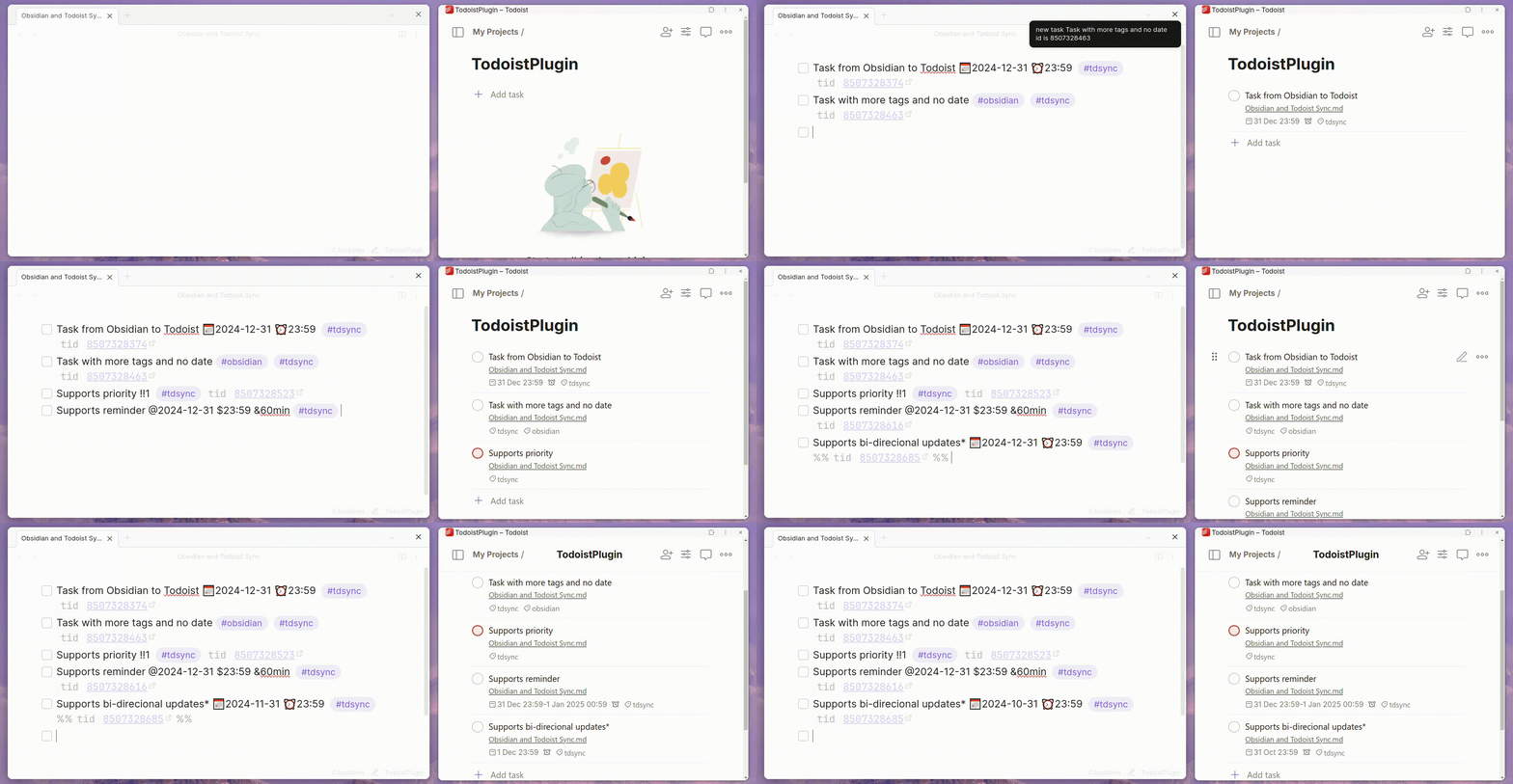
| Feature | from Obsidian to Todoist | from Todoist to Obsidian |
|---|---|---|
| Add task | ✅ | 🔜 |
| Delete task | ✅ | 🔜 |
| Modify task content | ✅ | ✅ |
| Modify task due date | ✅ | ✅ |
| Modify task due time | ✅ | 🔜 |
| Modify task description | 🔜 | 🔜 |
| Modify task labels/tags | ✅ | 🔜 |
| Mark task as completed | ✅ | ✅ |
| Mark task as uncompleted | ✅ | ✅ |
| Modify project | 🔜 | 🔜 |
| Modify section | 🔜 | 🔜 |
| Modify priority [1] | ✅ | 🔜 |
| Add reminder | ✅ | ✅ |
| Add duration | ✅ | 🔜 |
| Move tasks between files | 🔜 | 🔜 |
| Added-at date | 🔜 | 🔜 |
| Completed-at date | 🔜 | 🔜 |
| Task notes [2] | 🔜 | ✅ |
| Optional app link | ✅ | ✅ |
| Assign project to task | ✅ | 🔜 |
| Manage Deadline Date | ✅ | 🔜 |
| Import task from URL | ✅ (experimental) | — |
- [1] Task priority only support one-way synchronization
- [2] Task notes/comments only support one-way synchronization from Todoist to Obsidian.
Installation
[!WARNING] The plugin will require the Todoist API token, which can be found on your
Settings > Integrations > Developer(direct link here). Note that some features will work for Todoist paid users.
From within Obsidian
- Open Obsidian's
Community pluginstab, within theSettingswindow - Click
Browseand search forAnother Todoist Sync Plugin - Back to
Community plugins, find theInstalled Pluginssection and activate theAnother Todoist Sync Plugin
[!NOTE] You can update the plugin following the same procedure, clicking Update instead of Install
Manually
- Download the latest release of the plugin from the Releases page.
- Extract the downloaded zip file and copy the entire folder to your Obsidian plugins directory.
- Enable the plugin in the Obsidian settings.
Configuration
- Open Obsidian's
Settingswindow - Select the
Community pluginstab on the left - Under
Installed plugins, click the gear icon next to theAnother Simple Todoist Syncplugin - Enter your Todoist API token
Settings
- Automatic synchronization interval time The time interval for automatic synchronization is set to 300 seconds by default, which means it runs every 5 minutes. You can modify it yourself.
- Default project New tasks will be added to the default project, and you can change the default project in the settings.
- Sync Comments By default, comments on tasks are added below your task on Obsidian. With this enabled, it won't sync comments.
- Custom Sync Tag
By default, sync new task with
#tdsync, but you can change to#todoist - Alternative Keywords When enabled, accept new keywords for date, due time and duration (@,$ and &).
Usage
Task format
| Syntax | Description | Example |
|---|---|---|
| #tdsync | Tasks marked with #tdsync[4] will be added to Todoist. If you have enabled Full Vault Sync, #tdsync will be added automatically. |
- [ ] task #tdsync |
| 📅YYYY-MM-DD | The date format is 📅YYYY-MM-DD, indicating the due date of a task. | - [ ] task content 📅2025-02-05 #todoist [1] |
| #tag | Note that all tags without a project of the same name are treated as normal tags | - [ ] task #tagA #tagB #tagC #todoist |
!!<number> |
The priority of the task between 1 and 4. [2] | - [ ] task !!1 #todoist |
| ⏰HH:MM | This sets the time of the task. If none is given, the default is 08:00 | - [ ] task ⏰23:59[3] |
| ⏳MMmin | This sets the duration of the task | - [ ] task ⏳30min[[5]] |
| ///<section_name> | This adds the task to a section with <section_name> | - [ ] task ///section_name[7] |
| #project #tag | First hashtag assign to a project with the same name | -[ ] task #project #tag1 #tag2 [8] |
| %%[p::ProjectName]%% | Assign task to project with hidden field | %%[p::ProjectName]%% [9] |
| {{YYYY-MM-DD}} | Assign a deadline date to a task | {{YYYY-MM-DD}} [10] |
- [1] Supports the following characters/emojis: 📅, 📆, 🗓, 🗓️, @ [6]
- [2] It's follow the same pattern of p1, p2, p3 and p4, p1 being the highest priority.
- [3] Supports the following characters/emojis: ⏰, ⏲, $ [6]
- [4] On the original plugin, this tag was
#todoist, but on this fork was changed to avoid conflicts. - [5] Supports the following characters/emojis: ⏳, & [6]
- [6] Alternative characters are enabled via "Alternative Keywords" on plugin settings page
- [7] If the section if removed from the task content, it won't update in Todoist (yet)
- [8] First tag will be used for project, but will also create a tag with the same name.
- [9] Project name is case-sensitive.
- [10] It supports YY-MM-DD, and if you use MM-DD default to the current YY
Import a task from a Todoist link
Enable the Import task from Todoist link option under Experimental features in settings. Then use the command palette (Import task from Todoist link) to paste any Todoist task URL, preview the task, and insert it into the current note already formatted for bidirectional sync.
Supported URL formats:
https://app.todoist.com/app/task/TASK_IDhttps://app.todoist.com/app/task/task-name-TASK_ID(slugged URLs)https://app.todoist.com/app/project/PROJECT_ID/task/TASK_IDtodoist://task?id=TASK_ID(app URI)
Set a default project for each file separately
The default project in the setting applies to all files. You can set a separate default project for each file using the comand Set default project for Todoist task in the current file from the command menu.
Tips
List your Todoist tasks within Obsidian
You can list all synchronized tasks from your Obsidian Vault using the Obsidian DataView plugin. If you create a view using the following code:
```dataview
task
where !completed and contains(tags, "#tdsync")
```
Expose tasks meta data
If you have the Obsidian DataView plugin you will be able to see the task ID on your tasks within Obsidian.
Contributing & AI-assisted development
This repository includes a CLAUDE.md file that documents the architecture, data flow, key classes, and common gotchas for AI tools (Claude, Copilot, Cursor, etc.). If you are using an AI assistant to review or contribute to this repo, point it at that file first.
Disclaimer
This plugin is for learning purposes only. The author and contributors makes no representations or warranties of any kind, express or implied, about the accuracy, completeness, or usefulness of this plugin and shall not be liable for any losses or damages resulting from the use of this plugin.
The author shall not be responsible for any loss or damage, including but not limited to data loss, system crashes, computer damage, or any other form of loss arising from software problems or errors. Users assume all risks and are solely responsible for any consequences resulting from the use of this product.
By using this plugin, you agree to be bound by all the terms of this disclaimer. If you have any questions, please contact the author.
Contributing
Contributions are welcome! If you find a bug or have a feature request, please open an issue. Pull requests are also appreciated.
Prerequisites
- Node.js (v18+)
- A local Obsidian vault for manual testing
Setup
git clone https://github.com/eudennis/ultimate-todoist-sync-for-obsidian-experiment.git
cd ultimate-todoist-sync-for-obsidian-experiment
npm install
npm Scripts
| Script | Command | Purpose |
|---|---|---|
dev |
npm run dev |
Starts esbuild in watch mode. Rebuilds main.js on every file change. Use this during development. |
build |
npm run build |
Runs TypeScript type-checking, builds main.js for production (minified, no sourcemaps), then auto-bumps the patch version in manifest.json (e.g. 0.6.0 → 0.6.1). Run before submitting a PR. |
build-without-tsc |
npm run build-without-tsc |
Same as build but skips the TypeScript type check and does not bump the version. Useful for a quick production build when you're confident types are clean. |
build-local |
npm run build-local |
Same type-check + production build as build, then bumps a build number (4th version component) in LocalBuild/another-simple-todoist-sync/manifest.json and copies main.js and styles.css there. Use this to iterate locally in Obsidian without touching the source version. |
test |
npm test |
Runs the Vitest unit-test suite once (vitest run). This is the check CI runs on every pull request. |
test:watch |
npm run test:watch |
Runs Vitest in watch mode, re-running affected tests as you edit. |
test:coverage |
npm run test:coverage |
Runs the suite once and prints a coverage report (also writes lcov for editor integrations). |
version |
npm version <patch|minor|major> |
Bumps the version in package.json and syncs it to manifest.json and versions.json (Obsidian's compatibility map). Also stages those files for commit. |
Testing
Automated tests (Vitest)
npm test               # run the unit-test suite once
npm run test:watch     # re-run on change during development
npm run test:coverage  # run with a coverage report
Tests live in tests/ and cover the plugin's pure logic — markdown task parsing (taskParser), the in-memory cache (cacheOperation), the Todoist-link import modal (importTaskModal), and Todoist API payload assembly (todoistAPI). Obsidian and the Todoist SDK are mocked under tests/__mocks__/, so the suite needs no vault or network access. CI runs npm test on every pull request — please keep it green and add tests when you touch parsing, cache, import, or API logic.
Manual testing in Obsidian
Sync behaviour, file edits, and the settings UI can only be exercised inside Obsidian.
Option A — iterate quickly with dev (watch mode)
- Run
npm run devto start the watcher. - Copy
main.js,manifest.json, andstyles.cssinto your vault's plugin directory:<vault>/.obsidian/plugins/another-simple-todoist-sync/ - In Obsidian, run Reload app without saving (or fully restart Obsidian) to load the new build.
- Enable Debug mode in the plugin's settings to get verbose console output (
Ctrl+Shift+Iopens the developer console). - Exercise the feature you changed and check the console for errors.
Repeat steps 1–5 after each code change (the watcher rebuilds main.js automatically; you still need to reload Obsidian).
Option B — production build with build-local
Point your Obsidian vault's plugin directory at LocalBuild/another-simple-todoist-sync/ once, then run:
npm run build-local
Each run type-checks, builds a production bundle, bumps a build number in the local manifest, and copies main.js and styles.css into LocalBuild/another-simple-todoist-sync/. Reload Obsidian to pick up the new build. The source manifest.json is not modified.
License
This plugin is released under the GNU GPLv3 License.