
README file from
Githubobsidian-bases-timeline-view
Timeline view for Obsidian Bases.
Chinese documentation: 中文版.md.
Features
- Timeline: Plot notes on a timeline for a clear view of temporal information.
- Grouping: Group timeline items by any note field and visually separate related events.
- Background and markers (Bases): In addition to regular timeline items, support drawing backgrounds and markers.
- Render API: Expose an API for other scripts to customize drawing and extend the timeline.
- Preview: Timeline items support Obsidian's built-in hover preview for immersive reading.
Example
Basic usage
To draw a timeline, add properties to your notes, for example:
start: 2025-01-01
end: 2025-01-04
content: title of the item
tags:

- moment
Then create a Base and add a timeline view:
filters:
  and:
    - file.tags.contains("moment")
    - and:
        - file.ctime >= "2025-01-01"
        - file.ctime <= "2025-12-31"
views:
  - type: timeline-view
    name: moment of 2025
The result looks roughly like this:
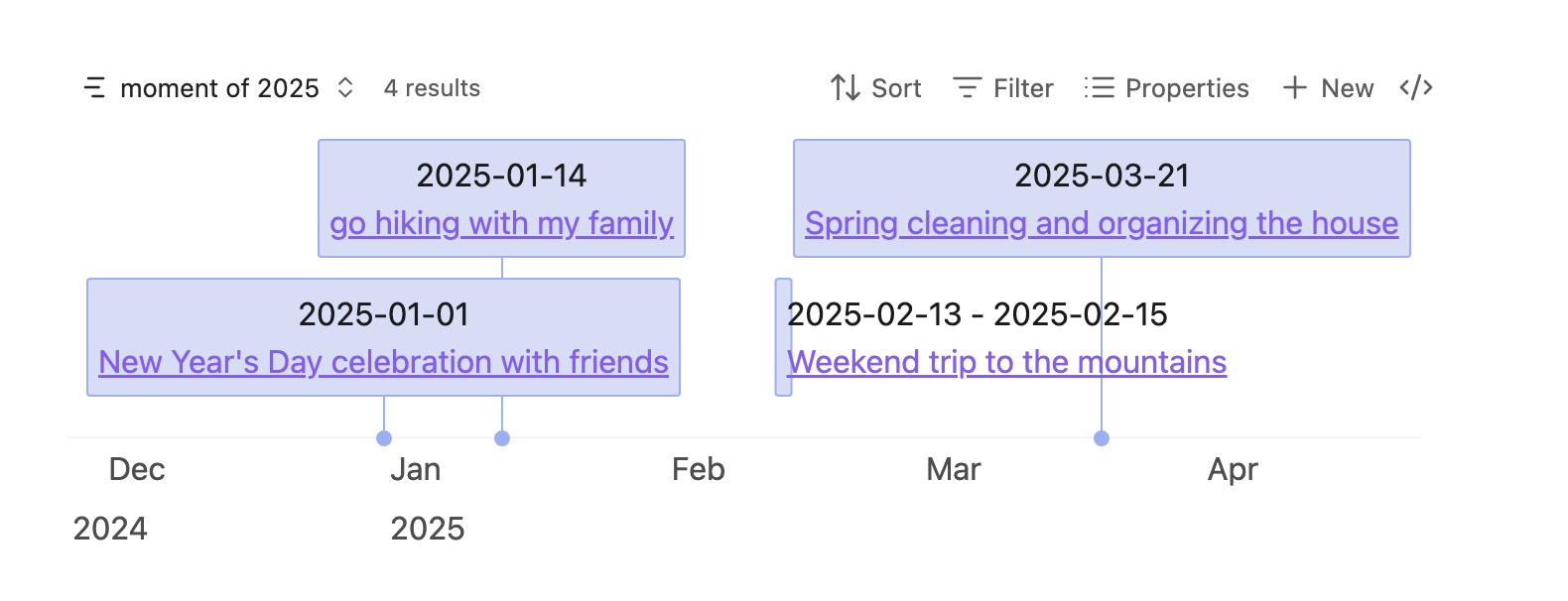
timeline-view reads frontmatter from each file and plots it on the timeline.
Default frontmatter properties:
| Property | Description | Required | Example | Notes |
|---|---|---|---|---|
| start | Start date | No | 2025-01-01 | |
| date | Start date | No | 2025-01-01 | Used when start is not set |
| end | End date of the item | No | 2025-01-04 | |
| content | Item content / title | No | title of the item | Falls back to the file name when unset |
| startLabel | Display label for the start date | No | start | |
| endLabel | Display label for the end date | No | end | |
| cssclasses | CSS classes attached to the vis item | No | phase-bg | Built-in Obsidian list property; join multiple with spaces |
Custom fields
If you prefer not to use the default property names, specify custom fields in the view, for example:
filters:
  and:
    - file.tags.contains("moment")
    - and:
        - file.ctime >= "2025-01-01"
        - file.ctime <= "2025-12-31"
views:
  - type: timeline-view
    name: moment of 2025
    startField: note.startData
    endField: note.endData
Make sure these properties are defined in your notes.
Grouping
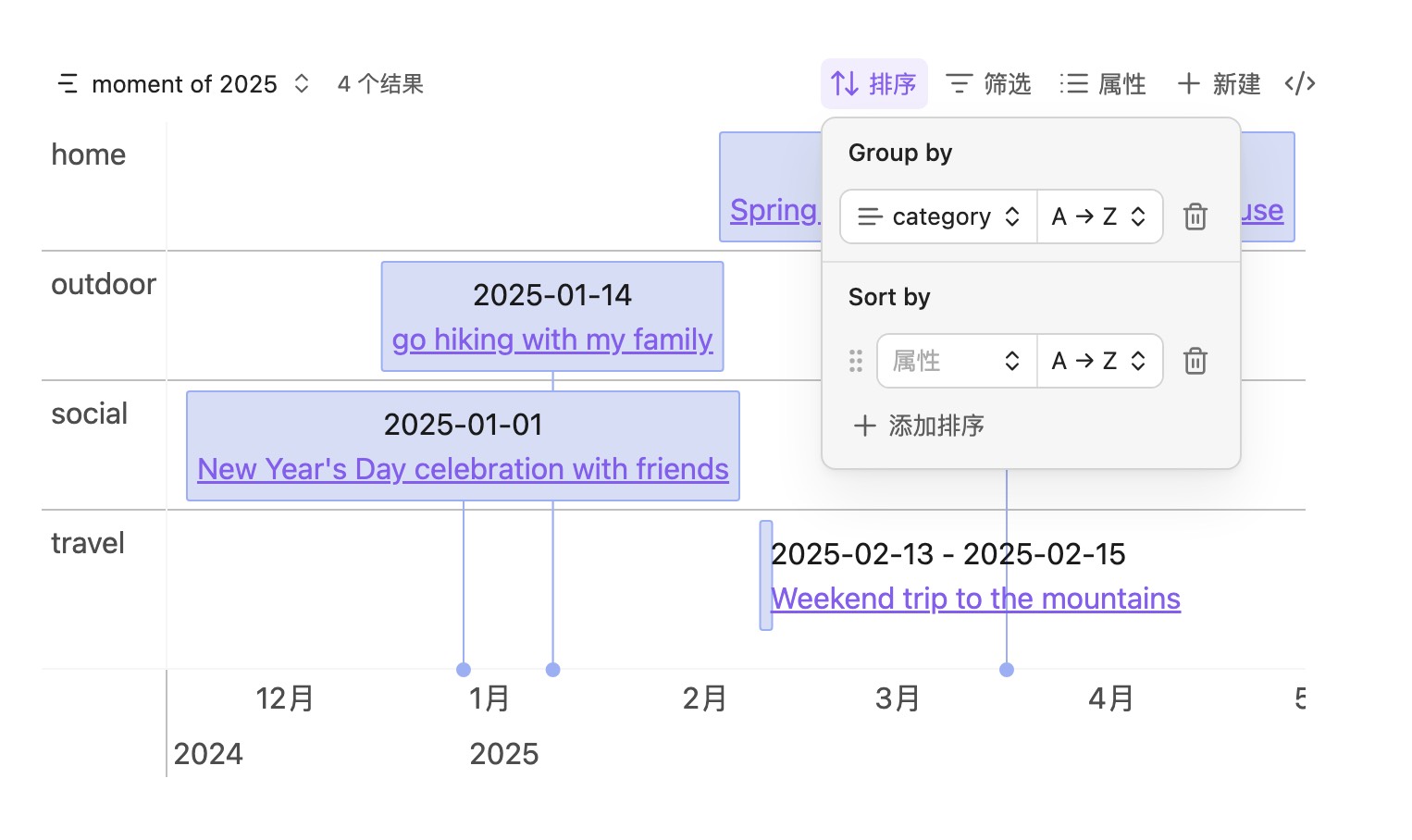
With Obsidian 1.10 or later, use group by to group timeline items, for example:
Background and markers
Use backgroundWhen and markerWhen to decide which notes should be drawn as backgrounds or markers. Example:
filters:
  or:
    - file.tags.contains("moment")
    - file.tags.contains("phase")
    - file.tags.contains("milestone")
formulas:
  isPhase: 'file.tags.contains("phase")'
  isMilestone: 'file.tags.contains("milestone")'
views:
  - type: timeline-view
    name: moment of 2025
    startField: note.start
    endField: note.end
    backgroundWhen: formula.isPhase
    markerWhen: formula.isMilestone
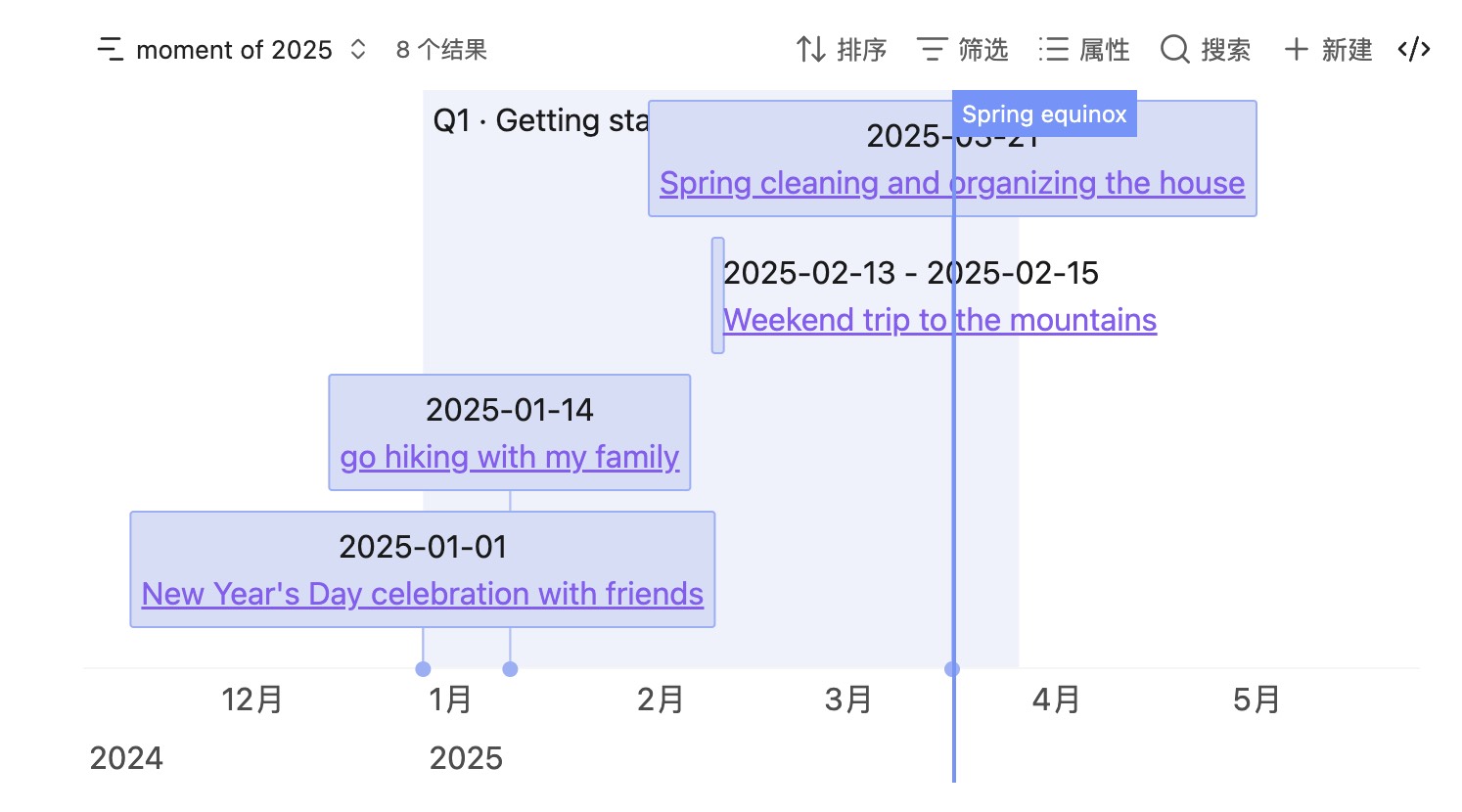
- Background notes need
startandendin frontmatter.- Marker notes need
start(as the vertical line time);content/ file name is used as the marker label.- When multiple roles match, priority is: marker > background > item.
- Backgrounds also support grouping and can be drawn by group.
Custom styles
Use Obsidian's built-in style extensions together with this plugin's hooks to customize the timeline look.
Style via cssclasses
By default the plugin reads Obsidian's built-in cssclasses and sets them as the vis-timeline item/background className. You can also point the class name field in the view to another property.
cssclasses:

- phase-bg
.vis-item.phase-bg {
	background-color: rgba(211, 211, 211, 0.45);
	border-color: #d3d3d3;
}
Style via data attributes
Timeline items also expose tags and frontmatter as data- attributes for CSS selectors, for example:
.vis-item:has(.timeline-item[data-tags~='#projects']) {
	border-width: 1px;
	border-style: solid;
}

.vis-item:has(
	.timeline-item[data-tags~='#projects'][data-status='not started']
) {
	background-color: rgba(211, 211, 211, 0.45);
	border-color: #d3d3d3;
}
#projectsis a tag; replace it with any tagdata-status="not started"comes from frontmatter (status); replace it with any field
API
When you need to query data yourself (for example with DataviewJS), use the plugin's exposed api:
| Method | When to use |
|---|---|
api.render(containerEl, input, options?) |
You already have a generic data structure and want full control |
api.dv.render(containerEl, sources) |
Pass Dataview page lists directly; the plugin maps fields and default item templates |
Plugin id: bases-timeline-view.
const api = app.plugins.plugins['bases-timeline-view']?.api;
if (!api) {
	// Plugin not enabled
	dv.paragraph('Please update and enable Bases Timeline View');
} else {
	// Call api.render / api.dv.render
}
Full parameters and types: API reference.
Quick example: api.render
```dataviewjs
const api = app.plugins.plugins['bases-timeline-view']?.api;
if (!api) {
  dv.paragraph('请先启用 Bases Timeline View 插件。');
} else {
  const items = [
    {
      id: 'notes/事件-甲.md',
      start: '2025-01-01',
      end: '2025-01-03',
      content: '事件甲',
      group: '工程',
    },
    {
      id: 'notes/事件-乙.md',
      start: '2025-02-10',
      content: '事件乙',
      group: '设计',
    },
  ];

  const backgrounds = [
    {
      id: 'notes/Q1.md',
      start: '2025-01-01',
      end: '2025-03-31',
      content: 'Q1',
      className: 'phase-bg',
    },
  ];

  const markers = [
    { id: 'launch', time: '2025-03-01', title: '发布' },
  ];

  api.render(this.container, { items, backgrounds, markers });
}
```
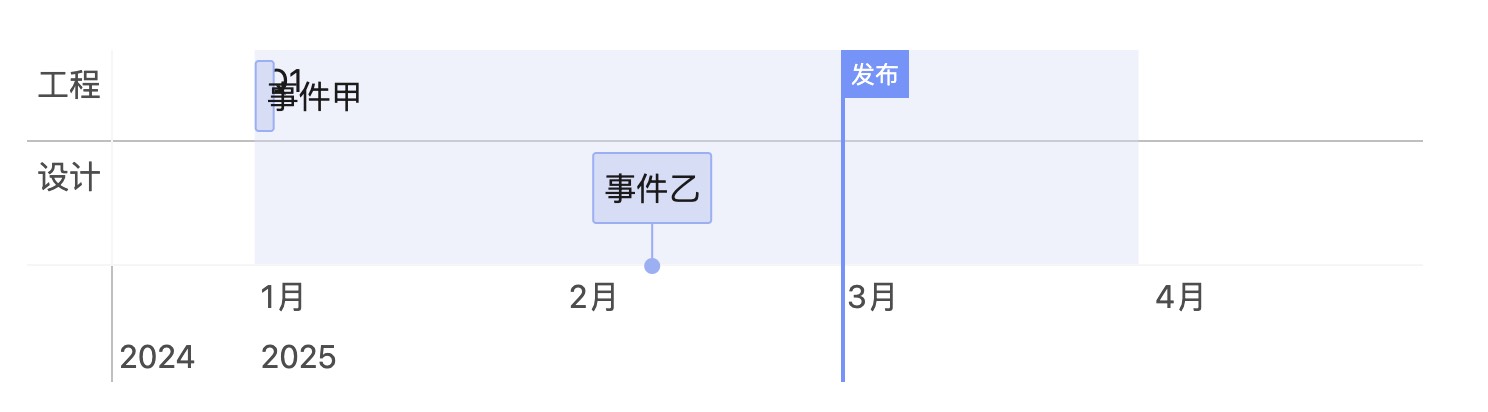
Quick example: api.dv.render
```dataviewjs
const api = app.plugins.plugins['bases-timeline-view']?.api;
if (!api?.dv) {
  dv.paragraph('请先启用 Bases Timeline View 插件。');
} else {
	api.dv.render(this.container, {
		items: dv.pages('#event'),
		backgrounds: dv.pages('#phase'),
		markers: dv.pages('#milestone'),
	});
}

```
Commands
In a Markdown editor, open the command palette and run:
- Insert custom render template — inserts the
api.renderDataviewJS example at the cursor - Insert Dataview render template — inserts the
api.dv.renderDataviewJS example at the cursor
Previewing these blocks requires the Dataview plugin.
Tips
- Bases views and
api/api.dv.rendershare the same date normalization (string,Date, number → moment →YYYY-MM-DD). - Incomplete inputs like
"2025"or"2025-01"are completed by moment into full dates (for example2025-01-01). If a property only needs to represent a year or year-month, you can use a text type, but rendering still normalizes toYYYY-MM-DD.
Installation
Three ways:
- (Recommended)Install from Obsidian Community Plugins, search
bases timeline viewto install - Manual install
- Download the latest release from GitHub Releases
- Create a folder
bases-timeline-viewunder.obsidian/plugins/ - Put the downloaded files into that folder
- Reload Obsidian
- Enable it in Settings → Community plugins
- Install via BRAT
- If you don't have it yet, install BRAT
- Enable BRAT in Settings → Community plugins
- Open the command palette (Ctrl+P) and run
BRAT: Plugins: Add a beta plugin for test - Enter the repository URL: https://github.com/xjiaxiang/obsidian-bases-timeline-view
- Select the latest version
- Click
Add pluginto install - If it is not enabled automatically, enable
bases-timeline-viewin Settings → Community plugins
Other
- Thanks to vis-timeline and obsidian timeline