Genkan

by Kenroy Harrison
5
4
3
2
1
Score: 50/100

Description

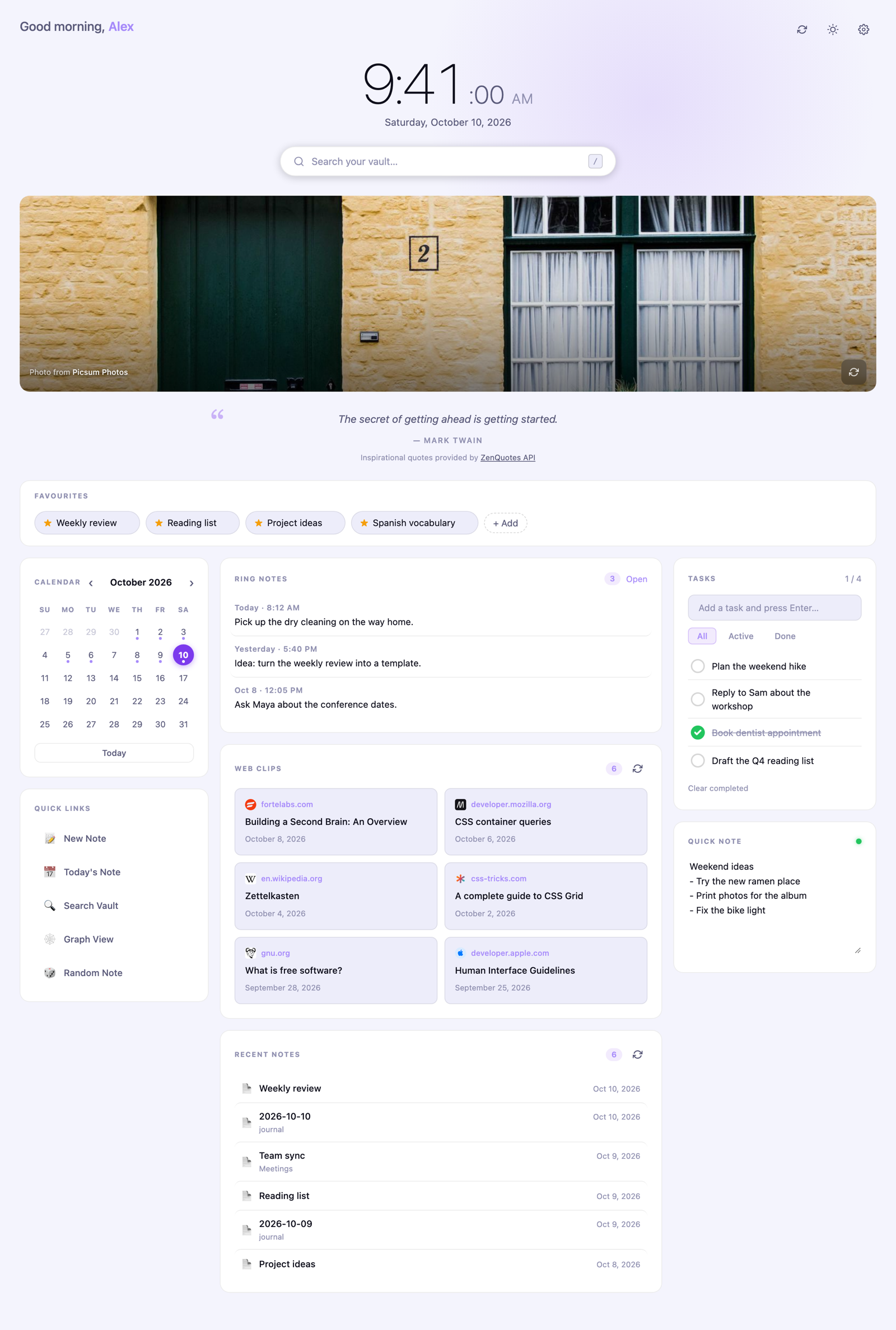
The Genkan plugin adds a dashboard homepage with vault search, favourite note shortcuts, tasks and seven quick notes. A calendar opens or creates daily notes using existing Daily Notes or Periodic Notes settings. Web clips and recent notes sit alongside configurable links to commands, notes or web pages. Quick notes support rich text editing while remaining plain Markdown files, with word counts and the last saved time shown below the editor. Content that cannot be preserved unchanged opens as plain text instead. Favourites use wikilinks that stay updated when notes are renamed. The dashboard follows the current theme and adapts to a single column on phones. Optional cards show Pebble Index ring notes, a daily photo and a quote. It reads and writes vault files locally through Obsidian's API without requiring a server, account or API key.

Reviews

No reviews yet.

Stats

0
stars
391
downloads
0
forks
7
days
1
days
1
days
0
total PRs
0
open PRs
0
closed PRs
0
merged PRs
0
total issues
0
open issues
0
closed issues
50
commits

Latest Version

a day ago

Changelog

Accessibility fixes for the seven quick notes:

  • Each dot now says whether its note has text ("Note 3, empty", "Note 2, has text") and updates as you type, clear a note or edit from another device
  • The save dot's label follows its state: "Saved" or "Unsaved changes"
  • The editor is named for the open note ("Quick note 3") and the tabs control a labelled tab panel
  • Better contrast: a darker yellow ring in light mode, and a brighter outline on the selected dot in dark mode (all dots now meet 3:1)
  • New strings translated into French, Spanish, German and Japanese

README file from

Github

Genkan

Genkan (玄関) is the entryway of a Japanese home: the place you step in. This plugin is the entryway to your vault, a dashboard homepage for Obsidian that works on desktop, iPhone and iPad.

  • Clock, greeting and date, with 12 or 24 hour time
  • Search your whole vault from the homepage (press / to focus it)
  • Favourites: one-click chips for the notes you open most
  • Tasks and seven quick notes (like Tot) that sync with the rest of your vault
  • Calendar that opens (or creates) your daily notes
  • Web clips from the Obsidian Web Clipper and your recent notes
  • Quick links to commands, notes or web pages
  • Ring notes: an optional card for voice notes from a Pebble Index ring
  • A photo of the day and a daily quote (both optional)

It reads and writes your vault directly through Obsidian's own API. There is no server, no account and no API key required.

Screenshots

Dark and light themes (the dashboard follows Obsidian's theme by default):
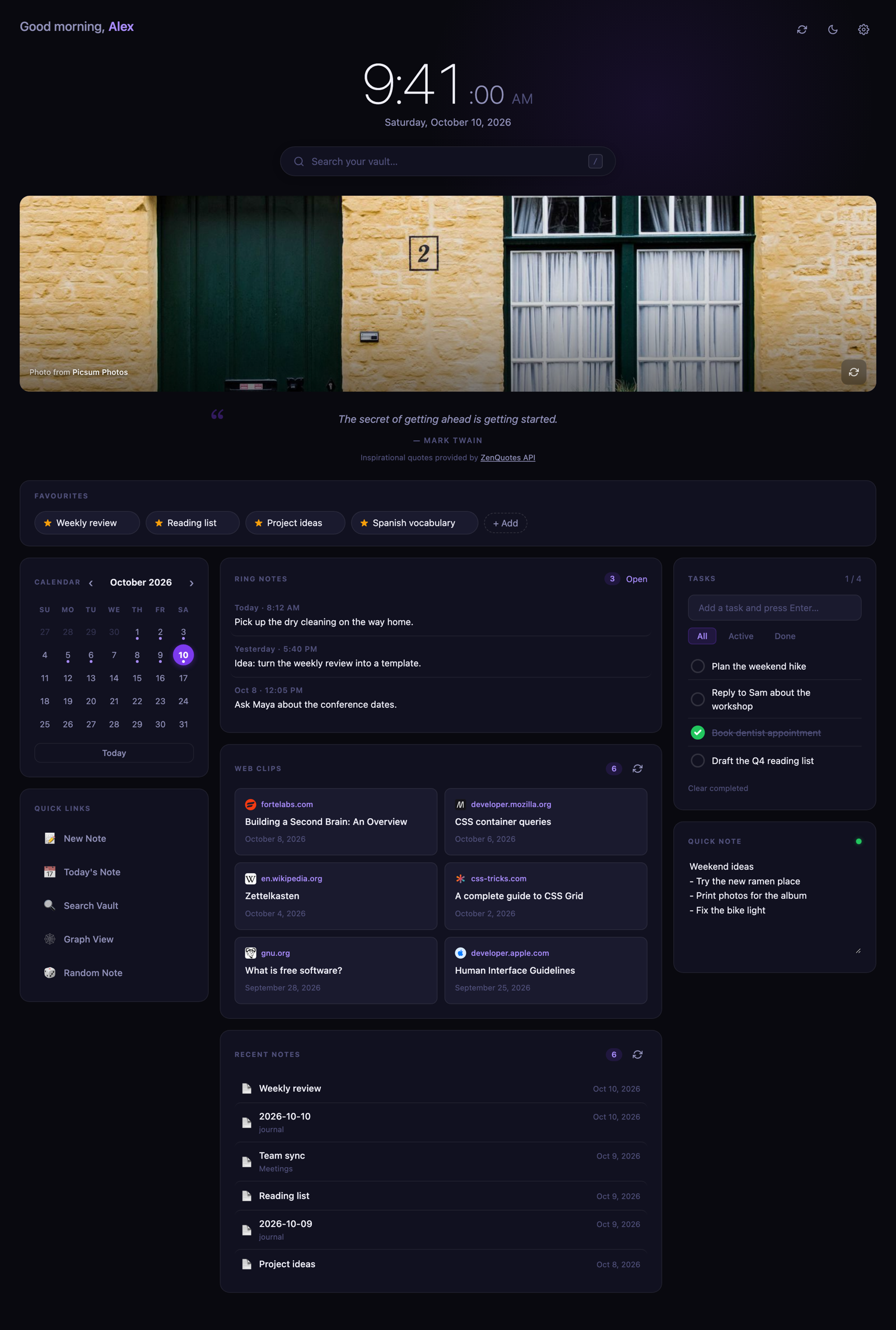
Genkan dashboard in the dark theme

Genkan dashboard in the light theme

On a phone it becomes a single column with tasks and the quick notes first:

The quick notes card, in light and dark: seven notes, one per colored dot, with formatting as you type and a footer of counts and the last-saved time.
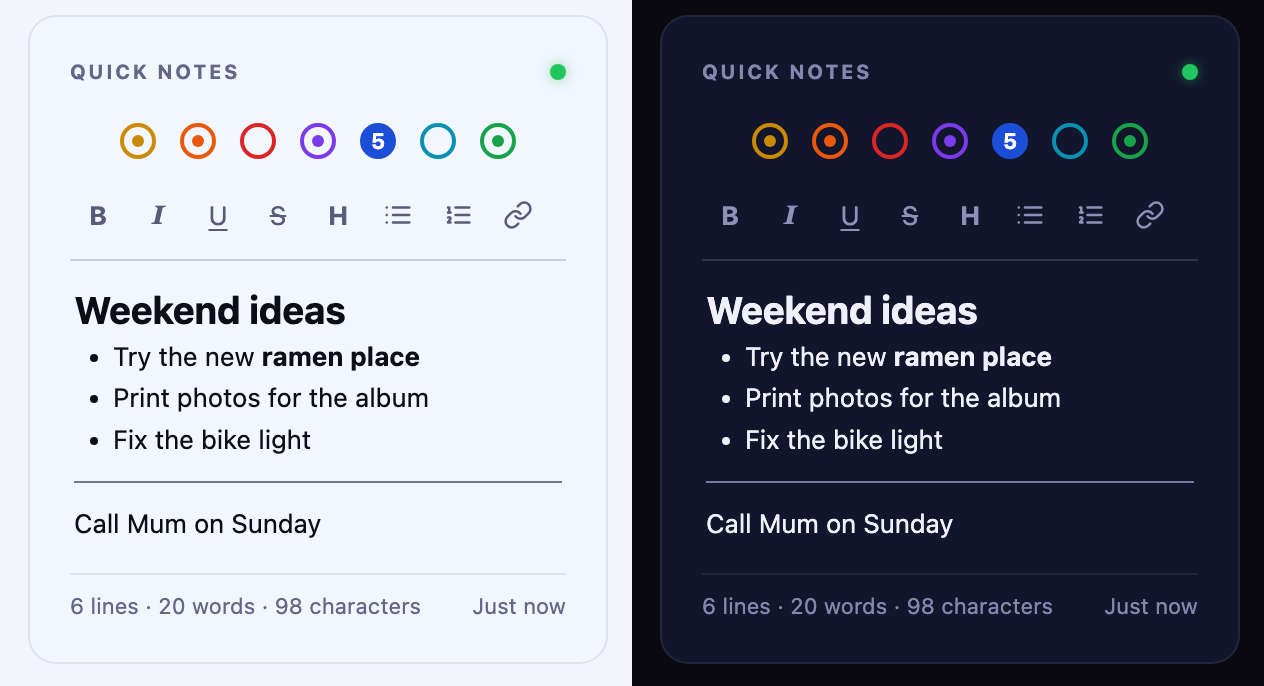
The Genkan quick notes card in the light and dark themes

The screenshots use sample data.

Install

With BRAT: install the BRAT plugin, choose "Add beta plugin", and enter kenroy/genkan.

Manually:

  1. Download main.js, manifest.json and styles.css from the latest release.
  2. Put them in <your vault>/.obsidian/plugins/genkan/ (create the folder).
  3. In Obsidian, open Settings → Community plugins, reload, and turn on Genkan.

Open it from the home icon in the ribbon, or run Genkan: Open homepage from the command palette. Turn on Open on startup in the settings to make it your landing page.

On iPhone and iPad the plugins folder is hidden. The easy route is to install on a computer and let Obsidian Sync carry the plugin across (Settings → Sync → installed community plugins).

Using Genkan

Favourites

Click + Add and pick a note, click the star in any note's header, right-click inside a note, or run Genkan: Add or remove current note from homepage favourites. Click the × on a chip to remove it. Favourites are plain [[wikilinks]] in Favourites.md, so Obsidian keeps them correct when you rename a note, and you can reorder them by editing the file.

Tasks and the quick note

Tasks are a checklist in Tasks.md, written like - [ ] Buy milk ➕ 2026-10-10 ^id (compatible with the Tasks plugin). There are seven quick notes, shown as colored dots across the top of the card. The open one is filled and numbered, and a small center dot marks a note that has something in it. The first is Quick Note.md, and the rest are Quick Note 2.md to Quick Note 7.md, created when you first type in them. Click a dot, use the arrow keys on the dots, or press Cmd/Ctrl+1 to 7 while the note has focus to switch. The footer shows the lines, words and characters in the open note and when it was last saved. Each device remembers which note you had open. Because they are normal notes, they sync with the rest of your vault, and changes made on another device appear live. You can edit them by hand; tasks typed without an id get one automatically.

The quick note is a small rich-text editor: the toolbar (and Cmd/Ctrl+B, I, U, K and Shift+X) makes text bold, italic, underlined or struck through, turns lines into headings, bullets or numbered lists, and adds links, and you see the styling as you type. Type --- and press Enter for a horizontal line. The file is still plain markdown: **bold**, *italic*, ~~strike~~, [links](url), # headings, - and 1. lists, --- rules, and <u>underline</u> (markdown has no underline). Anything else in the note is kept as typed. If a note holds something the editor could not write back unchanged, it opens as plain text with a short notice instead, so nothing is ever altered behind your back.

By default these live in genkan/data/. Change the Data folder setting to put them elsewhere.

Collapsing cards

Click the − beside Ring notes, Web clips or Recent notes to fold a card down to its title (the count stays visible), and the + to open it again. Each device remembers what you collapsed.

Calendar and daily notes

Click a day to open that day's note, creating it if it does not exist. Genkan uses your Daily Notes or Periodic Notes settings for the folder, date format and template, or the Daily notes folder setting if you set one. A dot marks days that have a note.

Edit them in settings, one per line: icon | label | action, where the action is command:<command id>, open:<note path>, daily, random or an https:// address.

Ring notes (Pebble Index)

Turn on Pebble ring notes, then set Where does the ring save notes? to match the Obsidian setting in the Pebble app:

Pebble app setting Genkan setting What Genkan reads
One main note One main note Pebble Index.md, with entries appended under headings like ## 2026-10-05 21:55
An existing note An existing note I choose The note you pick (with autocomplete). Same heading format; other sections of the note are ignored
A separate file for each note A separate file for each note Every note in the folder you pick (default Pebble Index; use the subfolder you chose in the app). Each note's time comes from its frontmatter (created: 2026-10-11T00:21, also date, timestamp, …), else its file name (2026-10-11 0021, 2026-10-11 09-15, …), else when it was created

Newest first. Click an entry to open it. The card updates live as the ring saves notes, and Max ring notes sets how many are shown.

Languages and regions

Genkan is available in English, French, Spanish, German and Japanese. By default it follows Obsidian's own language setting (Settings → General → Language); the Language setting in Genkan overrides it. Other Obsidian languages fall back to English.

  • Dates, times, number formatting and the first day of the week follow your device's region as well, so a French device set to Canada gets Canadian French formats. The 12/24-hour clock and the first day of the week can be set explicitly.
  • English spelling follows the region: American on US devices ("favorites"), British elsewhere ("favourites"). The Spelling setting overrides it.
  • Daily quotes: the Quote source setting chooses between ZenQuotes (English only), the Echoes API (quotes in your language) and a bundled list in each language that works offline. Existing English installs keep ZenQuotes; other languages start on the bundled list.
  • The bundled quotes and proverbs were also written with AI assistance, from memory, so attributions should be checked.
  • The translations were written with AI assistance and have not been reviewed by native speakers. Corrections are welcome as issues or pull requests: the text lives in src/i18n.js, keyed by the English wording.

Network use and privacy

Genkan does not collect analytics or telemetry, does not require an account, shows no ads, does not download or run code, and never reads files outside your vault. The contents of your notes are never sent anywhere. The only network requests are below, and each can be turned off.

Service When What it receives How to turn it off
ZenQuotes (zenquotes.io/api/today) Once a day, only when Quote source is ZenQuotes Nothing from your vault; the server sees your IP address, as for any web request Settings → Daily quote, or choose another Quote source
Echoes API (echoes.soferity.com/api/quotes/random) Once a day, only when Quote source is Echoes The language code (such as fr); nothing from your vault. The server sees your IP address Settings → Daily quote, or choose another Quote source
Unsplash (api.unsplash.com) At most once a day (and when you press the photo's refresh button), only if you enter an Unsplash access key Your access key and fixed nature search terms. The photo itself loads from Unsplash's image servers whenever the dashboard opens, with credit links back to the photographer and Unsplash Remove the key, or turn off Photo of the day
Picsum Photos Whenever the dashboard opens, for the photo, when you have no Unsplash key An image address seeded with today's date; nothing from your vault Settings → Photo of the day
Google favicon service (www.google.com/s2/favicons) When web clips are shown The domain (not the full address, title or contents) of each clipped page, to fetch a small site icon Settings → Site icons on web clips

Notes:

  • The Unsplash key is optional. It is stored in this plugin's settings file (.obsidian/plugins/genkan/data.json) in your vault. If you use Obsidian Sync with plugin settings, the key syncs with it, so keep your vault private.
  • Quotes from ZenQuotes are credited in the interface, as their free API requires: "Inspirational quotes provided by ZenQuotes API". Echoes quotes are credited the same way. The bundled quotes make no request. If a request fails, a bundled quote is shown.
  • To search, list recent notes, offer the favourites picker and match daily notes, Genkan reads the list of note names and paths in your vault through Obsidian's API. It reads a note's contents only for search snippets, ring notes and web clips, and none of it leaves your device.
  • Today's photo and quote are cached in the plugin's own settings file, not in browser storage.
  • Links you click (photographer credits, the ZenQuotes and Echoes links, any https:// quick link) open in your browser.

Settings

Settings → Genkan: your name, open on startup, appearance (follows Obsidian's light or dark theme by default), clock format and clock font (your Obsidian theme's interface, text or monospace font, the system serif, or the name of any font installed on the device; it never downloads fonts), Web Clipper, daily notes and data folders, how many clips and recent notes to show, the Pebble ring options, photo of the day and Unsplash key, daily quote, site icons, and quick links.

Development

The repo has no dependencies besides Python 3 for the build step.

python3 build.py
  • main.template.js: the plugin source
  • src/icons.js, src/quotes.js, src/i18n.js: the icon, built-in quote and translation data
  • src/base.css and styles.extra.css: the styles. build.py scopes src/base.css under .hp-root, adds styles.extra.css, and writes styles.css
  • main.js and styles.css are generated; edit the sources above instead

To release, set version in manifest.json (and add it to versions.json), run the build, commit and push, then push a tag that matches the version exactly (for example git tag 0.1.5 && git push origin 0.1.5, with no "v"). The Release workflow in .github/workflows/ rebuilds main.js and styles.css, checks they match what is committed, attests their provenance, and publishes the release with main.js, manifest.json and styles.css attached. To verify a downloaded file: gh attestation verify main.js --repo kenroy/genkan.

Credits and licence

Genkan is released under the MIT licence.

Quotes by ZenQuotes and the Echoes API. Photos from Unsplash and Picsum Photos. Site icons from Google's favicon service.

Genkan is an independent project. It is not affiliated with or endorsed by Obsidian, Pebble or Core Devices. "Pebble" and "Pebble Index" belong to their owners and are used only to describe compatibility.

Similar Plugins

info
• Similar plugins are suggested based on the common tags between the plugins.
Pinboard Sync
5 years ago by Mathew Spolin
Obsidian plugin to sync Pinboard.in links to Daily Notes
Big Calendar
5 years ago by Boninall
Big Calendar in Obsidian, for manage your events in a day/week/month and see agenda too!
Things Link
5 years ago by @gavmn
Daily notes opener
5 years ago by Reorx
Easily open daily notes and periodic notes in new pane; customize periodic notes background; quick append new line to daily notes.
Daily Notes Viewer
5 years ago by Johnson0907
Obsidian Google Tasks
5 years ago by YukiGasai
Add Google Tasks inside Obsidian
Upcoming
4 years ago by Charlie Chao
Show upcoming daily notes in their own panes.
Agile Task Notes
4 years ago by BoxThatBeat
This Obsidian plugin integrates your TFS data from either Jira or Azure Devops
Week Planner
4 years ago by Ralf Wirdemann
Repeat
4 years ago by Andre Perunicic
Review notes using periodic or spaced repetition.
Checkbox 3 states
4 years ago by Renaud Héluin @ NovaGaïa
This is a simple plugin for add a third state to checkbox list.
Daily Note Outline
4 years ago by iiz
Add a custom view which shows outline of multiple daily notes with headings, links, tags and list items
Checklist Reset
4 years ago by Luke Hansford
Add a command to reset the state of any checklists in a document in Obsidian
Order List
4 years ago by Henry Gustafson
Task Marker
4 years ago by wenlzhang
An Obsidian plugin to change task status and append text with hotkeys and right-click context menu.
Pending notes
4 years ago by Ulises Santana
Obsidian plugin for searching links without notes in your vault.
Journal Review
4 years ago by Kageetai
Review your daily notes on their anniversaries, like "what happened today last year"
Brainframe
4 years ago by pedersen
Prioritize
4 years ago by EloiMusk
Obsidian Plugin, to prioritize stuff in Obsidian
Tray
3 years ago by dragonwocky
Run Obsidian from the system tray for customisable window management & global quick notes
Dynamic Timetable
3 years ago by L7Cy
Calculate the estimated completion time from the estimated task time and dynamically create a timetable.
Pivotal Tracker Integration
3 years ago by jondeates
Custom State for Task List
3 years ago by Okami Wong
A plugin for Obsidian to define your own states for task items.
TodoTxt
3 years ago by Mark Grimes
Obsidian plugin to manage todotxt files
Due When
3 years ago by Andy Baxter
An Obsidian plugin which gives shortcuts to insert set due dates
GTD No Next Step
3 years ago by Tobias Davis
Obsidian plugin for GTD workflow, badge projects with no next step.
Waka time box
3 years ago by complexzeng
Uncheck All
3 years ago by Shahar Har-Shuv
Obsidian plugin to uncheck all checkboxes in a file with one action
Reflection
3 years ago by Brandon Boswell
An Obsidian Plugin for seeing daily and weekly notes from this day in years past.
Auto Journal
3 years ago by Evan Bonsignori
Opinionated journaling automation like daily notes but with backfills for the days that you didn't open Obsidian.
TODO Wrangler
3 years ago by Jeel Shah
An obsidian plugin to wrangle your Todos and put them in their place.
Homework Manager
3 years ago by Kadison McLellan
An Obsidian plugin that keeps track of homework through a to-do list.
Daily Note Pinner
3 years ago by LukeMT
Pins the daily note of the day and unpins other daily notes in Obsidian
iCal
3 years ago by Andrew Brereton
This is a plugin for Obsidian that searches your vault for tasks that contain dates, and generates a calendar in iCal format that can be imported into your preferred calendar application.
Single File Daily Notes
3 years ago by Pranav Mangal
An Obsidian plugin to create and manage daily notes in a single file
Nested Daily Todos
3 years ago by Thomas Brezinski
A plugin for Obsidian will parse previous Daily Notes for incomplete todos and add them to today's Daily Note. It supports grouping the todos by section and supports alternative checkbox states and nested todos.
Daily note creator
3 years ago by Mario Holubar
Automatically creates missing daily notes.
Canvas Daily Note
3 years ago by Andrew McGivery
A plugin for Obsidian that allows you to add a daily note node to the canvas that will always show todays note.
Templated daily notes
3 years ago by digitorum
Allow to create templayted daily note in specific folder
Task list
3 years ago by Ted Marozzi
A simple obsidian plugin enabling better task management via lists.
Track-a-Lot
3 years ago by Iulian Onofrei
This is a tracker plugin for Obsidian
Ego Rock
3 years ago by Ashton Eby
An obsidian plugin that implements a basic taskwarrior UI for listing and modifying tasks.
Pomodoro Planner
3 years ago by Onur Nesvat
Daily Note Navbar
3 years ago by Karsten Finderup Pedersen
Adds a daily note navbar to quickly navigate between sequential daily notes in Obsidian.
Things3 Today
3 years ago by wudanyang6
Telegram Inbox
3 years ago by icealtria
Receive messages from Telegram bots and add them to Obsidian's daily note.
Foodiary
3 years ago by vkostyanetsky
Food tracker plugin for Obsidian
Grind Manager
3 years ago by dromse
Gamify your task management with rewards system, craft your tasks by tags.
Amazing Marvin Integration
3 years ago by Cloud Atlas
Interoperability between Obsidian and Amazing Marvin
Daily Prompt
3 years ago by Erl-koenig
Personal OS
3 years ago by A.Buot
Checkbox Sounds
2 years ago by yasd251
Adds a nice completion sound for checkboxes when ticked in Obsidian
Timekeep
2 years ago by Jacobtread
Obsidian task time tracking
Future Dates
2 years ago by Dmitry Manannikov
Checkbox Time Tracker
2 years ago by UD
Checkbox Time Tracker for Obsidian
Memos Sync
2 years ago by RyoJerryYu
Syncing Memos to Obsidian daily note. Fully compatible with official Daily Notes plugin, Calendar plugin and Periodic Notes plugin.
Task List Kanban
2 years ago by Chris Kerr
doing
2 years ago by rooyca
What was I doing?
Daily Note Structure
2 years ago by db-developer
This obsidian plugin creates a structure for your daily notes
Everyday Classical Music
2 years ago by the flying markhor
Obsidian Plugin: Enhance your daily notes with the timeless elegance of classical music. Have a great day with the company of beautiful melodies!
Vikunja Sync
2 years ago by Peter Heiss
Manage your tasks in vikunja.
Geulo
2 years ago by Junyoung Bang
Geulo — an Obsidian plugin for pulling and syncing your liked YouTube videos to your Obsidian vault.
Daily Note Collector
2 years ago by Adar Butel
An Obsidian plugin that adds links to new notes to your daily note.
Morgen Tasks
2 years ago by Morgen AG
Calendar
6 years ago by Liam Cain
Simple calendar widget for Obsidian.
Review
6 years ago by ryanjamurphy
Add the current note to a future daily note to remember to review it.
Rollover Daily Todos
6 years ago by Matt Sessions
An obsidian plugin that rolls over todo items from the previous daily note
Things Logbook
6 years ago by Liam Cain
Sync your Things 3 Logbook with Obsidian
Kanban
5 years ago by mgmeyers
Create markdown-backed Kanban boards in Obsidian.
Org Mode
5 years ago by ryanpcmcquen
Add Org Mode support to Obsidian.
Tasks
5 years ago by Clare Macrae and Ilyas Landikov (created by Martin Schenck)
Task management for the Obsidian knowledge base.
Amazing Marvin
5 years ago by Shirayuki Nekomata
Simple plugin for Amazing Marvin
Homepage
5 years ago by mirnovov
An Obsidian plugin that opens a specified note, canvas, or workspace on startup, instead of the most recent one.
Random To-Do
5 years ago by NatiAris
Pick a random todo item or a file with todo items
Daily Named Folder
5 years ago by Nemo Andrea
Like daily note, but nested in a daily folder and some more improvements
Trello
5 years ago by Nathonius
An Obsidian Plugin that connects Trello cards to Obsidian notes.
Carry-Forward
5 years ago by Jacob Levernier
An Obsidian Notes plugin for generating and copying block IDs, and copying lines with a link to the copied line
Archiver
5 years ago by ivan-lednev
Archive completed tasks in your Obsidian vault (plus other org-mode-like features)
Habitica Sync
5 years ago by Leoh and Ran
This is a under-development Obsidian Plugin for Habitica
Flow
2 years ago by Ben Phillips
Implements key processes in David Allen's Getting Things Done (GTD) methodology
Nav Link Header
2 years ago by ahts4962
Display navigation links at the top of the notes in Obsidian
Another Simple Todoist Sync
2 years ago by eudennis
Obsidian.md plugin to integrate with Todoist app.
Open with Natural Language Dates
2 years ago by Charlie Chao
Quickly open a daily note using natural language. Requires "Natural Language Dates" plugin to work.
Daily notes calendar
2 years ago by bartkessels
Quickly navigate your vault using a calendar view, this plugin allows you to create and navigate to periodic notes and notes that are created on a specific date.
Simple Todo
2 years ago by elliotxx
A minimalist text-based todo manager (Text-Based GTD) for efficient task management in Obsidian.
Goal Tracker
2 years ago by Ben Rotholtz
Kikijiki Habit Tracker
2 years ago by KIKIJIKI
Kikijiki Habit Tracker Plugin for Obsidian
Organized daily notes
2 years ago by duchangkim
Automatically organizes your daily notes into customizable folder structures for better organization and easier navigation.
Task Mover
2 years ago by Mariia Nebesnaia
A plugin for obsidian to move unfinished tasks to the daily note automatically
Asana
2 years ago by Ryan Bantz
Obsidan plugin that creates tasks in Asana for highlighted text or the current line
Previous Daily Note
2 years ago by Marcos Talau
Plugin for Obsidian that opens the previous daily note
Daily Note Metrics
2 years ago by Andre-Diamond
Obsidian Plugin that parses Daily Notes and uses data to create charts
Multiple Daily Notes
2 years ago by Vab Kapoor
Obsidian plugin for adding multiple daily notes, with some extra configurations too.
Wordflow Tracker
2 years ago by LeCheenaX
Track the changes and stats of your edited note files automatically in Obsidian. Record the modified notes and statistics to your daily note with various customizations!
Pinned Daily Notes
2 years ago by Jeremy Neiman
Dynamically update a pinned tab with today's daily note
ProgressTracker
a year ago by Van Nam
A plugin that helps you track progress and manage tasks in your notes.
Auto Daily Note
a year ago by John Dolittle
Daily Notes Automater
a year ago by David Pedrero
Limitless Lifelogs
a year ago by Maclean Dunkin
Sync your Limitless AI lifelog entries directly into Obsidian markdown files.
Inboxer
a year ago by Eoin Hurrell
Obsidian plugin to add an inbox to notes
Hledger Notes
a year ago by Boburmirzo Khamrakulov
Hledger Notes: Create and manage hledger entries directly in Obsidian Daily notes
Status.lol Publisher
a year ago by Eric Walker
Allows you to post to weblogs.lol, status.lol, some.pics and paste.lol from Obsidian.
Create Note with Date in This Directory
a year ago by Sangrak Choi
Obsidian plugin for creating a note with current date in this directory
Countdown To
a year ago by Gui Cattani
A countdown/progress Obsidian widget using progressbar.js
Streams
a year ago by Floyd
Streams Obsidian Plugin
Coalesce
a year ago by Floyd
Coalesce is an Obsidian plugin that merges all your linked notes into a single, organized view for a cohesive research and writing experience.
Scratchpad
a year ago by KVH
An open source Obsidian plugin for quick note-taking and freehand drawing.
Send to Canvas
a year ago by wenlzhang
An Obsidian plugin that allows you to send tasks, blocks, and notes to Canvas files as plain text, links, and embeds.
Startpage
a year ago by kuzzh
A modern startup homepage plugin for Obsidian that provides a beautiful dashboard interface, displaying vault statistics, pinned notes, and recent notes.
Google Calendar Importer
a year ago by Fan Li
A simple and light-weighted google calendar importer, allow injecting the events / tasks of a day automatically to your daily notes, or import it to anywhere with a command.
Open or Create File
a year ago by Ilya Paripsa
Set up Obsidian commands that create or open files based on predefined patterns.
Timestamper
a year ago by René Coignard
Insert the current timestamp into your notes.
Daily Notes Tweaks
a year ago by René Coignard
Open a random daily note and automatically switch past daily notes to reading mode.
LongtimeDiary
7 months ago by sawamaru
This is Obsidian Plugin to show past DailyNotes on the same day in previous years.
Kanban Bases View
7 months ago by I. Welch Canavan
A kanban-style drag-and-drop custom view for Obsidian Bases that allows you to organize your notes into columns based on any property.
Synaptic View
7 months ago by Yongmini
Obsidian Plugin : Synaptic View that unifies your dashboards, hub notes, quick-entry notes, periodic notes, web shortcuts, and calendar navigation—enable it as the default new-tab experience or summon it with a command.
Simplest Todo
5 months ago by kintolayli
Yori Task
5 months ago by yorigo77
task manager, week planner, year planner
Project Manager
5 months ago by stepankropachev
Project management inside Obsidian. Table, Gantt and Kanban over plain Markdown notes, with a local API for agents and scripts.
Task Collector
5 months ago by ebullient
Manage tasks and logs within an Obsidian note.
TaskNotes
4 months ago by callumalpass
Task and time-tracking management with calendar integration for Obsidian
Apex Dashboard
4 months ago by PandoraReads
Stop switching between Obsidian notes. One page. Everything you need. Memo your thoughts, crush your todos, track your projects — and make it look incredible doing it.
基于第二大脑理念的Obsidian工作台,一站式管理笔记、待办、备忘录、项目和你的日常工作流
Gantt Calendar
3 months ago by Sugar
obsidian-gantt-calendar
Live Life Recording
3 months ago by goryugocast
Operate tasks directly in Markdown with start/finish records, routine insertion, and a lightweight daily summary for Obsidian.
Journalit
3 months ago by Cursive
Obsidian trading journal with broker sync, trade imports, analytics, prop firm tracking, reviews and rule-based trading workflows.
GTD Tasks
3 months ago by unpreditable
Sheet Plus
3 months ago by ljcoder
obsidian spreadsheets solutions
Natural Language Dates
3 months ago by obsidian-community
Work with dates in natural language in Obsidian
Day Planner
3 months ago by ivan-lednev
An Obsidian plugin for day planning with a clean UI and a simple task format
Browser Note
3 months ago by fengshuzi
Obsidian plugin: localhost HTTP API for vault notes with a built-in browser UI.
Yuhanbo Task
3 months ago by yuhanbo
Obsidian 智能任务管理与番茄时钟插件,集成 AI 智能拆分的任务管理系统,配备专业番茄时钟,提升工作效率。
Journal View
2 months ago by RUverse
A journal view for Obsidian
Thino
2 months ago by quorafind
A quick capture plugin for Obsidian, all data from your notes.
Granola Sync
2 months ago by tomelliot
Sync Granola notes to your Obsidian vault
BeautyTasks
2 months ago by Avni Bilgin
Todoist-style task & project manager for Obsidian — one markdown note per task, native UI, no plugin dependencies.
TODOseq
2 months ago by Stephen Cross
TODOseq ("to-do-seek") is a lightweight, keyword-based task tracker for Obsidian
Dayframe
2 months ago by Ganessh Kumar R P
🖼️ like a picture frame but for your daily notes.
Pinned Tabs
2 months ago by NameIsKyro
Chrome-style compact pinned tabs for Obsidian with custom icons, smooth movement, and accidental-close protection.`
Mobile Sidebar Notes
2 months ago by ckep1
Open notes & new tabs in the sidebar on the Obsidian mobile app.
Operon
2 months ago by Hasan Yılmaz
Task management system for humans and agents in Obsidian.
Xboard
2 months ago by wrbin
一款易上手、已美化、更适合AI工作流的obsidian工作台
Today Alias
2 months ago by tanoshia
Plugin for Obsidian md editor. This hides a date prefix of any file name (in browser and tabs).
TaskChute Plus
2 months ago by hiroyaiizuka
Execute Taskchute for Obsidian
WorkLife Calendar
2 months ago by RavenLife
Say goodbye to chaos. A smart calendar, task tracker, time tracking, habit tracking, and finance management — all in one beautiful, connected space.
Abele
2 months ago by dudaanton
An Obsidian plugin that adds a lot of functionality I personally find missing.
Xove Dashboard
2 months ago by ty
Obsidian 个人工作台插件:把任务管理 / 项目管理 / 灵感收集 / 笔记统计 收进一个首页,数据全留在本地的。
ICOR for Life - Connect
2 months ago by Paperless Movement S.L.
Your app.myicor.com account inside your vault: ICOR Journey and Growth Assignment dashboards, knowledge-base search, reflections synced as notes you own, and myICOR context for Claude sessions. Part of the ICOR for Life suite.
Wiki Companion
2 months ago by Mo A
A minimalist, read-only calendar for Obsidian, built on the frontmatter you already have.
Rollover Plus
2 months ago by Wren
Move unfinished tasks between daily notes with Rollover Plus.
Weekday Commands
a month ago by Wren
Simple Meeting Sidebar
a month ago by Wren
A macOS-only Obsidian plugin that reads Apple Calendar events into a sidebar and turns them into tasks or meeting notes.
Floating Quick Note
a month ago by sabosman
Floating Quick Note is an Obsidian plugin that lets you open a small, detached note window that stays on top of your other apps. It is great for taking notes during meetings or while you are working in other programs without having to switch back and forth to Obsidian.
Qiaomu AI RSS
a month ago by 向阳乔木
在 Obsidian 中阅读乔木 RSS、中文 AI 改写与翻译,并保存为 Markdown 笔记。
Simple Reminder
a month ago by Dmitry
Напоминалка
BrainCore LifeOS
a month ago by 囍樂
BrainCore 侧边栏不仅是一个展示面板,更是你整个 Obsidian 知识库的“核心呼吸机”。它由 6 大模块组成,涵盖了时间感知、极速收集、工作流转、习惯养成与知识内化。一切信息从这里输入,最终也会在这里沉淀。
Projects Plus
21 days ago by Pavel
Projects Plus turns a folder of notes into a managed project: you see all tasks on a kanban board, all events on a calendar, all cards in a gallery — all without export, without cloud, right in your vault.
Home Pages
19 days ago by jepicaju862-lab
Customizable homepage dashboard for Obsidian
Routine Timeline
10 days ago by Arsalan Amin
The Routine Timeline plugin is built and sent as main.js, manifest.json and styles.css. It type-checks and bundles cleanly, but I couldn't run it inside Obsidian, so test it before relying on it.
Prism
10 days ago by floorianmb
Prism: sandboxed, themed, interactive visualizations in Obsidian notes
Abyss Tasks
9 days ago by flowing-abyss
Task management for Markdown tasks in Obsidian.
Note Pulse
8 days ago by shovy
Dashboard for your Obsidian vault: note and word trends, writing streak heatmap, task completion, tags and link stats.
Magical Cards
7 days ago by FF Barry
Interactive book and film cover cards for Obsidian, with draggable modules and note embeds.
Home Cards
4 days ago by ttangents
Home Cards plugin for Obsidian. Show a start page of note cards, in sections drawn from recent activity, properties, tags and links, styled by your active theme.