Power Bases

by Power Plugins
5
4
3
2
1
Score: 35/100

Description

Category: Productivity Tools

The Power Bases plugin extends the core Bases feature with six extra views: board, calendar, timeline, chart, gallery, and a much deeper table. It keeps rows as normal notes with frontmatter, so data stays portable and sync friendly across devices. The board supports drag moves, swimlanes, WIP limits and bulk actions. Calendar and timeline views write schedule changes back to notes, while charts render grouped data as plain SVG. The table adds more field types, rollups, summaries, formatting, CSV import and formula editing with live preview. Every edit is grouped into undoable batches, and most features work fully offline. Its only network use is optional address autocomplete for Place fields.

Reviews

No reviews yet.

Stats

stars
downloads
0
forks
5
days
NaN
days
NaN
days
0
total PRs
0
open PRs
0
closed PRs
0
merged PRs
0
total issues
0
open issues
0
closed issues
0
commits

Latest Version

Invalid date

Changelog

README file from

Github

Power Bases

Six extra views for Obsidian's core Bases plugin: a kanban board, a calendar, a Gantt-style timeline, a chart, an image gallery, and a much richer table.

Your rows stay ordinary notes and the data stays in ordinary frontmatter, so nothing is locked in and everything syncs and works on mobile. Built to stay fast in big vaults: 20,000 notes is where it is used daily, and there is no row limit anywhere.
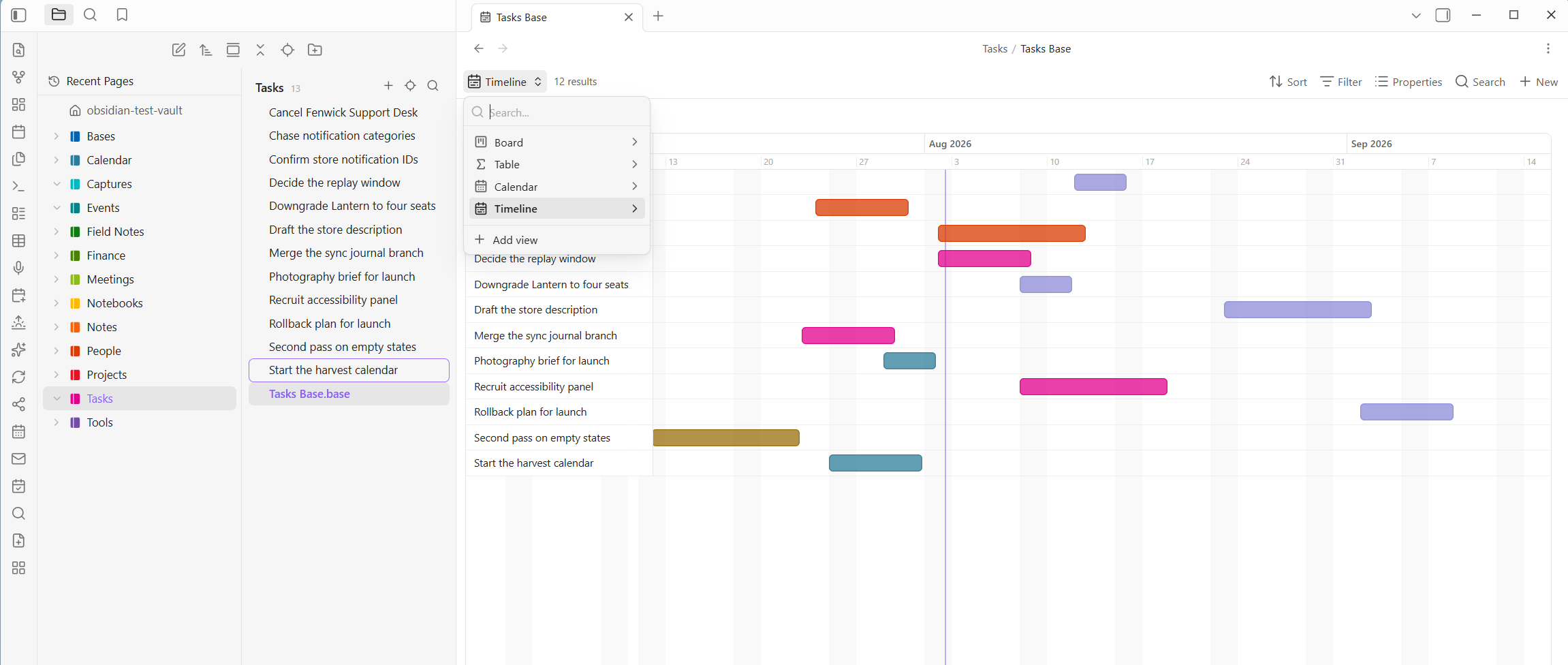
A Gantt-style timeline of twelve tasks, each drawn as a bar from its start to its end date and colored by status, with the view switcher open showing board, table, calendar and timeline

What you get over stock Bases

Core Bases ships Table, Cards, and List. Power Bases adds six more views and reworks the table, all riding the native engine, so stock and Power views live side by side in the same base.

Need Stock Bases Power Bases
Table Grid with columns and inline edits Ten extra field types, a Notion-style column menu, formulas with a live editor, number and date formats, bars, rings and stars, rollups, subtotals, and value colors
Kanban Cards in a static grid Drag between lanes to change a property, manual order, swimlanes, WIP limits, lane rules, and lane totals
Calendar Not available Month and week, drag to reschedule, double-click a day to create
Gantt Not available Drag to move or resize bars, dependencies with late warnings, milestones, progress fills
Charts Not available Bar, line, and donut over any grouping
Gallery Cards Covers from a property or the first image in the note, three sizes
Getting data in Type into cells CSV import that works out the column types, plus starter templates
Safety net Undo per note Every change is one undoable batch, with an Undo link on the toast

Requirements

Obsidian 1.10.2 or newer with the Bases core plugin turned on. Open any base, click the view switcher, and the six Power views appear next to the built-in ones.

Getting started fast

Right-click any folder and choose New Power base here. A ready-made database appears beside your notes with board, table, calendar, and timeline views already set up. Any folder of notes becomes a database in one click.

You can also Import CSV here to turn a spreadsheet into a base, or start from a template: Tasks Tracker, Project Roadmap, Feature Requests, or Contacts. Each lands as a folder of example notes with its column types already set, so you can see the shape and swap in your own rows.

From inside a note, Insert new base here drops a database into the page you are writing. Its rows live in a folder of their own, so they stay searchable without cluttering your file tree, exactly the way a Notion database hides its row pages.

Power Board

Pick a property to Group by and every value becomes a lane. Drag a card to another lane and the property is written into the note. Click a card to open it, right-click for the full menu, and use "+ New page" at the bottom of a lane to create a note already tagged for that lane.

  • Manual order: drops between cards stick, and the order is real data, so it syncs and can sort other views too.
  • Lane rules: properties written whenever a card enters a lane, so a Done lane can stamp today's date by itself.
  • WIP limits turn a lane's count red when it is overloaded, and lane totals put a running sum in the lane header.
  • Swimlanes: add a second property and the board becomes a grid. Dropping a card sets both values at once.
  • Bulk select: Alt+click to gather cards, then move them all in one go.
  • Touch: hold a card to lift it, then drag.

Calendar

Pick a Date property and your pages land on their day. Month mode is a familiar grid; week mode lays timed pages out over hour rows, which is the shape meeting notes want. Drag a chip to another day to reschedule it, and double-click any day to start a page already dated.

Power Timeline

Release planning without leaving your vault. Pick a start date property, optionally an end date, and every page becomes a bar on a day-scaled axis.

Drag a bar to move it, drag its edges to change its dates, and every change writes straight back to the note. Color bars by any property, group them into sections, mark milestones as diamonds, and fill each bar to show progress. Set a Depends-on property and it draws arrows between bars, turning both red when a predecessor finishes too late.

Pages with no start date wait in a strip at the top until you drag them onto the axis.

Power Chart

Pick something to group by and something to measure, and get a bar, line, or donut chart drawn as plain SVG with no library. Count by status, total estimates by project, pages per month. Embed it in any note and it stays live.

A light board for folders full of images. Each card shows a cover, taken from an image property or the first image in the note. Covers load as you scroll, so a thousand cards stay cheap. Three sizes, and up to three properties under each title.

Power Table

The Bases table with a great deal more, and it edits in place.

  • Type into any cell. The editor matches the property: number fields, a date field with a calendar button, checkboxes that toggle in place, and multi-select popovers with colored chips.
  • It works like a spreadsheet. Tab and the arrow keys move between cells, Ctrl+D fills down, and pasting a block copied from Excel fans out across rows and columns, creating rows as needed. Moving past the last cell creates a new row.
  • Column menu: rename, set the type, filter, sort, calculate a summary, freeze, wrap, insert, duplicate, hide, or delete. Renaming a column renames the property across every row, as one undoable change.
  • Reorder and resize columns by dragging the header or its edge. Both stick.
  • Manual row order: hover a row for its grip and drag.
  • Select rows and act in bulk: set a property across every selected row, duplicate, or delete, all as a single undoable change.
  • Summary row and group subtotals: sum, average, min, max, filled, or empty per column.
  • Column colors: a hue per distinct value, or a scale across a number column.
  • Rollups, Notion style: follow a link property and sum, average, or count a property on the notes it points at. It works in both directions, so a Projects base can total up the tasks that point at each project.
  • Number and date formats: currencies, decimals, percentages, and dates in the style you like. Numbers can show as a bar, a ring, stars, or a traffic light. It is display only, so the stored values stay exact.
  • Export as CSV writes exactly what you see, filters and formatting included.

Field types

Obsidian's own property types stop at text, number, date, checkbox, and list. Power Bases adds ten more, the way Notion has them, on top of ordinary frontmatter. Right-click a column header to pick one. It is remembered by property name, so once email is an Email it renders as one in every base.

  • URL, Email, Phone: click to open the site, the mail composer, or the dialer. A URL can show a friendly label instead of a long address.
  • Place opens in Google Maps and can show a short name instead of the full address. Typing an address suggests real ones, which is the plugin's only network feature and can be turned off.
  • Person shows names as colored chips.
  • ID hands out identifiers in order, so TASK-007 begets TASK-008.
  • Button runs an action on click: write properties to that row, open a link, or both.
  • Verification is a badge that flips to Expired on its own once a date passes.
  • Image and Files show the picture in the cell, or hold attachments that open on click. Both pick from your vault or upload from your computer.

Formula columns

Bases has a real formula engine. Power Bases adds the editor it is missing: an expression box, a live preview on a sample row, and a clickable function reference.

Reference properties with note["Property"], reuse another formula with formula.other, and use everyday functions like round, if, concat, and min. A yearly total is just (formula.mo_rent + formula.mo_dues) * 12.

What you save goes into the base's own file, so the column shows up in the built-in Table view too, and there is nothing to lose if you stop using Power Bases.

Undo, and who changed what

Every write the plugin makes lands as one undoable change, from a drag to a bulk edit. A toast appears with an Undo link, and the Undo last Power Bases change command walks back the last thirty, restoring the exact previous values.

For shared vaults, set your name in settings and turn on Stamp changes with your name. Changes made through a Power view then record who made them, in plain frontmatter. Off by default.

Built for big vaults

Cost scales with what is on screen, not with vault size. Big boards, tables, and galleries render a batch at a time and add more as you scroll, so a lane with thousands of pages opens instantly. Every view has a type-to-filter box.

Two operations are honest exceptions, because they touch real files: renaming or deleting a column rewrites one note per row, and reverse rollups sweep frontmatter once per repaint. Both only run when you use them.

Privacy and network use

Power Bases works entirely offline except for one opt-in feature. No telemetry, no analytics.

  • Address autocomplete (Place fields): as you type an address, that text is sent to OpenStreetMap to fetch matches. Nothing else about your vault is sent, and nothing at all is sent until you type in a Place editor. Turn it off and Place fields stay fully offline.

Everything else, including all views, formulas, colors, rollups, and CSV import, runs locally.

What the catalog's scan reports

The community catalog scans a plugin for what it is capable of, which is not the same as what it does with it. Power Bases reports one thing.

What the scan reports What it is Where
Vault enumeration Listing your notes, which is what a base is built from: gathering the notes a view covers, resolving links between them, and offering files in the pickers. Only paths and frontmatter a view already displays are read, and the list stays inside Obsidian. src/main.ts, the view builders and file pickers

Power Bases never touches your clipboard, starts no processes, and reads no files outside your vault. There is no eval, no Function constructor, no innerHTML, and no code fetched and run at runtime. Its one network call is the address autocomplete above, made through Obsidian's own requestUrl; there is no fetch in the built main.js at all.

More Power Plugins

Each one works on its own, and they fit together when you have more than one.

  • Power Assistant: record and summarize meetings, capture anything from a link, and ask your notes questions.
  • Power Connect: sync your vault through your own Dropbox, OneDrive, or Google Drive.
  • Power Desk: your calendars and your mail, inside your vault.
  • Power Editor: a formatting toolbar, drag-and-drop blocks, and WYSIWYG editing.
  • Power Explorer: arrange files by hand, and search a huge vault instantly.
  • Power Extract: reads the text inside images so you can search it.
  • Power Tables: colors, live formulas, and sorting for Markdown tables.

Build from source

npm install
npm run build     # type-check + bundle main.js
npm test          # pure-logic unit tests (Node)

Support

Power Bases is built and maintained by one person. If it earns a place in your daily vault, you can buy me a coffee. Nothing in the plugin is held back either way.

Buy me a coffee

Similar Plugins

info
• Similar plugins are suggested based on the common tags between the plugins.
Excel to Markdown Table
5 years ago by Ganessh Kumar R P
An Obsidian plugin to paste data from Microsoft Excel, Google Sheets, Apple Numbers and LibreOffice Calc as Markdown tables in Obsidian editor.
Big Calendar
4 years ago by Boninall
Big Calendar in Obsidian, for manage your events in a day/week/month and see agenda too!
Heatmap Calendar
4 years ago by Richard Slettevoll
An Obsidian plugin for displaying data in a calendar similar to the github activity calendar
AsciiDoc Blocks Plugin
4 years ago by Juracy Filho
A plugin to render asciidoc blocks in Obsidian, initially asciidoc tables
Release Timeline
4 years ago by cakechaser
Table to CSV Exporter
4 years ago by Stefan Wolfrum
An Obsidian Plugin that allows to export tables from a pane in reading mode to CSV files.
Agile Task Notes
4 years ago by BoxThatBeat
This Obsidian plugin integrates your TFS data from either Jira or Azure Devops
Google Calendar
4 years ago by YukiGasai
Add Google Calendar inside Obsidian
Table Generator
4 years ago by Boninall
A plugin for generate markdown table quickly like Typora.
Chronology
4 years ago by Gabriele Cannata
Habit Calendar
3 years ago by Hedonihilist
Monthly Habit Calendar for DataviewJS. This plugin helps you render a calendar inside DataviewJS code block, showing your habit status within a month.
Tasks Calendar Wrapper
3 years ago by zhuwenq
This plugin currently provides a timeline view to display your tasks from your obsidian valut, with customizable filters and renderring options.
OZ Calendar
3 years ago by Ozan Tellioglu
Obsidian plugin to display notes on a calendar based on YAML frontmatter or file names
Any Block
3 years ago by LincZero
You can flexibility to create a 'Block' by many means. It also provides many useful features, like `list to table`. (obsidian/markdown-it/vuepress plugin/app)
Time Ruler
3 years ago by Joshua Tazman Reinier
A drag-and-drop time ruler combining the best of a task list and a calendar view (integrates with Tasks, Full Calendar, and Dataview).
ICS
3 years ago by muness
Generate Daily Planner from one or more ical feeds
Sheets Extended
3 years ago by NicoNekoru
Plugin that adds features to tables in obsidian including merging, vertical headers, and custom css
Markdown table checkboxes
3 years ago by DylanGiesberts
Obsidian plugin. Allows for the usage of checkboxes inside markdown tables.
Lunar Calendar
3 years ago by OSmile
obsidian插件,一个支持农历的日历插件。
MagicCalendar
3 years ago by Vaccarini Lorenzo
An obsidian plugin that exploit a natural language processing engine to find potential events and sync them with iCalendar
Timeline View
3 years ago by b.camphart
Obsidian plugin for viewing your notes linearly based on a given property
JSON table
3 years ago by Dario Baumberger
Simply switch between JSON and tables in your Obsidian notes.
iCal
3 years ago by Andrew Brereton
This is a plugin for Obsidian that searches your vault for tasks that contain dates, and generates a calendar in iCal format that can be imported into your preferred calendar application.
Timeline Schedule
3 years ago by Evan Bonsignori
Inline timelines generated from human-readable time strings, e.g. 'Walk dog (30min)' in a ```schedule codeblock.
Single File Daily Notes
3 years ago by Pranav Mangal
An Obsidian plugin to create and manage daily notes in a single file
Markline
3 years ago by 闲耘
Markline: Markdown timeline view in Obsidian.
Journals
2 years ago by Sergii Kostyrko
MemoryLane
2 years ago by BangCa
Relive and celebrate your life's milestones on a personal, interactive timeline. A nostalgic journey through your history with anniversary reminders and cherished memories.
Enhanced tables
2 years ago by pistacchio
A plugin for Obsidian to add advanced controls (like sorting and filtering) to standard markup tables
Date Inserter
2 years ago by namikaze-40p
An Obsidian plugin that lets you insert a date at the cursor position using a calendar.
Calendarium
2 years ago by Jeremy Valentine
The ultimate Obsidian plugin for crafting mind-bending fantasy and sci-fi calendars
Dust Calendar
2 years ago by 纳米级尘埃
obsidian 日历插件
Calendar Event Sync
2 years ago by Stephen Dolan
Set the title of your note to the current event
Focus Tracker
2 years ago by Jeet Sukumaran
Task List Kanban
2 years ago by Chris Kerr
Datepicker
2 years ago by Mostafa Mohamed
Datepicker widget for Obsidian.
Account Viewer
2 years ago by Muaz Yediyüzkırkiki
Obsidian Plugin that automatically generate accounting tables from Markdown code blocks tagged with "accounting" alias.
Chinese Calendar
2 years ago by DevilRoshan
在obsidian中使用的更符合中国习惯的日历插件。
Daily Statistics
2 years ago by yefengr
obsidian daily statistics
Diarian
2 years ago by Erika Gozar
All-in-one journaling toolkit.
Morgen Tasks
2 years ago by Morgen AG
Advanced Tables
6 years ago by Tony Grosinger
Improved table navigation, formatting, and manipulation in Obsidian.md
Calendar
6 years ago by Liam Cain
Simple calendar widget for Obsidian.
Table of Contents
5 years ago by hipstersmoothie
Create a tables of contents for a note.
Open cards in imdone.
5 years ago by saxmanjes
Open cards in imdone from obsidian
Table Extended
5 years ago by AidenLx
Extend basic table in Obsidian with MultiMarkdown table syntax
Kanban
5 years ago by mgmeyers
Create markdown-backed Kanban boards in Obsidian.
CSV Table
5 years ago by Adam Coddington
Have a CSV file you want to render some or all of the data from? This plugin allows you to display that data in your obsidian preview.
Timeline
5 years ago by George Butco
Obisdian.md plugin for creating timelines
Trello
5 years ago by Nathonius
An Obsidian Plugin that connects Trello cards to Obsidian notes.
Jump-to-Date
5 years ago by TfTHacker
Jump to a date via a convenient popup form. This plugin is a part of the Obsidian42 family of Obsidian plugins.
Itinerary
5 years ago by Adam Coddington
Make planning your trip or event easier by rendering a calendar from event information found in your notes.
CardBoard
5 years ago by roovo
An Obsidian plugin to make working with tasks a pleasure (hopefully anyway).
Daily notes calendar
2 years ago by bartkessels
Quickly navigate your vault using a calendar view, this plugin allows you to create and navigate to periodic notes and notes that are created on a specific date.
Markdown Timeline
2 years ago by Jiaheng Zhang
An Obsidian plugin to record the events in a Flashback timeline
Auto Tasks
2 years ago by Jamie Hurst
Obsidian plugin to combine periodic notes with tags and tasks to automatically manage your daily, weekly and project TODO lists. Requires the "Periodic Notes" and "Tasks" plugins.
Chronos Timeline
2 years ago by Claire Froelich
Render interactive timelines in your Obsidian notes from simple Markdown.
Heatmap Tracker
2 years ago by Maksim Rubanau
A customizable heatmap tracker plugin for Obsidian to visualize daily data trends with intuitive navigation and flexible settings.
Easy Timeline
2 years ago by Romeliun
The Easy Timeline plugin for Obsidian allows you to create timelines easily.
Recent Notes
2 years ago by Kamil Rudnicki
Recent Notes Plugin for Obsidian
Every Day Calendar
a year ago by QuBe
Obsidian plugin to create calendars inspired by Simone Giertz's Every Day Calendar
Task Board
a year ago by Atmanand Gauns
An Obsidian plugin to view and manage your tasks from whole vault using much efficient boards using various methodologies.
HTML checkboxes
a year ago by Anareaty
Daily Routine
a year ago by sechan100
new version of daily-routine obsidian plugin
Content Cards
a year ago by leo
Insert content cards in Markdown, such as timeline, highlightblock, target card, book information card, music information card, movie information card, photoes ablum, business card, content subfield, countdown, SWOT,BCG.
CSV All-in-One
a year ago by hihangeol
Outlook Meeting Notes
a year ago by David Ingerslev
An Obsidian plugin to create meeting notes from Microsoft Outlook .msg files
Kanban Status Updater
a year ago by Ankit Kapur
Obsidian plugin that automatically updates the note property when card is moved to a column.
Generate Timeline
a year ago by Shanshuimei
An obsidian plugin to generate timelines from tags, folders, files or metadata automatically. 根据标签,文件夹,文件或者属性自动生成时间轴的插件。
MemoChron
a year ago by Michalis Efstratiadis
Calendar integration and note creation with support for public iCalendar URLs.
Vertical Timeline List
a year ago by Jalad
Utilizes task lists to create a timeline... or something like a timeline.
Inboxer
a year ago by Eoin Hurrell
Obsidian plugin to add an inbox to notes
Markwhen File Sync
a year ago by rouvenjahnke
Synchronize properties from your Obsidian notes with a Markwhen timeline file.
Timelive
a year ago by aNNiMON
Turn a list of dates into a timeline
Markdown Calendar Generator
a year ago by Zach Russell
An intentionally simple obsidian markdown table calendar generator
Timeline Canvas Creator
a year ago by chris-codes1
Quickly create timeline structured canvases in Obsidian.
Storyteller Suite
a year ago by Maws
Sortable Tables
a year ago by filippov112
A plugin for Obsidian that adds the ability to interactively sort Markdown tables in preview mode.
Maps
10 months ago by Obsidian
Map layout for Obsidian Bases. Display your notes as an interactive map view.
List to table converter
9 months ago by paddomanno
Life in Weeks Calendar
9 months ago by Jeff Szuc
Plugin for the Obsidian markdown editor. Displays a calendar of your life in weeks with weekly Periodic Notes plugin integration. Includes options for the traditional Memento Mori/Stoic style calendar, as well as a Gregorian calendar accurate version.
Table Checkbox Renderer
8 months ago by Daniel Aguerrevere
Interactive checkboxes for Markdown tables in Obsidian. Toggle checkboxes in Reading Mode and instantly update your Markdown file. Supports multiple checkboxes per cell and any table layout.
Workout Planner
7 months ago by Rares Spatariu
Table Line Break Mobile
6 months ago by marcelflymark
Obsidian plugin: Insert a new line break inside a table cell using the <br> HTML element
Kanban Bases View
5 months ago by I. Welch Canavan
A kanban-style drag-and-drop custom view for Bases.
Calendar Bases
5 months ago by Edrick Leong
Adds a calendar layout to bases so you can display notes with dates in an interactive calendar view.
Synaptic View
5 months ago by Yongmini
A dynamic control center for your vault. Unify hubs, notes, tasks, periodic notes, and web resources with intuitive buttons. Replace new tab for instant access.
Yori Task
3 months ago by yorigo77
This plugin has not been manually reviewed by Obsidian staff. Task manager, week planner, year planner.
TaskNotes
a month ago by callumalpass
Note-based task management with calendar, pomodoro and time-tracking integration.
ReverySky Map
20 days ago by MoonSkorch Studio
Navigate your vault through an interactive 3D graph built with a game engine and shaped into an explorable universe. - This plugin has not been manually reviewed by Obsidian staff.
Sheet Plus
19 days ago by ljcoder
Create Excel-like spreadsheets and easily embed them in Markdown.
Budget Planner
15 days ago by kalinichenko88
A minimalist budget planning tool. Create, track, and manage budgets using markdown code blocks directly in your notes. - This plugin has not been manually reviewed by Obsidian staff.
Notebook Navigator
11 days ago by Johan Sanneblad
A better file browser and calendar inspired by Apple Notes, Bear, Evernote and Day One.
Day Planner
10 days ago by ivan-lednev
Day planning from a task list in a Markdown note with enhanced time block functionality.
Power Tables
5 days ago by Power Plugins
Color, calculate, and sort Markdown tables in place: cell fills and text colors, live formulas that recalculate, and column sorting, all stored as plain Markdown. - This plugin has not been manually reviewed by Obsidian staff.
Power Editor
5 days ago by Power Plugins
Format any note from a toolbar, selection bubble, or slash menu: WYSIWYG editing, block drag handles, image resizing, dictation, and AI edits, all staying plain Markdown. - This plugin has not been manually reviewed by Obsidian staff.
Journal View
4 days ago by RUverse
Turn your daily notes into one continuous, editable journal—scroll through time, jump to any date, and write without leaving the view. - This plugin has not been manually reviewed by Obsidian staff.