
README file from
GithubMasonry
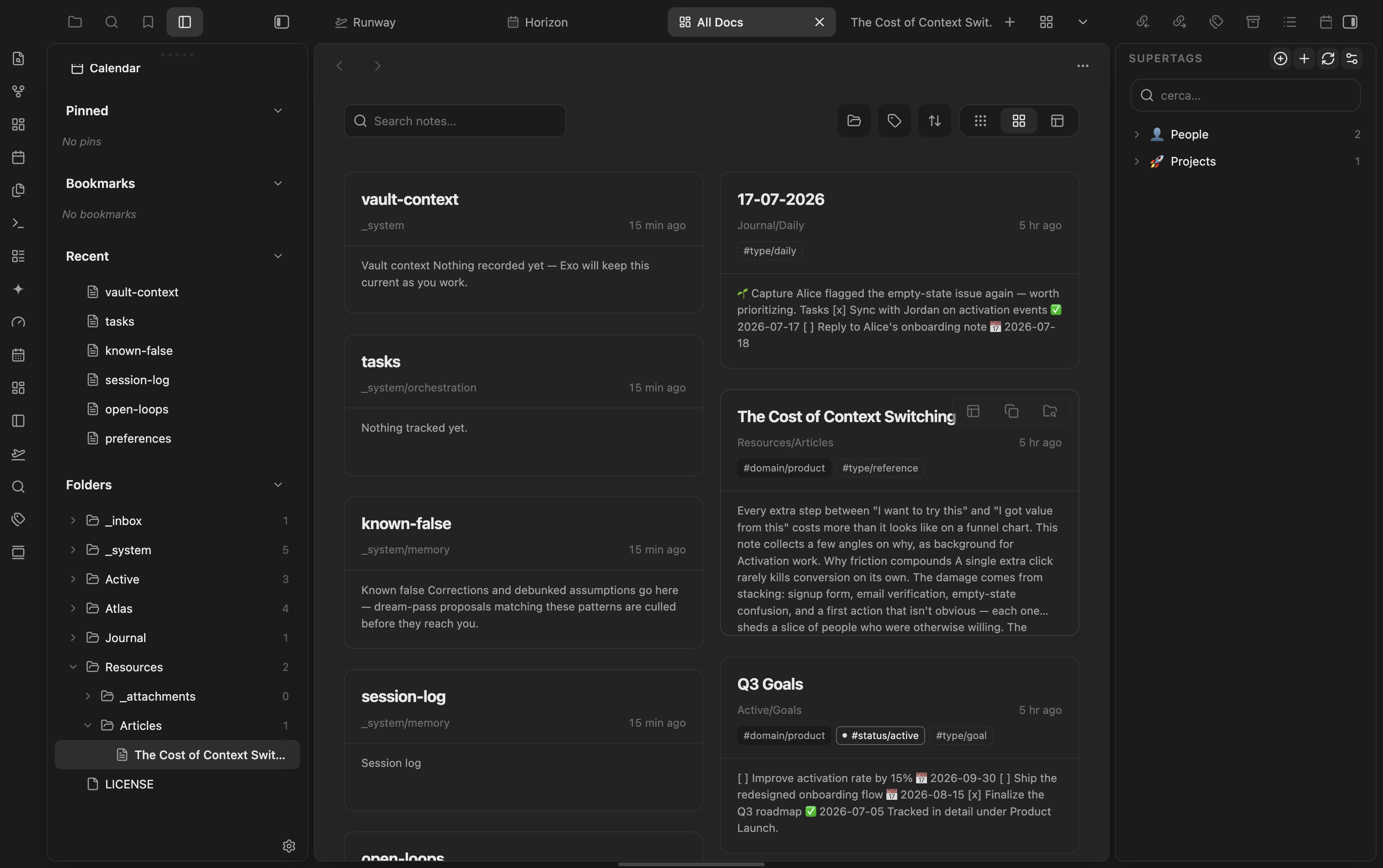
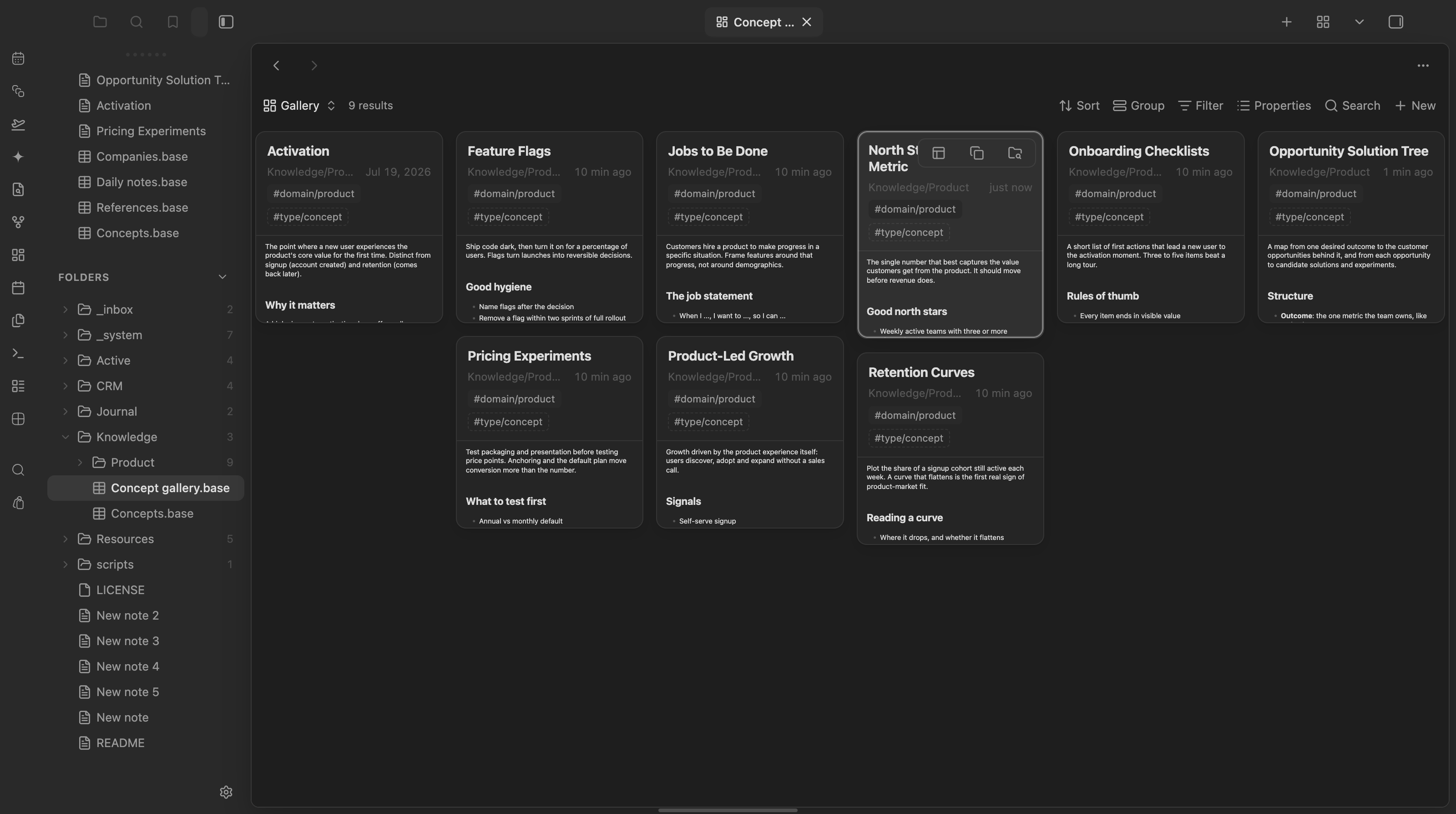
Masonry is a visual browser for Obsidian notes. It adds three native surfaces while keeping Markdown files and Bases as the source of truth:
- All Docs: a workspace tab for browsing the complete vault as a responsive document wall.
- Masonry for Bases: a custom Base view that renders filtered, sorted, and grouped results without replacing the native Base toolbar.
- Open tabs: your open tabs as a vertical rail in the sidebar and as a Masonry gallery of cards, plus tab bar options (auto-hide, horizontal scrolling). This used to be the separate TabX plugin.
Selecting a card opens the note in Obsidian's editor. Modifier-click and middle-click open it in a new tab.
Part of the marioverse Obsidian plugin suite.
Screenshots
| Masonry | Masonry for Bases |
|---|---|
 |
 |
Features
- Three layouts: Masonry (cards with a rendered preview of the note), List (one row per note: title, folder, tags, date) and Table (one column per Base property, plus folder, tags and modified date).
- Search, folder (including subfolders) and tag filters, six sort orders (persisted across sessions), lazy previews, and progressive loading in All Docs.
- Compact icon-button filters and sort open a themed, searchable picker (same style as the Quick Switcher) instead of the OS-native dropdown.
- Exclude folders (e.g. archives, templates) from All Docs via Settings → Masonry → Excluded folders.
- Native Base filtering, sorting, grouping, and configurable view properties.
- Local cover images from
cover,image, orthumbnailfrontmatter and image embeds. - Card actions for opening a new tab, copying a wikilink, and revealing the note in the file explorer.
- Native Obsidian hover previews and keyboard navigation.
Open tabs (formerly TabX)
- Tab rail: every open tab as a list in the left sidebar. Click to jump, middle-click or the x to close, hover for a page preview.
- Tab grid: the open tabs as a Masonry gallery, with the same cards and rendered previews as All Docs. Search and five sort orders (including tab order). Tabs without a note (plugin views, web viewers, PDFs) get a poster with their icon. Closing a tab keeps every other card and its preview in place.
- Tab bar: optional auto-hide (the bar collapses to a thin strip and slides in on hover), horizontal scrolling instead of shrinking tabs, a tab grid button next to the native "+", and a "+" in the right sidebar that adds any sidebar pane (browser, terminal, and more).
- Configure all of it under Settings → Masonry → Open tabs.
Migrating from TabX
TabX has been merged into Masonry and its repository is archived. To move over:
- Update Masonry to 1.4.0 or newer.
- Disable (and then remove) the TabX plugin. Keep only one of the two enabled: both register the same views.
- Reload Masonry. On its first load it imports your TabX settings once from
.obsidian/plugins/tabx/data.json.
What carries over unchanged: the view types tabx-rail and tabx-grid (saved workspace layouts reopen them), the hover preview source, and the tabx-* CSS classes and body classes (tabx-autohide-tabs, tabx-scroll-tabs) that themes and snippets may target.
What changes: commands now live under Masonry, so hotkeys bound to the old TabX commands need to be set again.
| TabX command | Masonry command |
|---|---|
tabx:open-rail |
masonry:open-tab-rail (Open tab rail) |
tabx:open-grid |
masonry:open-tab-grid (Open tab grid) |
tabx:toggle-autohide |
masonry:toggle-tab-bar-autohide (Toggle tab bar auto-hide) |
Installation
BRAT
- Install and enable the BRAT plugin.
- In Settings → BRAT, choose Add beta plugin.
- Enter
mariomile/obsidian-masonryand enable Masonry.
Manual
- Download
main.js,manifest.json, andstyles.cssfrom the latest GitHub release. - Create
<vault>/.obsidian/plugins/masonry/. - Copy the three files into that directory.
- Reload Obsidian and enable Masonry under Community plugins.
Masonry requires Obsidian 1.12.7 or newer.
Covers and remote images
Masonry resolves the first available cover in this order:
coverfrontmatter propertyimagefrontmatter propertythumbnailfrontmatter property- first local image embed
- first external Markdown image
Frontmatter may contain a vault path, wikilink, Markdown image, or HTTP(S) URL. Local images work by default. Remote HTTP(S) images are disabled by default because loading them contacts the external host and can expose your IP address and request metadata. Enable Settings → Masonry → Load remote images only if you accept that behavior. Changing the setting clears cached previews and refreshes open Masonry views.
Privacy
Masonry works locally in your vault. It does not require an account, collect telemetry, upload notes, or send note content to a Masonry service. The plugin makes no network requests unless you explicitly enable remote images; those image requests go directly to the hosts referenced by your notes.
Configuration
Global defaults are available under Settings → Community plugins → Masonry. Each Masonry Base view can configure its layout, preview length, folder visibility, and tag visibility through native Base view properties.
Mobile
Verified — isDesktopOnly: false in manifest.json; styles.css ships a pointer: coarse media query extending small control hit areas to 44pt Apple HIG.
Development
pnpm install
pnpm lint
pnpm typecheck
pnpm test
pnpm build
To test a local build in Obsidian:
obsidian plugin:reload id=masonry
Manual validation should cover All Docs persistence, native Base chrome, all three layouts (masonry, list, table) in All Docs and in a Base, keyboard opening, card actions, narrow-container layout, remote-image opt-in, the complete hover ring on a first-row card, and for open tabs: rail and grid reopening from a saved layout, closing a tab from the grid without the other cards reflashing, and the tab bar options.
Try it
See it running in the Obsidianverse sample vault, a small, fictional vault with the whole plugin suite pre-configured.