Magical Cards

by FF Barry
5
4
3
2
1
Score: 50/100

Description

The Magical Cards plugin presents books, films and image collections as browsable cards backed by Markdown notes. Cards support editable covers and details, linked notes, manual ordering and summaries on their reverse side. Collections can appear in multiple dashboard categories or be embedded in notes in reading mode and live preview. Five animated layouts come with adjustable proportions, cover cropping and materials. Image showcases store their collection in one shared note and support batch imports with optional names and descriptions. Individual module dashboards provide statistics, search, filters and temporary sorting without changing the saved order. Optional WeRead imports bring selected ebooks and audiobooks into book modules using an API key, skipping existing source entries within that module. Desktop and mobile interfaces are supported, although physical device testing remains unverified on the listed platforms. The interface is currently Chinese.

Reviews

No reviews yet.

Stats

1
stars
300
downloads
0
forks
7
days
1
days
1
days
0
total PRs
0
open PRs
0
closed PRs
0
merged PRs
0
total issues
0
open issues
0
closed issues
55
commits

Latest Version

2 days ago

Changelog

修复删除模块时确认框背景透明、提示文字与设置页面重叠的问题。

  • 确认框独立适配明暗主题,避免其他插件旧版同名样式的覆盖。
  • 窄面板中的长文本与按钮自动换行,内容过长时可滚动。
  • 取消或按 Esc 只关闭确认框并恢复删除入口焦点;关闭设置时正确释放原生弹窗与按键作用域。

Fix module deletion confirmations overlapping Settings. The dialog now has its own theme-aware surface, supports narrow panels, and restores focus when cancelled. Escape dismisses the confirmation without closing Settings.

已完成 Obsidian 1.14.4 独立设置窗口的明暗主题、取消及 Esc 原生验收;343px / 390px 浏览器视口检查通过。383 项自动化测试、类型检查、lint、资源检查、可复现构建与 5 MB 包体检查通过。

工程源码继续在私有仓库维护,使用许可见 LICENSE。社区用户可在 Obsidian 检查更新;手动安装只需下载下面三个附件。GitHub 自动提供的源码压缩包仅包含公开分发资料。

文件 SHA-256
main.js d06c0bb98113ddbb7e7dd9784473ee54f8c8c72f4c64f039d85b0e1adf347955
manifest.json 2654baf51730262f340a9d4c36ef190faa5b4c3ba6b27d306cb6f879c912f384
styles.css bdb3bbccfc42d764c9e89a8134b866d5c5d0ee15c2f2f8aaf0189909a906f197

README file from

Github

Magical Cards

English guide · 更新日志

已上传Obsidian社区,我会不定时维护和更新,欢迎体验插件,希望你喜欢~ https://community.obsidian.md/plugins/magical-cards

Magical Cards 是桌面和手机上的 Obsidian 卡片插件,用于浏览、编辑和嵌入书籍、影视与图片橱窗。作品保存在自己的 Markdown 笔记中,六张可编辑示例封面随插件提供,断网也能开始使用。插件界面目前为中文。

从 0.9.0 起,完整源码在私有仓库维护;本公开仓库继续提供安装更新、使用文档及 Issues。个人与企业可免费正常使用,许可与再分发限制见使用许可。

目录

开始使用

需要 Obsidian 1.11.4 或更新版本。在「设置 → 第三方插件 → 浏览」搜索 Magical Cards,安装并启用。手动安装时,从最新 Release 下载 main.js、manifest.json、styles.css,将三个文件放入 <笔记库>/.obsidian/plugins/magical-cards/,重新加载 Obsidian 后启用插件。

首次在空目录启用,插件会在 卡片库 中创建说明页、3 本书与 3 部影视,并自动打开说明页。六张封面随插件打包,断网也能查看;示例作品可以编辑或删除。

起步外观为 圆柱弧面、整幅封面、填满裁切、纸感、2:3、同屏最多三张卡片。滑动或使用方向键,仍可浏览全部六张作品。

  1. 打开卡片:点击侧栏卡片图标,或执行「Magical Cards: 打开卡片视图」。
  2. 添加作品:点击模块右上角的 +,填写标题、封面及作品信息。
  3. 记录感想:翻到卡片背面编辑摘要,或打开关联的作品笔记。

再次查看说明,执行「查看示例及用法说明」。初始化中途失败也可通过此命令重试。已有卡片库不会重复导入示例,也不会修改原外观;删除示例后重启不会补回。

功能

功能 操作
浏览与搜索 滑动、滚轮或方向键切换卡片;点击放大镜搜索作品。
管理作品 添加、编辑封面和信息、关联笔记、删除作品、调整排序。
翻面摘要 翻到背面记录感想;布局切换保留当前卡和摘要草稿。
图片橱窗 每个模块共用一篇笔记,批量导入图片、可选名称及翻面描述。
Dashboard 分类 在顶部切换同等分类、拖动分类标签;在设置选择已有模块,各分类独立排序。
微信读书书目导入 在设置保存 API Key,读取书架并勾选要导入到书籍模块的书目。
模组作品 Dashboard 点击模块菜单中搜索左侧的传送图标,查看该模块的统计、最近更新、搜索、筛选、临时排序与封面墙。
模块排序 拖动标题前的手柄;键盘聚焦手柄后按 Alt / Option + ↑ / ↓。
笔记嵌入 阅读模式和实时预览均可展示集合,同一集合可以重复引用。

Dashboard 分类

Dashboard 用来分类卡片模块,每个分类同等,可以放入任意数量的模块。同一模块可主动加入多个分类,笔记和图片仍共用一份。标签页没有固定“全部”页;未分类模块保留在设置中,仍可嵌入笔记。

打开标签页的横向操作菜单,可以新建、重命名或删除 Dashboard。删除分类只删除分类引用,保留模块和资料。拖动顶部标签,或聚焦后按 Alt / Option + ←、→,可以调整分类顺序;每个 Dashboard 内的模块顺序独立保存。

模块归属统一在插件设置中管理:

  • 放入 Dashboard:展开模块,选择已有分类,也可新建分类并随模块一起保存。新建模块不选择分类时,先留在设置中。
  • 移出 Dashboard:所属分类右侧的退出箭头只移出该分类,其他分类和笔记嵌入继续显示。
  • 删除模块:展开标题右侧的垃圾桶删除模块配置、全部分类引用及模块位置。作品笔记、橱窗笔记、图片和作品 ID 保留;原嵌入会提示模块已删除,没有模块恢复入口。
  • 删除当前卡片/图片:在模块横向菜单中操作,仅针对当前单张卡片。删除前确认窗口会明确显示名称。

新用户首次安装会得到可改名、可删除的普通“示例” Dashboard,包含阅读和影视。

模组作品 Dashboard

点击模块菜单中搜索左侧的传送图标,展开该模块的全部作品。在 Magical Cards 分类页内打开时,使用当前标签页;从笔记嵌入打开时,复用同一窗口已有的 Magical Cards 标签页,没有时新建。页面顶部只有「返回」与模组名称,搜索、筛选、临时排序和封面比例继续沿用原有行为;临时排序不改写模块保存的顺序。

点击「返回」恢复来源页面的滚动位置与传送入口焦点。来源已经关闭,或重启后恢复作品页时,返回 Magical Cards 分类页。自定义卡片优先打开关联笔记,图片橱窗打开模块笔记;书籍、影视和橱窗的既有字段与封面行为保留。

插件设置中的「启用模组作品 Dashboard」默认开启,只保存在本机插件配置中。关闭后各处传送入口立即隐藏,已经打开的作品页显示关闭提示,仍可返回。已有安装升级后首次加载会打开 Magical Cards 设置并显示本版本更新说明;关闭或点击「知道了」后记为当前版本已读。全新安装继续显示原有示例引导。本次无需迁移作品数据,也不改变 Dashboard 分类配置。

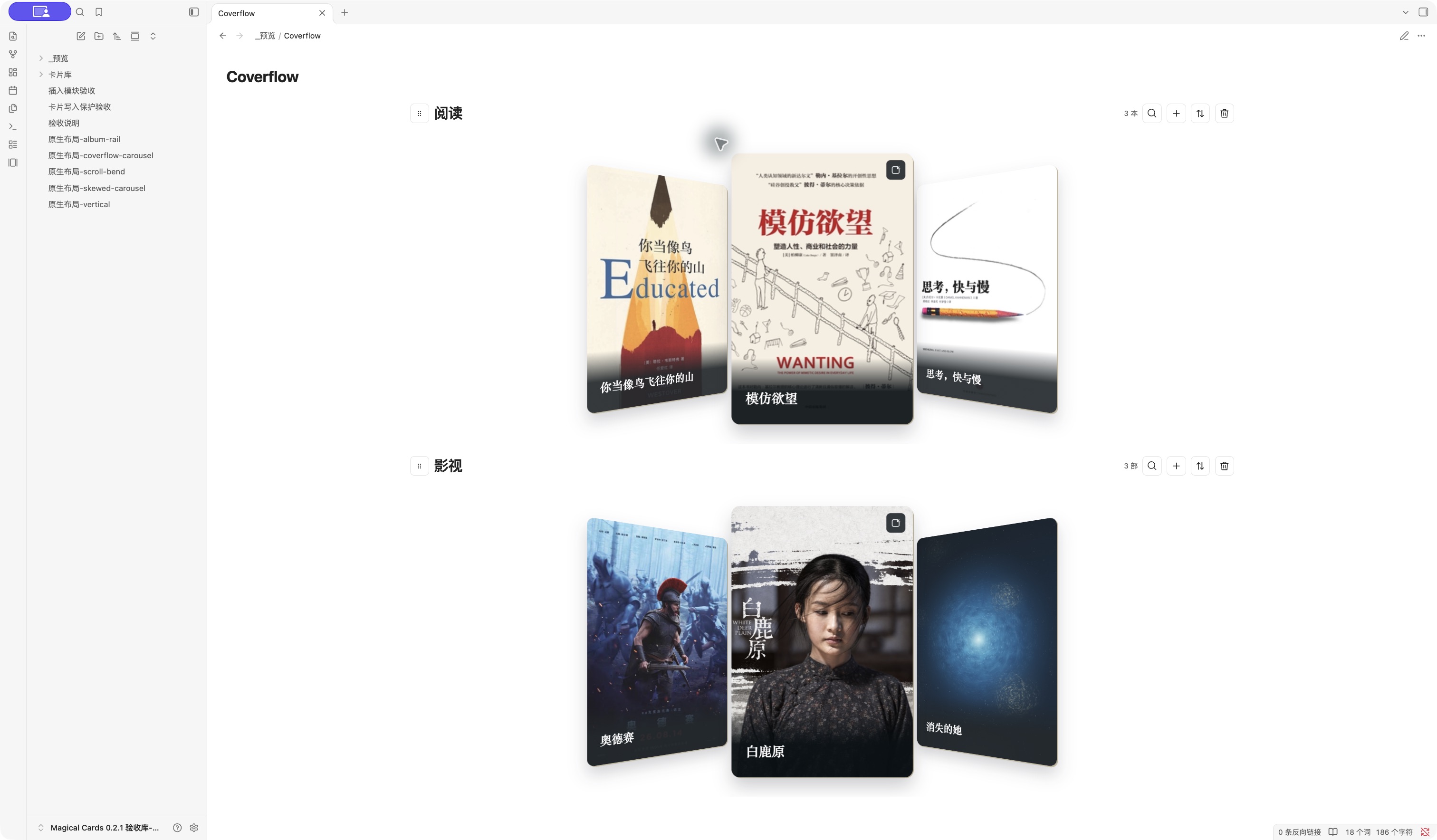
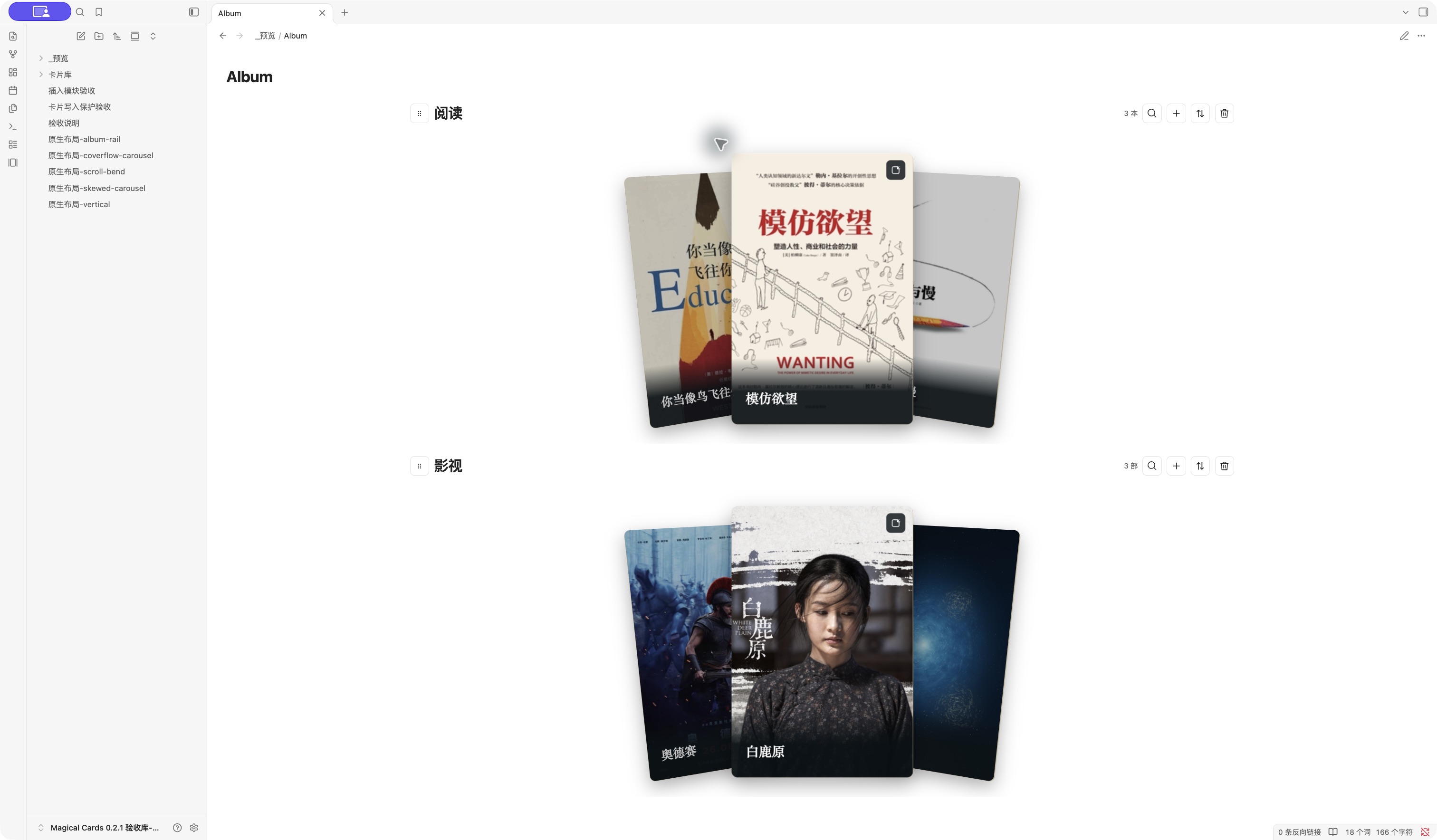
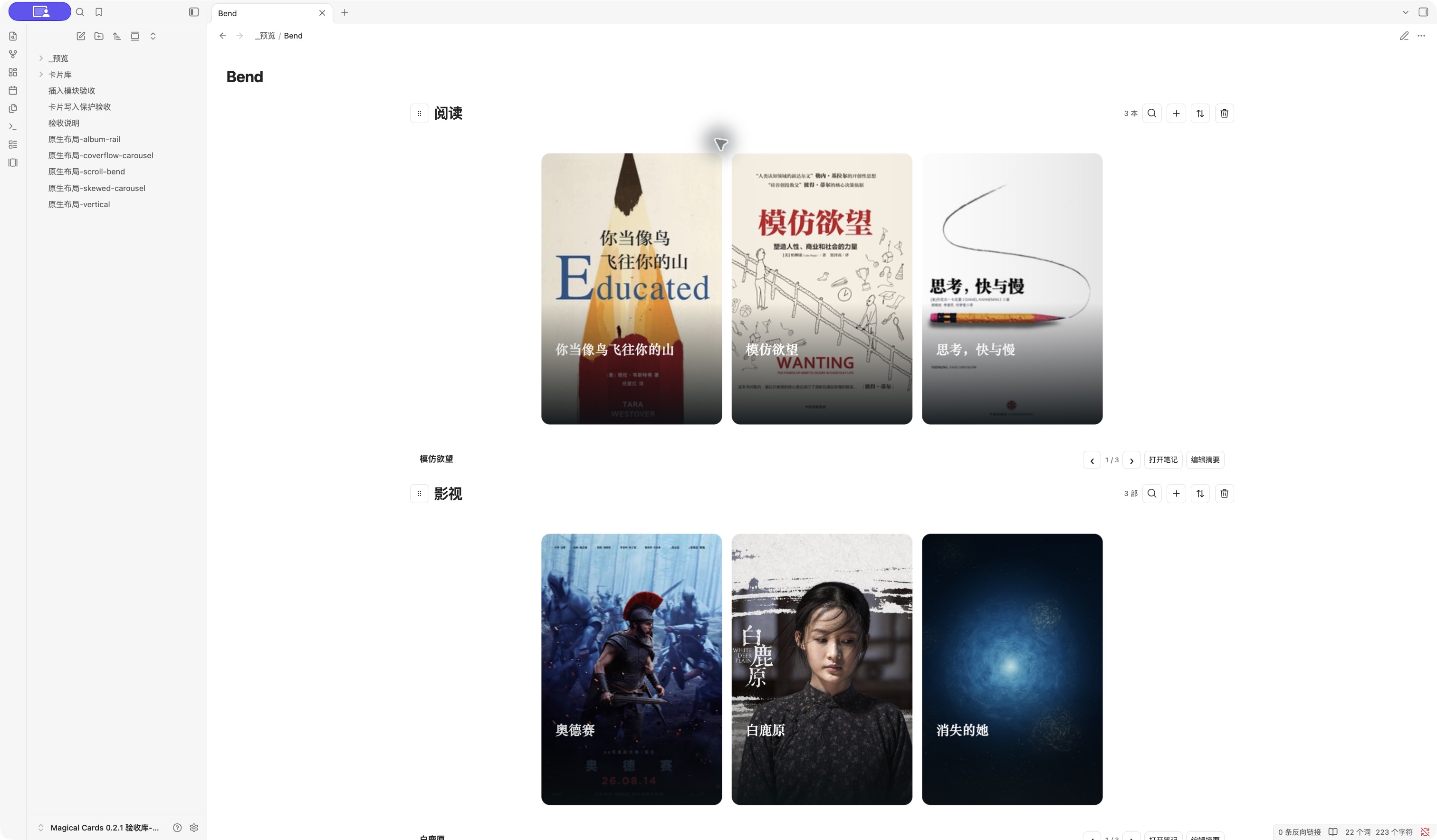
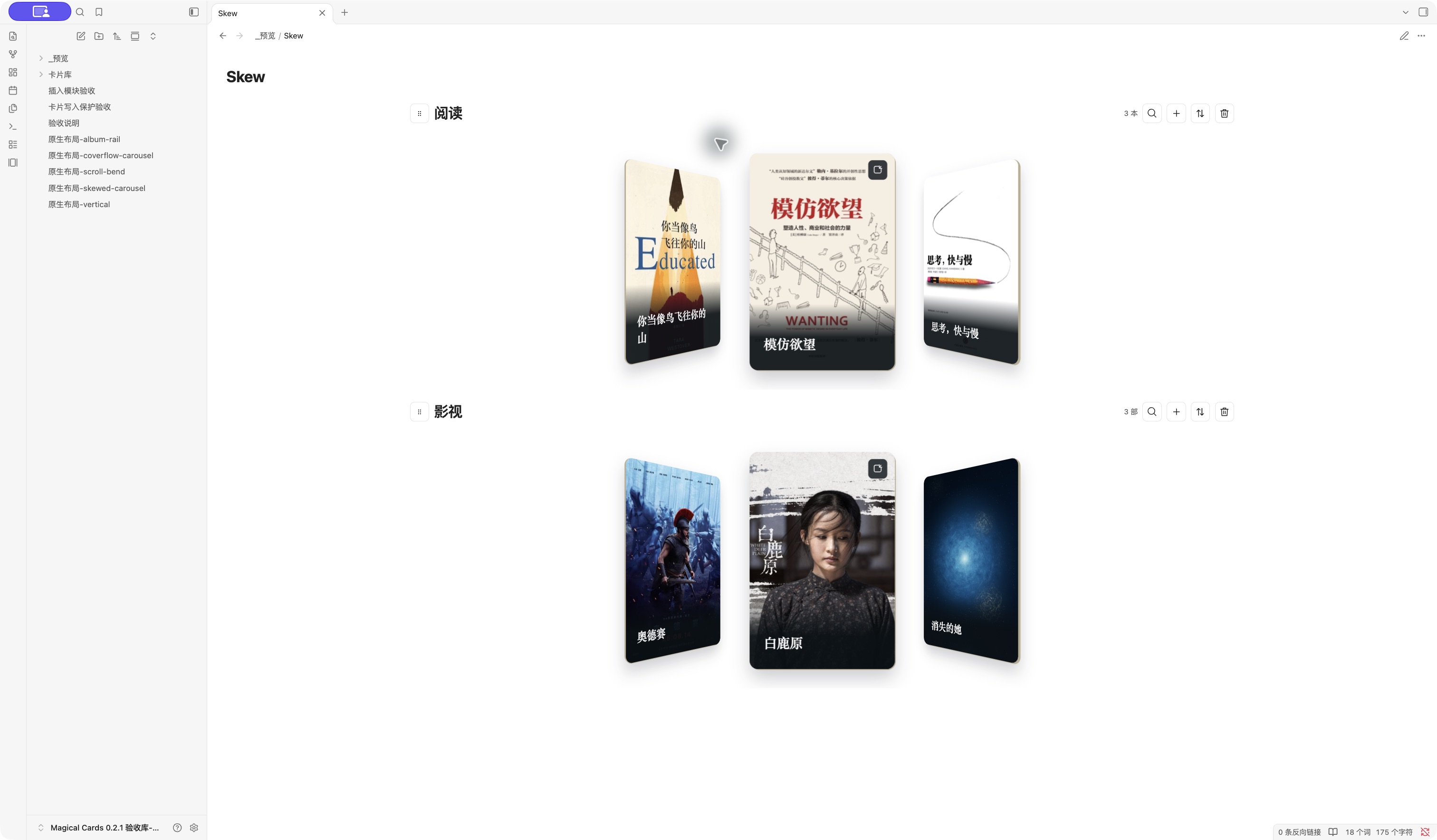
五种动效布局

封面流轮播 黑胶专辑架
原生笔记中的封面流轮播 原生笔记中的黑胶专辑架,仅展示封套
横向滚动弯曲画廊 倾斜轮播
原生笔记中的横向滚动弯曲画廊 原生笔记中的倾斜轮播

微信读书书目导入

在「设置 → Magical Cards」展开默认收起的「微信读书」:

  1. 打开获取 API Key,按微信读书指引获取密钥。粘贴后点击「保存授权」;成功后输入框清空,不会回显密钥。
  2. 点击「读取书架」,按书名或作者搜索并勾选书目。电子书与有声书均可导入,默认不勾选任何书目。
  3. 选择目标书籍模块,点击「导入所选」。未选择时使用内置阅读模块,并显示它当前的名称。若该模块已删除,需要选择有效目标;不会自动恢复模块。

目标只提供内置阅读与普通书籍模块。新建普通模块时可选择「作品类型:影视/书籍」,默认影视;已有模块不支持类型转换。同一模块已有的相同来源书目会跳过,保留所有手工内容;同一本书可在不同模块保留独立笔记。手工添加且没有来源标识的同名作品不会自动匹配。

失败书目保留勾选,可直接重试;成功或已存在的书目取消勾选。导入时不能修改授权、目标或卡片目录,关闭设置后已开始的导入会继续,插件停用或目标删除时停止后续写入。选择、目标和书架列表只保留在当前设置会话中。

密钥仅存于 Obsidian SecretStorage 独立槽位,不写入插件配置、卡片配置或作品笔记。仅在点击「读取书架」时向微信读书官方接口请求当前书架,不自动同步,不请求划线、想法、阅读时长或逐书详情,不创建文章收藏入口卡片。源中缺失的摘要、个人评分及其他资料保持为空。有声书的「已完结」不会被当作你的「已读」。

外观与设置

设置依次为:启用模组作品 Dashboard → 卡片目录 → 微信读书 → 示例 → 添加卡片模块 → 添加图片橱窗 → 已有模块 → 笔记代码块生成。

按用途展开“添加卡片模块”或“添加图片橱窗”,填写模块名称、选择作品类型(普通模块)和比例,可选一个或多个 Dashboard,也可新建分类并放入,然后点击保存并收起。不选择分类也能保存。两个入口的类型固定、草稿独立;高级样式仅选择整幅封面或简约,不转换存储类型。保存后点击左侧紫色叠卡图标,在 Magical Cards 标签页体验。设置中的预览仅能浏览和滑动,不会翻面或打开描述编辑。

“高级设置”依次包含:卡片样式 → 显示方式 → 卡片材质 → 动效布局 → 仅显示三张卡片。弯曲画廊才显示方向。新模块预设为 整幅封面、填满裁切、纸感、2:3、倾斜轮播、关闭仅三张;阅读/影视示例和已有模块保留原外观。三卡选项分别作用于各模块,仍可浏览全部图片。

普通卡片批量导入与资料

阅读、影视和自定义普通模块的菜单提供 批量导入图片/SVG。一次选择多张,每张生成独立卡片与作品笔记,名称取文件名,摘要留空。支持 PNG、JPEG、WebP、GIF 和安全 SVG;每图最多 10 MB,SVG 最多 2 MB。

部分失败时,仅重试未完成图片,成功卡片不会重复创建,也不会覆盖后来编辑的名称、摘要或封面。切换分类和删除模块前需完成导入或明确放弃重试;放弃保留已写入的笔记和图片。文件重试队列仅在当前共享卡片库保持打开期间存在,完整退出后重新选图属于新导入。

作品笔记默认只展开 名称、摘要,其他属性在 更多信息。观看日期、观看状态不再提供控件,旧值保留。每张影视类型卡片都能单独修改“导演”字段名称,例如“开发商”;空标签恢复为“导演”。

比例新增 32:15 宽幅横图,适合约 2.13:1 的横幅;2:3 竖向封面适用于竖版图片。选择“完整显示”保留全部图像,“填满裁切”贴满卡片并可能裁切边缘。

图片橱窗

橱窗适合只展示图片的收藏。在设置中展开独立的添加图片橱窗,填写名称、选择比例并保存。此入口始终创建橱窗,已有作品模块不转换为橱窗。保存失败时保留草稿与已经创建的橱窗笔记,重试不会重复建笔记。

  • 点击橱窗的添加图片按钮批量选择图片,也可拖入图片。不会自动扫描文件夹;支持 PNG、JPEG、WebP、GIF 和安全 SVG,每张最大 10 MB,SVG 最大 2 MB。
  • 每个橱窗独用一个文件夹与一篇 橱窗.md,导入图片复制到该文件夹。打开笔记即可看到全部图片、可选名称与描述。图片名称可以留空。
  • 高级设置可关闭翻面,或把名称放在正面、背面、不显示。默认开启翻面、名称放在背面,正面聚焦图片。正面名称模式的背面仅显示描述;不显示名称会保留已填写文字。
  • 背面描述为最多 400 字纯文本,自动保存;输入法输入期间等待确认,冲突或失败保留草稿并提供重试。关闭翻面后仍可通过“编辑当前图片”或共享笔记修改资料。
  • 删除单张卡片仅移除其笔记区块,图片文件保留。图片顺序也保存在共享笔记中;修改目标字段和排序保留其他区块及未知属性。请保留卡片 ID 和管理标记。笔记缺失或标记损坏时提示修复,不会重建空笔记。

嵌入笔记

展开设置中的「笔记代码块生成」,选择一个或多个已有模块,然后生成并复制代码,粘贴进笔记即可。也可在笔记内执行「插入卡片模块」命令,选择模块后直接插入代码块。每次生成新的代码块 ID 和模块实例 ID;引用原作品,默认继承集合设置。

同一集合可以出现在多篇笔记中。嵌入中的模块顺序只影响该代码块;排序原子更新 modules 数组,保留其余正文。重复 ID、源码冲突或未保存的原生编辑会阻止覆盖并保留草稿。复制代码到同一笔记时,请重新生成 ID。

collection 引用 book、film 或已有自定义集合的稳定 ID。模块可增加 layout:cylinder、coverflow-carousel、album-rail、scroll-bend 或 skewed-carousel;弯曲画廊可增加 orientation: vertical。这些覆盖只影响该处展示。省略时继承集合设置。

常见问题与数据

开启三卡后,其他作品会消失吗?

不会。同屏最多显示当前卡和两张邻卡;仍可浏览全部作品,作品数量不会改变。

封面为什么留边?

「完整显示」保留图片全部内容,比例不同时可能留边;「填满裁切」贴满卡片,会裁切部分图片。原图自身的白边属于图片内容,插件会保留它。

数据保存在哪里?

作品是卡片目录中的普通 Markdown 笔记;外观与模块顺序保存在 _数据/卡片配置.md。插件本地配置保存目录、首次体验状态、模组作品 Dashboard 开关、更新说明已读状态及必要恢复信息。切换目录不会重新导入示例或迁移原作品。

修改外观后标签页黑屏怎么办?

先等待保存完成,再退出并重新启动 Obsidian,打开原笔记库。外观已保存,作品和图片保留;修改现有模块外观时也会显示这条恢复提示。

是否联网或读取剪贴板?

微信读书导入是可选功能:只有主动点击「读取书架」时,才向微信读书官方网关 https://i.weread.qq.com/api/agent/gateway 请求当前书架,并发送保存在 SecretStorage 中的授权密钥;不自动同步,也不上传笔记内容。内置示例离线可用;远程封面 URL(包括导入书目的封面)会向相应图片服务器加载资源。插件不收集遥测。「复制」只在用户点击后写入生成的代码;编辑标题时,主动粘贴仅读取该次粘贴的纯文本,不在后台读取剪贴板。关联笔记选择器搜索笔记库中的笔记路径,不向外发送笔记内容。

可以在手机上使用吗?

支持 iOS/iPadOS 和 Android 版 Obsidian。能正常运行 Android 版 Obsidian 的鸿蒙设备使用同一安装包;鸿蒙原生版或兼容容器取决于宿主的插件能力,尚未验证。Obsidian 当前官方手机客户端下载入口为 iOS 和 Android。

手机上在底部菜单选择「打开 Magical Cards」,或在命令面板执行「Magical Cards:打开卡片视图」。模块菜单可批量选择图片或 SVG,SVG 可从系统文件选择器导入。卡片下方的「上一张/下一张」用于翻页;按住 400ms 后每 160ms 切换一张,松手停止。单指滑动留给 Obsidian 侧栏和页面滚动,双指仍可缩放;横向、竖向画廊都使用按钮翻页。点击邻卡先居中,点击当前卡右上角透明区域翻面,其他位置打开笔记。翻面后在原模块内放大背面并暂停翻页,返回正面保留当前位置。三张卡会按模块宽度和可视高度缩放,不改变已保存的比例和外观。Dashboard 标签左右滑动查看,在分类菜单用「向前移动/向后移动」排序。模块仍可拖动标题手柄调整位置。

手机设置和卡片资料与桌面版共用 Markdown 文件。请先让所使用的笔记同步工具完整同步笔记及附件,再打开卡片。手机浏览器模拟检查不等同于实机验收;iOS、Android、鸿蒙和 Windows 尚未实机验证。插件界面目前为中文。

原 barry-cards 代码块、作品 ID、bw_* 属性、视图和恢复草稿继续兼容;旧目录及未知配置字段保留。

先备份原 .obsidian/plugins/barry-cards/ 与卡片目录,再停用旧插件,等待未保存修改写入完成。将三个新文件安装到 magical-cards,把原 data.json 和恢复 JSON 一并保留到新目录,最后按原启用状态启用新插件。不要同时启用两个独立插件。

新版保留现有作品、编辑和排序草稿。最终停用时保存失败的草稿会写入插件目录的恢复 JSON,并提示位置。

0.9.1 修复

修复删除模块时确认框背景透明、文字与设置页面重叠的问题;适配独立设置窗口、明暗主题及窄面板,避免其他插件旧版同名样式的影响。

0.9.0 更新

  • 微信读书书目导入:在设置中授权、读取书架、搜索并勾选电子书或有声书,导入内置阅读或普通书籍模块。同模块去重,跨模块可留独立副本,已有内容保持不变。
  • 独立模组作品 Dashboard:点击搜索左侧的传送图标,进入紧凑的统计、作品横幅与封面墙;支持搜索、状态筛选和临时排序,返回时恢复来源位置。
  • 书籍模块:新建普通模块时可选影视或书籍,默认保留影视类型;已有模块不转换类型。

完整版本记录见 Releases。

使用许可与源码

从 0.9.0 起,Magical Cards 的作者代码采用专有许可:个人和企业可以免费正常使用,允许个人备份与私人修改;未经作者许可,不得二次发布、改名分发或售卖插件及该版本起的源码。完整工程、测试与构建流程在私有源码仓库维护,本公开仓库用于安装、更新、文档和问题反馈。

已经以 MIT 发布的旧版本仍适用其原有 MIT 许可,新许可不撤销旧版已授予的权利。第三方组件继续适用各自许可证,见 THIRD_PARTY.md。第三方封面及含封面的预览图归各自权利人,不受作者代码许可授权;请保留封面来源与版权。

示例笔记库 仅包含三本书、三部影视及独立示例 ID;安装三个插件文件后用 Obsidian 打开即可。其卡片目录为「示例」。说明页模板 用于首次体验。

Similar Plugins

info
• Similar plugins are suggested based on the common tags between the plugins.
Quoth
5 years ago by Eric Rykwalder
Multi-Column Markdown
5 years ago by Cameron Robinson
A plugin for the Obsidian markdown note application, adding functionality to render markdown documents with multiple columns of text.
Copy as HTML
5 years ago by Bailey Jennings
A simple plugin that copies the selected text to your clipboard as HTML
Excel to Markdown Table
5 years ago by Ganessh Kumar R P
An Obsidian plugin to paste data from Microsoft Excel, Google Sheets, Apple Numbers and LibreOffice Calc as Markdown tables in Obsidian editor.
Marjdown shortcuts
5 years ago by Jules Guesnon
🪨 Obsidian plugin that allows to write markdown from commands
Creases
5 years ago by Liam Cain
👕 Tools for effectively folding markdown sections in Obsidian
Quiet Outline
5 years ago by the_tree
Improving experience of outline in Obsidian
Enveloppe
4 years ago by Mara-Li
Enveloppe helps you to publish your notes on a GitHub repository from your Obsidian Vault, for free!
Auto Card Link
4 years ago by Nekoshita Yuki
Filename Emoji Remover
4 years ago by Yüksel Tolun
A simple plugin for the note taking app Obsidian that will rename your files to remove emojis in their names.
ExcaliBrain
4 years ago by Zsolt Viczian
A graph view to navigate your Obsidian vault
Obsidian GoLinks
4 years ago by David Brownman (@xavdid)
Turn go/links into clickable elements in Obsidian
Hard Breaks
4 years ago by Börge Kiss
↩ A plugin for Obsidian that adds functionality to force hard line breaks
Heading Shifter
4 years ago by kasahala
Easily Shift and Change markdown headings.
Literate Haskell
4 years ago by James Jensen
An obsidian plugin for integrating .lhc files into your PKM.
Blockquote Levels
4 years ago by Carlo Zottmann
A plugin for Obsidian (https://obsidian.md) that adds commands for increasing/decreasing the blockquote level of the current line or selection(s).
Table Generator
4 years ago by Boninall
A plugin for generate markdown table quickly like Typora.
qmd as md
4 years ago by Daniel Borek
A plugin for Obsidian that enables editing and compiling `qmd` Quarto files.
Awesome Flashcard
4 years ago by AwesomeDog
Handy Anki integration for Obsidian.
Dirtreeist
4 years ago by kasahala
Render a directory Structure Diagram from a markdown lists in codeblock.
Obsidian Handlebars Template Plugin
4 years ago by Sean Quinlan
This is a plugin for Obsidian adding support for the Handlebars template engine in Obsidian notes
Markdown to Jira Converter
4 years ago by muckmuck
An obsidian.md plugin, which provides a markdown to jira markup converter
Obsidian markdown export
4 years ago by bingryan
This plugin allows to export directory/single markdown to a folder. support output format(html/markdown/text)
Obsidian Clipper
4 years ago by John Christopher
Obsidian plugin that allows users to clip parts of a website into their obsidian daily note (or new note)
Image Captions
4 years ago by Alan Grainger
Add captions to images with inline Markdown and link support. The caption format is compatible with the CommonMark spec and other Markdown applications.
Console Markdown Plugin
4 years ago by Daniel Ellermann
An Obsidian plugin which renders console commands and their output.
Advanced Slides
4 years ago by MSzturc
Create markdown-based reveal.js presentations in Obsidian
Marp
4 years ago by JichouP
Plugin to use Marp with Obsidian
ChatGPT MD
4 years ago by Bram Adams
A (nearly) seamless integration of ChatGPT into Obsidian.
Image Upload Toolkit
4 years ago by Addo Zhang
An obsidian plugin for uploading local images embedded in markdown to remote store and export markdown for publishing to static site.
Avatar
4 years ago by froehlichA
An obsidian plugin for displaying an avatar image in front of your notes.
Links
3 years ago by MiiKey
manipulate & manage obisidian links
PubScale
3 years ago by piriwata
An obsidian plugin for insert your note into a PlanetScale table
Confluence to Obsidian
3 years ago by K
import confluence space into obsidian
Recipe Grabber
3 years ago by seethroughdev
File Include
3 years ago by Till Hoffmann
Importer
3 years ago by Obsidian
Convert your data to Markdown files you can use in Obsidian. Works with Apple Notes, OneNote, Evernote, Notion, Google Keep, and many other formats.
Markdown Link Space Encoder
3 years ago by Ron Kosova
Obsidian plugin to automatically encode spaces to %20 in Markdown-style links
Markdown Blogger
3 years ago by Alexa Fazio
Allows developers to push markdown notes to their local blog, portfolio, or static site. Works with Astro.js, Next.js, and any other framework configured to render markdown pages.
Markdown Tree
3 years ago by carvah
Introducing a powerful plugin that revolutionizes directory tree creation. With its intuitive Markdown-inspired coding style, this plugin empowers users to effortlessly and swiftly construct intricate directory trees.
Auto Front Matter
3 years ago by conorzhong
Markdown to Slack Message
3 years ago by Woongshik Choi
Postfix
3 years ago by Bhagya Nirmaan Silva (@bhagyas)
A postfix plugin for Obsidian
Floccus Bookmarks to Markdown
3 years ago by mddevils
Sheets Extended
3 years ago by NicoNekoru
Plugin that adds features to tables in obsidian including merging, vertical headers, and custom css
Nifty Links
3 years ago by x-Ai
Generating elegant, Notion-styled rich link cards to enhance your note-taking experience.
Pickly PageBlend
3 years ago by Dmitrii Mitrichev
The easiest way to share your Obsidian notes
Recipe view
3 years ago by lachholden
View your Obsidian notes as interactive recipe cards while you cook.
Markdown table checkboxes
3 years ago by DylanGiesberts
Obsidian plugin. Allows for the usage of checkboxes inside markdown tables.
MagicCalendar
3 years ago by Vaccarini Lorenzo
An obsidian plugin that exploit a natural language processing engine to find potential events and sync them with iCalendar
Discord Message Formatter
3 years ago by Emile Durkheim
Obsidian.md plugin that lets you copy Discord conversations and perfectly formats them to Obsidian Markdown!
Markdown Image Caption
3 years ago by Hananoshika Yomaru
Generate image caption easily. Completely markdown-based.
Global Markdown Encryption
3 years ago by shlemiel
a plugin for encrypting obsidian markdowns in-memory, single password based.
Slackify Note
3 years ago by Jeremy Overman
File Cleaner Redux
3 years ago by husjon
A plugin for Obsidian to help clean up files in your vault
Autocorrect Formatter
3 years ago by b-yp
A plugin running on Obsidian that utilizes autocorrect to format Markdown content.
Highlight Helper
3 years ago by Chongmyung Park
Helper to collect highlight in Obsidian
Strip Internal Links
3 years ago by Adi Ron
A simple Obsidian plugin to strip internal links from files
Reason
3 years ago by Joshua Pham
Digest your Obsidian notes
My Bible
3 years ago by GsLogimaker
Your own customization bible in your personal vault!
Task list
3 years ago by Ted Marozzi
A simple obsidian plugin enabling better task management via lists.
GitHub Sync
3 years ago by Kevin Chin
Sync Obsidian vault to personal GitHub
Simple File Push
3 years ago by Kim Hudaya
Simple file push blog plugin
Quadro
3 years ago by Chris Grieser (aka pseudometa)
Obsidian Plugin for social-scientific Qualitative Data Analysis (QDA). An open alternative to MAXQDA and atlas.ti, using Markdown to store data and research codes.
Yesterday
3 years ago by Dominik Mayer
Obsidian plugin providing Yesterday journaling support
Cooklang
3 years ago by Roger Veciana i Rovira
Foodiary
3 years ago by vkostyanetsky
Food tracker plugin for Obsidian
Mehrmaid
3 years ago by huterguier
Rendering Obsidian Markdown inside Mermaid diagrams.
Slurp
3 years ago by inhumantsar
Slurps webpages and saves them as clean, uncluttered Markdown. Think Pocket, but better.
Enhanced Copy
3 years ago by Mara-Li
A obsidian plugin that allows to copy in markdown in reading view or canvas read-only view, creating profile and transform the text during copy.
Slides Extended
3 years ago by Erin Schnabel (original: MSzturc)
Create markdown-based reveal.js presentations in Obsidian
ii
2 years ago by Wilson
The main feature of this plugin is to quickly insert common Markdown code and HTML code, including Sup, Sub, Audio, Video, Iframe, Left-Center-Right Alignment, Variables, Footnotes, Callout, Anchor Points, HTML Comments and so on.
Docxer
2 years ago by Developer-Mike
🚀 Boost your productivity by previewing and converting Word files easily to markdown.
Prettier
2 years ago by GoodbyeNJN
Interactive Code Blocks
2 years ago by Student Assistenten Team Deeltaken
Spoilers
2 years ago by Jacobtread
Spoiler blocks for Obsidian
Asciidoc Reader
2 years ago by voidgrown
Obsidian plugin for reading AsciiDoc files
Dataview Serializer
2 years ago by Sébastien Dubois
Obsidian plugin that gives you the power of Dataview, but generates Markdown, making it compatible with Obsidian Publish, and making the links appear on the Graph.
Dataview Publisher
2 years ago by UD
Output markdown from your Dataview queries and keep them up to date. You can also be able to publish them.
AI Chat as Markdown
2 years ago by Charl P. Botha
Better Markdown Links
2 years ago by mnaoumov
Obsidian plugin that adds support for angle bracket links and manages relative links properly
Note Linker with Previewer
2 years ago by Nick Allison
Obsidian Plugin to find and Link notes
Marker PDF to MD
2 years ago by L3N0X
Make use of different AI models to convert your pdfs into markdown with perfect ocr, latex formulas, tables, images and more! Supports Mistral AI OCR (free) and self hosted variants!
Recursive Copy
2 years ago by datawitch
Import GitHub Readme
2 years ago by Chasebank87
Markdown prettifier
6 years ago by pelao
A markdown prettifier for obsidian
Mind Map
6 years ago by James Lynch
An Obsidian plugin for displaying markdown notes as mind maps using Markmap.
Markdown Formatting Assistant
6 years ago by Reocin
This Plugin provides a simple WYSIWYG Editor for Markdown and in addition a command line interface. The command line interface facilitate a faster workflow.
Mochi Cards Exporter
6 years ago by kalbetre
Mochi Cards Exporter Plugin for Obsidian
Extract url content
6 years ago by Stephen Solka
Plugin to extract markdown out of urls
Table Extended
6 years ago by AidenLx
Extend basic table in Obsidian with MultiMarkdown table syntax
mdx as md
5 years ago by Nikolay Kozhukharenko
Edit mdx files in Obsidian.md as if they were markdown
Markdown Furigana
5 years ago by Steven Kraft
Simple Markdown to Furigana Rendering Plugin for Obsidian
Enhancing Mindmap
5 years ago by Mark
obsidian plugin editable mindmap,you can edit mindmap on markdown file
Paste Mode
5 years ago by Jacob Levernier
Obsidian Notes plugin for pasting text and blockquotes to the cursor's current level of indentation.
Markdown Attributes
5 years ago by Jeremy Valentine
Add attributes to elements in Obsidian
Emoji Shortcodes
5 years ago by phibr0
Emoji Shortcodes - Obsidian Plugin | Adds Support for Emoji Shortcodes to Obsidian
ReadItLater
5 years ago by Dominik Pieper
OzanShare Publish
5 years ago by Ozan Tellioglu
This plugin allows you to publish your markdown notes with a single click directly from your Obsidian vault.
Tweet to Markdown
5 years ago by kbravh
An Obsidian.md plugin to save tweets as Markdown files.
Copy as LaTeX
5 years ago by mo-seph
Quick plugin to be able to copy/paste from Obsidian/Markdown into a Latex document
CardBoard
5 years ago by roovo
An Obsidian plugin to make working with tasks a pleasure (hopefully anyway).
CookLang Editor
5 years ago by death_au/cooklang
Edit and display Cooklang recipes in Obsidian
Remove HTML Tag
2 years ago by ChenPengyuan
Immersive Translate
2 years ago by imfenghuang
Immersive Translate For Obsidian
Quarto Exporter
2 years ago by Andreas Varotsis
Export Obsidian notes to Quarto-compatible QMD files.
Copy Section
2 years ago by skztr
Obsidian.md plugin adding a Copy button to the top of Headed sections
Advanced Copy
2 years ago by leschuster
An Obsidian plugin to copy Markdown and transform it into HTML, Anki, or any custom format. Create custom profiles with versatile templates tailored to your workflow.
Arweave Uploader
2 years ago by makesimple
Hexo Toolkit
2 years ago by Xiangru
An Obsidian plugin for maintaining Hexo posts.
Markdown Timeline
2 years ago by Jiaheng Zhang
An Obsidian plugin to record the events in a Flashback timeline
Beautiful Contact Cards
2 years ago by Seth Tenembaum
A plugin for the Obsidian text editor which renders "contact" code blocks with tappable links for phone, social media, etc.
Markdown Tags
2 years ago by John Smith III
Enhance your Markdown documents with custom tags. Use predefined or custom labels, customizable colors, and arrow indicators to visually track tasks and statuses.
Insta TOC
2 years ago by Nick C.
Generate, update, and maintain a table of contents for your notes while typing in real time.
Simple Todo
2 years ago by elliotxx
A minimalist text-based todo manager (Text-Based GTD) for efficient task management in Obsidian.
Chronos Timeline
2 years ago by Claire Froelich
Render interactive timelines in your Obsidian notes from simple Markdown.
WikiDocs
2 years ago by pahkey
Cooksync
2 years ago by Cooksync
This is the official Obsidian plugin for Cooksync, maintained by the Cooksync team. It enables automatic import of recipe data from your Cooksync account. Note that this plugin requires a Cooksync account - a paid service that makes it easy to collect recipes from almost any recipe website.
WhatsApp export note
2 years ago by JoaoEmanuell
Obsidian plugin to export notes for whatsapp
Callout Copy Buttons
2 years ago by Aly Thobani
An Obsidian plugin that adds copy buttons to callout blocks in your notes.
Attachments MD Indexer
2 years ago by Ian Inkov
Converts Obsidian canvas files to markdown index files, making canvas content searchable and graph-viewable within Obsidian.
Automatic Linker
2 years ago by Kodai Nakamura
Extended Markdown Syntax
2 years ago by Kotaindah55
Extend your Markdown syntax using delimiters instead of HTML tags, such as underlining, superscript, subscript, highlighting, and spoiler.
Title As Link Text
2 years ago by Lex Toumbourou
An Obsidian plugin to set the Link Text using the document title
Content Cards
2 years ago by leo
Insert content cards in Markdown, such as timeline, highlightblock, target card, book information card, music information card, movie information card, photoes ablum, business card, content subfield, countdown, SWOT,BCG.
Chat clips
2 years ago by sleepingraven
Record chat in ordinary markdown list.
Daily Note Metrics
2 years ago by Andre-Diamond
Obsidian Plugin that parses Daily Notes and uses data to create charts
Student Repo
2 years ago by Feirong.zfr
学生知识库助手(Student Repository Helper)是一个面向学生或学生家长的Obsidian 插件,这款插件旨在解决学生在学习阶段面临的资料管理难题,将学习过程中产生的各类重要资料,如试卷、笔记、关键文档、绘画手工作品等,进行系统性的数字化整合与管理,并利用 AI 助手定期进行学习分析总结。随着时间的推移,它将助力你逐步搭建起一座专属你自己的知识宝库,这座宝库将伴随你一生,成为你知识成长与积累的见证。
Advanced Progress Bars
2 years ago by cactuzhead
Obsidian plugin to create custom progress bars
PDF Folder to Markdowns
2 years ago by CrisHood
Convert a folder of PDFs into a folder of Markdown files with embedded PDFs. This plugin is useful for users who want to migrate their PDF notes from different apps (e.g., Boox) or organize their reference materials inside Obsidian.
Limitless Lifelogs
a year ago by Maclean Dunkin
Sync your Limitless AI lifelog entries directly into Obsidian markdown files.
Countdown To
a year ago by Gui Cattani
A countdown/progress Obsidian widget using progressbar.js
Gyazo Viewer
a year ago by Helpfeel Inc.
Official Gyazo plugin for Obsidian
Markdown Calendar Generator
a year ago by Zach Russell
An intentionally simple obsidian markdown table calendar generator
Simple Columns
a year ago by Josie
An Obsidian plugin that lets you create easily resizable and customizable columns in your notes.
Startpage
a year ago by kuzzh
A modern startup homepage plugin for Obsidian that provides a beautiful dashboard interface, displaying vault statistics, pinned notes, and recent notes.
Keyboard Formatter
a year ago by Lauloque
Formats keyboard text (kbd) in your Obsidian notes quickly and consistently.
Note Minimap
a year ago by Yair Segel
Add a minimap to your Obsidian notes.
Horizontal Blocks
a year ago by iCodeAlchemy
Bring Notion-style layouts to Obsidian — with side-by-side, resizable markdown blocks that support full Obsidian syntax including images, embeds, and internal links.
GH Links Shortener
a year ago by David Barnett
Obsidian plugin to set shortened link text for pasted GitHub URLs
Table Checkbox Renderer
a year ago by Daniel Aguerrevere
Interactive checkboxes for Markdown tables in Obsidian. Toggle checkboxes in Reading Mode and instantly update your Markdown file. Supports multiple checkboxes per cell and any table layout.
SlashComplete
10 months ago by Spiderpig86
Notion-style Markdown autocompletion for Obsidian.
Card Forge
7 months ago by Carl Sverre
Create printable cards from your notes!
Archivist Importer
7 months ago by Archivist AI
An Obsidian Plugin to Imort Your Vaults into Archivist
Synaptic View
7 months ago by Yongmini
Obsidian Plugin : Synaptic View that unifies your dashboards, hub notes, quick-entry notes, periodic notes, web shortcuts, and calendar navigation—enable it as the default new-tab experience or summon it with a command.
Markdown Cleaner
5 months ago by gao-qian-long
Obsidian格式化markdown插件
Fountain Editor
5 months ago by Chuang Caleb
Obsidian plugin for Fountain screenplay syntax formatting.
Apex Dashboard
4 months ago by PandoraReads
Stop switching between Obsidian notes. One page. Everything you need. Memo your thoughts, crush your todos, track your projects — and make it look incredible doing it.
基于第二大脑理念的Obsidian工作台,一站式管理笔记、待办、备忘录、项目和你的日常工作流
Card View Mode
3 months ago by yo-goto
Obsidian Card View Mode Plugin
Journalit
3 months ago by Cursive
Obsidian trading journal with broker sync, trade imports, analytics, prop firm tracking, reviews and rule-based trading workflows.
Sheet Plus
3 months ago by ljcoder
obsidian spreadsheets solutions
Square
3 months ago by Jiao Yingxing
用小方块追踪习惯与项目,周月视图纵览进度。Track habits and projects with a grid of small squares, plus weekly and monthly progress views.
Budget Planner
3 months ago by kalinichenko88
A minimalist budget planning tool for Obsidian. Create, track, and manage budgets using markdown code blocks directly in your notes.
Side-Notes
3 months ago by Fried Fishsticks
Tufte-style sidenotes for Obsidian
Tabsdown
3 months ago by grafanakibana
Create accessible, theme-native tabbed blocks for Markdown-renderable content in Obsidian.
Power Editor
2 months ago by Power Plugins
Format any note from a toolbar, selection bubble, or slash menu: WYSIWYG editing, block drag handles, image resizing, dictation, and AI edits, all staying plain Markdown.
Visual Card Writer
2 months ago by David Hurt
A visual, card-based Markdown writing interface for Obsidian.
PDF to Markdown Native
2 months ago by Andres Herle Lang
rumdl
2 months ago by rvben
Obsidian plugin for markdown linting with rumdl
Xove Dashboard
2 months ago by ty
Obsidian 个人工作台插件:把任务管理 / 项目管理 / 灵感收集 / 笔记统计 收进一个首页,数据全留在本地的。
Sectionals
2 months ago by Aaron Bell
Edit Markdown by structure
Dynamic Views
2 months ago by churnish
Obsidian plugin that adds elegant grid and masonry card views for Bases.
ICOR for Life - Connect
2 months ago by Paperless Movement S.L.
Your app.myicor.com account inside your vault: ICOR Journey and Growth Assignment dashboards, knowledge-base search, reflections synced as notes you own, and myICOR context for Claude sessions. Part of the ICOR for Life suite.
Simple Editorial
2 months ago by Beppe
A minimal editorial markup plugin for writers using Obsidian.
Table Resize
a month ago by lishuai1993
调整obsidian中表格宽度的插件
Format Convert Copy
a month ago by shallow1992
Obsidian plugin to convert Markdown text or active notes into Slack, Discord, and WhatsApp formats, or copy as raw Markdown with one tap.
OsyC
a month ago by 3yesore
BrainCore LifeOS
a month ago by 囍樂
BrainCore 侧边栏不仅是一个展示面板,更是你整个 Obsidian 知识库的“核心呼吸机”。它由 6 大模块组成,涵盖了时间感知、极速收集、工作流转、习惯养成与知识内化。一切信息从这里输入,最终也会在这里沉淀。
Projects Plus
21 days ago by Pavel
Projects Plus turns a folder of notes into a managed project: you see all tasks on a kanban board, all events on a calendar, all cards in a gallery — all without export, without cloud, right in your vault.
Mappy
20 days ago by hiroyaiizuka
An Obsidian plugin to view and edit Markdown notes as linked, illustrated mind maps.
Home Pages
19 days ago by jepicaju862-lab
Customizable homepage dashboard for Obsidian
Prism
10 days ago by floorianmb
Prism: sandboxed, themed, interactive visualizations in Obsidian notes
Note Pulse
8 days ago by shovy
Dashboard for your Obsidian vault: note and word trends, writing streak heatmap, task completion, tags and link stats.
Genkan
8 days ago by Kenroy Harrison
A dashboard for Obsidian. Can also display notes from Pebble index-01 ring if configured.
gogoga Mind Map
5 days ago by jackweigogoga
Obsidian plugin: edit Markdown notes as XMind-style mind maps.