Note Player

by xia-ataraxia
5
4
3
2
1
Score: 45/100

Description

The Note Player plugin plays music from YouTube, cached downloads and local vault audio through a sidebar player. Tracks are Markdown notes with frontmatter, while playlists use Bases files embedded in companion notes. Adding a YouTube link creates a track note with its title, channel and thumbnail, reusing an existing note when the video is already in the library. Playlist links import every video. Queue membership follows playlist links in track properties and playback order follows the base's first view sort. The player includes repeat one, autoplay and a turntable display with optional needle and vinyl sounds. Uncached tracks stream while downloading. Local files play without network access. It requires desktop Obsidian 1.13.0 or later, with yt-dlp and ffmpeg needed for audio downloads.

Reviews

No reviews yet.

Stats

2
stars
474
downloads
0
forks
10
days
0
days
0
days
93
total PRs
0
open PRs
0
closed PRs
93
merged PRs
3
total issues
1
open issues
2
closed issues
414
commits

RequirementsExperimental

  • yt-dlp for YouTube downloads, stream resolution and playlist expansion

  • ffmpeg for converting downloaded audio to MP3 or WAV

Latest Version

9 hours ago

Changelog

Fixes

  • fix(deps): override minimatch to patched range
  • fix(settings): show progress and failures for companion Bases refresh
  • fix(settings): trim folder queries before validating them
  • fix(settings): replace dropdowns and reset with one searchable picker

README file from

Github

Note Player

Play note-backed playlists with YouTube, cached audio, and local files.
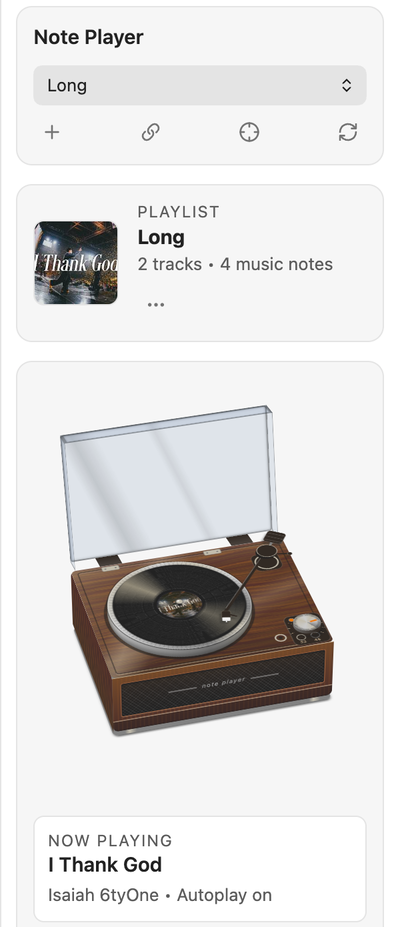
The Note Player view in a sample vault: a playlist card, a turntable with the needle on the record, and a now-playing card for a track by Isaiah 6tyOne.

Each track is a Markdown note. Each playlist is a Bases file embedded in a companion note, with playback in the sidebar player.

Features

  • Playlists and tracks are notes with frontmatter, so they work with links, properties, and Bases.
  • Add a track from a YouTube URL; the note is created with the title, channel, and thumbnail.
  • Audio is downloaded once with yt-dlp and cached locally for instant playback.
  • Play local audio files from your vault.
  • Turntable now-playing card with optional needle and crackle sounds, a queue, repeat-one, and autoplay.

Installation

From the Community plugins browser, search for Note Player, then install and enable it.

Manual: download main.js, manifest.json, and styles.css from the latest release, copy them into <vault>/<config folder>/plugins/note-player/, then enable the plugin.

Requirements

Desktop only (Obsidian 1.13.0 or later). Downloading audio needs two command-line tools on your PATH:

  • yt-dlp, for downloading and for expanding playlist links
  • ffmpeg, which yt-dlp uses to convert audio to MP3 or WAV
brew install yt-dlp ffmpeg   # macOS; use your package manager elsewhere

Usage

Add a track by YouTube URL

Copy a YouTube link, then do any one of these:

  • Run the command Add YouTube URL to playlist and paste it into the modal. The paste adds the track immediately.
  • Click the link button in the player toolbar.
  • Paste straight into the player view.

The track note is created in the Music folder setting (or Obsidian's default location for new notes) and appended to the selected playlist. If no playlist exists, one named Inbox is created. A video that is already in the library reuses its note. A YouTube playlist link adds every video in it, using yt-dlp.

Playlist notes

A playlist is a companion note with type: music-playlist embedding a .base file. Its first view is Obsidian's native Cards view, showing track titles, authors, and the configured thumbnail property. Cards use Obsidian's theme in both light and dark mode. Open a card to open its track note; playback is only from the sidebar player.

Track notes have type: music, a YouTube URL in source, and links to companion playlist notes in playlists. Property names and note types are configurable in settings. Queue membership follows those links; queue order follows the base's first view's sort, regardless of view type, with name ascending when no supported sort is set.

Run Convert playlist notes to Bases from the command palette or settings to preview conversion of legacy track lists and upgrades of paired playlist bases from the former custom view to native cards. Original lists stay in tracks_legacy; filters, sorting, and other views are preserved. Unpaired bases are never upgraded. Conversion runs only when requested, not on startup.

Player

Open it from the ribbon icon or the Open player view command. Other commands:

  • Refresh music library
  • Load active playlist note into player
  • Add active note to selected playlist
  • Create or refresh companion bases files

Turntable

The now-playing card shows a spinning record with a tonearm. Starting playback lowers the needle with a synthesized drop and vinyl crackle; pausing lifts it with a soft tick. The sounds are generated with Web Audio (no audio files are bundled) and follow the player volume. Turn them off with Turntable sounds in settings. With reduced motion enabled the record stays still.

Settings

Playlist folder, music folder, property mapping for URL, thumbnail, artist, playlist membership, description, cover, and note types, audio format (MP3 or WAV), autoplay, open on startup, and Turntable sounds.

  • Music folder is a library discovery scope and where imported track notes are created.
  • Playlist folder is a playlist discovery scope and where new playlists are created.

Both folder settings include all subfolders. Pick an existing folder from the list, or type a new path to create it. In any picker, Shift+Enter creates what you typed, even when other options match. Choosing Vault root in either setting includes the whole vault, including all subfolders.

Disclosures

Note Player is desktop only. It has no telemetry and no accounts, and it sends nothing to any server except YouTube.

Network

  • Adding a track sends its video URL to youtube.com/oembed, through Obsidian's requestUrl, to read the title, channel and thumbnail. No API key is used.
  • Thumbnails load from img.youtube.com.
  • Downloads, playlist expansion and streaming run yt-dlp, which contacts YouTube. A track that isn't cached yet streams straight from YouTube's media servers while it downloads.
  • While a track plays, the stream link for the next uncached track in the queue is looked up ahead of time. Apart from that and thumbnails, YouTube is only contacted when you add a track or play one that isn't cached. Local vault audio never uses the network.

Running programs (yt-dlp and ffmpeg)

  • The plugin runs yt-dlp as a child process to download audio, resolve stream links and expand playlist links. yt-dlp calls ffmpeg to convert audio. No other programs are run.
  • It finds yt-dlp on your PATH or in the usual install folders (~/.local/bin, /opt/homebrew/bin, /usr/local/bin, /usr/bin); it tries to start each one and keeps the first that runs.
  • To turn this off, don't install yt-dlp (or uninstall it). Local audio files in your vault still play.

Files

  • Downloaded audio and waveform data (<id>.peaks.json) are stored in <vault>/<config folder>/plugins/note-player/audio-cache. The plugin reads, lists and deletes them through Obsidian's vault adapter. Only yt-dlp itself writes into this folder, using the absolute path of the vault.
  • Nothing outside your vault is written. To clear the cache, delete the folder.

Reading your vault

  • To build the music library, the plugin reads the frontmatter of Markdown notes in your Music folder and Playlist folder, including all subfolders, and in the track notes your playlists link to, through Obsidian's metadata cache. Choosing Vault root in either folder setting includes the whole vault, including all subfolders. Initial indexing is deferred until the workspace layout is ready; subsequent indexing runs when notes change and when you run Refresh music library. Discovery uses cached Markdown file metadata rather than walking folders or reading note contents. Only paired .base files are read for queue sorting. Nothing leaves your device.
  • The property pickers in settings list frontmatter keys found across your vault, with how many notes use each one and a sample value. Nothing leaves your device.

Clipboard

  • The plugin never reads the clipboard. When you paste a YouTube link into the Add YouTube URL to playlist field with your own paste (Cmd/Ctrl+V), it is added at once.
  • Pasting a YouTube link into the player view adds that track. Other pasted text is ignored.

Troubleshooting

  • yt-dlp not found: confirm yt-dlp --version works in a terminal and that its folder is on your PATH.
  • Audio not playing: confirm ffmpeg is installed and the video is publicly accessible, then run Refresh music library.
  • Playlist missing: check that the note's type matches the playlist note type in settings.

Development

bun install
bun run dev    # watch build into dist/
bun run ci     # build, typecheck, lint, test

Releases are cut by CI only.

License

MIT. See LICENSE. Author: Beomsu Koh.

Similar Plugins

info
• Similar plugins are suggested based on the common tags between the plugins.
Thumbnails
4 years ago by Michael Harris
Add youtube thumbnails into your obsidian notes
Douban
4 years ago by Wanxp
an obsidian plugin that can pull data from douban to your markdown file
YTranscript
4 years ago by Łukasz Strzępek
Home tab
4 years ago by Renso
A browser-like search tab for your local files in Obsidian.
Copilot
4 years ago by Logan Yang
Run agents in Obsidian - OpenCode, Codex, Claude Code etc.
Enhance YouTube Links
3 years ago by GitSum
Take a YouTube link and get the title and optionally channel name, channel URL, and thumbnailURL.
Spotify Link
3 years ago by Studio Webux
Obsidian.md Plugin to include the song or episode you're currently listening to in your note.
Spotify Links
3 years ago by Dillon Cutaiar
For those that get inspired to write by music, a small plugin connecting Spotify to Obsidian.md
Lyrics
3 years ago by eatgrass
Enhance your Obsidian audio player by adding a interactive lyrics display feature.
YouTube Template
3 years ago by sundevista
📺 A plugin that would help you to fetch YouTube videos data into your vault.
Soundscapes
3 years ago by Andrew McGivery
A plugin for Obsidian.MD that adds a music/ambiance player to the status bar to play Lofi beats, nature sounds, ambiance, relaxing music, and more.
Youtube Summarizer
3 years ago by ozdemir08
Aloud
3 years ago by Adrian Lyjak
Obsidian TTS Plugin
YouTube downloader
2 years ago by Blake Chan
download video from youtube
Geulo
2 years ago by Junyoung Bang
Geulo — an Obsidian plugin for pulling and syncing your liked YouTube videos to your Obsidian vault.
Youtube Iframe Timestamps
2 years ago by Nils Leo
Obsidian plugin to embed YouTube videos with clickable timestamps. Take video notes seamlessly without leaving your vault.
Setlist.fm Sync
2 years ago by Nick Felker
Sync your setlist.fm events to Obsidian
YouTube Video Summarizer
2 years ago by mbramani
Generate AI-powered summaries of YouTube videos directly in Obsidian using Google's Gemini AI.
WHISPERER.md
2 years ago by Falcion
A plugin for note-taking app Obsidian which allows you to play ambience music in vault and assign different tracks to files specifically
Timecodes
2 years ago by Kirill Gavrilov
Makes timecodes clickable, if there was a video URL mentioned earlier in Obsidian note
YTSummarizer
a year ago by Arda Kalaycı
Smart Link Formatter
a year ago by ccmdi
Obsidian plugin that automatically formats links with information from dynamic websites
Maps
a year ago by Obsidian
Map layout for Obsidian Bases. Display your notes as an interactive map view.
RSS Dashboard
10 months ago by Aditya Amatya
A dashboard for organizing and consuming RSS feeds, YouTube channels, and podcasts with smart tagging, media playback, and seamless content flow.
Kanban Bases View
8 months ago by I. Welch Canavan
A kanban-style drag-and-drop custom view for Obsidian Bases that allows you to organize your notes into columns based on any property.
Calendar Bases
7 months ago by Edrick Leong
Feed Bases
6 months ago by edrickleong
Bases Charts
6 months ago by Moritz Jung
Convert url to preview (iframe)
5 months ago by fhachez
Plugin for Obsidian.md to convert a selected URL to an iframe.
Note Companion
5 months ago by nexus-jpf
Note Companion: AI assistant for Obsidian that goes beyond just a chat. (prev File Organizer 2000)
Base Board
5 months ago by mderazon
Kanban Plugin For Obsidian
TaskNotes
4 months ago by callumalpass
Task and time-tracking management with calendar integration for Obsidian
Bases Paginator
3 months ago by sean2077
A plugin for Obsidian that adds a paginated table view with column filtering capabilities to Obsidian Bases.
Bases Toolbox
3 months ago by Grub Basket
Adds Quality of Life features to Obsidian Bases
Star Gate
3 months ago by starhunter
obsidian gate plugin
Power Bases
3 months ago by Power Plugins
Add board, calendar, timeline, chart, gallery, and table views to Bases, with inline editing, colors, rollups, field types, formulas, and CSV import.
Canvas Bases
3 months ago by callumalpass
Canvas-style layouts and JSON Canvas materialization for Obsidian Bases.
AutoPause
3 months ago by ckep1
Allows only one audio track playing in Obsidian at a time, pausing the others.
Link Structure
3 months ago by Dmitry Fert
Obsidian plugin that adds a Structure view for Bases, displaying notes as a hierarchical tree based on the up property. Supports drag-and-drop reorganization with automatic link updates, multi-select, and Templater integration.
Qiaomu Radio
2 months ago by 向阳乔木
在 Obsidian 里发现和收听全球直播电台 | Discover and play live radio while you read, write, and think.
Quran Life
a month ago by Imed Ghomari
Base Source Editor
a month ago by fronglemog
Edit the YAML source of a Base without leaving Obsidian.
Split Groups
a month ago by Fuad Laguda
Obsidian Bases view that puts a note in every group its list property names
Bases Timeline View
a month ago by xjiaxiang
timeline view for obsidian bases
Andante
a month ago by jordtcasbeer535
An elegant metronome for Obsidian
Home Cards
21 days ago by ttangents
Home Cards plugin for Obsidian. Show a start page of note cards, in sections drawn from recent activity, properties, tags and links, styled by your active theme.
Cool Bases
18 days ago by pattgue
Design cool card views for Obsidian Bases.
Masonry
18 days ago by Mario Miletta
A visual masonry browser for Obsidian notes and filtered Bases.
Horizon
18 days ago by Mario Miletta
Horizon — calendar for your Obsidian vault: daily and periodic notes, tasks, and dated notes in one place.
Just Simple Planner
6 days ago by David Hurt
A local visual planner for Obsidian: Markdown notes on a continuous timeline, connected threads, compact previews, tasks and notebook view.