Cool Bases

by pattgue
5
4
3
2
1
Score: 30/100

Description

The Cool Bases plugin adds a card view to Bases with a visual side panel for editing the whole view. Changes appear immediately but are saved only when confirmed. Four starting styles cover poster, profile, cover and list layouts, with options to save designs or copy them from another view. Card dimensions, colours, typography and image effects are configurable. Properties can be reordered, joined on one line or positioned over images, while ratings appear as stars, scores or faces. Boolean properties support several display formats, including checkboxes that update the note directly. Notes without images can receive generated typographic covers. Each view stores its design in the .base file and accepts its own CSS. It works on desktop and mobile with Obsidian 1.10 or later and Bases enabled.

Reviews

No reviews yet.

Stats

4
stars
338
downloads
0
forks
7
days
4
days
4
days
1
total PRs
0
open PRs
0
closed PRs
1
merged PRs
3
total issues
3
open issues
0
closed issues
7
commits

README file from

Github

Cool Bases

Turn your Bases into cards you design yourself, from a visual side panel.
🇪🇸 Leer en español

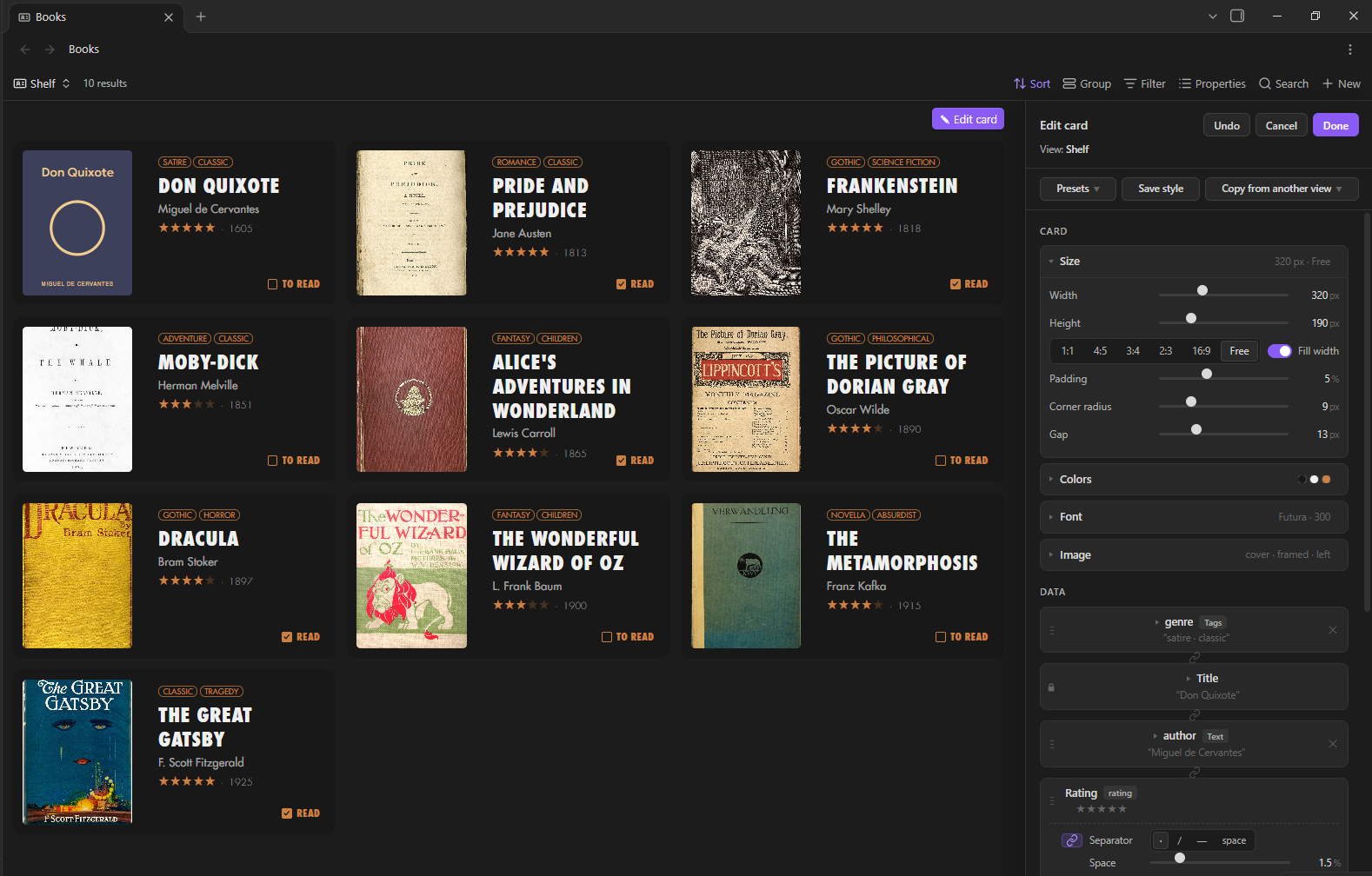
A Cool Bases view with the edit panel open

What it does

  • A new view type for Bases. Your notes show up as cards: books, films, people, places, projects… anything with properties.

  • Design the card from a panel, live. Size, colors, font, image, data and decorations. Every change shows on the cards at once. Nothing is saved until you press Done.
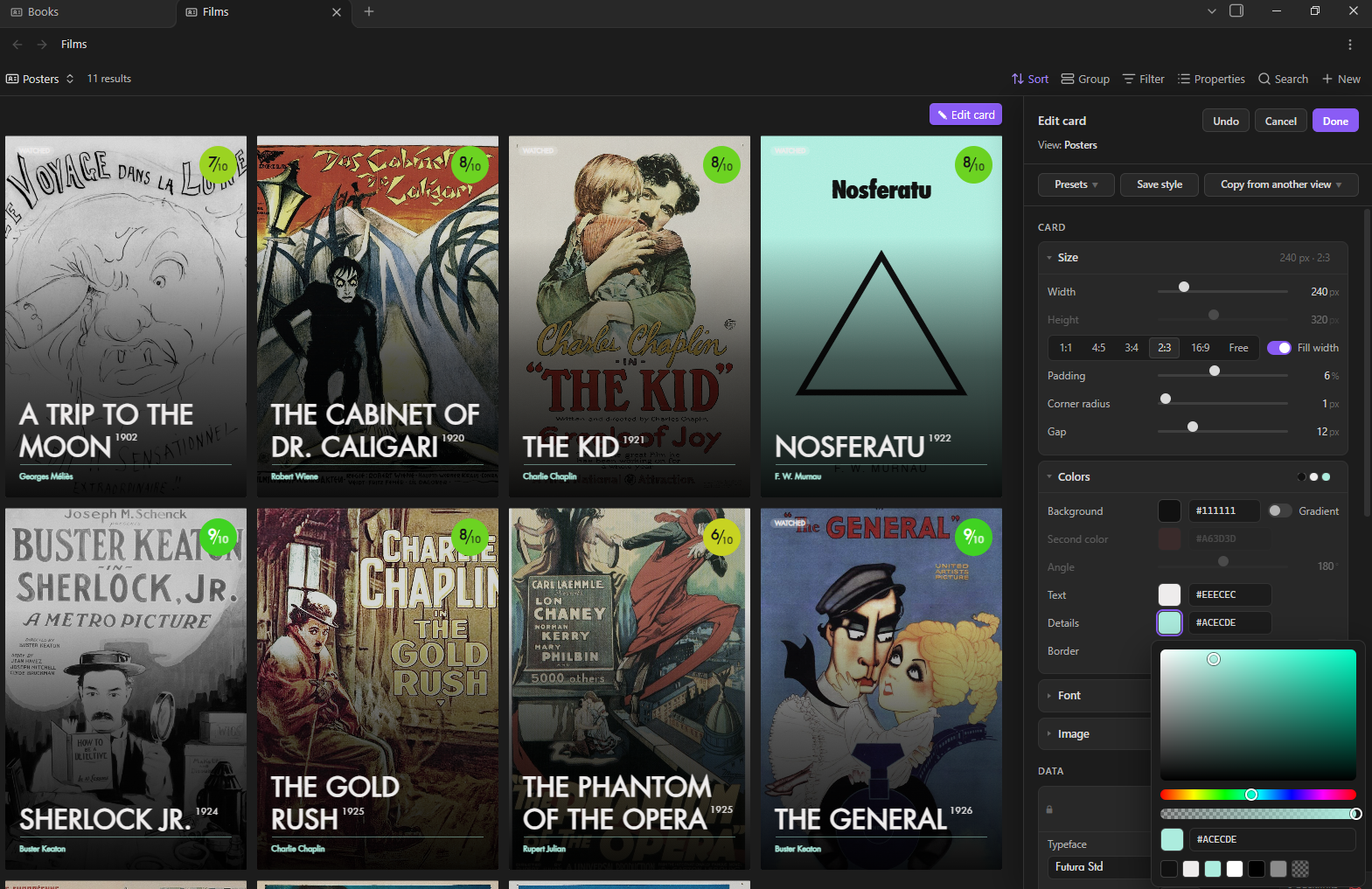
    Changing the card live from the panel

  • Four presets to start from. Poster, Profile, Cover and List. Save your own styles, or copy the style of any other Cool Bases view in your vault.
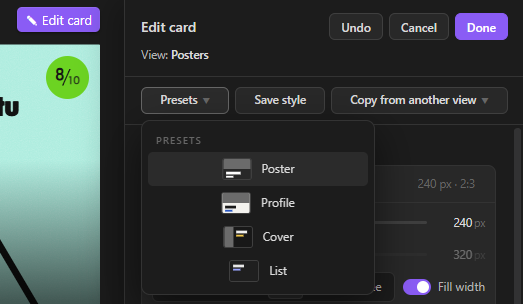
    The four presets

  • Your data, your way. Drag the properties into order, put two on the same line, turn one into a superscript, show lists as tags, links as site names, linked notes one per line.
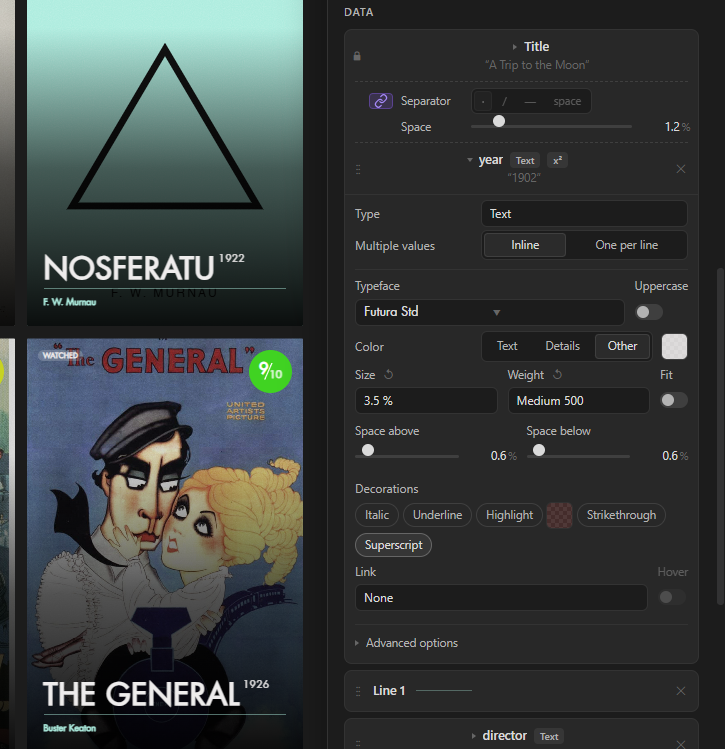
    Data options

  • Ratings and states. Stars, scores or faces from a number or from ⭐ emoji. Yes/no properties as text, pills, tags, icons, dots… or a checkbox you can tick right on the card.
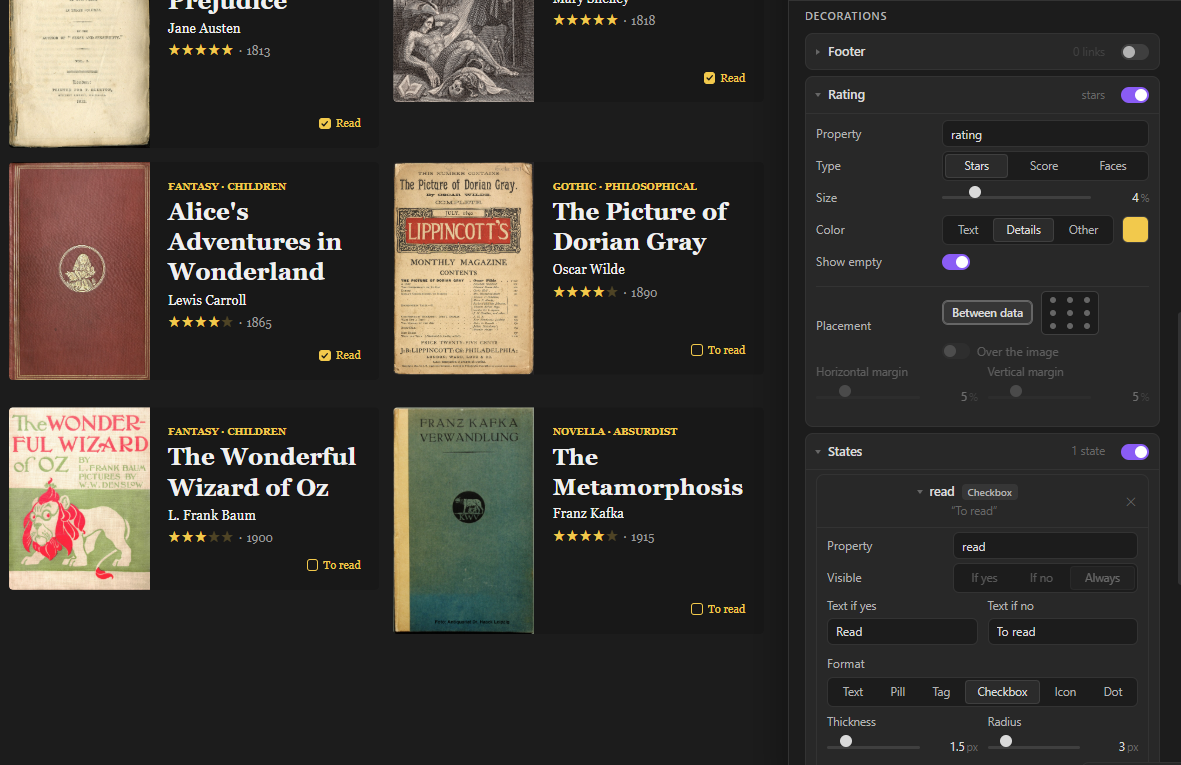
    Ratings and states

  • Covers for notes without an image. A simple typographic cover is drawn for them, so every card keeps the same size.
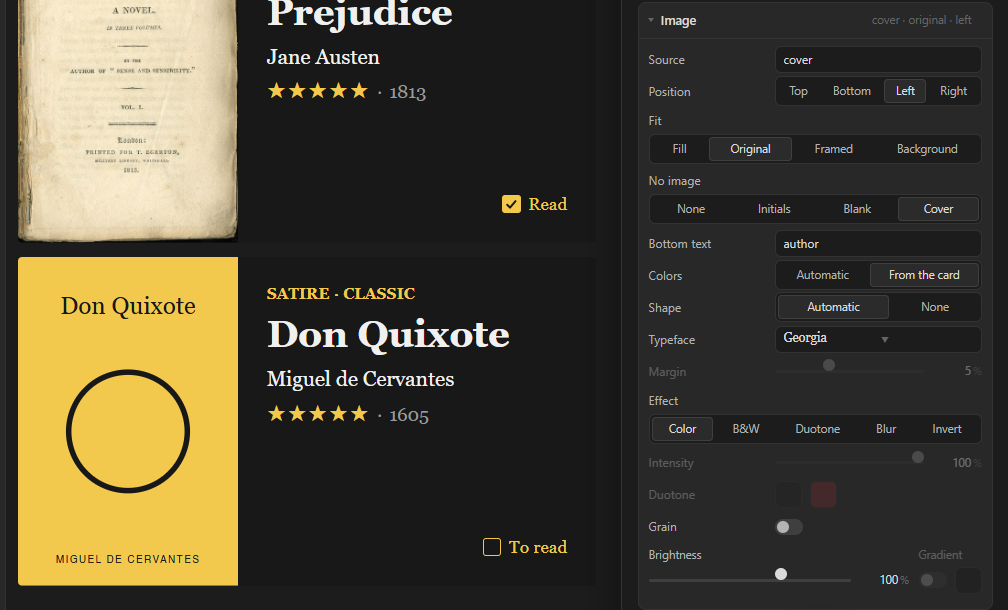
    Generated covers

Install

From Community plugins (once it's listed): Settings → Community plugins → Browse → search for Cool Bases → Install → Enable.

With BRAT: install the BRAT plugin, choose Add beta plugin and paste pattgue/cool-bases.

By hand: download main.js, manifest.json and styles.css from the latest release and put them in .obsidian/plugins/cool-bases/ inside your vault. Restart Obsidian and enable Cool Bases in Settings → Community plugins.

Quick start

  1. Turn on the Bases core plugin (Settings → Core plugins → Bases).

  2. Create a base: right-click a folder → New base, or use the command Bases: Create new base.

  3. In the views menu at the top left of the base, add a view (or edit the current one) and choose Cool Bases as its layout.
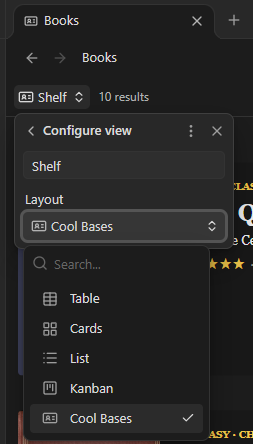
    Choosing Cool Bases as the view type

  4. Press ✎ Edit card (top right of the view). The panel opens on the right.

  5. Change whatever you like and press Done.

The cards start with the properties you ticked in the base's Properties menu. Click a card to open its note.

Want to try it with real data first? The demo-vault folder has a small vault with books and films, already designed.

The edit panel

The panel edits the whole view: all its cards at once. Each view of each base keeps its own design, saved inside the .base file.

At the top: Undo (or Ctrl/Cmd+Z), Cancel (or Escape: leaves the view as it was) and Done (saves).

Styles

  • Presets: Poster, Profile, Cover and List, plus My styles.
  • Save style: keeps the current design under a name, for any view in this vault.
  • Copy from another view: takes the design of another Cool Bases view (not its data).

Card

  • Size: width, height or a fixed format (1:1, 4:5, 3:4, 2:3, 16:9), fill width, padding, corner radius and gap between cards.
  • Colors: background (with an optional gradient), text, details (the accent color) and border.
  • Font: typeface, weight, size and alignment. You can pick any font installed on your computer, or type its name.
  • Image: which property holds the image, its position and fit (Fill, Original, Framed, Background), effects (B&W, duotone, blur, invert), grain, brightness and a dark gradient. No image decides what notes without an image show: nothing, their initials, a blank space or a generated Cover.

Data

  • The title comes first and carries a lock 🔒: tap it to move the title like any other item (data can also go above it). In Show you choose what it displays: the note name, the first alias, another property, or nothing at all (handy when the cover already shows the title).
  • Drag the other properties into order, remove them with ✕ and add more with + Add data.
  • The chain icon between two items puts them on the same line, with a separator. If the first one is empty in a note, the second one starts its own line.
  • Placement: each item (the title too, once unlocked) goes between the data or in any of the 9 spots of the card, also over the image. Items in the same spot stack, or share a line if they're joined.
  • Each item has its own typeface, uppercase, color, size, weight, Fit (one line, shrinks to fit), space above and below, italic, underline, highlight, strikethrough, superscript, link and hover.
  • Types: Text, Number, Smart number (a follower or listener count that links to the profile), Tags, Link and Linked notes (including the notes that link to this one).
  • Formulas from the base work too, including Obsidian icons: a formula with icon("star") shows the icon, at the size and color of its item.

Decorations

  • Footer: a strip at the bottom of the card for links (website, social profiles…).
  • Rating: stars, a score (like 8⁄10) or faces, between the data or in any of the 9 spots of the card.
  • States: one for each yes/no property you want to show: text, pill, tag, checkbox, icon or dot.
  • Lines: dividers you drag between the data.
  • Hover: how links look under the pointer.

Custom CSS

For anything else. It only applies to this view. Useful classes: .cb-card, .cb-body, .cb-media, .cb-l (a line of data), .cb-i[data-prop="note.year"] (one item), .cb-st (a state), .cb-foot.

Tips

  • Ratings with emoji. If your ratings look like ⭐⭐⭐⭐, Cool Bases counts the stars. Numbers work too (choose what they're out of).
  • Tick from the card. Give a yes/no property (like read) a state with the Checkbox format: click it on the card to change the note, without opening it.
  • Generated covers. Image → No image → Cover. Choose the text at the bottom (the author, the director, the year…), automatic or card colors, and a shape.
  • Several data on one line. Click the chain between two items: 1927 · Germany · 153 min. Ratings and states can join a line too.
  • Superscripts. Turn on Superscript in an item to place it small and high after the one before, like a year next to a title.

Updates

Update 1.0.2: → Covers saved as a plain file path (like "image.jpg" without the [[ ]]) now show up correctly.

Update 1.1.0: → You can now choose what the Title shows: the note name, the first alias, any other property, or nothing at all.

Update 1.1.1: → Any data field can now be placed in any of the 9 spots of the card, like the rating. → (Fixed) A field joined to an empty one no longer jumps onto the line above.

Update 1.1.2: → Formulas that return an Obsidian icon (icon("…")) now show the icon on the card.

FAQ

Where is my design saved? In the .base file, inside the view, under the coolbases key. Delete that key to go back to the default card.

Does it change my notes? Only if you tick a Checkbox state on a card: that changes the yes/no property of that note. Nothing else is written to your notes.

What does it read? The properties of your notes, through Obsidian, to draw the cards. And only for Copy from another view it lists the .base files in your vault, to find their Cool Bases views. It reads nothing else and sends nothing to the internet.

Can I use my own fonts? Yes: any font installed on your computer. If Obsidian can't list them, type the font's name in the typeface search. Generated covers can only use fonts installed on the system.

Does the smart number update itself? No. It shows the number stored in the note and links to the profile. Keeping the number up to date is up to you (or another plugin).

Does it connect to the internet? No. It only shows the images your notes point to.

Compatibility

  • Obsidian 1.10 or later (it needs the Bases view API).
  • Desktop and mobile.

Support and feedback

Found a bug or have an idea? Open an issue on GitHub. Screenshots help a lot.

License

MIT © 2026 Patt

Similar Plugins

info
• Similar plugins are suggested based on the common tags between the plugins.
Card View Switcher
5 years ago by qawatake
An Obsidian plugin to provide a quick switcher with card view
Editing Toolbar
4 years ago by Cuman
An obsidian toolbar plugin, modified from the Cmenu plugin
Plugin Groups
4 years ago by Mocca101
A plugin that allows you to easily group and manage your other plugins in Obsidian.
Text Wrapper
4 years ago by smx0
Plugin for Obsidian
Custom Classes
4 years ago by Lila Rest
A minimal Obsidian plugin that allows you to add your own HTML classes to chosen Markdown elements directly from your notes.
Unicode Search
4 years ago by BambusControl
Simple Unicode character search for Obsidian.md
Callout Integrator
4 years ago by
A plugin for Obsidian to allow the integration of long blocks of text into callouts.
Emoji Magic
4 years ago by simplgy
Makes it easier to add emojis using an improved keyword search
Natural Language Syntax Highlighting
4 years ago by artisticat
Highlight adjectives, nouns, adverbs, verbs, and conjunctions in Obsidian.md
Page Properties
4 years ago by Anton Bualkh
A plugin that adds Logseq-like page tags to Obsidian
Multi Properties
3 years ago by fez-github
Plugin for Obsidian that allows user to add properties to multiple notes at once.
Root Folder Context Menu
3 years ago by mnaoumov
Obsidian Plugin that enables context menu for vault root folder
Beautitab
3 years ago by Andrew McGivery
A plugin for Obsidian.MD that creates a customizable new tab view with beautiful backgrounds, quotes, search, and more.
Canvas Daily Note
3 years ago by Andrew McGivery
A plugin for Obsidian that allows you to add a daily note node to the canvas that will always show todays note.
Better Order List
3 years ago by Boninall
Tag Formatter
3 years ago by snsvrno
Configurable Obsidian plugin that hides parent tags.
Set View Mode per Note
3 years ago by Alex Davies
Use YAML frontmatter to specify a view mode per note.
Metadata Icon
3 years ago by Benature
change metadata entry icon
MantouAI
3 years ago by Morino Pan
MantouAI—— 让Obsidian变身智能助手
Live Variables
2 years ago by Hamza Ben Yazid
Define variables in your note's properties and reuse them throughout your content.
Quick Cards
2 years ago by Camus Qiu
MetaEdit
5 years ago by Christian B. B. Houmann
MetaEdit for Obsidian
Fold Properties
2 years ago by James Alexandre
Adds Fold/Unfold Properties Function to Folder Context Menu
Sentinel
2 years ago by Giorgos Sarigiannidis
A plugin for Obsidian that allows you to update properties or run commands based on document visibility changes.
Interactive Ratings
2 years ago by peritus
Edit symbol ratings in your Obsidian notes interactively.
Notes Explorer
a year ago by Atmanand Gauns
Plugin for Obsidian.md. Explore your notes as cards in gallery or masonry view. A new way to revise your content.
Simple Banner
a year ago by Sandro Ducceschi
Visually enhance your Obsidian notes with a customizable banner. Supports icons and time/date display.
Banyan
a year ago by ratiger
A card-based homepage for Obsidian —— browse, organize, and navigate notes effortlessly with multi-tag filtering.
Simple Columns
a year ago by Josie
An Obsidian plugin that lets you create easily resizable and customizable columns in your notes.
New 3D Graph
a year ago by Aryan Gupta
Visualize your vault in 3D with a powerful, highly customizable, and filterable graph.
Pixel Pets
a year ago by Lucas Jin
Adds cute pixel pets to Obsidian.
Custom Slides
a year ago by David V. Kimball
Customize Obsidian's Slides core plugin's navigation, styles, and behavior.
Maps
a year ago by Obsidian
Map layout for Obsidian Bases. Display your notes as an interactive map view.
Custom Theme Studio
a year ago by @gapmiss
An Obsidian.md plugin to create and tweak custom themes with live CSS editing, element styling, and instant previews. All without leaving Obsidian.
Pretty Properties
a year ago by Anareaty
Card Viewer
a year ago by vsme
一个用于在 Obsidian 中解析和查看电影、电视剧、书籍、音乐和 HTML 内容卡片的插件。
My SVGs
9 months ago by Omar Badawy
An Obsidian plugin that Registers your own SVGs into Obsidian's global icon library for use with other plugins or however you want.
Kanban Bases View
7 months ago by I. Welch Canavan
A kanban-style drag-and-drop custom view for Obsidian Bases that allows you to organize your notes into columns based on any property.
Calendar Bases
7 months ago by Edrick Leong
Feed Bases
5 months ago by edrickleong
Bases Charts
5 months ago by Moritz Jung
Base Board
5 months ago by mderazon
Kanban Plugin For Obsidian
Dragger
4 months ago by ariestar
An Obsidian plugin for dragging and rearranging any block.
Commander
4 months ago by jsmorabito
Commander - Obsidian Plugin | Add Commands to every part of Obsidian's user interface
TaskNotes
4 months ago by callumalpass
Task and time-tracking management with calendar integration for Obsidian
Card View Mode
4 months ago by yo-goto
Obsidian Card View Mode Plugin
Bases Paginator
3 months ago by sean2077
A plugin for Obsidian that adds a paginated table view with column filtering capabilities to Obsidian Bases.
Bases Toolbox
3 months ago by Grub Basket
Adds Quality of Life features to Obsidian Bases
Property Panels
3 months ago by Eva Chen
Display and edit Obsidian frontmatter properties in configurable panels that stay inside the note's scrollable content.
Power Bases
3 months ago by Power Plugins
Add board, calendar, timeline, chart, gallery, and table views to Bases, with inline editing, colors, rollups, field types, formulas, and CSV import.
Canvas Bases
3 months ago by callumalpass
Canvas-style layouts and JSON Canvas materialization for Obsidian Bases.
Image Manager
2 months ago by David V. Kimball
Insert, rename, and sort external images by transforming them into local files within your notes.
Link Structure
2 months ago by Dmitry Fert
Obsidian plugin that adds a Structure view for Bases, displaying notes as a hierarchical tree based on the up property. Supports drag-and-drop reorganization with automatic link updates, multi-select, and Templater integration.
Bases Board
2 months ago by flowing-abyss
Kanban and gallery views for Obsidian Bases.
Chronobars
2 months ago by Daniel Hidefjäll
Create time-based progress bars in Obsidian
List Callouts Improved
a month ago by Daniel Yim
Create callouts in lists in Obsidian.
Base Source Editor
a month ago by fronglemog
Edit the YAML source of a Base without leaving Obsidian.
Split Groups
a month ago by Fuad Laguda
Obsidian Bases view that puts a note in every group its list property names
Mermaid Beauty
a month ago by theChildinus
Make Mermaid diagrams clearer in Obsidian, with automatic layouts, coordinated colors, and per-diagram controls. Works offline and preserves your source.
Home Pages
a month ago by jepicaju862-lab
Customizable homepage dashboard for Obsidian
Bases Timeline View
24 days ago by xjiaxiang
timeline view for obsidian bases
F2 Quick Rename
21 days ago by 熊猫别熬夜
F2 to quick rename the current note, or an embedded note/image under the cursor (including wiki aliases and markdown image alt text).
Momo
13 days ago by Capybara
Home Cards
11 days ago by ttangents
Home Cards plugin for Obsidian. Show a start page of note cards, in sections drawn from recent activity, properties, tags and links, styled by your active theme.
Masonry
7 days ago by Mario Miletta
A visual masonry browser for Obsidian notes and filtered Bases.
Horizon
7 days ago by Mario Miletta
Horizon — calendar for your Obsidian vault: daily and periodic notes, tasks, and dated notes in one place.
Grid Note
5 days ago by dcx199302
将Markdown文档转换成结构化的卡片布局,让卡片和结构更加清晰