TODOseq

by Stephen Cross
5
4
3
2
1
Score: 51/100

Description

The TODOseq plugin offers a lightweight, keyword-driven alternative to traditional checkbox task management. It scans your entire vault for lines beginning with task state keywords like TODO, DOING, or DONE and displays them in a unified Task View. Tasks remain in their original Markdown format, supporting both plain keyword-based entries and checkbox combinations. The interface lets you update task states with a click, filter tasks live, and sort them by priority, schedule, or deadline. Inspired by Logseq, it fully supports priority tokens, scheduled/deadline tags, and preserves list formatting. It even syncs checkbox states with task keywords for consistency.

Reviews

No reviews yet.

Stats

53
stars
3,782
downloads
3
forks
232
days
8
days
8
days
8
total PRs
0
open PRs
0
closed PRs
8
merged PRs
60
total issues
6
open issues
54
closed issues
0
commits

Latest Version

8 days ago

Changelog

  • Added natural date extraction from the task description, write tasks like 'TODO put out the garbage today' and automatically set the scheduled date. #59
  • Added smart date highlighting in the editor to visually show which words are detected as dates.
  • Added experimental support for scanning code files (JS, TS, Python, etc.) for TODO comments. #58
  • Added support for the Obsidian 'Readable line length' setting when TODOseq task list is shown in a main tab.
  • Fixed background write causing file changed externally notification when updating task priority using command palette action in editor.

README file from

Github

TODOseq for Obsidian

Obsidian Downloads GitHub Release License

Keyword-based task management for Obsidian. No checkboxes required.

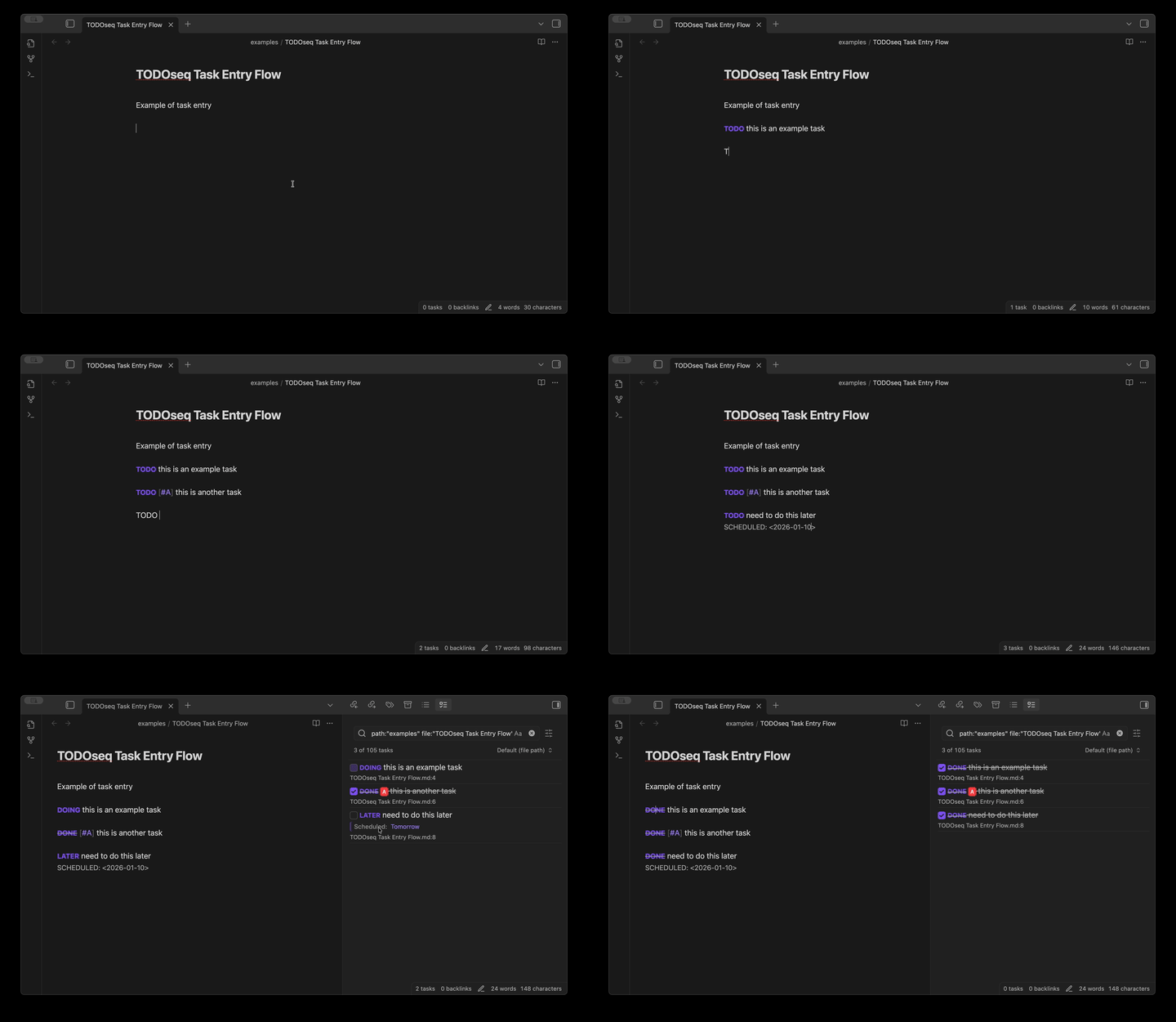
TODOseq ("to-do-seek") scans your vault for tasks marked with simple state keywords like TODO, DOING, and DONE, then presents them in a unified Task List view. Inspired by Logseq and Org-mode, it lets you capture tasks naturally within your notes without disrupting your writing flow.

TODOseq Screenshot

Why TODOseq?

Most task managers force you into a separate system. TODOseq meets you where you already work—inside your Obsidian notes. Type TODO Write report anywhere in your vault, and it appears instantly in your Task List. No switching contexts, no special syntax to remember, no checkboxes to click.

Core Features

Natural Task Capture — Write tasks as plain text using keywords: TODO, DOING, DONE, LATER, NOW, WAIT, and more. Add priorities [#A], [#B], [#C] and dates using natural language or structured Org-mode syntax.

Smart Date Recognition — Type dates using everyday language like "today", "tomorrow", "every Friday", or "daily 20:00". TODOseq automatically converts them to structured format when you finish typing.

Unified Task List — See all tasks from across your vault in one searchable, sortable panel. Filter by state, priority, date, tags, or use advanced boolean queries. Sort by urgency to surface what matters most right now.

Works Everywhere — Tasks remain functional in both Edit mode and Reader view. Click any keyword to cycle through states. Right-click for direct state selection. Use Ctrl+Enter to toggle tasks from your keyboard.

Code-Aware — Extracts tasks from code comments in 20+ languages. Capture // TODO Refactor this from JavaScript, # TODO Optimize query from SQL, or -- TODO Update schema from SQL.

Embedded Lists — Render filtered task lists directly in your notes using todoseq code blocks. Create dynamic dashboards showing "High Priority Work Tasks" or "Overdue Items" that update automatically.

Subtasks — Break down complex tasks with indented checkbox items. The Task List shows subtask progress as [1/3] indicating completed and total subtasks.

Repeating Tasks — Automatically advance scheduled and deadline dates when completed. Use natural language like "every day" or Org-mode repeaters like .+1d, ++1w, or +1m to create recurring tasks.

Closed Date Tracking — Optional CLOSED date on completed tasks, following Org-mode syntax. Records when tasks were marked as done and automatically manages the date when tasks are reactivated.

Logseq Compatible — Use the same task format across both tools. Existing Logseq tasks work without modification. Dual-use your vault or migrate at your own pace.

Experimental Features — Additional capabilities including Org-mode file support are available as experimental features. See documentation for details.

Quick Start

Basic Tasks with Natural Language Dates

TODO [#A] Finish quarterly report #work tomorrow
DOING [#B] Review pull requests #coding
DONE Submit expense report

Or use structured Org-mode dates:

TODO [#A] Finish quarterly report #work
SCHEDULED: <2025-03-15>

DOING [#B] Review pull requests #coding

DONE Submit expense report
DEADLINE: <2025-03-10>
  1. Install from Obsidian Community Plugins (search "TODOseq")
  2. Create tasks by typing TODO, DOING, DONE, etc. in any note
  3. Add dates using natural language ("today", "tomorrow", "every Friday") or structured format
  4. Open Task List — it appears automatically in the right sidebar (or use Command Palette → "TODOseq: Show task list")
  5. Click keywords to cycle states, or click task text to jump to source
  6. Search using natural language or advanced filters like priority:high deadline:this week

Installation

Settings → Community plugins → Browse → Search "TODOseq" → Install → Enable

Manual Installation

cd /path/to/your/vault/.obsidian/plugins
git clone https://github.com/scross01/obsidian-todoseq.git todoseq
cd todoseq
npm install
npm run build

Then enable "TODOseq" in Settings → Community plugins.

Documentation

Comprehensive documentation is available at scross01.github.io/obsidian-todoseq

Examples

Basic Tasks

TODO Draft proposal
DOING Review feedback
DONE Submit final version

With Priorities and Dates

Natural Language Dates:

TODO [#A] Critical security patch tomorrow
DOING [#B] Update documentation next Friday
DONE [#C] Quarterly review monthly

Structured Org-mode Dates:

TODO [#A] Critical security patch
DEADLINE: <2025-03-12>

DOING [#B] Update documentation
SCHEDULED: <2025-03-15>

Recurring Tasks:

TODO Daily standup every day 9am
DOING Weekly team meeting every Friday 14:00
DONE Monthly review every month

In Code Blocks

# TODO Add input validation
# FIXME Handle edge case when user is null
def process_user(user):
    pass

In Org-Mode Files (Experimental)

Note: Org-mode support is an experimental feature. Enable it in Settings → TODOseq → Experimental features.

* TODO [#A] Critical security patch
  DEADLINE: <2025-03-12>

** DOING [#B] Update documentation
   SCHEDULED: <2025-03-15>

*** DONE Submit expense report

Embedded Task List

```todoseq
search: tag:work priority:high
sort: urgency
show-completed: hide
limit: 10
title: High Priority Work
```

Support

  • ⭐ Star this repo if you find it useful
  • 🐛 Report issues or request features
  • 📝 Contribute improvements via pull requests

License

MIT License — see LICENSE for details.

Similar Plugins

info
• Similar plugins are suggested based on the common tags between the plugins.
Todoist Text
4 years ago by Wes Moncrief
Rewarder
4 years ago by Gustav Gnosspelius
An Obsidian-plugin to get rewards for completing todos
Packrat
4 years ago by Thomas Herden
Process completed instances of recurring items created by the Obsidian Tasks plugin
Task Genius
4 years ago by Boninall
Comprehensive task management plugin for Obsidian
Todoist completed tasks
4 years ago by Andrew 'Ledary' Kulishov
Obsidian plugin to display the completed tasks
ToggleList
4 years ago by Lite C
This is a simple plugin for Obsidian to overwrite the default behavior of toggle checkbox status. Also, it offers a simple way to toggle through frequently used attributes: task states, task tags, highlighted list, etc.
Todo sort
3 years ago by Ryan Gomba
A plugin for Obsidian that sorts todos within a note
Tasks Calendar Wrapper
3 years ago by zhuwenq
This plugin currently provides a timeline view to display your tasks from your obsidian valut, with customizable filters and renderring options.
Send Tasks to OmniFocus
3 years ago by Henry Gustafson
Sync Google Calendar
3 years ago by Dexin Qi
Sync tasks from Obsidian with system calendar
Time Ruler
3 years ago by Joshua Tazman Reinier
A drag-and-drop time ruler combining the best of a task list and a calendar view (integrates with Tasks, Full Calendar, and Dataview).
TickTick
3 years ago by Viduy Cheung
Tag Project
3 years ago by Odaimoko
GChat Reminder
3 years ago by Anil Erdogan
TickTickSync
2 years ago by thesamim
Task Status
2 years ago by Valerie Burzynski
Quickly change any task status in Obsidian. The searchable modal enables a more dynamic and indiscriminate workflow when you need to change your checkbox markers.
Extended Task Lists
2 years ago by joeriddles
Extended Markdown support for task lists in Obsidian.
Create Task
2 years ago by Simon Knittel
Create tasks faster from anywhere.
TaskWarrior Task Wiki
2 years ago by SntTGR
Small and simple task manager widget for obsidian and powered by taskwarrior.
Completed Task Display
5 years ago by Ben Lee-Cohen
Obsidian plugin to control the display of completed tasks
Tasks
5 years ago by Clare Macrae and Ilyas Landikov (created by Martin Schenck)
Task management for the Obsidian knowledge base.
CardBoard
5 years ago by roovo
An Obsidian plugin to make working with tasks a pleasure (hopefully anyway).
Overdue
5 years ago by Peter Parente
Obsidian plugin that marks items as [[Overdue]] if they are not checked off by their due date
Auto Strikethrough Tasks
2 years ago by Nomekuma
Automatically adds strikethrough to completed tasks.
Check and Delete
2 years ago by Danitiate
An Obsidian plugin that allows you to quickly clean up temporary list-items with the press of a button
Auto Tasks
2 years ago by Jamie Hurst
Obsidian plugin to combine periodic notes with tags and tasks to automatically manage your daily, weekly and project TODO lists. Requires the "Periodic Notes" and "Tasks" plugins.
Task Director
2 years ago by Cybertramp
A plugin that allows you to easily manage tasks in bulk.
Proletarian Wizard Task Manager
2 years ago by Charles Feval
Obsidian plugin ot manage todos and projects directly from your notes.
Clear Todos
2 years ago by Joshua Gawenda
An Obsidian Plugin to clear todos that are done
Todoist Context Bridge
2 years ago by wenlzhang
Bridge your Obsidian notes with Todoist tasks while preserving rich context, helping you highlight important tasks and maintain seamless workflows between the two platforms. Seamlessly integrate with Dataview and Tasks plugins.
Import Todoist tasks
a year ago by Duke
Import Todoist tasks as Obsidian tasks.
Project Tasks
a year ago by Paul Paterson
An Obsidian Add-in that allows you to create simple projects out of tasks
BuJo Bullets
a year ago by Will Olson
Alternate checkbox types for Obsidian to support Bullet Journal bullets
Inline Checkbox Groups
a year ago by Bradley Wyatt
Obsidian Plugin that creates multiple checkboxes on a single line, separated by a customizable separator character (default '|'), with the option to automatically cross out text when all checkboxes in the line are checked.
Task Board
a year ago by Atmanand Gauns
An Obsidian plugin to view and manage your tasks from whole vault using much efficient boards using various methodologies.
Task Mover
a year ago by Mariia Nebesnaia
A plugin for obsidian to move unfinished tasks to the daily note automatically
Completed Tasks
a year ago by Mgussekloo
A free, simple and intuitive Obsidian plugin that automatically moves completed tasks (checked checkboxes) to the bottom of the list they're in.
Tasks Cleaner
a year ago by lowit
🧹 Tasks Cleaner is a plugin for Obsidian that helps you automatically remove old completed tasks from your Markdown notes
TickTick Quick Add Task
a year ago by Muxin Li
The TickTick Quick Add Obsidian Plugin lets you quickly create tasks in TickTick directly from your Obsidian notes.
GitHub Tasks
9 months ago by Mike Thicke
Obsidian plugin to sync GitHub issues and PRs to Obsidian TODOs
Tasks Map
8 months ago by NicoKNL
A graph view of your tasks.
LighterPack importer
2 months ago by Nicola Siniscalchi
Import a packing list from https://lighterpack.com.