Vertical Timeline List

by Jalad
5
4
3
2
1
Score: 56/100

Description

The Vertical Timeline List plugin allows you to visually represent timelines using specially formatted task lists. By placing a 't' inside task brackets and nesting dates with corresponding descriptions, you can create structured vertical timelines that display cleanly in Reading View. This format is ideal for capturing chronological events such as project milestones, historical notes, or personal journals. While it integrates well with the Tasks and Dataview plugins, there are some limitations in Live Preview and Dataview queries involving collapsible sections.

Reviews

No reviews yet.

Stats

21
stars
2,908
downloads
2
forks
457
days
59
days
63
days
4
total PRs
0
open PRs
0
closed PRs
4
merged PRs
7
total issues
0
open issues
7
closed issues
0
commits

Latest Version

2 months ago

Changelog

What's Changed

Full Changelog: https://github.com/Jalad25/vertical-timeline-list/compare/3.0.2...3.0.3

README file from

Github

Vertical Timeline List

An Obsidian plugin that utilizes task lists to create a timeline... or something like a timeline.
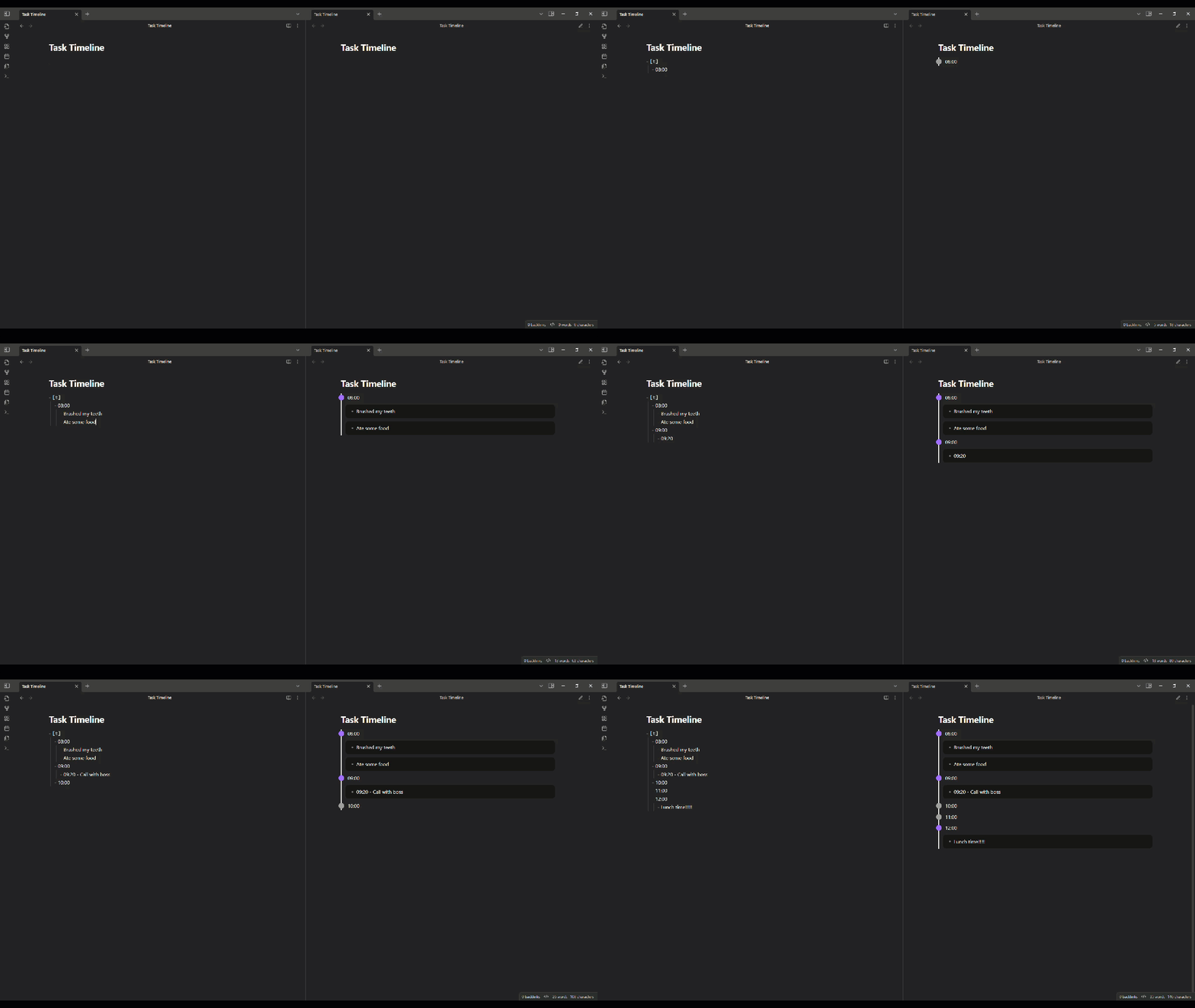
preview

Features

  • Timeline Rendering — Any task list whose parent task has a t status (e.g. - [t]) is rendered as a vertical timeline in Reading View.
  • Customizable Spacing — Adjust dot separation, line padding, and detail block spacing from the settings tab.
  • Theme-aware Colors — Independent light- and dark-mode color values for the line, dots, hover state, and detail backgrounds. The active set switches automatically when Obsidian's theme changes.
  • Collapsible Dots — Toggle whether timeline entries with details can be collapsed and expanded.

Installation

Obsidian Community Plugins

  1. Open Obsidian and go to Settings → Community plugins.
  2. If restricted mode is on, click Turn on community plugins.
  3. Click Browse and search for Vertical Timeline List.
  4. Click Install, then Enable.

BRAT

BRAT installs plugins directly from their GitHub repository and auto-updates them on each release.

  1. Install BRAT from Settings → Community plugins → Browse and enable it.
  2. Open the command palette (Ctrl+P (Windows) or Command+P (macOS)) and run BRAT: Add a beta plugin for testing.
  3. Enter the repository URL: https://github.com/Jalad25/vertical-timeline-list.
  4. Choose whether to track the latest release or the latest commit, then select Add Plugin.
  5. Open Settings → Community plugins and enable Contact Note.

To get future updates, run BRAT: Check for updates to all beta plugins from the command palette, or enable auto-update in BRAT's settings.

Manual

  1. Download main.js, manifest.json, and styles.css from the latest release.
  2. In your vault, create the folder .obsidian/plugins/vertical-timeline-list/ if it does not already exist.
  3. Copy the downloaded files into that folder.
  4. Open Obsidian, go to Settings → Community plugins, and enable Vertical Timeline List.

Usage

A timeline is denoted by a task list whose parent task has a t status. Nested list items become the timeline's entries. Further nesting under each entry becomes its details.

For example:

# Example
- [t]
  - 2020
    - Detail for 2020
    - Additional detail for 2020
  - 2021
  - 2022

renders as:
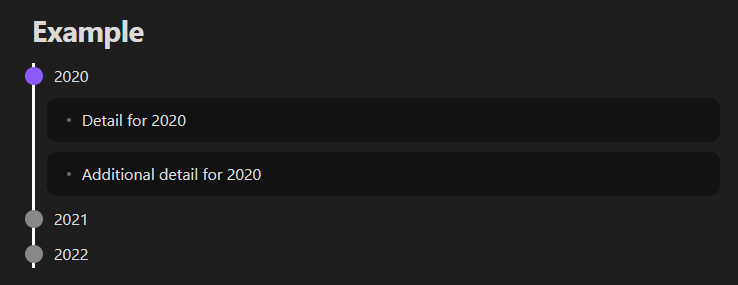
example

[!IMPORTANT] Add a space after the [t]. Without it, Obsidian does not recognize the line as a task and the timeline will not render.

Settings Reference

Spacing

Setting Description Default
Dot separation Vertical gap between dots on the line. 10 px
Line padding Left and right padding around the line. 12 px
Dot details padding Padding inside the detail block (all sides). 10 px
Dot details top separation Space above the detail block. 10 px
Dot details bottom separation Space below the detail block. 10 px

Theme Colors

Each color has independent light- and dark-mode values. The active value applies whenever Obsidian's theme matches.

Setting Description Light Default Dark Default
Dot color Dots without details. #888888 #888888
Dot collapsible color Dots with details. #8A5CF5 #8A5CF5
Dot collapsible hover color Hover ring on collapsible dots (only visible when Dot collapsible is on). #8A5CF5 #8A5CF5
Line color The vertical line itself. #000000 #ffffff
Dot details background color Background of each detail block. #8f8f8f67 #00000067

Behavior

Setting Description Default
Dot collapsible When on, dots with details can be collapsed and expanded. Off

Other Plugin Compatibility

Tested with:

Dataview

Internal links into nested timeline items work normally, but Dataview's TASK query only highlights a navigated-to task when every date in the note is already expanded in Reading View. The collapsible-dot option is therefore off by default. If you turn it on, this Dataview-specific highlight behavior will not work as expected.

Tasks

No issues were observed when using the Tasks plugin alongside this plugin. To exclude the timeline parent task from Dataview TASK queries, register t as a custom task status in the Tasks plugin and filter on that status.

Contributing

Contributions of all kinds are welcome!

See CONTRIBUTING.md for full guidelines.

License

GNU Affero General Public License v3.0. See LICENSE for details.

Similar Plugins

info
• Similar plugins are suggested based on the common tags between the plugins.
Release Timeline
4 years ago by cakechaser
Chronology
4 years ago by Gabriele Cannata
Tasks Calendar Wrapper
3 years ago by zhuwenq
This plugin currently provides a timeline view to display your tasks from your obsidian valut, with customizable filters and renderring options.
Timeline View
3 years ago by b.camphart
Obsidian plugin for viewing your notes linearly based on a given property
Extended Task Lists
3 years ago by joeriddles
Extended Markdown support for task lists in Obsidian.
Timeline Schedule
3 years ago by Evan Bonsignori
Inline timelines generated from human-readable time strings, e.g. 'Walk dog (30min)' in a ```schedule codeblock.
Markline
3 years ago by 闲耘
Markline: Markdown timeline view in Obsidian.
MemoryLane
2 years ago by BangCa
Relive and celebrate your life's milestones on a personal, interactive timeline. A nostalgic journey through your history with anniversary reminders and cherished memories.
Outline to task list
2 years ago by alexandrerbb
A simple Obsidian plugin to convert a note's outline to a task list
Focus Tracker
2 years ago by Jeet Sukumaran
Timeline
5 years ago by George Butco
Obisdian.md plugin for creating timelines
Markdown Timeline
2 years ago by Jiaheng Zhang
An Obsidian plugin to record the events in a Flashback timeline
Chronos Timeline
2 years ago by Claire Froelich
Render interactive timelines in your Obsidian notes from simple Markdown.
Easy Timeline
2 years ago by Romeliun
The Easy Timeline plugin for Obsidian allows you to create timelines easily.
Recent Notes
2 years ago by Kamil Rudnicki
Recent Notes Plugin for Obsidian
Content Cards
a year ago by leo
Insert content cards in Markdown, such as timeline, highlightblock, target card, book information card, music information card, movie information card, photoes ablum, business card, content subfield, countdown, SWOT,BCG.
Generate Timeline
a year ago by Shanshuimei
An obsidian plugin to generate timelines from tags, folders, files or metadata automatically. 根据标签,文件夹,文件或者属性自动生成时间轴的插件。
Checkbox Sort
a year ago by mattang687
obsidian plugin to sort completed checkboxes to the bottom of the list
Inboxer
a year ago by Eoin Hurrell
Obsidian plugin to add an inbox to notes
Markwhen File Sync
a year ago by rouvenjahnke
Synchronize properties from your Obsidian notes with a Markwhen timeline file.
Timelive
a year ago by aNNiMON
Turn a list of dates into a timeline
Timeline Canvas Creator
a year ago by chris-codes1
Quickly create timeline structured canvases in Obsidian.
Storyteller Suite
a year ago by Maws
Checkbox Autochecker
a year ago by Klaas Klee
Adapt to Current View
10 months ago by greetclammy
Obsidian plugin to set different accent colors for Reading view, Live Preview and Source view.
Custom Syntax Highlights
9 months ago by Outsiders17711
Display files with custom extensions as syntax-highlighted code blocks in reading view with configurable extension-to-language mappings.
Day Planner OG
3 months ago by ebullient
Day planning from a simple task list in a Markdown note (bare bones, preserves the features and behavior of the original plugin).
Timelines (Revamped)
3 months ago by seanlowe
Generate a chronological timeline in which all 'events' are notes that include a specific tag or set of tags.
April Automatic Timelines
2 months ago by april-gras
Simple timeline generator for story tellers.
Gantt Calendar
a month ago by Sugar
A powerful visual task management plugin. Visualize and manage tasks created by the Tasks plugin, supporting both emoji and Dataview task formats. Support Feishu Task syncing. - This plugin has not been manually reviewed by Obsidian staff.
StoryLine
a month ago by Jan Sandström
Transform your vault into a powerful book planning and writing tool. Corkboard, KanbanBoard view, timeline, plotlines,character tracking, and more. - This plugin has not been manually reviewed by Obsidian staff.
ReverySky Map
25 days ago by MoonSkorch Studio
Navigate your vault through an interactive 3D graph built with a game engine and shaped into an explorable universe. - This plugin has not been manually reviewed by Obsidian staff.
Power Bases
11 days ago by Power Plugins
Add board, calendar, timeline, chart, gallery, and table views to Bases, with inline editing, colors, rollups, field types, formulas, and CSV import. - This plugin has not been manually reviewed by Obsidian staff.
Journal View
9 days ago by RUverse
Turn your daily notes into one continuous, editable journal—scroll through time, jump to any date, and write without leaving the view. - This plugin has not been manually reviewed by Obsidian staff.
TODOseq
7 days ago by Stephen Cross
Lightweight keyword-based task tracker using Logseq style keywords.