
README file from
Github⚠️ Attention ⚠️
Right now this plugin have a serious issue with the "Map view" feature. You can read more about it here. The data of the map view is being stored inside a
LocalStorage, which a very bad system design to store user's data. This architecture will be completely changed in the next major release, version2.0.0.Please be aware of this issue and use the feature cautiously. Would rather request to not use the map view feature for your day to day workflow till the issue has been fixed. The testing for the next series of this plugin has already begun. Please read the migration guide : Migrating to Task Board 2.x.x series | Task Board Docs.
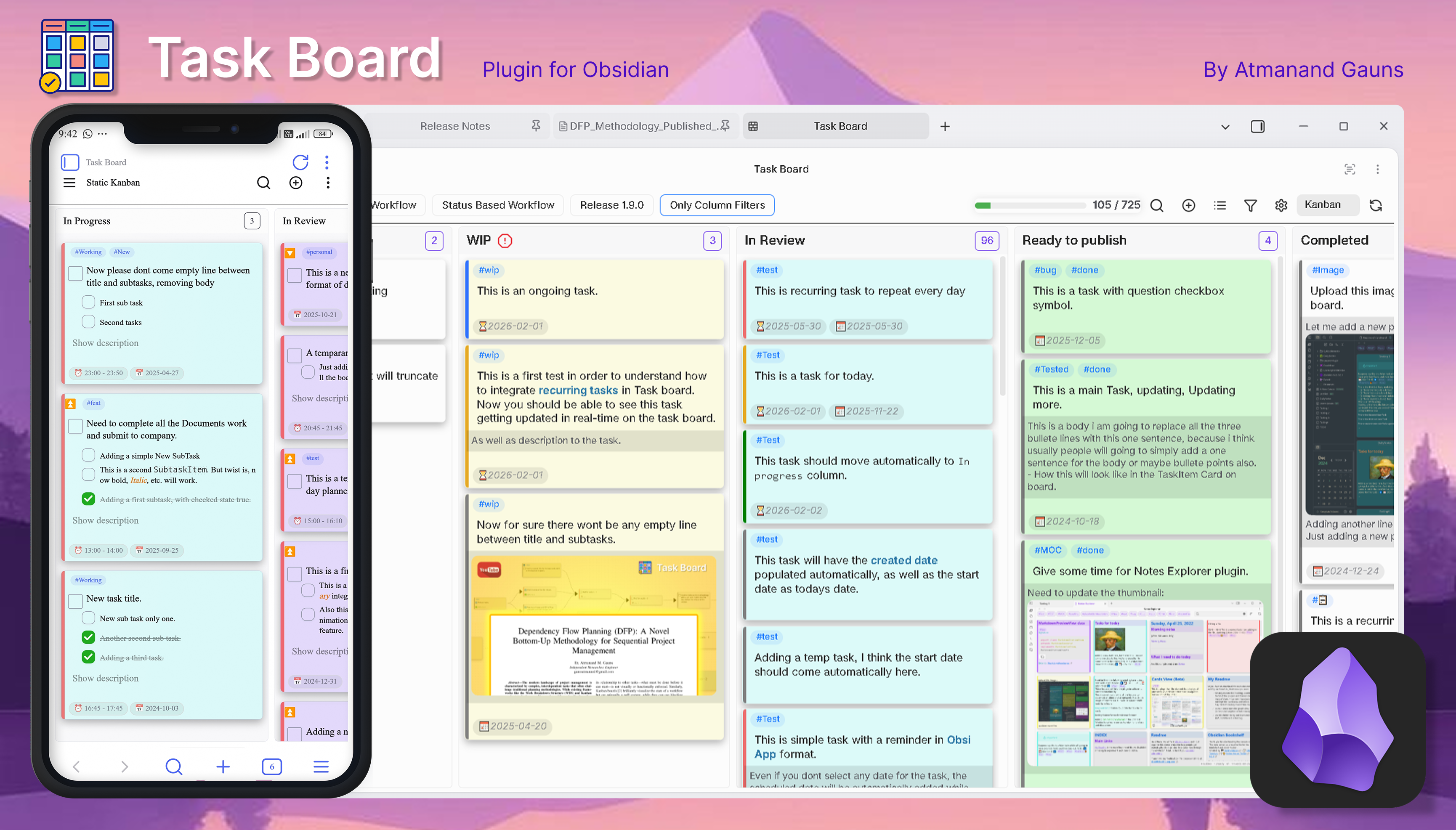
YouTube playlist : Task Board - Obsidian plugin
This plugin is designed to help you document your work seamlessly from start to finish while completing a specific task. With this plugin, you can quickly open a task without manually accessing the markdown file, allowing you to add solutions, key points, resources, and even sub-tasks effortlessly.
Inspired by the GitHub Projects Board Layout, the goal is to bring the full functionality of GitHub Projects into Obsidian. This will enable you to manage private projects efficiently or even create a collaborative workspace within Obsidian.
Documentation
This readme will only provide a basic information. Ill highly recommend to go through the docs to understand the plugin better and to make use of Task Board efficiently : Task Board Documentation.
Discussion
Join the forum top to share your thoughts, ideas or requests and hear from other, how they have adapted to this GTD methodologies to get their tasks done and complete projects inside Obsidian : Task Board topic on Obsidian forum
How Does it work ?
- It scans tasks from all the Markdown files from your whole vault and show them on a Kanban type board.
- Edit the task directly from the Task Board, without opening the Markdown file.
- See Real-Time changes in the parent markdown file.
- Add task to currently opened files using a pop-up window.
How to start ?
Step 1 : Install and Enable the plugin : How to install Task Board.
Step 2 : Open Task Board using the Icon from the right side Ribbon Icon Bar. There is also a command in the Command Pallet.
Step 3 : Click on the Vault scanner button from the top-right corner in the Task Board view header. Then click on the run button and it will scan all your files to look for tasks. If your vault contains thousands of notes, you can apply "filters for scanning" to exclude certain files from scanning.
Step 4 : There are already three predefined board for your convenience as an example. Feel free to delete or edit the boards and create your own boards from the Board configure modal.
Enjoy !
Features
Task Formats
This plugin can scan all kinds of task formats which are supported by the Tasks plugin. Whether the tasks are multi-level indented tasks, tasks from callouts and tasks with checkboxes starting with the patterns - [ ], + [ ], * [ ] or > [ ] will be scanned.
Additionally, you can add multi-level sub-tasks and body description with images and files with the accepted format as explained in the docs. Following is an example of a task :
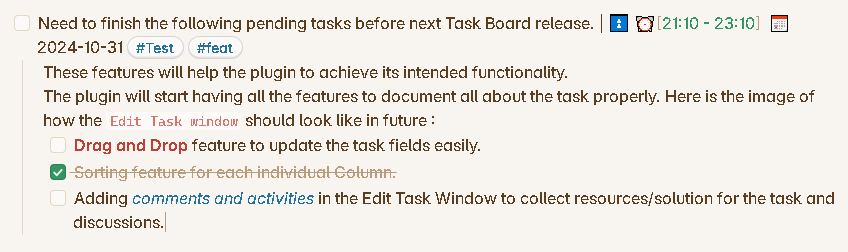
NOTE : Tasks inside callout will be considered as single tasks. That is, it will not be possible for these tasks to have sub-tasks or description.
Adding a Task
There are 4 ways to add a new task.
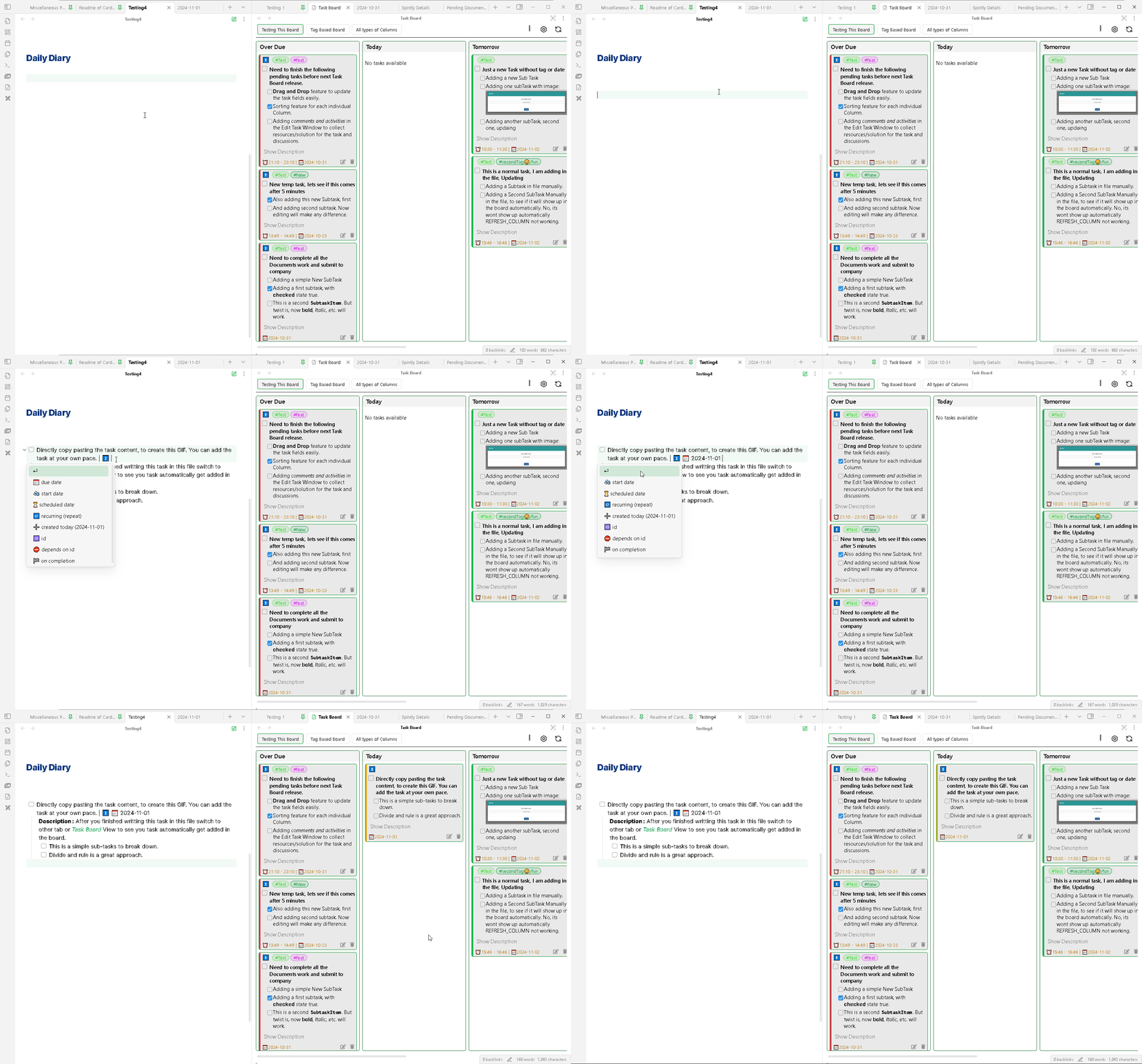
Obvious Method : Your old way of adding a task, that is directly writing inside the markdown files. After you have written the content of the task switch you focus away from the editor, like click on the Task Board and your task will be directly added in the board. Provided you havent applied Scan Filters on that edited file.
In the active file : The plugin provides a command to open the Add New Task modal to add new task directly at the current cursor position in the active note.
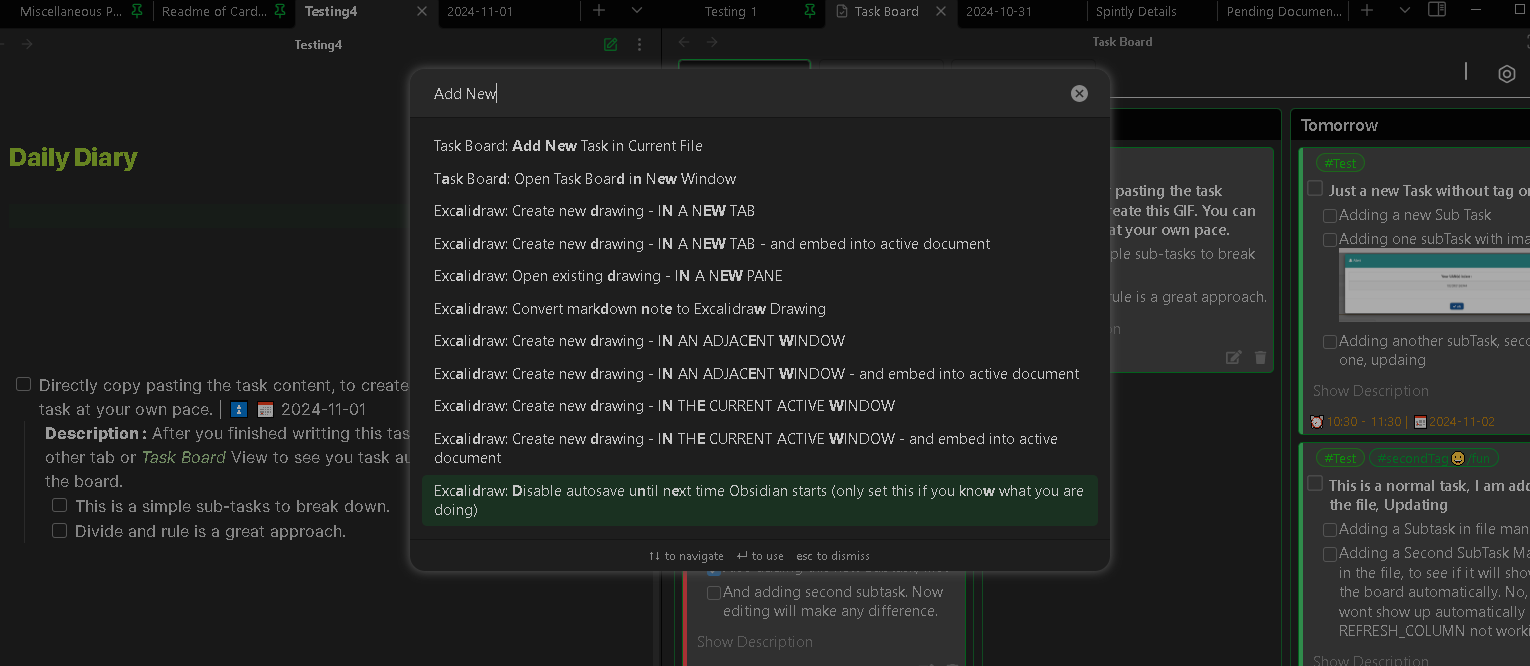
In the pre-defined file : The plugin also provides another command to open the Add New Task modal to add new task directly inside the pre-defined file you have selected in the note. This will help to add a new task from anywhere in Obsidian.
Using button : The plugin provides a button in the board header to open the Add New Task modal to add new task directly in either the pre-defined note or any other note using the file selector.
With the integration of QuickAdd plugin, this feature can become a very powerful tool.
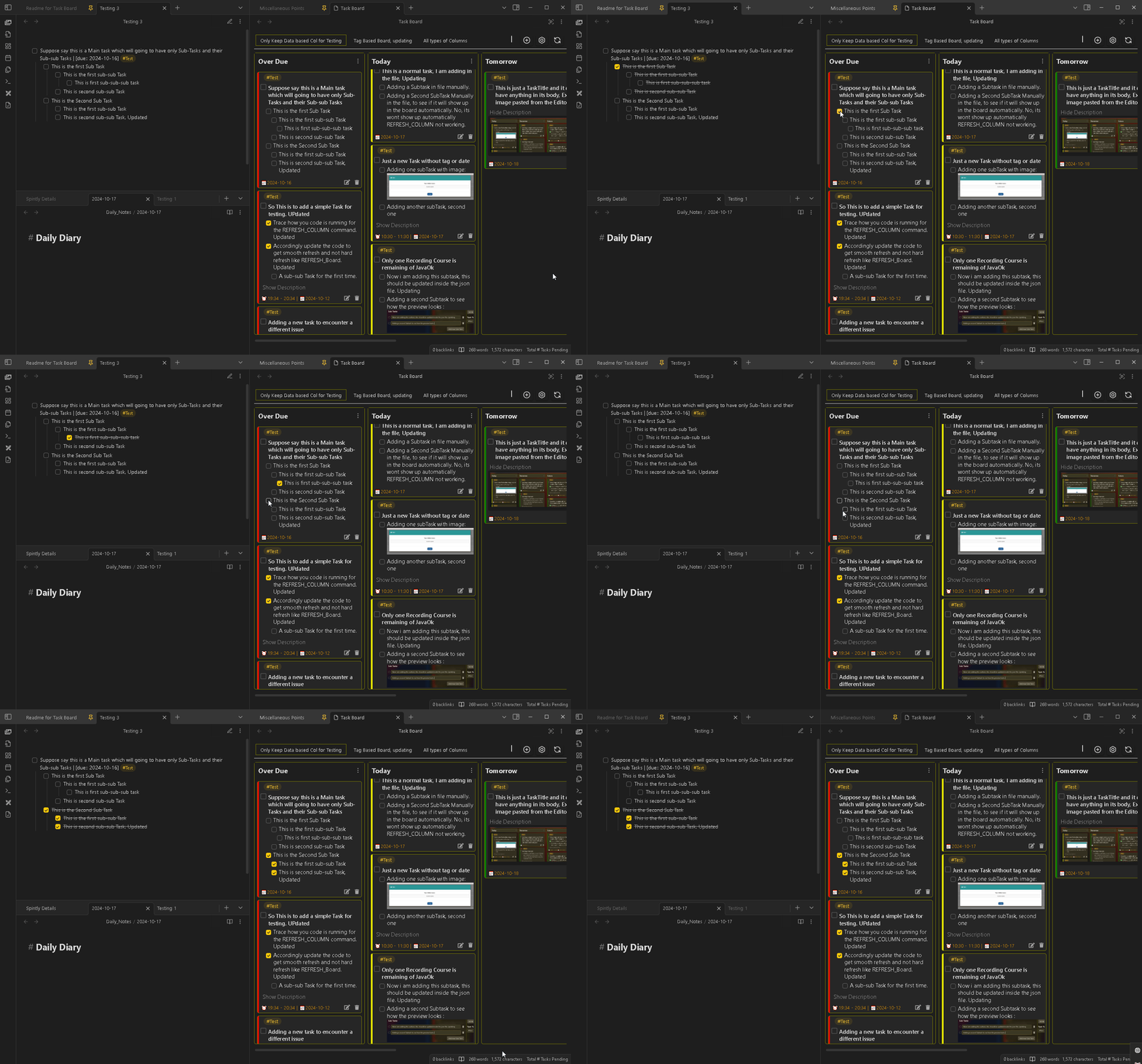
Marking as Complete
Marking a Task as complete from the board is real-time, as soon as you will mark or unmark the task, the changes will be instantly made in the parent markdown file.
Editing a Task
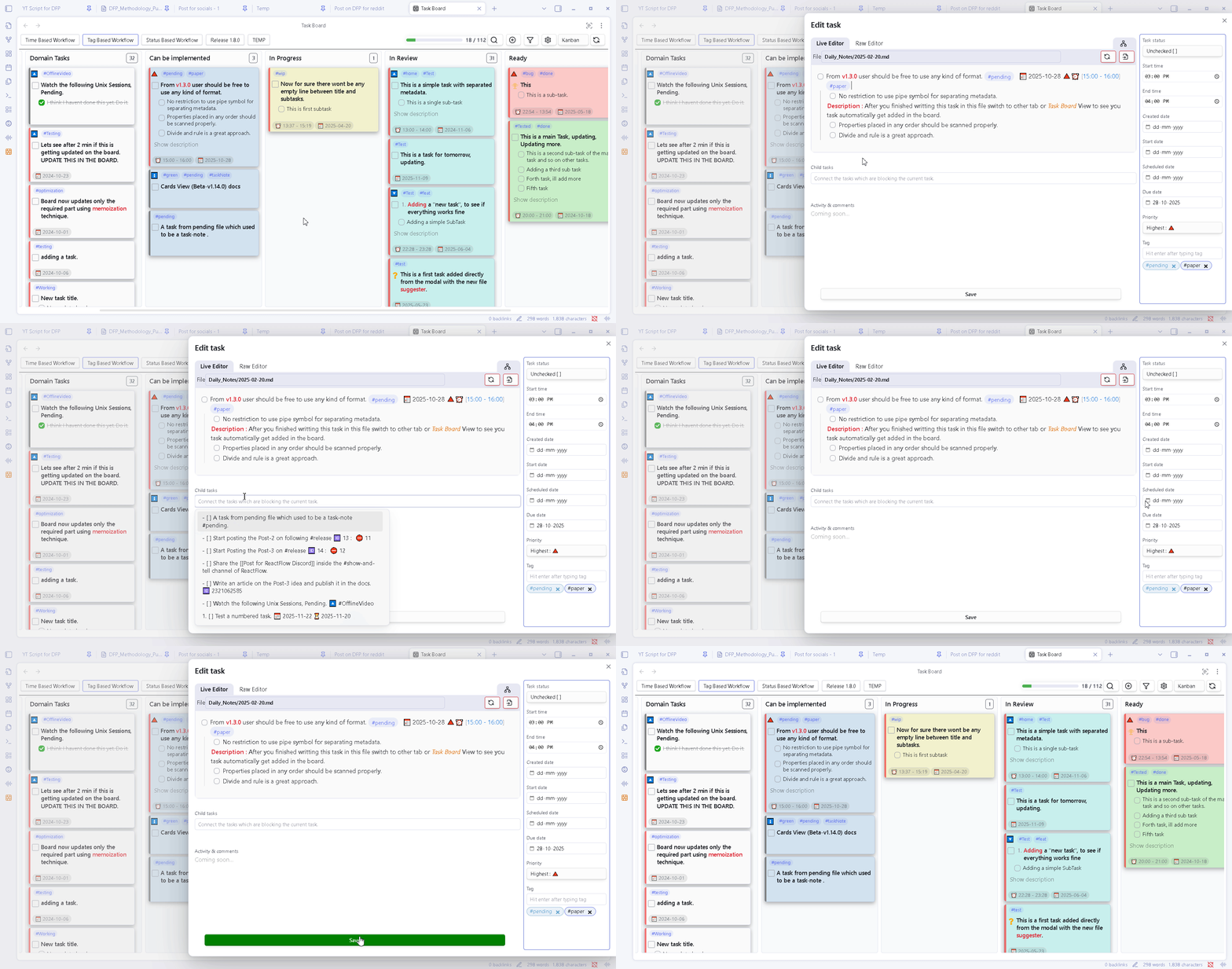
Edit task directly from the Edit Task modal. You can add different properties to the task, add more subTask, add or edit description to the task. And the changes will be updated in the parent markdown file exactly the way you see it in the modal preview.
Deleting a Task
Directly delete unwanted task from the board using the delete button on card.
You have also the option to archive the task either in the same note or move it in a dedicated archived-tasks-note.md.
Applying Filters
Apply advanced filters to boards as well as columns to have double level of filtering for customized views.
This advanced and dynamic filters will help you to use boards as separate projects to manage them effectively.
Upcoming Features
- Drag N Drop for Tasks : User will be able to drag and drop tasks from one column to another for easy editing fields.
- Comments and Activity : Using the Add or Edit task modal, you can add comments to the task, which will help you to document everything you were doing while working on this task, similar to GitHub Projects Planning Issus feature.
- Separate tabs for different boars : View your boards in different tabs to see them at the same time.
- New Board Type : A new type of Board called
Static Boardwill be added, which will work with a single markdown file, similar to the Kanban Plugin.
How to Contribute
You can contribute to this project by :
1. Requesting a new feature, suggesting an improvement or reporting a Bug : How to create a new request.
2. Improving the translated languages or add a new language : How to Contribute for Language Translation.
3. Improve the documentation : How to Contribute for improvement of the documentation.
4. Test a beta version : HOw to test a beta release version.
4. Contribute to the Development of the plugin Code : : How to join the plugin development.
Motivation for the Project
I always used the Kanban Plugin to manage my tasks. And it use to work nice for me with all the amazing features. But as soon as I came across the CardBoard plugin, everything changed. The idea of adding tasks anywhere in your vault and managing them from a single board amazed me. While using Kanban plugin the only issue I had was to open the board and then add a new task in that board/file. This sometimes use to become a little distracting for me to navigate to the specific board, search for the task and to edit it, etc.. I immediately switched to the CardBoard plugin after I came across it. But after using it for few days, I realized there are few important features this plugin is lacking and it's development has been on halt from a long time. So I went to first contribute to the main project, but I wasn't familiar with the elm files, hence decided to start my own plugin.
While development I took inspirations from CardBoard and Kanban plugin as well as many feature ideas from GitHub Project Kanban board. I hope I am able to give the best of all this three plugins into one, and will be improving this further.
Vision
This plugin have a strong vision and it is on track to achive that vision soon. Read more about it here : Vision of the Task Board plugin.
Support
A great effort of work has been put into this idea to bring it to reality. I created the plugin for personal use, but I believed it will surely help other Obsidian users to make their work easier in managing tasks and handling project. If you have got benefitted with this plugin, consider donating for further improvement of this project.

License
Task Board is licensed under GNU GPL V3. Refer to LICENSE for more information.