ICS

by muness
5
4
3
2
1
Score: 57/100

Description

Category: 3rd Party Integrations

The ICS plugin integrates Google Calendar events into your daily notes in Obsidian. With this plugin, you can import events from calendar URLs to your daily note on demand. The plugin works seamlessly with the Daily Note and Periodic Notes plugins, allowing you to customize the output format for events. You can also use Dataview or Templater to automate event imports and create custom templates. This plugin is a great tool for staying organized and up-to-date with your Google Calendar events directly in Obsidian.

Reviews

No reviews yet.

Stats

11
stars
31,033
downloads
1
forks
1,125
days
987
days
996
days
0
total PRs
0
open PRs
0
closed PRs
0
merged PRs
0
total issues
0
open issues
0
closed issues
0
commits

Latest Version

3 years ago

Changelog

Last release you'll find here. Find new ones at this plugin's new home, https://github.com/cloud-atlas-ai/obsidian-ics

README file from

Github

Obsidian ICS Plugin

GitHub release (latest SemVer) Obsidian Downloads

This is a plugin for Obsidian. It adds events from calendar/ics URLs to your Daily Note on demand.

This is designed to work with the Daily Note or Periodic Notes plugins: specifically it gets the date to search for events during from the currently open daily note. You can use it through Dataview or Templater for more advanced / customized usage.

I highly recommend pairing this with the Day Planner plugin: the output format is tuned to support it and you'll get support for seeing the day and week planners.

Installation

This plugin is in the community plugin browser in Obsidian. Search for ICS and you can install it from there.

Using BRAT

If you want to try out beta releases, you can use the BRAT plugin.

  1. Install the BRAT plugin
    1. Open Settings -> Community Plugins
    2. Disable safe mode, if enabled
    3. Browse, and search for "BRAT"
    4. Install the latest version of Obsidian42 - BRAT
  2. Open BRAT settings (Settings -> BRAT)
    1. Scroll to the Beta Plugin List section
    2. Add Beta Plugin
    3. Specify this repository: cloud-atlas-ai/obsidian-ics
  3. Enable the Amazing Marvin plugin (Settings -> Community Plugins)

Setup

  1. From Google Calendar, look for the calendar in the left sidebar click the vertical … menu, Settings and Sharing, Integrate calendar, Copy the Secret address in iCal format
  2. Enter that URL into settings with a calendar name
  3. Customize your format settings. Some are per calendar, others are for all calendars.
    • Per calendar settings: Whether to include a checkbox, the event end time, the calendar name, event summary, event location, event description
    • General output settings: Time format and emitting start and end as Dataview Metadata.
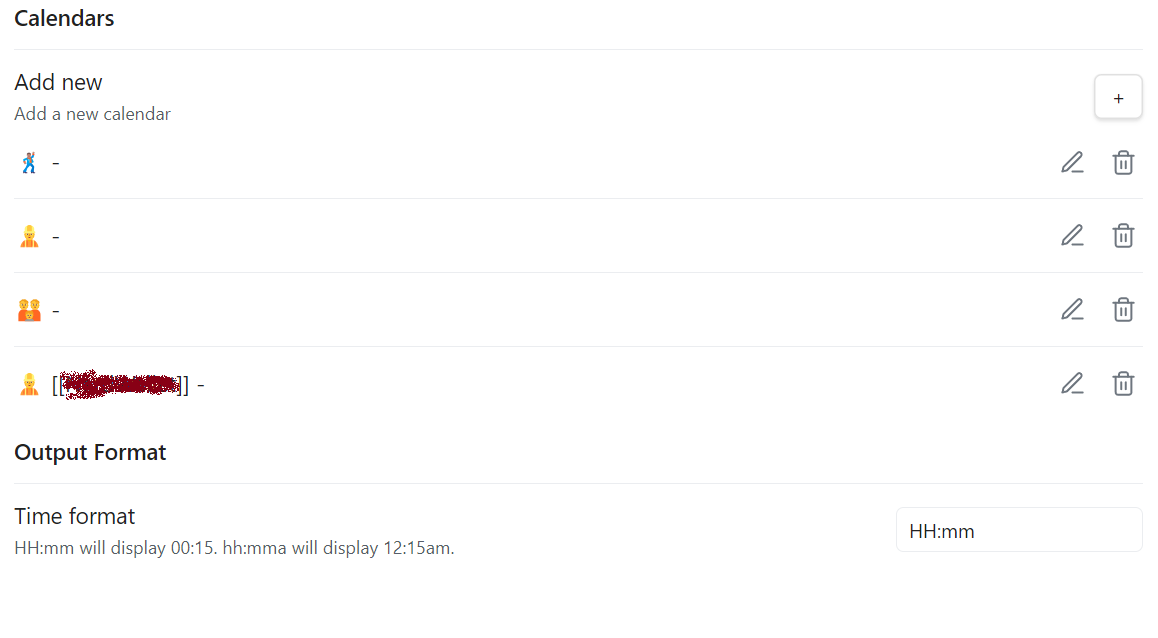
Settings Screenshot

Usage

Go to a daily note, use the ICS: Import events command.

For customizations not available to the formatting, use Dataview or Templater (see below). Likewise, if you want to automatically import events when you create your daily notes, you'll want to use one of those.

Data view usage

You can also use a Dataview to add your events to your journal notes when they get created. For examples, if you use the core Templates plugin you can add the following to add events to your daily note template:

```dataviewjs
var events = await app.plugins.getPlugin('ics').getEvents("{{date:YYYY-MM-DD}}");
var mdArray = [];
events.forEach((e) => {
  mdArray.push(`${e.time} ${e.summary} ${e.location}: ${e.description}`.trim())
})
dv.list(dv.array(mdArray))```

You can see the available fields in the Event interface.

Templater

Or you can use Templater:

<%*
var events = await app.plugins.getPlugin('ics').getEvents(moment(tp.file.title,'YYYY-MM-DD'));
events.sort((a,b) => a.utime - b.utime).forEach((e) => {
  tR+=`- [ ] ${e.time} ${e.summary} ${e.location? e.location : ''}\n`
})
%>

See advanced Templated usage example for an example that demonstrates more features.

You can see the available fields an the Event interface.

Support

If you want to support my work, you can buy me a coffee

Contributions

Manual Installation

If for some reason you want to install the plugin manually:

  1. Download the obsidian-ics-[version].zip release file from releases.
  2. Unpack the file. It should create a obsidian-ics folder.
  3. Place the folder in your .obsidian/plugins directory
  4. Activate the ICS plugin

Local Development

  1. To develop Obsidian plugins you need NodeJS and npm installed. Do that first.
  2. npm install
  3. Make the changes you want...
  4. npm run dev will watch for changes and build the plugin to dist/main.js.
  5. copy the dist/main.js (or dist/main-debug.js if you want the un-minified version) to your Obdisian vault plugin folder (cp dist/main.js <vault>/.obsidian/plugins/ics/main.js).
  6. Reload the vault or use the Hot Reload Plugin.

Similar Plugins

info
• Similar plugins are suggested based on the common tags between the plugins.
Apex Dashboard
2 months ago by PandoraReads
Stop switching between Obsidian notes. One page. Everything you need. Memo your thoughts, crush your todos, track your projects — and make it look incredible doing it.
Automation
2 years ago by Benature
BeautyTasks
a month ago by Avni Bilgin
Todoist-style task & project manager for Obsidian — one markdown note per task, native UI, no plugin dependencies.
Big Calendar
5 years ago by Boninall
Big Calendar in Obsidian, for manage your events in a day/week/month and see agenda too!
Calendar
6 years ago by Liam Cain
Simple calendar widget for Obsidian.
Calendar Bases
6 months ago by Edrick Leong
Calendar Event Sync
2 years ago by Stephen Dolan
Set the title of your note to the current event
Calendarium
3 years ago by Jeremy Valentine
The ultimate Obsidian plugin for crafting mind-bending fantasy and sci-fi calendars
Chinese Calendar
2 years ago by DevilRoshan
在obsidian中使用的更符合中国习惯的日历插件。
Daily notes calendar
2 years ago by bartkessels
Quickly navigate your vault using a calendar view, this plugin allows you to create and navigate to periodic notes and notes that are created on a specific date.
Daily Routine
2 years ago by sechan100
new version of daily-routine obsidian plugin
Daily Statistics
2 years ago by yefengr
obsidian daily statistics
Date Inserter
3 years ago by namikaze-40p
An Obsidian plugin that lets you insert a date at the cursor position using a calendar.
Datepicker
2 years ago by Mostafa Mohamed
Datepicker widget for Obsidian.
Day Planner
a month ago by ivan-lednev
An Obsidian plugin for day planning with a clean UI and a simple task format
Diarian
2 years ago by Erika Gozar
All-in-one journaling toolkit.
Dust Calendar
2 years ago by 纳米级尘埃
obsidian 日历插件
Event Highlight
a year ago by playmean
Render colored bars with relative event dates
Every Day Calendar
2 years ago by QuBe
Obsidian plugin to create calendars inspired by Simone Giertz's Every Day Calendar
Full Calendar
5 years ago by Davis Haupt (@davish)
Keep events and manage your calendar alongside all your other notes in your Obsidian Vault.
Full Calendar Remastered
3 months ago by obsidian-full-calendar-remastered
Keep events and manage your calendar alongside all your other notes in your Obsidian Vault.
Gantt Calendar
2 months ago by Sugar
obsidian-gantt-calendar
Gantt this
a month ago by Altarok
Obsidian plugin showing multiple TTRPG calendars at once in one gantt chart.
Google Calendar
4 years ago by YukiGasai
Add Google Calendar inside Obsidian
Habit Calendar
4 years ago by Hedonihilist
Monthly Habit Calendar for DataviewJS. This plugin helps you render a calendar inside DataviewJS code block, showing your habit status within a month.
Heatmap Calendar
5 years ago by Richard Slettevoll
An Obsidian plugin for displaying data in a calendar similar to the github activity calendar
Heatmap Tracker
2 years ago by Maksim Rubanau
A customizable heatmap tracker plugin for Obsidian to visualize daily data trends with intuitive navigation and flexible settings.
iCal
3 years ago by Andrew Brereton
This is a plugin for Obsidian that searches your vault for tasks that contain dates, and generates a calendar in iCal format that can be imported into your preferred calendar application.
Itinerary
5 years ago by Adam Coddington
Make planning your trip or event easier by rendering a calendar from event information found in your notes.
Journal View
a month ago by RUverse
A Journal View for Obsidian
Jump-to-Date
5 years ago by TfTHacker
Jump to a date via a convenient popup form. This plugin is a part of the Obsidian42 family of Obsidian plugins.
Life in Weeks Calendar
10 months ago by Jeff Szuc
Plugin for the Obsidian markdown editor. Displays a calendar of your life in weeks with weekly Periodic Notes plugin integration. Includes options for the traditional Memento Mori/Stoic style calendar, as well as a Gregorian calendar accurate version.
Lunar Calendar
3 years ago by OSmile
obsidian插件,一个支持农历的日历插件。
MagicCalendar
3 years ago by Vaccarini Lorenzo
An obsidian plugin that exploit a natural language processing engine to find potential events and sync them with iCalendar
Markdown Calendar Generator
a year ago by Zach Russell
An intentionally simple obsidian markdown table calendar generator
MemoChron
a year ago by Michalis Efstratiadis
Calendar integration and note creation with support for public iCalendar URLs.
Morgen Tasks
2 years ago by Morgen AG
Notebook Navigator
2 months ago by Johan Sanneblad
A better file browser and calendar inspired by Apple Notes, Bear, Evernote and Day One.
Notion Bases
2 months ago by bgarciamoura
Turn any folder into a Notion-style database — 7 views, 17 column types, formulas, relations, rollups, and subtasks. All stored in plain Markdown frontmatter.
Operon
a month ago by Hasan Yılmaz
Task management system for humans and agents in Obsidian.
Outlook Meeting Notes
a year ago by David Ingerslev
An Obsidian plugin to create meeting notes from Microsoft Outlook .msg files
OZ Calendar
3 years ago by Ozan Tellioglu
Obsidian plugin to display notes on a calendar based on YAML frontmatter or file names
Power Bases
a month ago by Power Plugins
Add board, calendar, timeline, chart, gallery, and table views to Bases, with inline editing, colors, rollups, field types, formulas, and CSV import.
Prisma Calendar
a month ago by Matej Vavro Productivity
Prisma is not just a calendar plugin. It turns any note with a date into a flexible planning system inside Obsidian. There are no rigid schemas or predefined structures — just your data, your rules, fully under your control. It lets you see your entire vault through time.
Sheet Plus
2 months ago by ljcoder
obsidian spreadsheets solutions
Single File Daily Notes
3 years ago by Pranav Mangal
An Obsidian plugin to create and manage daily notes in a single file
Synaptic View
6 months ago by Yongmini
Obsidian Plugin : Synaptic View that unifies your dashboards, hub notes, quick-entry notes, periodic notes, web shortcuts, and calendar navigation—enable it as the default new-tab experience or summon it with a command.
Tasks Calendar Wrapper
3 years ago by zhuwenq
This plugin currently provides a timeline view to display your tasks from your obsidian valut, with customizable filters and renderring options.
Time Ruler
3 years ago by Joshua Tazman Reinier
A drag-and-drop time ruler combining the best of a task list and a calendar view (integrates with Tasks, Full Calendar, and Dataview).
Timelines (Revamped)
4 months ago by seanlowe
Create a timeline view of all notes with the specified combination of tags
Weekday Commands
10 days ago by Wren
Wiki Companion
13 days ago by Mo A
A minimalist, read-only calendar for Obsidian, built on the frontmatter you already have.
WorkLife Calendar
23 days ago by RavenLife
All-in-one: a smart calendar, task and habit tracker, time tracker, and financial planner, all connected into a single ecosystem within Obsidian.