Calendar

by Liam Cain
5
4
3
2
1
Score: 59/100

Description

The Calendar plugin adds a sidebar calendar that helps you move through daily notes visually and see how your writing builds over time. You can open any day, create missing daily notes from your current template and spot activity through dots that reflect word count and unfinished tasks. It also supports weekly notes, including opening them from week numbers and configuring their folder, template and format. The view respects your daily note settings, can start the week based on your locale or a fixed day and allows styling through CSS variables and class overrides. It is a practical fit for people who manage journals, logs or planning notes inside a date driven workflow.

Reviews

No reviews yet.

Stats

2248
stars
3,000,741
downloads
251
forks
2,115
days
783
days
1,941
days
65
total PRs
16
open PRs
13
closed PRs
36
merged PRs
305
total issues
168
open issues
137
closed issues
0
commits

Latest Version

5 years ago

Changelog

Fixes:

  • Settings are properly saved
  • Hiding a source will now move it to the bottom of the source list
  • Fixed word count for Chinese characters
  • plugin should properly unload

For discussion related to this release, use: #173

README file from

Github

obsidian-calendar-plugin

This plugin for Obsidian creates a simple Calendar view for visualizing and navigating between your daily notes.
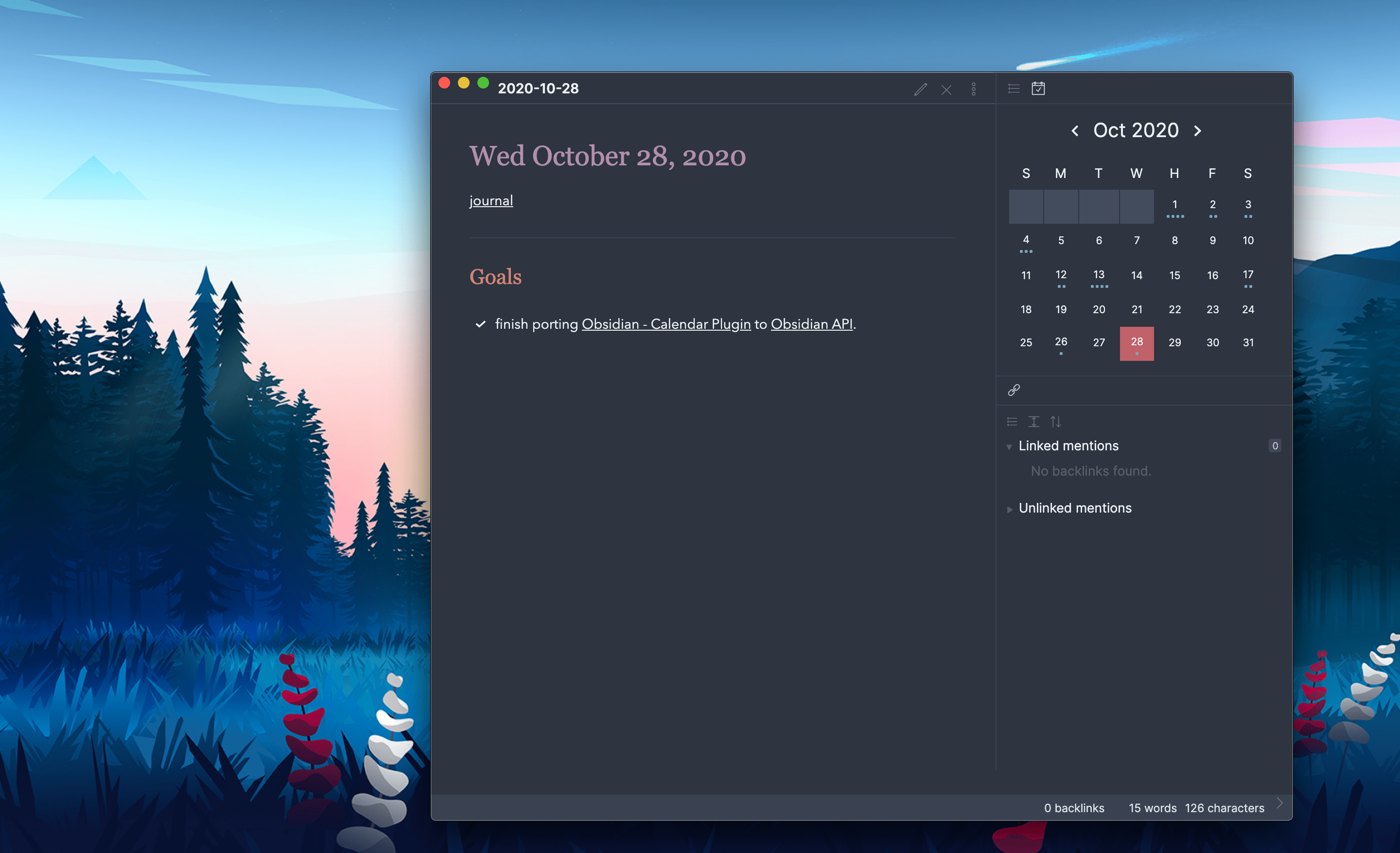
screenshot-full

Usage

After enabling the plugin in the settings menu, you should see the calendar view appear in the right sidebar.

The plugin reads your Daily Note settings to know your date format, your daily note template location, and the location for new daily notes it creates.

Features

  • Go to any daily note.
  • Create new daily notes for days that don't have one. (This is helpful for when you need to backfill old notes or if you're planning ahead for future notes! This will use your current daily note template!)
  • Visualize your writing. Each day includes a meter to approximate how much you've written that day.
  • Use Weekly notes for an added organization layer! They work just like daily notes, but have their own customization options.

Settings

  • Start week on [default: locale]: Configure the Calendar view to show Sunday or Monday as the first day of the week. Choosing 'locale' will set the start day to be whatever is the default for your chosen locale (Settings > About > Language)
  • Words per Dot [default: 250]: Starting in version 1.3, dots reflect the word count of your files. By default, each dot represents 250 words, you can change that value to whatever you want. Set this to 0 to disable the word count entirely. Note: There is a max of 5 dots so that the view doesn't get too big!
  • Confirm before creating new note [default: on]: If you don't like that a modal prompts you before creating a new daily note, you can turn it off.
  • Show Week Number [default: off]: Enable this to add a new column to the calendar view showing the Week Number. Clicking on these cells will open your weekly note.

Customization

The following CSS Variables can be overridden in your obsidian.css file.

/* obsidian-calendar-plugin */
/* https://github.com/liamcain/obsidian-calendar-plugin */

#calendar-container {
  --color-background-heading: transparent;
  --color-background-day: transparent;
  --color-background-weeknum: transparent;
  --color-background-weekend: transparent;

  --color-dot: var(--text-muted);
  --color-arrow: var(--text-muted);
  --color-button: var(--text-muted);

  --color-text-title: var(--text-normal);
  --color-text-heading: var(--text-muted);
  --color-text-day: var(--text-normal);
  --color-text-today: var(--interactive-accent);
  --color-text-weeknum: var(--text-muted);
}

In addition to the CSS Variables, there are some classes you can override for further customization. For example, if you don't like how bright the title is, you can override it with:

#calendar-container .year {
  color: var(--text-normal);
}

Note: It's especially important when overriding the classes to prefix them with #calendar-container to avoid any unexpected changes within Obsidian!

Caution to Theme Creators

If you use "Inspect Element" on the calendar, you will notice that the CSS classes are quite illegible. For example: .task.svelte-1lgyrog.svelte-1lgyrog. What's going on here? The classes that begin with svelte- are autogenerated and are used to avoid the calendar styles affecting any other elements in the app. That being said: ignore them! Those CSS classes are likely to change from release to release, and your overrides will break. Just target the human-readable part of the class names. So to override task.svelte-1lgyrog.svelte-1lgyrog, you should use #calendar-container .task { ... }

Compatibility

obsidian-calendar-plugin currently requires Obsidian v0.9.11 or above to work properly.

Installation

You can install the plugin via the Community Plugins tab within Obsidian. Just search for "Calendar."

FAQ

What do the dots mean?

Each solid dot represents 250 words in your daily note. So 4 dots means you've written a thousands words for that day! If you want to change that threshold, you can set a different value for "Words Per Dot" in the Calendar settings.

The hollow dots, on the other hand, mean that the day has incomplete tasks in it. (Note: There will only ever be 1 hollow dot on a particular day, regardless of the number of remaining tasks)

How do I change the styling of the Calendar?

By default, the calendar should seamlessly match your theme, but if you'd like to further customize it, you can! In your obsidian.css file (inside your vault) you can configure the styling to your heart's content.

Can I add week numbers to the calendar?

In the settings, you can enable "Show Week Numbers" to add a "week number" column to the calendar. Click on the week number to open a "weekly note".

How do I hide the calendar plugin without disabling the plugin?

Just like other sidebar views (e.g. Backlinks, Outline), the calendar view can be closed by right-clicking on the view icon.

how-to-close

I accidentally closed the calendar. How do I reopen it?

If you close the calendar widget (right-clicking on the panel nav and clicking close), you can always reopen the view from the Command Palette. Just search for Calendar: Open view.
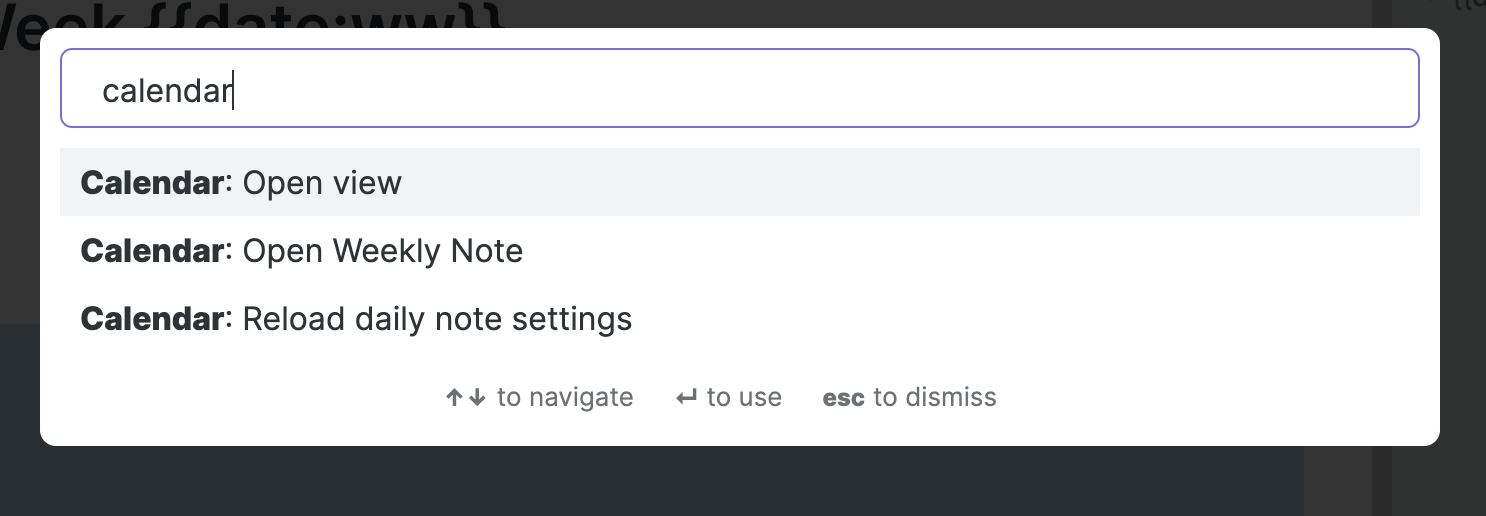
how-to-reopen

How do I have the calendar start on Monday?

From the Settings menu, you can toggle "Start week on Monday".

How do I include "unformatted" words in my weekly note filenames?

If you want the weekly note format to include a word (e.g. "Week 21 of Year 2020") you can do so by surrounding the words with [] brackets. This tells moment to ignore the words. So for the example above, you would set your format to [Week] ww [of Year] gggg.

I don't like showing the week numbers but I still want to use weekly notes. Can I still use them?

You can open the current weekly note from the command palette by searching Calendar: Open weekly Note. This will open the weekly note for the current week.

To configure the format, folder, and template, you will temporarily need to toggle on "Show weekly numbers" in the settings, but if you toggle it back off, your settings will persist.

Protips

Embed your entire week in a weekly note

If you add the following snippet to your weekly note template, you can a seamless view of your week in a single click.

## Week at a Glance

![[{{sunday:gggg-MM-DD}}]]
![[{{monday:gggg-MM-DD}}]]
![[{{tuesday:gggg-MM-DD}}]]
![[{{wednesday:gggg-MM-DD}}]]
![[{{thursday:gggg-MM-DD}}]]
![[{{friday:gggg-MM-DD}}]]
![[{{saturday:gggg-MM-DD}}]]

Hover Preview

Just like the Obsidian's graph and internal links, the calendar supports page previews for your daily notes. Just hover over a cell while holding down Ctrl/Cmd on your keyboard!

The calendar can be moved (and pinned!) anywhere

Just because the calendar appears in the right sidebar doesn't mean it has to stay there. Feel free to drag it to the left sidebar, or (if you have the screen real estate for it) into the main content area. If you move it out of the sidebar, the view can even be pinned; great for more advanced tile layouts!
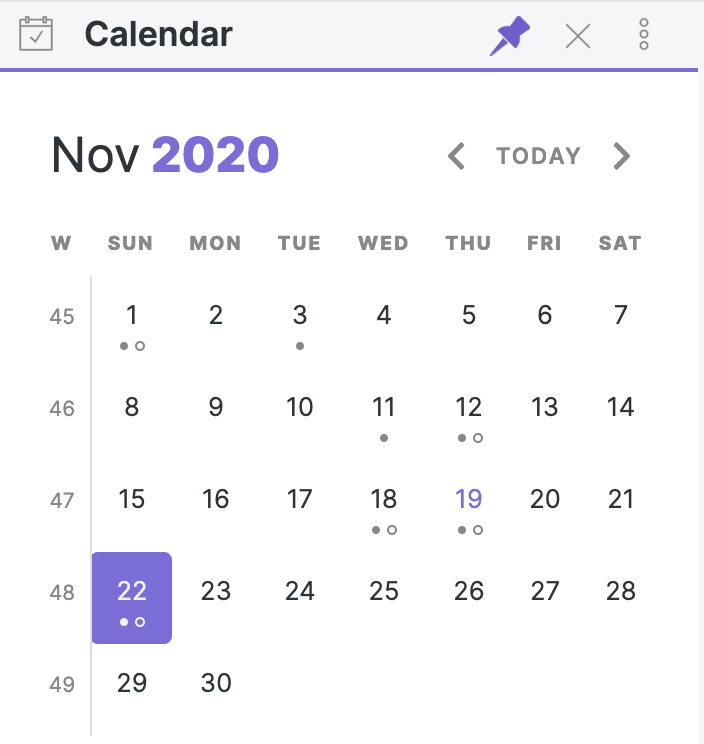
how-to-pin

Open daily notes in a new split

If you Ctrl/Command-Click on a note in your calendar, it will open daily note in a new split. Useful if you want to open a bunch of daily notes in a row (especially if you have the Sliding Panes plugin enabled!)

Reveal open note on calendar

If you open a note from a different month, you might want to see it on the calendar view. To do so, you can run the command Calendar: Reveal open note from the command palette.

Add custom styling for weekends

If you want to style weekends to be distinguishable from weekdays, you can set the var(--color-background-weekend) to be any color you want.
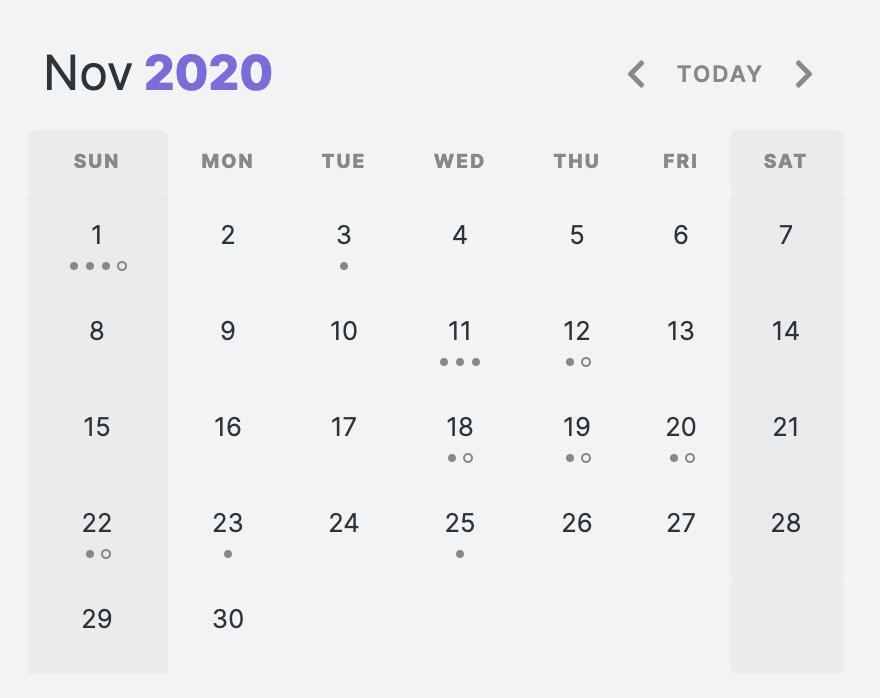
how-to-weekend

Weekly Notes (deprecated)

Weekly notes have a new home

The weekly note functionality has been split out into its very own plugin. In the future, the functionality will be removed from the Calendar plugin; so if you're currently using weekly notes, I encourage you to make the switch. Don't worry, the behavior is functionally identical and will still integrate with the calendar view!

This split was inspired by the One Thing Well philosophy. Plugins should be as modular. Some users might want weekly notes and have no use for a calendar view. And vice versa.

If you are currently using weekly notes within the Calendar plugin, the new Periodic Notes plugin will migrate your settings for you automatically.

Usage

You can open weekly notes in 2 ways: searching Calendar: open weekly note in the command palette or by clicking on the week number. Weekly notes can be configured from the Calendar settings. There are 3 settings:

  • Folder: The folder that your weekly notes go into. It can be the same or different from your daily notes. By default they are placed in your vault root.
  • Template: Configure a template for weekly notes. Weekly notes have slightly different template tags than daily notes. See here for the list of supported weekly note template tags.

Note: The path here won't autocomplete for you, you'll need to enter the full path.

  • Format: The date format for the weekly note filename. Defaults to "gggg-[W]ww. If you use DD in the week format, this will refer to first day of the week (Sunday or Monday, depending on your settings).
Template Tags
Tag Description
sunday, monday, tuesday, wednesday, thursday, friday, saturday, sunday Because weekly tags refer to main days, you can refer to individual days like this {{sunday:gggg-MM-DD}} to automatically insert the date for that particular day. Note, you must specify the date format!
title Works the same as the daily note {{title}}. It will insert the title of the note
date, time Works the same as the daily note {{date}} and {{time}}. It will insert the date and time of the first day of the week. Useful for creating a heading (e.g. # # {{date:gggg [Week] ww}}).

See it in action

Say Thanks 🙏

If you like this plugin and would like to buy me a coffee, you can!

Like my work and want to see more like it? You can sponsor me.

GitHub Sponsors

Similar Plugins

info
• Similar plugins are suggested based on the common tags between the plugins.
Apex Dashboard
a month ago by PandoraReads
Your personal command center — memos, todos, and projects in one stunning glassmorphism dashboard. - This plugin has not been manually reviewed by Obsidian staff.
Auto Daily Note
a year ago by John Dolittle
Auto Journal
3 years ago by Evan Bonsignori
Opinionated journaling automation like daily notes but with backfills for the days that you didn't open Obsidian.
Automatic Table Of Contents
3 years ago by Johan Satgé
💠 An Obsidian plugin to create a table of contents in a note, that updates itself when the note changes
Backlink Settings
a year ago by calvinwyoung
Barosaurus
18 days ago by polygonhunter
One bar for everything — select text and type b for bold, jump to any note, move it to a folder, run any command. Notes, commands and open tabs in one list, ranked by what you are doing right now. - This plugin has not been manually reviewed by Obsidian staff.
Bearings
2 years ago by Jeet Sukumaran
An Obsidian plugin providing dynamically scoped tree views of multidimensional semantic and logcal archictectures of your vault.
BeautyTasks
7 days ago by Avni Bilgin
A Todoist-inspired task and project manager built entirely on Markdown — one note per task, no external services, no dependencies. - This plugin has not been manually reviewed by Obsidian staff.
Beeminder Word Count
5 years ago by Yuta Miyama
Beeminder integration with Obsidian, so that your word count in Obsidian contributes to your writing goals.
Better Word Count
6 years ago by Luke Leppan
Counts the words of selected text in the editor.
Big Calendar
4 years ago by Boninall
Big Calendar in Obsidian, for manage your events in a day/week/month and see agenda too!
Browser Note
15 days ago by fengshuzi
Expose a localhost HTTP API (API-key protected) to view, create, edit and delete vault notes, with a built-in browser UI. - This plugin has not been manually reviewed by Obsidian staff.
Calendar Bases
5 months ago by Edrick Leong
Adds a calendar layout to bases so you can display notes with dates in an interactive calendar view.
Calendar Event Sync
2 years ago by Stephen Dolan
Set the title of your note to the current event
Calendarium
2 years ago by Jeremy Valentine
The ultimate Obsidian plugin for crafting mind-bending fantasy and sci-fi calendars
Canvas Daily Note
3 years ago by Andrew McGivery
A plugin for Obsidian that allows you to add a daily note node to the canvas that will always show todays note.
Chinese Calendar
2 years ago by DevilRoshan
在obsidian中使用的更符合中国习惯的日历插件。
Chinese Novel Assistant
21 days ago by pingo888
A set of small features designed to make writing Chinese novels more convenient. - This plugin has not been manually reviewed by Obsidian staff.
CJK Count
a year ago by Louie Kurenai
Coalesce
a year ago by Floyd
Coalesce is an Obsidian plugin that merges all your linked notes into a single, organized view for a cohesive research and writing experience.
Create Note with Date in This Directory
a year ago by Sangrak Choi
Obsidian plugin for creating a note with current date in this directory
Custom Selected Word Count
a year ago by banisterious
Custom Selected Word Count for Obsidian
Daily Named Folder
5 years ago by Nemo Andrea
Like daily note, but nested in a daily folder and some more improvements
Daily Note Collector
2 years ago by Adar Butel
An Obsidian plugin that adds links to new notes to your daily note.
Daily note creator
3 years ago by Mario Holubar
Automatically creates missing daily notes.
Daily Note Metrics
a year ago by Andre-Diamond
Obsidian Plugin that parses Daily Notes and uses data to create charts
Daily Note Navbar
2 years ago by Karsten Finderup Pedersen
Adds a daily note navbar to quickly navigate between sequential daily notes in Obsidian.
Daily Note Outline
4 years ago by iiz
Add a custom view which shows outline of multiple daily notes with headings, links, tags and list items
Daily Note Pinner
3 years ago by LukeMT
Pins the daily note of the day and unpins other daily notes in Obsidian
Daily Note Structure
2 years ago by db-developer
This obsidian plugin creates a structure for your daily notes
Daily Notes Automater
a year ago by David Pedrero
Daily notes calendar
2 years ago by bartkessels
Quickly navigate your vault using a calendar view, this plugin allows you to create and navigate to periodic notes and notes that are created on a specific date.
Daily notes opener
4 years ago by Reorx
Easily open daily notes and periodic notes in new pane; customize periodic notes background; quick append new line to daily notes.
Daily Notes Tweaks
9 months ago by René Coignard
Open a random daily note and automatically switch past daily notes to reading mode.
Daily Notes Viewer
4 years ago by Johnson0907
Daily Prompt
2 years ago by Erl-koenig
Daily Routine
a year ago by sechan100
new version of daily-routine obsidian plugin
Daily Statistics
2 years ago by yefengr
obsidian daily statistics
Daily Stats
6 years ago by Dhruvik Parikh
Plugin to view your daily word count across all notes in your Obsidian.md vault.
Date Inserter
2 years ago by namikaze-40p
An Obsidian plugin that lets you insert a date at the cursor position using a calendar.
Datepicker
2 years ago by Mostafa Mohamed
Datepicker widget for Obsidian.
Day Planner
16 days ago by ivan-lednev
Day planning from a task list in a Markdown note with enhanced time block functionality.
Dayframe
6 days ago by Ganessh Kumar R P
like a picture frame but for your daily notes. - This plugin has not been manually reviewed by Obsidian staff.
Diarian
2 years ago by Erika Gozar
All-in-one journaling toolkit.
Dust Calendar
2 years ago by 纳米级尘埃
obsidian 日历插件
Efficient Word Count
a year ago by Blue Heron
Efficiently calculates and caches word counts for notes, with folder exclusion. Uses cache to avoid recalculating word counts for unchanged notes.
Every Day Calendar
a year ago by QuBe
Obsidian plugin to create calendars inspired by Simone Giertz's Every Day Calendar
Everyday Classical Music
2 years ago by the flying markhor
Obsidian Plugin: Enhance your daily notes with the timeless elegance of classical music. Have a great day with the company of beautiful melodies!
File Info Panel
5 years ago by CattailNu
This plugin for Obsidian creates a small File Info view that displays the active file's date created, date modified, file size, and links to open the file in its native application and to open the file's folder.
Foodiary
2 years ago by vkostyanetsky
Food tracker plugin for Obsidian
Full Calendar Remastered
2 months ago by obsidian-full-calendar-remastered
Complete Calendar HUB experience. Work with all your calendars in one place. Analyze your time and take action! - This plugin has not been manually reviewed by Obsidian staff.
Future Dates
2 years ago by Dmitry Manannikov
Gantt Calendar
a month ago by Sugar
A powerful visual task management plugin. Visualize and manage tasks created by the Tasks plugin, supporting both emoji and Dataview task formats. Support Feishu Task syncing. - This plugin has not been manually reviewed by Obsidian staff.
Geulo
2 years ago by Junyoung Bang
Extension for pulling and syncing the videos that you liked in Youtube to Obsidian vault.
Google Calendar
4 years ago by YukiGasai
Add Google Calendar inside Obsidian
Google Calendar Importer
10 months ago by Fan Li
A simple and light-weighted google calendar importer, allow injecting the events / tasks of a day automatically to your daily notes, or import it to anywhere with a command.
Granola Sync
7 days ago by tomelliot
Sync Granola notes to your vault.
Habit Calendar
4 years ago by Hedonihilist
Monthly Habit Calendar for DataviewJS. This plugin helps you render a calendar inside DataviewJS code block, showing your habit status within a month.
Heatmap Calendar
4 years ago by Richard Slettevoll
An Obsidian plugin for displaying data in a calendar similar to the github activity calendar
Heatmap Tracker
2 years ago by Maksim Rubanau
A customizable heatmap tracker plugin for Obsidian to visualize daily data trends with intuitive navigation and flexible settings.
Hledger Notes
a year ago by Boburmirzo Khamrakulov
Hledger Notes: Create and manage hledger entries directly in Obsidian Daily notes
iCal
3 years ago by Andrew Brereton
This is a plugin for Obsidian that searches your vault for tasks that contain dates, and generates a calendar in iCal format that can be imported into your preferred calendar application.
ICS
3 years ago by muness
Generate Daily Planner from one or more ical feeds
Inboxer
a year ago by Eoin Hurrell
Obsidian plugin to add an inbox to notes
Itinerary
5 years ago by Adam Coddington
Make planning your trip or event easier by rendering a calendar from event information found in your notes.
Journal Review
3 years ago by Kageetai
Review your daily notes on their anniversaries, like "what happened today last year"
Journal View
9 days ago by RUverse
Turn your daily notes into one continuous, editable journal—scroll through time, jump to any date, and write without leaving the view. - This plugin has not been manually reviewed by Obsidian staff.
Journey
6 years ago by Alexis Rondeau
Discover the story between your notes in Obsidian
Jump-to-Date
5 years ago by TfTHacker
Jump to a date via a convenient popup form. This plugin is a part of the Obsidian42 family of Obsidian plugins.
Keep the Rhythm
2 years ago by Ezben
An Obsidian plugin to track your daily word count through a heatmap.
Life in Weeks Calendar
9 months ago by Jeff Szuc
Plugin for the Obsidian markdown editor. Displays a calendar of your life in weeks with weekly Periodic Notes plugin integration. Includes options for the traditional Memento Mori/Stoic style calendar, as well as a Gregorian calendar accurate version.
Limitless Lifelogs
a year ago by Maclean Dunkin
Sync your Limitless AI lifelog entries directly into Obsidian markdown files.
Live Life Recording
a month ago by goryugocast
Record task start and finish times directly in Markdown. LLR (Live Life Recording) adds routine insertion and a lightweight daily summary sidebar. - This plugin has not been manually reviewed by Obsidian staff.
LongtimeDiary
5 months ago by sawamaru
Show past Daily notes on the same day in previous years.
Lunar Calendar
3 years ago by OSmile
obsidian插件,一个支持农历的日历插件。
MagicCalendar
3 years ago by Vaccarini Lorenzo
An obsidian plugin that exploit a natural language processing engine to find potential events and sync them with iCalendar
Markdown Calendar Generator
a year ago by Zach Russell
An intentionally simple obsidian markdown table calendar generator
MemoChron
a year ago by Michalis Efstratiadis
Calendar integration and note creation with support for public iCalendar URLs.
Memos Sync
2 years ago by RyoJerryYu
Syncing Memos to Obsidian daily note. Fully compatible with official Daily Notes plugin, Calendar plugin and Periodic Notes plugin.
Mobile Sidebar Notes
5 days ago by ckep1
Open notes & new tabs in the sidebar in the mobile app.
Morgen Tasks
2 years ago by Morgen AG
Multiple Daily Notes
a year ago by Vab Kapoor
Obsidian plugin for adding multiple daily notes, with some extra configurations too.
Natural Language Dates
19 days ago by obsidian-community
Create date-links based on natural language.
Nav Link Header
2 years ago by ahts4962
Display navigation links at the top of the notes in Obsidian
Nested Daily Todos
3 years ago by Thomas Brezinski
A plugin for Obsidian will parse previous Daily Notes for incomplete todos and add them to today's Daily Note. It supports grouping the todos by section and supports alternative checkbox states and nested todos.
Notebook Navigator
16 days ago by Johan Sanneblad
A better file browser and calendar inspired by Apple Notes, Bear, Evernote and Day One.
Notion Bases
a month ago by bgarciamoura
Turn any folder into a database — table, kanban board, gallery, calendar, timeline and list views powered by frontmatter. - This plugin has not been manually reviewed by Obsidian staff.
Novel Word Count
4 years ago by Isaac Lyman
Obsidian plugin. Displays a word count or other statistic for each file, folder and vault in the File Explorer pane.
Open or Create File
10 months ago by Ilya Paripsa
Set up Obsidian commands that create or open files based on predefined patterns.
Open with Natural Language Dates
2 years ago by Charlie Chao
Quickly open a daily note using natural language. Requires "Natural Language Dates" plugin to work.
Operon
5 days ago by Hasan Yılmaz
Task and project management system that unifies inline tasks and file-based tasks in the same workflows with Tables, Filters, Calendar planning, Kanban boards, pinned tasks, and time tracking. - This plugin has not been manually reviewed by Obsidian staff.
Organized daily notes
a year ago by duchangkim
Automatically organizes your daily notes into customizable folder structures for better organization and easier navigation.
Outlook Meeting Notes
a year ago by David Ingerslev
An Obsidian plugin to create meeting notes from Microsoft Outlook .msg files
OZ Calendar
3 years ago by Ozan Tellioglu
Obsidian plugin to display notes on a calendar based on YAML frontmatter or file names
Pinboard Sync
5 years ago by Mathew Spolin
Obsidian plugin to sync Pinboard.in links to Daily Notes
Pinned Daily Notes
a year ago by Jeremy Neiman
Dynamically update a pinned tab with today's daily note
Pinned Tabs
6 days ago by NameIsKyro
Chrome-style compact pinned tabs with custom icons, smooth movement, and accidental-close protection. - This plugin has not been manually reviewed by Obsidian staff.
Power Bases
11 days ago by Power Plugins
Add board, calendar, timeline, chart, gallery, and table views to Bases, with inline editing, colors, rollups, field types, formulas, and CSV import. - This plugin has not been manually reviewed by Obsidian staff.
Previous Daily Note
a year ago by Marcos Talau
Plugin for Obsidian that opens the previous daily note
Prisma Calendar
9 days ago by Matej Vavro Productivity
Prisma turns any note with a date into a flexible planning system inside Obsidian. There are no rigid schemas or predefined structures — just your data, your rules, fully under your control. - This plugin has not been manually reviewed by Obsidian staff.
Reflection
3 years ago by Brandon Boswell
An Obsidian Plugin for seeing daily and weekly notes from this day in years past.
Repeat
4 years ago by Andre Perunicic
Review notes using periodic or spaced repetition.
ReverySky Map
25 days ago by MoonSkorch Studio
Navigate your vault through an interactive 3D graph built with a game engine and shaped into an explorable universe. - This plugin has not been manually reviewed by Obsidian staff.
Review
6 years ago by ryanjamurphy
Add the current note to a future daily note to remember to review it.
Rollover Daily Todos
6 years ago by Matt Sessions
An obsidian plugin that rolls over todo items from the previous daily note
Rollover Weekly Todo
2 years ago by Shubham Sethi
An obsidian plugin that rolls over todo items from the previous weekly note
Sheet Plus
24 days ago by ljcoder
Create Excel-like spreadsheets and easily embed them in Markdown.
Single File Daily Notes
3 years ago by Pranav Mangal
An Obsidian plugin to create and manage daily notes in a single file
Status.lol Publisher
a year ago by Eric Walker
Allows you to post to weblogs.lol, status.lol, some.pics and paste.lol from Obsidian.
Streams
a year ago by Floyd
Streams Obsidian Plugin
Synaptic View
5 months ago by Yongmini
A dynamic control center for your vault. Unify hubs, notes, tasks, periodic notes, and web resources with intuitive buttons. Replace new tab for instant access.
Target Word Count
2 years ago by TwoFive Labs
Target Word Count Plugin for Obsidian
Task Mover
a year ago by Mariia Nebesnaia
A plugin for obsidian to move unfinished tasks to the daily note automatically
Tasks Calendar Wrapper
3 years ago by zhuwenq
This plugin currently provides a timeline view to display your tasks from your obsidian valut, with customizable filters and renderring options.
Telegram Inbox
2 years ago by icealtria
Receive messages from Telegram bots and add them to Obsidian's daily note.
Templated daily notes
2 years ago by digitorum
Allow to create templayted daily note in specific folder
Things Logbook
6 years ago by Liam Cain
Sync your Things 3 Logbook with Obsidian
Thino
9 days ago by quorafind
Quickly capture memos and display them in the sidebar with a heatmap. (Closed source)
Time Ruler
3 years ago by Joshua Tazman Reinier
A drag-and-drop time ruler combining the best of a task list and a calendar view (integrates with Tasks, Full Calendar, and Dataview).
Timestamper
9 months ago by René Coignard
Insert the current timestamp into your notes.
Upcoming
4 years ago by Charlie Chao
Show upcoming daily notes in their own panes.
Vault Stats
a year ago by Blue Heron
A plugin with some simple statistics.
Waka time box
3 years ago by complexzeng
Wordflow Tracker
a year ago by LeCheenaX
Track the changes and stats of your edited note files automatically in Obsidian. Record the modified notes and statistics to your daily note with various customizations!
WPM Reading Time - How Long to Read This Text
4 months ago by Santi Younger
Calculate reading time estimates for selected text using your own reading speed in Words Per Minute.
Writing Goals
3 years ago by James Lynch
Set yourself dynamic writing goals for notes and folders to help you hit your long form writing targets with Obsidian.
YourPulse - Your Writing Activity Visualised
a year ago by Jiri Sifalda
YourPulse.cc - Obsidian.md plugin that turns your vault into a reflection of your creativity, and put your writing on steroids 💪