Notion Bases

by bgarciamoura
5
4
3
2
1
Score: 37/100

Description

Category: Productivity Tools

The Notion Bases plugin turns folders of markdown notes into local databases with table, board, gallery, list, calendar, timeline and chart views. It stores rows as normal notes with frontmatter fields, then layers a database style interface on top with inline editing, column pinning, multi column sorting, filters, bulk actions and CSV import or export. The plugin also adds richer data modelling through formula columns, relations, lookups, rollups, subtasks and media aware fields for images, audio and video. Charts are rendered as SVG, timeline views support drag resizing, and board views allow card movement by grouped fields. Instead of replacing notes with a separate storage system, it keeps everything in plain markdown while expanding how structured note collections can be queried, visualised and edited.

Reviews

No reviews yet.

Stats

stars
12,224
downloads
0
forks
32
days
NaN
days
NaN
days
0
total PRs
0
open PRs
0
closed PRs
0
merged PRs
0
total issues
0
open issues
0
closed issues
0
commits

Latest Version

Invalid date

Changelog

README file from

Github

Notion Bases for Obsidian

The database engine Obsidian deserves

7 views. 18 column types. Charts, subtasks, formulas and relations. Zero code required.

Turn any folder into a Notion-style database with Table, Board (Kanban), Gallery, List, Calendar, Timeline (Gantt), and Chart views — powered by plain Markdown and frontmatter. Your data stays yours, always.

Now available in Obsidian's Community Plugins directoryinstall it directly in the app

GitHub release Obsidian License Downloads

Stars Issues PRs Welcome

Website · Latest Release · Report Bug · Request Feature
Hero — Table view overview


Highlights

  • 7 views — Table, Board (Kanban), Gallery, List, Calendar, Timeline (Gantt), Chart
  • 18 column types — Title, Text, Number, Select, Multi-select, Checkbox, Date, URL, Email, Phone, Status, Formula, Relation, Lookup, Rollup, Image, Audio, Video
  • Charts — Bar, line, and pie charts with configurable axes, aggregations, and smart formatting — pure SVG, zero dependencies
  • Subtasks — Hierarchical rows with expand/collapse, up to 3 levels deep, powered by self-relation columns
  • Rollup columns — Aggregate values across related databases with 7 functions (sum, count, avg, min, max, count_values, list)
  • Formula engine — Spreadsheet-style functions: IF, SUM, AVG, CONCAT, LEFT, ROUND, and many more
  • Relations & Lookups — Link rows across databases and pull values from related notes
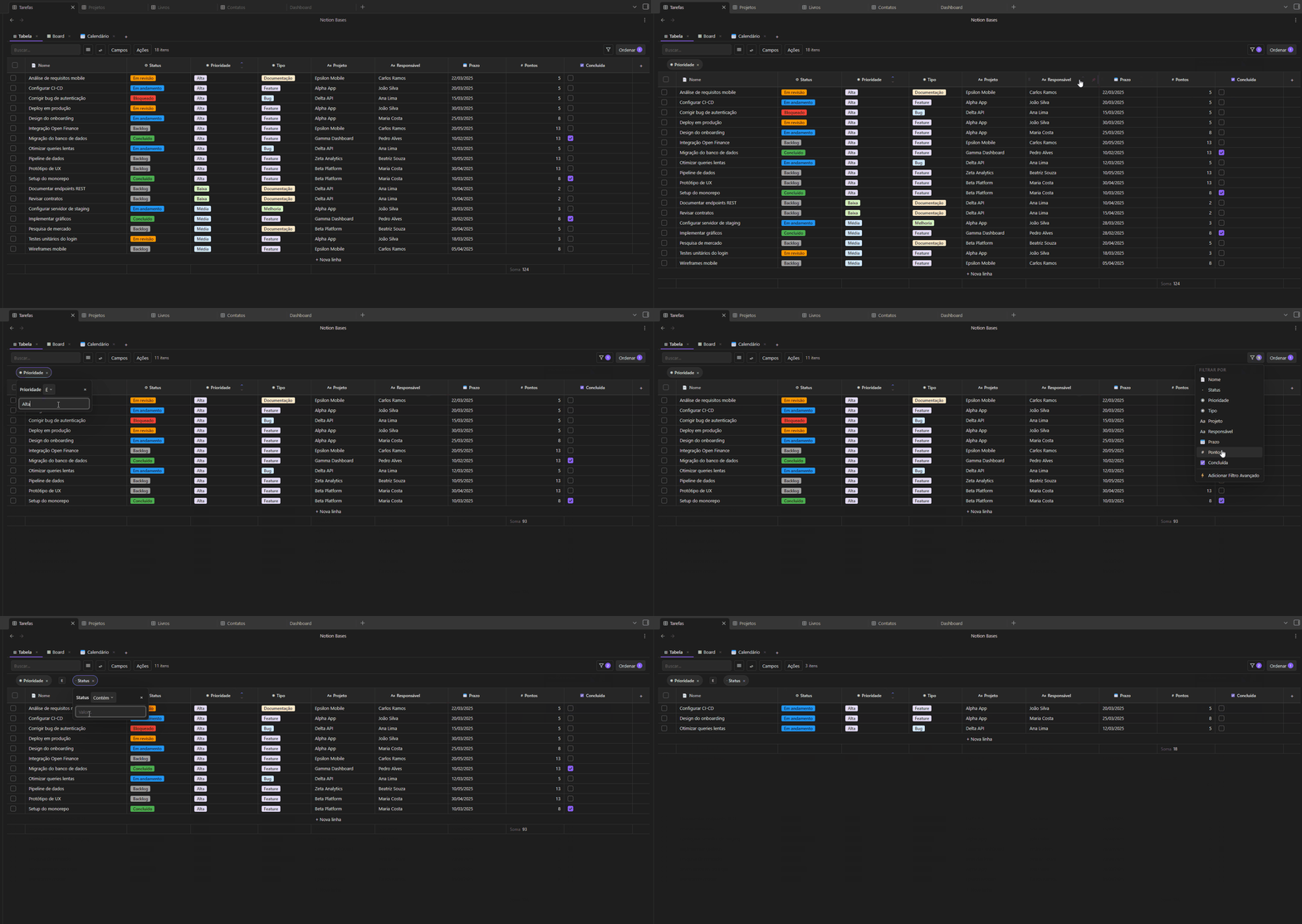
  • Advanced filters — Type-aware operators with AND/OR logic
  • Live placeholders{{column}} tokens in a note body render the current cell value in reading view, updating as you edit the table
  • Auto-arrange — Optionally file rows into nested subfolders driven by property values (status=Done, priority=HighDone/High/row.md)
  • 7 languages — English, Português (BR), Español, Français, Deutsch, 中文, 日本語
  • 100% local Markdown — Every row is a .md file, every column is a frontmatter field. No lock-in, no cloud, no telemetry

Why Notion Bases?

Obsidian's built-in Bases plugin is great for tables and has its own expression-based formula system. Notion Bases focuses on a different set of trade-offs — more views, more column types, and a spreadsheet-style formula syntax.

Views

View Notion Bases Core Bases
Table Yes Yes
Board / Kanban Yes No
Gallery Yes No
List Yes Yes
Calendar Yes No
Timeline / Gantt Yes No
Chart view Yes No

Notion Bases offers 5 exclusive views that Core Bases doesn't have — Board, Gallery, Calendar, Timeline, and Chart — giving you the flexibility to visualize data the way that fits your workflow.

Data modeling

Feature Notion Bases Core Bases
Column types 18 6
Formulas Spreadsheet-style (IF, SUM, AVG, CONCAT) Expression-based (JS-like)
Relation columns Yes No
Lookup columns Yes No
Rollup columns Yes No
Image columns Rendered in cell Text only
Subtasks / Sub-rows Yes No
Number formatting (prefix, suffix, decimals, thousands) Yes No

With relation and lookup columns, you can link databases together and pull values across notes — just like Notion. The spreadsheet-style formula syntax is familiar to anyone who has used Excel or Google Sheets.

Table experience

Feature Notion Bases Core Bases
Column reordering (drag) Yes Yes
Column resizing (drag) Yes Yes
Column pinning Yes No
Row height options Yes Yes
Text wrap toggle Yes No
Aggregation row 5 functions always visible Right-click → Summarize
Multi-column sort with priority Yes Basic sort
CSV import / export Yes No
Bulk actions (delete, duplicate, move) Yes No

Both plugins let you resize, reorder columns and adjust row height. Notion Bases goes further with column pinning, text wrap, a persistent aggregation footer, multi-column sort with drag-to-reorder priority, CSV import/export, and bulk row actions.

Shared features

Feature Notion Bases Core Bases
Embed database in any note Yes Yes
Multiple views per database Yes Yes
AND/OR filter logic Yes Yes
100% local Markdown Yes Yes

If you ever wished Obsidian had Notion-level databases without leaving your vault, this is it.


Views

Table

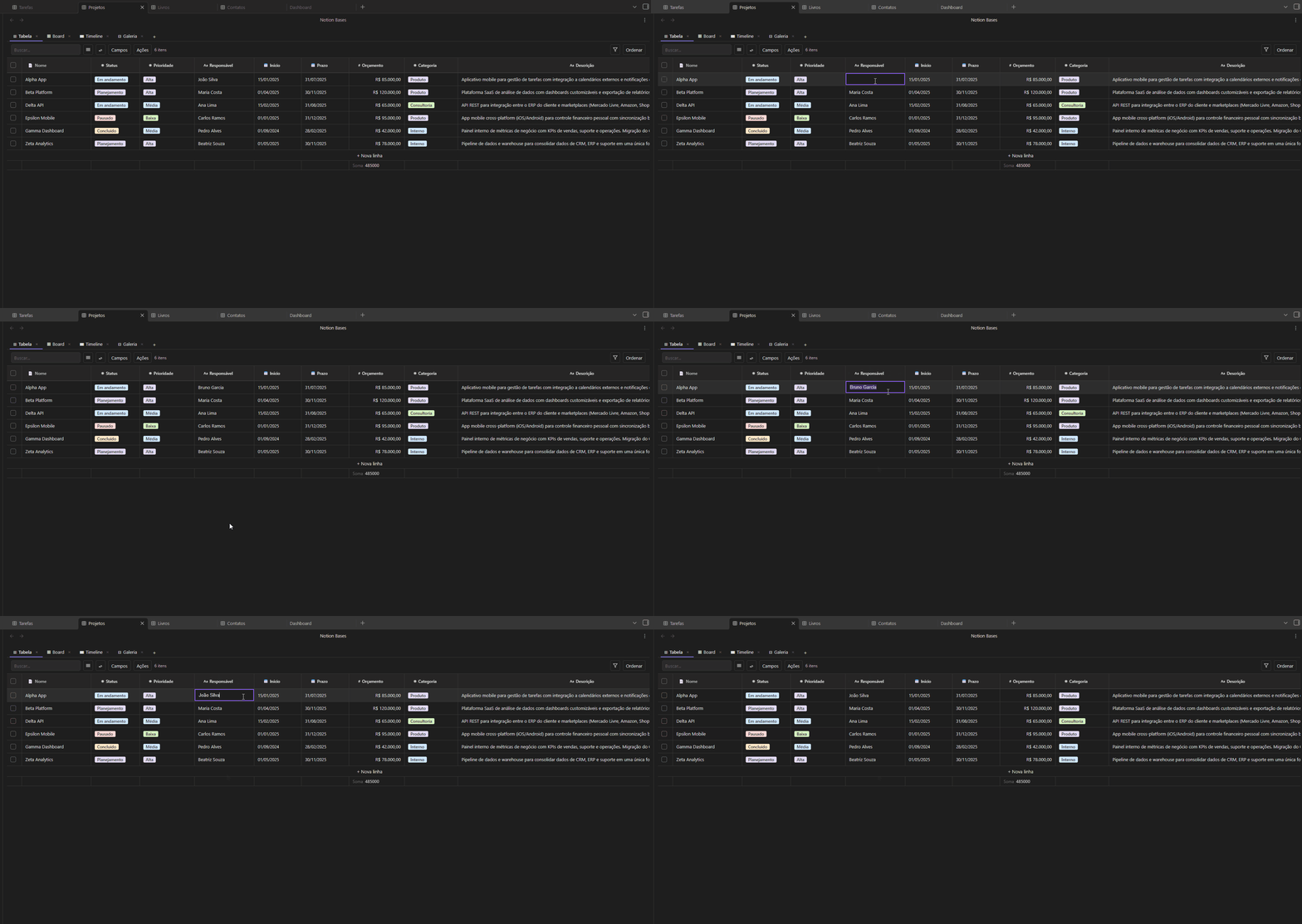
A fully interactive spreadsheet: inline editing, resizable/reorderable/pinnable columns, aggregation footer, row height options, text wrap, multi-column sort, and bulk row actions.
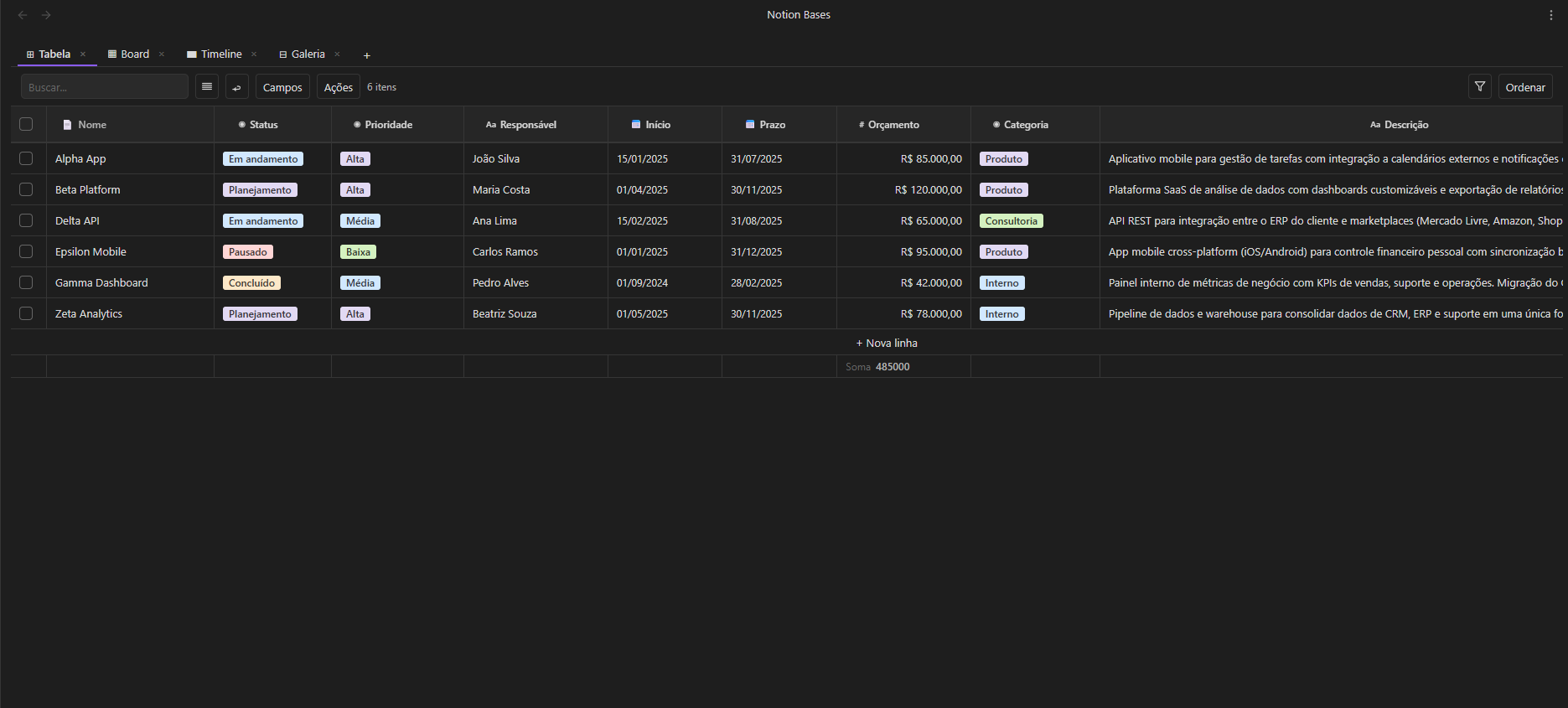
Table view

Board (Kanban)

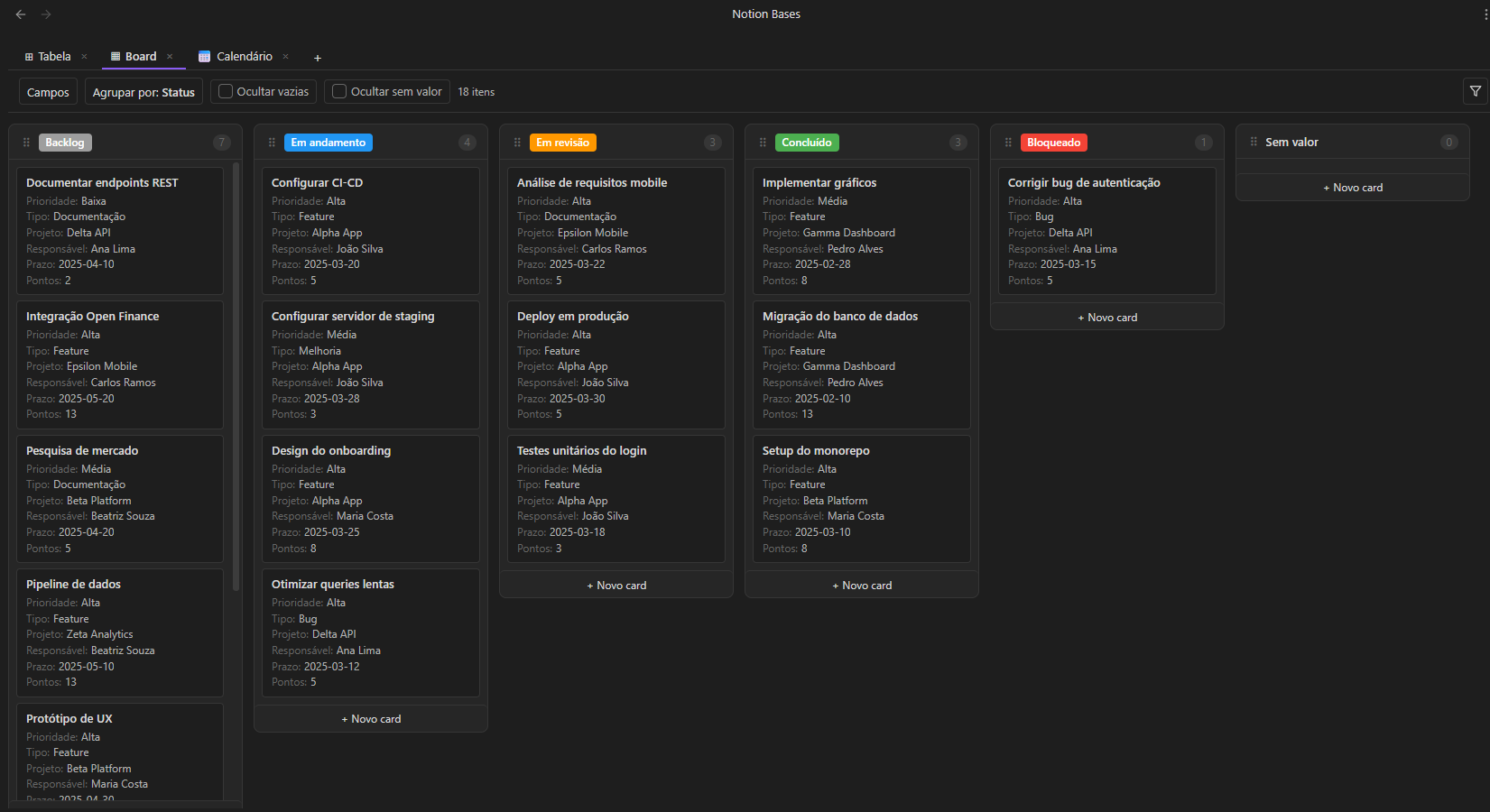
Drag cards between columns grouped by any select or status field. Add cards directly to a column. Hide empty or no-value columns. Configure which properties appear on each card.
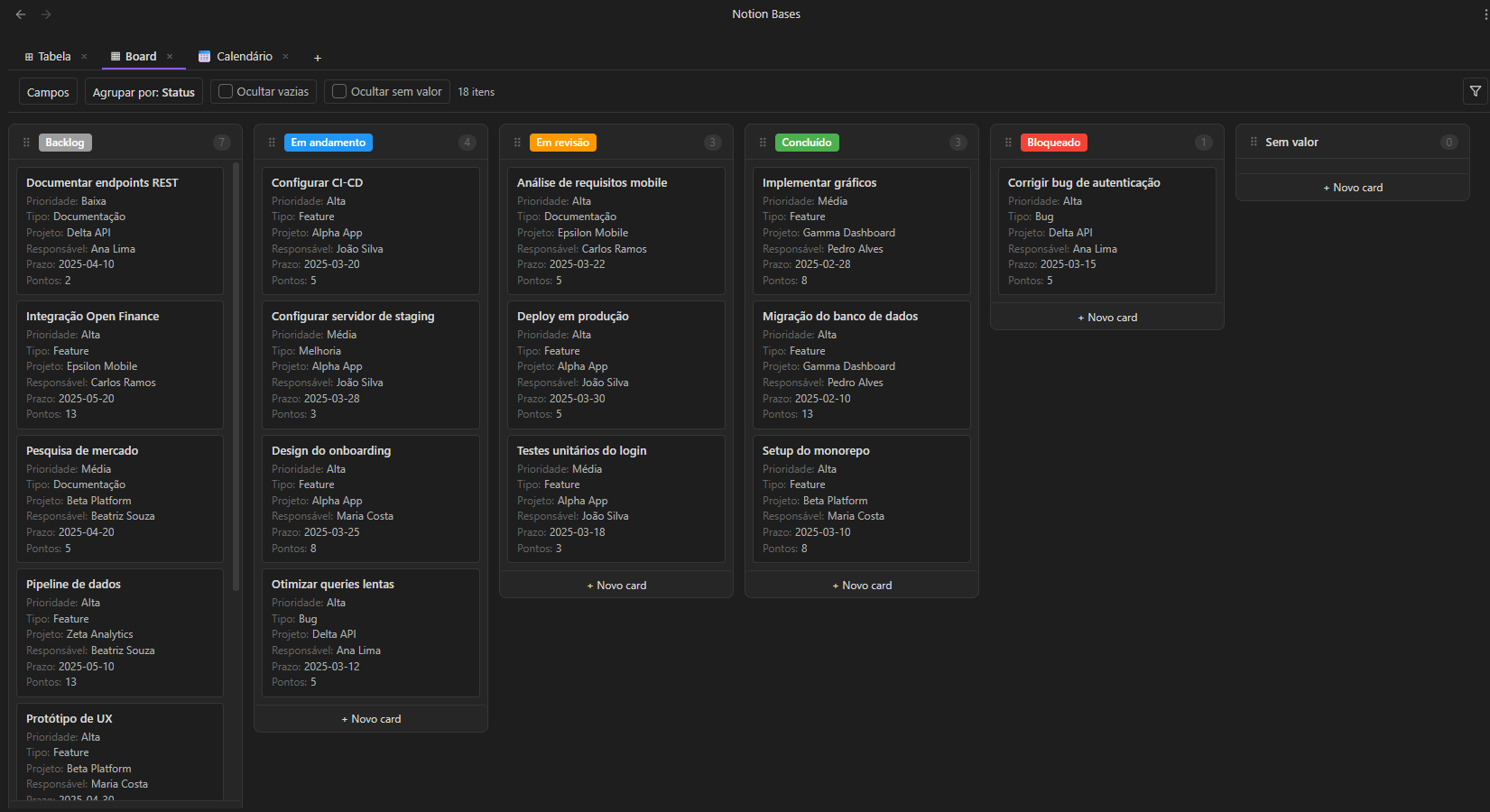
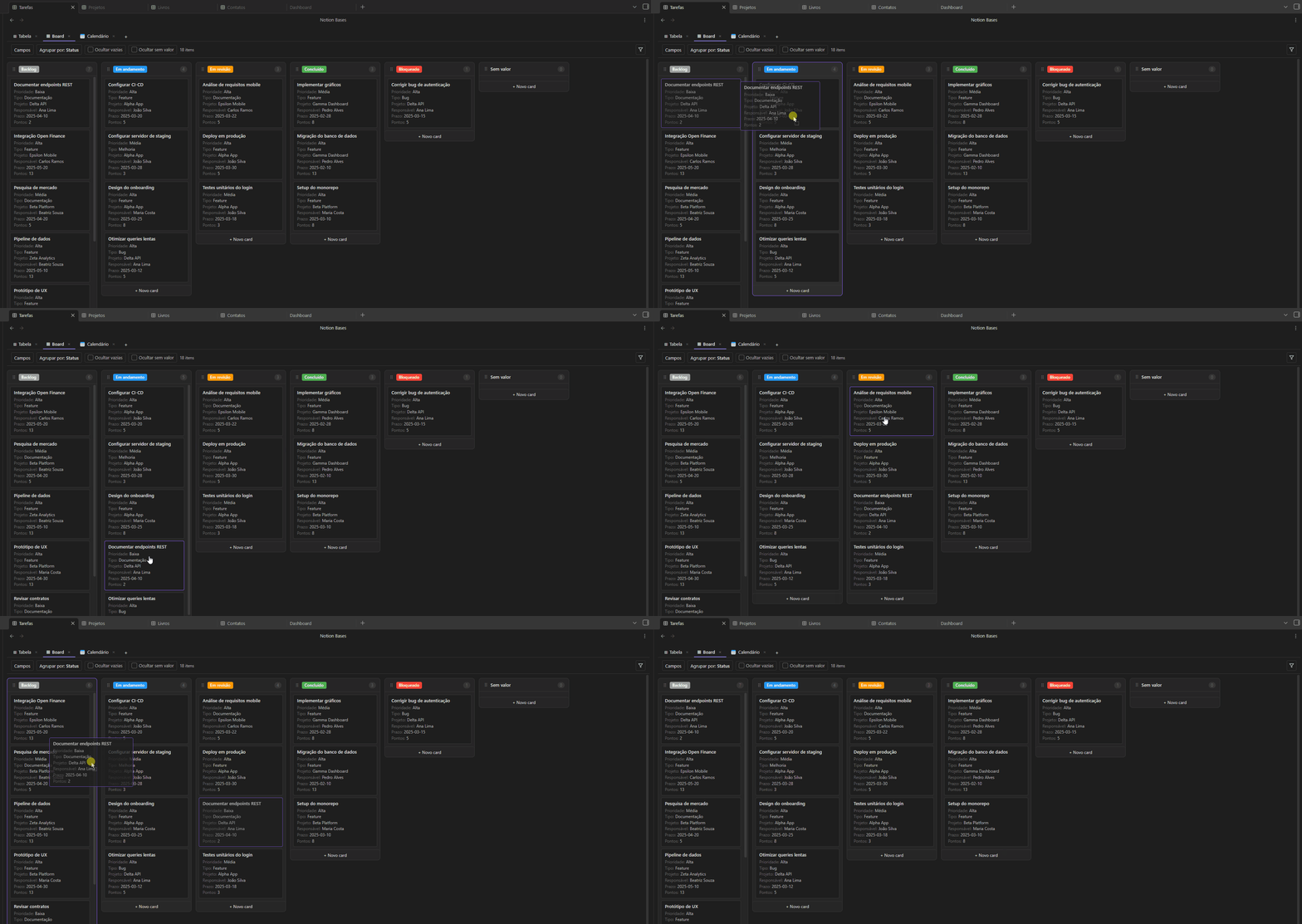
Board view

Board drag

A responsive card grid. Pick a cover field, choose card size (small / medium / large), and display any properties below the title.
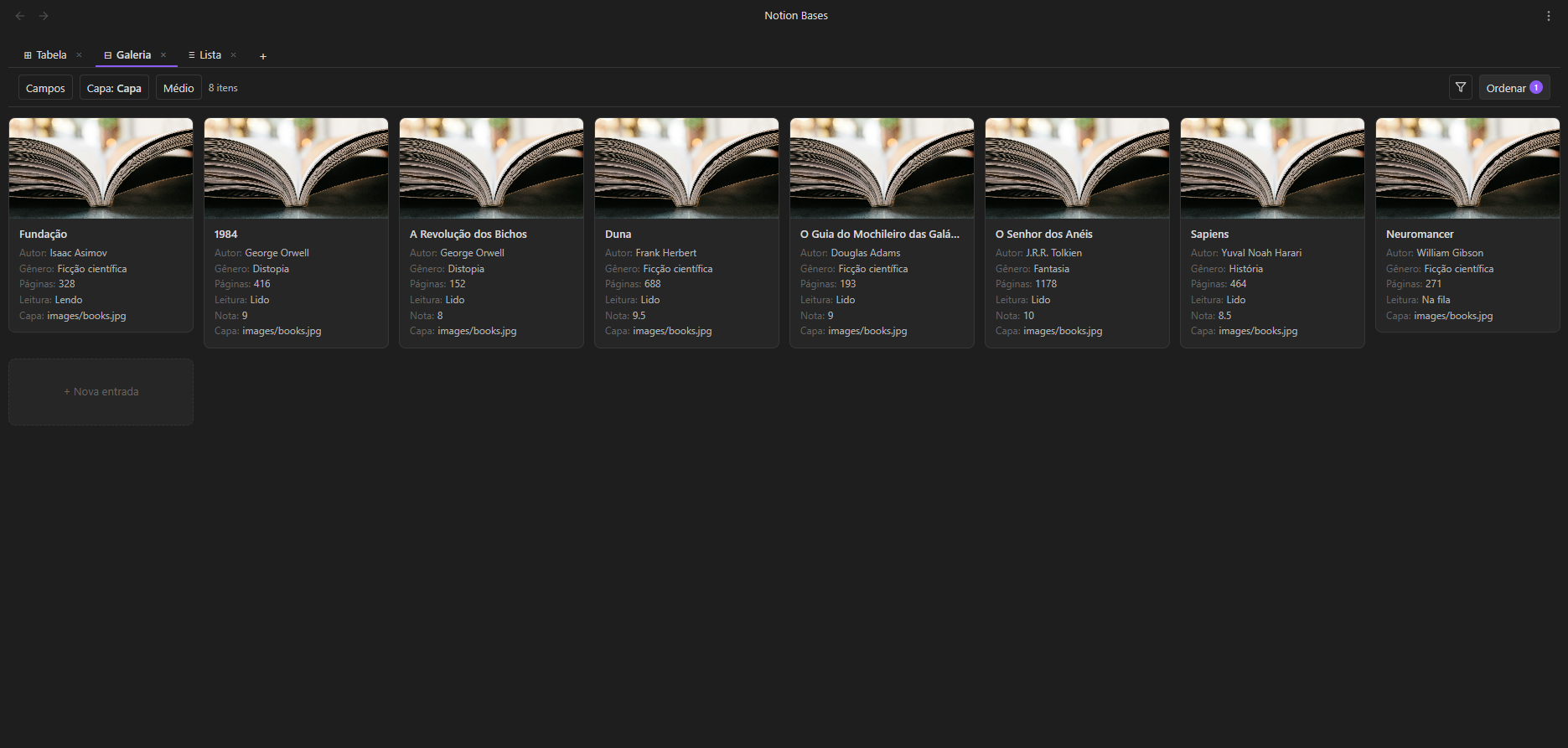
Gallery view

List

A minimal, single-line view — title plus property chips. Great for quick overviews and task-oriented databases.
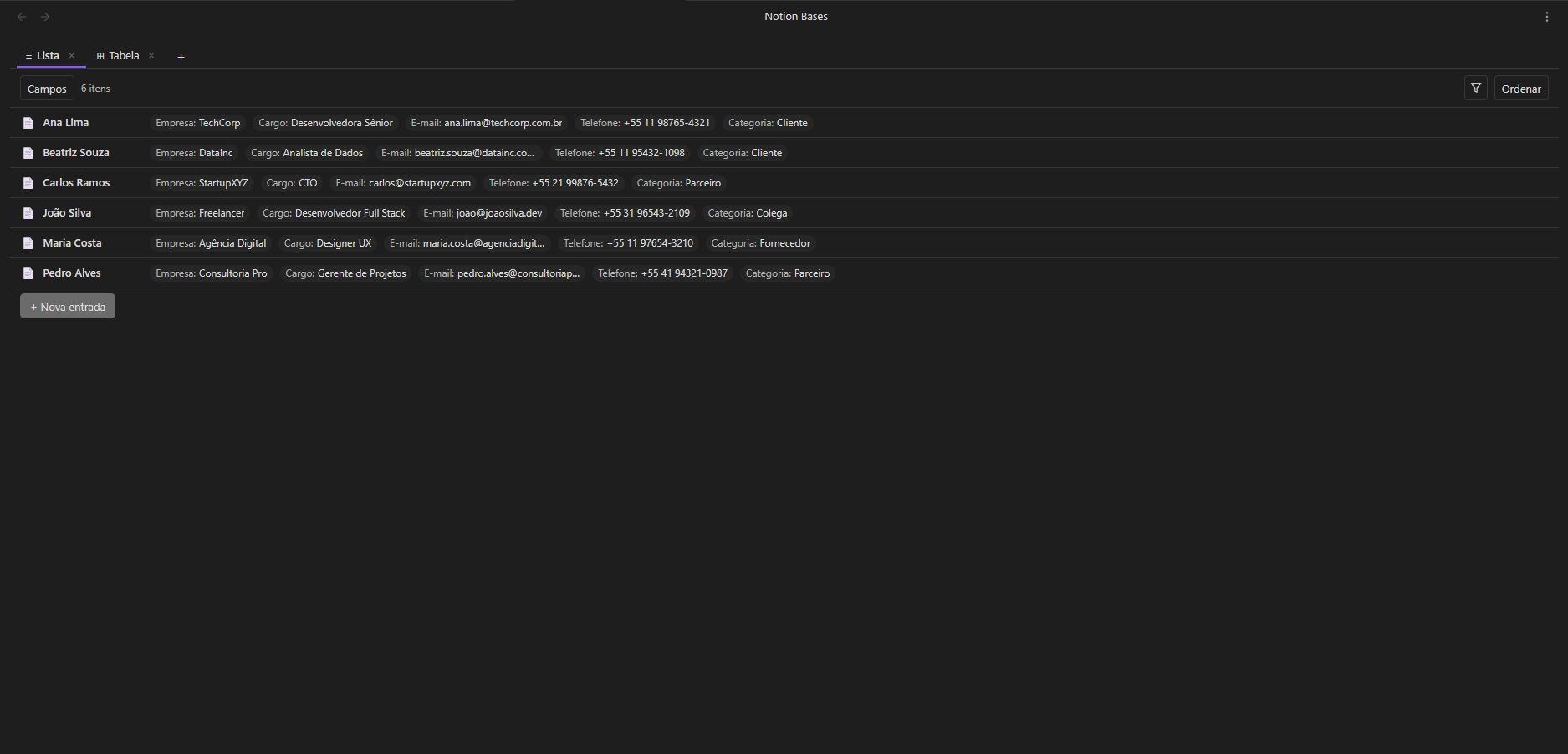
List view

Calendar

Monthly calendar. Position notes by any date field. Click a day to create a note with the date pre-filled. Notes without a date appear in a collapsible section.
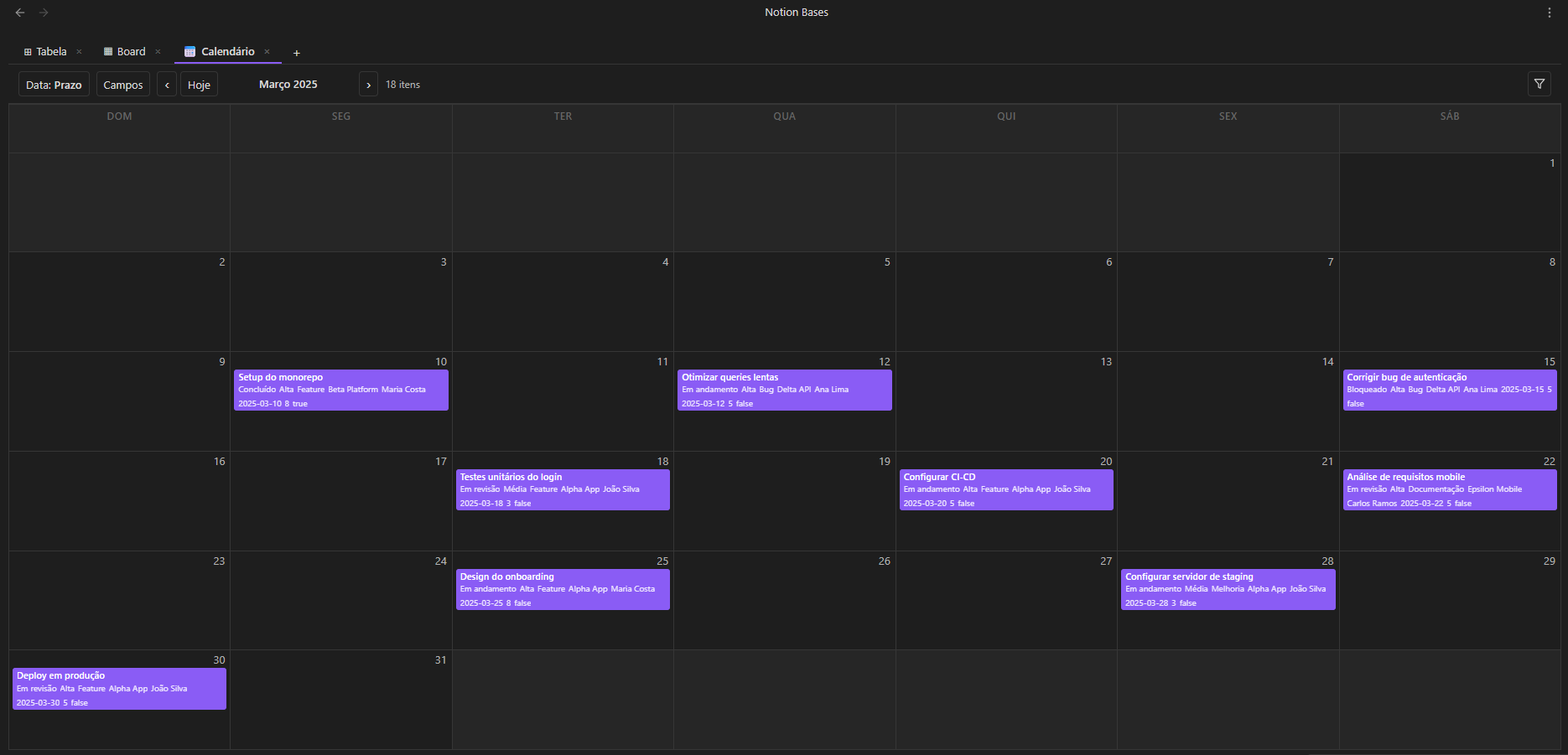
Calendar view

Timeline (Gantt)

Horizontal bar chart with three zoom levels (days / weeks / months). Drag bar edges to resize start or end dates. Group rows by any field.
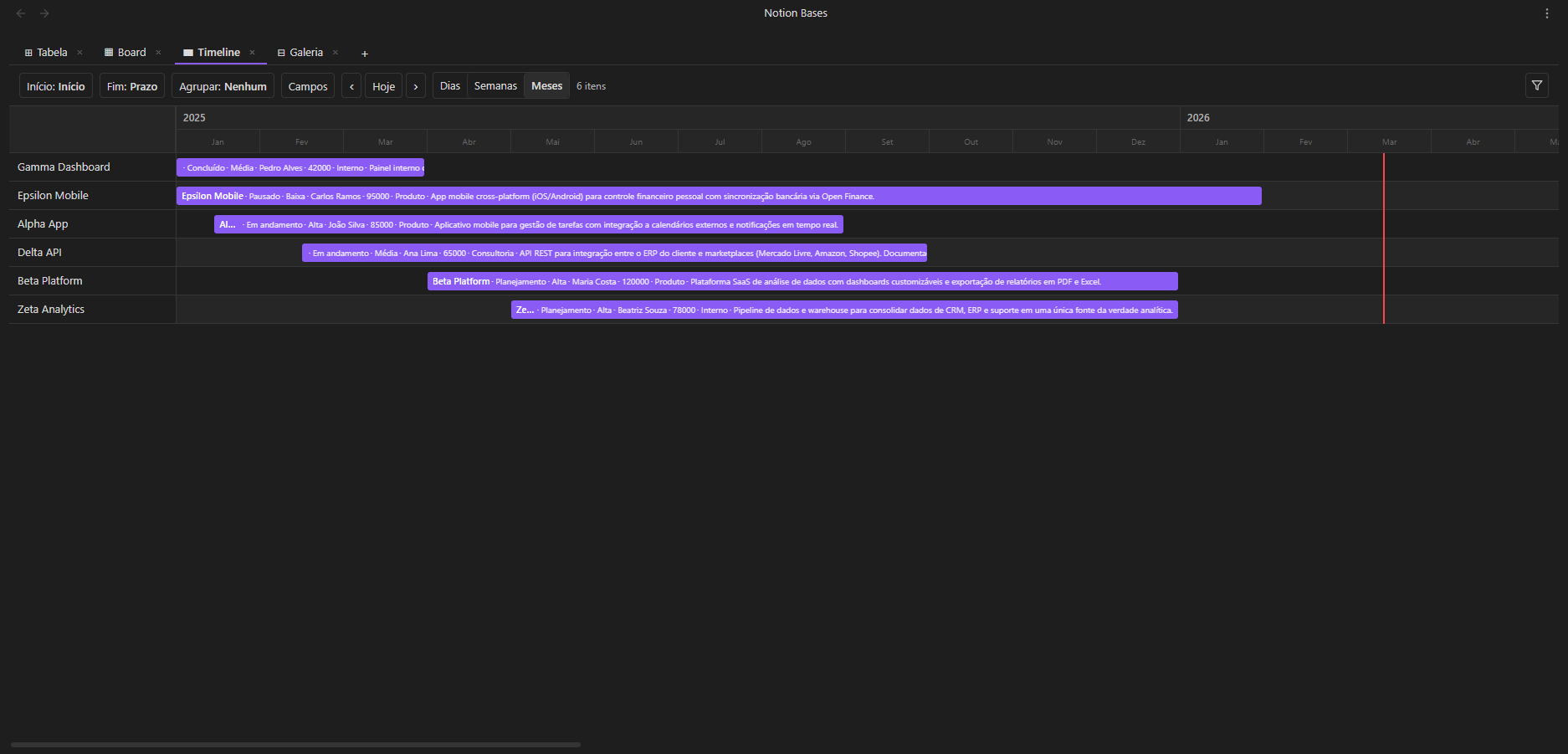
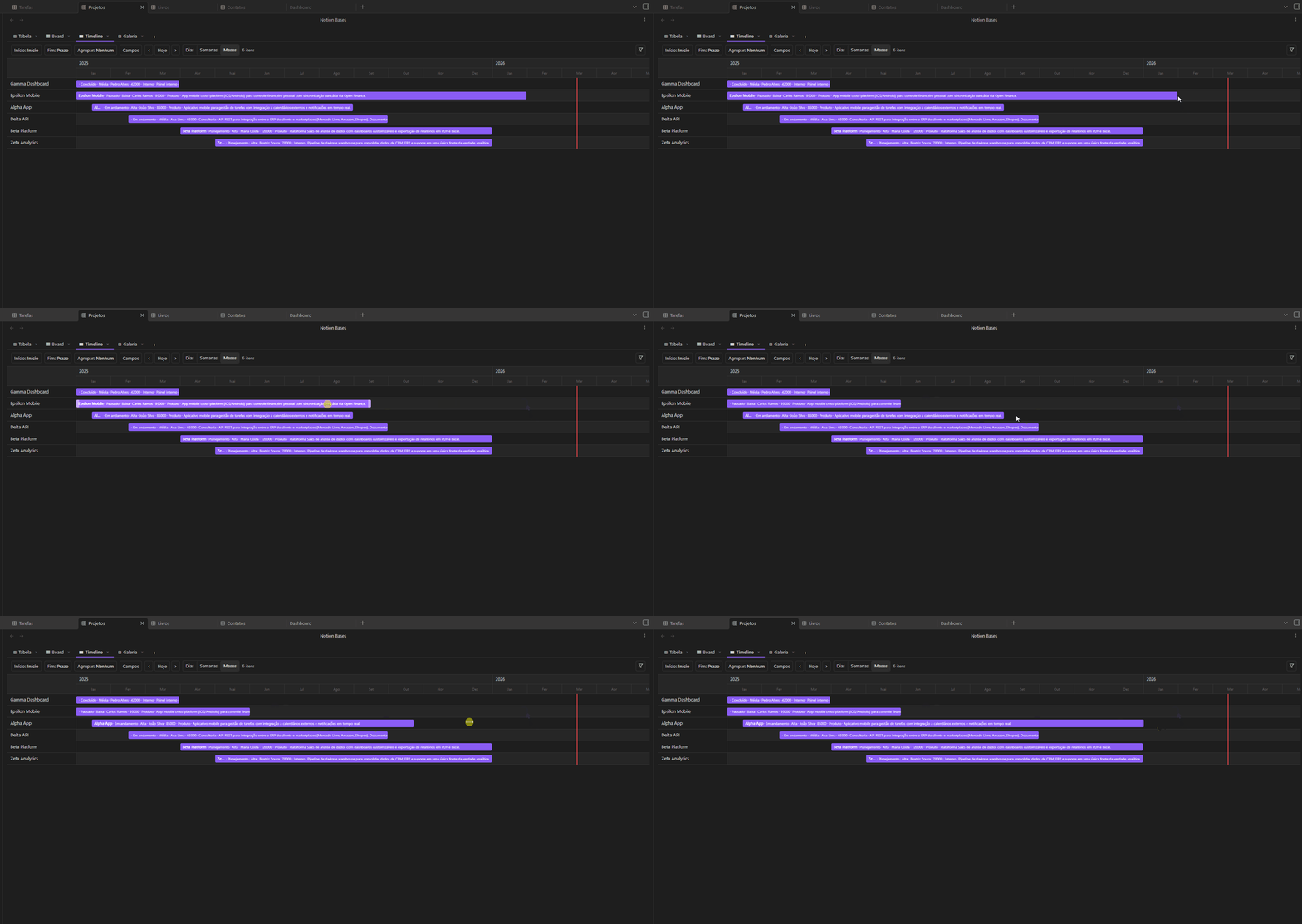
Timeline view

Timeline resize

Chart

Bar, line, and pie charts rendered as pure SVG. Pick a category column (X axis), choose count or a number column (Y axis), and select an aggregation function. Smart axis formatting with k/M suffixes and integer ticks. Responsive sizing and full mobile support.

Chart view


Features

Category What you get
Column types Title, Text, Number, Select, Multi-select, Checkbox, Date, URL, Email, Phone, Status, Formula, Relation, Lookup, Rollup, Image, Audio, Video
Formulas IF, SUM, AVG, CONCAT, LEFT, ROUND and more
Relations & Lookups Link rows across databases, pull values from related notes
Rollup Aggregate values across related databases: sum, count, avg, min, max, count_values, list
Charts Bar, line, pie — pure SVG with aggregations and smart axis formatting
Subtasks Hierarchical rows with expand/collapse up to 3 levels via self-relations
Filters Type-aware operators, AND/OR groups
Sorts Multi-column with priority ordering
Aggregation Sum, Average, Min, Max, Count — updates live
Number formatting Prefix ($, R$), suffix (%, kg), decimals, thousands separator
Column controls Pin, resize (drag), reorder (drag)
CSV Import and export
Bulk actions Select rows to delete, duplicate or move
Schema inference Auto-detects column types from existing frontmatter
Embeds Embed any database inside a note via code block — free multi-view or pinned to any view type
Multi-view Each view has independent filters, sorts and field visibility
Live placeholders {{column}} tokens in note bodies resolve to cell values in reading view
Folder arrangement Auto-file rows into subfolders by property values, with batch preview
i18n Full UI translation in 7 languages (en, pt-BR, es, fr, de, zh, ja)
100% Markdown Every row is a .md file. No lock-in, ever

Inline editing

Filters


Column types

Type Description
title Note filename — always the first column
text Plain text
number Numeric value with optional formatting
select Single option from a defined list
multiselect Multiple options
checkbox Boolean true / false
date Date value
url Clickable link
email Email address
phone Phone number
status Colored badge with inline management
formula Computed value from other columns
relation Link to a note in another database
lookup Pull a field from a related database
image Display an image from the vault
rollup Aggregate values from related databases
audio Inline audio player with folder-based file picker
video Video with modal player and folder-based file picker

Getting started

Installation

Via Community Plugins (recommended)

Notion Bases is available in Obsidian's Community Plugins directory:

  1. Open Settings → Community plugins → Browse
  2. Search for "Notion Bases"
  3. Click Install, then Enable

Or install it in one click from your browser: open in Obsidian.

Manual installation

  1. Download main.js, manifest.json and styles.css from the latest release
  2. Create <your-vault>/.obsidian/plugins/notion-bases/
  3. Copy the three files into it
  4. Reload Obsidian and enable the plugin in Settings → Community plugins

Create your first database

  1. Open the command palette (Ctrl/Cmd + P) → "Create new database"
  2. Pick a folder — a _database.md file marks it as a database
  3. Click the table icon in the ribbon (or run "Open database") to open it

Add views

Click + in the view tab bar to add a new view. Each view has its own filters, sorts and field visibility. Drag tabs to reorder.

Embed in a note

```nb-database
path: Projects
```

Pin a fixed view type (no tabs) — any of table, list, board, gallery, calendar, timeline or chart:

```nb-database
path: Projects
type: board
```

A pinned embed inherits its configuration (board grouping, calendar date column, …) from the matching view defined in the database, so different notes can show the same data as a board, a calendar or a chart.
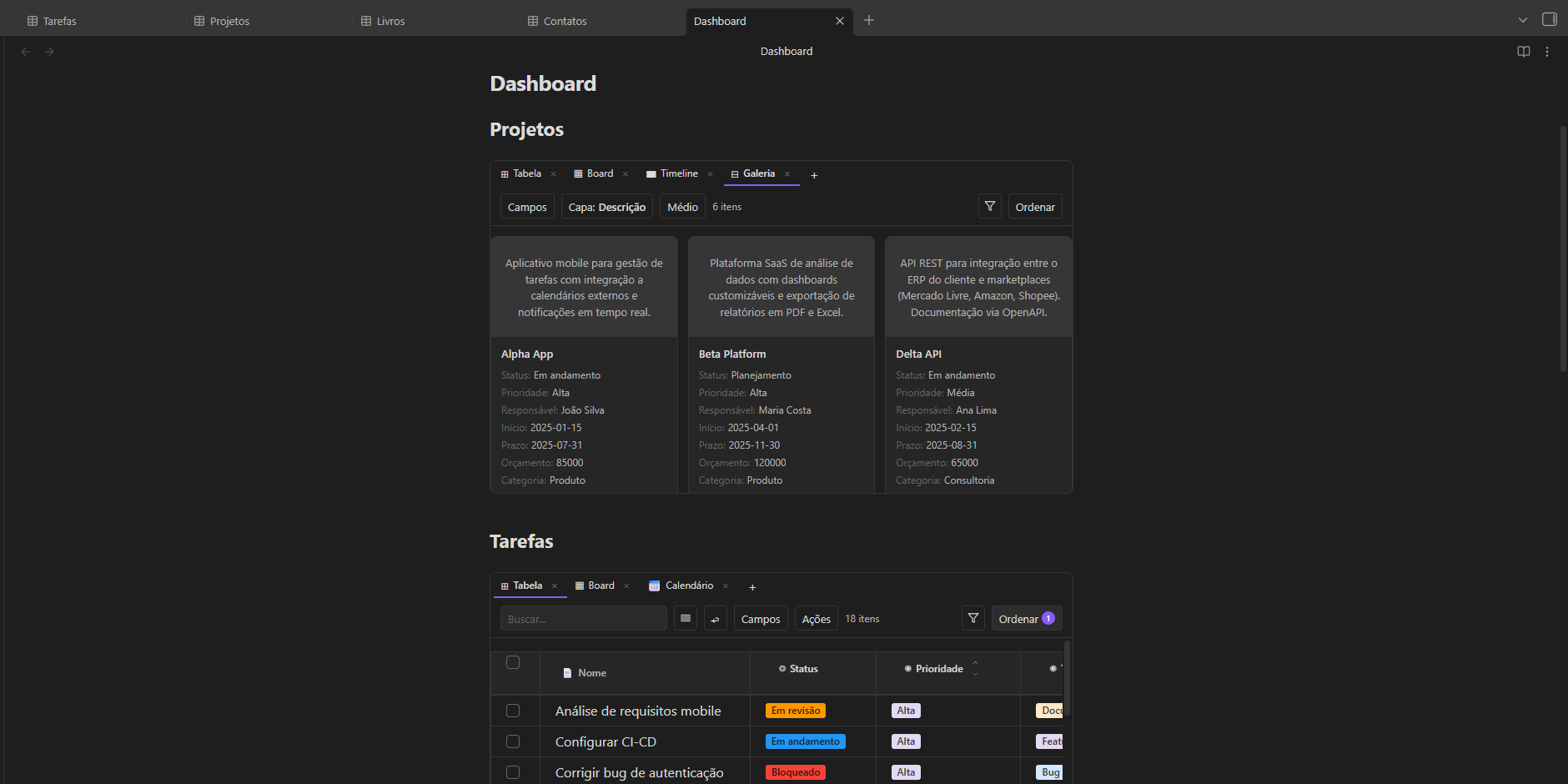
Embed in note


How data is stored

Everything lives in your vault as plain Markdown:

What Where
Rows .md files in the database folder
Column values Frontmatter fields in each note
Schema & view config Frontmatter of _database.md
Embed view configs Frontmatter of the hosting note

Open any file in any text editor and your data is right there.


Requirements

  • Obsidian 1.8.7 or later
  • Desktop and mobile supported

Support the project

If Notion Bases makes your vault more powerful, consider supporting development:

GitHub Sponsors Buy Me a Coffee


Contributing

Contributions are welcome! Please read the Contributing Guide before submitting a pull request.

For bugs and feature requests, use the issue tracker.


License

GPL v3 — free to use and modify, but any distribution must remain open source under the same license.

Similar Plugins

info
• Similar plugins are suggested based on the common tags between the plugins.
Big Calendar
4 years ago by Boninall
Big Calendar in Obsidian, for manage your events in a day/week/month and see agenda too!
Heatmap Calendar
4 years ago by Richard Slettevoll
An Obsidian plugin for displaying data in a calendar similar to the github activity calendar
Simple Dice Roller
4 years ago by yeeshue99
A simple, plug-and-play dice roller that searches the current, active leaf and will simulate or average all dice formulas, regardless of where they are.
Agile Task Notes
4 years ago by BoxThatBeat
This Obsidian plugin integrates your TFS data from either Jira or Azure Devops
Google Calendar
4 years ago by YukiGasai
Add Google Calendar inside Obsidian
MAKE.md
4 years ago by MAKE.md
Vega Visualizations
4 years ago by Justin Kim
Create Vega and Vega-Lite visualizations in https://obsidian.md/.
Habit Calendar
4 years ago by Hedonihilist
Monthly Habit Calendar for DataviewJS. This plugin helps you render a calendar inside DataviewJS code block, showing your habit status within a month.
Tasks Calendar Wrapper
3 years ago by zhuwenq
This plugin currently provides a timeline view to display your tasks from your obsidian valut, with customizable filters and renderring options.
OZ Calendar
3 years ago by Ozan Tellioglu
Obsidian plugin to display notes on a calendar based on YAML frontmatter or file names
PubScale
3 years ago by piriwata
An obsidian plugin for insert your note into a PlanetScale table
Financial Doc
3 years ago by Studio Webux
Financial Documentation and Tracking using CSV format and Chart.js directly in Obsidian
Time Ruler
3 years ago by Joshua Tazman Reinier
A drag-and-drop time ruler combining the best of a task list and a calendar view (integrates with Tasks, Full Calendar, and Dataview).
ICS
3 years ago by muness
Generate Daily Planner from one or more ical feeds
Spreadsheets
3 years ago by Divam Gupta
Size History
3 years ago by Piotr Borowski
Graph with vault size over time
Lunar Calendar
3 years ago by OSmile
obsidian插件,一个支持农历的日历插件。
MagicCalendar
3 years ago by Vaccarini Lorenzo
An obsidian plugin that exploit a natural language processing engine to find potential events and sync them with iCalendar
iCal
3 years ago by Andrew Brereton
This is a plugin for Obsidian that searches your vault for tasks that contain dates, and generates a calendar in iCal format that can be imported into your preferred calendar application.
CalcCraft
3 years ago by Claudiu Ivan
have formulas in tables like in excel: a1+a2, sum(), etc.
Single File Daily Notes
3 years ago by Pranav Mangal
An Obsidian plugin to create and manage daily notes in a single file
Journals
2 years ago by Sergii Kostyrko
Date Inserter
2 years ago by namikaze-40p
An Obsidian plugin that lets you insert a date at the cursor position using a calendar.
Calendarium
2 years ago by Jeremy Valentine
The ultimate Obsidian plugin for crafting mind-bending fantasy and sci-fi calendars
Dust Calendar
2 years ago by 纳米级尘埃
obsidian 日历插件
Calendar Event Sync
2 years ago by Stephen Dolan
Set the title of your note to the current event
TinyChart
2 years ago by Alin Coop
Dead simple ASCII charts for Obsidian.
TaskWarrior Task Wiki
2 years ago by SntTGR
Small and simple task manager widget for obsidian and powered by taskwarrior.
Task List Kanban
2 years ago by Chris Kerr
Datepicker
2 years ago by Mostafa Mohamed
Datepicker widget for Obsidian.
Chinese Calendar
2 years ago by DevilRoshan
在obsidian中使用的更符合中国习惯的日历插件。
Daily Statistics
2 years ago by yefengr
obsidian daily statistics
Diarian
2 years ago by Erika Gozar
All-in-one journaling toolkit.
Morgen Tasks
2 years ago by Morgen AG
Calendar
6 years ago by Liam Cain
Simple calendar widget for Obsidian.
Charts
6 years ago by phibr0
Charts - Obsidian Plugin | Create editable, interactive and animated Charts in Obsidian via Chart.js
Open cards in imdone.
5 years ago by saxmanjes
Open cards in imdone from obsidian
Kanban
5 years ago by mgmeyers
Create markdown-backed Kanban boards in Obsidian.
Charts View
5 years ago by caronchen
Data visualization solution in Obsidian, support plots and graphs.
Trello
5 years ago by Nathonius
An Obsidian Plugin that connects Trello cards to Obsidian notes.
Jump-to-Date
5 years ago by TfTHacker
Jump to a date via a convenient popup form. This plugin is a part of the Obsidian42 family of Obsidian plugins.
Itinerary
5 years ago by Adam Coddington
Make planning your trip or event easier by rendering a calendar from event information found in your notes.
Plotly
5 years ago by Dmitriy Shulha
Obsidian plugin to embed Plotly charts into markdown notes.
CardBoard
5 years ago by roovo
An Obsidian plugin to make working with tasks a pleasure (hopefully anyway).
Daily notes calendar
2 years ago by bartkessels
Quickly navigate your vault using a calendar view, this plugin allows you to create and navigate to periodic notes and notes that are created on a specific date.
Auto Tasks
2 years ago by Jamie Hurst
Obsidian plugin to combine periodic notes with tags and tasks to automatically manage your daily, weekly and project TODO lists. Requires the "Periodic Notes" and "Tasks" plugins.
Heatmap Tracker
2 years ago by Maksim Rubanau
A customizable heatmap tracker plugin for Obsidian to visualize daily data trends with intuitive navigation and flexible settings.
Every Day Calendar
a year ago by QuBe
Obsidian plugin to create calendars inspired by Simone Giertz's Every Day Calendar
Task Board
a year ago by Atmanand Gauns
An Obsidian plugin to view and manage your tasks from whole vault using much efficient boards using various methodologies.
SQLSeal Charts
a year ago by hypersphere
Charting extension for SQLSeal Obsidian Plugin. Visualise your data!
Daily Routine
a year ago by sechan100
new version of daily-routine obsidian plugin
SQLite DB
a year ago by Stefano Frigerio
Daily Note Metrics
a year ago by Andre-Diamond
Obsidian Plugin that parses Daily Notes and uses data to create charts
Outlook Meeting Notes
a year ago by David Ingerslev
An Obsidian plugin to create meeting notes from Microsoft Outlook .msg files
Kanban Status Updater
a year ago by Ankit Kapur
Obsidian plugin that automatically updates the note property when card is moved to a column.
MemoChron
a year ago by Michalis Efstratiadis
Calendar integration and note creation with support for public iCalendar URLs.
Markdown Calendar Generator
a year ago by Zach Russell
An intentionally simple obsidian markdown table calendar generator
Life in Weeks Calendar
9 months ago by Jeff Szuc
Plugin for the Obsidian markdown editor. Displays a calendar of your life in weeks with weekly Periodic Notes plugin integration. Includes options for the traditional Memento Mori/Stoic style calendar, as well as a Gregorian calendar accurate version.
Workout Planner
7 months ago by Rares Spatariu
Kanban Bases View
5 months ago by I. Welch Canavan
A kanban-style drag-and-drop custom view for Bases.
Calendar Bases
5 months ago by Edrick Leong
Adds a calendar layout to bases so you can display notes with dates in an interactive calendar view.
Synaptic View
5 months ago by Yongmini
A dynamic control center for your vault. Unify hubs, notes, tasks, periodic notes, and web resources with intuitive buttons. Replace new tab for instant access.
Yori Task
3 months ago by yorigo77
This plugin has not been manually reviewed by Obsidian staff. Task manager, week planner, year planner.
Project Manager
3 months ago by stepankropachev
This plugin has not been manually reviewed by Obsidian staff. Full-featured project management: stunning Gantt charts, Kanban boards, Table views, customizable fields, due date notifications.
Bases Charts
3 months ago by Moritz Jung
This plugin has not been manually reviewed by Obsidian staff. Bases views for scatter, line, and bar charts.
Base Board
2 months ago by mderazon
This plugin has not been manually reviewed by Obsidian staff. Organize notes into Kanban boards using frontmatter properties. Drag and drop cards between columns powered by Bases.
Full Calendar Remastered
2 months ago by obsidian-full-calendar-remastered
Complete Calendar HUB experience. Work with all your calendars in one place. Analyze your time and take action! - This plugin has not been manually reviewed by Obsidian staff.
TaskNotes
2 months ago by callumalpass
Note-based task management with calendar, pomodoro and time-tracking integration.
Apex Dashboard
a month ago by PandoraReads
Your personal command center — memos, todos, and projects in one stunning glassmorphism dashboard. - This plugin has not been manually reviewed by Obsidian staff.
Gantt Calendar
a month ago by Sugar
A powerful visual task management plugin. Visualize and manage tasks created by the Tasks plugin, supporting both emoji and Dataview task formats. Support Feishu Task syncing. - This plugin has not been manually reviewed by Obsidian staff.
Sheet Plus
21 days ago by ljcoder
Create Excel-like spreadsheets and easily embed them in Markdown.
Habitify
15 days ago by justrelaxdc
A tracker for habits and metrics. Features heatmaps, charts, and streaks while keeping your data in pure Markdown files. No hidden databases. - This plugin has not been manually reviewed by Obsidian staff.
Notebook Navigator
13 days ago by Johan Sanneblad
A better file browser and calendar inspired by Apple Notes, Bear, Evernote and Day One.
Day Planner
13 days ago by ivan-lednev
Day planning from a task list in a Markdown note with enhanced time block functionality.
Power Bases
8 days ago by Power Plugins
Add board, calendar, timeline, chart, gallery, and table views to Bases, with inline editing, colors, rollups, field types, formulas, and CSV import. - This plugin has not been manually reviewed by Obsidian staff.
Power Tables
8 days ago by Power Plugins
Color, calculate, and sort Markdown tables in place: cell fills and text colors, live formulas that recalculate, and column sorting, all stored as plain Markdown. - This plugin has not been manually reviewed by Obsidian staff.
Journal View
7 days ago by RUverse
Turn your daily notes into one continuous, editable journal—scroll through time, jump to any date, and write without leaving the view. - This plugin has not been manually reviewed by Obsidian staff.
BeautyTasks
5 days ago by Avni Bilgin
A Todoist-inspired task and project manager built entirely on Markdown — one note per task, no external services, no dependencies. - This plugin has not been manually reviewed by Obsidian staff.