Discord Message Sender

by okawak
5
4
3
2
1
Score: 51/100

Description

Category: 3rd Party Integrations

The discord_message_sender plugin syncs notes from Discord directly into your vault. It connects to a dedicated Discord server via a bot, automatically fetching messages and converting them into well-organized Markdown files. Users can also trigger web page clipping with a simple command, saving content from URLs as Markdown. The plugin supports automation on desktop startup and sends completion notifications back to Discord.

Reviews

No reviews yet.

Stats

6
stars
881
downloads
3
forks
410
days
0
days
43
days
21
total PRs
4
open PRs
0
closed PRs
17
merged PRs
5
total issues
1
open issues
4
closed issues
14
commits

RequirementsExperimental

  • Discord bot with API token and a dedicated Discord server

README file from

Github

English | 日本語 | 简体中文

discord_message_sender

Overview

This is a Obsidian plugin that allows you to take notes in Discord and automatically sync them to Obsidian.

Key Features:

  • Automatically converts Discord messages into Obsidian Markdown files and saves them
  • Automatically clips web page contents from URLs and saves them as Markdown by using !url command
  • Syncs multiple Discord channels and stores each channel in its own subfolder
  • Stores regular messages as individual, daily, weekly, or monthly Markdown files
  • Lets you disable or customize the Discord notification messages sent after sync
  • Can be triggered on Obsidian desktop startup or via the command palette

Usage Flow

  1. Prepare Your Discord Environment

    • Create a dedicated Discord server for Obsidian integration
    • Create a bot and invite it to your server
    • Specify one or more integration channels (using their channel IDs)
  2. Message Processing

    • When you launch Obsidian, the plugin fetches messages from Discord via the API
    • Regular messages → Saved using the selected storage mode under channel-specific folders
    • Special commands (messages starting with the prefix) → Processed with custom handlers
    • After processing, a completion notification is optionally sent to Discord

⚠️ Notes

  • Security: Since this uses the Discord API, avoid sending sensitive or confidential information.
  • Supported Environment: Requires Obsidian 1.8.10 or later and only works on desktop.

Setup Guide

1. Create a Discord Bot

  1. Go to the Discord Developer Portal
  2. Click New Application to create a new app image

  3. Bot Settings
    • Select Bot from the left menu
    • Enable Message Content Intent image
    • Save the bot token (⚠️ Important: Keep it secure)

2. Invite the Bot to Your Server

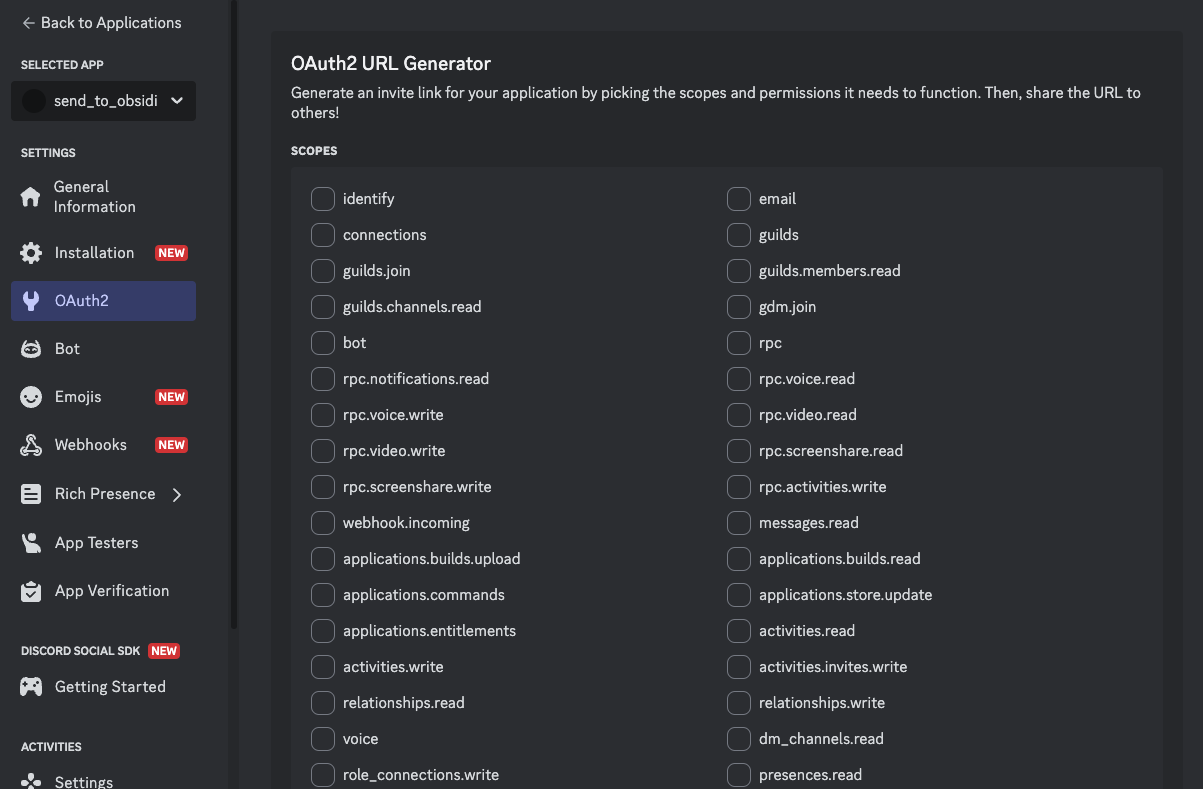
  1. Go to OAuth2OAuth2 URL Generator in the left menu image
  2. Under Scopes, select bot
  3. Under Bot Permissions, enable:
    • View Channels
    • Send Messages (only required when sync notifications are enabled)
    • Read Message History
    • Add Reactions
  4. Use the generated URL to invite your bot

3. Get Channel IDs

  1. In Discord settings, enable Developer Mode (in Advanced settings)
  2. Right-click each channel you want to sync → Copy Channel ID

4. Required Plugin Settings

Please enter the following information in the plugin settings:

  • Bot Token
  • Channels: Add each Discord channel ID. A channel name is optional and is used as the Obsidian subfolder name. Channel names must resolve to unique folder names.
  • Message storage: Choose one file per message, or daily, weekly, or monthly logs.
  • Show author names: Include the Discord author in daily, weekly, and monthly logs.
  • Show message time: Include the local message time in daily, weekly, and monthly logs.
  • Send sync notifications: Disable this to prevent the plugin from posting completion messages to Discord.
  • Notification templates: Optional templates for the Discord messages sent after sync. Available variables: {count}, {channelName}, {channelId}

By default, messages are saved under DiscordLogs/<channel name or ID>/, and URL clippings are saved under DiscordClippings/<channel name or ID>/. Duplicate folder names are rejected in settings, and sync also stops if manually edited settings contain a duplicate.

Channel names cannot contain \ / : * ? " < > | # ^ [ ]. The names . and .. are also not allowed. Invalid names are not saved.

Message Storage

Regular messages are stored under DiscordLogs/<channel name or ID>/. Choose one of the following modes:

  • One file per message: YYYYMMDD_HHMMSS_<message ID>.md
  • Daily log: YYYY-MM-DD.md
  • Weekly log: <ISO week-year>-W<week>.md; weeks start on Monday
  • Monthly log: YYYY-MM.md

Dates, times, and individual file names use the computer's local time zone when synchronization starts. Daily logs use the date as the level-one heading. Weekly and monthly logs use the period as the level-one heading and each date as a level-two heading. Messages do not create their own headings.

With author names and message times disabled, an aggregated entry is stored like this:

<!-- discord-message-id: 1520291078606028900 -->
yes

With both options enabled, the same entry is stored like this:

<!-- discord-message-id: 1520291078606028900 -->
**Alice** · 21:34

yes

The plugin also writes managed-log and date markers as HTML comments. These markers are hidden in Obsidian Reading view and prevent duplicate messages when a sync is retried or the storage mode changes. Do not remove or edit them.

Existing settings are automatically migrated to One file per message, preserving channels and synchronization cursors. Changing the storage mode only affects new messages. Existing files are not converted, moved, or renamed, so files from different modes can coexist safely.

URL clippings always remain individual files under DiscordClippings/<channel name or ID>/.

Discord API behavior

The plugin uses Discord API v10 and requests up to 100 messages at a time. The first synchronization imports the latest 100 messages. Later synchronizations request only pages needed to reach the saved per-channel cursor, so daily, weekly, and monthly logs do not cause the entire period to be downloaded again. Requests are paginated when more than 100 new messages exist and observe Discord rate-limit responses.

Command List

Messages starting with the configured prefix (default: !) are treated as special commands.

!url - Web Page Clipping (under development)

Example:

!url https://www.example.com

Behavior:

  • Fetches the contents of the specified URL
  • Saves it as a Markdown file
  • Save location: Channel-specific directory under the clipping directory (default: DiscordClippings)

Roadmap

Additional useful commands will be added in future releases.

Development

References

This plugin was inspired by the following project(s):

Similar Plugins

info
• Similar plugins are suggested based on the common tags between the plugins.
Execute Code
4 years ago by twibiral
Obsidian Plugin to execute code in a note.
Enveloppe
4 years ago by Mara-Li
Enveloppe helps you to publish your notes on a GitHub repository from your Obsidian Vault, for free!
Packrat
4 years ago by Thomas Herden
Process completed instances of recurring items created by the Obsidian Tasks plugin
Linkify
4 years ago by Matthew Chan
Text Expander JS
4 years ago by Jonathan Heard
Obsidian plugin: Type text shortcuts that expand into javascript generated text.
Open File by Magic Date
4 years ago by simplgy
Note Linker
4 years ago by Alexander Weichart
🔗 Automatically link your Obsidian notes.
Day and Night
4 years ago by Kevin Patel
An Obsidian plugin to automatically switch between day and night themes based on a set schedule
Obsidian Clipper
4 years ago by John Christopher
Obsidian plugin that allows users to clip parts of a website into their obsidian daily note (or new note)
Weekly Review
4 years ago by Brandon Boswell
Khoj
4 years ago by Debanjum Singh Solanky
Your AI second brain. Self-hostable. Get answers from the web or your docs. Build custom agents, schedule automations, do deep research. Turn any online or local LLM into your personal, autonomous AI (gpt, claude, gemini, llama, qwen, mistral). Get started - free.
Babashka
3 years ago by Filipe Silva
Run Obsidian Clojure(Script) codeblocks in Babashka.
Tab Rotator
3 years ago by Steven Jin
Obsidian Rotate opened tabs with a specified time interval
Cron
3 years ago by Callum Loh
Obsidian cron / schedular plugin to schedule automatic execution of commands
Auto Template Trigger
3 years ago by Numeroflip
An obsidian.md plugin, to automatically trigger a template on new file creation
Pieces for Developers
3 years ago by Pieces For Developers
Pieces' powerful extension for Obsidian-MD that allows users to access their code snippets directly within the Obsidian workspace
Arcana
3 years ago by A-F-V
Supercharge your Obsidian note-taking through AI-powered insights and suggestions
Auto Front Matter
3 years ago by conorzhong
Auto Hyperlink
3 years ago by take6
Syncthing Integration
3 years ago by LBF38
Obsidian plugin for Syncthing integration
RunJS
3 years ago by eoureo
Let's run JavaScript easily and simply in Obsidian.
Attachment Manager
3 years ago by chenfeicqq
Attachment folder name binding note name, automatically rename, automatically delete, show/hide.
YouVersion Linker
3 years ago by Jaanonim
Obsidian plugin that automatically link bible verses to YouVersion bible.
Gnome Terminal Loader
3 years ago by David Carmichael
Codeblock Template
3 years ago by Super10
A template plugin that allows for the reuse of content within Code Blocks!一个可以把Code Block的内容重复利用模板插件!
Modal forms
3 years ago by Danielo Rodriguez
Define forms for filling data that you will be able to open from anywhere you can run JS
Tag Breakdown Generator
3 years ago by Hananoshika Yomaru
Break down nested tags into multiple parent tags
Auto Filename
3 years ago by rcsaquino
Auto Filename is an Obsidian.md plugin that automatically renames files in Obsidian based on the first x characters of the file, saving you time and effort.
Discord Message Formatter
3 years ago by Emile Durkheim
Obsidian.md plugin that lets you copy Discord conversations and perfectly formats them to Obsidian Markdown!
Frontmatter generator
3 years ago by Hananoshika Yomaru
A plugin for Obsidian that generates frontmatter for notes
Run
3 years ago by Hananoshika Yomaru
Generate markdown from dataview query and javascript.
RSS Copyist
3 years ago by aoout
Get the RSS articles as notes.
Daily note creator
3 years ago by Mario Holubar
Automatically creates missing daily notes.
AI Tagger
2 years ago by Luca Grippa
Simplify tagging in Obsidian. Instantly analyze and tag your document with one click for efficient note organization.
Prompt ChatGPT
2 years ago by Coduhuey
Differential ZIP Backup
2 years ago by vorotamoroz
Automation
2 years ago by Benature
Personal OS
2 years ago by A.Buot
LinkMagic
2 years ago by AndyReifman
Notes 2 Tweets
2 years ago by Tejas Sharma
Generate and schedule tweets automatically from your notes on Obsidian
Rapid AI
2 years ago by Rapid AI
AI Assistant for selected text and generating content with Markdown. Shortcuts and quick action buttons provide instant AI assistance. It provides a high availability API for unlimited Chat GPT request rates, so you can ensure smooth work for any workload.
Substitutions
2 years ago by BambusControl
Automatic text replacer for Obsidian.md
Watched-Metadata
2 years ago by Nail Ahmed
Watches for changes in metadata and updates the note content accordingly.
Daily Note Structure
2 years ago by db-developer
This obsidian plugin creates a structure for your daily notes
Note Linker with Previewer
2 years ago by Nick Allison
Obsidian Plugin to find and Link notes
Paste as Embed
2 years ago by Matt Laporte
Obsidian plugin to paste contents of clipboard into a new note, and embed it in the active note.
Note 2 Tag Generator
2 years ago by Augustin
Fast Image Auto Uploader
2 years ago by Longtao Wu
upload images from your clipboard by gopic
Current File
2 years ago by Mark Fowler
An Obsidian plugin to allows external applications to know what file Obsidian is currently viewing
Snippets Manager
2 years ago by Venkatraman Dhamodaran
Snippets Manager (Text Expander) For Obsidian
Auto Periodic Notes
2 years ago by Jamie Hurst
Obsidian plugin to create new periodic notes automatically in the background and allow these to be pinned in your open tabs. Requires the "Periodic Notes" plugin.
Discord Rich Presence
6 years ago by Luke Leppan
Update your Discord Status to show your friends what you are working on in Obsidian. With Discord Rich Presence.
Templater
6 years ago by SilentVoid
A template plugin for obsidian
Snippets
6 years ago by Pelao
Advanced URI
5 years ago by Vinzent
Advanced modes for Obsidian URI
Regex Pipeline
5 years ago by No3371
An Obsidian plugin that allows users to setup custom regex rules to automatically format notes.
Excalidraw
5 years ago by Zsolt Viczian
A plugin to edit and view Excalidraw drawings in Obsidian
Zoottelkeeper
5 years ago by Akos Balasko
Obsidian plugin of Zoottelkeeper: An automated folder-level index file generator and maintainer.
Apply Patterns
5 years ago by Jacob Levernier
An Obsidian plugin for applying patterns of find and replace in succession.
Shell commands
5 years ago by Jarkko Linnanvirta
Execute system commands via hotkeys or command palette in Obsidian (https://obsidian.md). Some automated events are also supported, and execution via URI links.
CustomJS
5 years ago by Sam Lewis
An Obsidian plugin to allow users to reuse code blocks across all devices and OSes
JavaScript Init
5 years ago by ryanpcmcquen
Run custom JavaScript in Obsidian.
Webhooks
5 years ago by Stephen Solka
Connect obsidian to the internet of things via webhooks
Jura Links
2 years ago by Lukas Collier & Emi Le
Verlinke deine Normangaben, Aktenzeichen oder Fundstellen in deiner Obsidian Notiz mit Gesetzesanbietern.
Metadata Auto Classifier
2 years ago by Beomsu Koh
AI-powered Obsidian plugin that automatically classifies and generates metadata (tags, frontmatter) for your notes.
Smart Composer
2 years ago by Heesu Suh
AI chat assistant for Obsidian with contextual awareness, smart writing assistance, and one-click edits. Features vault-aware conversations, semantic search, and local model support.
Todos sort
2 years ago by Jiri Sifalda
A plugin for Obsidian that sorts todos within a note
Discord Timestamps
2 years ago by Erika Gozar
Displays discord timestamps in read mode as they would appear in Discord.
pycalc
2 years ago by pycalc
Clipper Catalog
2 years ago by Greg K.
A catalog view that provides a powerful interface for all your clipped web articles and content. Easily organize, search, and manage your web clippings within your vault.
Hanko
2 years ago by Telehakke
Obsidian plugin.
Sentinel
2 years ago by Giorgos Sarigiannidis
A plugin for Obsidian that allows you to update properties or run commands based on document visibility changes.
Missing Link File Creator
2 years ago by Lemon695
The plugin creates both missing links and the corresponding files.
NetClip
2 years ago by Elhary
this plugin is for Obsidian that allows you to browse the web and clip webpages directly into your vault.
Plugin REPL
2 years ago by readwithai
An in-note Read Evaluate Print Loop to execute JavaScript within Obsidian
InlineAI
2 years ago by FBarrca
AI Providers
a year ago by Pavel Frankov
This plugin is a hub for setting AI providers (OpenAI-like, Ollama and more) in one place.
Enhanced Canvas
a year ago by RobertttBS
When editing on Canvas, properties and Markdown links to notes are automatically updated, enabling backlinks in Canvas.
Varinote
a year ago by Giorgos Sarigiannidis
A plugin for Obsidian that allows you to add variables in Templates and set their values during the Note creation.
Mastodon Threading
a year ago by El Pamplina de Cai
Obsidian plugin to compose and post threads to Mastodon
AI integration Hub
a year ago by Hishmat Salehi
A modular AI integration hub for Obsidian
Organized daily notes
a year ago by duchangkim
Automatically organizes your daily notes into customizable folder structures for better organization and easier navigation.
Hotstrings
a year ago by wakywayne
Runsh
a year ago by Ddone
A simple plugin that allows to run shell commands from obsidian.
EUpload
a year ago by Appleex
Obsidian 插件,专用于上传文件到存储仓库。目前支持 Lskypro(兰空图床),后续有需求会引入其它存储方式,如:Github/Gitee等等。
Inkporter
a year ago by Ayush Kumar Saroj
Inkporter is an Obsidian plugin that digitizes handwritten notes with smart ink isolation, adaptive theming, and seamless import workflows.
Automatic Linker
a year ago by Kodai Nakamura
Last Position
a year ago by saktawdi
Automatically scroll to the last viewed position when opening the markdown document.
Vault File Renamer
a year ago by Louan Fontenele
Vault File Renamer: Automatically standardizes file names to GitHub style (lowercase, no accents, only -, ., _) while preserving folder structure and file contents.
Rsync
a year ago by Ganapathy Raman
An Obsidian plugin to perform sync files between machines using Rsync
Task Mover
a year ago by Mariia Nebesnaia
A plugin for obsidian to move unfinished tasks to the daily note automatically
Title As Link Text
a year ago by Lex Toumbourou
An Obsidian plugin to set the Link Text using the document title
KOI Sync
a year ago by Luke Miller
AI Tagger Universe
a year ago by Hu Nie
An intelligent Obsidian plugin that leverages AI to automatically analyze note content and suggest relevant tags, supporting both local and cloud-based LLM services.
Memos AI Sync
a year ago by leoleelxh
obsidian-memos-sync-plugin,将 Memos 内容同步到 Obsidian 的插件,提供无缝集成体验。
Blog AI Generator
a year ago by Gareth Ng
Obsidian Plugin: generate blog via AI based on the current note.
tidit
a year ago by codingthings.com
tidit is an Obsidian - https://obsidian.md - plugin that adds timestamps to your document as you type — when you want it, how you want it, where you want it.
Copy Local Graph Paths
a year ago by Amy Z
copy-local-graph-paths is a simple Obsidian plugin that copies the paths of notes linked to your current page.
IMSwitch in Math Block
a year ago by XXM
One Step Wiki Link
a year ago by Busyo
用于 Obsidian 一步插入当前界面匹配到的所有外链(维基链接)
ClipperMaster
a year ago by aqeja
Auto Daily Note
a year ago by John Dolittle
Daily Notes Automater
a year ago by David Pedrero
Tasks Cleaner
a year ago by lowit
🧹 Tasks Cleaner is a plugin for Obsidian that helps you automatically remove old completed tasks from your Markdown notes
Themed Discord RPC
a year ago by Mouadhbendjedidi
A Customizable Obsidian discord RPC
Template Filename
a year ago by Callum Alpass
Obsidian plugin for creating notes with templatable filenames
Note UID Generator
a year ago by Valentin Pelletier
Allow you to automatically generate UID for the notes in your vault.
Auto Replacer
a year ago by Alecell
A live text replacement plugin that applies automatic formatting, corrections, or custom replacements in real-time. Define your own regex-based rules and transformation logic to modify text dynamically as you type.
Current View
a year ago by Lucas Ostmann
Automatically set the view mode (Reading, Live Preview, Source) for notes in Obsidian using folder rules, file patterns, or frontmatter.
Timeline Canvas Creator
a year ago by chris-codes1
Quickly create timeline structured canvases in Obsidian.
Random Wikipedia Article
a year ago by SpencerF718
An Obsidian plugin to generate a note of a random Wikipedia article.
Content OS
a year ago by eharris128
Post to LinkedIn from within Obsidian
NotePix
a year ago by Ayush Parkara
Automatically upload Obsidian images to GitHub (public/private) and replace them with fast hosted links. Encrypted, cross-platform.
URL Formatter
a year ago by Thomas Snoeck
Automatically formats specific URLs pasted into Obsidian into clean Markdown links.
Move Cursor On Startup
a year ago by Jared Kelnhofer
Obsidian plugin to move the cursor to the right and back to the left when starting up. Why? To keep DataView expressions from not running on the first load of, say, your Home file.
Google Calendar Importer
10 months ago by Fan Li
A simple and light-weighted google calendar importer, allow injecting the events / tasks of a day automatically to your daily notes, or import it to anywhere with a command.
Open or Create File
10 months ago by Ilya Paripsa
Set up Obsidian commands that create or open files based on predefined patterns.
Steward
10 months ago by Dang Nguyen
A vault-specific agent equipped with agentic capacity, fast search, flexible commands, vault management, and terminals to "jump" into other CLI agents, such as Claude, Gemini, etc.
Handlebars Dynamic Templating
6 months ago by Hide_D
Handlebars dynamic templating. Define template files and use them dynamically via hb blocks. Template recursion is also possible.
Local REST API with MCP
3 months ago by Adam Coddington
A secure REST API and Model Context Protocol (MCP) server for your vault.
Hot Reload
a month ago by pjeby
Automatically reload Obsidian plugins in development when their files are changed
Advanced Note Mover
a month ago by Lars Bücker
Quickly and easily move notes to predefined folders. Perfect for organizing your notes.
Sidet
21 days ago by Jiao Yingxing
An easy-to-use AI chat plugin for Obsidian with side browsing, focused conversations, and vault-aware knowledge capture.
Star Gate
12 days ago by starhunter
obsidian gate plugin
Daily News Briefing
9 days ago by Adam Chen
Get AI-powered daily news summaries directly in your Obsidian vault. Stay informed about your topics of interest with smart, automated news collection and summarization.
Community Install Manager
8 days ago by Konstantin Volobuev
Allows you to use `community-plugins.js` to search for and automatically install plugins when you launch `obsidian`.