Note Chain

by ZigHolding
5
4
3
2
1
Score: 52/100

Description

The Note Chain plugin helps users organize their notes in a sequential order within Obsidian, creating a structured workflow for managing ideas. It allows users to link notes through metadata fields, establishing relationships such as previous and next notes to create a linear structure. The plugin offers commands to easily create, insert, and reorder notes in a chain, enhancing note management for projects, articles, or books. Users can also automate note chain organization within folders and sort files accordingly in the file explorer. Additional features include integration with popular Obsidian plugins like Dataview and Templater, enabling efficient workflow automation and tracking.

Reviews

No reviews yet.

Stats

42
stars
6,181
downloads
3
forks
833
days
7
days
20
days
0
total PRs
0
open PRs
0
closed PRs
0
merged PRs
13
total issues
8
open issues
5
closed issues
242
commits

Latest Version

21 days ago

Changelog

README file from

Github

Thoughts as river, notes as chain. Sort and indent notes in File Explorer, expose MCP/EasyAPI, and automate AI chats in Web Viewer.

Obsidian Downloads

Why Note Chain

The modern note concept of dual-linking allows notes to think like the brain, in a mesh of thoughts. Like roots or river networks, they are scattered without missing any idea, and based on the internal links of the notes, we can easily pick up each idea.

However, when we finally decide to organize our views into articles and compile topics into books, we have to roll this net into a main line. So why not make a little effort for this from the start?

When I stared at the messy drawers of notes like Nicholas Bourbaki, various drawers, all kinds of notes, titles, content, tags, references, and dates flickered in my mind, I realized:

Linear output requires linear input.

image

For this reason, I call all notes arranged in order the note chain and developed the Note Chain plugin, aimed at adding a small piece to the puzzle of note management.

How to Create a Note Chain?

graph LR

Head -.-> P[...] --> PrevA --> A --> NextA -.-> N[...] --> Tail

Note Chain defines the pre-note and post-note of the current note through metadata PrevNote and NextNote (field names are configurable). Through this relationship, notes on the same chain are linked together.

  • Prev note: The note that precedes the current note;
  • Next note: The note that follows the current note;
  • Head note: The first note in the note chain;
  • Tail note: The last note in the note chain;

Note Chain provides multiple commands to help create a note chain.

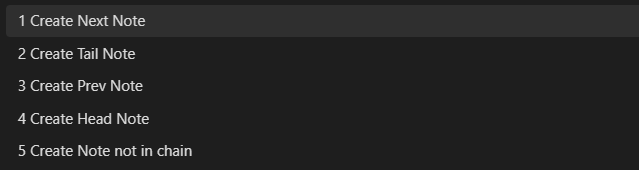
Create New Note: Create pre/post/head/tail/non-chain notes for the current note. Choose the type when creating, then enter the file name. If the file already exists, it will jump to that file. This command can replace the Create New Note command provided by Obsidian, and it is recommended to set the shortcut key to Ctrl + N;
image

Move node up: Move the current note up in the note chain, changing A-B-C-D-E to A-C-B-D-E. It is recommended to set the shortcut key to Alt + PgUp;

Move node down: Move the current note down in the note chain, changing A-B-C-D-E to A-B-D-C-E. It is recommended to set the shortcut key to Alt + PgDn;

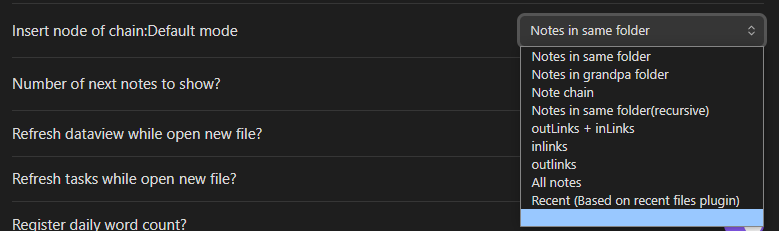
Insert node of chain: Insert the current note into the note chain. First, select the note group according to different modes, then choose the note as the anchor point, and finally select the relationship between the current note and the anchor point. Since it is usually chosen for the same directory notes, you can select the default note group in the Insert node of chain: Default mode on the settings page. It is recommended to set the shortcut key to Alt + I.
image

Files in the file list also provides commands to facilitate the creation of note chains:

  • Create next note: Create a post-file for the current note;
  • Move as next note: Set the current note or folder as a post-note for a certain note. For notes, select from all notes. For folders, only select notes in the same directory;
  • Move as next notes (selected): Chain multiple selected notes as next notes.

The methods introduced above are all for setting nodes for a single note. Note Chain also provides multiple commands to organize notes in the same folder.

Rebuild the chain of current folder will string all notes in the current note's folder into a note chain. You can create a note chain based on the file name name, creation time ctime, and modification time mtime, in ascending order (a to z) or descending order (z to a), which is suitable for initialization. You can also create a note chain based on the existing note chain chain, suitable for situations where there are multiple note chains in a directory.

Reset note chain by longform and Reset longform scenes by note chain are a set of mutually reinforcing commands, which correspond the note chain of the current folder notes to the scenes of the LongForm plugin. Reset longform scenes by note chain generates longform project metadata in the folder's namesake note and sets the current note chain as its scene. You can move the order of individual or multiple notes in the metadata with Move line down and Move line up, or cut notes to a specified location. Then, set the corresponding note chain with Reset note chain by longform. Nested LongForm scenes also sync indentation levels (notechain.level).

Enable On create/move into a folder, link notes not yet in the chain? on the Settings page: when a note is created or moved into a folder, notes that are not yet in any chain can be appended automatically (existing chains are not reshaped). Use Ignore these folders under word-count settings to skip folders where needed.

Hierarchical Indentation

Beyond linear order, notes can show hierarchy in File Explorer via Confluence-style indentation stored in frontmatter notechain.level (a string of tab characters \t).

  • Increase the indentation level — recommended hotkey Mod+Shift+L
  • Decrease the indentation level — recommended hotkey Mod+Shift+J
  • Remove the indentation level — recommended hotkey Mod+Shift+K

Indentation is prefixed to the File Explorer display name. LongForm scene nesting and note-chain level stay in sync when you use the LongForm ↔ chain commands.

Files' Sorting Rules

After setting the note chain, turn on Sort by chain in file explorer on the settings page, and the files in the Files list will be sorted in the order of the note chain.

image

Optional explorer behaviors:

  • Sort folder first in file explorer? — folders before files when sorting;
  • Sort files by drag & drop? — drag a note in File Explorer to reorder the chain.

Note Sorting Rules

markdown note (including Excalidraw) sorting rules:

  1. For each directory in the File List, obtain the file and folder sorting A;
  2. Initialize a new sorting B;
  3. For the first note in A, obtain its note chain C;
  4. Update A and B: B=B+A∩C, A=A-A∩C.
  5. Repeat step 3 until there are no md notes in A;
  6. Get the note sequence B;

Folder Sorting Rules

Folder sorting rules:

  1. The note index value in the note sequence B is 0, 1, 2, ...;
  2. The default index for folders is -1;
  3. If the folder's namesake note has set the metadata FolderPrevNote and FolderPrevNoteOffset:
    • FolderPrevNote is the anchor note;
    • FolderPrevNoteOffset is a number, the default is 0.5;
    • The directory index value is: FolderPrevNote + FolderPrevNoteOffset;
  4. Sort files and folders by index;

For example, set the following metadata for Folder C and Folder D:

  • Folder C: FolderPrevNote: "[[Note B]]", FolderPrevNoteOffset: 0.2;
  • Folder D: FolderPrevNote: "[[Note B]]", FolderPrevNoteOffset: 0.6;

The sorting in the Files list is:

graph LR
NoteA --> NoteB --> FolderC --> FolderD --> NoteF

Set folder sorting, in the Files/Files list, right-click the directory, and click Move as next note, choose after which note.

Display Text & Style

Customize how notes appear in File Explorer:

  • notechain.display — display template. Placeholders use <field> syntax:
    • <$0> — original file name / basename;
    • <title|alias|$0> — first non-empty frontmatter field, else basename;
    • <?($1)> style suffix — when a value exists, wrap it (e.g. <title?「$1」>);
    • Indentation from notechain.level is always applied in front of the template.
  • notechain.style — File Explorer item style: a CSS color string, a style object, or a function name resolved via EasyAPI. Use Set background color field via color picker to write a color quickly.

canvas Whiteboard Sorting Rules

canvas whiteboards cannot set pre and post notes, and it is already a file, creating a namesake note for it like a folder feels redundant. But I suddenly thought, it is often after having notes that there is a need for a whiteboard. So, the sorting rule for the whiteboard is:

  1. Create a namesake whiteboard after the note, i.e., the whiteboard is arranged after the namesake note;
  2. If a note requires multiple whiteboards, the new whiteboard is named according to Note filename.xxx, i.e., the whiteboard is arranged after the note corresponding to the last . cut off in the filename;

Quick Access

Note Chain provides multiple commands for more convenient access to notes.

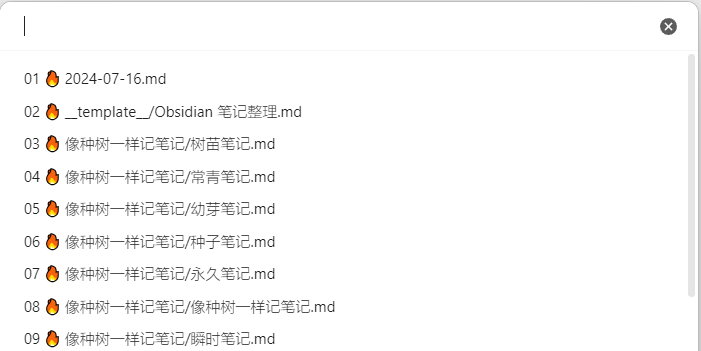
Open note: Open the note. All notes are sorted by modification time and can be accessed through numerical encoding.
image

Open and reveal note: Open and locate the note, the note will be displayed in the middle of the File List;

Reveal current file in navigation: Locate the note in the File List, the note is centered when displayed, which can replace the system's own command;

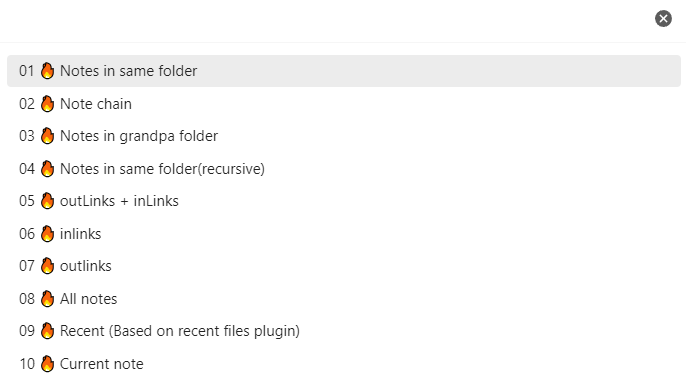
Open note smarter: First select the note group, then select the note.
image

Move current file to another folder: Move the current note, the folder is sorted according to the latest modification time of the note, so it is prioritized to move to the active directory.

Open prev note: Open the pre-note, it is recommended to set the shortcut key to Alt+←;

Open next note: Open the post-note, it is recommended to set the shortcut key to Alt+→;

Open prev note of right leaf: Open the pre-note of the right page;

Open next note of right leaf: Open the post-note of the right page;

The last two commands are suitable for linked notes, and specific examples are here

Other handy commands:

  • Open note in modal / Open note in view — preview a note in a modal or custom view;
  • Execute current note — run Templater JS / extract CSS / open as modal (Alt+R recommended);
  • Execute Templater modal — pick a script note and insert its output;
  • Mermaid of notes / linked / folder — generate Mermaid flowcharts;
  • Toogle css block in note — enable or disable a CSS code block in the note;
  • Set frontmatter for selected notes — batch set properties;
  • Replace by regex — regex replace across notes;
  • Desktop: File - open with system app, File - show in system explorer, File - rename file.

textarea Code Blocks

In reading view, fenced blocks with language textarea become interactive panels (YAML config + optional text area + button rows):

```textarea
textarea:
  style:
    height: 120px
buttons:
  - Clear: clear_area
  - Copy: copy_area
  - Run: my_templater_func
```
  • Frontmatter of the host note is merged into the config unless frontmatter: false;
  • Buttons can call built-ins (clear_area, copy_area, log_area), Templater/CustomJS functions, Obsidian commands, or script notes;
  • Wiki-link autocomplete ([[) works inside the textarea;
  • Online vault can run button actions via /online/api/textarea-exec.

Local HTTP Server (Desktop)

Settings → Note Chain tab → enable the server. You can turn on HTTPS and/or HTTP independently.

Option Role
Enable server Master switch
HTTPS (mobile / LAN) Self-signed TLS; phone/LAN access, e.g. https://IP:3000/oldbuddy
HTTP localhost (Obsidian WebViewer) Local HTTP for Web Viewer; when HTTPS is also on, HTTP uses HTTPS port + 1
Listen Host / HTTPS port Shared host; default 0.0.0.0 / 3000

MCP for Agents

Note Chain exposes vault tools over MCP so Cursor / other agents can call Obsidian workflows.

Tools are defined in the vault (Templater scripts): prefer obsidian_mcp_list_tools.md, or notes with frontmatter mcp_tool / names like mcp_*. Calling a tool runs the matching {name}.md through Templater.

Endpoint Purpose
/mcp/list_tools List tools
/mcp/call_tool Call a tool { name, arguments }
/sse + /messages MCP SSE / JSON-RPC
/mcp/test Browser test page
/mcp/skill Generated Agent SKILL.md
/templater Run a Templater script remotely

Command Generate MCP Agent Skill (SKILL.md) saves a ready-to-use skill document for agents.

Online Vault

Browse and edit vault markdown from a browser at /online (search, read/save, render, media, textarea-exec APIs under /online/api/*).

OldBuddy

Local chat companion UI at /oldbuddy (WebSocket + message APIs). Command Open OldBuddy in Web Viewer opens it inside Obsidian Web Viewer (requires HTTP enabled).

WebViewer LLM

Automate AI chats inside Obsidian Web Viewer via selector-driven profiles.

Supported sites: Yuanbao, ChatGPT, Kimi, Doubao, DeepSeek, ChatGLM, Gemini, Claude.

Useful commands:

  • WebviewLLM: Chat with Target File — build a prompt from a template note and send (Alt+F recommended);
  • WebviewLLM: New AI Chat / send to first or all models;
  • Start / stop continuous chat;
  • Paste last AI content; paste as tab/card list;
  • Probe elements / copy active AI profile snippet (for maintaining selectors).

Prompt templates support placeholders such as ${selection}, ${tfile.content}, ${[[Note]]}, ${prompt.xxx}, optional reference notes, and Templater pre/post-process. See cmd_chat_with_target_tfile 用法.md for details.

Settings live under the Web viewer AI tab (prompt tag filter, reference notes, clipboard, pre/post-process, auto-stop phrases, HTML→Markdown styles).

Other Features

Settings Page

Two tabs: Note Chain and Web viewer AI.

Common Note Chain options also include:

  • Refresh dataview while open new file? / Refresh tasks while open new file?;
  • Notice while modify note chain?;
  • Configurable frontmatter field names for prev/next/display/level/style;
  • Tags or folder of script note — where script notes for Templater / MCP live;
  • Avata — avatar field name used by related UIs.

Word Count

Register daily word count: Whether to record the word count of the note for the day when modifying the note, the word count is similar to the core plugin Word Count. This feature can track the output of notes. Skip folders via Ignore these folders.

let nc = app.plugins.getPlugin('note-chain');
let note = nc.chain.current_note;
// Get the number of words updated for the note on a specific date
nc.wordcount.get_new_words(note,'2024-07-15')

EasyAPI & Utility Functions

Note Chain exposes window.ea (EasyAPI) for Templater / Dataview / scripts: file helpers, editor/frontmatter, dialogs (suggest, multi-suggest, prompt, cards, calendar, color), Templater runner, time/random/web/fs utilities, plus shortcuts such as ea.nc, ea.wv, ea.dv, ea.cfile.

let nc = app.plugins.getPlugin('note-chain');
let ea = window.ea;

let note = nc.chain.get_last_daily_note()

Get the most recently accessed log note, the priority is: whether the current page is a log note, whether the right page is a log note, the first log note in the history.

let leaf = nc.chain.get_neighbor_leaf(offset=-1)

Get the left or right page of the current note, offset is negative for the left, positive for the right. leaf.view.file is the corresponding note.

let note = await nc.chain.sugguster_note()

Select a note from the library.

let func = nc.utils.get_tp_func(app, "tp.system.prompt")

Get the function provided by the Templater plugin;

let func = await nc.utils.get_tp_func(app, "tp.user.func")

Get the user-defined function of the Templater plugin;

Installation

Note Chain works best with:

  • Templater + Dataview + Recent Files + Tasks
  • Obsidian core Web Viewer (for WebViewer LLM / OldBuddy in-app)
  • Optional: LongForm for scene ↔ chain sync

Install from the Plugin Community

  1. In Obsidian, ctrl+, to open Settings;
  2. Click Browse in Community Plugins;
  3. Search and select Note Chain;
  4. Click Install and Enable;

You can also install from obsidian plugins note-chain.

Manual Installation

  1. Click on the latest release page, download main.js, manifest.json, and styles.css (or a zip file);
  2. Copy the files to your obsidian library [your vault]/.obsidian/plugins/note-chain/;
  3. Restart Obsidian or refresh the plugin list, and you will see this plugin;
  4. In the plugin list, enable Note Chain;

You can also download these files from Baidu Cloud Disk.

Similar Plugins

info
• Similar plugins are suggested based on the common tags between the plugins.
Kanban
5 years ago by mgmeyers
Create markdown-backed Kanban boards in Obsidian.
Copilot
3 years ago by Logan Yang
THE Copilot in Obsidian
Homepage
5 years ago by mirnovov
An Obsidian plugin that opens a specified note, canvas, or workspace on startup, instead of the most recent one.
Smart Connections
4 years ago by Brian Petro
Find related notes and excerpts while writing. Your link building copilot displays relevant content in graph + list view. A local embedding model powers semantic search. Zero setup. No API key.
MAKE.md
4 years ago by MAKE.md
Checklist
5 years ago by delashum
TagFolder
5 years ago by vorotamoroz
File Color
4 years ago by ecustic
An Obsidian plugin for setting colors on folders and files in the file tree.
Longform
5 years ago by Kevin Barrett
A plugin for Obsidian that helps you write and edit novels, screenplays, and other long projects.
Smart Composer
2 years ago by Heesu Suh
AI chat assistant for Obsidian with contextual awareness, smart writing assistance, and one-click edits. Features vault-aware conversations, semantic search, and local model support.
Task Genius
4 years ago by Boninall
Comprehensive task management plugin for Obsidian
Consistent attachments and links
5 years ago by Dmitry Savosh
Obsidian plugin. Move note with attachments.
Auto Note Mover
5 years ago by faru
This is a plugin for Obsidian (https://obsidian.md).
Zoottelkeeper
5 years ago by Akos Balasko
Obsidian plugin of Zoottelkeeper: An automated folder-level index file generator and maintainer.
Tasks Calendar Wrapper
3 years ago by zhuwenq
This plugin currently provides a timeline view to display your tasks from your obsidian valut, with customizable filters and renderring options.
Gemini Scribe
2 years ago by Allen Hutchison
An obsidian plugin to interact with Google Gemini
Modal forms
3 years ago by Danielo Rodriguez
Define forms for filling data that you will be able to open from anywhere you can run JS
Slash Commander
3 years ago by alephpiece
Customizable slash command list for Obsidian.md
Task Board
2 years ago by Atmanand Gauns
An Obsidian plugin to view and manage your tasks from whole vault using much efficient boards using various methodologies.
Contribution Graph
3 years ago by vran
generate interactive gitxxx style contribution graph for obsidian, use it to track your goals, habits, or anything else you want to track.
Janitor
4 years ago by Gabriele Cannata
Performs various maintenance tasks on the Obsidian vault
Floating Search
3 years ago by Boninall
A plugin for searching text by using Obsidian default search view.
Periodic PARA
3 years ago by YiBing Lin
Obsidian Plugin for combining P.A.R.A with Periodic Notes(LifeOS for Obsidian)
File Order
3 years ago by lukasbach
Obsidian plugin to reorder files with drag-and-drop by customizing a number-prefix in the filenames
Typing Assistant
3 years ago by Jambo
Typing Assistant is a plugin that improves writing efficiency and provides a user experience similar to that of【Notion】
Super Simple Time Tracker
4 years ago by Ellpeck
Multi-purpose time trackers for your notes!
Task List Kanban
2 years ago by Chris Kerr
Heading Shifter
4 years ago by kasahala
Easily Shift and Change markdown headings.
Autocomplete
6 years ago by Yeboster
Obsidian plugin to provide text autocomplete
Dynamic Outline
2 years ago by theopavlove
Adds a customizable GitHub-like floating table of contents to Obsidian.
Archiver
5 years ago by ivan-lednev
Archive completed tasks in your Obsidian vault (plus other org-mode-like features)
TickTickSync
3 years ago by thesamim
Bidirectional synchronization between Obsidian and TickTick. Mobile compatible.
Doubleshift
4 years ago by Qwyntex
Obsidian Plugin to open the command palette by pressing shift twice
Hotkeys for specific files
6 years ago by Vinzent
Mononote
3 years ago by Carlo Zottmann
An Obsidian plugin that ensures each note occupies only one tab. If a note is already open, its existing tab will be focussed instead of opening the same file in the current tab.
Hotkeys for templates
5 years ago by Vinzent
Vantage - Advanced search builder
6 years ago by ryanjamurphy
Vantage helps you build complex queries using Obsidian's native search tools.
Workbench
6 years ago by ryanjamurphy
A plugin to help you collect working materials.
Shortcuts extender
6 years ago by kitchenrunner
Plugin for Obsidian: Use shortcuts for input special symbols and changing level of headings without language switching
Audio Notes
4 years ago by Jason Maldonis
Easily take notes on podcasts and other audio files using Obsidian Audio Notes.
Note Definitions
2 years ago by Dominic Let
Obsidian plugin for seamless viewing of personal definitions
Daily Stats
6 years ago by Dhruvik Parikh
Plugin to view your daily word count across all notes in your Obsidian.md vault.
Extract PDF Annotations
4 years ago by Franz Achermann
This is a plugin for https://obsidian.md. It extracts Annotations from PDF Files.
Daily Note Outline
4 years ago by iiz
Add a custom view which shows outline of multiple daily notes with headings, links, tags and list items
Mxmind Mindmap
2 years ago by mxmind
mxmind for obsidian plugin
Folders to Graph
2 years ago by Ratibus11
Enhance your Obsidian graph view with folders and headings structure!
Word Sprint
5 years ago by Andrew Lombardi
Obsidian Word Sprint plugin
Personal Assistant
3 months ago by edonyzpc
A plugin that harnesses AI agents and streamlining techniques to help you automatically manage Obsidian.
Journal Review
3 years ago by Kageetai
Review your daily notes on their anniversaries, like "what happened today last year"
ToggleList
4 years ago by Lite C
This is a simple plugin for Obsidian to overwrite the default behavior of toggle checkbox status. Also, it offers a simple way to toggle through frequently used attributes: task states, task tags, highlighted list, etc.
Dangling links
6 years ago by Graydon Hoare
obsidian plugin for displaying dangling links
Date Inserter
2 years ago by namikaze-40p
An Obsidian plugin that lets you insert a date at the cursor position using a calendar.
Folder Focus Mode
4 years ago by grochowski
Focus file explorer on chosen folder and its files and subdirectories, while hiding all the other elements.
Daily Notes Viewer
4 years ago by Johnson0907
Better Plugins Manager
2 years ago by zero
Auto Hide
4 years ago by skelato1
This Obsidian plugin enables you to collapse (and expand) the sidebar easier.
Copy Inline Code
3 years ago by Ondrej Zavodny
Plugin Manager
3 years ago by ohm-en
Allows better management of Obsidian.md plugins.
Keyshots
4 years ago by KrazyManJ
🔮📝 Obsidian plugin that adds classic hotkey/shortcuts commands from popular IDEs like Visual Studio Code or JetBrains Family.
Key Promoter
5 years ago by Johannes Theiner
Learn keyboard shortcuts by showing them when using the mouse
Uncheck All
3 years ago by Shahar Har-Shuv
Obsidian plugin to uncheck all checkboxes in a file with one action
Pomodoro
5 years ago by Tokuhiro Matsuno
Proletarian Wizard Task Manager
2 years ago by Charles Feval
Obsidian plugin ot manage todos and projects directly from your notes.
Recent Notes
2 years ago by Kamil Rudnicki
Recent Notes Plugin for Obsidian
Custom window title
6 years ago by Joost Plattel
Small Obsidian plugin that updates the window title with the current open note
Embedded Code Title
5 years ago by tadashi-aikawa
It is an Obsidian plugin which can embeds title to code blocks.
Task Marker
4 years ago by wenlzhang
An Obsidian plugin to change task status and append text with hotkeys and right-click context menu.
Org Mode
5 years ago by ryanpcmcquen
Add Org Mode support to Obsidian.
Timekeep
2 years ago by Jacobtread
Obsidian task time tracking
Unique attachments
5 years ago by Dmitry Savosh
Obsidian plugin. Renames attachments, making their names unique.
Note Folder Autorename
6 years ago by PJ Eby
Obsidian plugin to support folder-overview notes by keeping their folder in sync
CardNote
2 years ago by cycsd
Help you extract your thoughts more quickly in canvas
Improved Random Note
3 years ago by ShockThunder
Timer
3 years ago by Marius Wörfel
Obsidian plugin, which allows you to measure time.
Tag Page
3 years ago by Matthew Sumpter
An Obsidian plugin to create and manage dedicated Markdown pages for tags, with features to automatically populate and refresh content based on user-defined settings.
TodoTxt
3 years ago by Mark Grimes
Obsidian plugin to manage todotxt files
Habit Calendar
4 years ago by Hedonihilist
Monthly Habit Calendar for DataviewJS. This plugin helps you render a calendar inside DataviewJS code block, showing your habit status within a month.
Week Planner
4 years ago by Ralf Wirdemann
Vim Toggle
3 years ago by Conner Ohnesorge
This is a plugin that adds the ability to toggle on and off vim into obsidian with a nice notice to let you know when you switched.
Link with alias
3 years ago by Pavel Vojtechovsky
Obsidian plugin for handy creation of links and alias in front matter of target document
Diarian
2 years ago by Erika Gozar
All-in-one journaling toolkit.
Fold Properties By Default
2 years ago by Tommy Bergeron
Always have editor/metadata properties folded by default.
Open with
5 years ago by phibr0
Ego Rock
2 years ago by Ashton Eby
An obsidian plugin that implements a basic taskwarrior UI for listing and modifying tasks.
Folder Links
2 years ago by Stefan Rausch
Obsidian Plugin that enables using links to folders.
Tag Project
3 years ago by Odaimoko
DEVONlink
5 years ago by ryanjamurphy
Open notes indexed in DEVONthink in, well, DEVONthink
Journaling
2 years ago by Ordeeper
View daily notes in a journal-like format, similar to Logseq. It enhances note organization and facilitates better reflection by consolidating daily notes into a continuous journaling view.
Habitica Sync
5 years ago by Leoh and Ran
This is a under-development Obsidian Plugin for Habitica
Search In Canvas
2 years ago by Boninall
Multi-line Formatting
5 years ago by nmady
Format Obsidian text over an entire selection, even if that selection has paragraph breaks in the middle!
Marjdown shortcuts
4 years ago by Jules Guesnon
🪨 Obsidian plugin that allows to write markdown from commands
Stopwatch
5 years ago by Tokuhiro Matsuno
Daily notes opener
4 years ago by Reorx
Easily open daily notes and periodic notes in new pane; customize periodic notes background; quick append new line to daily notes.
YouTube Template
3 years ago by sundevista
📺 A plugin that would help you to fetch YouTube videos data into your vault.
Contacts
4 years ago by vbeskrovnov
With this plugin, you can easily organize and manage your contacts within Obsidian. Simply create a note with contact information and use the plugin's features to quickly search, and sort through your contacts. Contacts plugin also helps you to remember birthdays of your contacts and keeps track of the last time you met them.
Arcana
3 years ago by A-F-V
Supercharge your Obsidian note-taking through AI-powered insights and suggestions
Automatic Renumbering
2 years ago by Omri Levi
Automatically reorders checklists and numbered lists as you edit them.
Autocorrect Formatter
3 years ago by b-yp
A plugin running on Obsidian that utilizes autocorrect to format Markdown content.
VirtFolder
2 years ago by mr.grogrig
Creating a hierarchical structure like Luhmann's Zettelkasten
Quick snippets and navigation
4 years ago by @aciq
Quick snippets and navigation for Obsidian
WordWise
3 years ago by ckt1031
Writing companion for AI content generation.
Weekly Review
4 years ago by Brandon Boswell
Todo sort
4 years ago by Ryan Gomba
A plugin for Obsidian that sorts todos within a note
Mini Toolbar
3 years ago by AidenLx & Boninall
mini context toolbar in editor for Obsidian
Single File Daily Notes
3 years ago by Pranav Mangal
An Obsidian plugin to create and manage daily notes in a single file
Rapid Notes
4 years ago by valteriomon
Sequence Hotkeys
4 years ago by Ruan Moolman
Obsidian plugin to support a sequenced of keyboard shortcuts to run commands.
Grind Manager
2 years ago by dromse
Gamify your task management with rewards system, craft your tasks by tags.
Navigate Cursor History
4 years ago by heycalmdown
Things Link
4 years ago by @gavmn
Project Garden
4 years ago by Ben Goosman
Metadata Auto Classifier
2 years ago by Beomsu Koh
AI-powered Obsidian plugin that automatically classifies and generates metadata (tags, frontmatter) for your notes.
Zettelkasten LLM Tools
3 years ago by Karl Smith
Zettelkasten note taking powered by Large Language Models
Auto Folder Collapse
2 years ago by Dario Casciato
A plugin for Obsidian that automatically collapses all child folders when you collapse a parent folder. This helps keep your file explorer organized and clutter-free.
PARA Shortcuts
5 years ago by gOAT
This plugin serves usefull commands to setup and manage your knowledge using the PARA method.
Favorite Note
3 years ago by Mahmudul Hasan
The missing Obsidian plugin to mark note as favorite.
TagMany
3 years ago by Joshua Martius
Tag many Notes at once in Obsidian
Command Alias
5 years ago by @Yajamon
Obsidianのコマンドに対してエイリアスを設定するプラグイン
Auto Tasks
2 years ago by Jamie Hurst
Obsidian plugin to combine periodic notes with tags and tasks to automatically manage your daily, weekly and project TODO lists. Optionally uses the "Periodic Notes" and "Tasks" plugins.
Gemmy
3 years ago by Obsidian
Structured
5 years ago by dobrovolsky
Automatic Tags
3 years ago by Jamalam
Add tags to new notes automatically based on their path
Lemons Search
2 years ago by Moritz Jung
An Obsidian plugin that offers a fast fuzzy finder based quick switcher with preview.
Insert Multiple Attachments
2 years ago by mnaoumov
Obsidian Plugin that allows to insert multiple attachments at a time
Key-Value List
3 years ago by Christian Wannerstedt
Obsidian plugin which makes it easy to turn lists into formatted key value lists
Content Cards
a year ago by leo
Insert content cards in Markdown, such as timeline, highlightblock, target card, book information card, music information card, movie information card, photoes ablum, business card, content subfield, countdown, SWOT,BCG.
Swiss army knife
3 years ago by mwoz123
Note archiver
3 years ago by thenomadlad
Broken Links
3 years ago by ipshing
Tag Buddy
3 years ago by David Fasullo
Unlock powerful tag editing features in Reading Mode. Add, remove and edit tags across your vault. Use tag inboxes to level up any workflow with a powerful idea assembly line.
Packrat
4 years ago by Thomas Herden
Process completed instances of recurring items created by the Obsidian Tasks plugin
Auto Periodic Notes
2 years ago by Jamie Hurst
Obsidian plugin to create new periodic notes automatically in the background and allow these to be pinned in your open tabs. Optionally uses the "Periodic Notes" plugin.
Linked Data Vocabularies
3 years ago by kometenstaub
Add linked data to the YAML of your Obsidian notes.
Custom State for Task List
3 years ago by Okami Wong
A plugin for Obsidian to define your own states for task items.
Blockquote Levels
4 years ago by Carlo Zottmann
A plugin for Obsidian (https://obsidian.md) that adds commands for increasing/decreasing the blockquote level of the current line or selection(s).
open-as-md
3 years ago by kursad-k
open and edit preferred formats as markdown in Obsidian
Daily Statistics
2 years ago by yefengr
obsidian daily statistics
Go to Line
5 years ago by phibr0
Bookmarks Caller
2 years ago by namikaze-40p
This is an Obsidian plugin which can easily open bookmarks.
GPT-LiteInquirer
3 years ago by ittuann
💬 Experience OpenAI ChatGPT assistance directly within Obsidian, drafting content without interrupting your creative flow.
Lite Gallery
2 years ago by Jordan Poles
Flow
2 years ago by Ben Phillips
Implements key processes in David Allen's Getting Things Done (GTD) methodology
PopKit
2 years ago by Zhou Hua
Activity Logger
5 years ago by Creling
Brainframe
3 years ago by pedersen
Prioritize
3 years ago by EloiMusk
Obsidian Plugin, to prioritize stuff in Obsidian
ZettelGPT
3 years ago by Overraddit
Turbocharge Your Note-taking with AI Assistance
Quick Open
2 years ago by James Alexandre
Quickly select items in any modal using keyboard shortcuts. Supercharge your workflow with fast, efficient item selection in Obsidian modals.
Key Sequence Shortcut
4 years ago by anselmwang
Execute obsidian commands with short key sequences. For example, 'tp' for 'Toggle Preview' and 'tb' for 'Toggle Sidebar'. Easier to remember.
Auto File Organizer
2 years ago by mofukuru
Obsidian plugin: Automatically organizes files into folders based on their extensions.
Overdue
5 years ago by Peter Parente
Obsidian plugin that marks items as [[Overdue]] if they are not checked off by their due date
Note aliases
4 years ago by Pulsovi
This plugin manages wikilinks aliases and save them on the aliases list of the linked note
Amazing Marvin
5 years ago by Shirayuki Nekomata
Simple plugin for Amazing Marvin
CAO
2 years ago by Godot
Claude AI for Obsidian
File chucker
4 years ago by Ken Lim
GTD No Next Step
3 years ago by Tobias Davis
Obsidian plugin for GTD workflow, badge projects with no next step.
VaultAI
a year ago by Tharushka Dinujaya
An AI chatbot plugin for Obsidian using the Gemini API for note summarization, content generation, and more. Enhance your workflow with AI assistance like the Notion AI bot.
BuJo Bullets
2 years ago by Will Olson
Alternate checkbox types for Obsidian to support Bullet Journal bullets
Editor Commands Remap
5 years ago by cactus5
Obsidian plugin to map hotkeys to editor commands
Journalyst
3 years ago by Justin Arnold
Nav Link Header
2 years ago by ahts4962
Display navigation links at the top of the notes in Obsidian
Notice logger
2 years ago by @gapmiss
An Obsidian.md plugin for logging all notices to the developer console, with optional prefix & timestamp.
Open File by Magic Date
4 years ago by simplgy
Filename Emoji Remover
4 years ago by Yüksel Tolun
A simple plugin for the note taking app Obsidian that will rename your files to remove emojis in their names.
Order List
4 years ago by Henry Gustafson
Another Simple Todoist Sync
2 years ago by eudennis
Obsidian.md plugin to integrate with Todoist app.
Harpoon
3 years ago by mask(developermask)
Waka time box
3 years ago by complexzeng
Bellboy
4 years ago by Shaked Lokits
Opinionated file structure manager for the Obsidian knowledge base.
Desk
3 years ago by David Landry
A desk for obsidian
Codename
3 years ago by dstack
Due When
3 years ago by Andy Baxter
An Obsidian plugin which gives shortcuts to insert set due dates
Search Templates Library
3 years ago by Pentchaff
Obsidian plugin that allows to store searches templates for later use, and displays search results both in the search view and graph view.
Extended Task Lists
3 years ago by joeriddles
Extended Markdown support for task lists in Obsidian.
TODO Wrangler
3 years ago by Jeel Shah
An obsidian plugin to wrangle your Todos and put them in their place.
Spacekeys
2 years ago by Jared Lumpe
Obsidian plugin to define hotkeys based on sequences of keypresses.
Hierarchical Backlinks
2 years ago by Jason Motylinski
Plugin which displays backlinks as a tree structure based on file paths
File Forgetting Curve
4 years ago by ptrsvltns
File Forgetting Curve
Feeds
3 years ago by LukeMT, pashashocky, madx
Magic feeds dataview query for obsidian
At People
3 years ago by Tobias Davis
Obsidian plugin to use the familiar @ notation to cross link to people.
Journal Folder
2 years ago by Charl Fourie
Expiration-Date-Tracker
3 years ago by Marius Wörfel
Opsidian plugin to keep track of all expiration dates, for example, for your groceries.
Postfix
3 years ago by Bhagya Nirmaan Silva (@bhagyas)
A postfix plugin for Obsidian
Random Number Generator
3 years ago by iRewiewer
Gives you a random number
Activity Heatmap
2 years ago by Zak Hijaouy
Focus Time
2 years ago by AstraDev
Focus Time is a plugin that helps you track how much time you spend on each note.
Context Command Hider
2 years ago by Mara-Li
This plugin allows you to hide every command from the Obsidian's right-click context menu.
Index Notes
2 years ago by Alejandro Daniel Noel
Plugin that automatically generates index blocks based on tags
Pomodoro Planner
2 years ago by Onur Nesvat
Note Minimap
a year ago by Yair Segel
Add a minimap to your Obsidian notes.
Set View Mode per Note
3 years ago by Alex Davies
Use YAML frontmatter to specify a view mode per note.
Custom save
3 years ago by Hananoshika Yomaru
add custom save action to your save command
External Links
2 years ago by Juan Vimberg
Next Link
3 years ago by Juan Luque
Task list
3 years ago by Ted Marozzi
A simple obsidian plugin enabling better task management via lists.
New Note Fixer
2 years ago by mnaoumov
Obsidian Plugin that unifies the way non-existing notes are created when clicking on their links
Jira Issue Manager
a year ago by Alamion
Obisdian plugin to sync tasks between Obsidian and Jira
Cursor Position History
a year ago by Florian Gubler
A Plugin to remember (and make accessible) the cursor history in Obsidian. Both within a file and across files.
RescueTime
3 years ago by Tatsuya Hayashi
A RescueTime integration plugin to view your activity logs in Obsidian.
Sort Frontmatter
3 years ago by Kanzi
Sort frontmatter automatically
Simple Todo
2 years ago by elliotxx
A minimalist text-based todo manager (Text-Based GTD) for efficient task management in Obsidian.
Tag Breakdown Generator
3 years ago by Hananoshika Yomaru
Break down nested tags into multiple parent tags
Daily Routine
2 years ago by sechan100
new version of daily-routine obsidian plugin
Copy Section
2 years ago by skztr
Obsidian.md plugin adding a Copy button to the top of Headed sections
Dataview Autocompletion
2 years ago by Daniel Bauer
Cluster
2 years ago by Lorens Osman
Cluster plugin mainly designed to simplify the process of note clustering on mobile devices and work well on PCs ether
Folder overview
2 years ago by Lost Paul
Provides a dynamic overview of your vault or folders in the format of a code block.
Clipper Catalog
2 years ago by Greg K.
A catalog view that provides a powerful interface for all your clipped web articles and content. Easily organize, search, and manage your web clippings within your vault.
Highlight Helper
3 years ago by Chongmyung Park
Helper to collect highlight in Obsidian
Editor Autofocus
3 years ago by Mgussekloo
MantouAI
2 years ago by Morino Pan
MantouAI—— 让Obsidian变身智能助手
Inline Checkbox Groups
2 years ago by Bradley Wyatt
Obsidian Plugin that creates multiple checkboxes on a single line, separated by a customizable separator character (default '|'), with the option to automatically cross out text when all checkboxes in the line are checked.
Templated daily notes
3 years ago by digitorum
Allow to create templayted daily note in specific folder
Canvas Blocks
2 years ago by Kay606
Daily note creator
3 years ago by Mario Holubar
Automatically creates missing daily notes.
Personal OS
2 years ago by A.Buot
PDF Paste
2 years ago by Cormac
Todos sort
2 years ago by Jiri Sifalda
A plugin for Obsidian that sorts todos within a note
Goal Tracker
2 years ago by Ben Rotholtz
Duplicate Detector
2 years ago by David Alcalde
Obsidian plugin to detect and highlight duplicate lines in the active file
Minote Sync
2 years ago by Emac Shen
Minote Sync is a Obsidian plugin to sync Minote(小米笔记) into your Vault.
Missing Link File Creator
2 years ago by Lemon695
The plugin creates both missing links and the corresponding files.
Mass Create
2 years ago by vellikhor
Create large quantities of notes easily at one time.
Unit Converter
2 years ago by Ruslan Zabarov
Unit conversion plugin for Obsidian
Vault File Renamer
2 years ago by Louan Fontenele
Vault File Renamer: Automatically standardizes file names to GitHub style (lowercase, no accents, only -, ., _) while preserving folder structure and file contents.
Canvas Link to Group
10 months ago by TGRRRR
Plugin for Obsidian Canvas enabling direct links to specific groups within canvas files for improved navigation
Beautiful Contact Cards
2 years ago by Seth Tenembaum
A plugin for the Obsidian text editor which renders "contact" code blocks with tappable links for phone, social media, etc.
Typezen
2 years ago by Ilgam Gabdullin
Plugin for obsidian which lets you turn zen mode instantly
Alias Picker
2 years ago by rostunic
Focus Tracker
2 years ago by Jeet Sukumaran
Hide Commands in Menu
2 years ago by bomian98
Obsidian Plugin, hide different commands in different menus.
Ctrl-XA cycle various items
3 years ago by nbossard
The equivalent in Obsidian of Vim Ctrl X-A. But supercharged with lists of various items : days, months, ...
Markwhen File Sync
a year ago by rouvenjahnke
Synchronize properties from your Obsidian notes with a Markwhen timeline file.
NodeFlow
2 years ago by LincZero
Render node streams like `ComfyUi`, `UE`, `Houdini`, `Blender`, etc., to make it easy to write relevant notes. json describes the chart, compared to screenshots, making it easier to modify later. The plugin is also compatible with blogs.",
AI integration Hub
2 years ago by Hishmat Salehi
A modular AI integration hub for Obsidian
Boost Link Suggestions
4 years ago by Jacob Levernier
An Obsidian (https://obsidian.md) plugin for altering the order of inline link suggestions by link count and manual boosts.
Quick Cards
2 years ago by Camus Qiu
LinkMagic
2 years ago by AndyReifman
Pinned Daily Notes
a year ago by Jeremy Neiman
Dynamically update a pinned tab with today's daily note
Daily Prompt
2 years ago by Erl-koenig
Peekaboo
2 years ago by Wang Guoshi
An Obsidian plugin protects your privacy by setting a password to hide notes.
Asana
a year ago by Ryan Bantz
Obsidan plugin that creates tasks in Asana for highlighted text or the current line
Sentinel
2 years ago by Giorgos Sarigiannidis
A plugin for Obsidian that allows you to update properties or run commands based on document visibility changes.
Weekly Goal Tracker
2 years ago by George Gorman
downloadPDF
2 years ago by Frieda
Task Mover
a year ago by Mariia Nebesnaia
A plugin for obsidian to move unfinished tasks to the daily note automatically
Organized daily notes
2 years ago by duchangkim
Automatically organizes your daily notes into customizable folder structures for better organization and easier navigation.
Brain Dump Mode
2 years ago by yesjinu
Obsidian plugin - DISABLE your delete key and eliminate hesitation!
MOC Link Helper
2 years ago by Bogdan Codreanu
This obsidian plugins allows you to quickly see which notes you need to include in your MOC.
Target Word Count
2 years ago by TwoFive Labs
Target Word Count Plugin for Obsidian
Runsh
2 years ago by Ddone
A simple plugin that allows to run shell commands from obsidian.
Template by Note Name
2 years ago by Jacob Learned
A simple Obsidian plugin to automatically template notes based on their title
WhatsApp backup importer
2 years ago by Luigi Cerone
Obsidian plugin that allows you to import exported WhatsApp chat archives (in .zip format) into your vault.
Daily Random Note
2 years ago by Alexandre Silva
Daily Random Notes in Obsidian.
Current File Tags
2 years ago by Trung Tran
doing
2 years ago by rooyca
What was I doing?
Kikijiki Habit Tracker
2 years ago by KIKIJIKI
Kikijiki Habit Tracker Plugin for Obsidian
AI Revisionist
2 years ago by Synaptic Labs
Tab Group Arrangement
a year ago by situ2001
Arrange the tab groups of Obsidian in a more flexible way
Tab Limiter
2 years ago by Henry Gustafson
Limits the number of tabs that can be opened in Obsidian
Outline to task list
2 years ago by alexandrerbb
A simple Obsidian plugin to convert a note's outline to a task list
BlazeJump
2 years ago by henryco
Plugin for Obsidian that makes text navigation blazingly fast.
Note Progressbar
5 months ago by Ryoma Kawahara
Instant Above Divider
2 years ago by SedationH
URI Converter
a year ago by wenlzhang
An Obsidian plugin to convert Obsidian URIs to Obsidian internal links.
JIRA links shortener
a year ago by Ruslans Platonovs
Obsidian JIRA links shortener plugin
Abbrlink
2 years ago by Q78KG
Tag Timer
8 months ago by quantavil
The Tag Timer is a versatile plugin for Obsidian that allows you to seamlessly track the time you spend on specific tasks or sections within your notes.
Nav Weight
2 years ago by shu307
A simple plugin designed to sort files in navigation based on markdown frontmatter (also known as metadata) for Obsidian.
Select word
2 years ago by Connor Espino
Close Window When Empty
2 years ago by Taylor Jadin
Previous Daily Note
a year ago by Marcos Talau
Plugin for Obsidian that opens the previous daily note
e-Daiary
2 years ago by Thomas Campanholi
This plugin was created to make daily entries in a journal based on the day of the year.
Task Director
2 years ago by Cybertramp
A plugin that allows you to easily manage tasks in bulk.
Hanko
2 years ago by Telehakke
Obsidian plugin.
Superstition
2 years ago by Jeffry
An Obsidian plugin for routine management.
Bottom to Top
2 years ago by Henry Gustafson
SolidTime Integration
a year ago by proniclabs
Obsidian SolidTime Integration Plugin
Sonkil
a year ago by ohyoungpark
Store
22 days ago by shimeoki
Manage your notes within a single folder.
Crackboard
2 years ago by Franklin
Obsidian plugin for crackboard.dev
Alternative Explorer
10 days ago by sk-obsidian
Alternative Explorer is an Apple Notes–style sidebar for browsing folders and notes in Obsidian. Switch between an expandable folder tree and a notes list — a compact alternative to the built-in File Explorer.