Modal forms

by Danielo Rodriguez
5
4
3
2
1
Score: 73/100

Description

The Modal forms plugin enhances data entry in Obsidian by enabling users to create and manage customizable forms that can be triggered from various sources, such as templates or automation plugins. It allows for structured data collection with multiple input types, including text, date, and multiple-choice fields. The plugin integrates seamlessly with existing workflows by offering a user-friendly interface for form creation and template management. It supports popular plugins like Templater and QuickAdd, making it easier to capture information and automate note creation efficiently. Users can also define form behaviors, pre-fill default values, and insert collected data directly into their notes.

Reviews

No reviews yet.

Stats

391
stars
73,557
downloads
31
forks
1,090
days
5
days
67
days
267
total PRs
28
open PRs
59
closed PRs
180
merged PRs
222
total issues
92
open issues
130
closed issues
91
commits

Latest Version

2 months ago

Changelog

Bug Fixes

  • fix: round-trip serialization of frontmatter template command (a4f8874)

README file from

Github


GitHub all releases ko-fi

Obsidian Modal Form Plugin

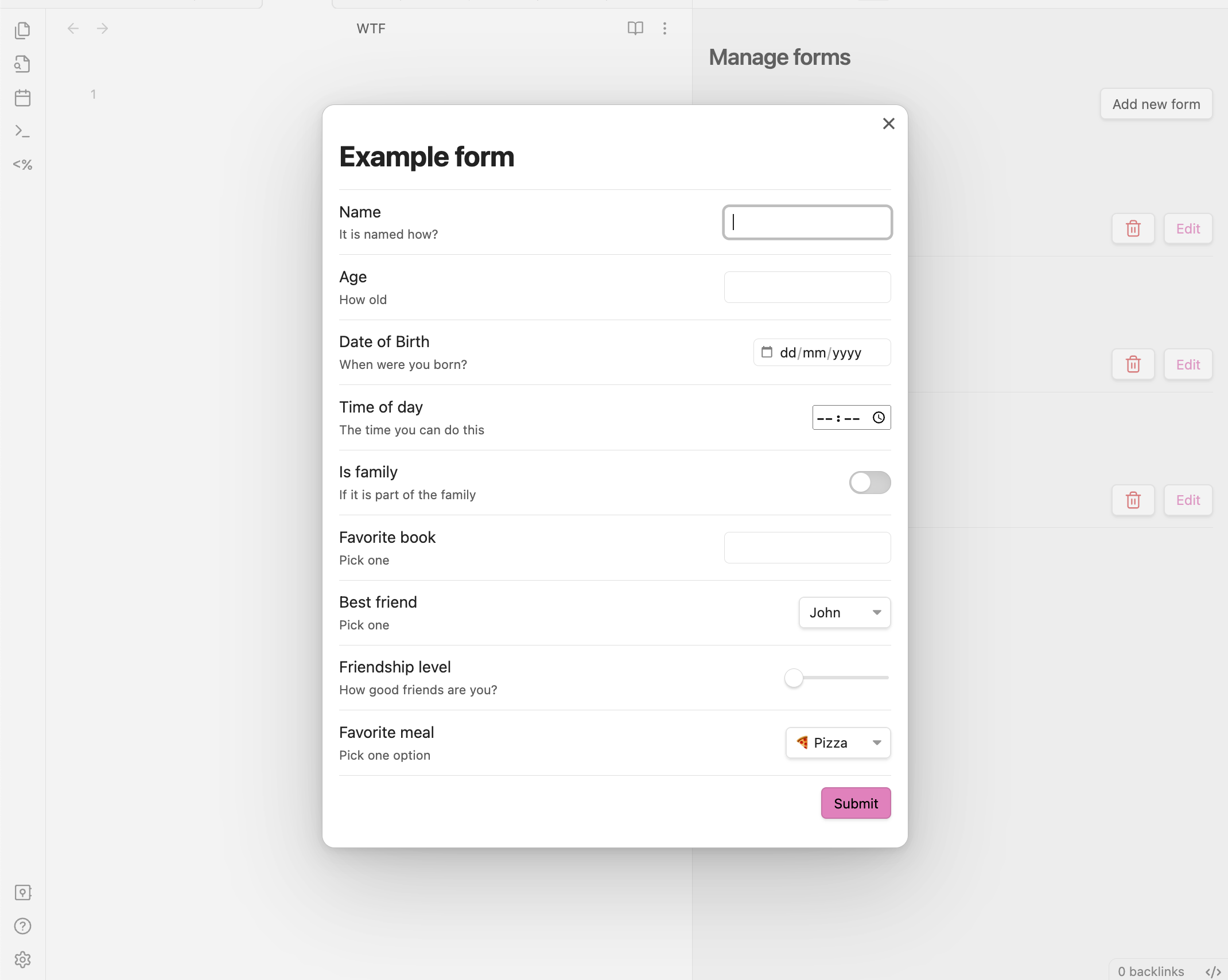
This plugin for Obsidian allows you to define forms that can be opened from anywhere you can run JavaScript, so you can combine it with other plugins like Templater or QuickAdd.

https://github.com/danielo515/obsidian-modal-form/assets/2270425/542974aa-c58b-4733-89ea-9c20ea11bee9

Features

  • Forms open in a modal window and return you the values, so you can trigger it from:
    • Templater templates
    • QuickAdd captures
    • DataviewJS queries
    • Many other places...
  • Define forms using a simple JSON format
  • Create and manage a collection of forms, each identified by a unique name
  • User interface for creating new forms
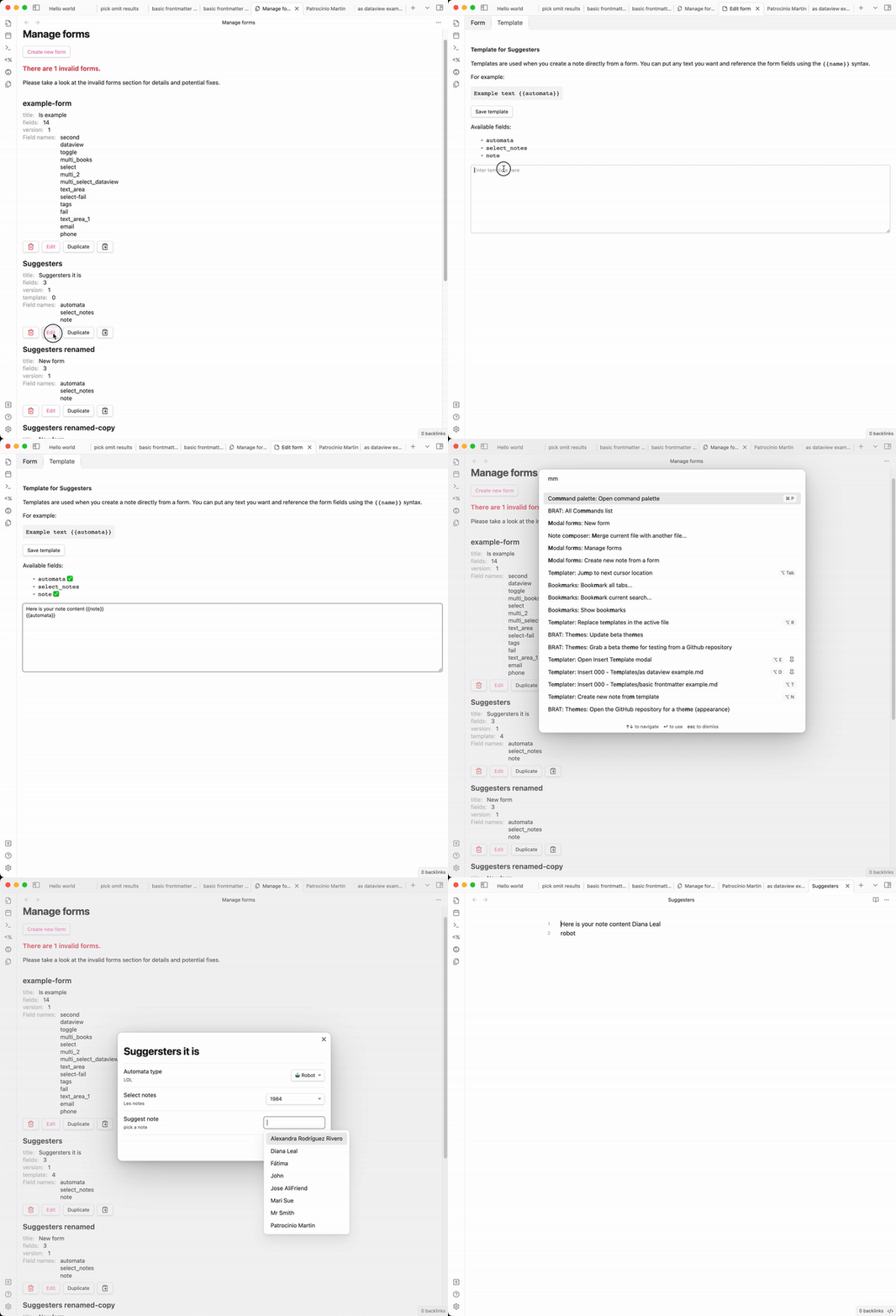
  • Create new notes directly from the form using templates
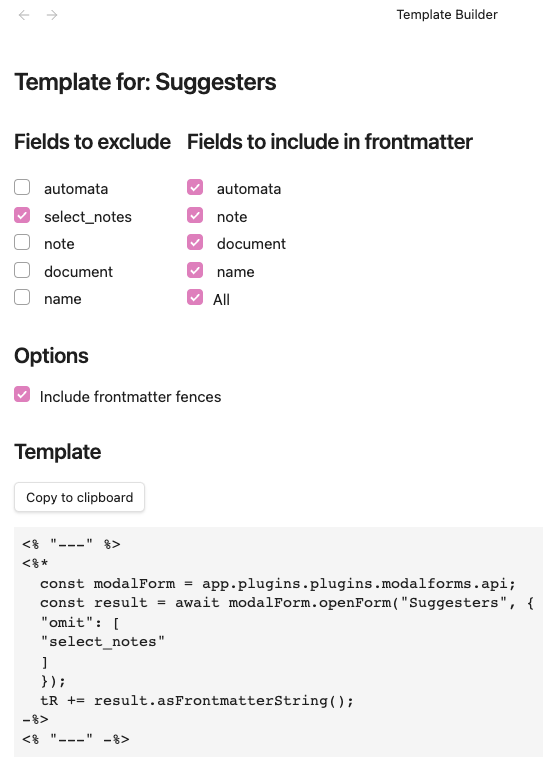
    • Template editor has a nice UI for creating templates
  • Register commands for your forms: Instantly trigger any form (with a template) from the command palette—no need for QuickAdd or external templates for simple use cases
  • Many input types
    • number
    • date
    • time
    • slider
    • toggle (true/false)
    • free text
    • text with autocompletion for note names (from a folder or root)
    • text with autocompletion from a dataview query (requires dataview plugin)
    • multiple choice input
    • select from a list
      • list of fixed values
      • list of notes from a folder

example form templates

Template builder

We have a nice UI to help you creating the required templates. template builder
Why this plugin?

Obsidian is a great tool for taking notes, but it is also a nice for managing data. However, when it's time to capture structured data it doesn't offer many conveniences. Some plugins like Templater or QuickAdd alleviate this problem with templates/automation that ease the creation of notes with a predefined structure, but then you have to fill the data manually. The mentioned plugins (Templater, QuickAdd) have some little convenience inputs, but they have certain tradeoffs/problems:

  • they are limited to inputting a single value at a time
  • they don't have labels or detailed descriptions about the field you are filling
  • you can't skip fields, you will always be prompted for all of them one by one

All of the mentioned tools are great at their job and unleash super convenient workflows. For that reason, rather than offering an alternative, this plugin is designed as a complement to them, offering some basic building blocks that you can integrate with your existing templates and workflows.

Friends of modal form

Note: With the ability to register commands for your forms, you no longer need QuickAdd just to trigger a form. QuickAdd remains useful for more advanced workflows, but for simple form-triggering, Modal Forms is now a complete solution.

  • Templater to open modals from templates
  • QuickAdd to quickly capture data from a modal
  • dataview to provide values for auto-completion

Scope of this plugin

This plugin is intentionally narrow in scope. As mentioned in the previous section, it is designed as a building block, so you can integrate it with other plugins and workflows. The only features that I will consider adding will be ones about improving the form itself.

Usage

Call the form from JavaScript

Since the main usage of this plugin is opening forms and getting back their data let's start with that. If you want to learn how to create forms, skip to the next section define a form.

The plugin exposes an API that can be accessed from any JavaScript code that has access to the global app object. So, in order to get the API you can do:

const modalForm = app.plugins.plugins.modalforms.api;

From here you can call any of the main methods of the API, openForm which allows you to open a form by name and get back the data. Let's see an example:

const modalForm = app.plugins.plugins.modalforms.api;
const result = await modalForm.openForm("example-form");

The result is a special type of object that contains the data of the form. It also has some convenient methods to help you process the returned data. One of them is asFrontmatterString, which returns the data as a string that can be used in a frontmatter block. Let's see an example using Templater:

Usage with Templater
---
<%*
const modalForm = app.plugins.plugins.modalforms.api;
const result = await modalForm.openForm('example-form');
tR += result.asFrontmatterString();
-%>
---

When you insert this template in a note, it will open the form, and once you submit it, it will insert the data in the note as a frontmatter block.

Usage with QuickAdd

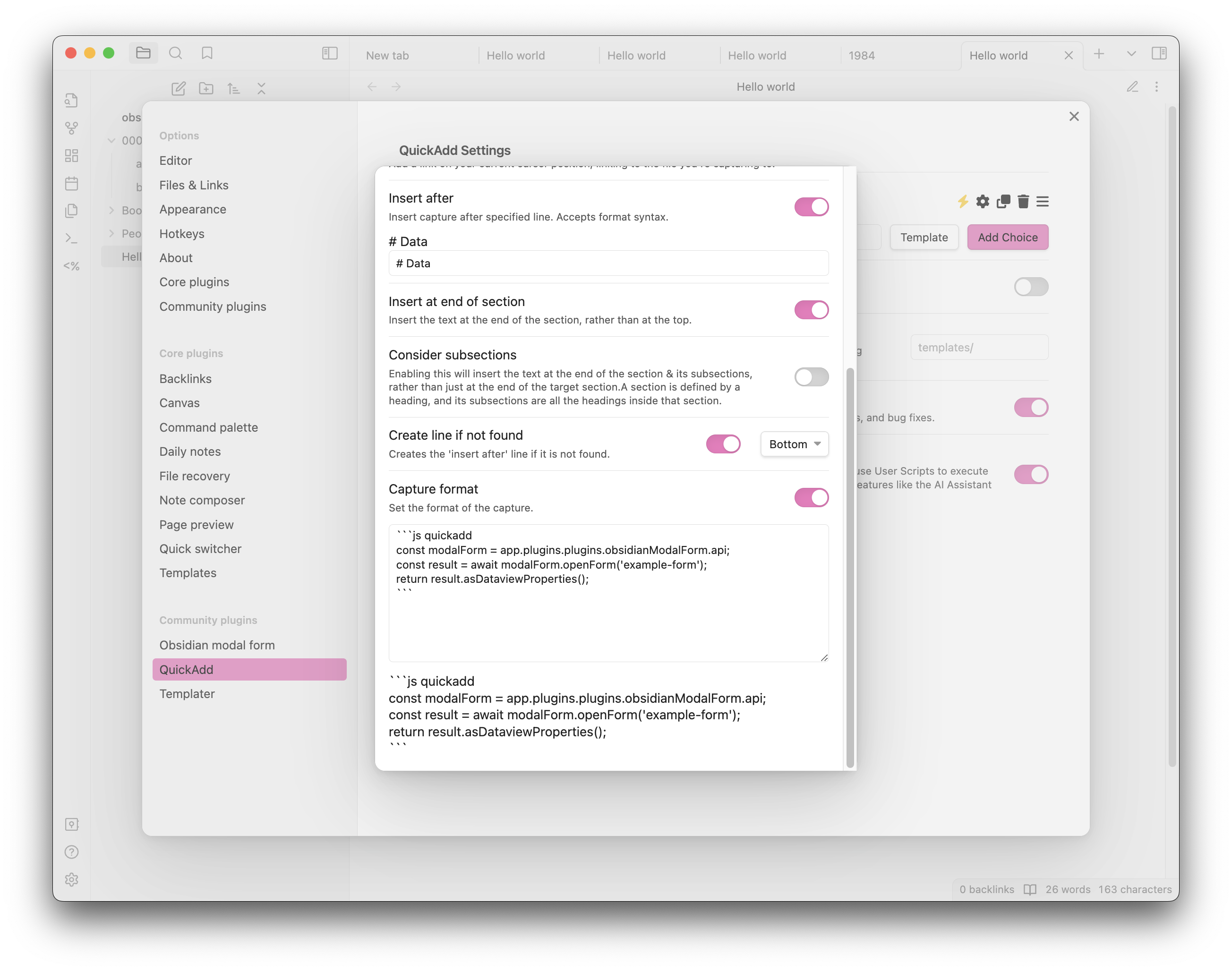
In order to open a form from QuickAdd capture, you need to create a capture and activate the capture format, then in the format text-area you must create a code block with the language defined as js quickadd and copy the code below:

```js quickadd
 const modalForm = app.plugins.plugins.modalforms.api;
 const result = await modalForm.openForm('example-form');
 return result.asDataviewProperties();
```

Here you have an example screenshot of how it should look like: quick capture example
Providing Default Values When Opening a Form

When opening a form you can provide default values for the form fields. This can be done by passing an object to the openForm or limitedForm methods as part of the FormOptions parameter. This object should have the same structure as the form definition, with each key corresponding to a field name and its value being the default value for that field.

Here's an example:

const values = {
    title: "My Default Title",
    description: "This is a default description.",
};

const modalForm = app.plugins.plugins.modalforms.api;
const result = await modalForm.openForm("example-form", { values: values });

In this example, the form will open with the title field pre-filled with My Default Title and the description field pre-filled with This is a default description..

Note: If a field in the default values object does not exist in the form definition, it will be ignored.

FormResult Methods

When you open a form, you get back a FormResult object. This object contains the data of the form and some methods to help you process it. This FormResult object returned by the openForm method has several methods that can be used to process the form data. Here is a brief description of each method:

asFrontmatterString()

This method returns the form data as a string that can be used in a frontmatter block. It formats the data in YAML syntax. Here is an example of how to use it:

asDataviewProperties()

This method returns the form data as a string of dataview properties. Each key-value pair in the form data is converted into a string in the format key:: value. Here is an example of how to use it:

getData()

This method returns a copy of the form data. It can be used when you need to manipulate the form data without affecting the original data.

asString(template: string)

This method returns the form data formatted as a string matching the provided template. The template is a string that can contain placeholders in the format {{key}}, which will be replaced with the corresponding value from the form data. Whitespace around the key is allowed ({{ key }} is equivalent to {{key}}), and you can apply the same transformations supported by form templates by appending | transformation — for example {{ name | upper }} or {{ note | trim }}. Unknown keys are left untouched (the literal {{ key }} stays in the output) so typos are easy to spot. Here is an example of how to use it in a templater template:

<%*
const modalForm = app.plugins.plugins.modalforms.api;
const result = await modalForm.openForm('example-form');
tR += result.asString('{{name}} is {{age}} years old and his/her favorite food is {{favorite_meal}}. Family status: {{is_family}}');
-%>
Advanced usage

For more advanced usage of the FormResult methods please refer to the specific documentation of FormResult here

Define a form

Create a new form

Creating a new form is easy, you just need to open the manage forms view, either by clicking on the ribbon icon or by using the command palette (Obsidian modal form: New form). Once there, click on the + button and you will be presented with a form to create a named form definition. The form is self-explanatory, but here are some key points you need to keep in mind:

  • The name must be unique, and it will be used to identify the form when you open it from JavaScript, case-sensitive
  • The title is what you will see as a header in the modal window when you open the form
  • You will not be able to save the form unless all the fields are valid (which means they have a name and a type)
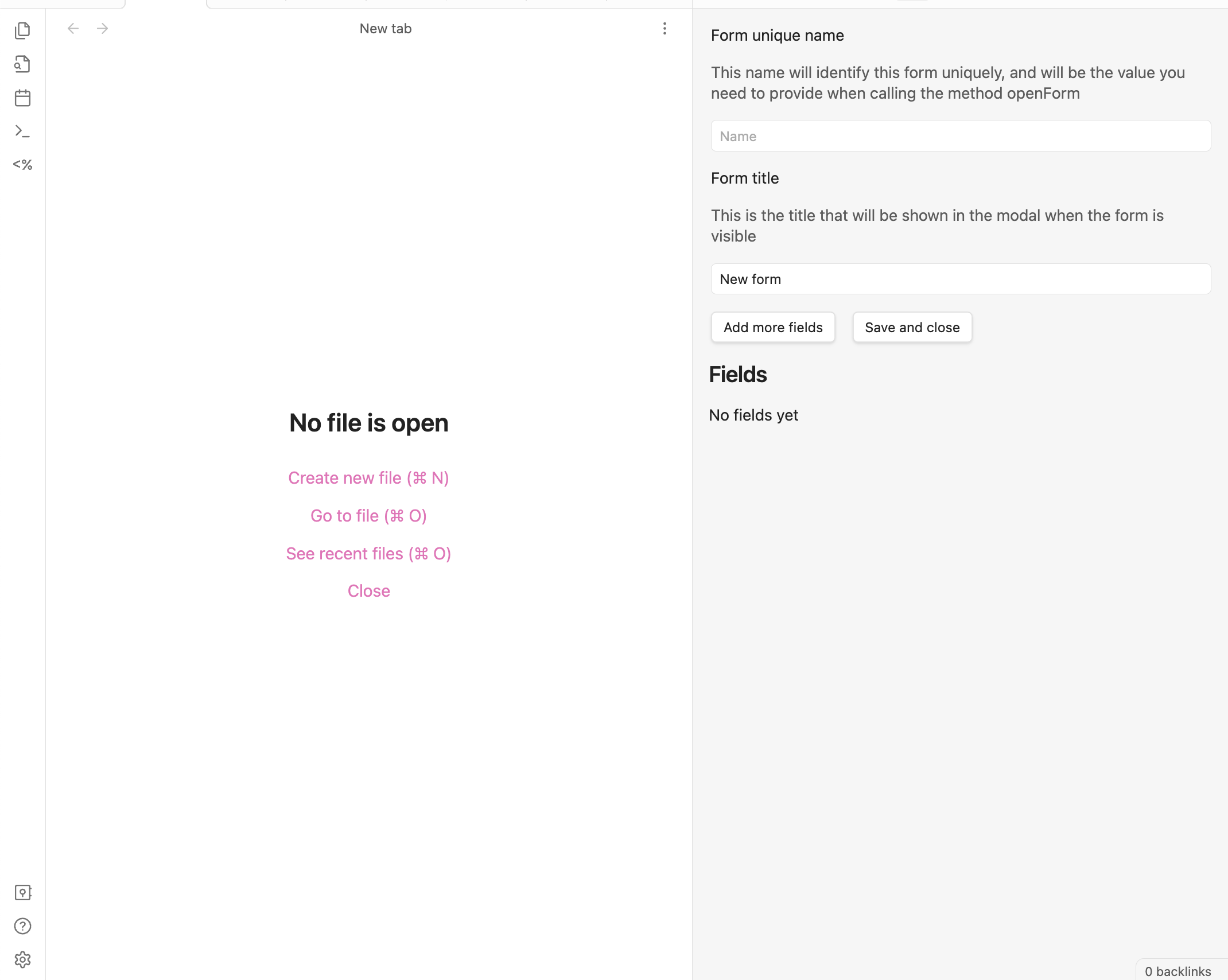
form editor/creator

Dataview integration

Modal Form integrates with Dataview to provide powerful data querying capabilities in your forms. You can use Dataview queries to:

  • Create dynamic input fields with suggestions from your vault
  • Generate dynamic content in document and markdown blocks based on form data
  • Create interactive previews that update as users fill out the form

For detailed documentation and examples, see Dataview Integration.
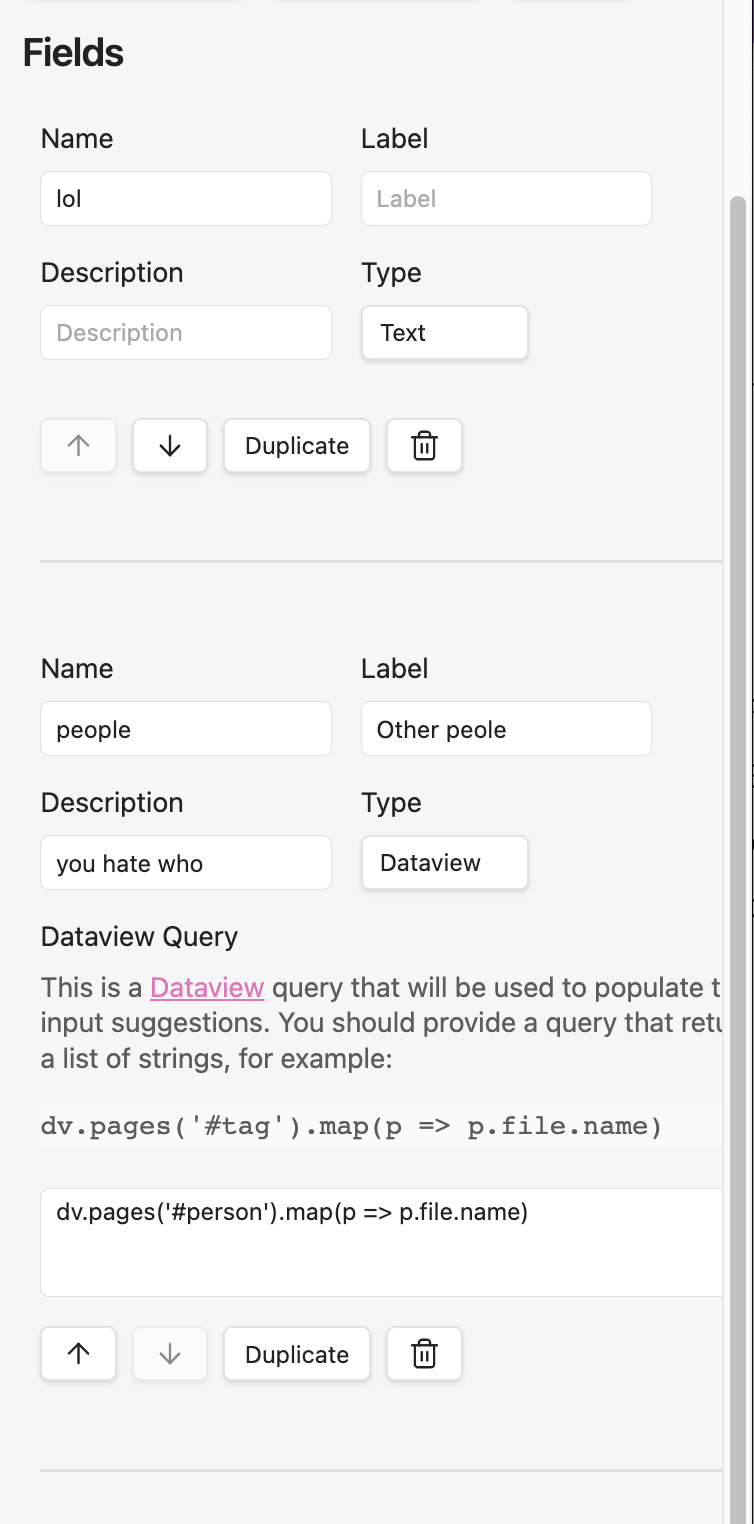
dataview

Inline forms

The plugin also supports inline forms, which are forms that are defined when you call the openForm method. This is useful when you want to create a form that is only used in one place and it is simple enough. However, note the format is a bit verbose for typing it manually and it is error-prone, so unless it is a very small form, you will most likely prefer to use a named form.

Here is an example of how to use it:

const modalForm = app.plugins.plugins.modalforms.api;
const result = await modalForm.openForm({
    title: "Example form",
    fields: [
        {
            name: "name",
            label: "Name",
            description: "Your name",
            input: { type: "text" },
        },
        {
            name: "age",
            label: "Age",
            description: "Your age",
            input: { type: "number" },
        },
        {
            name: "favorite_meal",
            label: "Favorite meal",
            description: "Your favorite meal",
            input: { type: "text" },
        },
        {
            name: "is_family",
            label: "Is family",
            type: "toggle",
            description: "Are you family?",
            required: true,
            input: { type: "toggle" },
        },
    ],
});

You can make it smaller by removing some of the optional fields like description or label, but I really encourage you to define them all.

Using Templates and Triggering Forms via Commands

You can enhance your forms with templates, allowing you to generate dynamic note content or insert text based on form responses. When you add a template to a form, you can also register dedicated commands to trigger that form directly from Obsidian's command palette—no extra plugins or scripting needed.

How it works:

  • Edit a form and go to the Template tab.
  • Create or edit your template.
  • Enable one or both command options:
    • "Create command to insert template": lets you insert the template output into the current note after submitting the form.
    • "Create command to create note from template": lets you create a new note from the template after form submission.
  • Save the template. The commands will be registered and available in the command palette as:
    • Modal Forms: Insert template: [Form Name]
    • Modal Forms: Create note from template: [Form Name]

This makes it easy to trigger forms and use their templates anywhere with just a command—perfect for quick note creation or structured data capture.

For details on template syntax and advanced features, see the Templates documentation.

Tips and tricks

Installing the plugin

You can install the plugin directly from the Obsidian plugin store or through BRAT

Installing with BRAT

  1. Install the BRAT plugin (GitHub page) and enable it.
  2. Open the command palette and run the command BRAT: Add a beta plugin for testing.
  3. Enter https://github.com/danielo515/obsidian-modal-form into the modal and press the Add Plugin button.
  4. Return to the settings and navigate to the Community plugins tab.
  5. Enable the plugin.

Manually installing the plugin

  • Copy over main.js, styles.css, manifest.json to your vault VaultFolder/.obsidian/plugins/modalForm/.

How to develop

  • Clone this repo.
  • Make sure your NodeJS is at least v16 (node --version).
  • npm i or yarn to install dependencies.
  • npm run dev to start compilation in watch mode.

Releasing new releases

  • run npm version patch, npm version minor, or npm version major after updating minAppVersion manually in manifest.json.
  • Upload the files manifest.json, main.js, styles.css as binary attachments. Note: The manifest.json file must be in two places, first the root path of your repository and also in the release.
  • Publish the release.

The command npm version whatever will bump version in manifest.json and package.json, and add the entry for the new version to versions.json

Publish docs

We use mkdocs to generate the documentation. To publish the docs, run:

./build-docs.sh

Similar Plugins

info
• Similar plugins are suggested based on the common tags between the plugins.
Activity Heatmap
2 years ago by Zak Hijaouy
Activity Logger
5 years ago by Creling
Advanced Note Mover
3 months ago by Lars Bücker
Quickly and easily move notes to predefined folders. Perfect for organizing your notes.
Advanced URI
6 years ago by Vinzent
Advanced modes for Obsidian URI
AI integration Hub
2 years ago by Hishmat Salehi
A modular AI integration hub for Obsidian
AI Providers
2 years ago by Pavel Frankov
This plugin is a hub for setting AI providers (OpenAI-like, Ollama and more) in one place.
AI Revisionist
2 years ago by Synaptic Labs
AI Tagger
3 years ago by Luca Grippa
Simplify tagging in Obsidian. Instantly analyze and tag your document with one click for efficient note organization.
AI Tagger Universe
2 years ago by Hu Nie
An intelligent Obsidian plugin that leverages AI to automatically analyze note content and suggest relevant tags, supporting both local and cloud-based LLM services.
Amazing Marvin
5 years ago by Shirayuki Nekomata
Simple plugin for Amazing Marvin
Another Simple Todoist Sync
2 years ago by eudennis
Obsidian.md plugin to integrate with Todoist app.
Apply Patterns
5 years ago by Jacob Levernier
An Obsidian plugin for applying patterns of find and replace in succession.
Arcana
3 years ago by A-F-V
Supercharge your Obsidian note-taking through AI-powered insights and suggestions
Asana
2 years ago by Ryan Bantz
Obsidan plugin that creates tasks in Asana for highlighted text or the current line
Attachment Manager
3 years ago by chenfeicqq
Attachment folder name binding note name, automatically rename, automatically delete, show/hide.
Audio Notes
4 years ago by Jason Maldonis
Easily take notes on podcasts and other audio files using Obsidian Audio Notes.
Auto Daily Note
2 years ago by John Dolittle
Auto Filename
3 years ago by rcsaquino
Auto Filename is an Obsidian.md plugin that automatically renames files in Obsidian based on the first x characters of the file, saving you time and effort.
Auto Front Matter
3 years ago by conorzhong
Auto Hyperlink
3 years ago by take6
Auto Journal
3 years ago by Evan Bonsignori
Opinionated journaling automation like daily notes but with backfills for the days that you didn't open Obsidian.
Auto Move File
2 months ago by sx kan
Automatically move files based on frontmatter properties in Obsidian
Auto Periodic Notes
2 years ago by Jamie Hurst
Obsidian plugin to create new periodic notes automatically in the background and allow these to be pinned in your open tabs. Optionally uses the "Periodic Notes" plugin.
Auto Replacer
a year ago by Alecell
A live text replacement plugin that applies automatic formatting, corrections, or custom replacements in real-time. Define your own regex-based rules and transformation logic to modify text dynamically as you type.
Auto Template Trigger
3 years ago by Numeroflip
An obsidian.md plugin, to automatically trigger a template on new file creation
Autocomplete
6 years ago by Yeboster
Obsidian plugin to provide text autocomplete
Autocorrect Formatter
3 years ago by b-yp
A plugin running on Obsidian that utilizes autocorrect to format Markdown content.
Automatic Linker
2 years ago by Kodai Nakamura
Automation
3 years ago by Benature
Babashka
4 years ago by Filipe Silva
Run Obsidian Clojure(Script) codeblocks in Babashka.
Blockquote Levels
4 years ago by Carlo Zottmann
A plugin for Obsidian (https://obsidian.md) that adds commands for increasing/decreasing the blockquote level of the current line or selection(s).
Blog AI Generator
2 years ago by Gareth Ng
Obsidian Plugin: generate blog via AI based on the current note.
Bookmarks Caller
3 years ago by namikaze-40p
This is an Obsidian plugin which can easily open bookmarks.
Boost Link Suggestions
4 years ago by Jacob Levernier
An Obsidian (https://obsidian.md) plugin for altering the order of inline link suggestions by link count and manual boosts.
Brain Dump Mode
2 years ago by yesjinu
Obsidian plugin - DISABLE your delete key and eliminate hesitation!
Brainframe
4 years ago by pedersen
Canvas Link to Group
a year ago by TGRRRR
Plugin for Obsidian Canvas enabling direct links to specific groups within canvas files for improved navigation
CAO
2 years ago by Godot
Claude AI for Obsidian
Codeblock Template
3 years ago by Super10
A template plugin that allows for the reuse of content within Code Blocks!一个可以把Code Block的内容重复利用模板插件!
Codename
3 years ago by dstack
Command Alias
5 years ago by @Yajamon
Obsidianのコマンドに対してエイリアスを設定するプラグイン
Community Install Manager
3 months ago by Konstantin Volobuev
Allows you to use `community-plugins.js` to search for and automatically install plugins when you launch `obsidian`.
Content OS
a year ago by eharris128
Post to LinkedIn from within Obsidian
Contextual note templating
3 years ago by Roman Kubiv
Contextual note templating with value input prompts configured in frontmatter.
Contribution Graph
3 years ago by vran
generate interactive gitxxx style contribution graph for obsidian, use it to track your goals, habits, or anything else you want to track.
Copy Inline Code
3 years ago by Ondrej Zavodny
Copy Local Graph Paths
2 years ago by Amy Z
copy-local-graph-paths is a simple Obsidian plugin that copies the paths of notes linked to your current page.
Copy Section
2 years ago by skztr
Obsidian.md plugin adding a Copy button to the top of Headed sections
Crackboard
2 years ago by Franklin
Obsidian plugin for crackboard.dev
Cron
4 years ago by Callum Loh
Obsidian cron / schedular plugin to schedule automatic execution of commands
Ctrl-XA cycle various items
3 years ago by nbossard
The equivalent in Obsidian of Vim Ctrl X-A. But supercharged with lists of various items : days, months, ...
Current File
2 years ago by Mark Fowler
An Obsidian plugin to allows external applications to know what file Obsidian is currently viewing
Current View
a year ago by Lucas Ostmann
Automatically set the view mode (Reading, Live Preview, Source) for notes in Obsidian using folder rules, file patterns, or frontmatter.
Cursor Position History
2 years ago by Florian Gubler
A Plugin to remember (and make accessible) the cursor history in Obsidian. Both within a file and across files.
CustomJS
5 years ago by Sam Lewis
An Obsidian plugin to allow users to reuse code blocks across all devices and OSes
Daily News Briefing
3 months ago by Adam Chen
Get AI-powered daily news summaries directly in your Obsidian vault. Stay informed about your topics of interest with smart, automated news collection and summarization.
Daily note creator
3 years ago by Mario Holubar
Automatically creates missing daily notes.
Daily Note Structure
2 years ago by db-developer
This obsidian plugin creates a structure for your daily notes
Daily Notes Automater
a year ago by David Pedrero
Daily notes opener
5 years ago by Reorx
Easily open daily notes and periodic notes in new pane; customize periodic notes background; quick append new line to daily notes.
Daily Prompt
3 years ago by Erl-koenig
Daily Random Note
2 years ago by Alexandre Silva
Daily Random Notes in Obsidian.
Daily Routine
2 years ago by sechan100
Habit tracker & daily routine planner for Obsidian — recurring tasks, todos, streaks, calendar. 습관 트래커 · 루틴 관리
Daily Statistics
2 years ago by yefengr
obsidian daily statistics
Daily Stats
6 years ago by Dhruvik Parikh
Plugin to view your daily word count across all notes in your Obsidian.md vault.
Data Entry
3 years ago by Wayne Van Son
Create forms that modify data in existing notes; the dataview plugin for data entry.
Dataview Autocompletion
2 years ago by Daniel Bauer
Day and Night
4 years ago by Kevin Patel
An Obsidian plugin to automatically switch between day and night themes based on a set schedule
DEVONlink
6 years ago by ryanjamurphy
Open notes indexed in DEVONthink in, well, DEVONthink
Differential ZIP Backup
3 years ago by vorotamoroz
Discord Message Sender
a year ago by okawak
Obsidian Plugin: Send messages from a Discord channel to your Vault
doing
2 years ago by rooyca
What was I doing?
Doubleshift
5 years ago by Qwyntex
Obsidian Plugin to open the command palette by pressing shift twice
Due When
3 years ago by Andy Baxter
An Obsidian plugin which gives shortcuts to insert set due dates
Editor Autofocus
3 years ago by Mgussekloo
Editor Commands Remap
5 years ago by cactus5
Obsidian plugin to map hotkeys to editor commands
Ego Rock
3 years ago by Ashton Eby
An obsidian plugin that implements a basic taskwarrior UI for listing and modifying tasks.
Enhanced Canvas
2 years ago by RobertttBS
When editing on Canvas, properties and Markdown links to notes are automatically updated, enabling backlinks in Canvas.
Enveloppe
5 years ago by Mara-Li
Enveloppe helps you to publish your notes on a GitHub repository from your Obsidian Vault, for free!
EUpload
2 years ago by Appleex
Obsidian 插件,专用于上传文件到存储仓库。目前支持 Lskypro(兰空图床),后续有需求会引入其它存储方式,如:Github/Gitee等等。
Excalidraw
6 years ago by Zsolt Viczian
A plugin to edit and view Excalidraw drawings in Obsidian
Execute Code
5 years ago by twibiral
Obsidian Plugin to execute code in a note.
Fast Image Auto Uploader
2 years ago by Longtao Wu
upload images from your clipboard by gopic
Filename Emoji Remover
4 years ago by Yüksel Tolun
A simple plugin for the note taking app Obsidian that will rename your files to remove emojis in their names.
Floating Quick Note
2 months ago by sabosman
Floating Quick Note is an Obsidian plugin that lets you open a small, detached note window that stays on top of your other apps. It is great for taking notes during meetings or while you are working in other programs without having to switch back and forth to Obsidian.
Floating Search
4 years ago by Boninall
A plugin for searching text by using Obsidian default search view.
Flow
2 years ago by Ben Phillips
Implements key processes in David Allen's Getting Things Done (GTD) methodology
Focus Time
2 years ago by AstraDev
Focus Time is a plugin that helps you track how much time you spend on each note.
Focus Tracker
2 years ago by Jeet Sukumaran
Folder overview
2 years ago by Lost Paul
Provides a dynamic overview of your vault or folders in the format of a code block.
Forms
2 years ago by Sorin Mircea
Frontmatter generator
3 years ago by Hananoshika Yomaru
A plugin for Obsidian that generates frontmatter for notes
Gemini Scribe
2 years ago by Allen Hutchison
An obsidian plugin to interact with Google Gemini
Gemmy
4 years ago by Obsidian
Gnome Terminal Loader
3 years ago by David Carmichael
Go to Line
5 years ago by phibr0
Goal Tracker
2 years ago by Ben Rotholtz
Google Calendar Importer
a year ago by Fan Li
A simple and light-weighted google calendar importer, allow injecting the events / tasks of a day automatically to your daily notes, or import it to anywhere with a command.
GPT-LiteInquirer
3 years ago by ittuann
💬 Experience OpenAI ChatGPT assistance directly within Obsidian, drafting content without interrupting your creative flow.
Grind Manager
3 years ago by dromse
Gamify your task management with rewards system, craft your tasks by tags.
Habit Calendar
4 years ago by Hedonihilist
Monthly Habit Calendar for DataviewJS. This plugin helps you render a calendar inside DataviewJS code block, showing your habit status within a month.
Habitica Sync
5 years ago by Leoh and Ran
This is a under-development Obsidian Plugin for Habitica
Handlebars Dynamic Templating
9 months ago by Hide_D
Handlebars dynamic templating. Define template files and use them dynamically via hb blocks. Template recursion is also possible.
Hanko
2 years ago by Telehakke
Obsidian plugin.
Harpoon
3 years ago by mask(developermask)
Heading Shifter
4 years ago by kasahala
Easily Shift and Change markdown headings.
Hot Reload
4 months ago by pjeby
Automatically reload Obsidian plugins in development when their files are changed
Hotkeys for templates
6 years ago by Vinzent
Hotstrings
2 years ago by wakywayne
IMSwitch in Math Block
2 years ago by XXM
Inkporter
2 years ago by Ayush Kumar Saroj
Inkporter is an Obsidian plugin that digitizes handwritten notes with smart ink isolation, adaptive theming, and seamless import workflows.
Inline Checkbox Groups
2 years ago by Bradley Wyatt
Obsidian Plugin that creates multiple checkboxes on a single line, separated by a customizable separator character (default '|'), with the option to automatically cross out text when all checkboxes in the line are checked.
InlineAI
2 years ago by FBarrca
Insert Multiple Attachments
2 years ago by mnaoumov
Obsidian Plugin that allows to insert multiple attachments at a time
JavaScript Init
5 years ago by ryanpcmcquen
Run custom JavaScript in Obsidian.
JIRA links shortener
a year ago by Ruslans Platonovs
Obsidian JIRA links shortener plugin
Journal Review
4 years ago by Kageetai
Review your daily notes on their anniversaries, like "what happened today last year"
Jura Links
2 years ago by Lukas Collier & Emi Le
Verlinke deine Normangaben, Aktenzeichen oder Fundstellen in deiner Obsidian Notiz mit Gesetzesanbietern.
Key Promoter
5 years ago by Johannes Theiner
Learn keyboard shortcuts by showing them when using the mouse
Key Sequence Shortcut
5 years ago by anselmwang
Execute obsidian commands with short key sequences. For example, 'tp' for 'Toggle Preview' and 'tb' for 'Toggle Sidebar'. Easier to remember.
Keyshots
4 years ago by KrazyManJ
🔮📝 Obsidian plugin that adds classic hotkey/shortcuts commands from popular IDEs like Visual Studio Code or JetBrains Family.
Khoj
4 years ago by Debanjum Singh Solanky
Your AI second brain. Self-hostable. Get answers from the web or your docs. Build custom agents, schedule automations, do deep research. Turn any online or local LLM into your personal, autonomous AI (gpt, claude, gemini, llama, qwen, mistral). Get started - free.
Kikijiki Habit Tracker
2 years ago by KIKIJIKI
Kikijiki Habit Tracker Plugin for Obsidian
KOI Sync
2 years ago by Luke Miller
Last Position
2 years ago by saktawdi
Automatically scroll to the last viewed position when opening the markdown document.
Lemons Search
2 years ago by Moritz Jung
An Obsidian plugin that offers a fast fuzzy finder based quick switcher with preview.
Link with alias
3 years ago by Pavel Vojtechovsky
Obsidian plugin for handy creation of links and alias in front matter of target document
Linkify
4 years ago by Matthew Chan
LinkMagic
3 years ago by AndyReifman
Local REST API with MCP
5 months ago by Adam Coddington
A secure REST API and Model Context Protocol (MCP) server for your vault.
MantouAI
3 years ago by Morino Pan
MantouAI—— 让Obsidian变身智能助手
Marjdown shortcuts
5 years ago by Jules Guesnon
🪨 Obsidian plugin that allows to write markdown from commands
Markwhen File Sync
a year ago by rouvenjahnke
Synchronize properties from your Obsidian notes with a Markwhen timeline file.
Mastodon Threading
2 years ago by El Pamplina de Cai
Obsidian plugin to compose and post threads to Mastodon
MD Butler
2 months ago by Peter Petschownik
Automatically manages YAML frontmatter fields for all notes. A reliable alternative to Templater formulas for consistent metadata.
Memos AI Sync
2 years ago by leoleelxh
obsidian-memos-sync-plugin,将 Memos 内容同步到 Obsidian 的插件,提供无缝集成体验。
Metadata Auto Classifier
2 years ago by Beomsu Koh
Obsidian plugin that uses AI providers to generate tags and frontmatter metadata for your notes.
Mini Toolbar
3 years ago by AidenLx & Boninall
mini context toolbar in editor for Obsidian
Missing Link File Creator
2 years ago by Lemon695
The plugin creates both missing links and the corresponding files.
Move Cursor On Startup
a year ago by Jared Kelnhofer
Obsidian plugin to move the cursor to the right and back to the left when starting up. Why? To keep DataView expressions from not running on the first load of, say, your Home file.
Multi-line Formatting
5 years ago by nmady
Format Obsidian text over an entire selection, even if that selection has paragraph breaks in the middle!
Mxmind Mindmap
3 years ago by mxmind
mxmind for obsidian plugin
Navigate Cursor History
5 years ago by heycalmdown
Note 2 Tag Generator
2 years ago by Augustin
Note Chain
2 years ago by ZigHolding
Package my frequently used tools, highly personal plugins.
Note Linker
4 years ago by Alexander Weichart
🔗 Automatically link your Obsidian notes.
Note Linker with Previewer
2 years ago by Nick Allison
Obsidian Plugin to find and Link notes
Note Minimap
a year ago by Yair Segel
Add a minimap to your Obsidian notes.
Note Progressbar
7 months ago by Ryoma Kawahara
Note UID Generator
a year ago by Valentin Pelletier
Allow you to automatically generate UID for the notes in your vault.
NotePix
a year ago by Ayush Parkara
Automatically upload Obsidian images to GitHub (public/private) and replace them with fast hosted links. Encrypted, cross-platform.
Notes 2 Tweets
2 years ago by Tejas Sharma
Generate and schedule tweets automatically from your notes on Obsidian
Obsidian Handlebars Template Plugin
4 years ago by Sean Quinlan
This is a plugin for Obsidian adding support for the Handlebars template engine in Obsidian notes
One Step Wiki Link
2 years ago by Busyo
用于 Obsidian 一步插入当前界面匹配到的所有外链(维基链接)
Open File by Magic Date
4 years ago by simplgy
Open or Create File
a year ago by Ilya Paripsa
Set up Obsidian commands that create or open files based on predefined patterns.
Organized daily notes
2 years ago by duchangkim
Automatically organizes your daily notes into customizable folder structures for better organization and easier navigation.
Packrat
4 years ago by Thomas Herden
Process completed instances of recurring items created by the Obsidian Tasks plugin
Paste as Embed
2 years ago by Matt Laporte
Obsidian plugin to paste contents of clipboard into a new note, and embed it in the active note.
PDF Paste
2 years ago by Cormac
Personal OS
3 years ago by A.Buot
Pieces for Developers
3 years ago by Pieces For Developers
Pieces' powerful extension for Obsidian-MD that allows users to access their code snippets directly within the Obsidian workspace
Pinned Daily Notes
2 years ago by Jeremy Neiman
Dynamically update a pinned tab with today's daily note
Plugin Manager
3 years ago by ohm-en
Allows better management of Obsidian.md plugins.
Plugin REPL
2 years ago by readwithai
An in-note Read Evaluate Print Loop to execute JavaScript within Obsidian
Pomodoro
5 years ago by Tokuhiro Matsuno
Pomodoro Planner
3 years ago by Onur Nesvat
PopKit
2 years ago by Zhou Hua
Postfix
3 years ago by Bhagya Nirmaan Silva (@bhagyas)
A postfix plugin for Obsidian
Proletarian Wizard Task Manager
2 years ago by Charles Feval
Obsidian plugin ot manage todos and projects directly from your notes.
Prompt ChatGPT
3 years ago by Coduhuey
pycalc
2 years ago by pycalc
Quick snippets and navigation
4 years ago by @aciq
Quick snippets and navigation for Obsidian
Random Number Generator
3 years ago by iRewiewer
Gives you a random number
Random Wikipedia Article
a year ago by SpencerF718
An Obsidian plugin to generate a note of a random Wikipedia article.
Rapid AI
2 years ago by Rapid AI
AI Assistant for selected text and generating content with Markdown. Shortcuts and quick action buttons provide instant AI assistance. It provides a high availability API for unlimited Chat GPT request rates, so you can ensure smooth work for any workload.
Rapid Notes
4 years ago by valteriomon
Recipe Grabber
3 years ago by seethroughdev
Regex Pipeline
6 years ago by No3371
An Obsidian plugin that allows users to setup custom regex rules to automatically format notes.
Replace Pencil
a year ago by penyt
🐧 An Obsidian plugin that can easily replace the custom variable in the code block.
RescueTime
3 years ago by Tatsuya Hayashi
A RescueTime integration plugin to view your activity logs in Obsidian.
RSS Copyist
3 years ago by aoout
Get the RSS articles as notes.
Rsync
2 years ago by Ganapathy Raman
An Obsidian plugin to perform sync files between machines using Rsync
Run
3 years ago by Hananoshika Yomaru
Generate markdown from dataview query and javascript.
RunJS
3 years ago by eoureo
Let's run JavaScript easily and simply in Obsidian.
Runsh
2 years ago by Ddone
A simple plugin that allows to run shell commands from obsidian.
Search Templates Library
3 years ago by Pentchaff
Obsidian plugin that allows to store searches templates for later use, and displays search results both in the search view and graph view.
Select word
2 years ago by Connor Espino
Sentinel
2 years ago by Giorgos Sarigiannidis
A plugin for Obsidian that allows you to update properties or run commands based on document visibility changes.
Shell commands
5 years ago by Jarkko Linnanvirta
Execute system commands via hotkeys or command palette in Obsidian (https://obsidian.md). Some automated events are also supported, and execution via URI links.
Shortcuts extender
6 years ago by kitchenrunner
Plugin for Obsidian: Use shortcuts for input special symbols and changing level of headings without language switching
Simple Todo
2 years ago by elliotxx
A minimalist text-based todo manager (Text-Based GTD) for efficient task management in Obsidian.
Smart Composer
2 years ago by Heesu Suh
AI chat assistant for Obsidian with contextual awareness, smart writing assistance, and one-click edits. Features vault-aware conversations, semantic search, and local model support.
Snippets
6 years ago by Pelao
Snippets Manager
2 years ago by Venkatraman Dhamodaran
Snippets Manager (Text Expander) For Obsidian
SolidTime Integration
a year ago by proniclabs
Obsidian SolidTime Integration Plugin
Sonkil
a year ago by ohyoungpark
Spacekeys
2 years ago by Jared Lumpe
Obsidian plugin to define hotkeys based on sequences of keypresses.
Steward
a year ago by Dang Nguyen
A vault-specific agent equipped with agentic capacity, fast search, flexible commands, vault management, and terminals to "jump" into other CLI agents, such as Claude, Gemini, etc.
Stopwatch
5 years ago by Tokuhiro Matsuno
Substitutions
2 years ago by BambusControl
Automatic text replacer for Obsidian.md
Super Simple Time Tracker
4 years ago by Ellpeck
Multi-purpose time trackers for your notes!
Superstition
2 years ago by Jeffry
An Obsidian plugin for routine management.
Swiss army knife
3 years ago by mwoz123
Syncthing Integration
3 years ago by LBF38
Obsidian plugin for Syncthing integration
Tab Limiter
2 years ago by Henry Gustafson
Limits the number of tabs that can be opened in Obsidian
Tab Rotator
4 years ago by Steven Jin
Obsidian Rotate opened tabs with a specified time interval
Tag Breakdown Generator
3 years ago by Hananoshika Yomaru
Break down nested tags into multiple parent tags
Tag Timer
10 months ago by quantavil
The Tag Timer is a versatile plugin for Obsidian that allows you to seamlessly track the time you spend on specific tasks or sections within your notes.
Target Word Count
3 years ago by TwoFive Labs
Target Word Count Plugin for Obsidian
Task Director
2 years ago by Cybertramp
A plugin that allows you to easily manage tasks in bulk.
Task list
3 years ago by Ted Marozzi
A simple obsidian plugin enabling better task management via lists.
Task Mover
2 years ago by Mariia Nebesnaia
A plugin for obsidian to move unfinished tasks to the daily note automatically
Tasks Calendar Wrapper
4 years ago by zhuwenq
This plugin currently provides a timeline view to display your tasks from your obsidian valut, with customizable filters and renderring options.
Tasks Cleaner
a year ago by lowit
🧹 Tasks Cleaner is a plugin for Obsidian that helps you automatically remove old completed tasks from your Markdown notes
Template Filename
a year ago by Callum Alpass
Obsidian plugin for creating notes with templatable filenames
Templater
6 years ago by SilentVoid
A template plugin for obsidian
Text Expander JS
4 years ago by Jonathan Heard
Obsidian plugin: Type text shortcuts that expand into javascript generated text.
Things Link
5 years ago by @gavmn
tidit
2 years ago by codingthings.com
tidit is an Obsidian - https://obsidian.md - plugin that adds timestamps to your document as you type — when you want it, how you want it, where you want it.
Timekeep
2 years ago by Jacobtread
Obsidian task time tracking
Timeline Canvas Creator
a year ago by chris-codes1
Quickly create timeline structured canvases in Obsidian.
Timer
3 years ago by Marius Wörfel
Obsidian plugin, which allows you to measure time.
Title As Link Text
2 years ago by Lex Toumbourou
An Obsidian plugin to set the Link Text using the document title
Todos sort
2 years ago by Jiri Sifalda
A plugin for Obsidian that sorts todos within a note
Typezen
2 years ago by Ilgam Gabdullin
Plugin for obsidian which lets you turn zen mode instantly
Typing Assistant
3 years ago by Jambo
Typing Assistant is a plugin that improves writing efficiency and provides a user experience similar to that of【Notion】
Uncheck All
3 years ago by Shahar Har-Shuv
Obsidian plugin to uncheck all checkboxes in a file with one action
Unit Converter
2 years ago by Ruslan Zabarov
Unit conversion plugin for Obsidian
URL Formatter
a year ago by Thomas Snoeck
Automatically formats specific URLs pasted into Obsidian into clean Markdown links.
Varinote
2 years ago by Giorgos Sarigiannidis
A plugin for Obsidian that allows you to add variables in Templates and set their values during the Note creation.
Vault File Renamer
2 years ago by Louan Fontenele
Vault File Renamer: Automatically standardizes file names to GitHub style (lowercase, no accents, only -, ., _) while preserving folder structure and file contents.
VaultAI
a year ago by Tharushka Dinujaya
An AI chatbot plugin for Obsidian using the Gemini API for note summarization, content generation, and more. Enhance your workflow with AI assistance like the Notion AI bot.
Waka time box
3 years ago by complexzeng
Watched-Metadata
2 years ago by Nail Ahmed
Watches for changes in metadata and updates the note content accordingly.
Webhooks
5 years ago by Stephen Solka
Connect obsidian to the internet of things via webhooks
Week Planner
4 years ago by Ralf Wirdemann
Weekly Goal Tracker
2 years ago by George Gorman
Weekly Review
4 years ago by Brandon Boswell
Word Sprint
5 years ago by Andrew Lombardi
Obsidian Word Sprint plugin
WordWise
3 years ago by ckt1031
Writing companion for AI content generation.
Workbench
6 years ago by ryanjamurphy
A plugin to help you collect working materials.
YouVersion Linker
3 years ago by Jaanonim
Obsidian plugin that automatically link bible verses to YouVersion bible.
Zoottelkeeper
5 years ago by Akos Balasko
Obsidian plugin of Zoottelkeeper: An automated folder-level index file generator and maintainer.