Extract PDF Annotations

by Franz Achermann
5
4
3
2
1
Score: 64/100

Description

Category: Note Enhancements

The Extract PDF Annotations plugin allows users to efficiently extract and organize annotations such as highlights, notes, and comments from PDF files, both within and outside their Obsidian vault. It categorizes annotations by topics derived from the first line of comments, making it easier to group related notes across multiple documents. The plugin supports batch extraction from entire directories or targeted extraction from individual files. Users can customize the output with templates, choosing annotation types and sorting preferences.

Reviews

No reviews yet.

Stats

44
stars
23,333
downloads
10
forks
1,528
days
212
days
234
days
29
total PRs
0
open PRs
2
closed PRs
27
merged PRs
30
total issues
3
open issues
27
closed issues
30
commits

Latest Version

8 months ago

Changelog

What's Changed

Full Changelog: https://github.com/munach/obsidian-extract-pdf-annotations/compare/1.9.3...1.9.4

README file from

Github

Obsidian Extract PDF Annotations Plugin

This is a plugin for Obsidian. It extracts all types of annotations (highlight, underline, squiggle, note, free text, etc.) from PDF files inside and outside the Obsidian Vault. It can be used on single PDF files (see Extract PDF Annotations on single file and Extract PDF Annotations from single file from path in clipboard) or even on a whole directory containing PDFs (see Extract PDF Annotations) for batch extraction.

Features

  • Extract PDF Annotations Works when editing a markdown note. Searches all PDF files in current Folder for annotations, and inserts them at the current position of the open note.
  • Extract PDF Annotations on single file Works while displaying a PDF file inside the Obsidian PDF-Viewer. Extracts annotations from this file and writes them to the note Annotations for <filename>
  • Extract PDF Annotations from single file from path in clipboard Works when editing a markdown note. Looks for a file path of a PDF in clipboard, extracts annotations from it and inserts them at the current position of the open note. This command can be used for external PDF files, which are not part of the Obsidian Vault. Helpful, if you do not want to copy your PDFs inside your vault.

Plugin Settings

  • Desired annotations
    • Select your desired annotation types that should be extracted from the PDF, if it includes other types that you don't need
  • Styling settings
    • Template settings for different types of notes: notes from internal or external PDFs and highlights from internal or external PDFs. The distinction between internal and external exists, if one wants to use different links (internal [[]] links vs. external file:// links). The following template variables are available and can be used by following the Handlebars syntax:
      • {{highlightedText}}: 'Highlighted text from PDF',
      • {{folder}}: 'Folder of PDF file',
      • {{file}}: 'Binary content of file',
      • {{filepath}}: 'Path of PDF file',
      • {{pageNumber}}: 'Page number of annotation with reference to PDF pages',
      • {{author}}: 'Author of annotation',
      • {{body}}: 'Body of annotation'
    • Structure settings
      • Use structuring headlines or not, if you only want to display annotations in the specified template
      • Use the first line of the comment as 'Topic' (and sort accordingly), or not
      • Use folder name or PDF-Filename for sorting
  • Settings for Extract PDF Annotations on single file
    • Specify the export path for the command
    • Specify the export name for the command
    • Create one note per annotation
    • Specify the export name for each note per annotation

How it works

Extract PDF Annotations

This command visits all PDF files in the current directory and extracts comments and highlights from the PDF files into the open note. It treats the first line of every comment as Topic for grouping the comments.

Assume we have in a folder in our Vault containing PDF files, e.g:
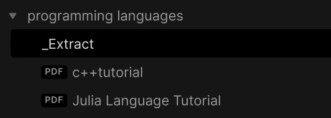
vault_folder

and we have highlighted the Julia Hello World Programm with a note 'Hello World':
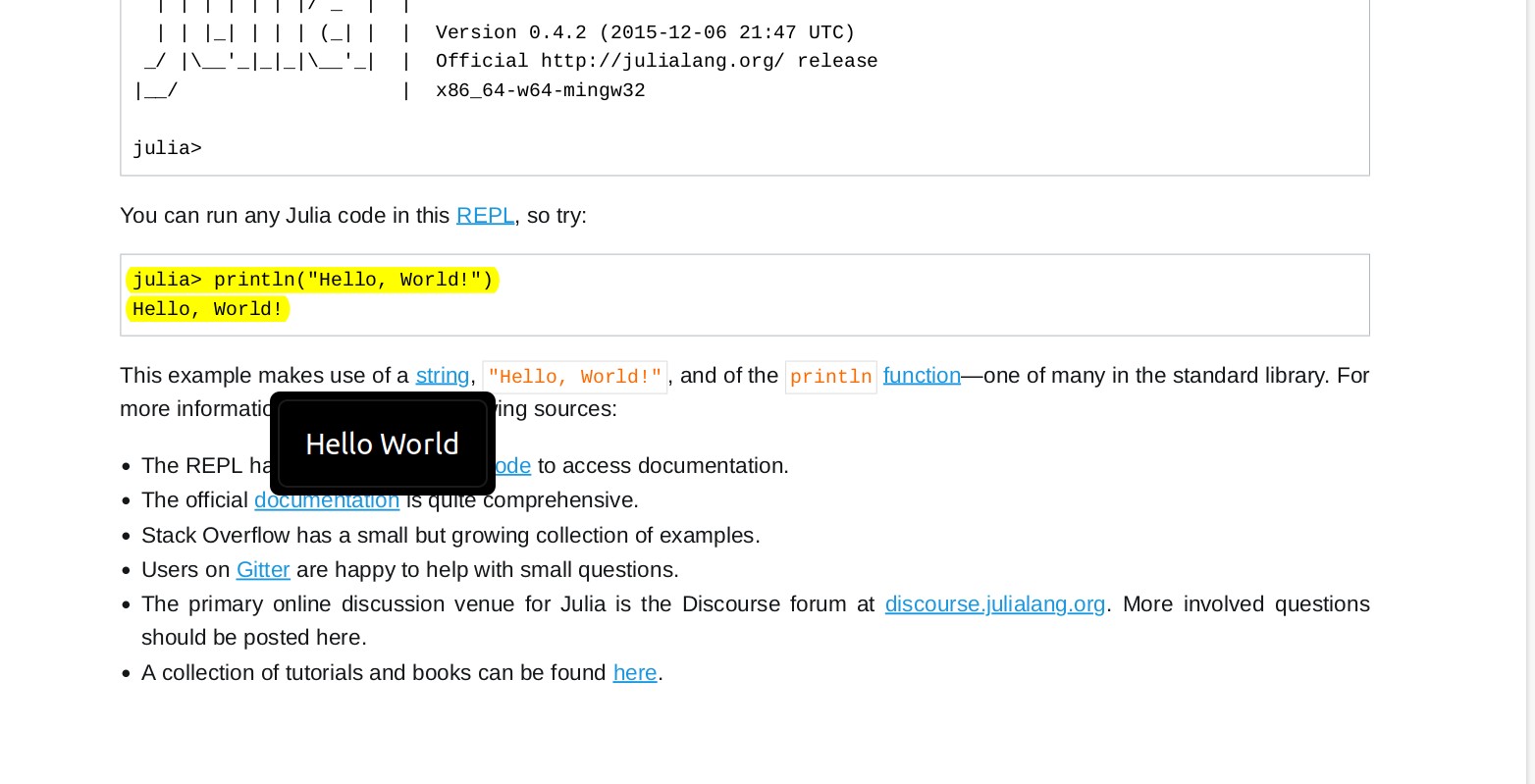
pdf_note

In the editor (e.g. _Extract) we run the plugin's command Extract PDF Annotations (Hotkey Ctrl-P for all Commands). This will fetch all annotations in the PDF files in the current folder and sort them by Topic:
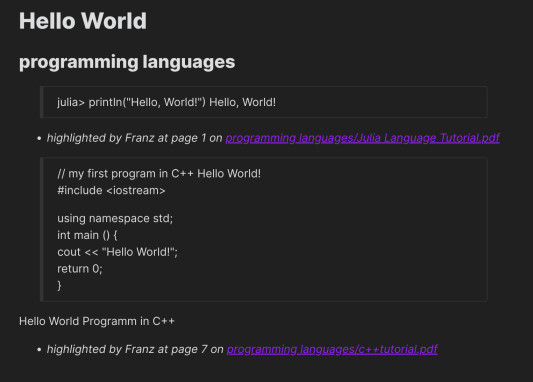
extracted_annotations

As such, you can relate comments for your topics (here 'Hello World') from several PDF files.

Versions

1.9.4 extract from file path on clipboard can handle single quotes

1.9.3 use pdfjs-dist like Obsidian does

1.9.2 add new template attribute for page labels

1.9.1 avoid duplicate tags, when using option to extract tags from annotation body

1.9.0 update packages

1.8.2 remove placeholder text Extracting PDF Comments from... for Extract PDF Annotations

1.8.1 add option to extract tags from annotation body and setting to overwrite existing export note

1.8.0 add option to export each extracted annotation to a separate note

1.7.0 add settings for dynamic export path (next to PDF) and export name

1.6.0 fix bug after pdfjs api change

1.5.0 add setting for export path

1.4.0 add support for squiggle annotations

1.3.2 bugfix for free text, which is now treated in the same way as a note

1.3.1 bugfix for desired annotations setting

1.3.0 add support for free text annotations

1.2.1 improved annotation extraction

1.2.0 added template settings

1.1.0 add new function Extract PDF Annotations from single file from path in clipboard to extract annotations from PDFs outside Obsidian vault

1.0.4 clean up hyphenation https://github.com/munach/obsidian-extract-pdf-annotations/issues/5

1.0.3 updated highlight fetching to use QuadPoints instead of Rectangles

Installation / Build

Fetch repository:

$ git clone https://github.com/munach/obsidian-extract-pdf-annotations.git
$ cd obsidian-extract-pdf-annotations

Install dependencies:

$ npm i

Transpile main.ts:

$ npm run build

Then create the plugin directory and copy the files main.js and manifest.json, e.g.;

$ mkdir ~/MyVault/.obsidian/plugins/obsidian-extract-pdf-annotations
$ cp main.js manifest.json ~/MyVault/.obsidian/plugins/obsidian-extract-pdf-annotations/

Enable the plugin in Obsidan's setting.

Issues / Bugs

[] works only on left-to-right highlights

Credits

This plugin builds on ideas from Alexis Rondeaus Plugin https://github.com/akaalias/obsidian-extract-pdf-highlights, but uses obsidians build-in pdf.js library.

Author

Franz Achermann and Florian Stöckl

Similar Plugins

info
• Similar plugins are suggested based on the common tags between the plugins.
TagFolder
4 years ago by vorotamoroz
Obsidian Enhancing Export
4 years ago by YISH
This is an enhancing export plugin base on Pandoc for Obsidian (https://obsidian.md/ ). It's allow you to export to formats like Markdown、Markdown (Hugo https://gohugo.io/ )、Html、docx、Latex etc.
Timestamp Notes
4 years ago by Julian Grunauer
This plugin allows side-by-side notetaking with videos. Annotate your notes with timestamps to directly control the video and remember where each note comes from.
Raindrop Highlights
4 years ago by kaiiiz
An Obsidian.md plugin that syncs highlights from Raindrop.
Super Simple Time Tracker
4 years ago by Ellpeck
Multi-purpose time trackers for your notes!
Onyx Boox Annotation & Highlight Extractor
4 years ago by Akos Balasko
This tool extracts the highlights and the annotations from OnyxBoox Reading Notes txt files, and converts them to linked zettelkasten literature and permanent notes
File Forgetting Curve
3 years ago by ptrsvltns
File Forgetting Curve
Text Extractor
3 years ago by Simon Cambier
A (companion) plugin to facilitate the extraction of text from images (OCR) and PDFs.
Smart Connections
3 years ago by Brian Petro
Chat with your notes & see links to related content with AI embeddings. Use local models or 100+ via APIs like Claude, Gemini, ChatGPT & Llama 3
Awesome Reader
3 years ago by AwesomeDog
Make Obsidian a proper Reader.
ibook
3 years ago by bingryan
export mac ibook annotations/hightlights to obsidian vault
Slide Note
3 years ago by Jinyan Xu
Interlinear Glossing
3 years ago by Mijyuoon
An Obsidian plugin for interlinear glosses used in linguistics texts.
Arcana
3 years ago by A-F-V
Supercharge your Obsidian note-taking through AI-powered insights and suggestions
Zettelkasten LLM Tools
3 years ago by Karl Smith
Zettelkasten note taking powered by Large Language Models
Image Converter
3 years ago by xRyul
⚡️ Convert, compress, resize, annotate, markup, draw, crop, rotate, flip, align images directly in Obsidian. Drag-resize, rename with variables, batch process. WEBP, JPG, PNG, HEIC, TIF.
Mononote
3 years ago by Carlo Zottmann
An Obsidian plugin that ensures each note occupies only one tab. If a note is already open, its existing tab will be focussed instead of opening the same file in the current tab.
Favorite Note
3 years ago by Mahmudul Hasan
The missing Obsidian plugin to mark note as favorite.
Journals
2 years ago by Sergii Kostyrko
Better Export PDF
2 years ago by l1xnan
Obsidian PDF export enhancement plugin
Journalyst
2 years ago by Justin Arnold
Set View Mode per Note
2 years ago by Alex Davies
Use YAML frontmatter to specify a view mode per note.
PDF++
2 years ago by Ryota Ushio
PDF++: the most Obsidian-native PDF annotation & viewing tool ever. Comes with optional Vim keybindings.
CardNote
2 years ago by cycsd
Help you extract your thoughts more quickly in canvas
PDF break page
2 years ago by CG
Plugin for obsidian that adding shortcuts to create breakpages for pdf exports.
Enhanced Annotations
2 years ago by ycnmhd
Date Inserter
2 years ago by namikaze-40p
An Obsidian plugin that lets you insert a date at the cursor position using a calendar.
BookFusion
2 years ago by BookFusion
BookFusion Obsidian Plugin
Persian Calendar
2 years ago by Hossein Maleknejad
Persian Calendar for Obsidian.md
SwiftLaTeX Render
2 years ago by gboyd068
External Links
2 years ago by Juan Vimberg
Note Chain
2 years ago by ZigHolding
Package my frequently used tools, highly personal plugins.
Note Definitions
2 years ago by Dominic Let
Obsidian plugin for seamless viewing of personal definitions
Plugins Annotations
2 years ago by Andrea Alberti
Obsidian plugin that allows adding personal comments to each installed plugin.
Search In Canvas
2 years ago by Boninall
Xournal++
2 years ago by Jon Jampen
Obsidian plugin that seamlessly integrates Xournal++ for handwritten notes and annotations.
e-Daiary
2 years ago by Thomas Campanholi
This plugin was created to make daily entries in a journal based on the day of the year.
Marker PDF to MD
2 years ago by L3N0X
Make use of different AI models to convert your pdfs into markdown with perfect ocr, latex formulas, tables, images and more! Supports Mistral AI OCR (free) and self hosted variants!
Quick Cards
2 years ago by Camus Qiu
Diarian
2 years ago by Erika Gozar
All-in-one journaling toolkit.
PDF Highlights
5 years ago by Alexis Rondeau
Extract highlights, underlines and annotations from your PDFs into Obsidian
Better PDF
5 years ago by MSzturc
Goal of this Plugin in to implement a native PDF handling workflow in Obsidian
Pandoc
5 years ago by Oliver Balfour
Pandoc document export plugin for Obsidian (https://obsidian.md)
Annotator
5 years ago by Elias Sundqvist
A plugin for reading and annotating PDFs and EPUBs in obsidian.
Markmind
5 years ago by Mark
A mind map, outline for obsidian,It support mobile and desktop
Hypothes.is
5 years ago by weichenw
An Obsidian.md plugin that syncs highlights from Hypothesis.
Omnisearch
4 years ago by Simon Cambier
A search engine that "just works" for Obsidian. Supports OCR and PDF indexing.
LLM Summary
2 years ago by QSun
wip
downloadPDF
2 years ago by Frieda
PDF2Image
2 years ago by RasmusAChr
Mass Create
a year ago by vellikhor
Create large quantities of notes easily at one time.
Template by Note Name
a year ago by Jacob Learned
A simple Obsidian plugin to automatically template notes based on their title
ShaahMaat-md
a year ago by Mihail Kovachev
Paperless
a year ago by Talal Abou Haiba
BibDesk Integration
a year ago by Andrea Alberti
Integration of Obsidian with bibtex files
Readeck Importer
a year ago by Makebit
Import bookmarks from Readeck to Obsidian
Feedly Annotations Sync
a year ago by Nick Felker
Download my Feedly annotations
Duplicate Detector
a year ago by David Alcalde
Obsidian plugin to detect and highlight duplicate lines in the active file
Minote Sync
a year ago by Emac Shen
Minote Sync is a Obsidian plugin to sync Minote(小米笔记) into your Vault.
PDF Writer
a year ago by Jobelin Kom
Obsidian plugin To write and fill a PDF
PDF Paste
a year ago by Cormac
Media Slider
a year ago by Aditya Amatya
An obsidian plugin that helps to make slider for images, audios, videos, pdfs, markdown, etc in obsidian notes.
Annotate Audio
a year ago by VidE
PDF Folder to Markdowns
a year ago by CrisHood
Convert a folder of PDFs into a folder of Markdown files with embedded PDFs. This plugin is useful for users who want to migrate their PDF notes from different apps (e.g., Boox) or organize their reference materials inside Obsidian.
Cubox
a year ago by delphi-2015
Cubox Official Obsidian Plugin
Handwriting OCR
9 months ago by ikmolbo
Transform handwritten documents and scanned images into editable text with Handwriting OCR's AI-powered handwriting to text conversion.
SideNote
6 months ago by mofukuru
Obsidian plugin: Add comment on the part of sentence and refer in comment view.