Audio Notes

by Jason Maldonis
5
4
3
2
1
Score: 46/100

Description

The Audio Notes plugin helps users take notes while listening to audio files such as podcasts. It enables the creation of timestamped audio notes that contain embedded audio players for replaying specific quotes. Users can generate transcripts, set playback speeds, and specify start and end times for their notes. The plugin supports integration with transcription services and allows hotkey customization for easier playback control. With mobile support, users can capture thoughts on the go and sync them across devices.

Reviews

No reviews yet.

Stats

184
stars
27,468
downloads
6
forks
1,221
days
1,099
days
1,099
days
10
total PRs
0
open PRs
0
closed PRs
10
merged PRs
32
total issues
19
open issues
13
closed issues
0
commits

Latest Version

3 years ago

Changelog

Bugfix for transcribing podcasts with Deepgram.

README file from

Github

version license

Obsidian Audio Notes

Audio Notes is a plugin for the note-taking app Obsidian.

What are Audio Notes?

Audio Notes makes it easy to take notes on podcasts and other audio files as you listen to them.

Check it out!
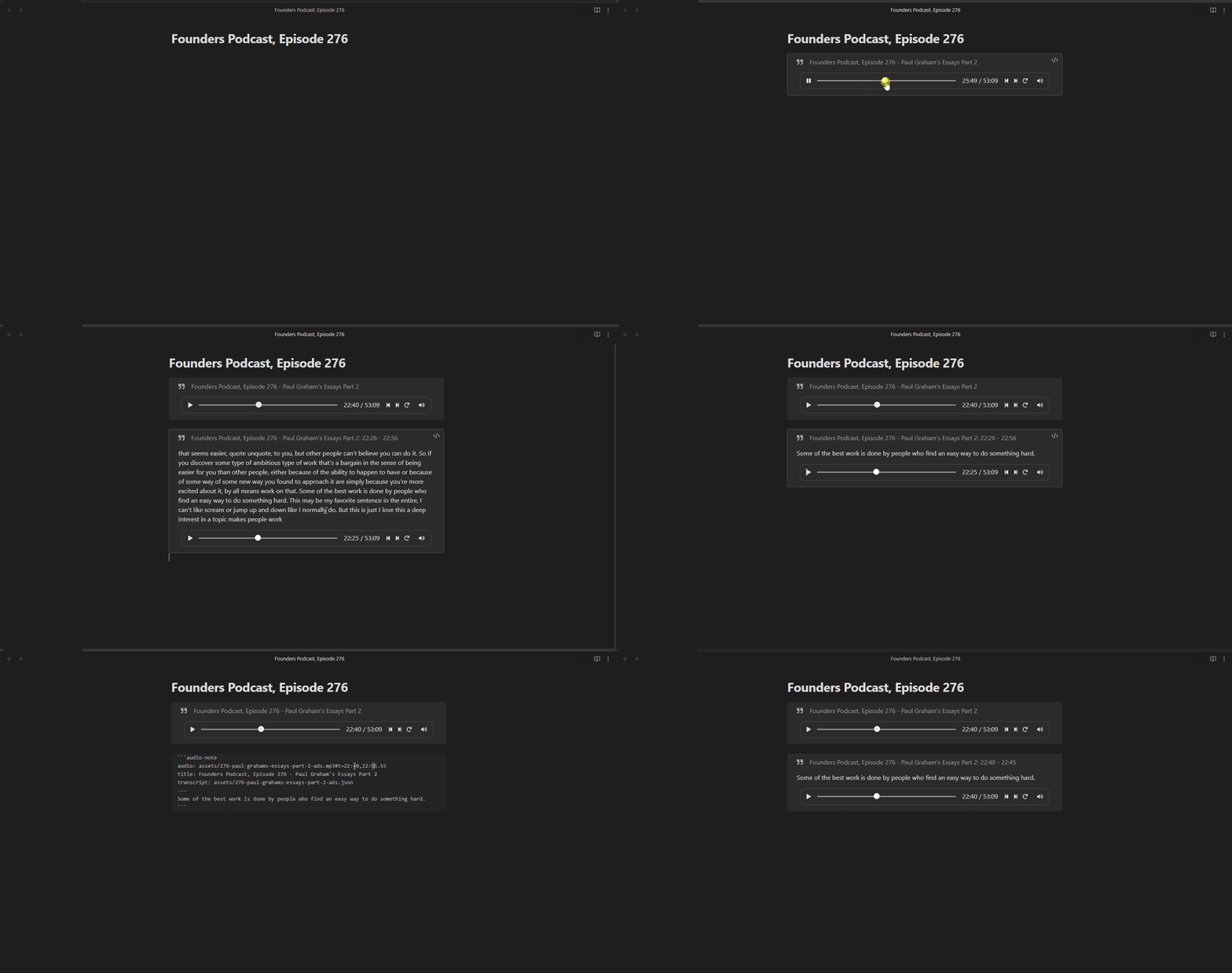
An Audio Note is a callout that contains the quote from the audio, coupled with an embedded audio player to replay the quote. It look like this:
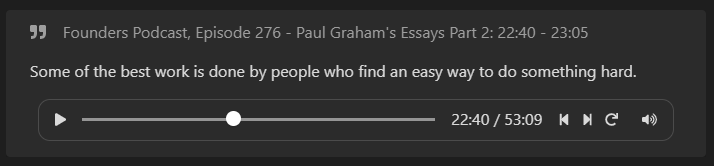
You can use the speech-to-text software described below to generate transcripts for your audio files. Once you have a transcript, Audio Notes will automatically generate quotes for your notes!

To create an Audio Note you must specify an audio file, and you may set a few other attributes. All attributes are set using a callout-like code block:
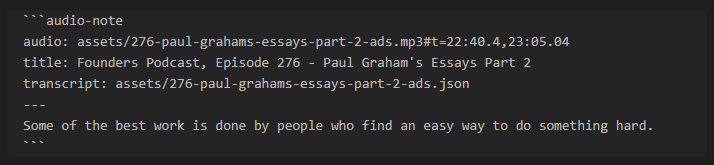
  • audio: (required) The audio filename. It can be a local file or a link to an audio file online.
    • (optional) You can add #t=<start>,<end> to the end of the filename to set the start and end time of the quote. For example, you can add t=1:20,1:30 to start the audio segment at 1:20 and end at 1:30. If you do not want to set an end time, you can simply use t=<start>.
    • (optional) You can add &s=<playback-speed> to the end of the filename, after #t=<start>,<end>, to specify the playback rate. If you do not have a start and end time, you can add #s=<playback-speed> to the end of the filename. The playback speed defaults to 1.0.
  • title: (optional) The title of your note.
  • transcript: (optional) The filename of the transcript. See below for details.
  • author: (optional) The text to be used as the author of the quote.
  • liveUpdate: true: (optional) If you add the liveUpdate: true attribute to the codeblock, the quote will automatically update in the codeblock as the audio plays (see below for more info).

How to Use the Plugin

Find the .mp3 (or .m4a or .m4b) file you want to take notes on and move it into your vault. You may want to generate a transcript file to allow Audio Notes to automatically insert the transcript of the audio (see below).

Once your .mp3 file is in your vault, run the command Create new Audio Note in new file. After selecting an mp3 file, a new note is created with an Audio Note that looks like this:

```audio-note
audio: assets/276-paul-grahams-essays-part-2-ads.mp3
title: Founders Podcast, Episode 276 - Paul Graham's Essays Part 2
transcript: assets/276-paul-grahams-essays-part-2-ads.json
```

Now you can start listening.

When you want to take a note on what was said in the audio, pause the player and run the command Create new Audio Note at current time (+/- 15 seconds). A new audio note will be added at the end of the file, based on the current time of the first audio player in the file.

You can edit the newly created audio note to your heart's content! You can change the text and the start/end times of the audio segment. If you extend the audio and need to regenerate the quote to include more words, you can delete the quote then use the command Regenerate Current Audio Note or Regenerate All Audio Notes to re-create the quote from the start/end times you set.

Now you can listen to your note any time, anywhere :)

Bind Hotkeys to Control the Audio Player

If you're on your computer, you can use hotkeys to control the currently-playing audio player. Below are the hotkeys I use:

  • Ctrl + Shift + Right Arrow: Skip forward
  • Ctrl + Shift + Left Arrow: Skip backward
  • Ctrl + Shift + Up Arrow: Speed up
  • Ctrl + Shift + Down Arrow: Slow down
  • Ctrl + Shift + =: Reset player to start time
  • Ctrl + Shift + Space: Toggle play/pause
  • Ctrl + Shift + N: Create new audio note at current time
  • Ctrl + Shift + G: Regenerate current audio note

Live Update for Reading

If you like to read as you listen, you can add the liveUpdate: true attribute to the codeblock.

When this feature is turned on, the quote in the audio note will automatically update as the audio plays. (note: the subtitles will not change unless the audio is playing.)

Using on Mobile

(Only tested on Android)

If you listen to podcasts or other audio files on your phone, being able to take notes on your phone is critical.

The workflow below follows the CODE process by Tiago Forte: Capture, Organize, Distill, and Express. You can quickly capture the information you care about and can come back to it later to organize, distill, and express it without losing your train of though on the podcast/audio you're listening to. This helps to avoid the Doorway effect.

This is the best way I've found to take notes:

  1. Install Audio Notes on your phone, and pin the Create new Audio Note ... command to the top of your commands (using the core plugin Command palette).
  2. On your computer preload the .mp3 and transcript, and create a new note in your vault with the initial Audio Note.
  3. Sync your vault to your phone.
  4. Open Obsidian on your phone and go for a walk! Listen to the .mp3 from within Obsidian using the Audio Note codeblock you just created and synced to your phone.
  5. Pause the audio when you hear something you want to remember and swipe down to create a new audio note at the end of the Obsidian note. You can add any personal thoughts at this time below the newly-generated note.
  6. When you're done, sync your note back to your computer and edit the quotes.
  7. Finish the note by highlighting or summarizing the things you most want to remember.

Click below to see a video of using Audio Notes on your phone.

Taking Notes on YouTube Videos

If you're watching a YouTube video with subtitles, you can take notes on it and Audio Notes will automatically insert the subtitles into your note.

  1. Install the Media Extended plugin.
  2. Embed a YouTube video into your note with ![](https://www.youtube.com/watch?v=ji5_MqicxSo).
  3. Run the command Media Extended: Open Media from Link and paste the URL of the YouTube video into the box. Start listening.
  4. When you're ready to take a note, run the command Audio Notes: (Media Extended YouTube Video) Create new Audio Note at current time (+/- 15 seconds) to create a new Audio Note that includes the subtitles of the YouTube video.
  5. You may want to use the liveUpdate: true attribute when listening to YouTube videos.

Quick Voice Messages

Obsidian provides a Core plugin called Audio Recorder which allows you to record voice messages directly in Obsidian, but it lacks some features. We've expanded the functionality of Audio Recorder to add transcripts of your voice messages in your Obsidian note.

We also added the ability to pause and resume the recording if you get interupted mid-recording.

Usage

First, you'll need an API Key from Deepgram AI. It does cost money, but it is really affordable. They also give you up to 12,000 minutes of transcription for free as part of the trial period, depending on which additional options you select. After you create a Deepgram API key, add it to your Audio Notes plugin settings.

You can then either use the command Generate quick audio recording with transcription, or you can click the microphone icon in the side ribbon. This will pop open a modal giving you the options to select for the transcription. (To learn more about each option, visit their respective links in the modal.) After checking the options you want added, you can hit the green microphone button to start the recording.

When you are done recording, hit the stop button. It will take a few seconds for the transcription to be ready, when it is you can hit the "Save" button and the audio and transcription will be added to your document.

Generating a Transcript

There are three ways to generate a transcript: use Deepgram to generate a transcript from a URL using the Audio Notes plugin use an existing .srt file, or generate a transcript yourself.

Use Deepgram AI to Transcript an Online Audio File

You can use Deepgram AI to transcribe your audio files if they are available online. (Note: we are working on allowing you to transcribe prerecorded audio files that are not online.)

You can use the Transcribe mp3 file online command or the Create new Audio Note in new file command to transcribe your podcast or audio. The transcript will be saved in JSON format in your vault and can be used for future Audio Notes.

First, you'll need an API Key from Deepgram AI. It does cost money, but it is really affordable. They also give you up to 12,000 minutes of transcription for free as part of the trial period, depending on which additional options you select. After you create a Deepgram API key, add it to your Audio Notes plugin settings.

Use an Existing .srt File

If you already have the transcript in .srt format, you can use it directly by putting the filename in the transcript: <your .srt file> attribute.

Generating a Transcript Yourself

This process can be difficult because installing OpenAI Whisper is difficult, but here's how it works:

You can use OpenAI Whisper to generate a transcript from an audio file on your computer.

Running OpenAI Whisper requires Python 3.9. I recommending installing Python 3.9 using miniconda. Once python is installed, install OpenAI Whipser with pip install git+https://github.com/openai/whisper.git. You may also need to install ffmpeg, which is more difficult. See OpenAI Whisper's documentation for more info.

The following python script will perform speech recognition on your audio file and save the transcript to your vault. Once the transript is in your vault, the Audio Notes plugin can use it to generate text automatically.

You can install tkinter using pip install tkinter to display a "Select File" dialog rather than setting the filename in the code.

import whisper
import json


# If tkinter is installed, show a "Select File" dialog.
try:
    import tkinter as tk
    from tkinter.filedialog import askopenfilename
    root = tk.Tk()
    root.withdraw()
    audio_filename = askopenfilename()
    print(f"You selected: {audio_filename}")
except ImportError:
    audio_filename = r"<path-to-audio-file-in-your-vault>.mp3"


# Set the following information to perform speech recognition:
model_name = "small.en"  # See https://github.com/openai/whisper for other options
start: float = None  # (optional) Set to the # of seconds to start at
end: float = None  # (optional) Set to the # of seconds to end at

# Load the audio file and trim it if desired
audio = whisper.load_audio(audio_filename)
samples_per_second = 16_000
if end is not None:
    audio = audio[:int(end * samples_per_second)]
if start is not None:
    audio = audio[int(start * samples_per_second):]

# Load the model. It may be multiple GBs.
model = whisper.load_model(model_name)

# Generate the transcript. This may take a long time.
result = model.transcribe(audio, verbose=False)

# Save the transript to a .json file with the same name as the audio file.
for segment in result["segments"]:
    del segment["id"]
    del segment["seek"]
    del segment["tokens"]
    del segment["temperature"]
    del segment["avg_logprob"]
    del segment["compression_ratio"]
    del segment["no_speech_prob"]
    if start is not None:
        segment["start"] += start
        segment["end"] += start
output_filename = ".".join(audio_filename.split(".")[:-1]) + ".json"
with open(output_filename, "w") as f:
    json.dump(result, f)

print("Done!")

Similar Plugins

info
• Similar plugins are suggested based on the common tags between the plugins.
Text to Speech
4 years ago by Johannes Theiner
Text to speech for Obsidian. Hear your notes.
KOReader Sync
4 years ago by Federico "Edo" Granata
Obsidian.md plugin to sync highlights/notes from koreader
Power Search
4 years ago by Aviral Batra
Auto Note Mover
4 years ago by faru
This is a plugin for Obsidian (https://obsidian.md).
AidenLx's Folder Note - folderv Component
4 years ago by AidenLx
Things Link
4 years ago by @gavmn
Marjdown shortcuts
4 years ago by Jules Guesnon
🪨 Obsidian plugin that allows to write markdown from commands
Digital Garden
4 years ago by Ole Eskild Steensen
Key Sequence Shortcut
4 years ago by anselmwang
Execute obsidian commands with short key sequences. For example, 'tp' for 'Toggle Preview' and 'tb' for 'Toggle Sidebar'. Easier to remember.
Navigate Cursor History
4 years ago by heycalmdown
Daily notes opener
4 years ago by Reorx
Easily open daily notes and periodic notes in new pane; customize periodic notes background; quick append new line to daily notes.
Zotero Desktop Connector
4 years ago by mgmeyers
Insert and import citations, bibliographies, notes, and PDF annotations from Zotero into Obsidian.
Doubleshift
4 years ago by Qwyntex
Obsidian Plugin to open the command palette by pressing shift twice
Book Search
4 years ago by anpigon
Obsidian plugin that automatically creates notes by searching for books
Filename Emoji Remover
4 years ago by Yüksel Tolun
A simple plugin for the note taking app Obsidian that will rename your files to remove emojis in their names.
Weread Plugin
4 years ago by hank zhao
Obsidian Weread Plugin is a plugin to sync Weread(微信读书) hightlights and annotations into your Obsidian Vault.
PodNotes
4 years ago by Christian B. B. Houmann
PodNotes is a plugin for Obsidian that helps the user write notes on podcasts.
Heading Shifter
4 years ago by kasahala
Easily Shift and Change markdown headings.
Quick snippets and navigation
4 years ago by @aciq
Quick snippets and navigation for Obsidian
Super Simple Time Tracker
4 years ago by Ellpeck
Multi-purpose time trackers for your notes!
Blockquote Levels
4 years ago by Carlo Zottmann
A plugin for Obsidian (https://obsidian.md) that adds commands for increasing/decreasing the blockquote level of the current line or selection(s).
Week Planner
4 years ago by Ralf Wirdemann
New Note Content Pusher
4 years ago by Henry Gustafson
An Obsidian plugin to add (prepend or append) specified content to a note (existing or new) without opening another pane.
Old Note Admonitor
3 years ago by tadashi-aikawa
Dynbedded
3 years ago by Marcus Breiden
Embed snippets, templates and any linkable by delegating the current scope to the embedded file either by using a direct reference or as reference with date naming format relative from today.
Rapid Notes
3 years ago by valteriomon
Daily Notes Editor
3 years ago by boninall
A plugin for you to edit a bunch of daily notes in one page(inline), which works similar to Roam Research's default daily note view.
Transcription
3 years ago by djmango (Sulaiman Ghori)
Obsidian plugin to create high-quality transcriptions from markdown linked audio files
Keyshots
3 years ago by KrazyManJ
🔮📝 Obsidian plugin that adds classic hotkey/shortcuts commands from popular IDEs like Visual Studio Code or JetBrains Family.
Boost Link Suggestions
3 years ago by Jacob Levernier
An Obsidian (https://obsidian.md) plugin for altering the order of inline link suggestions by link count and manual boosts.
Audio Player
3 years ago by noonesimg
audio player plugin with bookmarks for Obsidian.md
Weekly Review
3 years ago by Brandon Boswell
YTranscript
3 years ago by Łukasz Strzępek
Habit Calendar
3 years ago by Hedonihilist
Monthly Habit Calendar for DataviewJS. This plugin helps you render a calendar inside DataviewJS code block, showing your habit status within a month.
Awesome Reader
3 years ago by AwesomeDog
Make Obsidian a proper Reader.
Create Note in Folder
3 years ago by Mara-Li
Set a folder in settings and get directly a command to create a note in it. Use this with QuickAdd/Button to get more pratical things :D
Tasks Calendar Wrapper
3 years ago by zhuwenq
This plugin currently provides a timeline view to display your tasks from your obsidian valut, with customizable filters and renderring options.
Journal Review
3 years ago by Kageetai
Review your daily notes on their anniversaries, like "what happened today last year"
Brainframe
3 years ago by pedersen
Gemmy
3 years ago by Obsidian
Source Code Note
3 years ago by Waiting
The obsidian plugin can help you organize source code note easily.
Floating Search
3 years ago by Boninall
A plugin for searching text by using Obsidian default search view.
OZ Calendar
3 years ago by Ozan Tellioglu
Advanced Merger
3 years ago by Anto Keinänen
Colorful Note Borders
3 years ago by rusi
Tolino notes Importer
3 years ago by juergenbr
Obsidian plugin to import notes from a Tolino E-Reader
Quickly
3 years ago by Sparsh Yadav
Quick capture to obsidian note
Smart Rename
3 years ago by mnaoumov
Obsidian Plugin that helps to rename notes keeping previous title in existing links
Folder notes
3 years ago by Lost Paul
Create notes within folders that can be accessed without collapsing the folder, similar to the functionality offered in Notion.
GPT-LiteInquirer
3 years ago by ittuann
💬 Experience OpenAI ChatGPT assistance directly within Obsidian, drafting content without interrupting your creative flow.
Personal Assistant
3 years ago by edony
A plugin that harnesses AI agents and streamlining techniques to help you automatically manage Obsidian.
Plugin Manager
3 years ago by ohm-en
Allows better management of Obsidian.md plugins.
Link with alias
3 years ago by Pavel Vojtechovsky
Obsidian plugin for handy creation of links and alias in front matter of target document
Note archiver
3 years ago by thenomadlad
Cloudinary
3 years ago by Uday Samsani, Jordan Handy
Cloudinary plugin for content uploading and transformation.
Due When
3 years ago by Andy Baxter
An Obsidian plugin which gives shortcuts to insert set due dates
Air Quotes
3 years ago by Alan Grainger
Plugin for Obsidian. Search and insert quotes from a source text as you type. This is great for reading a physical book or eReader while taking notes on a separate laptop or phone.
AI Tools
3 years ago by solderneer
Adding powerful semantic search, generative answers, and other AI tools to Obsidian, using Supabase + OpenAI.
ZettelGPT
3 years ago by Overraddit
Turbocharge Your Note-taking with AI Assistance
Mini Toolbar
3 years ago by AidenLx & Boninall
mini context toolbar in editor for Obsidian
Copy Inline Code
3 years ago by Ondrej Zavodny
Easy Bake
3 years ago by mgmeyers
Compile many Obsidian notes down to one.
Waka time box
3 years ago by complexzeng
Codename
3 years ago by dstack
Uncheck All
3 years ago by Shahar Har-Shuv
Obsidian plugin to uncheck all checkboxes in a file with one action
Voice
3 years ago by Chris Oguntolu
🔊 The Obsidian Voice plugin lets you listen to your written content being read aloud—mobile-friendly audiobook-like experience. 🎧
Quick note
3 years ago by James Greenhalgh MBCS
Create New note from right-clicking app icon
Harpoon
3 years ago by mask(developermask)
Postfix
3 years ago by Bhagya Nirmaan Silva (@bhagyas)
A postfix plugin for Obsidian
Typing Assistant
3 years ago by Jambo
Typing Assistant is a plugin that improves writing efficiency and provides a user experience similar to that of【Notion】
Search Templates Library
3 years ago by Pentchaff
Obsidian plugin that allows to store searches templates for later use, and displays search results both in the search view and graph view.
Swiss army knife
3 years ago by mwoz123
Eleven Labs
3 years ago by Mark Charles
Merge Notes
3 years ago by fnya
Merge Notes is Plugin for Obsidian
Timer
3 years ago by Marius Wörfel
Obsidian plugin, which allows you to measure time.
Notes Sync Share
3 years ago by Alt-er
Sync and share (publish) your notes in your own private service.
iDoRecall
3 years ago by dbhandel
iDoRecall Obsidian plugin
Modal forms
3 years ago by Danielo Rodriguez
Define forms for filling data that you will be able to open from anywhere you can run JS
Sets
3 years ago by Gabriele Cannata
Typing
3 years ago by Nikita Konodyuk
Programmatic customizations for groups of notes
RescueTime
3 years ago by Tatsuya Hayashi
A RescueTime integration plugin to view your activity logs in Obsidian.
Timeline View
3 years ago by b.camphart
Obsidian plugin for viewing your notes linearly based on a given property
Gladdis
2 years ago by Aurélien Stébé
Gladdis (Generative Language Artificial Dedicated & Diligent Intelligence System) - it's an AI chatbot.
Multi Properties
2 years ago by fez-github
Plugin for Obsidian that allows user to add properties to multiple notes at once.
Zettelkasten Outliner
2 years ago by Tyler Suzuki Nelson
Editor Autofocus
2 years ago by Mgussekloo
Spotify Link
2 years ago by Studio Webux
Obsidian.md Plugin to include the song or episode you're currently listening to in your note.
Are.na unofficial
2 years ago by 0xroko
Unofficial Are.na plugin for Obsidian
Random Number Generator
2 years ago by iRewiewer
Gives you a random number
Time Things
2 years ago by Nick Winters
Show clock, track time spent editing a note, and track the last time a note has been edited.
Custom Note Width
2 years ago by 0skater0
Set the line width for each note individually in Obsidian. Works with a slider, pill presets, YAML frontmatter and hotkeys.
Formatto
2 years ago by Deca
Simple, fast, and easy-to-use Obsidian Markdown formatter.
Desk
2 years ago by David Landry
A desk for obsidian
Autocorrect Formatter
2 years ago by b-yp
A plugin running on Obsidian that utilizes autocorrect to format Markdown content.
R.E.L.A.X.
2 years ago by Syr
Regex Obsidian Plugin
Ollama Chat
2 years ago by Brumik
A plugin for chatting with you obsidian notes trough local Ollama LLM instead of Chat GTP.
YouTube Template
2 years ago by sundevista
📺 A plugin that would help you to fetch YouTube videos data into your vault.
Widgets
2 years ago by Rafael Veiga
Add cool widgets to your notes or your dashboard in Obsidian
Ctrl-XA cycle various items
2 years ago by nbossard
The equivalent in Obsidian of Vim Ctrl X-A. But supercharged with lists of various items : days, months, ...
Instapaper
2 years ago by Instapaper
Official Instapaper plugin for Obsidian
Apple Books - Import Highlights
2 years ago by bandantonio
Import highlights and notes from your Apple Books to Obsidian
Daily note creator
2 years ago by Mario Holubar
Automatically creates missing daily notes.
iCloud Contacts
2 years ago by Truls Aagaard
Obsidian plugin that imports contacts from iCloud and manages a note for each contact.
Contribution Graph
2 years ago by vran
generate interactive gitxxx style contribution graph for obsidian, use it to track your goals, habits, or anything else you want to track.
Protected Note
2 years ago by Mikail Gadzhikhanov
Plugin for Obsidian
Task list
2 years ago by Ted Marozzi
A simple obsidian plugin enabling better task management via lists.
Kindle Highlights Importer
2 years ago by MovingMillennial
Autogen
2 years ago by Aidan Tilgner
A plugin to use a language model to fill in parts of notes.
WordWise
2 years ago by ckt1031
Writing companion for AI content generation.
Ego Rock
2 years ago by Ashton Eby
An obsidian plugin that implements a basic taskwarrior UI for listing and modifying tasks.
MantouAI
2 years ago by Morino Pan
MantouAI—— 让Obsidian变身智能助手
Pomodoro Planner
2 years ago by Onur Nesvat
Mxmind Mindmap
2 years ago by mxmind
mxmind for obsidian plugin
Confluence Sync
2 years ago by Prateek Grover
Obsidian plugin for obsidian confluence sync
Title renamer
2 years ago by Peter Strøiman
Obsidian plugin to keep title in markdown synced with tile name
Note Companion Folder
2 years ago by Chris Verbree
A Obsidian Plugin providing a way to associate a folder to a note
Moulinette Search for TTRPG
2 years ago by Moulinette
Plugin for Obsidian
Kinopoisk search
2 years ago by Alintor
Obsidian Kinopoisk plugin
Quick File Name
2 years ago by Wapply
This Obsidian plugin generates a note with an random string as file name.
Note Toolbar
2 years ago by Chris Gurney
Flexible, context-aware toolbars for your notes in Obsidian.
Slurp
2 years ago by inhumantsar
Slurps webpages and saves them as clean, uncluttered Markdown. Think Pocket, but better.
Current Folder Notes
2 years ago by Pamela Wang
Shows notes in the current folder, useful for writing novels
Grind Manager
2 years ago by dromse
Gamify your task management with rewards system, craft your tasks by tags.
Target Word Count
2 years ago by TwoFive Labs
Target Word Count Plugin for Obsidian
Daily Prompt
2 years ago by Erl-koenig
Create List of Notes
2 years ago by Andrew Heekin
my anime list text exporter
2 years ago by XmoncocoX
a plugin who create an obsidian page for an anime with the data from my anime list.
Note Splitter
2 years ago by Trey Wallis
Split a note into individual notes based on a delimiter
Bookmarks Caller
2 years ago by namikaze-40p
This is an Obsidian plugin which can easily open bookmarks.
LinkMagic
2 years ago by AndyReifman
Timekeep
2 years ago by Jacobtread
Obsidian task time tracking
Select word
2 years ago by Connor Espino
Note Chain
2 years ago by ZigHolding
Package my frequently used tools, highly personal plugins.
Folder Periodic Notes
2 years ago by Andrew Heekin
BibTeX Manager
2 years ago by Akop Kesheshyan
Create literature notes in Obsidian from BibTeX entries, display formatted reference lists, and instantly generate citations.
Voicenotes Sync
2 years ago by Andrew Lombardi
Official Obsidian plugin that syncs your notes from VoiceNotes.com into your vault
Focus Tracker
2 years ago by Jeet Sukumaran
AudioPen Sync
2 years ago by Jonas Haefele
Connect AudioPen to Obsidian
Pinned Notes
2 years ago by vasilcoin002
doing
2 years ago by rooyca
What was I doing?
PopKit
2 years ago by Zhou Hua
Super Duper Audio Recorder
2 years ago by Thiago MadPin
Ever felt like the core audio recorder in Obsidian was playing hard to get? Well, fret no more! Our Super Duper Audio Recorder is here to save the day (and your sanity)! This plugin enhances your audio recording experience in Obsidian by adding folder selection and audio source options.
Truth Table+
2 years ago by Maximilian Schulten
This is the repository of an Obsidian.md plugin that allows users to create truth tables via the command palette.
Daily Statistics
2 years ago by yefengr
obsidian daily statistics
Live Variables
2 years ago by Hamza Ben Yazid
Define variables in your note's properties and reuse them throughout your content.
Auto Periodic Notes
2 years ago by Jamie Hurst
Obsidian plugin to create new periodic notes automatically in the background and allow these to be pinned in your open tabs. Requires the "Periodic Notes" plugin.
Journaling
2 years ago by Ordeeper
View daily notes in a journal-like format, similar to Logseq. It enhances note organization and facilitates better reflection by consolidating daily notes into a continuous journaling view.
Print
2 years ago by Marijn Bent
Print your notes directly from Obsidian
Hotkeys++
6 years ago by Argentina Ortega Sainz
Adds hotkeys to toggle todos, ordered/unordered lists and blockquotes in Obsidian
Note Refactor
6 years ago by James Lynch
Allows for text selections to be copied (refactored) into new notes and notes to be split into other notes.
Shortcuts extender
6 years ago by kitchenrunner
Plugin for Obsidian: Use shortcuts for input special symbols and changing level of headings without language switching
Search++
5 years ago by Noureddine Haouari
Allow inserting text context search results on the active note.
Workbench
5 years ago by ryanjamurphy
A plugin to help you collect working materials.
Smart Random Note
5 years ago by Eric Hall
A smart random note plugin for Obsidian
Tab Switcher
5 years ago by Vinzent & phibr0
Tab Switcher - Obsidian Plugin
Autocomplete
5 years ago by Yeboster
Obsidian plugin to provide text autocomplete
Icons
5 years ago by Camillo Visini
Add icons to your Obsidian notes – Experimental Obsidian Plugin
Folder Note
5 years ago by xpgo
Plugin to add description note to a folder for Obsidian.
Periodic Notes
5 years ago by Liam Cain
Create/manage your daily, weekly, and monthly notes in Obsidian
Daily Stats
5 years ago by Dhruvik Parikh
Plugin to view your daily word count across all notes in your Obsidian.md vault.
TODO | Text-based GTD
5 years ago by Lars Lockefeer
Prettier Format
5 years ago by Andrew Lisowski
Format obsidian.md notes using prettier
DEVONlink
5 years ago by ryanjamurphy
Open notes indexed in DEVONthink in, well, DEVONthink
Dice Roller
5 years ago by Jeremy Valentine
Inline dice rolling for Obsidian.md
Admonition
5 years ago by Jeremy Valentine
Adds admonition block-styled content to Obsidian.md
Tracker
5 years ago by pyrochlore
A plugin tracks occurrences and numbers in your notes
Hotkeys for templates
5 years ago by Vinzent
Highlight Public Notes
5 years ago by dennis seidel
Media Extended
5 years ago by AidenLx
Transform your Obsidian into a powerful video note-taking tool. 🖇️🗂️⏯️
Focus Mode
5 years ago by ryanpcmcquen
Add focus mode to Obsidian.
2Hop Links
5 years ago by Tokuhiro Matsuno
Stopwatch
5 years ago by Tokuhiro Matsuno
Pomodoro
5 years ago by Tokuhiro Matsuno
File Explorer Note Count
5 years ago by Ozan Tellioglu
Obsidian Plugin for viewing the number of elements under each folder within the file explorer
QuickAdd
5 years ago by Christian B. B. Houmann
QuickAdd for Obsidian
Amazing Marvin
5 years ago by Shirayuki Nekomata
Simple plugin for Amazing Marvin
Multi-line Formatting
5 years ago by nmady
Format Obsidian text over an entire selection, even if that selection has paragraph breaks in the middle!
Activity Logger
5 years ago by Creling
Go to Line
5 years ago by phibr0
Editor Commands Remap
5 years ago by cactus5
Obsidian plugin to map hotkeys to editor commands
Command Alias
5 years ago by @Yajamon
Obsidianのコマンドに対してエイリアスを設定するプラグイン
Podcast Note
5 years ago by Marc Julian Schwarz
A plugin for the note taking app Obsidian that lets you add podcast meta data to your notes.
Card View Mode
5 years ago by PADAone
Obsidian Card View Mode Plugin
Enhance Copy Note
5 years ago by kzhovn
Plugin which enhances the copy command for Obsidian.
Key Promoter
5 years ago by Johannes Theiner
Learn keyboard shortcuts by showing them when using the mouse
Wikipedia
5 years ago by Jonathan Miller
Grabs information from Wikipedia for a topic and brings it into Obsidian notes
Habitica Sync
5 years ago by Leoh and Ran
This is a under-development Obsidian Plugin for Habitica
Word Sprint
4 years ago by Andrew Lombardi
Obsidian Word Sprint plugin
Bible Reference
4 years ago by tim-hub
Take Bible Study notes easily in the popular note-taking app Obsidian, with automatic verse and reference suggestions.
Flexible Pomodoro
4 years ago by grassbl8d
Structured
4 years ago by dobrovolsky
From Template
4 years ago by mo-seph
Simple plugin to create Notes from a template, and fill in fields defined there
Epiphany
2 years ago by Epiphany
AutoPause
2 years ago by Chris Kephart
Allows only one audio track playing in Obsidian at a time, pausing the others.
Crackboard
2 years ago by Franklin
Obsidian plugin for crackboard.dev
Quick Notes
2 years ago by Sean McOwen
Lemons Search
2 years ago by Moritz Jung
An Obsidian plugin that offers a fast fuzzy finder based quick switcher with preview.
Flow
2 years ago by Ben Phillips
Implements key processes in David Allen's Getting Things Done (GTD) methodology
Quarto Exporter
2 years ago by Andreas Varotsis
Export Obsidian notes to Quarto-compatible QMD files.
Copy Section
2 years ago by skztr
Obsidian.md plugin adding a Copy button to the top of Headed sections
Local Media Embedder
2 years ago by seyf1elislam
an obsidian plugin allows you to Embed videos and images and audios from your local device in your notes.
Asciidoctor editor
2 years ago by dzruyk
Obsidian asciidoc editor plugin
Another Simple Todoist Sync
2 years ago by eudennis
Obsidian.md plugin to integrate with Todoist app.
random-retrieval
2 years ago by Rachninomav
Occura
2 years ago by Alexey Sedoykin
Plugin for https://obsidian.md/ that automatically selected same text occurrences in opened note
Smart Composer
a year ago by Heesu Suh
AI chat assistant for Obsidian with contextual awareness, smart writing assistance, and one-click edits. Features vault-aware conversations, semantic search, and local model support.
Session Notes
a year ago by tabibyte
A plugin for Obsidian to create temporary & session notes that will be deleted when session ends
Vault Review
a year ago by Alexander
This plugin allows you to create a snapshot of your vault and randomly review files from it 1-by-1.
Arweave Uploader
a year ago by makesimple
MOC Link Helper
a year ago by Bogdan Codreanu
This obsidian plugins allows you to quickly see which notes you need to include in your MOC.
Unearthed (Kindle Sync)
a year ago by CheersCal
Superstition
a year ago by Jeffry
An Obsidian plugin for routine management.
NeuroVox
a year ago by Synaptic Labs
Obsidian plugin for transcription and generation
Todos sort
a year ago by Jiri Sifalda
A plugin for Obsidian that sorts todos within a note
Activity Heatmap
a year ago by Zak Hijaouy
Brain Dump Mode
a year ago by yesjinu
Obsidian plugin - DISABLE your delete key and eliminate hesitation!
Daily Random Note
a year ago by Alexandre Silva
Daily Random Notes in Obsidian.
Typezen
a year ago by Ilgam Gabdullin
Plugin for obsidian which lets you turn zen mode instantly
Gemini Scribe
a year ago by Allen Hutchison
An obsidian plugin to interact with Google Gemini
Daily Summary
a year ago by Luke
Task Director
a year ago by Cybertramp
A plugin that allows you to easily manage tasks in bulk.
Beautiful Contact Cards
a year ago by Seth Tenembaum
A plugin for the Obsidian text editor which renders "contact" code blocks with tappable links for phone, social media, etc.
Proletarian Wizard Task Manager
a year ago by Charles Feval
Obsidian plugin ot manage todos and projects directly from your notes.
Instant Above Divider
a year ago by SedationH
Simple Todo
a year ago by elliotxx
A minimalist text-based todo manager (Text-Based GTD) for efficient task management in Obsidian.
Weekly Goal Tracker
a year ago by George Gorman
Abbrlink
a year ago by Q78KG
Tab Limiter
a year ago by Henry Gustafson
Limits the number of tabs that can be opened in Obsidian
Share as ZIP
a year ago by Till Friebe
create folder notes with dropdown
a year ago by Sturdy Shawn
Sync Cnblog
a year ago by zhanglei
同步文章到博客园
Focus Time
a year ago by AstraDev
Focus Time is a plugin that helps you track how much time you spend on each note.
Unit Converter
a year ago by Ruslan Zabarov
Unit conversion plugin for Obsidian
Scribe
a year ago by Mike Alicea
Record, transcribe, and transform voice notes into structured insights. Leverage Whisper or AssemblyAI and ChatGPT to fill in gaps, generate summaries, and visualize ideas — all seamlessly integrated within Obsidian.
Insert Multiple Attachments
a year ago by mnaoumov
Obsidian Plugin that allows to insert multiple attachments at a time
Hanko
a year ago by Telehakke
Obsidian plugin.
Sentinel
a year ago by Giorgos Sarigiannidis
A plugin for Obsidian that allows you to update properties or run commands based on document visibility changes.
Goal Tracker
a year ago by Ben Rotholtz
AI Revisionist
a year ago by Synaptic Labs
Kikijiki Habit Tracker
a year ago by KIKIJIKI
Kikijiki Habit Tracker Plugin for Obsidian
Dataview Autocompletion
a year ago by Daniel Bauer
Spacekeys
a year ago by Jared Lumpe
Obsidian plugin to define hotkeys based on sequences of keypresses.
Folder overview
a year ago by Lost Paul
Provides a dynamic overview of your vault or folders in the format of a code block.
WHISPERER.md
a year ago by Falcion
A plugin for note-taking app Obsidian which allows you to play ambience music in vault and assign different tracks to files specifically
AI integration Hub
a year ago by Hishmat Salehi
A modular AI integration hub for Obsidian
CAO
a year ago by Godot
Claude AI for Obsidian
Organized daily notes
a year ago by duchangkim
Automatically organizes your daily notes into customizable folder structures for better organization and easier navigation.
Inline Checkbox Groups
a year ago by Bradley Wyatt
Obsidian Plugin that creates multiple checkboxes on a single line, separated by a customizable separator character (default '|'), with the option to automatically cross out text when all checkboxes in the line are checked.
Runsh
a year ago by Ddone
A simple plugin that allows to run shell commands from obsidian.
PDF Paste
a year ago by Cormac
Daily Routine
a year ago by sechan100
new version of daily-routine obsidian plugin
Cursor Position History
a year ago by Florian Gubler
A Plugin to remember (and make accessible) the cursor history in Obsidian. Both within a file and across files.
Asana
a year ago by Ryan Bantz
Obsidan plugin that creates tasks in Asana for highlighted text or the current line
Chat clips
a year ago by sleepingraven
Record chat in ordinary markdown list.
Waveform Player
a year ago by Zhou Hua
Annotate Audio
a year ago by VidE
Pinned Daily Notes
a year ago by Jeremy Neiman
Dynamically update a pinned tab with today's daily note
Xiaohongshu Importer
a year ago by bnchiang96
An Obsidian plugin to import Xiaohongshu (小红书) notes into your vault. Extract titles, content, images, videos, and tags from share links, with customizable categories and optional local media downloads.
Sticky Notes
a year ago by NoPoint
Obsidian Sticky Notes Plugin
Tick Tones
a year ago by DontBlameMe
A plugin for Obsidian which makes checkboxes satisfying
JIRA links shortener
a year ago by Ruslans Platonovs
Obsidian JIRA links shortener plugin
Wakatime / Wakapi
a year ago by Kevin Woblick
Connect your Obsidian to Wakatime or Wakapi to track the time spent while browsing or writing notes.
SolidTime Integration
a year ago by proniclabs
Obsidian SolidTime Integration Plugin
Markwhen File Sync
a year ago by rouvenjahnke
Synchronize properties from your Obsidian notes with a Markwhen timeline file.
Auto Note Importer
a year ago by uppinote
Obsidian plugin that automatically creates notes from external database
Sonkil
9 months ago by ohyoungpark
Note Companion AI
8 months ago by Benjamin Ashgan Shafii
Note Companion: AI assistant for Obsidian that goes beyond just a chat. (prev File Organizer 2000)
VaultAI
8 months ago by Tharushka Dinujaya
An AI chatbot plugin for Obsidian using the Gemini API for note summarization, content generation, and more. Enhance your workflow with AI assistance like the Notion AI bot.
Note Minimap
8 months ago by Yair Segel
Add a minimap to your Obsidian notes.
Canvas Link to Group
6 months ago by TGRRRR
Plugin for Obsidian Canvas enabling direct links to specific groups within canvas files for improved navigation
Tag Timer
4 months ago by quantavil
The Tag Timer is a versatile plugin for Obsidian that allows you to seamlessly track the time you spend on specific tasks or sections within your notes.
RSS Dashboard
3 months ago by Aditya Amatya
A dashboard for organizing and consuming RSS feeds, YouTube channels, and podcasts with smart tagging, media playback, and seamless content flow.
AI Transcriber
3 months ago by Musashino Software
AI-powered speech-to-text transcription using OpenAI GPT-4o and Whisper APIs
Memories
3 months ago by DIMFLIX
Plugin to display a gallery directly in a note.
TikToker
2 months ago by ameyxd
Save TikTok videos as markdown notes with embedded content and metadata extraction.
Note Progressbar
a month ago by Ryoma Kawahara
Displays a live progress bar summarizing checkbox completion in the active note.