Key Sequence Shortcut

by anselmwang
5
4
3
2
1
Score: 62/100

Description

Category: Productivity Tools

The Key Sequence Shortcut plugin allows users to bind custom key sequences to commands in Obsidian, providing a more intuitive and memorable way to execute actions. For example, users can define sequences like 'xl' for toggling bullet lists or 'tb' for toggling the sidebar. This plugin features a text-based configuration file for defining key sequences and their associated commands, with support for easy reloading and editing. It is particularly useful for those who prefer customizable shortcuts or need an alternative to traditional hotkeys. The plugin also provides automatic command suggestions for improved usability and works seamlessly across mobile and desktop environments, including scenarios where Vim mode is unavailable.

Reviews

No reviews yet.

Stats

43
stars
107
downloads
4
forks
1,694
days
10
days
10
days
1
total PRs
0
open PRs
0
closed PRs
1
merged PRs
13
total issues
2
open issues
11
closed issues
2
commits

Latest Version

10 days ago

Changelog

Key Sequence Shortcut 2.1.0

English

  • Optional input method integration: when a compatible, enabled Vim Input Method Memory plugin is available, the key sequence palette prepares temporary English input before opening.
  • Still works independently: without the provider, or with a disabled, outdated, or unloaded provider, only IME integration is disabled. The palette and commands remain available, including on mobile.
  • Safer command and cancellation lifecycle: exact matches and selected suggestions dispatch once, after the existing 100 ms focus-settling delay. The palette keeps its scoped English override through close and dispatch, and releases it on completion, cancellation, or unload. There is no blind IME-restore timer.
  • Visible failures: provider preparation failures and unavailable or failing command dispatches are reported instead of silently treated as success.
  • Maintained TypeScript source: the lifecycle improvements now live in the source with automated regression tests, rather than only in a compiled bundle.

The preferred provider ID is vim-input-method-memory (Vim Input Method Memory 1.1.0 introduces the scoped integration API). Compatible legacy installations using obsidian-vim-im-switch-plugin are also detected. Older push/pop-only APIs are not invoked. Provider availability is checked each time you open the palette.

Your existing TAB-separated configuration, optional descriptions, matching rules, and hotkeys are unchanged. No new configuration is required.

Update through Obsidian's Community Plugins update checker after this release is published. For manual installation, use the attached main.js and manifest.json in the existing Key Sequence Shortcut plugin folder.

中文

  • **可选的输入法联动:**如果已启用兼容的 Vim Input Method Memory 插件,快捷键序列菜单会先准备临时英文输入,再打开。
  • **仍可独立使用:**未安装输入法插件,或插件被禁用、版本不兼容、已经卸载时,仅关闭输入法联动,不会禁用菜单或命令;移动端仍可独立使用。
  • **更可靠的命令与取消流程:**精确匹配和手动选择统一为只执行一次的流程,保留原有 100 毫秒焦点稳定延迟。临时英文状态覆盖菜单关闭与命令派发,并在完成、取消或卸载时释放,不再依靠固定定时器盲目恢复输入法。
  • **明确报告错误:**输入法准备失败、命令不可用或派发失败时会显示提示,不会伪装为成功。
  • **恢复源码维护:**相关改进已写回 TypeScript 源码,并加入自动化回归测试,不再仅修改编译后的 JavaScript。

优先识别新的插件 ID vim-input-method-memory(Vim Input Method Memory 1.1.0 提供本次联动所需的作用域 API),同时支持使用旧 ID obsidian-vim-im-switch-plugin 且具备兼容 API 的安装。不会调用旧版仅有的 push/pop API;每次打开菜单都会重新检查可用性。

现有 TAB 分隔配置、可选描述、匹配规则和快捷键保持不变,无需新增配置。正式发布后,可通过 Obsidian 社区插件更新检查获取新版。

README file from

Github

Key Sequence Shortcut

Key Sequence Shortcut is an obsidian plugin, allow binding key sequences to an obsidian command. For example

  • If we assume "t" stands for "toggle", we can bind "tl" to "Toggle Preview", "tb" to "Toggle Sidebar".
  • If we assume "x" stands for "text", we can bind "xl" to "Toggle Bulllet List", "xc" to "Toggle Check list status"

A key sequence is easier to memorize than typical key shortcut like "Ctrl-j".

Install

Install by search "Key Sequence Shortcut" in Obsidian "Commnuity plugins" option.

Usage

  • Command "Open Key Sequence Menu" (bind to Ctrl-m). Type "xl" will execute editor:toggle-bullet-list, no need to type "Enter".
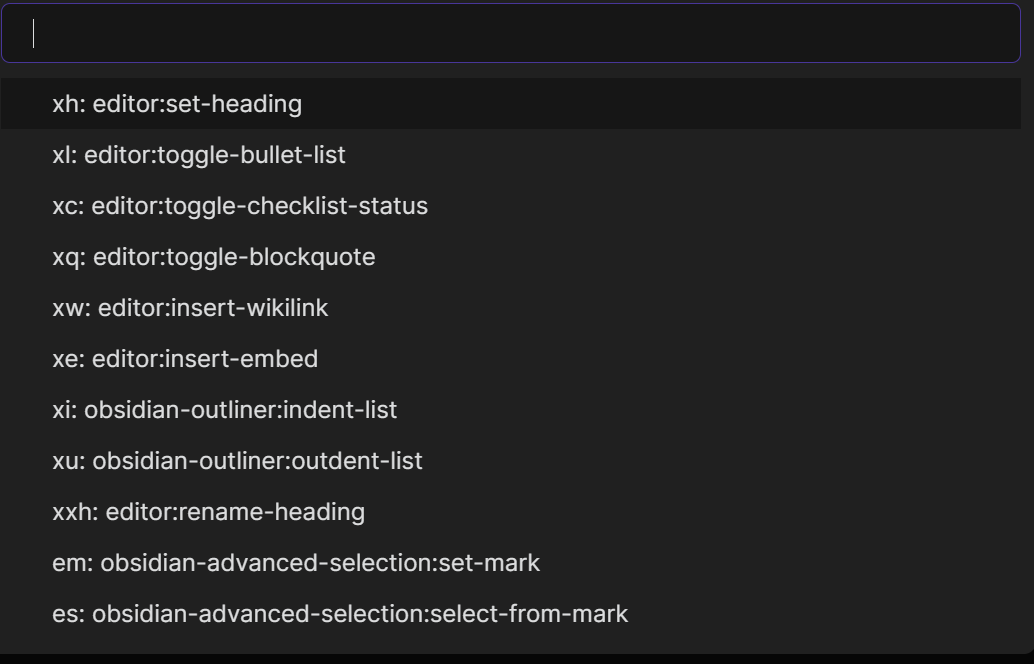
  • Configuration
    • The default configuration file is "kssrc.md" at workspace root folder. Can be customized.
      • Comment line: use double quote to start a comment line
      • Normal line: key-sequence<TAB>command-id<TAB>description. The last part "<TAB>description" is optional.
    • We can easily find command id by running command "Insert Command Id and Name" (bind to Ctrl-*)
    • Key Sequence Shortcut will run corresponding command as long at user input matches any configuration item, so "xh" will hide key sequences like "xha", "xhb". Please avoid to have one key sequence to be the prefix of other key sequences.
  • Run command "Reload Key Sequence Shortcut Config File" to reload after configuration file change

Choosing TAB as the separator is a trade-off. I understand we can't easily enter a TAB in Obsidian, it will indent the line. However, the last column in config file is "description" which can easily contain characters like ";" or "|" or space. Considering this, I still choose TAB. To enter it, I simply type TAB in any other editors (e.g. Notepad on Windows platform) ans paste it into Obsidian.

Optional input method integration (2.1.0)

Key Sequence Shortcut works on its own, including on mobile. If an enabled, compatible Vim Input Method Memory plugin (vim-input-method-memory) is available, the palette waits for temporary English input before opening. The override stays active while the palette closes and dispatches a command, then the input method provider reconciles the current editor/focus state. Cancelling or unloading releases only this palette's override.

Availability is checked whenever you open the palette. Missing, disabled, outdated, or disposed providers disable only IME integration, not the palette or commands. A compatible legacy installation with ID obsidian-vim-im-switch-plugin is also supported; older push/pop-only versions are not called. A real preparation failure is reported in a notice and the console instead of opening with an unprepared input method.

Key sequence matching, TAB-separated configuration, descriptions, and existing hotkeys are unchanged. Exact matches and selected suggestions both execute once, after the existing 100 ms editor-focus delay; there is no timed IME restoration.

Development and release

Use Node.js 22 LTS and run npm ci, npm test, and npm run build. Tests bundle the maintained TypeScript into memory and exercise the lifecycle with an Obsidian mock and deterministic timers; no vault or native IME helper is required. The production build generates main.js without a source map. Run node tests/lifecycle.cjs --release after building to exercise that exact release bundle with the same tests.

For an existing Community Plugins listing, merge the reviewed source first, then publish a GitHub release whose tag exactly matches the default branch's manifest.json version (for example 2.1.0, without a v prefix). Attach the built main.js and matching manifest.json; this plugin has no styles.css. Keep package.json, package-lock.json, manifest.json, and versions.json in sync. Include the changes and optional-provider requirements in the release notes so readers can see what changed; notification delivery depends on their GitHub subscription settings.

Configuration example

" p for project
pf	darlal-switcher-plus:switcher-plus:open	"Quick Switcher++: Open"

" x for text
xh	editor:set-heading
xl	editor:toggle-bullet-list
xc	editor:toggle-checklist-status
xq	editor:toggle-blockquote
xw	editor:insert-wikilink
xe	editor:insert-embed
xi	editor:indent-list
xu	editor:unindent-list

" xx for refactor
xxh	editor:rename-heading

" e for editor
em	obsidian-mark-and-select:set-mark
es	obsidian-mark-and-select:select-from-mark
"	following two commands only available on mobile
er	editor:redo
eu	editor:undo

Compare with similar plugins

Key sequence shortcut

  • Type Ctrl-M to trigger, then support character sequence like "phw" as hotkey.
  • Auto command suggestion to help memorize
  • text based configuration

Sequence hotkeys , Hotkeys chords

  • support arbitrary hotkey sequences, so you can use key sequence like "Alt-b Ctrl-a p h w"
  • No command suggestion
  • UI based configuration

Chorded hotkeys

  • Support character sequence as hotkey.
  • Type faster than average to trigger. This triggering method sounds strange to me, I haven't use the plugin in my daily life, not sure how well it works.

Acknowledgement

This plugin is inspired by Vim multi-key shortcut and VSpaceCode. Text editing will never been so much fun without such key sequence shortcut.

In the Obsidian world, I love vimrc-support plugin so much and I am using it literally everyday. It already support key sequence shortcut in editor VIM mode. Then why do I create Key Sequence Shortcut plugin? Because many situations there are no VIM mode, below are some pain points:

  • Users who don't like VIM mode
  • On Obsidian Mobile (I have too many buttons in Mobile toolbar!)
  • On desktop
    • When I switch to Markdown preview mode, I lose the VIM editor mode and can't switch back with key sequence.

Similar Plugins

info
• Similar plugins are suggested based on the common tags between the plugins.
Activity Heatmap
2 years ago by Zak Hijaouy
Activity Logger
5 years ago by Creling
AI integration Hub
2 years ago by Hishmat Salehi
A modular AI integration hub for Obsidian
AI Revisionist
2 years ago by Synaptic Labs
Amazing Marvin
5 years ago by Shirayuki Nekomata
Simple plugin for Amazing Marvin
Another Simple Todoist Sync
2 years ago by eudennis
Obsidian.md plugin to integrate with Todoist app.
Asana
2 years ago by Ryan Bantz
Obsidan plugin that creates tasks in Asana for highlighted text or the current line
Audio Notes
4 years ago by Jason Maldonis
Easily take notes on podcasts and other audio files using Obsidian Audio Notes.
Auto Periodic Notes
2 years ago by Jamie Hurst
Obsidian plugin to create new periodic notes automatically in the background and allow these to be pinned in your open tabs. Optionally uses the "Periodic Notes" plugin.
Autocomplete
6 years ago by Yeboster
Obsidian plugin to provide text autocomplete
Autocorrect Formatter
3 years ago by b-yp
A plugin running on Obsidian that utilizes autocorrect to format Markdown content.
Blockquote Levels
4 years ago by Carlo Zottmann
A plugin for Obsidian (https://obsidian.md) that adds commands for increasing/decreasing the blockquote level of the current line or selection(s).
Bookmarks Caller
3 years ago by namikaze-40p
This is an Obsidian plugin which can easily open bookmarks.
Boost Link Suggestions
4 years ago by Jacob Levernier
An Obsidian (https://obsidian.md) plugin for altering the order of inline link suggestions by link count and manual boosts.
Brain Dump Mode
2 years ago by yesjinu
Obsidian plugin - DISABLE your delete key and eliminate hesitation!
Brainframe
4 years ago by pedersen
Canvas Link to Group
a year ago by TGRRRR
Plugin for Obsidian Canvas enabling direct links to specific groups within canvas files for improved navigation
CAO
2 years ago by Godot
Claude AI for Obsidian
Codename
3 years ago by dstack
Command Alias
5 years ago by @Yajamon
Obsidianのコマンドに対してエイリアスを設定するプラグイン
Contribution Graph
3 years ago by vran
generate interactive gitxxx style contribution graph for obsidian, use it to track your goals, habits, or anything else you want to track.
Copy Inline Code
3 years ago by Ondrej Zavodny
Copy Section
2 years ago by skztr
Obsidian.md plugin adding a Copy button to the top of Headed sections
Crackboard
2 years ago by Franklin
Obsidian plugin for crackboard.dev
Ctrl-XA cycle various items
3 years ago by nbossard
The equivalent in Obsidian of Vim Ctrl X-A. But supercharged with lists of various items : days, months, ...
Cursor Position History
2 years ago by Florian Gubler
A Plugin to remember (and make accessible) the cursor history in Obsidian. Both within a file and across files.
Daily note creator
3 years ago by Mario Holubar
Automatically creates missing daily notes.
Daily notes opener
5 years ago by Reorx
Easily open daily notes and periodic notes in new pane; customize periodic notes background; quick append new line to daily notes.
Daily Prompt
3 years ago by Erl-koenig
Daily Random Note
2 years ago by Alexandre Silva
Daily Random Notes in Obsidian.
Daily Routine
2 years ago by sechan100
Habit tracker & daily routine planner for Obsidian — recurring tasks, todos, streaks, calendar. 습관 트래커 · 루틴 관리
Daily Statistics
2 years ago by yefengr
obsidian daily statistics
Daily Stats
6 years ago by Dhruvik Parikh
Plugin to view your daily word count across all notes in your Obsidian.md vault.
Dataview Autocompletion
2 years ago by Daniel Bauer
DEVONlink
6 years ago by ryanjamurphy
Open notes indexed in DEVONthink in, well, DEVONthink
doing
2 years ago by rooyca
What was I doing?
Doubleshift
5 years ago by Qwyntex
Obsidian Plugin to open the command palette by pressing shift twice
Due When
3 years ago by Andy Baxter
An Obsidian plugin which gives shortcuts to insert set due dates
Editor Autofocus
3 years ago by Mgussekloo
Editor Commands Remap
5 years ago by cactus5
Obsidian plugin to map hotkeys to editor commands
Ego Rock
3 years ago by Ashton Eby
An obsidian plugin that implements a basic taskwarrior UI for listing and modifying tasks.
Filename Emoji Remover
4 years ago by Yüksel Tolun
A simple plugin for the note taking app Obsidian that will rename your files to remove emojis in their names.
Floating Quick Note
2 months ago by sabosman
Floating Quick Note is an Obsidian plugin that lets you open a small, detached note window that stays on top of your other apps. It is great for taking notes during meetings or while you are working in other programs without having to switch back and forth to Obsidian.
Floating Search
4 years ago by Boninall
A plugin for searching text by using Obsidian default search view.
Flow
2 years ago by Ben Phillips
Implements key processes in David Allen's Getting Things Done (GTD) methodology
Focus Time
2 years ago by AstraDev
Focus Time is a plugin that helps you track how much time you spend on each note.
Focus Tracker
2 years ago by Jeet Sukumaran
Folder overview
2 years ago by Lost Paul
Provides a dynamic overview of your vault or folders in the format of a code block.
Gemini Scribe
2 years ago by Allen Hutchison
An obsidian plugin to interact with Google Gemini
Gemmy
4 years ago by Obsidian
Go to Line
5 years ago by phibr0
Goal Tracker
2 years ago by Ben Rotholtz
GPT-LiteInquirer
3 years ago by ittuann
💬 Experience OpenAI ChatGPT assistance directly within Obsidian, drafting content without interrupting your creative flow.
Grind Manager
3 years ago by dromse
Gamify your task management with rewards system, craft your tasks by tags.
Habit Calendar
4 years ago by Hedonihilist
Monthly Habit Calendar for DataviewJS. This plugin helps you render a calendar inside DataviewJS code block, showing your habit status within a month.
Habitica Sync
5 years ago by Leoh and Ran
This is a under-development Obsidian Plugin for Habitica
Hanko
2 years ago by Telehakke
Obsidian plugin.
Harpoon
3 years ago by mask(developermask)
Heading Shifter
4 years ago by kasahala
Easily Shift and Change markdown headings.
Hotkeys for templates
6 years ago by Vinzent
Inline Checkbox Groups
2 years ago by Bradley Wyatt
Obsidian Plugin that creates multiple checkboxes on a single line, separated by a customizable separator character (default '|'), with the option to automatically cross out text when all checkboxes in the line are checked.
Insert Multiple Attachments
2 years ago by mnaoumov
Obsidian Plugin that allows to insert multiple attachments at a time
JIRA links shortener
a year ago by Ruslans Platonovs
Obsidian JIRA links shortener plugin
Journal Review
4 years ago by Kageetai
Review your daily notes on their anniversaries, like "what happened today last year"
Key Promoter
5 years ago by Johannes Theiner
Learn keyboard shortcuts by showing them when using the mouse
Keyshots
4 years ago by KrazyManJ
🔮📝 Obsidian plugin that adds classic hotkey/shortcuts commands from popular IDEs like Visual Studio Code or JetBrains Family.
Kikijiki Habit Tracker
2 years ago by KIKIJIKI
Kikijiki Habit Tracker Plugin for Obsidian
Lemons Search
2 years ago by Moritz Jung
An Obsidian plugin that offers a fast fuzzy finder based quick switcher with preview.
Link with alias
3 years ago by Pavel Vojtechovsky
Obsidian plugin for handy creation of links and alias in front matter of target document
LinkMagic
3 years ago by AndyReifman
MantouAI
3 years ago by Morino Pan
MantouAI—— 让Obsidian变身智能助手
Marjdown shortcuts
5 years ago by Jules Guesnon
🪨 Obsidian plugin that allows to write markdown from commands
Markwhen File Sync
a year ago by rouvenjahnke
Synchronize properties from your Obsidian notes with a Markwhen timeline file.
Mini Toolbar
3 years ago by AidenLx & Boninall
mini context toolbar in editor for Obsidian
Modal forms
3 years ago by Danielo Rodriguez
Define forms for filling data that you will be able to open from anywhere you can run JS
Multi-line Formatting
5 years ago by nmady
Format Obsidian text over an entire selection, even if that selection has paragraph breaks in the middle!
Mxmind Mindmap
3 years ago by mxmind
mxmind for obsidian plugin
Navigate Cursor History
5 years ago by heycalmdown
Note Chain
2 years ago by ZigHolding
Package my frequently used tools, highly personal plugins.
Note Minimap
a year ago by Yair Segel
Add a minimap to your Obsidian notes.
Note Progressbar
7 months ago by Ryoma Kawahara
Organized daily notes
2 years ago by duchangkim
Automatically organizes your daily notes into customizable folder structures for better organization and easier navigation.
PDF Paste
2 years ago by Cormac
Pinned Daily Notes
2 years ago by Jeremy Neiman
Dynamically update a pinned tab with today's daily note
Plugin Manager
3 years ago by ohm-en
Allows better management of Obsidian.md plugins.
Pomodoro
5 years ago by Tokuhiro Matsuno
Pomodoro Planner
3 years ago by Onur Nesvat
PopKit
2 years ago by Zhou Hua
Postfix
3 years ago by Bhagya Nirmaan Silva (@bhagyas)
A postfix plugin for Obsidian
Proletarian Wizard Task Manager
2 years ago by Charles Feval
Obsidian plugin ot manage todos and projects directly from your notes.
Quick snippets and navigation
4 years ago by @aciq
Quick snippets and navigation for Obsidian
Random Number Generator
3 years ago by iRewiewer
Gives you a random number
Rapid Notes
4 years ago by valteriomon
RescueTime
3 years ago by Tatsuya Hayashi
A RescueTime integration plugin to view your activity logs in Obsidian.
Runsh
2 years ago by Ddone
A simple plugin that allows to run shell commands from obsidian.
Search Templates Library
3 years ago by Pentchaff
Obsidian plugin that allows to store searches templates for later use, and displays search results both in the search view and graph view.
Select word
2 years ago by Connor Espino
Sentinel
2 years ago by Giorgos Sarigiannidis
A plugin for Obsidian that allows you to update properties or run commands based on document visibility changes.
Shortcuts extender
6 years ago by kitchenrunner
Plugin for Obsidian: Use shortcuts for input special symbols and changing level of headings without language switching
Simple Todo
2 years ago by elliotxx
A minimalist text-based todo manager (Text-Based GTD) for efficient task management in Obsidian.
Smart Composer
2 years ago by Heesu Suh
AI chat assistant for Obsidian with contextual awareness, smart writing assistance, and one-click edits. Features vault-aware conversations, semantic search, and local model support.
SolidTime Integration
a year ago by proniclabs
Obsidian SolidTime Integration Plugin
Sonkil
a year ago by ohyoungpark
Spacekeys
2 years ago by Jared Lumpe
Obsidian plugin to define hotkeys based on sequences of keypresses.
Stopwatch
5 years ago by Tokuhiro Matsuno
Super Simple Time Tracker
4 years ago by Ellpeck
Multi-purpose time trackers for your notes!
Superstition
2 years ago by Jeffry
An Obsidian plugin for routine management.
Swiss army knife
3 years ago by mwoz123
Tab Limiter
2 years ago by Henry Gustafson
Limits the number of tabs that can be opened in Obsidian
Tag Timer
10 months ago by quantavil
The Tag Timer is a versatile plugin for Obsidian that allows you to seamlessly track the time you spend on specific tasks or sections within your notes.
Target Word Count
3 years ago by TwoFive Labs
Target Word Count Plugin for Obsidian
Task Director
2 years ago by Cybertramp
A plugin that allows you to easily manage tasks in bulk.
Task list
3 years ago by Ted Marozzi
A simple obsidian plugin enabling better task management via lists.
Tasks Calendar Wrapper
4 years ago by zhuwenq
This plugin currently provides a timeline view to display your tasks from your obsidian valut, with customizable filters and renderring options.
Things Link
5 years ago by @gavmn
Timekeep
2 years ago by Jacobtread
Obsidian task time tracking
Timer
3 years ago by Marius Wörfel
Obsidian plugin, which allows you to measure time.
Todos sort
2 years ago by Jiri Sifalda
A plugin for Obsidian that sorts todos within a note
Typezen
2 years ago by Ilgam Gabdullin
Plugin for obsidian which lets you turn zen mode instantly
Typing Assistant
3 years ago by Jambo
Typing Assistant is a plugin that improves writing efficiency and provides a user experience similar to that of【Notion】
Uncheck All
3 years ago by Shahar Har-Shuv
Obsidian plugin to uncheck all checkboxes in a file with one action
Unit Converter
2 years ago by Ruslan Zabarov
Unit conversion plugin for Obsidian
VaultAI
a year ago by Tharushka Dinujaya
An AI chatbot plugin for Obsidian using the Gemini API for note summarization, content generation, and more. Enhance your workflow with AI assistance like the Notion AI bot.
Waka time box
3 years ago by complexzeng
Week Planner
4 years ago by Ralf Wirdemann
Weekly Goal Tracker
2 years ago by George Gorman
Weekly Review
4 years ago by Brandon Boswell
Word Sprint
5 years ago by Andrew Lombardi
Obsidian Word Sprint plugin
WordWise
3 years ago by ckt1031
Writing companion for AI content generation.
Workbench
6 years ago by ryanjamurphy
A plugin to help you collect working materials.