MetaEdit

by Christian B. B. Houmann
5
4
3
2
1
Score: 86/100

Description

Category: Note Enhancements

The MetaEdit plugin focuses on editing note metadata without making you dig through raw frontmatter each time. It can add, update, delete and transform YAML properties, inline Dataview fields and tags from one menu, which makes routine cleanup much faster. Auto Properties let you define reusable values and pick them from a prompt, while progress properties can keep task counts in sync as notes change. It also supports metadata edits from a file menu, linked file updates from Kanban lane changes, and a plugin API for templates or other extensions.

Reviews

No reviews yet.

Stats

501
stars
144,545
downloads
20
forks
1,918
days
3
days
45
days
108
total PRs
0
open PRs
10
closed PRs
98
merged PRs
93
total issues
0
open issues
93
closed issues
93
commits

Latest Version

a month ago

Changelog

Fixed

  • Restored support for Dataview inline fields inside Admonition ad-* blocks. MetaEdit now finds fields such as NoteDate::, Id::, and Summary:: when reading an Admonition-backed note (#188, #189).
  • Kept ordinary code blocks, including nested code samples inside Admonitions, excluded from metadata parsing so examples are not mistaken for editable properties.

Full changelog: 1.10.2...1.10.3

README file from

Github

MetaEdit for Obsidian

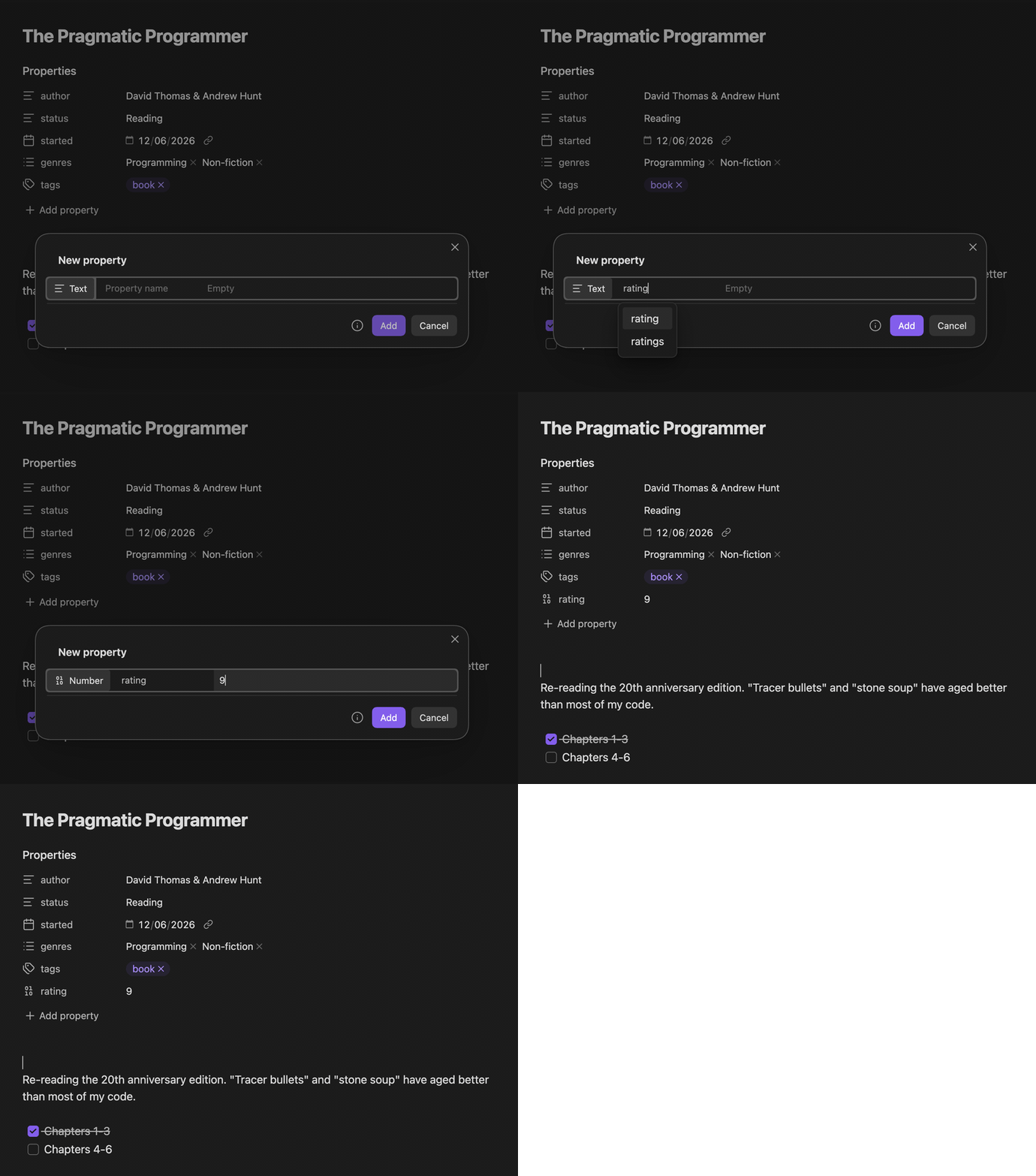
Creating a typed property with MetaEdit's New property modal - the key autocompletes and the value widget switches to the property's type as you type

📖 Documentation: metaedit.obsidian.guide - guides for every feature, the full API reference, a cookbook of workflows, and troubleshooting.

Features

  • Add or update Yaml properties and Dataview fields easily
  • Ignore properties to hide them from the menu
  • Auto Properties that have customizable, pre-defined values selectable through a prompt
    • Add an optional description shown when you pick a value
    • Choose a Single or Multi (multi-select) type per property
    • Type a value that is not in the list to use it once, or save it as a new choice
  • Multi-Value Mode that allows you to detect and vectorize/create arrays from your values
  • Progress Properties that automatically update properties/fields
    • Works with total task, completed task, and incomplete task counts. Mark a task as completed (from anywhere), and the file will be updated with the new count.
  • Transform properties between YAML and Dataview
  • Delete properties easily
  • Auto update properties in files linked to from Kanban boards on lane change
  • Edit metadata through a filemenu
  • Edit tags wherever they live - rename a body #tag in place or edit a frontmatter tags: list (see Editing tags)
  • API to use in other plugins and Templater templates.

Installation

This plugin is in the community plugin browser in Obsidian. Search for MetaEdit and you can install it from there.

Manual Installation

  1. Go to Releases and download the ZIP file from the latest release.
  2. This ZIP file should be extracted in your Obsidian plugins folder. If you don't know where that is, you can go to Community Plugins inside Obsidian. There is a folder icon on the right of Installed Plugins. Click that and it opens your plugins folder.
  3. Extract the contents of the ZIP file there.
  4. Now you should have a folder in plugins called 'metaedit' containing a main.js file, manifest.json file, and a styles.css file.

https://user-images.githubusercontent.com/29108628/119513092-3223e000-bd74-11eb-9060-3e0cae4dbef3.mp4

Guides

Editing tags guide

Run MetaEdit on a note and it lists that note's tags from both homes:

  • Body #tags show up as #tag rows. Selecting one lets you:
    • Rename tag - replace the whole tag for that one occurrence (e.g. #draft -> #published). The rest of the line, and any other occurrence of the same tag, are left untouched.
    • Edit last segment (nested tags only) - change just the leaf, e.g. #area/old -> #area/new.
    • Tracker value - when the Obsidian Tracker plugin is installed, write its #tag:value data syntax. This choice is made per edit and never leaks into later edits.
  • Frontmatter tags: show up as the tags property. Editing it strips a leading # you type, accepts a list / single value / comma- or space-separated string, stores the canonical #-free YAML list, and removes the key entirely when you clear the last tag.

What MetaEdit deliberately leaves to Obsidian (verified against Obsidian 1.12.7):

  • Vault-wide rename (rename a tag across every note) - use Obsidian's Tag pane: right-click a tag and choose Rename.
  • The rich frontmatter tag widget (pills, type-ahead) - Obsidian's native Properties editor.
  • Deleting a body tag - edit the note directly; MetaEdit no longer offers a delete/transform action on body #tags (it could not target them safely).

Kanban Helper Guide

https://user-images.githubusercontent.com/29108628/121333246-ebf48200-c918-11eb-889b-23b9a80299b2.mp4

API

You can access the API by using app.plugins.plugins["metaedit"].api.

I recommend destructuring the API, like so:

const {autoprop} = this.app.plugins.plugins["metaedit"].api;

autoprop(propertyName: string)

Takes a string containing a property name. Looks for the property in user settings and will open a prompt with the possible values for that property (and its description, if set).

Returns the selected value: a string for a Single property, or a string[] for a Multi property. If nothing was selected, or the property was not found / Auto Properties are disabled, it returns null.

For a Multi property used in a template, join the array yourself, e.g. <% (await autoprop("Tags"))?.join(", ") %>.

This is an asynchronous function, so you should await it.

update(propertyName: string, propertyValue: unknown, file: TFile | string)

Updates a property with the given name to the given value in the given file.

If the file is a string, it should be the file path. Otherwise, a TFile is fine.

This is an asynchronous function, so you should await it.

update changes an existing property. If you want to create the property when it is missing, use addOrUpdateProperty.

When updating inline Dataview fields, non-string values are stringified. YAML frontmatter properties can preserve richer YAML values such as numbers, booleans, arrays, and objects.

update is replace-by-design: when a note has several inline name:: value lines with the same name, it rewrites all of them to the new value. To add a new instance instead and leave the existing ones untouched, use appendDataviewField.

When the named property is a body #tag, update renames that one occurrence in place (update("#topic", "science", file) writes #science, not #topic/science). The value is normalized to a valid tag (a leading # is optional) and an invalid name - one with spaces, commas, or punctuation Obsidian would not index as a single tag - is rejected rather than written.

createYamlProperty(propertyName: string, propertyValue: unknown, file: TFile | string)

Creates a YAML frontmatter property in the given file.

If the file already has a property with the same name, MetaEdit leaves it unchanged.

This is an asynchronous function, so you should await it.

addOrUpdateProperty(propertyName: string, propertyValue: unknown, file: TFile | string)

Updates an existing property with the given name, or creates a YAML frontmatter property when the property does not exist.

This is an asynchronous function, so you should await it.

appendDataviewField(propertyName: string, propertyValue: unknown, file: TFile | string, options?: { location?: "afterLastMatch" | "end" })

Adds a new inline name:: value Dataview field instance to the body of the note, leaving any existing fields with the same name unchanged. This is the add-an-instance counterpart to update, which replaces every existing instance.

The field is never inserted into YAML frontmatter or a fenced code block. Non-string values are stringified (arrays are joined with , ).

options.location controls placement:

  • "afterLastMatch" (default): right after the last existing name:: line; if there is none, at the end of the note body.
  • "end": always at the end of the note body.

If the file is a string, it should be the file path. Otherwise, a TFile is fine.

This is an asynchronous function, so you should await it.

For example, a Dataview/Templater wishlist that appends a new pick without disturbing earlier ones:

const {appendDataviewField} = this.app.plugins.plugins["metaedit"].api;
await appendDataviewField("watch", "[[Dune: Part Two]]", tp.file.path);

getPropertyValue(propertyName: string, file: TFile | string)

Gets the value of the given property in the given file.

If the file is a string, it should be the file path. Otherwise, a TFile is fine.

This is an asynchronous function, so you should await it.

getPropertiesInFile(file: TFile | string)

Gets all metadata properties MetaEdit can read from the given file, including tags, YAML frontmatter properties, and inline Dataview fields.

This is an asynchronous function, so you should await it.

getFilesWithProperty(propertyName: string)

Gets all markdown files with a YAML frontmatter property matching the given name.

getAutoProperties()

Gets a copy of MetaEdit's configured Auto Properties.

The returned array is a copy, so mutating it will not change MetaEdit settings. Use setAutoProperties to save changes.

setAutoProperties(autoProperties: AutoProperty[])

Replaces MetaEdit's configured Auto Properties and saves settings.

Each Auto Property must have a string name and a choices array of strings.

This is an asynchronous function, so you should await it.

onMetadataChange(callback)

Registers a metadata-change listener and returns an unsubscribe function.

The callback receives { file, data, cache, properties, previousProperties }. properties contains the current properties parsed by MetaEdit for the file. previousProperties contains the last property snapshot emitted by this subscription for that file, or null when no previous snapshot is available.

MetaEdit does not classify changes as add, rename, value change, or remove, because Obsidian's metadata event does not provide a stable semantic diff. Compare previousProperties and properties in your callback when you need that detail.

Call the returned function when your plugin unloads, or register it with Obsidian's cleanup system:

const unsubscribe = app.plugins.plugins["metaedit"].api.onMetadataChange((change) => {
    console.log(change.file.path, change.properties);
});

this.register(unsubscribe);

API Examples

New Task template (requires Templater)
<%*
const {autoprop} = this.app.plugins.plugins["metaedit"].api;
_%>
#tasks 
Complete:: 0
Project::
Status:: <% await autoprop("Status") %>
Priority:: <% await autoprop("Priority") %>
Due Date::

Complete:: 0
Energy::
Estimated Time::

Total:: 1
Complete:: 0
Incomplete:: 1

---

- [ ] <% tp.file.cursor() %>

3EfcPLYkj6

Complete Task in Dataview Table (Buttons version)

Requires Dataview and Buttons.

```dataviewjs
const {update} = this.app.plugins.plugins["metaedit"].api
const {createButton} = app.plugins.plugins["buttons"]

dv.table(["Name", "Status", "Project", "Due Date", ""], dv.pages("#tasks")
    .sort(t => t["due-date"], 'desc')
    .where(t => t.status != "Completed")
    .map(t => [t.file.link, t.status, t.project, t["due-date"], 
    createButton({app, el: this.container, args: {name: "Done!"}, clickOverride: {click: update, params: ['Status', 'Completed', t.file.path]}})])
    )
```

CBrFA0qHr4

Complete Task in Dataview Table (HTML buttons version)

Requires Dataview.

```dataviewjs
const {update} = this.app.plugins.plugins["metaedit"].api;
const buttonMaker = (pn, pv, fpath) => {
    const btn = this.container.createEl('button', {"text": "Done!"});
    const file = this.app.vault.getAbstractFileByPath(fpath)
    btn.addEventListener('click', async (evt) => {
        evt.preventDefault();
        await update(pn, pv, file);
    });
    return btn;
}
dv.table(["Name", "Status", "Project", "Due Date", ""], dv.pages("#tasks")
    .sort(t => t["due-date"], 'desc')
    .where(t => t.status != "Completed")
    .map(t => [t.file.link, t.status, t.project, t["due-date"], 
    buttonMaker('Status', 'Completed', t.file.path)])
    )
```

BnAVIV4XCM


Dev Info

Made by Christian B. B. Houmann Discord: Chhrriissyy#6548 Twitter: https://twitter.com/chrisbbh Feel free to @ me if you have any questions.

Also from dev: NoteTweet: Post tweets directly from Obsidian.

Similar Plugins

info
• Similar plugins are suggested based on the common tags between the plugins.
Dataview
6 years ago by Michael Brenan
A data index and query language over Markdown files, for https://obsidian.md/.
Tag Wrangler
6 years ago by PJ Eby
Rename, merge, toggle, and search tags from the Obsidian tag pane
Linter
5 years ago by Victor Tao
An Obsidian plugin that formats and styles your notes with a focus on configurability and extensibility.
Meta Bind Plugin
4 years ago by Moritz Jung
A plugin for Obsidian to make your notes interactive with inline input fields, metadata displays, and buttons.
Note Toolbar
2 months ago by chrisgurney
Flexible, context-aware toolbars for your notes in Obsidian.
Metadata Menu
4 years ago by mdelobelle
For data management enthusiasts : type and manage the metadata of your notes.
Better Export PDF
3 months ago by l1xnan
Obsidian PDF export enhancement plugin
Breadcrumbs
3 months ago by skepticmystic
Add typed-links to your Obsidian notes
Pretty Properties
10 months ago by Anareaty
Colored Tags
3 years ago by Pavel Frankov
Colorizes tags in different colors.
Supercharged Links
5 years ago by mdelobelle
obsidian plugin to add attributes and context menu options to internal links
Custom File Explorer sorting
4 years ago by SebastianMC
Take full control over the order and sorting of folders and notes in File Explorer in Obsidian
Heatmap Calendar
4 years ago by Richard Slettevoll
An Obsidian plugin for displaying data in a calendar similar to the github activity calendar
Multi Properties
3 years ago by fez-github
Plugin for Obsidian that allows user to add properties to multiple notes at once.
Charts View
5 years ago by caronchen
Data visualization solution in Obsidian, support plots and graphs.
Completr
5 years ago by tth05
Auto-completion plugin for the obsidian editor.
Auto Card Link
4 years ago by Nekoshita Yuki
Update time on edit
5 years ago by beaussan
Snipd Official
3 months ago by snipd-app
Media DB Plugin
4 years ago by Moritz Jung
A plugin that can query multiple APIs for movies, series, anime, games, music and wiki articles, and import them into your vault.
Collapse All
5 years ago by Nathonius
April Automatic Timelines
2 months ago by april-gras
Simple timeline generator plugin for story tellers using obsidian
Colored Tags Wrangler
3 years ago by AndreasSasDev
Obsidian Plugin : Assign colors to tags. Has integrations with other plugins, like Kanban.
Smart Chat
24 days ago by 🌴 Brian
DataCards
a year ago by Sophokles187
Obsidian Plugin that transforms dataview tables into visually appealing and customizable card layouts.
Frontmatter Tag Sugest
5 years ago by Jonathan Miller
Autocompletes tags in Obsidian YAML frontmatter. No more deleting #!
Metadata Extractor
5 years ago by kometenstaub
Obsidian Plugin that provides metadata export for use with third-party apps.
Multi Tag
3 years ago by fez-github
Obsidian plugin that allows the user to add a tag to all files in a folder. Not in active development. Now working on Multi-Properties, which covers most of this plugin's functionality.
Tags Overview
3 years ago by Christian Wannerstedt
Obsidian plugin which adds an extended tags panel where tagged files can be overviewed, filtered and accessed in an easy way.
Nested tags graph
3 years ago by drpilman
A small plugin for Obsidian that links nested tags in graph view
Quick Tagger
3 years ago by Gorkycreator
Quick tagger for Obsidian.md
Tags Routes
2 years ago by Ken
This is a plugin for obsidian, to visualize files and tags as nodes in 3D graph.
HTML Tags Autocomplete
5 years ago by bicarlsen
Autocomplete HTML formatting tags.
Table to CSV Exporter
4 years ago by Stefan Wolfrum
An Obsidian Plugin that allows to export tables from a pane in reading mode to CSV files.
AutoMOC
4 years ago by Diego Alcantara
Frontmatter Markdown Links
2 years ago by mnaoumov
Obsidian Plugin that adds support for markdown links in frontmatter
Dataview Serializer
2 years ago by Sébastien Dubois
Obsidian plugin that gives you the power of Dataview, but generates Markdown, making it compatible with Obsidian Publish, and making the links appear on the Graph.
Auto Classifier
3 years ago by Hyeonseo Nam
Auto classification plugin for Obsidian using ChatGPT.
Canvas Filter
4 years ago by Ivan Koshelev
Obsidian Canvas plugin that let's you show only pages / arrows with specific tags / colors / connections.
Link Tree
3 years ago by Joshua Tazman Reinier
A sidebar foldable list of Obsidian link hierarchies.
AI Tagger Universe
a year ago by Hu Nie
An intelligent Obsidian plugin that leverages AI to automatically analyze note content and suggest relevant tags, supporting both local and cloud-based LLM services.
Gantt Calendar
2 months ago by Sugar
obsidian-gantt-calendar
Simple Note Review
4 years ago by dartungar
Simple, customizable plugin for easy note review, resurfacing & repetition in Obsidian.md.
Smart Title
3 years ago by magooup
obsidian-plugin-smart-title
Tasks Map
a year ago by NicoKNL
A graph view of your tasks.
Binary File Manager
5 years ago by qawatake
An Obsidian plugin to manage binary files
Tag Page
3 years ago by Matthew Sumpter
An Obsidian plugin to create and manage dedicated Markdown pages for tags, with features to automatically populate and refresh content based on user-defined settings.
Dataview Publisher
2 years ago by UD
Output markdown from your Dataview queries and keep them up to date. You can also be able to publish them.
Habit Calendar
4 years ago by Hedonihilist
Monthly Habit Calendar for DataviewJS. This plugin helps you render a calendar inside DataviewJS code block, showing your habit status within a month.
Better Inline Fields
4 years ago by David Sarman
Obsidian plugin to enhance Dataview style inline fields
NetClip
2 years ago by Elhary
this plugin is for Obsidian that allows you to browse the web and clip webpages directly into your vault.
Slash snippets
a year ago by echo-saurav
Insert snippet of text with slash command
Fold Properties By Default
2 years ago by Tommy Bergeron
Always have editor/metadata properties folded by default.
Reading comments
4 years ago by BumbrT
Reading comments, for consuming books or large articles in markdown with https://obsidian.md/.
Insta TOC
2 years ago by Nick C.
Generate, update, and maintain a table of contents for your notes while typing in real time.
Release Timeline
4 years ago by cakechaser
Habit Tracker
4 years ago by David Moeller
A Plugin to display a Habit Tracker in Obsidian.
Virtual Footer
a year ago by Signynt
Display markdown text (including dataview queries or Bases) at the bottom, top or in the sidebar for all notes which match a specified rule, without modifying them (sort of like a dynamic template).
Auto Tag
3 years ago by Control Alt
Easily generate relevant tags for your Obsidian notes.
Page Properties
3 years ago by Anton Bualkh
A plugin that adds Logseq-like page tags to Obsidian
Toggle Meta Yaml
4 years ago by hua
Image Manager
16 days ago by David V. Kimball
Insert, rename, and sort external images by transforming them into local files within your notes.
QuickLink
a year ago by Jamba Hailar
On obsidian, use @ to quickly link files
Media Companion
2 years ago by Nick de Bruin
moviegrabber
3 years ago by Leon Holtmeier
obsidian.md plugin to grab data from public movie Databases and make them into a note that can be used with dataview querries
View Count
2 years ago by Trey Wallis
Add view count tracking to your Obsidian vault
Metadata Auto Classifier
2 years ago by Beomsu Koh
AI-powered Obsidian plugin that automatically classifies and generates metadata (tags, frontmatter) for your notes.
Base Tag Renderer
4 years ago by Darren Kuro
A lightweight obsidian plugin to render the basename of tags in preview mode.
Live Variables
2 years ago by Hamza Ben Yazid
Define variables in your note's properties and reuse them throughout your content.
Double Colon Conceal
4 years ago by Michal Srch
Obsidian plugin to display double colon (i.e. Dataview inline fields) as a single colon for more natural reading experience.
Notes dater
3 years ago by Paul Treanor
Adds created_on and updated_on dates of the active note to status bar
Content Cards
a year ago by leo
Insert content cards in Markdown, such as timeline, highlightblock, target card, book information card, music information card, movie information card, photoes ablum, business card, content subfield, countdown, SWOT,BCG.
Bulk Exporter
3 years ago by symunona
Bulk export Markdown filtered, renamed and sorted by front matter metadata into a new structure.
Metadata Icon
3 years ago by Benature
change metadata entry icon
Tag Buddy
3 years ago by David Fasullo
Unlock powerful tag editing features in Reading Mode. Add, remove and edit tags across your vault. Use tag inboxes to level up any workflow with a powerful idea assembly line.
Conditional Properties
8 months ago by Diego Eis
Automate frontmatter property updates in your Obsidian notes using simple conditional rules.
Kanban Status Updater
a year ago by Ankit Kapur
Obsidian plugin that automatically updates the note property when card is moved to a column.
FuzzyTag
4 years ago by Adrian
Update Time
2 years ago by Sébastien Dubois
Obsidian plugin that updates front matter to include creation and last update times
Tag Group Manager
9 months ago by Stargazer-cc
Tag Group Manager is a plugin designed for Obsidian that helps manage tag groups and quickly insert tags.
Linked Data Vocabularies
3 years ago by kometenstaub
Add linked data to the YAML of your Obsidian notes.
Related Notes by Tag
a year ago by Chris Howard
displays notes that share tags with your currently active note
Liquid Templates
5 years ago by Diomede Tripicchio
Define your templates with LiquidJS tags support
Note aliases
4 years ago by Pulsovi
This plugin manages wikilinks aliases and save them on the aliases list of the linked note
Fold Properties
2 years ago by James Alexandre
Adds Fold/Unfold Properties Function to Folder Context Menu
File Title Updater
a year ago by wenlzhang
An Obsidian plugin that synchronizes titles between filename, frontmatter, and first heading in your notes.
Meld Build
3 years ago by meld-cp
Write and execute (sandboxed) JavaScript to render templates, query DataView and create dynamic notes.
Frontmatter generator
3 years ago by Hananoshika Yomaru
A plugin for Obsidian that generates frontmatter for notes
Additional Icons
3 years ago by Matthew Turk
Add additional iconsets to Obsidian
Symbol linking
a year ago by Evan Bonsignori ; Mara-Li
Adds ability to link with any trigger in Obsidian. Each trigger can limit linking to specific folders or file.
EmoTagsTitler
3 years ago by Cyfine
Testing Vault
3 years ago by Michael Pedersen
Bases Toolbox
a month ago by Grub Basket
Adds Quality of Life features to Obsidian Bases
HackerOne
3 years ago by neolex
A plugin to get our hackerone reports data into obsidian
Copy Metadata
3 years ago by wenlzhang
An Obsidian plugin to copy metadata to clipboard and insert it into file name.
Feeds
3 years ago by LukeMT, pashashocky, madx
Magic feeds dataview query for obsidian
KoReader Highlight Importer
2 years ago by Tahsin Kocaman
Imports highlights and metadata from KoReader into Obsidian notes
Tier List
a year ago by Mox Alehin
Obsidian plugin for visual ranking and organizing content into customizable Tier Lists.
Run
3 years ago by Hananoshika Yomaru
Generate markdown from dataview query and javascript.
Reason
3 years ago by Joshua Pham
Digest your Obsidian notes
File Index
3 years ago by Steffo
Obsidian plugin to create a metadata file about the files present in the Vault
Generate Timeline
a year ago by Shanshuimei
An obsidian plugin to generate timelines from tags, folders, files or metadata automatically. 根据标签,文件夹,文件或者属性自动生成时间轴的插件。
Index Notes
2 years ago by Alejandro Daniel Noel
Plugin that automatically generates index blocks based on tags
Note UID Generator
a year ago by Valentin Pelletier
Allow you to automatically generate UID for the notes in your vault.
Tag Breakdown Generator
3 years ago by Hananoshika Yomaru
Break down nested tags into multiple parent tags
Dataview Autocompletion
2 years ago by Daniel Bauer
Note 2 Tag Generator
2 years ago by Augustin
Tag Formatter
3 years ago by snsvrno
Configurable Obsidian plugin that hides parent tags.
GitHub Integration
a year ago by Kirill Zhuravlev
Plugin that fetch your github stars into notes
Folder by tags distributor
2 years ago by RevoTale
Automatically group Obsidian notes into folder by tags specified in note.
CSV All-in-One
a year ago by hihangeol
TikToker
5 months ago by ameyxd
A Tiktok parser and saver for Obsidian
LLM Tagger
2 years ago by David Jayatillake
Image Metadata
2 years ago by alexeiskachykhin
Adds image metadata editing capabilities to Obsidian
YAML Table
a year ago by dainakai
DevOps Companion
a year ago by Jobelin Kom
Obsidian DevOps Companion is a developer-oriented plugin that brings DevOps context awareness directly inside your Obsidian vault.
Paste Image Into Property
2 years ago by Nito
Virus Total Enrichment
2 years ago by ytisf
An Obsidian plugin to enrich a note with VirusTotal API.
Note Codes
a year ago by Ezhik
Reference your Obsidian notes from anywhere with simple 4-character codes.
Book Clipper
9 months ago by Hossein Fardmohammadi
Save book details from websites into your notes
Tag Links
2 years ago by Zacchary Dempsey-Plante
A plugin for Obsidian that allows tags to be opened as links using a hotkey.
Sentinel
2 years ago by Giorgos Sarigiannidis
A plugin for Obsidian that allows you to update properties or run commands based on document visibility changes.
Boardgame Search
2 years ago by Marlon May
A plugin to create notes for boardgames based on the BGG API
Every Day Calendar
2 years ago by QuBe
Obsidian plugin to create calendars inspired by Simone Giertz's Every Day Calendar
Note Favicon
a year ago by mdklab
Obsidian plugin – Show Favicon from Metadata
MOC Link Helper
2 years ago by Bogdan Codreanu
This obsidian plugins allows you to quickly see which notes you need to include in your MOC.
Papers
a year ago by William Liang
An obsidian plugin to retrieve and import research papers.
Current File Tags
2 years ago by Trung Tran
ExMemo Assistant
2 years ago by ExMemo AI
Using LLMs to manage files and generating metadata such as tags and summaries.
Simple File Info
a year ago by Lukas Capkovic
My Thesaurus
2 years ago by Mara-Li
A plugin that auto tags file based on contents and a csv file or a Markdown table (inspired by https://github.com/pmartinolli/MyThesaurus)
Private Mode
a year ago by markusmo3
Auto Close Tags
a year ago by k0src
Obsidian MD plugin to auto-close HTML tags.
Watched-Metadata
2 years ago by Nail Ahmed
Watches for changes in metadata and updates the note content accordingly.
Tag Timer
8 months ago by quantavil
The Tag Timer is a versatile plugin for Obsidian that allows you to seamlessly track the time you spend on specific tasks or sections within your notes.
Note Reviewer
2 years ago by Travis Linkey
An obsidian plugin to help review notes that have been taken
Another Name
a year ago by Jiyuan Wang
Add a subheading to your note in Obsidian
Onto Tracker
2 years ago by Jacob Hart
Plugin for obsidian allowing project management with ontologies.
Discrete
a year ago by shkarlsson
Frontmatter Metadata Link Classes
a year ago by Varvara Zmeeva / zmeeva.io
Enhanced internal links with automatic classnames based on frontmatter metadata.
Frontmatter to HTML Attributes
5 months ago by Tarek Saier
Gantt this
14 days ago by Altarok
Obsidian plugin showing multiple TTRPG calendars at once in one gantt chart.
Pug Templates
2 years ago by Nicholas Wilcox
An Obsidian plugin that enables the usage of Pug templates.
Move Cursor On Startup
a year ago by Jared Kelnhofer
Obsidian plugin to move the cursor to the right and back to the left when starting up. Why? To keep DataView expressions from not running on the first load of, say, your Home file.
SafeLearn Formatter
a year ago by UnterrainerInformatik
A community plugin for Obsidian, that offers visual aids for the SafeLearn-specific tags.
Xyls Starmap
9 days ago by xylhazlhztarr
A small little plugin for Obsidian MD to create interactive star system maps inside the note-taking app.
Property Panels
a month ago by Eva Chen
Display and edit Obsidian frontmatter properties in configurable panels that stay inside the note's scrollable content.