Property Panels

by Eva Chen
5
4
3
2
1
Score: 35/100

Description

The Property Panels plugin turns frontmatter into editable panels that live inside a note instead of staying tucked away in the default properties view. It lets you build different panel layouts for folders, tags, or linked notes, then fill them with text, number, toggle, date, rating, progress, select, multi select, link, and read only fields. Option lists can come from static values, other notes, Markdown lists, or folders in the vault. The plugin also gives fine control over labels, icons, spacing, colors, and placement around note content, linked mentions, or properties. It fits people who rely on structured metadata and want faster editing without hand editing YAML.

Reviews

No reviews yet.

Stats

stars
downloads
0
forks
1
days
NaN
days
NaN
days
0
total PRs
0
open PRs
0
closed PRs
0
merged PRs
0
total issues
0
open issues
0
closed issues
0
commits

Latest Version

Invalid date

Changelog

README file from

Github

Property Panels

Display and edit Obsidian frontmatter properties in configurable panels that stay inside the note's scrollable content.

Property Panels provides a visual settings editor for building compact metadata panels without writing JSON or CSS. Panels can be shared across the Vault or applied only to notes that match a folder, tag, or wikilink rule.

[!WARNING] AI development disclosure

Property Panels was created entirely by AI. Its architecture, source code, tests, build configuration, styles, and documentation were generated by AI rather than written by a human developer.

The codebase has not received a complete line-by-line human review. Automated linting, builds, and tests can detect some problems, but they do not replace manual code review, security review, or testing inside Obsidian. Before using this plugin with an important Vault, test it in a separate Vault, keep a current backup, and consider having the source reviewed by a qualified developer. The plugin is provided without a guarantee that it is free of bugs, security issues, or data-loss risks.

Preview
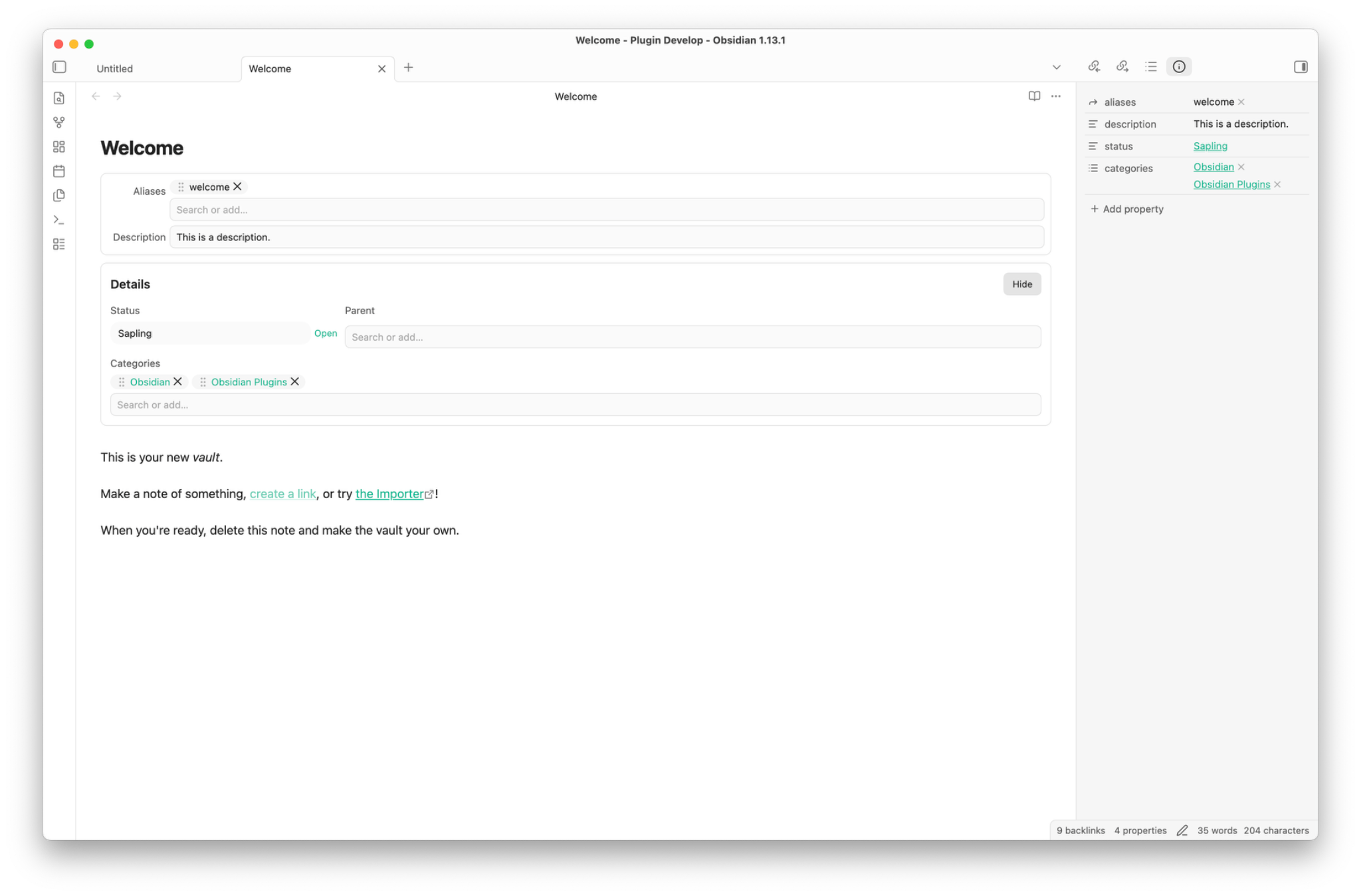
Property Panels displaying editable frontmatter fields inside an Obsidian note

Features

  • Place multiple property panels before or after Properties, note content, or Linked mentions.
  • Edit text, textarea, number, toggle, select, multi-select, date, datetime, progress, rating, and link values.
  • Display readonly values and horizontal dividers alongside editable fields.
  • Build options from static lists, another note's frontmatter, a Markdown list, or notes in a Vault folder.
  • Apply different panels and layouts with folder, tag, or wikilink rules.
  • Arrange fields in responsive grids with per-field column spans and four label positions.
  • Use Obsidian icons in field labels and control whether the icon, label, both, or neither is shown.
  • Search Select and Multi-select options with fuzzy matching; reorder, copy, edit, or remove Multi-select values.
  • Open wikilinks, Markdown links, and HTTP(S) URLs directly from displayed values.
  • Customize theme-aware colors, typography, spacing, borders, inputs, chips, ratings, and progress controls through Style Settings.
  • Export, validate, and restore configuration through the advanced JSON editor.

Property Panels requires Obsidian 1.13.0 or newer and supports desktop and mobile.

Installation

Community plugins

Once Property Panels is available in the Community plugins directory:

  1. Open Settings → Community plugins.
  2. Select Browse and search for Property Panels.
  3. Select Install, then Enable.
  4. Open Settings → Property Panels to add your first panel.

BRAT

Use BRAT to install the current GitHub version for testing before or outside the Community plugins release cycle:

  1. Install and enable BRAT from Settings → Community plugins.
  2. Open the command palette and run BRAT: Add a beta plugin for testing.
  3. Enter sakurastral/obsidian-property-panels or the full repository URL: https://github.com/sakurastral/obsidian-property-panels.
  4. Select Add Plugin and wait for BRAT to confirm the installation.
  5. Open Settings → Community plugins, refresh the installed plugin list if needed, and enable Property Panels.

BRAT can also check for updates to the installed testing version. See the BRAT quick guide for update and version-freezing options.

Manual installation

  1. Download main.js, manifest.json, and styles.css from the latest release.
  2. Create <Vault>/.obsidian/plugins/property-panels/.
  3. Copy the three release files into that folder.
  4. Reload Obsidian and enable Property Panels under Settings → Community plugins.

Quick start

  1. Open Settings → Property Panels.
  2. Under Default panels, select Add.
  3. Choose the panel name, insertion position, title visibility, and layout.
  4. Under Fields, select Add and enter the frontmatter property name.
  5. Choose a field type and adjust its label, icon, column span, empty-value behavior, and type-specific controls.
  6. Add note rules if particular folders, tags, or wikilinks need a different panel configuration.

New installations start without a predefined panel, so enabling the plugin does not add fields to existing notes until you configure one.

Configuration

Panels and positions

Each panel can be enabled, named, styled with a custom CSS class, made collapsible, or displayed without a title. Supported insertion positions are:

  • Before or after Properties
  • Before or after the note content
  • Before or after Linked mentions

Panels are part of the note's scrollable content. Plain Source Mode display is optional and disabled by default; Live Preview is unaffected by that setting.

Field types

Type Purpose
Text / Textarea Edit short or multi-line text with debounced saving.
Number / Toggle Edit numeric and boolean frontmatter values.
Select / Multi-select Choose values from a configured option source, with optional custom values.
Date / Datetime Store local date or datetime strings without adding a timezone.
Progress / Rating Edit numeric values with visual controls.
Readonly Display a property without an input control.
Link Display an HTTP(S), wikilink, or Markdown link; right-click to edit, copy, or clear its raw value.
Divider Add a horizontal separator to a panel layout.

Date fields store YYYY-MM-DD. Datetime fields use the local HTML datetime format, such as 2026-07-25T15:30.

Option sources

Select and Multi-select fields can load values from:

Source Description
Static A list entered directly in the field settings.
File property Values from a frontmatter property in another note.
Markdown list List items below an optional heading in another note.
Folder Notes in a selected folder, optionally including subfolders and excluding specific files.

Folder sources can store each note as its full path or basename, optionally formatted as a wikilink. Labels can come from a property in the matching note.

Note rules

Rules match notes by folder, tag, or wikilink. Each rule can:

  • Extend the inherited panel configuration or replace it.
  • Override panel definitions and layout values.
  • Use priority to control the order of rules at the same depth.
  • Be checked with the built-in rule tester before use.

Layout and labels

Panel layouts support one to four columns, three density levels, configurable gaps, and these label positions:

  • Top
  • Left
  • Left, align end
  • Inline

Each field can span 1–12 columns. The span is clamped to the active panel width, and narrow screens fall back to a single-column layout. Left, align end uses a shared label column based on the longest visible label and aligns each label with the first control line.

Multi-select and keyboard controls

  • Focus an empty search field to list all available values; typing uses token-based fuzzy search.
  • When custom values are enabled, Add “…” appears above the matching options.
  • Drag the grip-vertical handle to reorder selected values.
  • Select chip text normally, double-click a chip to edit it, or right-click for copy, edit, move, and remove actions.
  • Arrow Up and Arrow Down change the active option, Enter selects it, and Escape closes the list.
  • Backspace in an empty search field does not remove an existing chip.
  • Rating controls support arrow keys, Home, End, Delete, and Backspace.

Style Settings

Property Panels works without the Style Settings community plugin. When Style Settings is installed, controls are grouped into Panel, Field, Select, Rating and Progress, and Multi-select sections.

Available controls include panel backgrounds and borders, title and label colors, field-input text and backgrounds, borderless inputs, Select colors, chip colors, Rating and Progress appearance, field value typography, icon styles, and drag-grip styles.

Color presets use official Obsidian CSS variables whenever possible, so the panels follow the active theme. Custom light and dark colors remain available when a theme variable is not suitable.

Privacy and data handling

  • Property Panels runs locally and does not make network requests.
  • It does not include telemetry, analytics, advertising, or account requirements.
  • Property edits are written with Obsidian's FileManager.processFrontMatter() API.
  • Delete empty values is disabled by default. When enabled, clearing a field removes that frontmatter key.
  • Diagnostics contain plugin state and counts only; note paths and property values are excluded.
  • Plugin configuration is stored through Obsidian's standard plugin data API.

Keep a current backup of your Vault before testing any plugin that writes frontmatter.

Known limitations

  • Obsidian does not provide stable public insertion APIs for every supported panel position. Properties and Linked Mentions placement relies on isolated DOM selectors that may require maintenance after an Obsidian update.
  • Placement, folder suggestions, note rules, mobile behavior, and theme compatibility should be smoke-tested in the Obsidian versions and themes you use.
  • Obsidian's frontmatter processing may not preserve YAML comments exactly.
  • Arbitrary Bases files, Markdown rendering, Meta Bind, Dataview, formulas, half-star ratings, and nested YAML editing are outside the plugin's scope.

If a panel cannot find its requested insertion point, Property Panels uses a nearby content fallback where possible. Enable Debug logging to inspect placement fallbacks in the developer console.

Configuration backup and diagnostics

The Advanced JSON editor can copy the complete configuration, validate an edited configuration before saving, and restore defaults after confirmation.

Run Property Panels: Copy diagnostics from the command palette, or copy the same privacy-preserving report from the plugin settings.

Development

npm install
npm run dev

Before submitting a change, run:

npm run lint
npm run build
npm test

npm run build performs TypeScript checking before bundling main.js.

Releases

Release tags use the exact plugin version without a v prefix. Each GitHub release must include these individual assets:

  • main.js
  • manifest.json
  • styles.css

See CHANGELOG.md for release history.

Support and feedback

Report bugs or request features through GitHub Issues. When reporting a placement issue, include the Obsidian version, platform, theme, view mode, requested panel position, and the output of Copy diagnostics. Do not include private note content.

License

Property Panels is released under the MIT License.

Similar Plugins

info
• Similar plugins are suggested based on the common tags between the plugins.
Binary File Manager
5 years ago by qawatake
An Obsidian plugin to manage binary files
Frontmatter Tag Sugest
4 years ago by Jonathan Miller
Autocompletes tags in Obsidian YAML frontmatter. No more deleting #!
Obsidian Columns
4 years ago by Trevor Nichols
Auto Card Link
4 years ago by Nekoshita Yuki
Front Matter Title
4 years ago by Snezhig
Plugin for Obsidian.md
Media DB Plugin
4 years ago by Moritz Jung
A plugin that can query multiple APIs for movies, series, anime, games, music and wiki articles, and import them into your vault.
Metadata Menu
4 years ago by mdelobelle
For data management enthusiasts : type and manage the metadata of your notes.
Open Related Url
4 years ago by Dan Pickett
Custom File Explorer sorting
4 years ago by SebastianMC
Take full control over the order and sorting of folders and notes in File Explorer in Obsidian
Meta Bind Plugin
4 years ago by Moritz Jung
A plugin for Obsidian to make your notes interactive with inline input fields, metadata displays, and buttons.
Image Layouts
4 years ago by Luke Chadwick
FuzzyTag
4 years ago by Adrian
Note aliases
3 years ago by Pulsovi
This plugin manages wikilinks aliases and save them on the aliases list of the linked note
Page Properties
3 years ago by Anton Bualkh
A plugin that adds Logseq-like page tags to Obsidian
Testing Vault
3 years ago by Michael Pedersen
Frontmatter Alias Display
3 years ago by muhammadv-i
A plugin for Obsidian.md to show front-matter aliases as display names in the file menu.
Linked Data Vocabularies
3 years ago by kometenstaub
Add linked data to the YAML of your Obsidian notes.
Auto Front Matter
3 years ago by conorzhong
Add an ID to the front matter
3 years ago by llimllib
Notes dater
3 years ago by Paul Treanor
Adds created_on and updated_on dates of the active note to status bar
Bulk Exporter
3 years ago by symunona
Bulk export Markdown filtered, renamed and sorted by front matter metadata into a new structure.
Update frontmatter modified date
3 years ago by Alan Grainger
Automatically update a frontmatter/YAML modified date field
Copy Metadata
3 years ago by wenlzhang
An Obsidian plugin to copy metadata to clipboard and insert it into file name.
Auto Tag
3 years ago by Control Alt
Easily generate relevant tags for your Obsidian notes.
Frontmatter generator
3 years ago by Hananoshika Yomaru
A plugin for Obsidian that generates frontmatter for notes
Multi Properties
3 years ago by fez-github
Plugin for Obsidian that allows user to add properties to multiple notes at once.
File Index
3 years ago by Steffo
Obsidian plugin to create a metadata file about the files present in the Vault
Sort Frontmatter
3 years ago by Kanzi
Sort frontmatter automatically
Time Things
3 years ago by Nick Winters
Show clock, track time spent editing a note, and track the last time a note has been edited.
Note Gallery
3 years ago by Pash Shocky
A masonry note gallery for obsidian.
Additional Icons
3 years ago by Matthew Turk
Add additional iconsets to Obsidian
Metadata Icon
2 years ago by Benature
change metadata entry icon
Update Time Updater
2 years ago by MURATAGAWA Kei
Obsidian plugin to update the 'update time' element when saving or manually.
Draft Indicator
2 years ago by Brian Boucheron
Show draft status with ✎ icons in the Obsidian file explorer.
Update Time
2 years ago by Sébastien Dubois
Obsidian plugin that updates front matter to include creation and last update times
heti
2 years ago by Moeyua
Templify
2 years ago by Boninall
A releases repo for custom editable template in Obsidian.
Watched-Metadata
2 years ago by Nail Ahmed
Watches for changes in metadata and updates the note content accordingly.
Front Matter Timestamps
2 years ago by LighthouseDino
Track note created and modified times in front matter, kept up to date automatically.
Image Metadata
2 years ago by alexeiskachykhin
Adds image metadata editing capabilities to Obsidian
Virus Total Enrichment
2 years ago by ytisf
An Obsidian plugin to enrich a note with VirusTotal API.
Live Variables
2 years ago by Hamza Ben Yazid
Define variables in your note's properties and reuse them throughout your content.
Onto Tracker
2 years ago by Jacob Hart
Plugin for obsidian allowing project management with ontologies.
Recent Files
6 years ago by Tony Grosinger
Display a list of most recently opened files
Dataview
5 years ago by Michael Brenan
A data index and query language over Markdown files, for https://obsidian.md/.
Supercharged Links
5 years ago by mdelobelle
obsidian plugin to add attributes and context menu options to internal links
MetaEdit
5 years ago by Christian B. B. Houmann
MetaEdit for Obsidian
Force note view mode
5 years ago by Benny Wydooghe
Metadata Extractor
5 years ago by kometenstaub
Obsidian Plugin that provides metadata export for use with third-party apps.
Update time on edit
5 years ago by beaussan
Metadata Auto Classifier
2 years ago by Beomsu Koh
AI-powered Obsidian plugin that automatically classifies and generates metadata (tags, frontmatter) for your notes.
Fold Properties
2 years ago by James Alexandre
Adds Fold/Unfold Properties Function to Folder Context Menu
Featured Image
2 years ago by Johan Sanneblad
Obsidian plugin to automatically set a featured image property in your notes based on the first image, YouTube link, or Auto Card Link image found in your document. This allows you to create rich note galleries using Folder Notes and Dataview.
ExMemo Assistant
2 years ago by ExMemo AI
Using LLMs to manage files and generating metadata such as tags and summaries.
KoReader Highlight Importer
2 years ago by Tahsin Kocaman
Imports highlights and metadata from KoReader into Obsidian notes
Frontmatter Markdown Links
2 years ago by mnaoumov
Obsidian Plugin that adds support for markdown links in frontmatter
Boardgame Search
2 years ago by Marlon May
A plugin to create notes for boardgames based on the BGG API
Sentinel
2 years ago by Giorgos Sarigiannidis
A plugin for Obsidian that allows you to update properties or run commands based on document visibility changes.
Current File Tags
2 years ago by Trung Tran
Dataview Autocompletion
a year ago by Daniel Bauer
NetClip
a year ago by Elhary
this plugin is for Obsidian that allows you to browse the web and clip webpages directly into your vault.
Media Companion
a year ago by Nick de Bruin
Fold Properties By Default
a year ago by Tommy Bergeron
Always have editor/metadata properties folded by default.
LLM Tagger
a year ago by David Jayatillake
Paste Image Into Property
a year ago by Nito
My Thesaurus
a year ago by Mara-Li
A plugin that auto tags file based on contents and a csv file or a Markdown table (inspired by https://github.com/pmartinolli/MyThesaurus)
Content Cards
a year ago by leo
Insert content cards in Markdown, such as timeline, highlightblock, target card, book information card, music information card, movie information card, photoes ablum, business card, content subfield, countdown, SWOT,BCG.
AI Tagger Universe
a year ago by Hu Nie
An intelligent Obsidian plugin that leverages AI to automatically analyze note content and suggest relevant tags, supporting both local and cloud-based LLM services.
Tab Group Arrangement
a year ago by situ2001
Arrange the tab groups of Obsidian in a more flexible way
Note Favicon
a year ago by mdklab
Obsidian plugin – Show Favicon from Metadata
File Title Updater
a year ago by wenlzhang
An Obsidian plugin that synchronizes titles between filename, frontmatter, and first heading in your notes.
Kanban Status Updater
a year ago by Ankit Kapur
Obsidian plugin that automatically updates the note property when card is moved to a column.
Simple File Info
a year ago by Lukas Capkovic
Another Name
a year ago by Jiyuan Wang
Add a subheading to your note in Obsidian
Title-Only Tab
a year ago by tristone13th
a plugin of obsidian for to change showing tab name to short
Simple Colored Folder
a year ago by Mara-Li
Color each folder starting by their root. Allow to detecting root directly by obsidian ; and configuring using Style Settings.
GitHub Integration
a year ago by Kirill Zhuravlev
Plugin that fetch your github stars into notes
Note UID Generator
a year ago by Valentin Pelletier
Allow you to automatically generate UID for the notes in your vault.
Simple Banner
a year ago by Sandro Ducceschi
Visually enhance your Obsidian notes with a customizable banner. Supports icons and time/date display.
Current View
a year ago by Lucas Ostmann
Automatically set the view mode (Reading, Live Preview, Source) for notes in Obsidian using folder rules, file patterns, or frontmatter.
Symbol linking
a year ago by Evan Bonsignori ; Mara-Li
Adds ability to link with any trigger in Obsidian. Each trigger can limit linking to specific folders or file.
Animated Cursor
a year ago by Kotaindah55
Simple yet smooth animated cursor.
Frontmatter Metadata Link Classes
a year ago by Varvara Zmeeva / zmeeva.io
Enhanced internal links with automatic classnames based on frontmatter metadata.
Insert Arknights URL Banner
a year ago by Rerurate_514
Obsidianのプラグイン、img_dwnldr_wikigg_ak_ktに保存されている画像を選択してbannersプロパティに簡単に設定できるプラグイン
Template Folder
a year ago by LucasOe
Obsidian plugin to move notes to a folder when applying a template.
Discrete
a year ago by shkarlsson
Publish Note to Mowen Note
a year ago by ziyou
This is a mowen plugin for Obsidian (https://obsidian.md)
Papers
a year ago by William Liang
An obsidian plugin to retrieve and import research papers.
Note Codes
a year ago by Ezhik
Reference your Obsidian notes from anywhere with simple 4-character codes.
Horizontal Blocks
10 months ago by iCodeAlchemy
Bring Notion-style layouts to Obsidian — with side-by-side, resizable markdown blocks that support full Obsidian syntax including images, embeds, and internal links.
Pretty Properties
9 months ago by Anareaty
Book Clipper
8 months ago by Hossein Fardmohammadi
Save book details from websites into your notes
Conditional Properties
7 months ago by Diego Eis
Automate frontmatter property updates in your Obsidian notes using simple conditional rules.
Connections
6 months ago by Eric Van Cleve
Colorful Note Background
6 months ago by andresgongora
Set note background based on file location or frontmatter metadata
Frontmatter to HTML Attributes
5 months ago by Tarek Saier
Makes YAML frontmatter available as data-* attributes in HTML, enabling metadata based CSS styling.
Banners Reloaded
4 months ago by Dani García
A simple, fast, and lightweight way to add customizable banners to your notes.
Tabsdown
2 days ago by grafanakibana
Create accessible, theme-native tabbed blocks for Markdown-renderable content. - This plugin has not been manually reviewed by Obsidian staff.