Bulk Exporter

by symunona
5
4
3
2
1
Score: 66/100

Description

Category: File Management

The Bulk Exporter plugin allows Obsidian users to restructure and export their notes based on metadata. This powerful tool leverages the Dataview plugin's query language to select notes for export and organize them into a customized output structure, ideal for integration with static site generators like Jekyll or Hugo. It supports dynamic folder creation, renaming, and metadata-driven formatting for output paths. Internal links are adjusted automatically to reflect the exported structure, and referenced assets are also included. Advanced features include conditional placement, glob-based asset inclusion, and robust customization options for filenames and folder organization. The plugin is designed for users who manage extensive note collections and require streamlined export workflows.

Reviews

No reviews yet.

Stats

31
stars
6,492
downloads
0
forks
1,120
days
24
days
24
days
1
total PRs
0
open PRs
0
closed PRs
1
merged PRs
18
total issues
0
open issues
18
closed issues
55
commits

README file from

Github

Bulk Exporter plugin

This is a plugin for Obsidian (https://obsidian.md).

Bugs and Feature Requests

Use GitHub's issue tracker!

What it does

Output and restructure your notes based on metadata!

Simply:
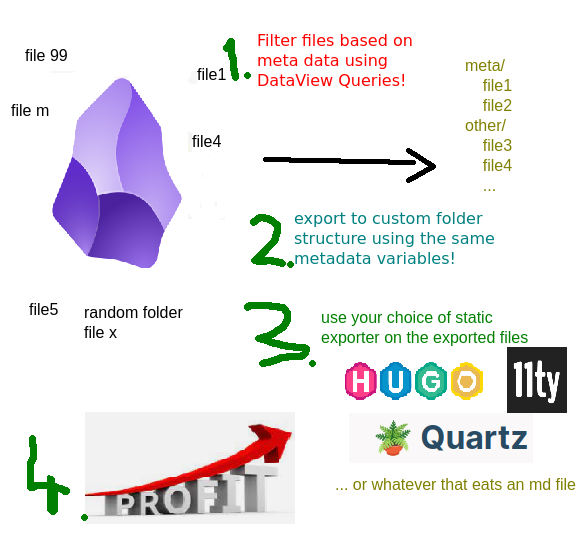
mspaint

So from your random structure like this:

- root
  - projects
    - some active project
      - note 1 i want to publish [*] -> tech blog
      - another side topic that belongs here but not ready
    - another active project
      - pacal recepie to publish [*] -> recepies
      - some private note
  - areas
   - photo stream
      - collection of photos [*] -> photo blog
  - archive
    - old recepies
      - soup recepie [*] -> recepies
      - ...

Makes something like this:

- blogs (output folder anywhere on your drive)
  - recepies
    - pacal-recepie-to-publish.md
    - soup-recepie.md
    - ...
  - tech
    - note-1-i-want-to-publish.md
    - another-archived-tech-blog-entry.md
  - photo-blog
    - collection-of-photos.md
  - ...

... so that you can run your custom static site generators on a subset of your notes, like 11ty, Hugo, Jekyll...

Uses the powerful Obsidian Dataview plugin's language to find the files you want to export.

Shows the latest exported file status in the sidebar.
Why?

I use static generators (11ty) for my blogs, they are the outlets of my thoughts.

Some of the blog posts I am working on, are part of a bigger topic, and I wanted to keep them around to their respective PARA project folders (Building a Second Brain). I needed a folder-independent structure. One source of truth: wherever the file might be, independent from where it is into a structured output format.

Filter

The plugin uses a full fetched DataView query without the results type of course, as it's always a table.

Examples:

Select all the notes that contain the tech tag:

FROM #tech

Notes modified last week:

file.ctime > date(today) - dur(1 week)

Select all notes that have the publishDate metadata key:

publishDate

Select all notes that have publishDate or blog among the metadata keys:

publishDate OR blog

Output File Path and Name

It's a standard JS string literal, that gets the file metadata and some extras into it's context.

This is great for grouping your output files: you can create conditional sorting parameters, any folder structures you want.

The following is an example:

If file metadata is like this:

{
  blog: 'diary',
  publishDate: '...'
  title: 'Another day at the office',
  tags: ['running', 'some']
}

it will be extended with the following:

{
  created: {
    // moment style object with keys:
    YYYY: '2023',
    MM: '05',
    ...
    date: '2023-05-14',
    time: '17-54'
  },
  modified { ... } // date like above

  fileName: 'Another Day At The Office'

  // if there is a slug property set, uses that, if there is not, falls back to the normalized
  // version of the title property, if again not present, falls back to the normalized version of the file name.
  slug: 'another-day-at-the-office'

  d: function (dateLikeParam){
    // Use it like this: ${d(someDateMetaData).date} // will return the date value parsed and reformatted.
   }
   norm: function(string){
    // Will remove any special characters from the string and replaces spaces and separators with dash (-) so it's url safe.
   }
}
Examples

Want separate folders for different blogs?

${blog}/${created.date}-${slug}

Want to group different years into different folders?

${blog}/${created.YYYY}/${created.MM}-${created.DD}-${slug}

Want to keep the original filename and just dump everything in a flat structure?

${fileName}

Convert any field to a date:

${d(date_published).date}

Use a custom metadata field as formatted date in the output name:

${blog}/${d(date_published).date}-${slug}

Conditions and ternary operators

For conditional placement of a file, you can use ternary operators

The following will put all values that have a same blogname/post/some-entry meta value into the same folder, except if the file has an index key, then it will go to blogname/indexslug:

${blog}/${index?'':'posts/'}${slug}

If a document references images from your vault, it will be exported into an assets folder, relative to the markdown file! If obsidian shows it, it will be copied.

- assets/
   - attachment1.jpg
   - image.webp
   - pic.gif
- markdown.md <- referenced in the content or even in metadata!

Also, the plugin parses the internal links that point to other notes. If the referenced obsidian file is exported in the process, the links will be re-pointed to the appropriate output file name.

If the link is to a non-exported note, it is removed (the text is left in).

Magic Metadata Key copy

If you want other files to be exported with your markdown, just add a copy metadata parameter. It eats any glob formatted regular expression you give it, using relative paths compared to where your markdown file is.

Security notes (review warnings explained)

The automated community review flags a few things. All of them are deliberate, and here is why:

  • Direct filesystem access (fs) — the whole point of the plugin is to write the exported files outside your vault, to a folder you pick. The Obsidian vault API cannot do that, so plain fs does.
  • Shell execution (child_process) — only used for the optional post-export shell script setting: a command you type in yourself, run after an export finishes. Nothing is executed otherwise.
  • Dynamic code execution (eval) — the output path template (${blog}/${slug}) is a tiny JS expression evaluated against your note's metadata. Cheap and generic: any metadata key, any ternary, any folder structure, with no special templating language to learn. It only ever runs on your own format string — only paste here things you understand!
  • Clipboard access — one convenience button in the export preview: when a metadata value is a nested object, clicking its cell copies the raw JSON so you can inspect it. Nothing is read from the clipboard.

Moving settings to another vault

The top of the settings page has Export and Import buttons. Export writes every export set to a JSON file (without the export cache, so it stays small and vault independent). Import asks whether to overwrite the export sets of the current vault, or to add the incoming ones next to them.

Manually installing the plugin

  • Copy over main.js, styles.css, manifest.json to your vault VaultFolder/.obsidian/plugins/obsidian-bulk-exporter/.
  • Or just simlink it with ln -s /path/to/your/dev/folder/ /path/to/your/vault/.obsidian/plugins/obsidian-bulk-exporter/

Development

The repo ships a small vault in test-vault/ with the tricky cases (spaces in file names, wiki links, embedded assets, external links). One script wires it up as a real Obsidian vault with this repo symlinked in as the plugin:

./scripts/setup-dev-vault.sh
pnpm run dev

The script symlinks the repo to test-vault/.obsidian/plugins/bulk-exporter, downloads Dataview (a hard runtime dependency) and Hot Reload, and drops a .hotreload marker so every esbuild rebuild reloads the plugin without restarting Obsidian.

Then in Obsidian: Open folder as vaulttest-vault, trust the author, and enable the three community plugins. Point the export target at a scratch folder like /tmp/bulk-export-out.

Use a separate vault for development — Obsidian keys plugins by id, so a dev checkout and the store-installed copy cannot both live in the same vault.

To develop against your own vault instead, do the same by hand:

ln -s /path/to/this/repo \
  /path/to/vault/.obsidian/plugins/bulk-exporter

The repo root doubles as a plugin folder: manifest.json and styles.css are checked in, and pnpm run dev writes main.js next to them.

Unit tests (no Obsidian needed) run with pnpm test.

Bugs and Feature requests

Open an Issue on github, or add a PR!

Thanks

Obsidian people

Marcus Olson for the Dataview plugin and the developer docs!

Till Friebe for the Diff Tool code

jspaint.app - for the marketing image.

Similar Plugins

info
• Similar plugins are suggested based on the common tags between the plugins.
Binary File Manager
5 years ago by qawatake
An Obsidian plugin to manage binary files
Heatmap Calendar
4 years ago by Richard Slettevoll
An Obsidian plugin for displaying data in a calendar similar to the github activity calendar
Auto Card Link
4 years ago by Nekoshita Yuki
Release Timeline
4 years ago by cakechaser
Media DB Plugin
4 years ago by Moritz Jung
A plugin that can query multiple APIs for movies, series, anime, games, music and wiki articles, and import them into your vault.
Table to CSV Exporter
4 years ago by Stefan Wolfrum
An Obsidian Plugin that allows to export tables from a pane in reading mode to CSV files.
Habit Tracker
4 years ago by David Moeller
A Plugin to display a Habit Tracker in Obsidian.
Metadata Menu
4 years ago by mdelobelle
For data management enthusiasts : type and manage the metadata of your notes.
Simple Note Review
4 years ago by dartungar
Simple, customizable plugin for easy note review, resurfacing & repetition in Obsidian.md.
Better Inline Fields
4 years ago by David Sarman
Obsidian plugin to enhance Dataview style inline fields
Custom File Explorer sorting
4 years ago by SebastianMC
Take full control over the order and sorting of folders and notes in File Explorer in Obsidian
Meta Bind Plugin
4 years ago by Moritz Jung
A plugin for Obsidian to make your notes interactive with inline input fields, metadata displays, and buttons.
Note aliases
4 years ago by Pulsovi
This plugin manages wikilinks aliases and save them on the aliases list of the linked note
Double Colon Conceal
4 years ago by Michal Srch
Obsidian plugin to display double colon (i.e. Dataview inline fields) as a single colon for more natural reading experience.
Habit Calendar
4 years ago by Hedonihilist
Monthly Habit Calendar for DataviewJS. This plugin helps you render a calendar inside DataviewJS code block, showing your habit status within a month.
Meld Build
3 years ago by meld-cp
Write and execute (sandboxed) JavaScript to render templates, query DataView and create dynamic notes.
Linked Data Vocabularies
3 years ago by kometenstaub
Add linked data to the YAML of your Obsidian notes.
HackerOne
3 years ago by neolex
A plugin to get our hackerone reports data into obsidian
Notes dater
3 years ago by Paul Treanor
Adds created_on and updated_on dates of the active note to status bar
Link Tree
3 years ago by Joshua Tazman Reinier
A sidebar foldable list of Obsidian link hierarchies.
Copy Metadata
3 years ago by wenlzhang
An Obsidian plugin to copy metadata to clipboard and insert it into file name.
moviegrabber
3 years ago by Leon Holtmeier
obsidian.md plugin to grab data from public movie Databases and make them into a note that can be used with dataview querries
Auto Tag
3 years ago by Control Alt
Easily generate relevant tags for your Obsidian notes.
Frontmatter generator
3 years ago by Hananoshika Yomaru
A plugin for Obsidian that generates frontmatter for notes
File Index
3 years ago by Steffo
Obsidian plugin to create a metadata file about the files present in the Vault
Run
3 years ago by Hananoshika Yomaru
Generate markdown from dataview query and javascript.
Feeds
3 years ago by LukeMT, pashashocky, madx
Magic feeds dataview query for obsidian
Additional Icons
3 years ago by Matthew Turk
Add additional iconsets to Obsidian
Reason
3 years ago by Joshua Pham
Digest your Obsidian notes
Metadata Icon
3 years ago by Benature
change metadata entry icon
View Count
2 years ago by Trey Wallis
Add view count tracking to your Obsidian vault
Update Time
2 years ago by Sébastien Dubois
Obsidian plugin that updates front matter to include creation and last update times
Watched-Metadata
2 years ago by Nail Ahmed
Watches for changes in metadata and updates the note content accordingly.
Dataview Serializer
2 years ago by Sébastien Dubois
Obsidian plugin that gives you the power of Dataview, but generates Markdown, making it compatible with Obsidian Publish, and making the links appear on the Graph.
Dataview Publisher
2 years ago by UD
Output markdown from your Dataview queries and keep them up to date. You can also be able to publish them.
Image Metadata
2 years ago by alexeiskachykhin
Adds image metadata editing capabilities to Obsidian
Virus Total Enrichment
2 years ago by ytisf
An Obsidian plugin to enrich a note with VirusTotal API.
Pug Templates
2 years ago by Nicholas Wilcox
An Obsidian plugin that enables the usage of Pug templates.
Onto Tracker
2 years ago by Jacob Hart
Plugin for obsidian allowing project management with ontologies.
Dataview
6 years ago by Michael Brenan
A data index and query language over Markdown files, for https://obsidian.md/.
Supercharged Links
5 years ago by mdelobelle
obsidian plugin to add attributes and context menu options to internal links
Charts View
5 years ago by caronchen
Data visualization solution in Obsidian, support plots and graphs.
MetaEdit
5 years ago by Christian B. B. Houmann
MetaEdit for Obsidian
Metadata Extractor
5 years ago by kometenstaub
Obsidian Plugin that provides metadata export for use with third-party apps.
Update time on edit
5 years ago by beaussan
Metadata Auto Classifier
2 years ago by Beomsu Koh
AI-powered Obsidian plugin that automatically classifies and generates metadata (tags, frontmatter) for your notes.
MOC Link Helper
2 years ago by Bogdan Codreanu
This obsidian plugins allows you to quickly see which notes you need to include in your MOC.
ExMemo Assistant
2 years ago by ExMemo AI
Using LLMs to manage files and generating metadata such as tags and summaries.
KoReader Highlight Importer
2 years ago by Tahsin Kocaman
Imports highlights and metadata from KoReader into Obsidian notes
Frontmatter Markdown Links
2 years ago by mnaoumov
Obsidian Plugin that adds support for markdown links in frontmatter
Boardgame Search
2 years ago by Marlon May
A plugin to create notes for boardgames based on the BGG API
Sentinel
2 years ago by Giorgos Sarigiannidis
A plugin for Obsidian that allows you to update properties or run commands based on document visibility changes.
Current File Tags
2 years ago by Trung Tran
Dataview Autocompletion
2 years ago by Daniel Bauer
NetClip
2 years ago by Elhary
this plugin is for Obsidian that allows you to browse the web and clip webpages directly into your vault.
Media Companion
2 years ago by Nick de Bruin
Fold Properties By Default
2 years ago by Tommy Bergeron
Always have editor/metadata properties folded by default.
Every Day Calendar
2 years ago by QuBe
Obsidian plugin to create calendars inspired by Simone Giertz's Every Day Calendar
LLM Tagger
2 years ago by David Jayatillake
Paste Image Into Property
2 years ago by Nito
My Thesaurus
2 years ago by Mara-Li
A plugin that auto tags file based on contents and a csv file or a Markdown table (inspired by https://github.com/pmartinolli/MyThesaurus)
Content Cards
a year ago by leo
Insert content cards in Markdown, such as timeline, highlightblock, target card, book information card, music information card, movie information card, photoes ablum, business card, content subfield, countdown, SWOT,BCG.
AI Tagger Universe
a year ago by Hu Nie
An intelligent Obsidian plugin that leverages AI to automatically analyze note content and suggest relevant tags, supporting both local and cloud-based LLM services.
Tier List
a year ago by Mox Alehin
Obsidian plugin for visual ranking and organizing content into customizable Tier Lists.
Note Favicon
a year ago by mdklab
Obsidian plugin – Show Favicon from Metadata
CSV All-in-One
a year ago by hihangeol
File Title Updater
a year ago by wenlzhang
An Obsidian plugin that synchronizes titles between filename, frontmatter, and first heading in your notes.
Kanban Status Updater
a year ago by Ankit Kapur
Obsidian plugin that automatically updates the note property when card is moved to a column.
Simple File Info
a year ago by Lukas Capkovic
Another Name
a year ago by Jiyuan Wang
Add a subheading to your note in Obsidian
DataCards
a year ago by Sophokles187
Obsidian Plugin that transforms dataview tables into visually appealing and customizable card layouts.
Virtual Footer
a year ago by Signynt
Display markdown text (including dataview queries or Bases) at the bottom, top or in the sidebar for all notes which match a specified rule, without modifying them (sort of like a dynamic template).
GitHub Integration
a year ago by Kirill Zhuravlev
Plugin that fetch your github stars into notes
Note UID Generator
a year ago by Valentin Pelletier
Allow you to automatically generate UID for the notes in your vault.
Slash snippets
a year ago by echo-saurav
Insert snippet of text with slash command
Symbol linking
a year ago by Evan Bonsignori ; Mara-Li
Adds ability to link with any trigger in Obsidian. Each trigger can limit linking to specific folders or file.
Frontmatter Metadata Link Classes
a year ago by Varvara Zmeeva / zmeeva.io
Enhanced internal links with automatic classnames based on frontmatter metadata.
Discrete
a year ago by shkarlsson
Papers
a year ago by William Liang
An obsidian plugin to retrieve and import research papers.
Note Codes
a year ago by Ezhik
Reference your Obsidian notes from anywhere with simple 4-character codes.
Move Cursor On Startup
a year ago by Jared Kelnhofer
Obsidian plugin to move the cursor to the right and back to the left when starting up. Why? To keep DataView expressions from not running on the first load of, say, your Home file.
Tasks Map
a year ago by NicoKNL
A graph view of your tasks.
Pretty Properties
10 months ago by Anareaty
Book Clipper
9 months ago by Hossein Fardmohammadi
Save book details from websites into your notes
Conditional Properties
8 months ago by Diego Eis
Automate frontmatter property updates in your Obsidian notes using simple conditional rules.
TikToker
5 months ago by ameyxd
A Tiktok parser and saver for Obsidian
Frontmatter to HTML Attributes
5 months ago by Tarek Saier
Snipd Official
3 months ago by snipd-app
Breadcrumbs
3 months ago by skepticmystic
Add typed-links to your Obsidian notes
Better Export PDF
3 months ago by l1xnan
Obsidian PDF export enhancement plugin
April Automatic Timelines
2 months ago by april-gras
Simple timeline generator plugin for story tellers using obsidian
Gantt Calendar
2 months ago by Sugar
obsidian-gantt-calendar
Note Toolbar
2 months ago by chrisgurney
Flexible, context-aware toolbars for your notes in Obsidian.
Bases Toolbox
a month ago by Grub Basket
Adds Quality of Life features to Obsidian Bases
Property Panels
a month ago by Eva Chen
Display and edit Obsidian frontmatter properties in configurable panels that stay inside the note's scrollable content.
Smart Chat
24 days ago by 🌴 Brian