Tier List

by Mox Alehin
5
4
3
2
1
Score: 47/100

Description

The Tier List plugin allows users to visually rank items in Obsidian by rendering nested lists as customizable tier lists. It supports manual sorting, enabling flexible ranking of items like movies, games, or projects without assigning numerical ratings. The plugin integrates images from both internal and external sources, including frontmatter-defined covers, to enhance visual organization. Users can interact with tier lists in both editing and reading modes, with quick ranking options via right-click menus and drag-and-drop functionality.

Reviews

No reviews yet.

Stats

45
stars
3,103
downloads
3
forks
460
days
199
days
199
days
1
total PRs
0
open PRs
1
closed PRs
0
merged PRs
12
total issues
5
open issues
7
closed issues
35
commits

Latest Version

7 months ago

Changelog

Fix: Apply local settings only to individual tier list elements instead of entire document

README file from

Github

Tier List

This plugin allows you to render nested lists as visual Tier Lists, providing an intuitive way to organize, rank, and display items using customizable tiers.
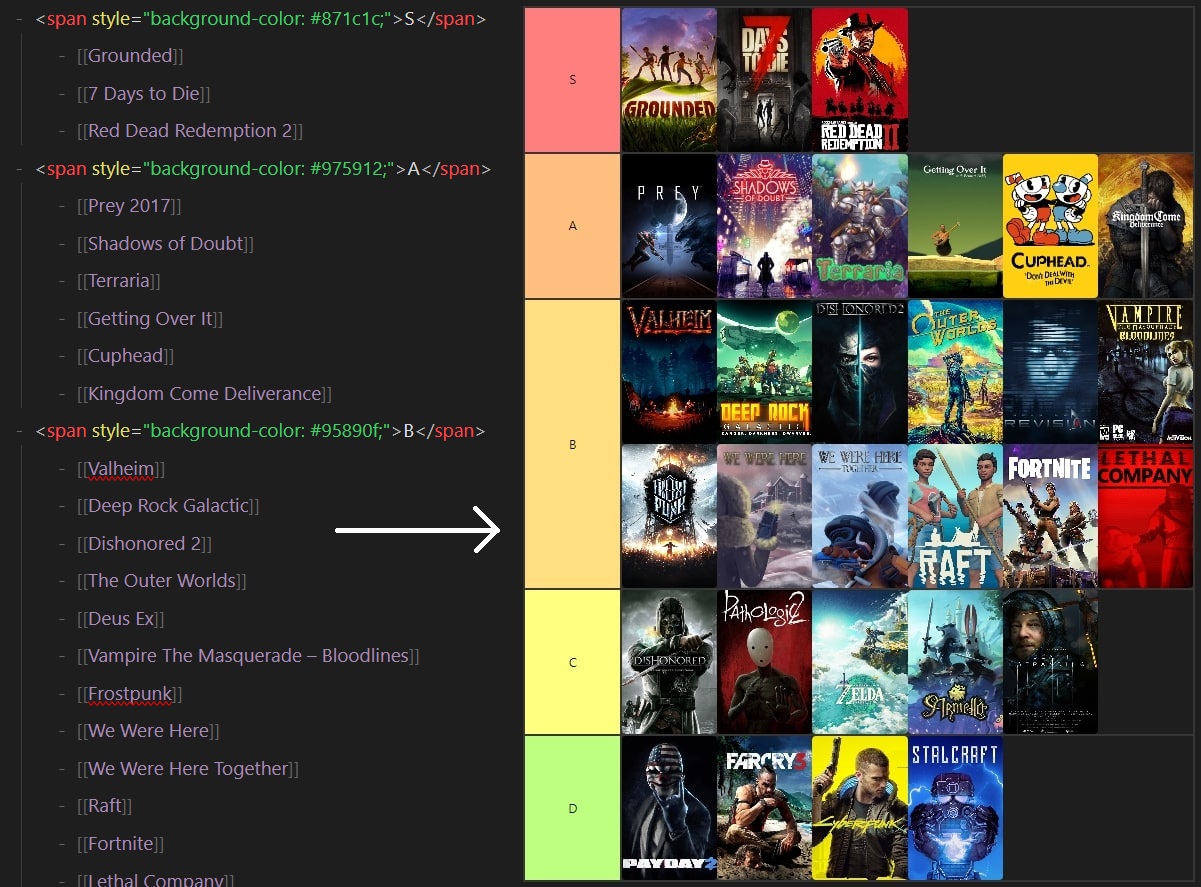
Games Example

One of the core features of the plugin is the ability to render lists with both internal and external images, any markdown text, or covers linked via a file's frontmatter. You can specify an image for a file in the frontmatter using the Image key, which will serve as a visual cover for that file in the tier list.
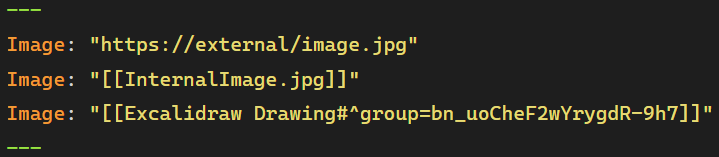
TierList Frontmatter

Tier List Philosophy

Unlike tools like Dataview, where sorting often requires defining custom variables, the Tier List plugin enables manual sorting of list items. This is useful when, for instance, you want to rank movies by genre without assigning them specific numerical ratings. Instead, you can place each movie relative to others, making it easier to say one movie is better than another but worse than a third. The manual nature of this ranking gives more flexibility and avoids the complexity of absolute ratings.

Using markdown links within a Tier List ensures that all items maintain their relationships in Obsidian’s Graph View. This keeps the graph clean and organized while still connecting your notes through the Tier List file.
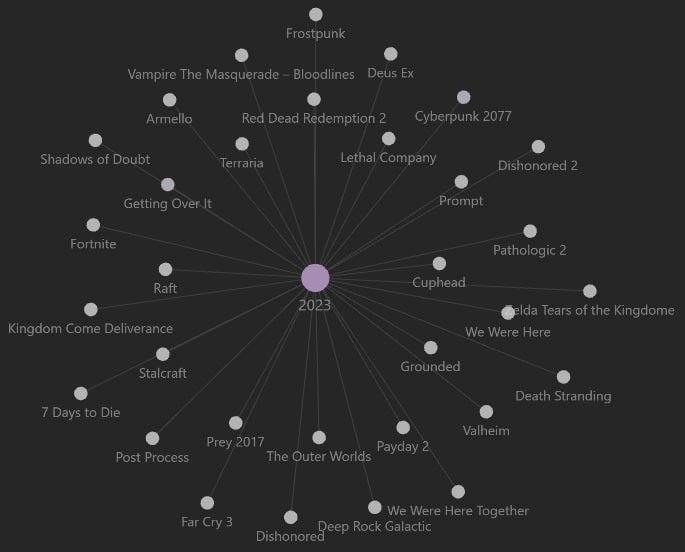
Local Graph

How to use

To use the Tier List plugin, you can either insert the #tier-list (can be changed in plugin settings) tag anywhere within an unordered list, which marks the list for tier rendering, or use the command Insert tier list to automatically create a list preformatted for ranking.

Tier List also includes a To Rank section, where items that have not yet been placed in a specific tier will be shown. This section collapses automatically once it becomes empty, keeping the view clean and focused on ranked items.
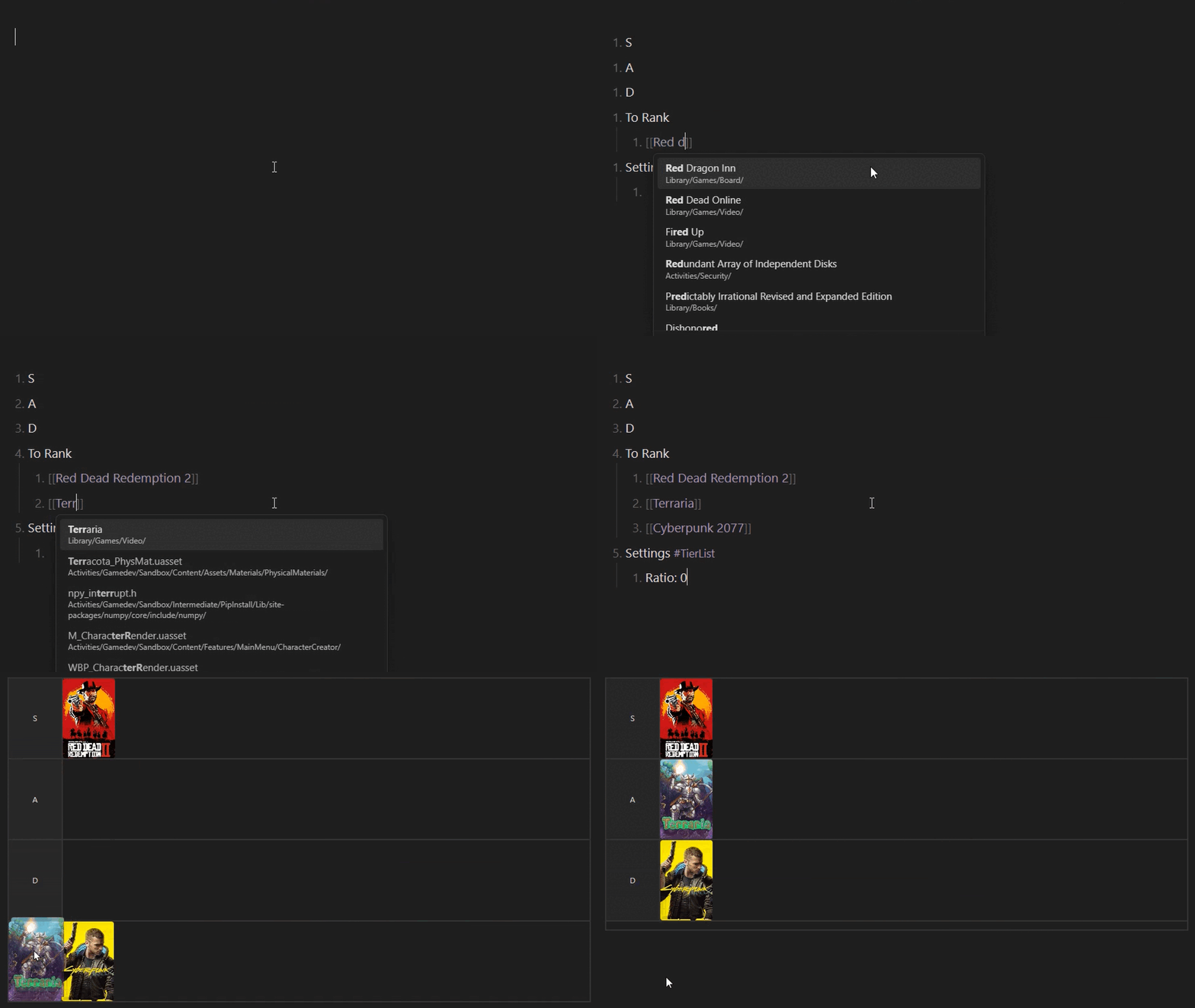
How To Use

Interaction

The Tier List plugin supports interaction in both Editing View and Reading View, each offering different workflows.

  • In Editing View, you can create and modify the list just like a regular markdown list—simply type items, add text fields, embed images, etc. This mode is ideal for quickly writing and organizing content without extra formatting.
  • In Reading View, interaction is handled through a right-click menu, where you can choose options and edit details in modal windows. For quick edits, you can also double-click on an item to modify it instantly. You can navigate to a note or a linked file by Ctrl/⌘ + Click on the corresponding slot.

If you need fast text input without additional styling, Editing View is the best choice. However, if you want more customization, including colors, transformations, and extra features, Reading View with modal editing provides a better experience.

Slot Modal

Settings

The plugin provides several customization options. You can define default settings for all Tier Lists globally, but you can also override these settings on a per-list basis. To do so, right-click on the tier list in the reading view and select Settings.
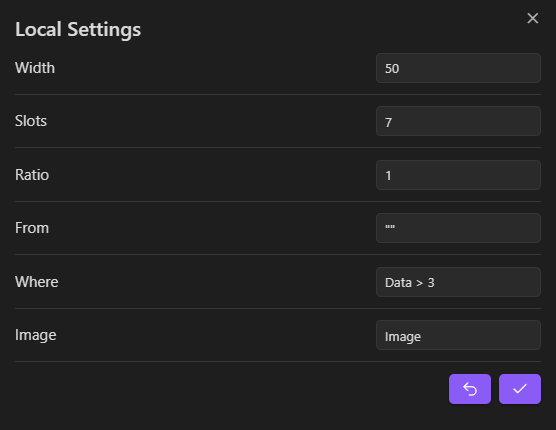
Local Settings

Dataview Integration

This plugin integrates with Dataview, allowing you to supplement your tier lists with missing notes using Dataview queries.

How It Works

  1. Right-click in the relevant area to open the context menu and select Request.
  2. In the modal window, configure the query settings (From, Where).
  3. The plugin will retrieve matching notes and add missing entries to your tier list.

Dataview Modal

Settings Persistence

  • The last used query is saved in the settings list for future use.
  • You can quickly reapply previous queries without manually re-entering them.
  • In addition to using the modal window, you can quickly add missing entries by right-clicking in the relevant area and selecting Add Missing from the context menu.

Similar Plugins

info
• Similar plugins are suggested based on the common tags between the plugins.
Excalidraw
5 years ago by Zsolt Viczian
A plugin to edit and view Excalidraw drawings in Obsidian
Dataview
5 years ago by Michael Brenan
A data index and query language over Markdown files, for https://obsidian.md/.
Advanced Canvas
2 years ago by Developer-Mike
⚡ Supercharge your canvas experience! Graph view integration and unlimited styling options empower flowcharts, dynamic presentations, and interconnected knowledge.
Markmind
5 years ago by Mark
A mind map, outline for obsidian,It support mobile and desktop
Custom File Explorer sorting
4 years ago by SebastianMC
Take full control over the order and sorting of folders and notes in File Explorer in Obsidian
Heatmap Calendar
4 years ago by Richard Slettevoll
An Obsidian plugin for displaying data in a calendar similar to the github activity calendar
Map View
5 years ago by esm
Interactive map view for Obsidian.md
Charts View
5 years ago by caronchen
Data visualization solution in Obsidian, support plots and graphs.
Extended Graph
a year ago by Kapirklaa
Community plugin to add features to the graph view.
Contribution Graph
2 years ago by vran
generate interactive gitxxx style contribution graph for obsidian, use it to track your goals, habits, or anything else you want to track.
Diagrams.Net
4 years ago by Jens M Gleditsch
This repository contains a plugin for Obsidian for inserting and editing diagrams.net (previously draw.io) diagrams.
Maps
8 months ago by Obsidian
Map layout for Obsidian Bases. Display your notes as an interactive map view.
GridExplorer
a year ago by Devon22
Browse note files in a grid view.
Note Gallery
2 years ago by Pash Shocky
A masonry note gallery for obsidian.
Heatmap Tracker
2 years ago by Maksim Rubanau
A customizable heatmap tracker plugin for Obsidian to visualize daily data trends with intuitive navigation and flexible settings.
Mehrmaid
2 years ago by huterguier
Rendering Obsidian Markdown inside Mermaid diagrams.
Smart Connections Visualizer
2 years ago by Evan Moscoso
Visualize your notes and see links to related content with AI embeddings. Use local models or 100+ via APIs like Claude, Gemini, ChatGPT & Llama 3
Link Exploder
3 years ago by Ben Hughes
DataCards
a year ago by Sophokles187
Obsidian Plugin that transforms dataview tables into visually appealing and customizable card layouts.
Optimize Canvas Connections
3 years ago by Félix Chénier
An Obsidian plugin that declutters a canvas by reconnecting notes using their nearest edges
Desmos
4 years ago by Nigecat
Embed graphs directly into your obsidian notes
Graph Banner
2 years ago by ras0q
An Obsidian plugin to display a relation graph view on the note header.
InfraNodus AI Graph View
2 years ago by Nodus Labs
Advanced graph view for Obsidian: text analysis, topic modeling, and AI with InfraNodus AI text analysis tool: https://infranodus.com
Habit Tracker
5 years ago by duo
This plguin for Obsidian creates a simple month view for visualizing your punch records.
D2
3 years ago by Terrastruct
The official D2 plugin for Obsidian. D2 is a modern diagram scripting language thats turns text to diagrams.
Table to CSV Exporter
4 years ago by Stefan Wolfrum
An Obsidian Plugin that allows to export tables from a pane in reading mode to CSV files.
Mindmap
2 years ago by YunXiaoYi
An Obsidian plugin for creating Mindmaps.
Canvas Links
3 years ago by aqav
Show the links between "Canvas" and "File"
Show Whitespace
2 years ago by Erin Schnabel
Show leading/trailing whitespace
Canvas Filter
3 years ago by Ivan Koshelev
Obsidian Canvas plugin that let's you show only pages / arrows with specific tags / colors / connections.
Link Tree
3 years ago by Joshua Tazman Reinier
A sidebar foldable list of Obsidian link hierarchies.
Simple Note Review
4 years ago by dartungar
Simple, customizable plugin for easy note review, resurfacing & repetition in Obsidian.md.
Dataview Serializer
2 years ago by Sébastien Dubois
Obsidian plugin that gives you the power of Dataview, but generates Markdown, making it compatible with Obsidian Publish, and making the links appear on the Graph.
Enhanced Canvas
a year ago by RobertttBS
When editing on Canvas, properties and Markdown links to notes are automatically updated, enabling backlinks in Canvas.
CardNote
2 years ago by cycsd
Help you extract your thoughts more quickly in canvas
Advanced Progress Bars
a year ago by cactuzhead
Obsidian plugin to create custom progress bars
Neo4j Graph View
5 years ago by Emile van Krieken
New 3D Graph
a year ago by Aryan Gupta
Visualize your vault in 3D with a powerful, highly customizable, and filterable graph.
Dataview Publisher
2 years ago by UD
Output markdown from your Dataview queries and keep them up to date. You can also be able to publish them.
Graph Link Types
2 years ago by natefrisch01
Link types for Obsidian graph view.
Tasks Map
8 months ago by NicoKNL
A graph view of your tasks.
Habit Calendar
3 years ago by Hedonihilist
Monthly Habit Calendar for DataviewJS. This plugin helps you render a calendar inside DataviewJS code block, showing your habit status within a month.
Better Inline Fields
4 years ago by David Sarman
Obsidian plugin to enhance Dataview style inline fields
Chessboard Viewer
5 years ago by Davide Aversa
Plugin to render chessboards in Obsidian using chessboardjs
Release Timeline
4 years ago by cakechaser
Habit Tracker
4 years ago by David Moeller
A Plugin to display a Habit Tracker in Obsidian.
Slash snippets
a year ago by echo-saurav
Insert snippet of text with slash command
Nifty Links
3 years ago by x-Ai
Generating elegant, Notion-styled rich link cards to enhance your note-taking experience.
Canvas Mindmap Helper
2 years ago by Tim Smart
Enhanced tables
2 years ago by pistacchio
A plugin for Obsidian to add advanced controls (like sorting and filtering) to standard markup tables
Arrows
2 years ago by artisticat
Draw arrows across different parts of your notes, similar to on paper
Export Graph View
a year ago by Sean McGhee
Plugin to export your vault's graph view.
Virtual Footer
a year ago by Signynt
Display markdown text (including dataview queries or Bases) at the bottom, top or in the sidebar for all notes which match a specified rule, without modifying them.
Argument Map with Argdown
5 years ago by amdecker
Todo sort
3 years ago by Ryan Gomba
A plugin for Obsidian that sorts todos within a note
Dirtreeist
4 years ago by kasahala
Render a directory Structure Diagram from a markdown lists in codeblock.
moviegrabber
3 years ago by Leon Holtmeier
obsidian.md plugin to grab data from public movie Databases and make them into a note that can be used with dataview querries
Double Colon Conceal
3 years ago by Michal Srch
Obsidian plugin to display double colon (i.e. Dataview inline fields) as a single colon for more natural reading experience.
Line Arrange
2 years ago by Chitwan Singh
Obsidian Plugin For Arranging Lines.
Bulk Exporter
3 years ago by symunona
Bulk export Markdown filtered, renamed and sorted by front matter metadata into a new structure.
Chemical Structure Renderer
3 years ago by xaya1001
Render chemical structures from SMILES strings into PNG or SVG format using Ketcher and Indigo Service.
Content Cards
a year ago by leo
Insert content cards in Markdown, such as timeline, highlightblock, target card, book information card, music information card, movie information card, photoes ablum, business card, content subfield, countdown, SWOT,BCG.
Kanban Status Updater
a year ago by Ankit Kapur
Obsidian plugin that automatically updates the note property when card is moved to a column.
Sortable Tables
10 months ago by filippov112
A plugin for Obsidian that adds the ability to interactively sort Markdown tables in preview mode.
WaveDrom
5 years ago by Alex Stewart
View Count
2 years ago by Trey Wallis
Add view count tracking to your Obsidian vault
Adamantine Pick
3 years ago by Urist McMiner
Embeddable Pikchr(https://pikchr.org) diagrams renderer plugin for Obsidian(https://obsidian.md)
Meld Build
3 years ago by meld-cp
Write and execute (sandboxed) JavaScript to render templates, query DataView and create dynamic notes.
historica
2 years ago by Nhan Nguyen
Not (smart) to help you create your timeline in obsidian like a ... bro
Lilypond
3 years ago by DOT-ASTERISK
Lilypond for Obsidian
Node Factor
a year ago by CalfMoon
Customize factors effecting node size in obsidian graph.
YourPulse - Your Writing Activity Visualised
a year ago by Jiri Sifalda
YourPulse.cc - Obsidian.md plugin that turns your vault into a reflection of your creativity, and put your writing on steroids 💪
Desk
2 years ago by David Landry
A desk for obsidian
HackerOne
3 years ago by neolex
A plugin to get our hackerone reports data into obsidian
Lineup Builder
5 years ago by James Fallon
An Obsidian plugin that lets you build football lineups
Flowcharts
a year ago by land0r
Flowchart Plugin for Obsidian – Create and customize flowcharts seamlessly within your Obsidian vault. Powered by Flowchart.js and designed for productivity
Run
3 years ago by Hananoshika Yomaru
Generate markdown from dataview query and javascript.
Laws of Form
3 years ago by Kevin German
Feeds
3 years ago by LukeMT, pashashocky, madx
Magic feeds dataview query for obsidian
Reason
2 years ago by Joshua Pham
Digest your Obsidian notes
Generate Timeline
a year ago by Shanshuimei
An obsidian plugin to generate timelines from tags, folders, files or metadata automatically. 根据标签,文件夹,文件或者属性自动生成时间轴的插件。
Storyclock Viewer
2 years ago by Jonathan Fisher
Obsidian plugin for creating a storyclock
BattleSnake Board Viewer
3 years ago by EnderInvader
Plugin to render battlesnake boards in Obsidian
Easy Timeline
a year ago by Romeliun
The Easy Timeline plugin for Obsidian allows you to create timelines easily.
Mathematica Plot
2 years ago by Marcos Nicolau
Insert functions on Obsidian using Wolfram Mathematica!
ASCII Tree Generator
a year ago by Matěj Michálek
Folder Canvas
2 years ago by Nancy Lee
Generate a canvas view of your folder structure
Sort Frontmatter
3 years ago by Kanzi
Sort frontmatter automatically
Markline
2 years ago by 闲耘
Markline: Markdown timeline view in Obsidian.
Dataview Autocompletion
a year ago by Daniel Bauer
Mermaid Icons
4 months ago by toshs
Obsidian plugin enabling the use of icons in Mermaid diagrams.
Alfonso Money Manager
2 years ago by SmartLifeGPT Innovation
This is the repository for the obsidian plugin of the Alfonso Money Manager mobile application
Extended File Support
a year ago by Nick de Bruin
Adds opening and embedding support for various filetypes to Obsidian
CSV All-in-One
a year ago by hihangeol
Weather Widget
4 months ago by mr-asa
Weather widget for display in notes, Canvas, and a separate tab.
Mapbox Location Image
2 years ago by Aaron Czichon
Render a mapbox location image based on provided coordinates
Canvas Explorer
2 years ago by Henri Jamet
A plugin that enables users to explore their vault by iteratively adding or ignoring linked notes, ultimately generating a customizable canvas that visually represents the preserved notes and their connections.
Magic Move
2 years ago by imfenghuang
Animating Code Blocks in Obsidian
NodeFlow
a year ago by LincZero
Render node streams like `ComfyUi`, `UE`, `Houdini`, `Blender`, etc., to make it easy to write relevant notes. json describes the chart, compared to screenshots, making it easier to modify later. The plugin is also compatible with blogs.",
TikToker
3 months ago by ameyxd
Save TikTok videos as markdown notes with embedded content and metadata extraction.
Waveform Player
a year ago by Zhou Hua
Timelive
a year ago by aNNiMON
Turn a list of dates into a timeline
Boardgame Search
a year ago by Marlon May
A plugin to create notes for boardgames based on the BGG API
Every Day Calendar
a year ago by QuBe
Obsidian plugin to create calendars inspired by Simone Giertz's Every Day Calendar
Life in Weeks Calendar
7 months ago by Jeff Szuc
Plugin for the Obsidian markdown editor. Displays a calendar of your life in weeks with weekly Periodic Notes plugin integration. Includes options for the traditional Memento Mori/Stoic style calendar, as well as a Gregorian calendar accurate version.
MOC Link Helper
2 years ago by Bogdan Codreanu
This obsidian plugins allows you to quickly see which notes you need to include in your MOC.
Inline Local Graph
4 months ago by TKOxff
Inline Local Graph of Obsidian
Visited Countries
8 months ago by Ivan Peshykov
Obsidian plugin to mark and visualize the countries you've visited on an interactive world map.
NyanBar
2 years ago by xhyabunny
Give life to your Obsidian notes with NyanBar !
Kale Graph
a year ago by Oli
Render mathematical graphs in Obsidian
Log Keeper
a year ago by James Sonneveld
Generates times stamps automatically as changes are made to a note.
Poker Range
2 years ago by marplek
Easily create, view, and interact with poker hand ranges in your obsidian.
ShaahMaat-md
a year ago by Mihail Kovachev
GLSL Viewer
4 months ago by iY0Yi
Preview GLSL shaders on Obsidian.
Class Relation Visualization
2 years ago by Yong
Mahgen Renderer
a year ago by Michael Francis Williams
Obsidian plugin to render mahgen automatically
Pug Templates
2 years ago by Nicholas Wilcox
An Obsidian plugin that enables the usage of Pug templates.
GoBoard
5 months ago by Dmitry I. Sokolov
Obsidian plugin for rendering Go game diagrams from markdown code blocks
Mahjong Renderer
2 years ago by hypersphere
Move Cursor On Startup
9 months ago by Jared Kelnhofer
Obsidian plugin to move the cursor to the right and back to the left when starting up. Why? To keep DataView expressions from not running on the first load of, say, your Home file.