InfraNodus AI Graph View

by Nodus Labs
5
4
3
2
1
Score: 56/100

Description

The InfraNodus AI Graph View plugin transforms Obsidian vaults into dynamic knowledge graphs, enabling users to visualize and analyze connections between ideas, concepts, and topics. It leverages advanced clustering and network science to highlight key topics, identify gaps, and generate research questions or ideas using built-in AI. The plugin can analyze single or multiple files, include backlinks and unlinked mentions, and provide rich graph analytics such as centrality, modularity, and influence metrics.

Reviews

No reviews yet.

Stats

137
stars
18,509
downloads
17
forks
565
days
118
days
118
days
0
total PRs
0
open PRs
0
closed PRs
0
merged PRs
12
total issues
2
open issues
10
closed issues
39
commits

Latest Version

4 months ago

Changelog

Visualize connections between your ideas and pages in Obsidian as a knowledge graph.

Reveal the main topics and gaps between them, generate new ideas using AI based on the blind spots you find.

To use in your Obsidian (desktop or mobile), get this plugin in the official Obsidian community plugin store. Or create the .obsidian/plugins/infranodus-obsidian folder in your Obsidian vault and copy the 3 files main.js, styles.css, and manifest.json to that folder. Then activate the community plugins.

You can use the plugin for free until you hit the AI / API token limit. If you'd like using it longer, you can go to https://infranodus.com/api-access and get the API token to extend your quota.

Version 0.9.4 Update

6 January 2026

  • do not reload a page on text change automatically in the default "automatic" mode
  • better error treatment in case of hitting API and free usage limits

Version 0.9.3 Update

3 December 2025

  • add new AI models from Claude, Google, and X (Grok)

Version 0.9.2 Updates

30 November 2025

  • fix bug where AI chat was not working properly
  • improved AI responses featuring GraphRAG functionality

Version 0.9.1 Updates

7 August 2025

  • support the new InfraNodus API token system
  • make the "graph" panel the default one instead of the "topics"
  • improve stability when loading AI topics
  • improve error handling and remove console errors

Version 0.9.0 Updates (current)

25 March 2025

  • added a view that emulates the Obsidian graph view (connections between the pages mentioned in the context) — can be selected in Settings. Good for using on folders as it emphasizes connections between the pages that have [[wiki links]]. We still recommend to use the default view for specific page analysis.
  • AI-generated summary for each topical cluster identified in the graph. To use: select Topics > Summary.
  • extended GraphRAG capabilities: use it to select certain clusters and nodes in the graph and to interact with those parts using the graph
  • longer AI responses (ideas, summaries, and AI Chat mode)
  • better quality generation of the names for topical clusters

README file from

Github

InfraNodus Advanced Graph View Plugin for Obsidian
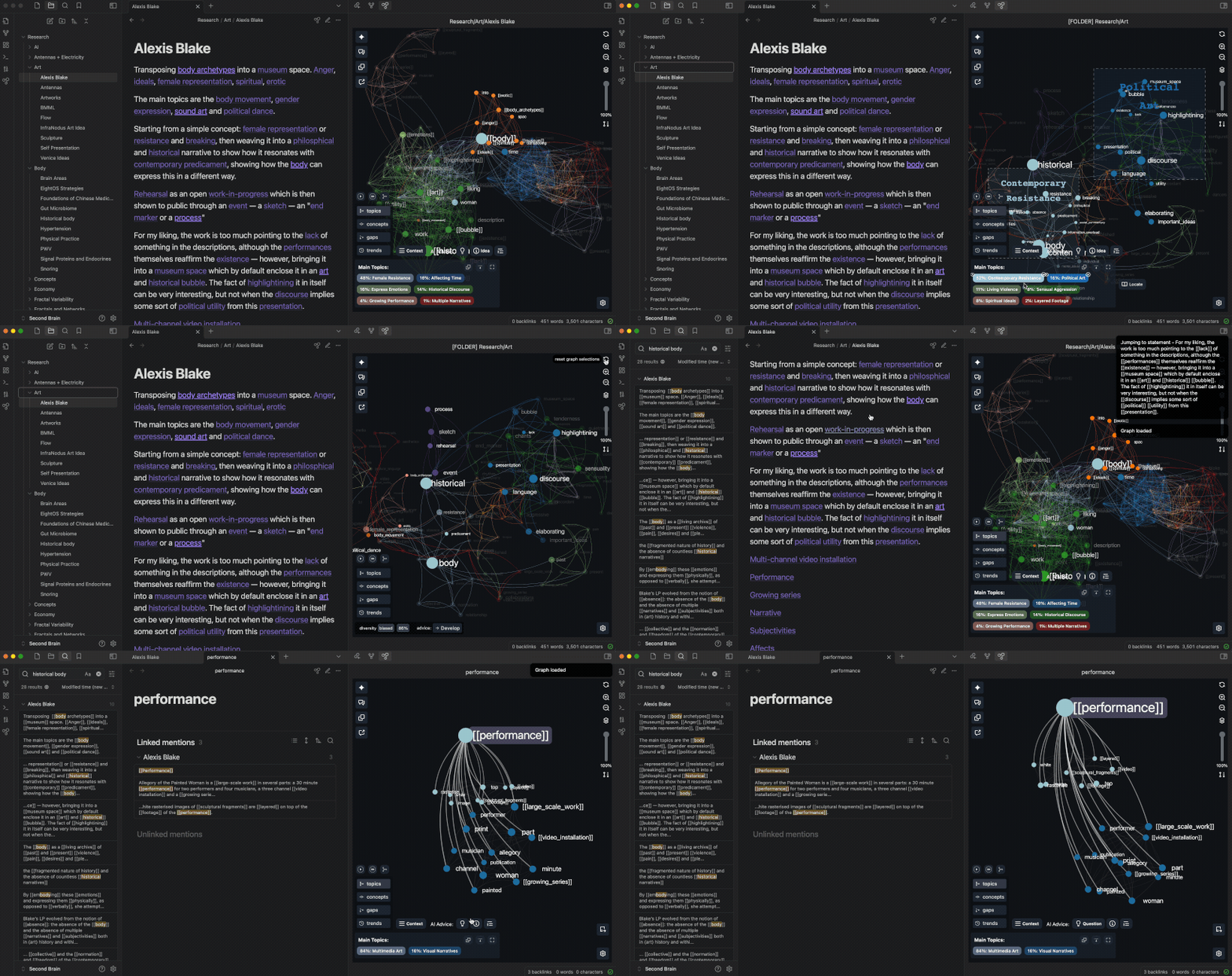
InfraNodus Obsidian plugin visualization

Based on InfraNodus AI text analysis and visualization tool, this plugin visualizes the content of Obsidian vaults as a knowledge graph, retrieves the main topical clusters, most important ideas, and identifies the gaps between them.

The built-in AI can be used to generate new ideas and research questions from your Obsidian content to bridge the gaps identified. You can use the plugin for free straight out of the box. The InfraNodus account is needed if you want to extend your AI quota, visualize your graph in the main version, and connect your graphs to AI workflows. OpenAI API GPT-4 use is included with the InfraNodus account, so you don't need your own OpenAI keys.

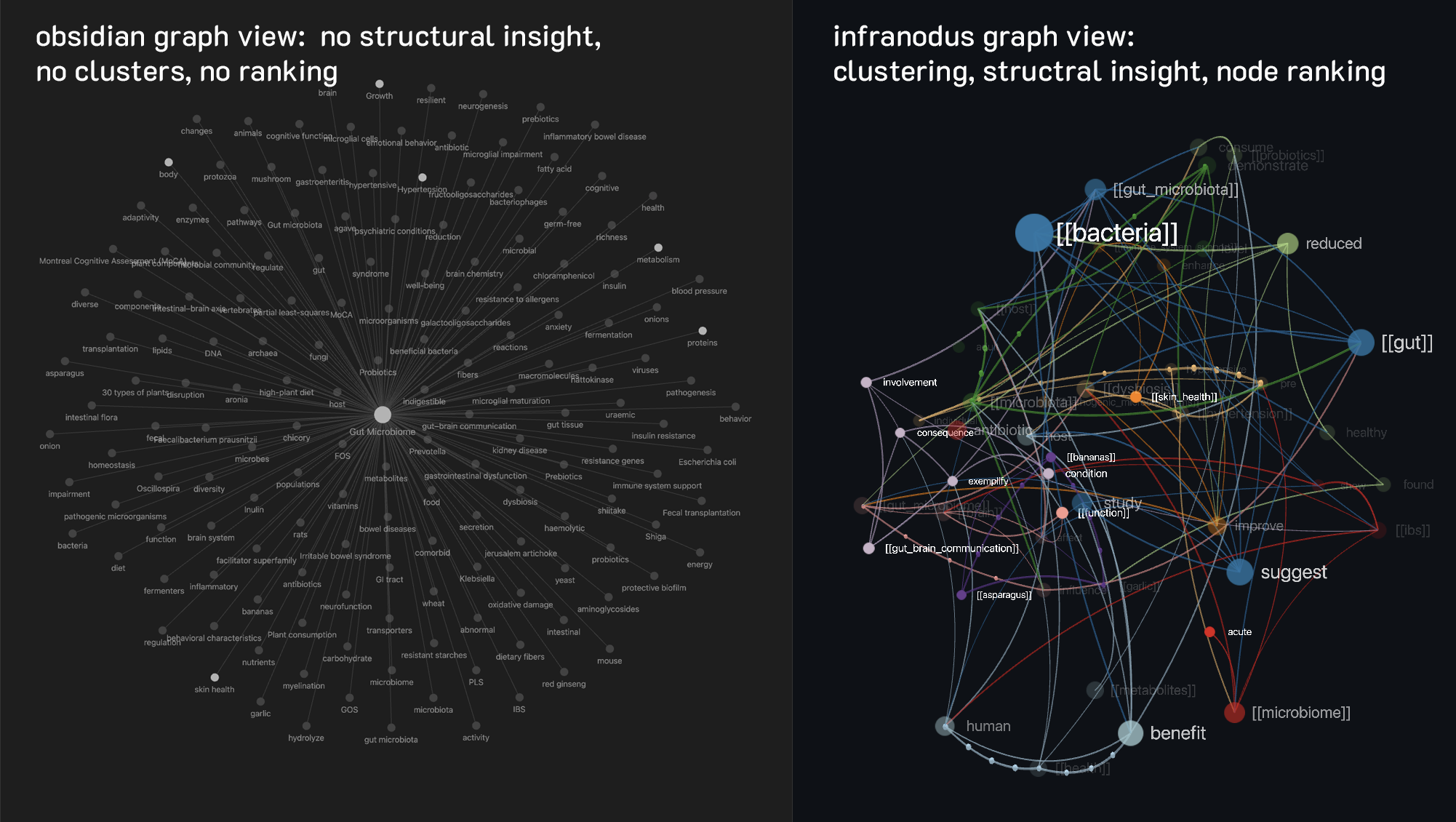
InfraNodus Graph Visualization vs. Obsidian

The standard Obsidian graph view will only show the connections between the page you are viewing and all other [[backlinks]] mentioned on that page.

Our default graph view is more detailed and shows connections between the concepts in your text and also between the [[backlinks]] mentioned in the same statements. We find this approach works much better for ideation and mimicks the way our brain thinks (following the landscape reading model). You can read more in our article on how InfraNodus is different from Obsidian.

However, if you like, you can switch back to the Obsidian graph view in the InfraNodus plugin. In order to do that, after you install it, go to the settings and:

  1. Set "Single Page Processing" to [[Wiki Links Only]] (our default is "[[Wiki Links]] and Concepts")

  2. Set Link Mentions To to Parent Page Only (Obsidian Style) (our default is "each other if in the same paragraph")

  3. Click Save and Reload

InfraNodus vs Obsidian graph view

What Can this Plugin Do?

1. Visualize the main ideas on any page:

  • take both mentions [[wiki-links]] and concepts into account (can be adjusted)

  • use advanced clustering algorithms and a beautiful 3D visualization module

  • show connections between ideas inside your text
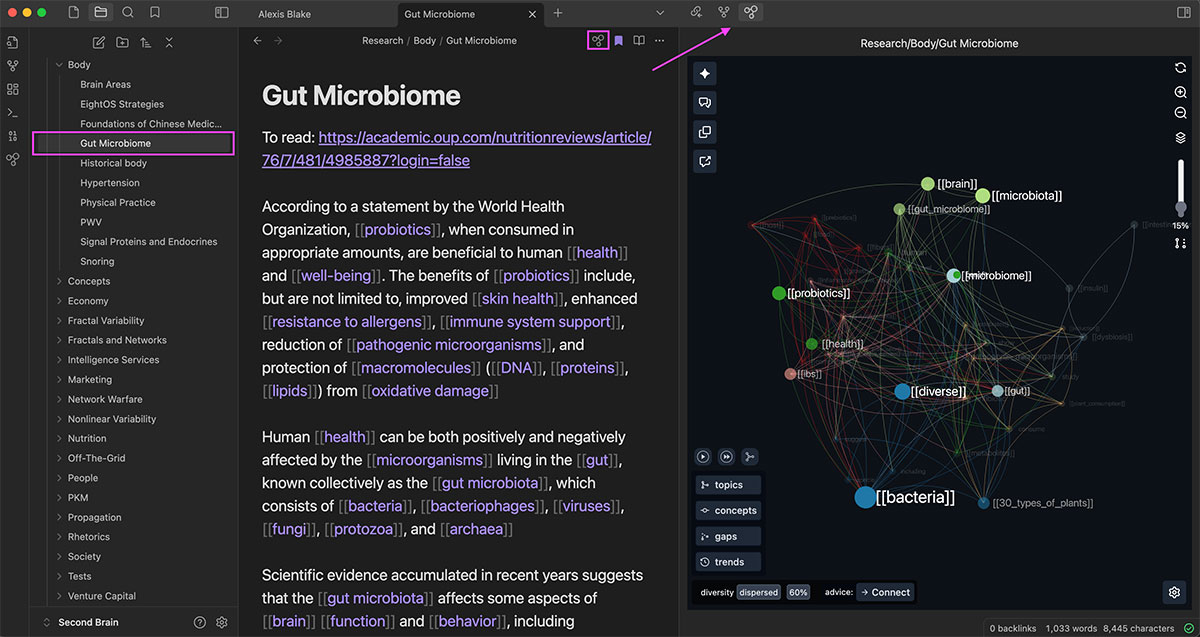
InfraNodus Obsidian plugin page visualization

2. Identify the main topics and most important ideas

Use advanced network science algorithms to:

  • detect clusters of concepts that appear together

  • highlight the most relevant concepts (shown bigger on the graph)

  • locate original content that belongs to the topics identified
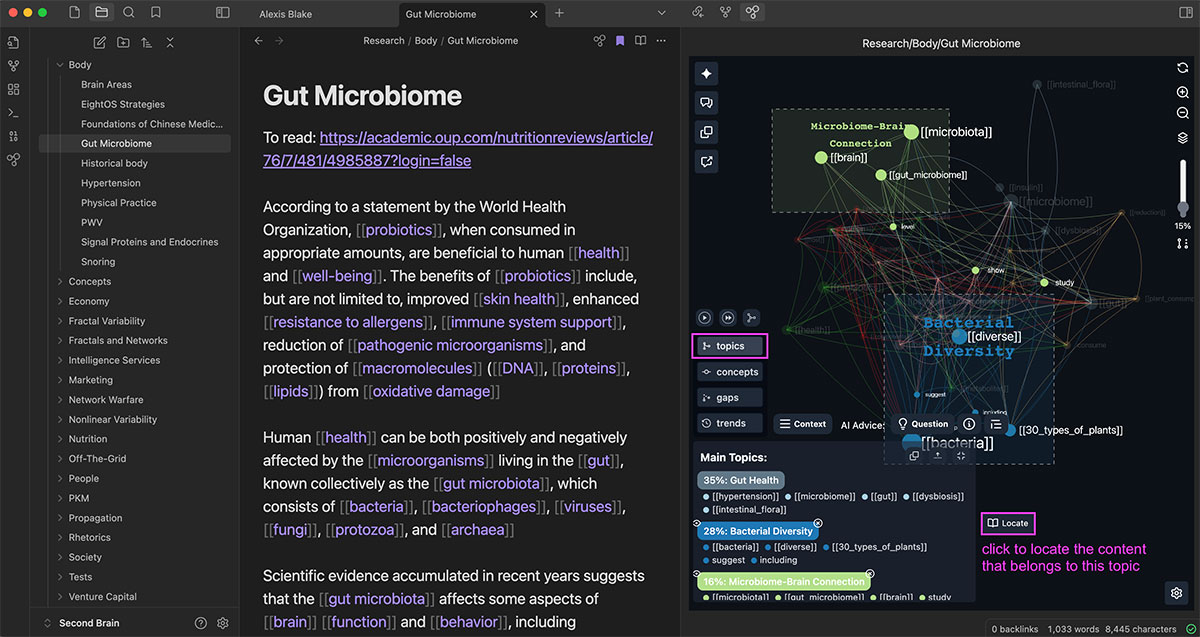
InfraNodus plugin view topics

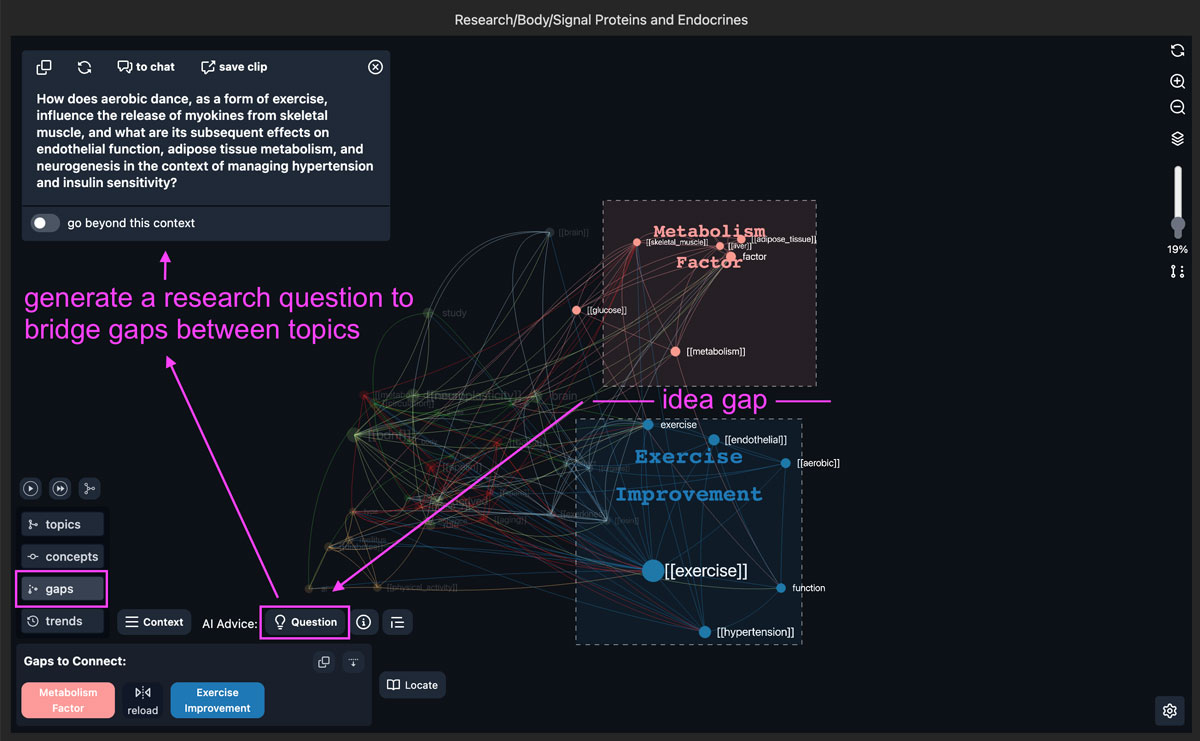
3. Identify gaps and generate new ideas using the built-in AI

To help you generate new ideas, you can run the built-in AI on:

  • the whole graph structure
  • selected topical clusters
  • selected concepts
  • selected statements
  • gaps
  • trends
  • using the built-in AI chat

InfraNodus Obsidian graph view plugin AI generation ideas

To help you find hidden connections between your ideas, you can:

  • include the snippets from backlink mentions into analysis (adjustable)

  • include unmentioned snippets into analysis
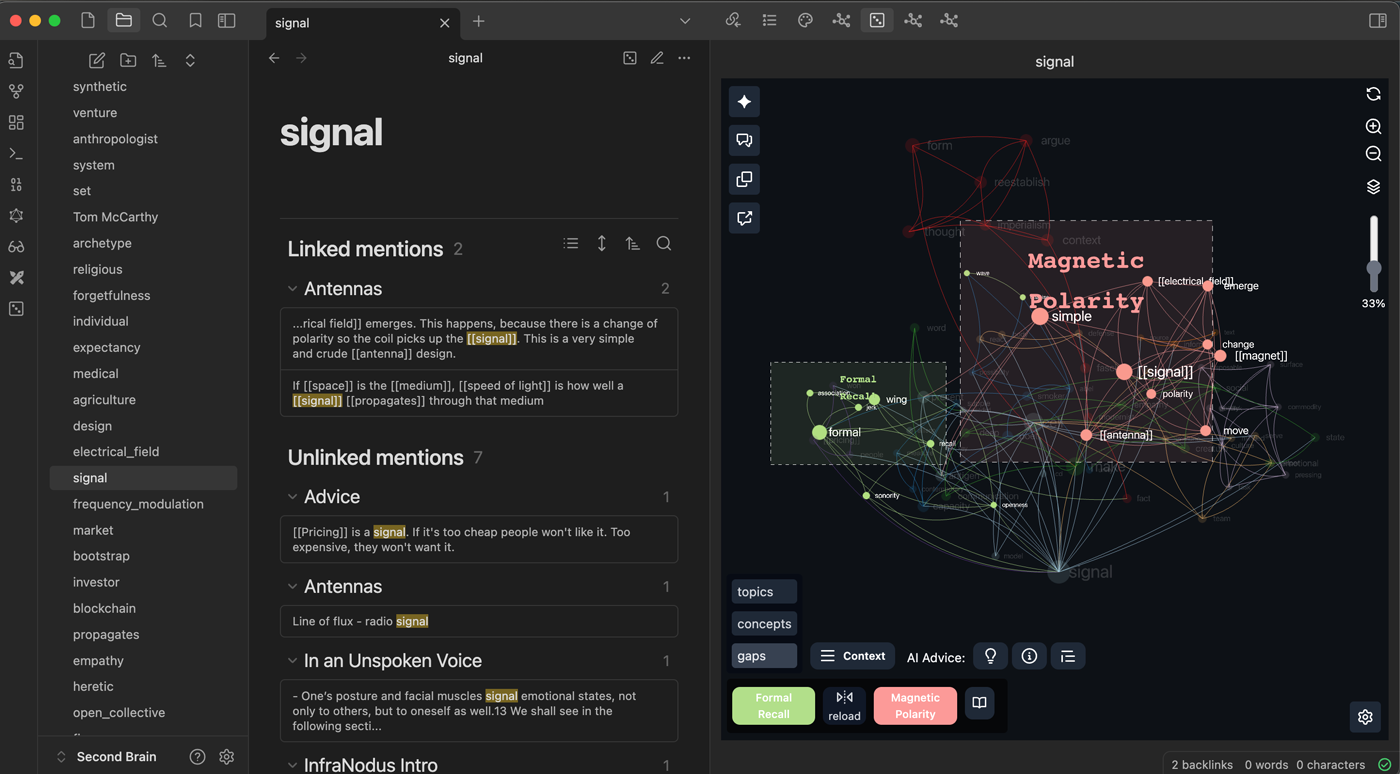
InfraNodus Obsidian backlinks analysis

5. Visualize from any content view

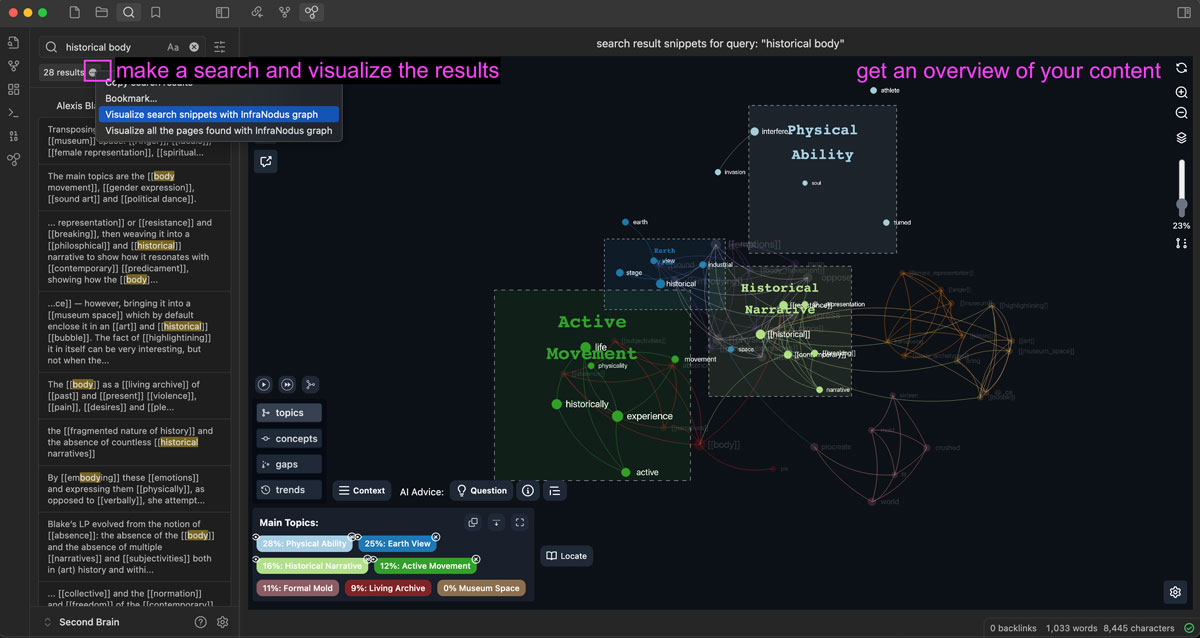
No other graph view plugin offers so many visualization options. You can extract the content to visualize from:

  • a single file
  • selected files
  • vault folders
  • search result snippets
  • pages found in the search results
  • bookmark folders

InfraNodus Obsidian search results visualization

6. Obtain advanced network science metrics on your graph

*This plugin has the most comprehensive graph analytics of any Obsidian plugin, including:

  • betweenness centrality (bc)
  • relative influence
  • graph's modularity
  • concept's relevanve (bc + degree)
  • main relations (bigrams)
  • graphDot structure for further analysis
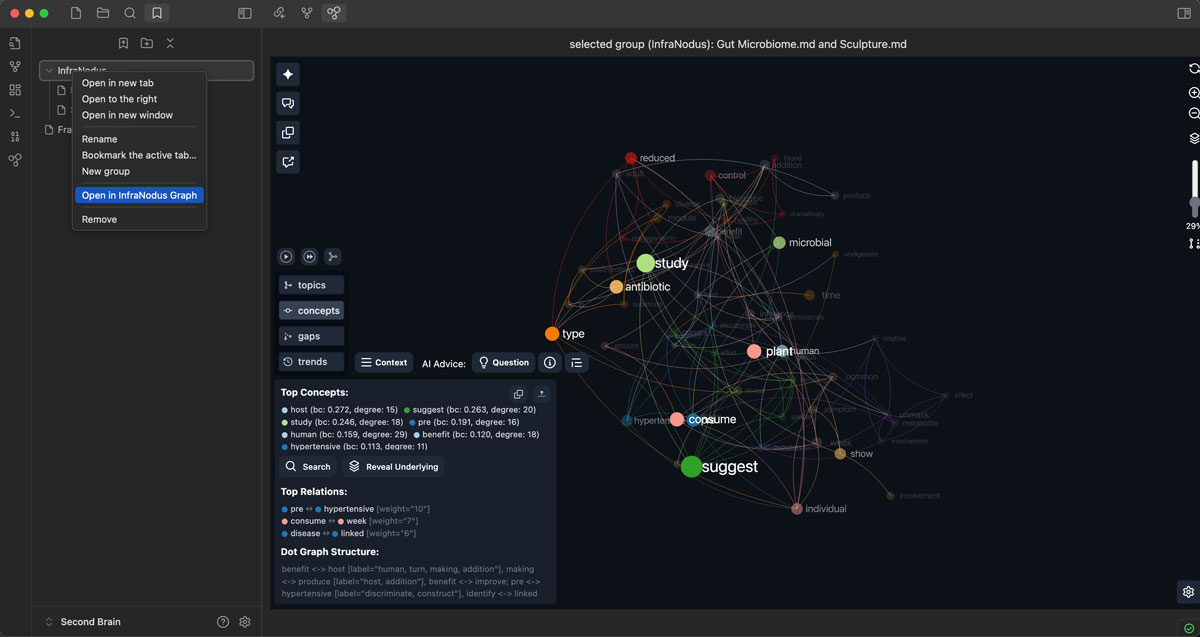
InfraNodus graph analytics

7. Navigate through your vault using the graph

You can navigate between pages using the arrow button
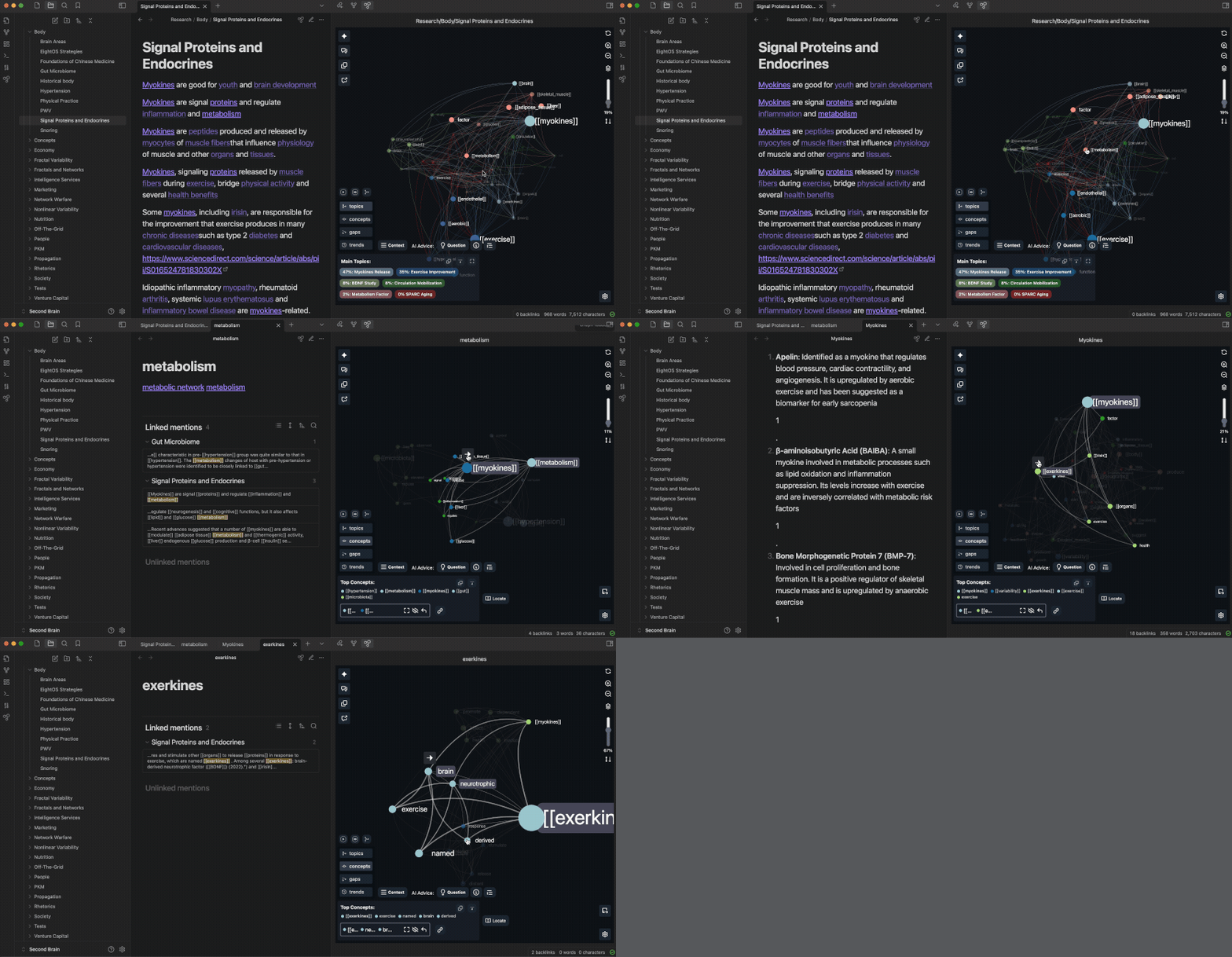
InfraNodus Obsidian graph view plugin

Installation Instructions

You can install the plugin from the Obsidian community plugins repository or manually by yourself. Below are the standard installation instructions. For manual installation, see the instructions in our support article

  • Activate the Community Plugins for your Obsidian Vault (Obsidian > Settings > Community Plugins > Activate Community Plugins).

  • Install the InfraNodus 3D Graph View plugin.

  • Activate the InfraNodus plugin and go to its settings (Obsidian > Settings > Community Plugins > InfraNodus > Settings).

  • Add your InfraNodus API key in the plugin's settings. It which can be found on https://infranodus.com/subscription and you will need an InfraNodus account for that. If you don't have one, you can get a free trial and also use the special code for Obsidian users INFRANODUSOBSIDIAN2024 to get a lifetime 50% discont (limited availability). With the subscription, you can also use the. main version of InfraNodus, which can import data from multiple sources and has advance analytic capabilities. You will also get a browser extension.

Why do I have to pay after the free trial?

Note, that this product is subscription-based because it's the only way for me to finance this work and the associated research which I've been doing for the last 10 years. I don't have any investors or external grants, so your contibution is the only resource what makes it possible. I believe that the value this tool can bring you is several times higher the subscription fee. If you don't think so, please, feel free to drop me a line and tell me how much you think it's worth and why.

User's Manual

The best use case for the plugin is to get an overview of the connections between your ideas and to find the gaps between different topics. Here's how you can do that:

1. Open any page in Obsidian

  • Open your Obsidian vault on any page

  • Navigate to that page and click the InfraNodus graph button at the top

– You can also right-click on the page's contextual menu and open the plugin from there

2. Move the plugin to the sidebar

  • For best experience, we recommend moving the plugin to your Obsidian's sidebar like this:
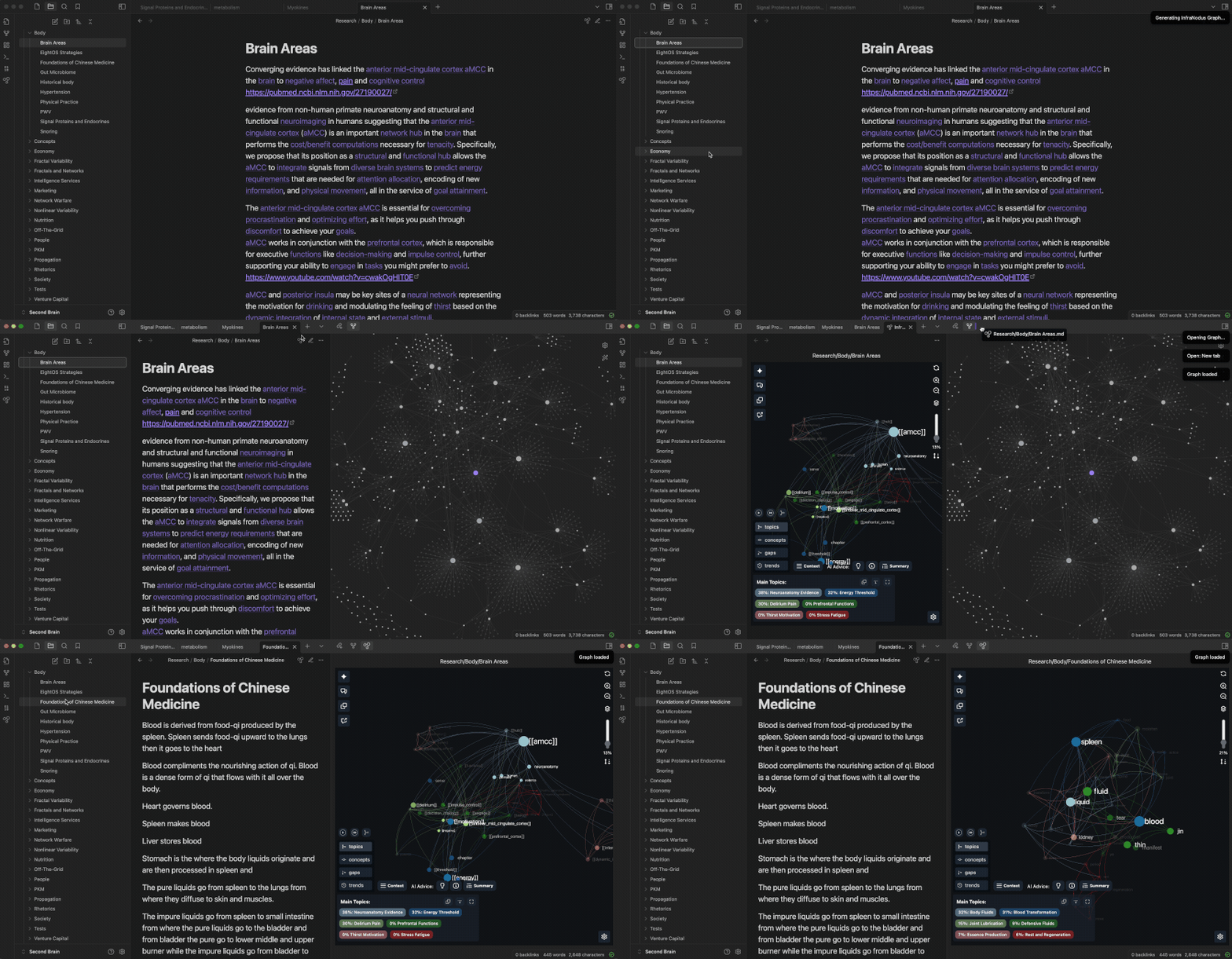
Move Obsidian plugin to sidebar

3. Try different activation options

You can activate the plugin in several ways for different views:

  • The InfraNodus icon on the top of the page or use the page's contextual menu (right-click)

  • File explorer / vault folder: just right-click on it and choose "InfraNodus Graph"

  • Selected files: select the files, right click, choose "InfraNodus Graph"

  • Main menu icon (on the left) — will visualize the nearest vault folder to the page currently selected

  • Search result snippets (use the ... button next to search result count) — experimental

  • Search result pages (use the ... button, choose the pages to analyze all the pages found)

  • Bookmark groups: select the groups, right-click and analyze using the contextual menu. Your Core Bookmarks plugin has to be activated.

  • Bookmarks: select the files, right-click and analyze using the contextual menu. Your Core Bookmarks plugin has to be activated. (experimental)

4. Read the graph

  • Once activated, InfraNodus will open a graph visualization of the page's content.

  • The words and the [[wikilinks]] that you use are the nodes and their co-occurrences inside the text (or links between them if you're analyzing several pages) are the connections between them. (E.g.: if you mention [[philosophy]] and [[deconstruction]] in the same context, they will show up as connected — you can change that in settings).

  • Based on network science metrics, the nodes will be ranged by their importance (betweenness centrality) and aligned into groups (topical clusters), which will have the same color. Based on this representation, you can see what are the most important ideas and what topical clusters exist in your document.

  • We use force-atlas layout to align the nodes that are more densely connected closer to each other on the graph

To learn more about the science behind the tool, please, check the [InfraNodus - How it Works (https://infranodus.com/about/how-it-works) page as well as the the peer-reviewed InfraNodus Whitepaper.

  • Use the graph visualization to get an overview of what the text is about and see if anything is missing.

5. Explore the main topics, find the context, generate AI summaries

  • Click on the "Topics" to see the main topics present in the document. You can use the built-in GPT-4 AI to generate a summary of the document in "Topics" > "Summary".

  • Click on the terms that seem relevant to you and then click on the "Concepts" > "Context" button to see the context where these terms appear in the document (the actual statement). You can also navigate directly to that statement in Obsidian and visualize a new graph of the document where the statement is contained.

6. Identify the gaps and use the AI to generate new ideas

  • Most interesting feature: click on the "Gaps" and see the blind holes identified in your content. These are the clusters of ideas that could be better connected. Use the built-in AI to generate interesting research questions that will help you develop the ideas in your notes further.

7. Reveal non-obvious layer of underlying ideas

  • Remove the top nodes from the graph (select > hide) to reveal underlying ideas and latent topics that are not visible on the surface.

8. Reiterate

  • If you find a concept or topic you like, you can also use InfraNodus to navigate to that page. Just click the node in the graph and then click the arrow above to proceed to that page.

9. Save and export ideas

  • Feel free to export the most interesting excerpts and AI-generated ideas to InfraNodus for later reference and analysis.

Settings

Here is a brief expalanation of the InfraNodus settings:

InfraNodus API Key - connects your plugin to your InfraNodus account

AI model — AI model to use (we like GPT-4 the most, but you can use GPT-4o-mini and such)

Single page processing — How to process the content on the single pages. We recommend [[wiki links]] and concepts so you can see all possible connections.

Multi page processing — How to process the content when multiple pages are analyzed. We recommend [[wiki links]] only so you can visualize the mentions only.

Include linked / unlinked mentions — shall we include the snippets shown in the backlinks / unlinked mentions to the analysis?

Improve unliked search — shall we do an aggressive search for any mention (finds more stuff than Obsidian's default one)

Updating graph — should we update the graph every time you change it (Automatic) or only when you press a button

Default graph layer — which graph layer to show by default? We like "Topics" for novice users, but for advanced users or mobile screens you might want to choose "Graph", so you give more space to the graph

Export type - you can export the data you're currently analyzing using the Export button (4th from the top in the left-side menu). You have two options: copying and pasting the content (requires your confirmation, doesn't work for big pages) or saving it automatically via our API (faster, in this case, it'll be saved into the graph selected in the next setting)

Export to graph name - how the name of your export graph is generated (you can choose "obsidian_files" to save everything to one graph — that works better if you're only saving AI ideas and content snippets)

Graph name — where to save AI insights when you export them

When using locate — what to do when you click "Locate statement" or "find in context" — should we open the edit mode (works beter) or leave it as it is.

Data Privacy

We do not save any data you send to InfraNodus servers via the Obsidian plugin to keep your privacy intact — not even in the logs. Our servers simply convert the text you choose to visualize into a JSON graph and send it back to the plugin along with important metrics for visualization.

When you use some of the parts of the graph to generate AI content, we only send the underlying graph structure and some of the statements that relate to the parts of the graph you selected (not your whole document) to the OpenAI's API in order to get a response. OpenAI's terms of use state that they do not use data received via the API for training their models.

While the plugin is in the beta stage we collect data about the features of the extension you use, so we can improve this plugin for you. We do not collect any information from your Obsidian vault.

Problems? Questions?

If you have a problem using the plugin, you can open an issue in our github repository or contact us via the support portal or Discord channel.

Please, describe in detail what you've been trying to do and your system setup, so we can troubleshoot your issue quickly.

Also, note, that Obsidian does not expose all the endpoints via their API, therefore some functionality may be unstable.

Here are some most urgent feature requests for their team, that you can support with your comments: contextual menus for bookmarks and expose search results via API

More Information

You can learn more about InfraNodus that powers this plugin on www.infranodus.com.

Also, please, check our support portal on https://support.noduslabs.com where you can learn more about network science and various use cases and practical applications.

You can contact us directly via the support portal above or via our Discord channel.

We also invite you to subscribe to the Nodus Labs YouTube channel, Instagram, and Twitter where you can learn more about the various exciting use cases for the plugin.

This plugin was developed by Nodus Labs (Ways Ltd in UK). You can find full information about our company and our contacts on www.noduslabs.com.

The plugin uses the software created by InfraNodus. When you are using the plugin, you agree to the Terms of Use and Privacy Policy.

TLDR: We will never sell or trade your personal registration data. By default, our plugin does not save any data from your Obsidian vault to your InfraNodus account. You use the extension at your own risk and we don't guarantee anything in the legal sense (it's a standard clause for all software companies). Please, refer to the Terms and Privacy Policy above for more information.

Similar Plugins

info
• Similar plugins are suggested based on the common tags between the plugins.
Adamantine Pick
3 years ago by Urist McMiner
Embeddable Pikchr(https://pikchr.org) diagrams renderer plugin for Obsidian(https://obsidian.md)
Advanced Canvas
2 years ago by Developer-Mike
⚡ Supercharge your canvas experience! Graph view integration and unlimited styling options empower flowcharts, dynamic presentations, and interconnected knowledge.
Advanced Progress Bars
a year ago by cactuzhead
Obsidian plugin to create custom progress bars
AI Assistant
3 years ago by Quentin Grail
AI Assistant Plugin for Obsidian
AI bot
a year ago by kuzzh
The AI Bot Plugin is a powerful tool designed to enhance your note-editing experience in Obsidian by leveraging the capabilities of AI. This plugin allows you to interact with an AI assistant directly within Obsidian, making it easier to generate, edit, and organize your notes with intelligent suggestions and automated tasks.
AI Chat
2 years ago by arenasys
AI Editor
3 years ago by Zekun Shen
AI for Templater
2 years ago by TfTHacker
Extends Templater with AI Chat commands using the OpenAI Client Library
AI Helper
a year ago by David Connolly
AI image analyzer
2 years ago by Swaggeroo
Analyze images with AI to get keywords of the image.
AI integration Hub
a year ago by Hishmat Salehi
A modular AI integration hub for Obsidian
AI LaTeX Generator
2 years ago by Aayush Shah
An Obsidian plugin that generates latex code from natural language inputs.
AI LLM
2 years ago by Sparky4567
Lets to use local llms in your Obsidian Vaults, extend your stories or create entirely new texts based on your previous input
AI Mentor
3 years ago by clementpoiret
AI Note Tagger
a year ago by Jasper Mayone
Auto tagging obsidian notes w/ AI
AI Notes Summary
3 years ago by R. Ian Bull (irbull)
An Obsidian plugin that uses ChatGPT to generate a summary of referenced notes
AI Providers
a year ago by Pavel Frankov
This plugin is a hub for setting AI providers (OpenAI-like, Ollama and more) in one place.
AI Research Assistant
3 years ago by Interweb Alchemy
Prompt Engineering Research Tool for AI APIs
AI Revisionist
a year ago by Synaptic Labs
AI Summarize
2 years ago by Alp Sariyer
Easy to use AI Summary tool for your notes in Obsidian
AI Tagger
2 years ago by Luca Grippa
Simplify tagging in Obsidian. Instantly analyze and tag your document with one click for efficient note organization.
AI Tagger Universe
a year ago by Hu Nie
An intelligent Obsidian plugin that leverages AI to automatically analyze note content and suggest relevant tags, supporting both local and cloud-based LLM services.
AI Transcriber
3 months ago by Musashino Software
AI-powered speech-to-text transcription using OpenAI GPT-4o and Whisper APIs
AI Zhipu
2 years ago by Tarslab
AI-zhipu is an Obsidian plugin that helps you utilize the Zhipu API. 智谱AI obsidian 插件
Alfonso Money Manager
2 years ago by SmartLifeGPT Innovation
This is the repository for the obsidian plugin of the Alfonso Money Manager mobile application
Arcana
3 years ago by A-F-V
Supercharge your Obsidian note-taking through AI-powered insights and suggestions
Argument Map with Argdown
5 years ago by amdecker
Arrows
2 years ago by artisticat
Draw arrows across different parts of your notes, similar to on paper
ASCII Tree Generator
a year ago by Matěj Michálek
Attachments MD Indexer
a year ago by Ian Inkov
Converts Obsidian canvas files to markdown index files, making canvas content searchable and graph-viewable within Obsidian.
Auto Keyword Linker
4 months ago by Daniel Rhodes
Stop manually typing [[brackets]] around recurring terms. Configure keywords with variations once, and automatically link them as you write or across your entire vault.
Ayanite
2 years ago by jemstelos
BattleSnake Board Viewer
3 years ago by EnderInvader
Plugin to render battlesnake boards in Obsidian
Blog AI Generator
a year ago by Gareth Ng
Obsidian Plugin: generate blog via AI based on the current note.
BMO Chatbot
3 years ago by Longy2k
Generate and brainstorm ideas while creating your notes using Large Language Models (LLMs) from Ollama, LM Studio, Anthropic, Google Gemini, Mistral AI, OpenAI, and more for Obsidian.
Boardgame Search
a year ago by Marlon May
A plugin to create notes for boardgames based on the BGG API
brAIn
3 years ago by lusob
Canvas Conversation
3 years ago by André Baltazar
A plugin for Obsidian that allows you to create a canvas conversation using ChatGPT.
Canvas Explorer
2 years ago by Henri Jamet
A plugin that enables users to explore their vault by iteratively adding or ignoring linked notes, ultimately generating a customizable canvas that visually represents the preserved notes and their connections.
Canvas Filter
3 years ago by Ivan Koshelev
Obsidian Canvas plugin that let's you show only pages / arrows with specific tags / colors / connections.
Canvas Links
3 years ago by aqav
Show the links between "Canvas" and "File"
Canvas LLM Extender
3 years ago by Pasi Saarinen
Let the OpenAI LLM add nodes to your Obsidian canvas
Canvas Mindmap Helper
2 years ago by Tim Smart
CardNote
2 years ago by cycsd
Help you extract your thoughts more quickly in canvas
Caret
2 years ago by Jake Colling
Caret, an Obsidian Plugin
Chat with Bard
3 years ago by Artel250
An obsidian plugin that enables you to talk to Google Gemnini directly
ChatCBT
2 years ago by Claire Froelich
AI-powered journaling plugin for your Obsidian notes, inspired by cognitive behavioral therapy
ChatGPT Definition
3 years ago by julix14
ChatGPT MD
3 years ago by Bram Adams
A (nearly) seamless integration of ChatGPT into Obsidian.
Chemical Structure Renderer
3 years ago by xaya1001
Render chemical structures from SMILES strings into PNG or SVG format using Ketcher and Indigo Service.
Chessboard Viewer
5 years ago by Davide Aversa
Plugin to render chessboards in Obsidian using chessboardjs
Class Relation Visualization
a year ago by Yong
Cloud Atlas
2 years ago by Cloud Atlas
Cloud Atlas Obsidian Client
CoCo AskAI
2 years ago by Yukee
CoCo-AskAI is an Obsidian plugin that enables AI-powered note assistance, enhancing the writing experience with customizable functions.
Connections
4 months ago by Eric Van Cleve
Content Cards
a year ago by leo
Insert content cards in Markdown, such as timeline, highlightblock, target card, book information card, music information card, movie information card, photoes ablum, business card, content subfield, countdown, SWOT,BCG.
Contribution Graph
2 years ago by vran
generate interactive gitxxx style contribution graph for obsidian, use it to track your goals, habits, or anything else you want to track.
D2
3 years ago by Terrastruct
The official D2 plugin for Obsidian. D2 is a modern diagram scripting language thats turns text to diagrams.
Desk
2 years ago by David Landry
A desk for obsidian
Desmos
4 years ago by Nigecat
Embed graphs directly into your obsidian notes
Diagrams.Net
4 years ago by Jens M Gleditsch
This repository contains a plugin for Obsidian for inserting and editing diagrams.net (previously draw.io) diagrams.
Dirtreeist
3 years ago by kasahala
Render a directory Structure Diagram from a markdown lists in codeblock.
Easy Timeline
a year ago by Romeliun
The Easy Timeline plugin for Obsidian allows you to create timelines easily.
Enhanced Canvas
a year ago by RobertttBS
When editing on Canvas, properties and Markdown links to notes are automatically updated, enabling backlinks in Canvas.
Every Day Calendar
a year ago by QuBe
Obsidian plugin to create calendars inspired by Simone Giertz's Every Day Calendar
Excalidraw
5 years ago by Zsolt Viczian
A plugin to edit and view Excalidraw drawings in Obsidian
Explain Selection With AI
2 years ago by Ben Wurster
This is my first go at making an Obsidian plugin to elaborate on and describe selected bits of information and their context.
Export Graph View
a year ago by Sean McGhee
Plugin to export your vault's graph view.
Extended File Support
a year ago by Nick de Bruin
Adds opening and embedding support for various filetypes to Obsidian
Extended Graph
a year ago by Kapirklaa
Community plugin to add features to the graph view.
Flashcard Generator
3 years ago by ChloeDia
Obsidian Plug-in to automatically create a set of questions/answers on your notes !
Flowcharts
a year ago by land0r
Flowchart Plugin for Obsidian – Create and customize flowcharts seamlessly within your Obsidian vault. Powered by Flowchart.js and designed for productivity
Folder Canvas
a year ago by Nancy Lee
Generate a canvas view of your folder structure
Folders to Graph
2 years ago by Ratibus11
Display your Obsidian vault folder structure into your graphs.
Gemini Assistant
2 years ago by eatgrass
Your AI assistant in obsidian
Gemini Scribe
a year ago by Allen Hutchison
An obsidian plugin to interact with Google Gemini
Generate Timeline
a year ago by Shanshuimei
An obsidian plugin to generate timelines from tags, folders, files or metadata automatically. 根据标签,文件夹,文件或者属性自动生成时间轴的插件。
Github Copilot
2 years ago by Vasseur Pierre-Adrien
A bridge between Obsidian and Github Copilot
GLSL Viewer
3 months ago by iY0Yi
Preview GLSL shaders on Obsidian.
GoBoard
4 months ago by Dmitry I. Sokolov
Obsidian plugin for rendering Go game diagrams from markdown code blocks
GPT Assistant
3 years ago by M7mdisk
Ask GPT from your notes and get personalized answers based on your knowledge base.
GPT-LiteInquirer
3 years ago by ittuann
💬 Experience OpenAI ChatGPT assistance directly within Obsidian, drafting content without interrupting your creative flow.
Graph Analysis
5 years ago by SkepticMystic & Emile
Analyse the structure of your Obsidian graph using various analysis techniques
Graph Banner
2 years ago by ras0q
An Obsidian plugin to display a relation graph view on the note header.
Graph Link Types
2 years ago by natefrisch01
Link types for Obsidian graph view.
Habit Tracker
5 years ago by duo
This plguin for Obsidian creates a simple month view for visualizing your punch records.
Habit Tracker
4 years ago by David Moeller
A Plugin to display a Habit Tracker in Obsidian.
Heatmap Calendar
4 years ago by Richard Slettevoll
An Obsidian plugin for displaying data in a calendar similar to the github activity calendar
Heatmap Tracker
a year ago by Maksim Rubanau
A customizable heatmap tracker plugin for Obsidian to visualize daily data trends with intuitive navigation and flexible settings.
HiNote
a year ago by Kai
Add comments to highlighted notes, use AI for thinking, and flashcards for memory.
historica
2 years ago by Nhan Nguyen
Not (smart) to help you create your timeline in obsidian like a ... bro
Hydrate
5 months ago by hydrateagent
Images to Notes
a year ago by Rodolfo Terriquez
Turn photos of your handwritten notes into markdown
Inline Local Graph
3 months ago by TKOxff
Inline Local Graph of Obsidian
InlineAI
a year ago by FBarrca
Intelligence
2 years ago by John Mavrick
Kale Graph
a year ago by Oli
Render mathematical graphs in Obsidian
Khoj
3 years ago by Debanjum Singh Solanky
Your AI second brain. Self-hostable. Get answers from the web or your docs. Build custom agents, schedule automations, do deep research. Turn any online or local LLM into your personal, autonomous AI (gpt, claude, gemini, llama, qwen, mistral). Get started - free.
Laws of Form
3 years ago by Kevin German
Life in Weeks Calendar
6 months ago by Jeff Szuc
Plugin for the Obsidian markdown editor. Displays a calendar of your life in weeks with weekly Periodic Notes plugin integration. Includes options for the traditional Memento Mori/Stoic style calendar, as well as a Gregorian calendar accurate version.
Lilypond
3 years ago by DOT-ASTERISK
Lilypond for Obsidian
Lineup Builder
4 years ago by James Fallon
An Obsidian plugin that lets you build football lineups
Link Exploder
3 years ago by Ben Hughes
LLM Test Generator
a year ago by Aldo E George
LLM workspace
a year ago by Olivér Falvai
Magic Move
2 years ago by imfenghuang
Animating Code Blocks in Obsidian
Mahgen Renderer
a year ago by Michael Francis Williams
Obsidian plugin to render mahgen automatically
Mahjong Renderer
2 years ago by hypersphere
Map View
5 years ago by esm
Interactive map view for Obsidian.md
Mapbox Location Image
2 years ago by Aaron Czichon
Render a mapbox location image based on provided coordinates
Maps
7 months ago by Obsidian
Map layout for Obsidian Bases. Display your notes as an interactive map view.
Markline
2 years ago by 闲耘
Markline: Markdown timeline view in Obsidian.
Markmind
5 years ago by Mark
A mind map, outline for obsidian,It support mobile and desktop
Markpilot
2 years ago by Taichi Maeda
AI-powered inline completions and chat view for Obsidian
Mathematica Plot
2 years ago by Marcos Nicolau
Insert functions on Obsidian using Wolfram Mathematica!
MCP Tools
a year ago by Jack Steam
Add Obsidian integrations like semantic search and custom Templater prompts to Claude or any MCP client.
Mehrmaid
2 years ago by huterguier
Rendering Obsidian Markdown inside Mermaid diagrams.
Memos AI Sync
a year ago by leoleelxh
obsidian-memos-sync-plugin,将 Memos 内容同步到 Obsidian 的插件,提供无缝集成体验。
Mermaid Icons
3 months ago by toshs
Obsidian plugin enabling the use of icons in Mermaid diagrams.
Mesh AI
2 years ago by Chasebank87
Metadata Auto Classifier
2 years ago by Beomsu Koh
AI-powered Obsidian plugin that automatically classifies and generates metadata (tags, frontmatter) for your notes.
Mindmap
2 years ago by YunXiaoYi
An Obsidian plugin for creating Mindmaps.
MostUsed
2 years ago by Levi Kingma
Obsidian plugin that shows the words you use most.
Neo4j Graph View
5 years ago by Emile van Krieken
NeuroVox
a year ago by Synaptic Labs
Obsidian plugin for transcription and generation
New 3D Graph
9 months ago by Aryan Gupta
Visualize your vault in 3D with a powerful, highly customizable, and filterable graph.
Nifty Links
3 years ago by x-Ai
Generating elegant, Notion-styled rich link cards to enhance your note-taking experience.
Node Factor
a year ago by CalfMoon
Customize factors effecting node size in obsidian graph.
NodeFlow
a year ago by LincZero
Render node streams like `ComfyUi`, `UE`, `Houdini`, `Blender`, etc., to make it easy to write relevant notes. json describes the chart, compared to screenshots, making it easier to modify later. The plugin is also compatible with blogs.",
Note Companion AI
8 months ago by Benjamin Ashgan Shafii
Note Companion: AI assistant for Obsidian that goes beyond just a chat. (prev File Organizer 2000)
Note Gallery
2 years ago by Pash Shocky
A masonry note gallery for obsidian.
Notemd
a year ago by Jacob
A Easy way to create your own Knowledge-base! Notemd enhances your Obsidian workflow by integrating with various Large Language Models (LLMs) to process your notes, automatically generate wiki-links for key concepts, create corresponding concept notes, perform web research, and more.
Nova
3 months ago by Shawn Duggan
Nova - AI plugin for Obsidian that edits your documents directly through natural conversation. Stop copying from chat, start collaborating with AI.
NyanBar
2 years ago by xhyabunny
Give life to your Obsidian notes with NyanBar !
Obsidian Graphviz
4 years ago by Feng Peng
Graphviz plugin for obsidian md.
Open Interpreter
2 years ago by Mike Bird
The power of Open Interpreter in your Obsidian vault
Optimize Canvas Connections
3 years ago by Félix Chénier
An Obsidian plugin that declutters a canvas by reconnecting notes using their nearest edges
Personal Assistant
3 years ago by edony
A plugin that harnesses AI agents and streamlining techniques to help you automatically manage Obsidian.
Poker Range
2 years ago by marplek
Easily create, view, and interact with poker hand ranges in your obsidian.
Proofreader
a year ago by pseudometa (aka Chris Grieser)
AI-based proofreading and stylistic improvements for your writing. Changes are inserted as suggestions directly in the editor, similar to suggested changes in word processing apps.
Quiz Generator
2 years ago by Edward Cui
Generate interactive flashcards from your notes using models from OpenAI (ChatGPT), Google (Gemini), Ollama (local LLMs), and more. Or manually create your own to use with the quiz UI.
Related Notes
a year ago by Oluwasanya Awe
Release Timeline
4 years ago by cakechaser
Research Quest
a year ago by Nathan Arthur
Reverse Prompter
2 years ago by Ryan Halliday
Let AI generate prompts to keep you writing
Select & Complete
2 years ago by Mario De Luca
A really simple and easy to use AI completion for Obsidian
Semantic Canvas
2 years ago by Aaron Gillespie
An Obsidian Plugin to update note properties using links on Canvases
ShaahMaat-md
a year ago by Mihail Kovachev
Show Whitespace
2 years ago by Erin Schnabel
Show leading/trailing whitespace
Silicon AI
3 years ago by deepfates
Add some intelligence to your notes with Silicon AI for Obsidian
Smart ChatGPT
a year ago by 🌴 Brian
Smart Composer
a year ago by Heesu Suh
AI chat assistant for Obsidian with contextual awareness, smart writing assistance, and one-click edits. Features vault-aware conversations, semantic search, and local model support.
Smart Connections
3 years ago by Brian Petro
Chat with your notes & see links to related content with AI embeddings. Use local models or 100+ via APIs like Claude, Gemini, ChatGPT & Llama 3
Smart Connections Visualizer
2 years ago by Evan Moscoso
Visualize your notes and see links to related content with AI embeddings. Use local models or 100+ via APIs like Claude, Gemini, ChatGPT & Llama 3
Smart Context
a year ago by 🌴 Brian
Smart Memos
2 years ago by Evan Moscoso
Super-human brainstorming and note-taking by smart transcribing your voice! This involves a complete transcript, a summary, an expansion on the concepts presented, and a fully customizable analysis of it for any use case you can think of!
Smart Second Brain
2 years ago by Leo310, nicobrauchtgit
An Obsidian plugin to interact with your privacy focused AI-Assistant making your second brain even smarter!
Smart Templates
2 years ago by 🌴 Brian Petro
Smart Templates is an AI powered templates for generating structured content in Obsidian. Works with Local Models, Anthropic Claude, Gemini, OpenAI and more.
Smart Vault Visualizer
a year ago by Evan Moscoso
Storyclock Viewer
2 years ago by Jonathan Fisher
Obsidian plugin for creating a storyclock
Strapi Exporter AI
2 years ago by Cinquin Andy
[prod] - 🚀 Strapi Exporter: Supercharge Your Obsidian-to-Strapi Workflow, export an obsidian notes directly to your Strapi API
Student Repo
a year ago by Feirong.zfr
学生知识库助手(Student Repository Helper)是一个面向学生或学生家长的Obsidian 插件,这款插件旨在解决学生在学习阶段面临的资料管理难题,将学习过程中产生的各类重要资料,如试卷、笔记、关键文档、绘画手工作品等,进行系统性的数字化整合与管理,并利用 AI 助手定期进行学习分析总结。随着时间的推移,它将助力你逐步搭建起一座专属你自己的知识宝库,这座宝库将伴随你一生,成为你知识成长与积累的见证。
Tagvis
a year ago by Mason Bryant
Tars
2 years ago by Tarslab
Obsidian tars plugin that supports text generation based on tag suggestions, using services like DeepSeek, Claude, OpenAI, OpenRouter, SiliconFlow, Gemini, Ollama, Kimi, Doubao, Qwen, Zhipu, QianFan & more.
Tasks Map
7 months ago by NicoKNL
A graph view of your tasks.
Tier List
a year ago by Mox Alehin
Obsidian plugin for visual ranking and organizing content into customizable Tier Lists.
Timelive
a year ago by aNNiMON
Turn a list of dates into a timeline
Tracker+
3 years ago by GreaterThan (original by pyrochlore)
A plugin for Obsidian that tracks and visualizes in your notes. A continuation of the plugin originally developed by @pyrochlore
Vault Chat
3 years ago by Exo Ascension
A ChatGPT bot trained on your vault notes. Ask your AI questions about your own thoughts and ideas!
Vision Recall
a year ago by Travis Van Nimwegen
Transform screenshots into searchable Obsidian notes using AI vision and text analysis
Visited Countries
7 months ago by Ivan Peshykov
Obsidian plugin to mark and visualize the countries you've visited on an interactive world map.
WaveDrom
5 years ago by Alex Stewart
Waveform Player
a year ago by Zhou Hua
Waypoint
4 years ago by Idrees Hassan
Obsidian plugin that gives you the power to generate dynamic MOCs in your folder notes. Enables folders to show up in the graph view and removes the need for messy tags!
Weather Widget
3 months ago by mr-asa
Weather widget for display in notes, Canvas, and a separate tab.
WordWise
2 years ago by ckt1031
Writing companion for AI content generation.
YOLO
4 months ago by Lapis0x0
Smart, snappy, and multilingual AI assistant for your vault.
YourPulse - Your Writing Activity Visualised
a year ago by Jiri Sifalda
YourPulse.cc - Obsidian.md plugin that turns your vault into a reflection of your creativity, and put your writing on steroids 💪
YouTube Video Summarizer
a year ago by mbramani
Generate AI-powered summaries of YouTube videos directly in Obsidian using Google's Gemini AI.
Zettelkasten Branch Tracker
8 months ago by James Cussen
Obsidian Graph View Plugin for Zettelkasten Notes