Smart Context

by 🌴 Brian
5
4
3
2
1
Score: 49/100

Description

Category: Productivity Tools

The Smart Context plugin enhances the ability to copy content from Obsidian for use with AI tools like ChatGPT. It allows users to copy entire folders or specific open files, including all linked content, to the clipboard. With advanced features such as excluding sections by heading (e.g., confidential content), it ensures only relevant material is shared. The plugin offers multiple commands, including options to copy content from visible files, all open files, or an entire folder. Notifications summarize the action taken, ensuring users have full control over the context provided to AI. This makes it easier to give AI tools a comprehensive understanding of a project or set of notes.

Reviews

No reviews yet.

Stats

62
stars
31,847
downloads
5
forks
596
days
1
days
12
days
1
total PRs
0
open PRs
1
closed PRs
0
merged PRs
6
total issues
5
open issues
1
closed issues
305
commits

Latest Version

13 days ago

Changelog

Smart Context Core v3.3

[!NOTE] What's new in v3.3.1 Updated: Smart Environment

Build context by sight, not by guesswork

Before context leaves Obsidian, you should be able to answer four questions: What is included? Where did it come from? How large is it? What rules changed the result?

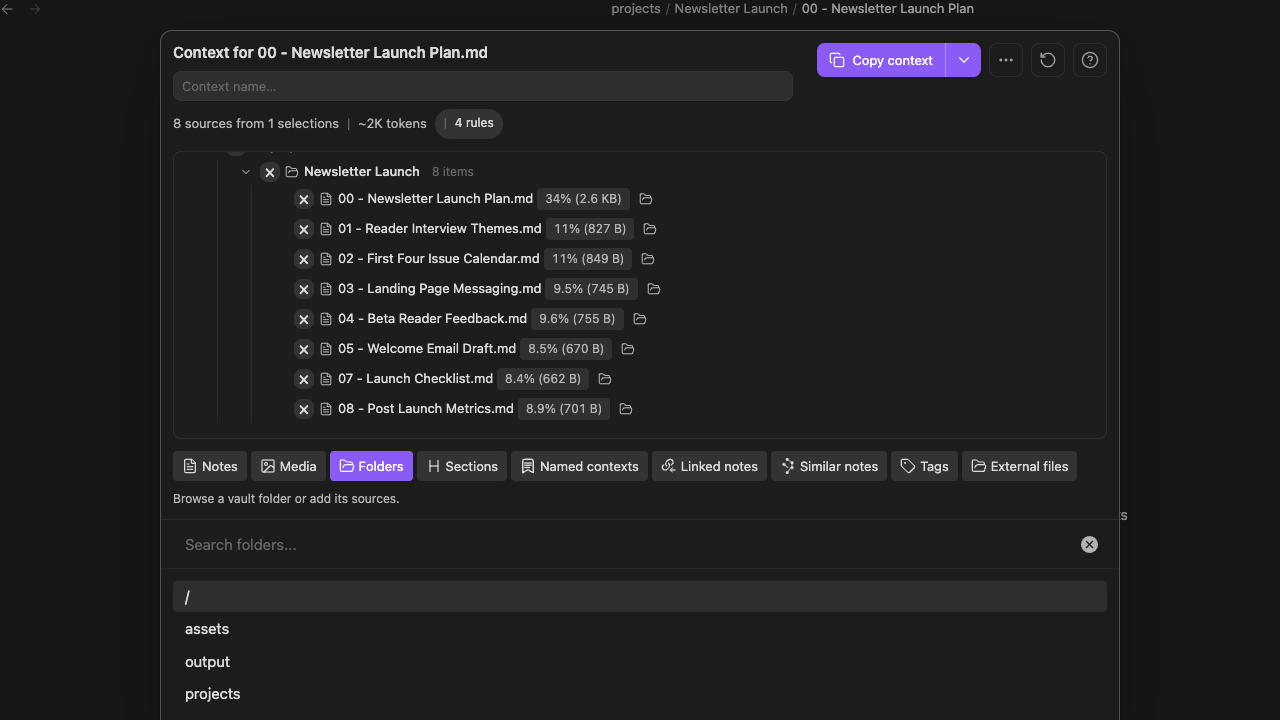
The redesigned Context Builder puts those answers in one place. Assemble sources from across the vault, inspect the actual tree, remove what does not belong, and copy or save only when the package looks right.

Update all installed Smart Plugins together, then restart Obsidian. Smart Context Core v3.3 requires Smart Environment v3.

The Builder is now the workflow

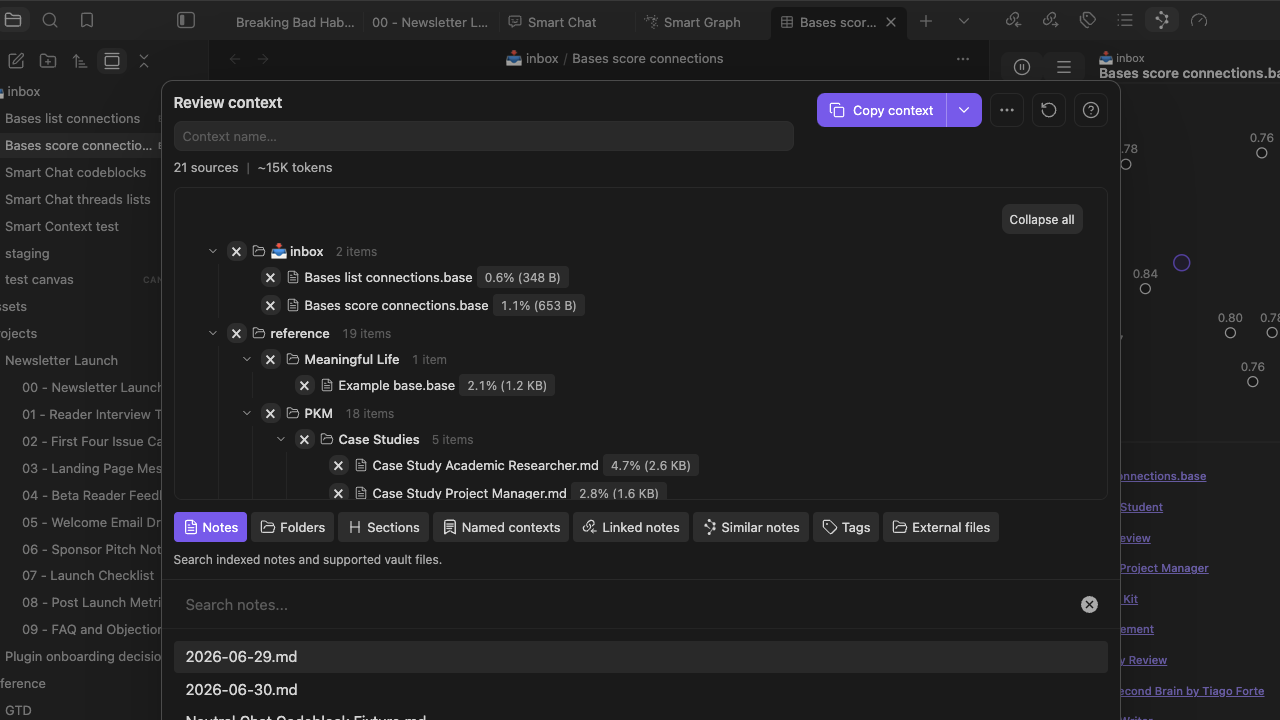
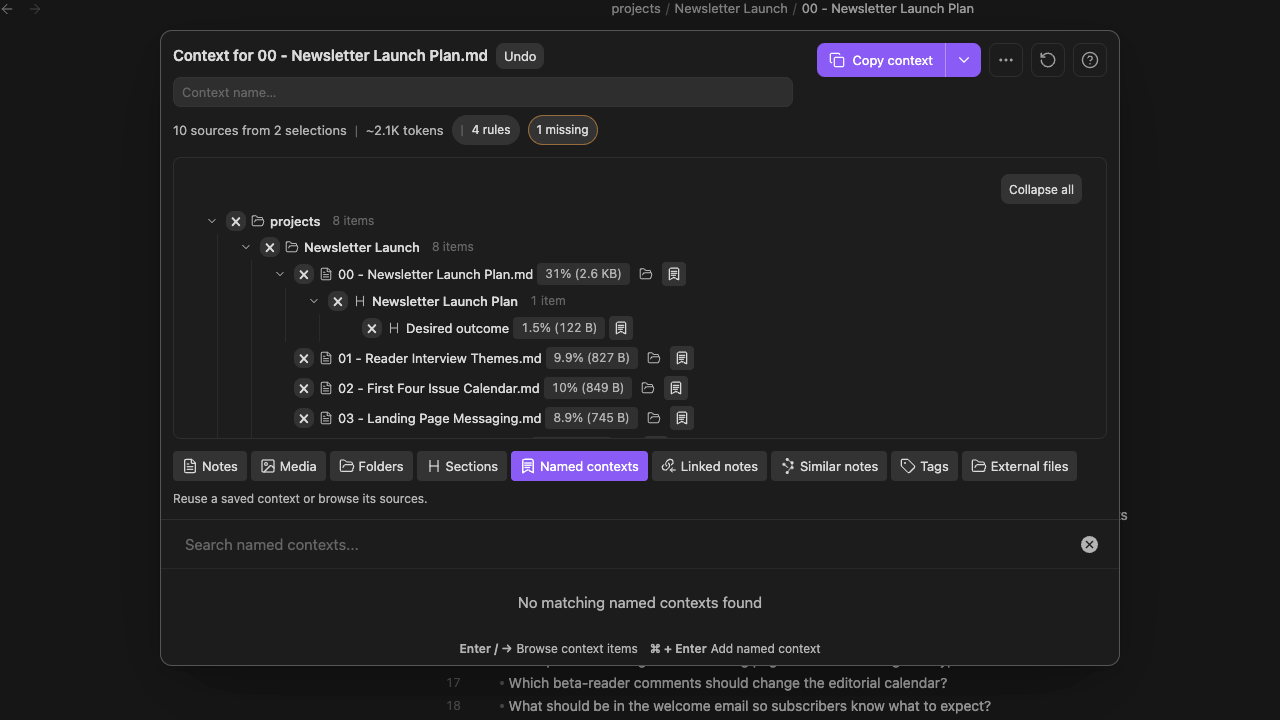
The top of the Builder shows the source count, number of selections, estimated token size, and active rules. The tree shows how the package expands, how much each source contributes, and which items came from a folder, section, or saved Context.

That makes Context useful before the copy action. You can see an overgrown folder, a source that dominates the payload, or a nested section that should be removed while the structure is still easy to change.

Add from the vault without flattening the source

Start with the current note, one block, a folder, linked notes, similar notes, a saved Context, or selected Lookup results. Drag supported items into the Builder or start typing from most places to search for the next source.

The tree keeps the origin visible. A section remains nested under its note. A named Context remains recognizable as a reusable source. The current note is easier to spot, and section or embedded-item detail stays attached when you add it.

Problems surface before the handoff

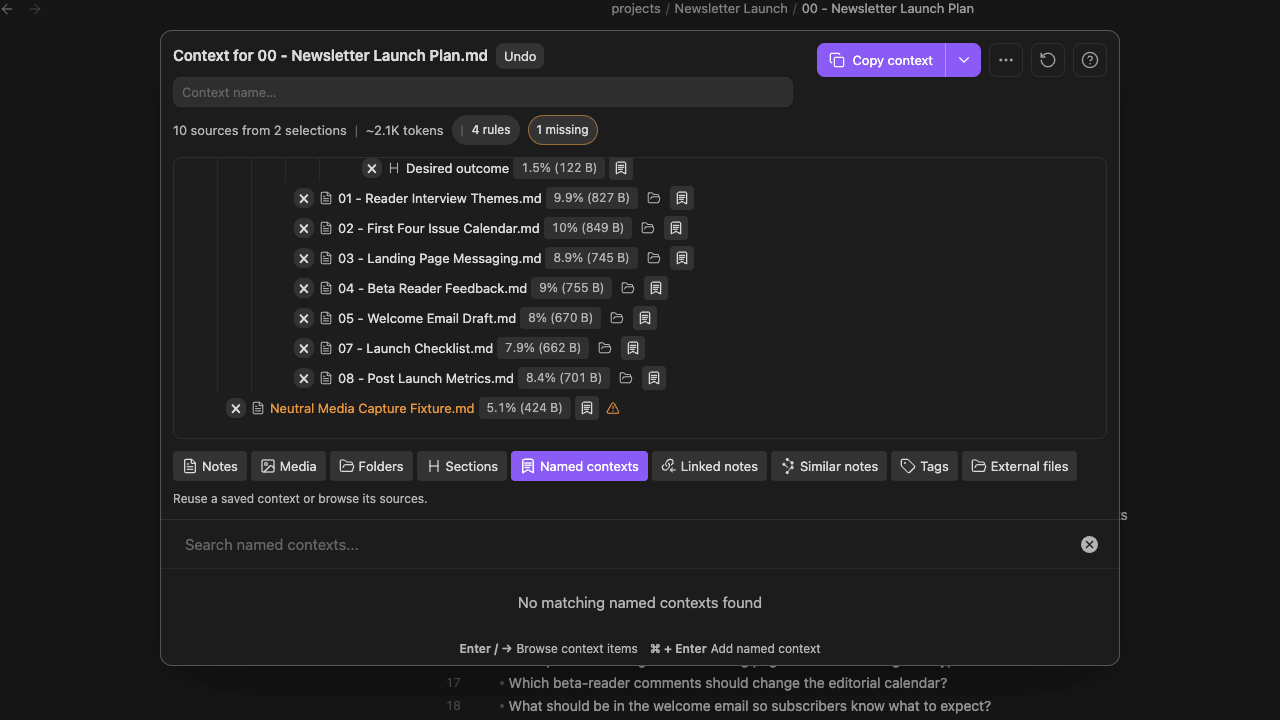
Missing items are now counted and highlighted instead of disappearing quietly. When a note moved or was deleted, the Builder gives you a direct removal path. You can clean up several broken references in succession without waiting for a complete background rerender after every click.

Include and exclude rules remain visible beside the package they shape. Expand or collapse the tree, inspect the source menu on any leaf, and understand why an item is present before it becomes part of a prompt.

Copy only when it looks right

When the source set is ready, choose the output that matches the next step:

  • Copy the compiled text for a one-off prompt.
  • Copy a Markdown link tree when the destination needs the source structure.
  • Save the reviewed package as a named Context when the same evidence will support later work.

The copy menu, source menus, file menus, commands, and ribbon actions now use the same Smart Environment action system, so the handoff feels less like a collection of plugin-specific shortcuts.

Smart Environment v3 makes the Builder part of the suite

The redesigned Builder sits on the same v3 foundation as Connections, Lookup, Chat, and Graph. Startup is faster, drag-and-drop preserves the source you moved, and shared menus make it easier to continue from the note or result set already in front of you.

The broader built-in embedding-model catalog and non-destructive model switching improve the semantic workflows that feed Context, while the new Environment Stats and source inspector help explain when a note was skipped, is stale, or is not embedded as expected.

Learn more about the release of Smart Environment v3.

Before / After

Before With the redesigned Context Builder
Context assembly and review felt like separate steps. Add, inspect, remove, copy, and save from one visible workspace.
A large package was difficult to explain at a glance. Source counts, token estimates, rules, contribution sizes, and the tree show what is actually present.
Nested sources could lose the reason they were included. Notes, sections, folders, and named Contexts keep their visible origin.
Missing sources could fail quietly or require cleanup elsewhere. Missing items are highlighted with a direct removal path.
Reusing a source set meant remembering how it was assembled. Save the reviewed result as a named Context and use it again.

Supporting improvements

  • Direct handoff from Smart Lookup results into the Builder.
  • Identity-preserving drag and drop for supported Context and Obsidian items.
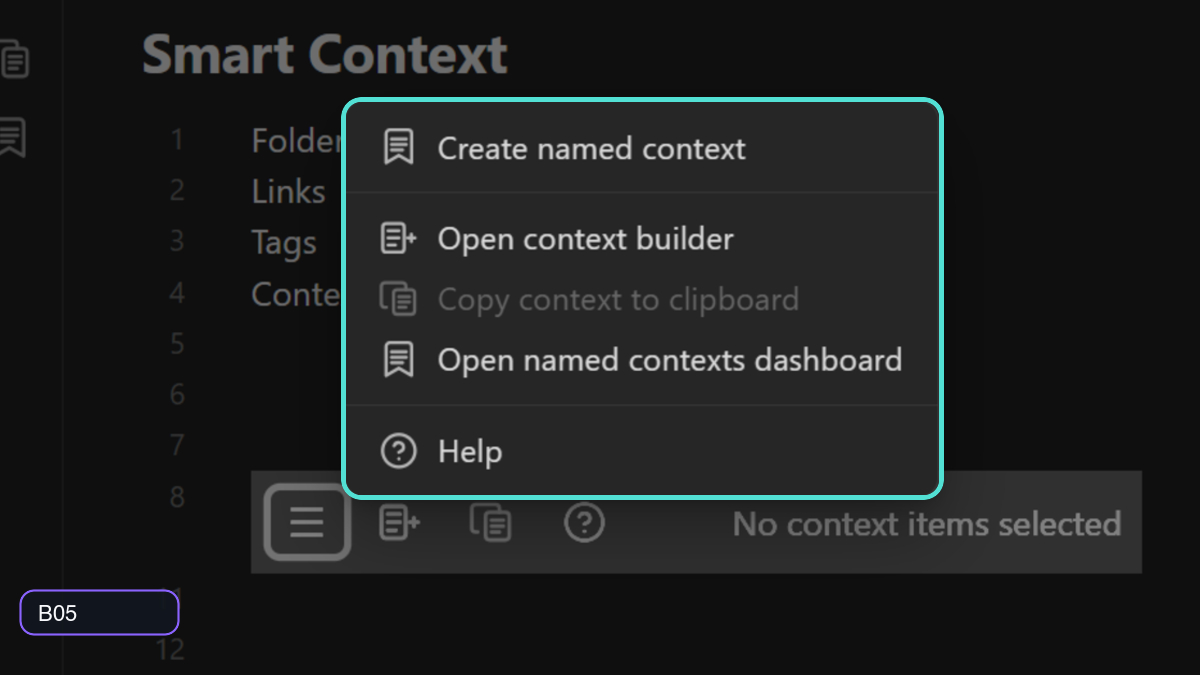
  • Clearer context-management, source, file, command, ribbon, and codeblock actions.
  • More consistent named-context identity across Smart Plugin workflows.
  • Queued source re-imports complete before direct context copying when needed.

Learn more

Updated: 2026-08-05

More details about the latest releases

README file from

Github

Smart Context

Copy the right Obsidian notes into AI without rebuilding context by hand.

Smart Context helps you send AI the notes, links, and source material the work actually needs.

Use it when an answer is weak because the AI did not have the right context, had too much context, or could not tell which notes mattered.

[!NOTE] Best first move Start with the current note at Depth 0. Use Depth 1 only when directly linked notes contain details the AI needs.

Why this works:

Common problem Smart Context move What improves
The answer is generic. Copy the note that already contains the task. AI starts from your real work.
Important facts are one note away. Add directly linked notes with Depth 1. Supporting sources travel with the request.
You keep rebuilding the same setup. Save the set as a named context. Repeated work starts faster.
The copied text is hard to inspect. Use templates with source paths and file trees. You can see where the context came from.
  • Works out of the box
  • Clipboard-first: paste into ChatGPT, Claude, Gemini, Smart Chat, or another AI tool
  • Starts small, then expands when the task needs more support
  • Uses templates so copied context can include source paths, depth, modified times, and a file tree
  • Built for local-first Obsidian workflows

Learn the workflows in depth:

Install Smart Context

Quick start: copy the current note first

Use this when one note already owns the work.

  1. Open the note that contains the task, question, draft, decision, meeting, or project brief.
  2. Run the current-note copy command.
  3. Choose Depth 0 first.
  4. Paste into your AI tool.
  5. Ask the model to use only the provided context.
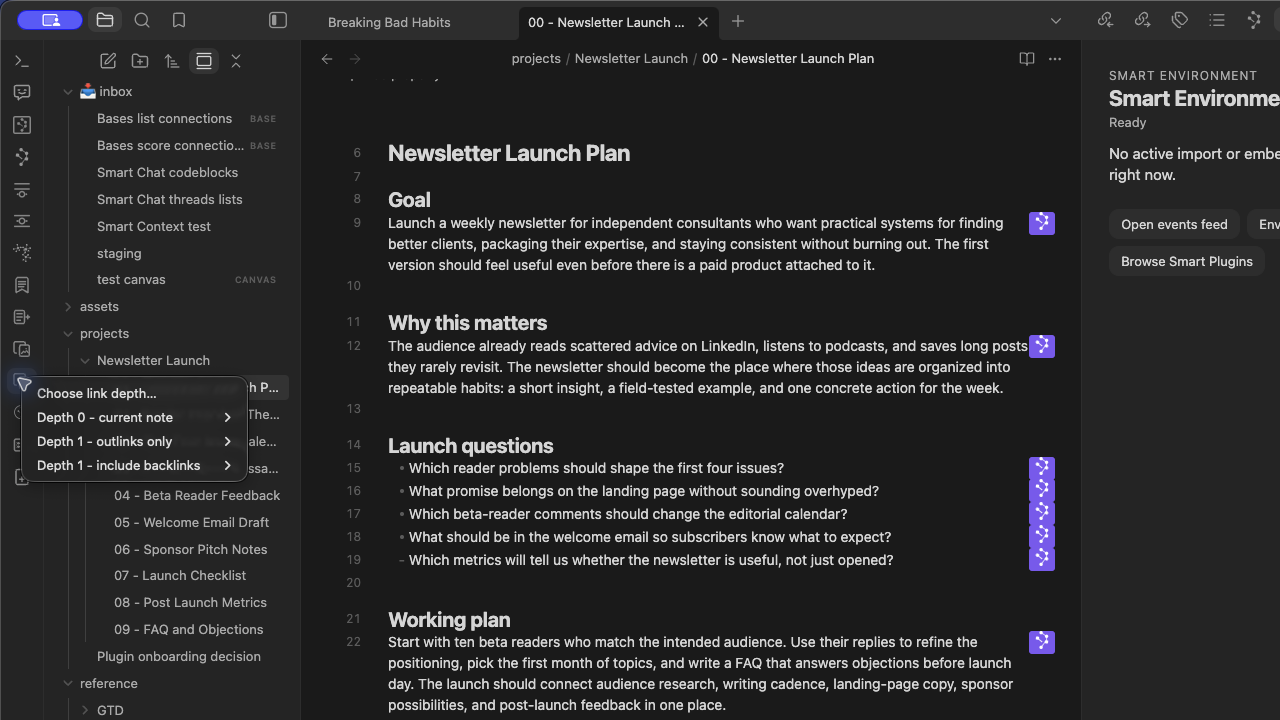
context-current-note-depth-menu-documentation-1280x720-desktop-2026-07-30

Prompt starter:

Use only this context.
First extract the constraints.
Then answer the request.
If something important is missing, list the exact missing note, section, or source instead of guessing.

You know it worked when:

  • the copied context is small enough to inspect after paste
  • the answer uses details from your note
  • or the answer clearly names what is missing

When to use Depth 1

Depth means how many link steps Smart Context includes.

Depth Plain meaning Use when
Depth 0 Copy just this note. The note is enough to start.
Depth 1 Copy this note plus notes it directly links to. Linked notes contain facts, examples, decisions, or requirements.
Depth 2+ Copy links beyond the first step. The starting set is small and you know those extra links matter.

If the answer is generic, do not immediately copy more notes.

First improve the starting note:

  • add the actual question
  • add What done looks like
  • add constraints
  • add or fix links to supporting notes
  • remove stale or noisy sources

Then copy again at the smallest useful depth.

Learn more in Copy current note as context.

Choose the right way to copy

What is true? Use this Why
One note owns the task. Current-note copy Best first move.
You already selected the right notes or folder. File navigator actions Fast direct export.
Notes are scattered or noisy. Builder Review and trim before copying.
The same set keeps coming back. Named context Save it for reuse.
Context should stay visible inside one note. Codeblock Keep a readable manifest attached to the note.
The work needs images, PDFs, Bases, repos, external files, dynamic groups, or heading filters. Pro Add richer sources or finer control.

Copy selected notes or folders

Use file navigator actions when you already know the right scope.

Copy selected notes

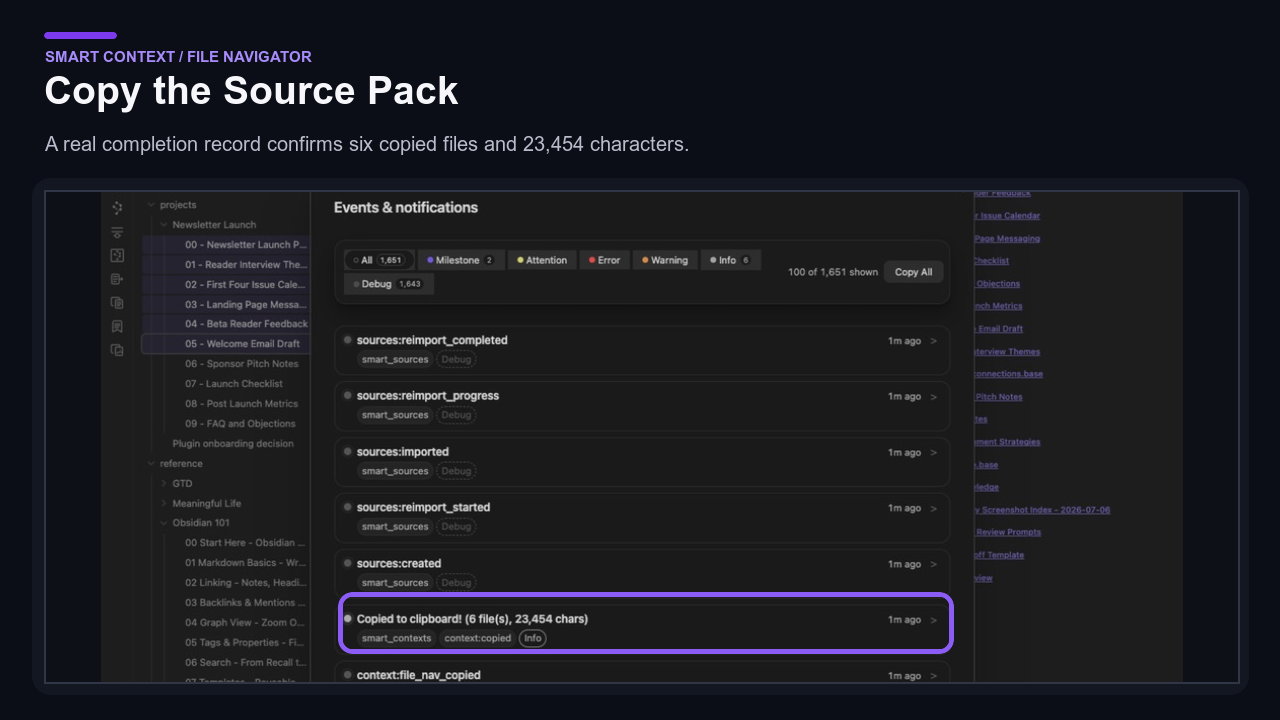
Select multiple notes, then right-click and choose Copy selected notes as context.
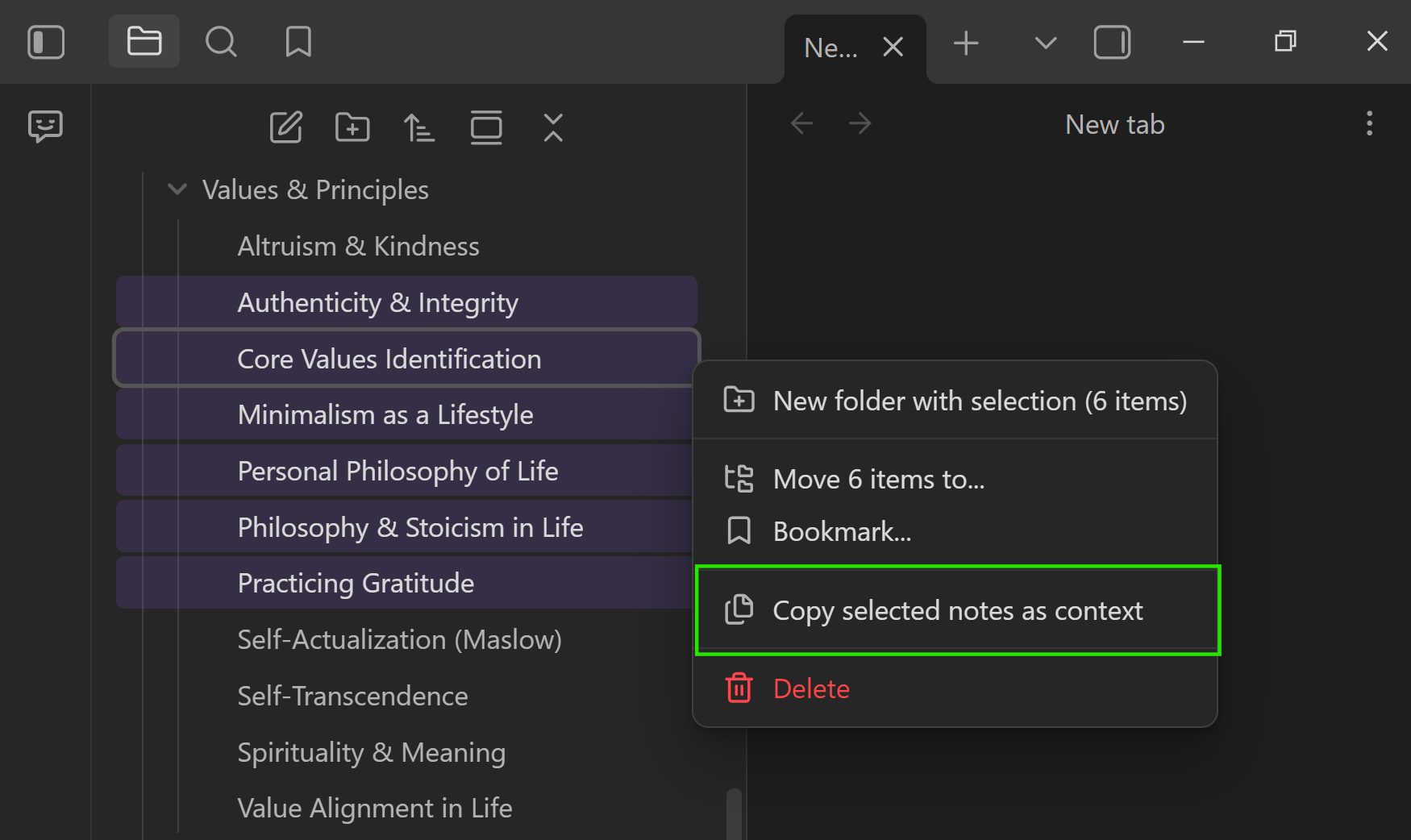
context-copy-confirmation-copy-confirmation-file-navigator-copy-selection-confirmed-1280x720-publication-srgb-e9e2af734277-2026-07-29

Copy a folder

Use this when the project already lives in one folder.
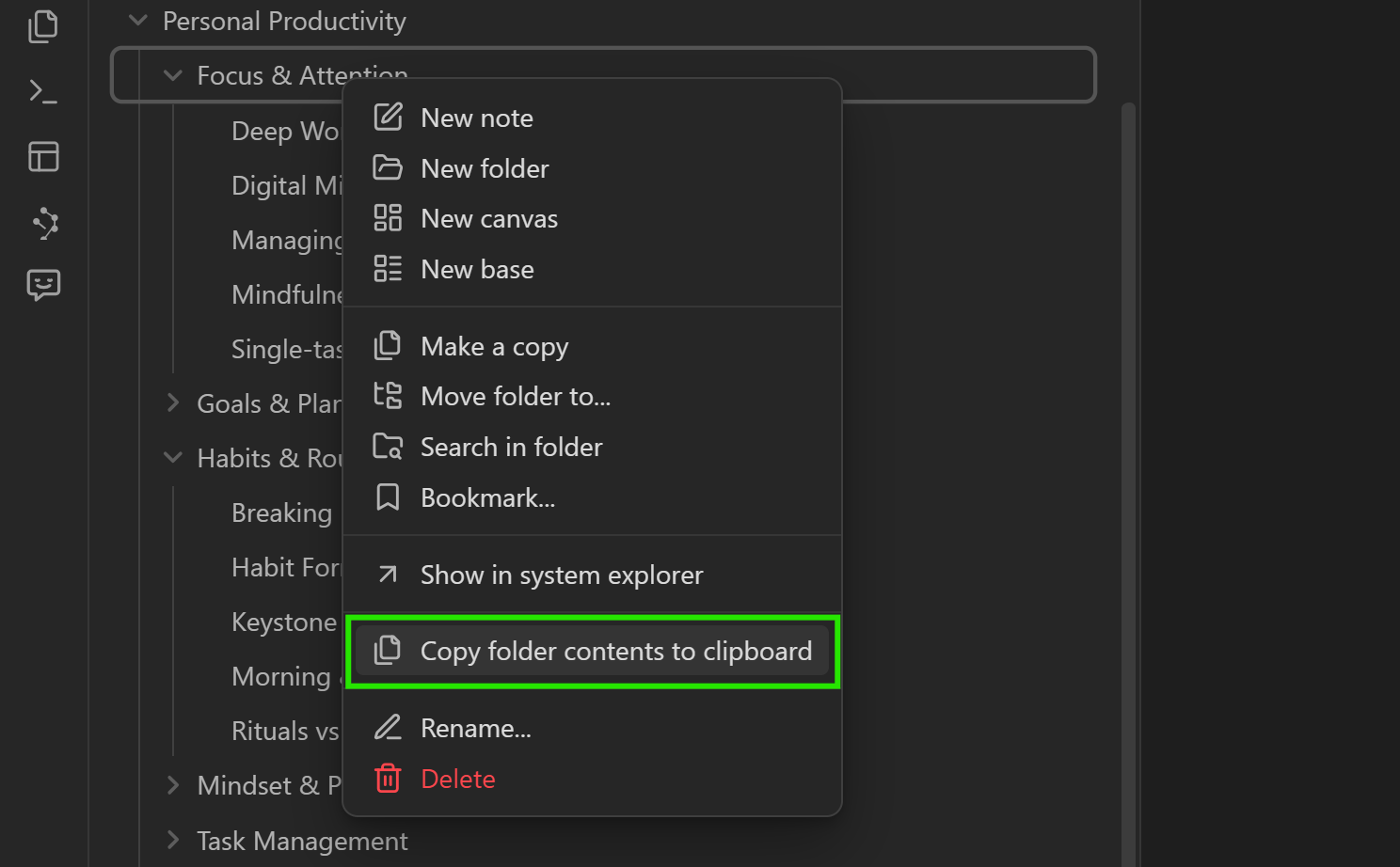
Folder menu - copy contents

Right-click a folder, then choose Copy contents.

Copy folder command
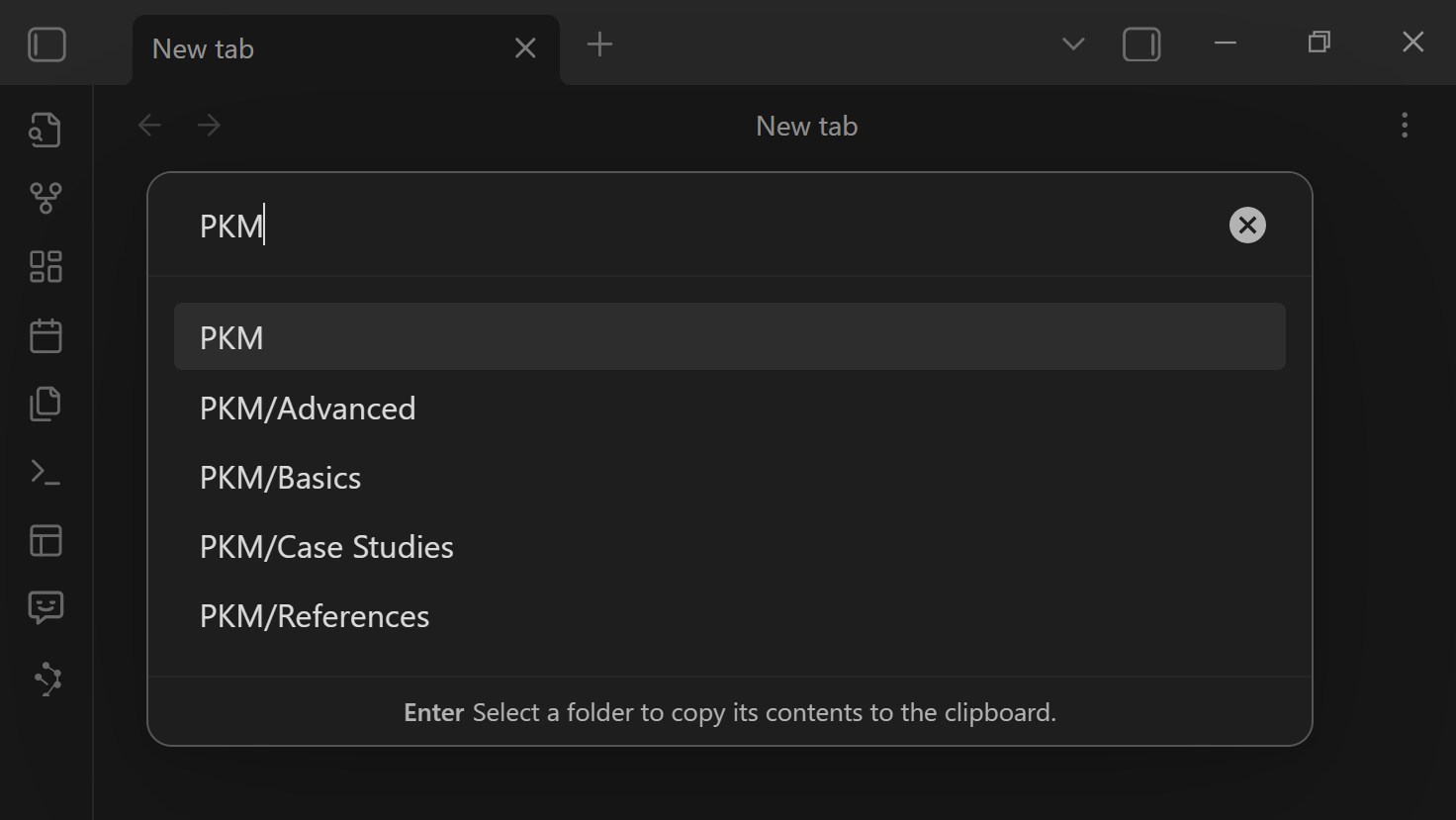
Select folder modal

You can also run the folder-copy command from the command palette and assign a hotkey.

[!TIP] Selected-note and folder-copy actions are fast direct-copy flows. They do not open the same link-depth chooser as current-note copy. If the copied context feels too broad, use a smaller selection or open the set in Builder.

Learn more about file nav actions.

Use Builder when the set needs cleanup

Builder is for reviewing, trimming, and saving context before copying.
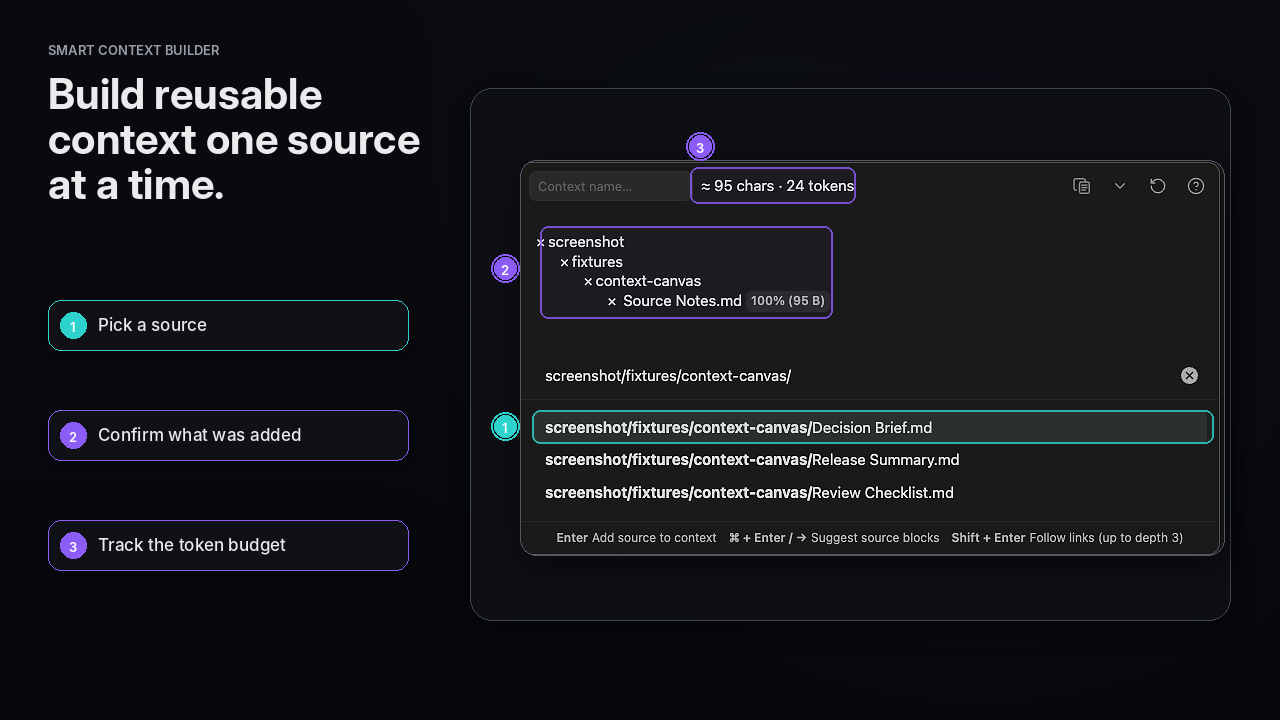
context-builder-source-to-context-editorial-hero-reviewed-1280x720-2026-07-29

Use Builder when:

  • the right notes are scattered
  • one long note only needs a few sections
  • the first copy was too large
  • you want to save the set for later

How it works:

  1. Run Smart Context: Open Selector for New Context.
  2. Search for notes or use the available suggestions.
  3. Press Enter to add a note.
  4. Press Right Arrow to choose blocks or sections when a full note is too much.
  5. Remove anything that does not help the task.
  6. Copy the set.
  7. Add a name only when you expect to reuse it.
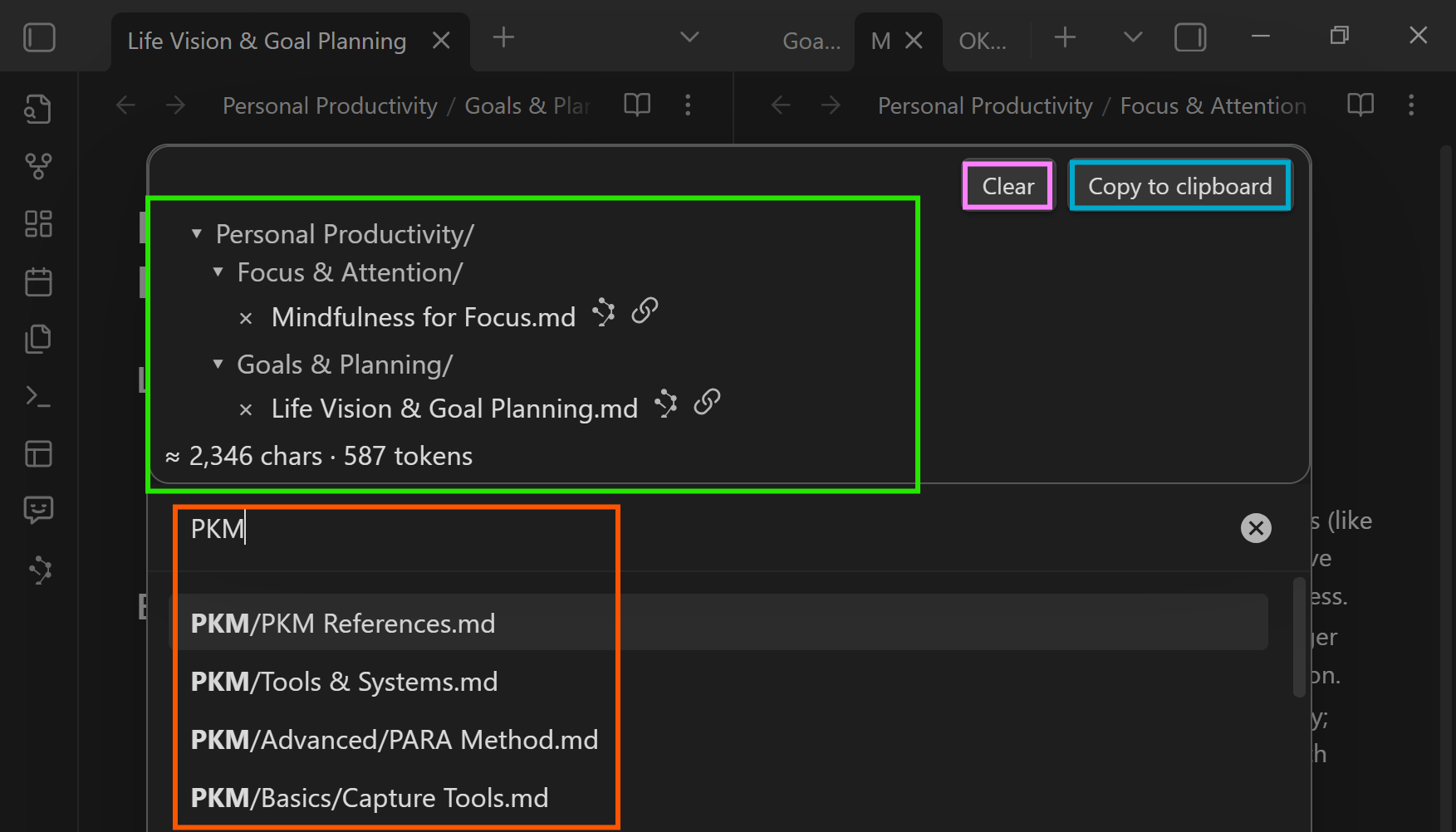
Context selector

Learn more about the Context Builder.

Block selection

Use blocks when one note has useful source material mixed with unrelated text.

Turn Connections results into context

Smart Connections can help you find related notes. Smart Context packages the useful ones.
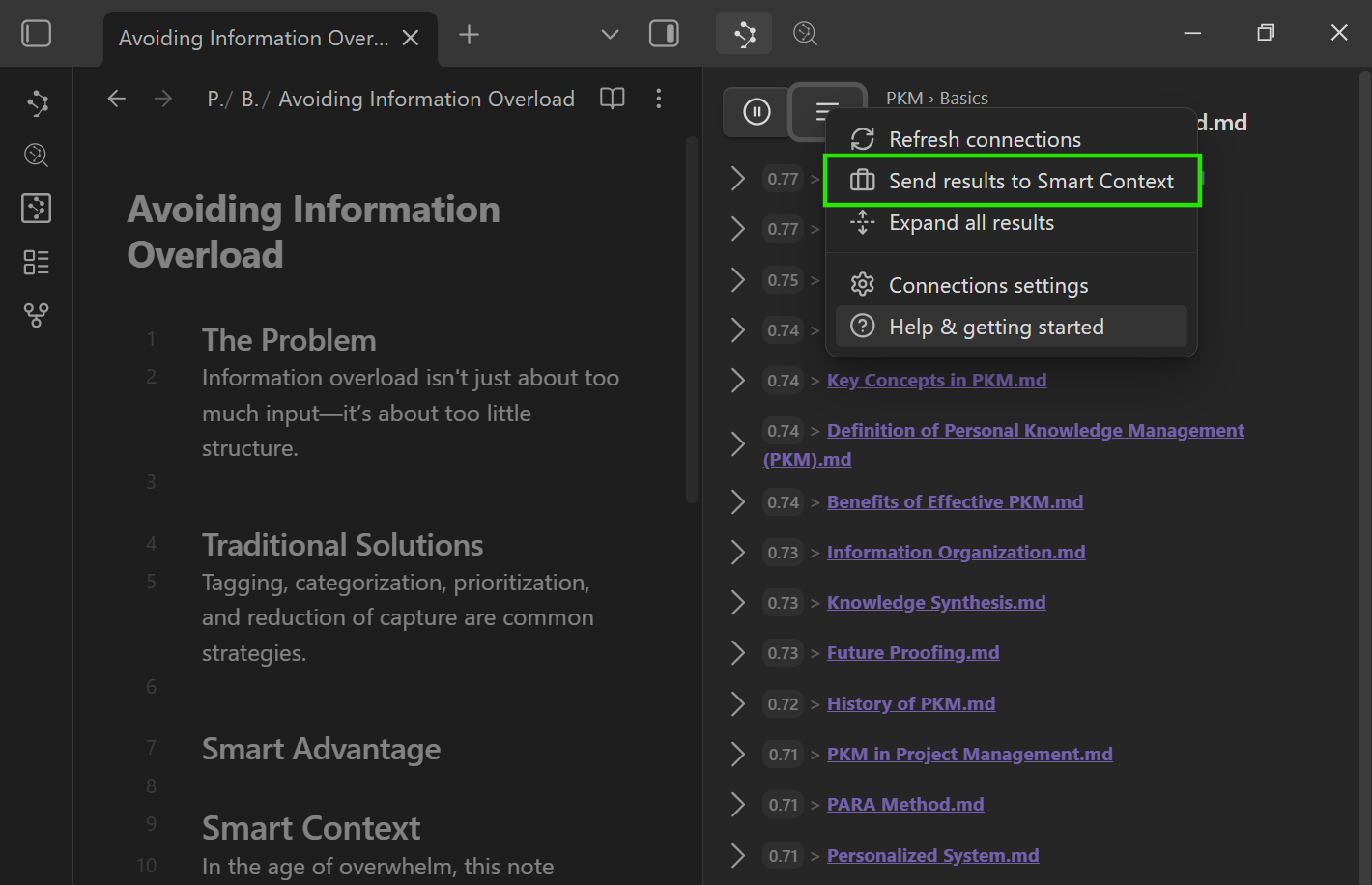
connections-results-transferred-context-builder-documentation-1280x720-desktop-2026-07-30

Workflow:

  1. Open the Connections view while working in a note.
  2. Send useful results to Smart Context when your version supports it.
  3. Remove noise in Builder.
  4. Copy the final set.

Save repeated sets as named contexts

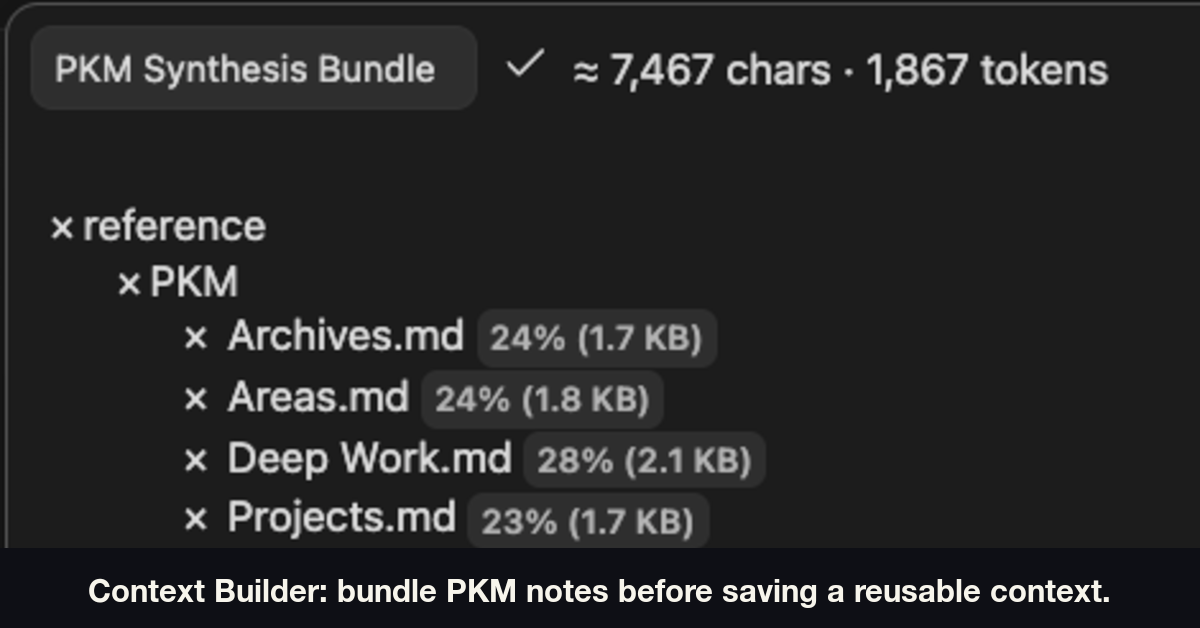
Named contexts are saved Smart Context sets you can reopen, copy, and refine later.

Use this rule:

If you rebuild the same set twice, save it as a named context.

Good named context examples:

  • project working set
  • meeting prep pack
  • writing voice pack
  • bug triage set
  • client handoff pack

context-builder-named-context-creation-campaign-pkm-sources-annotated-publication-srgb-6a3d884157b3-2026-07-29

Learn more in Named contexts.

Keep context attached to one note with codeblocks

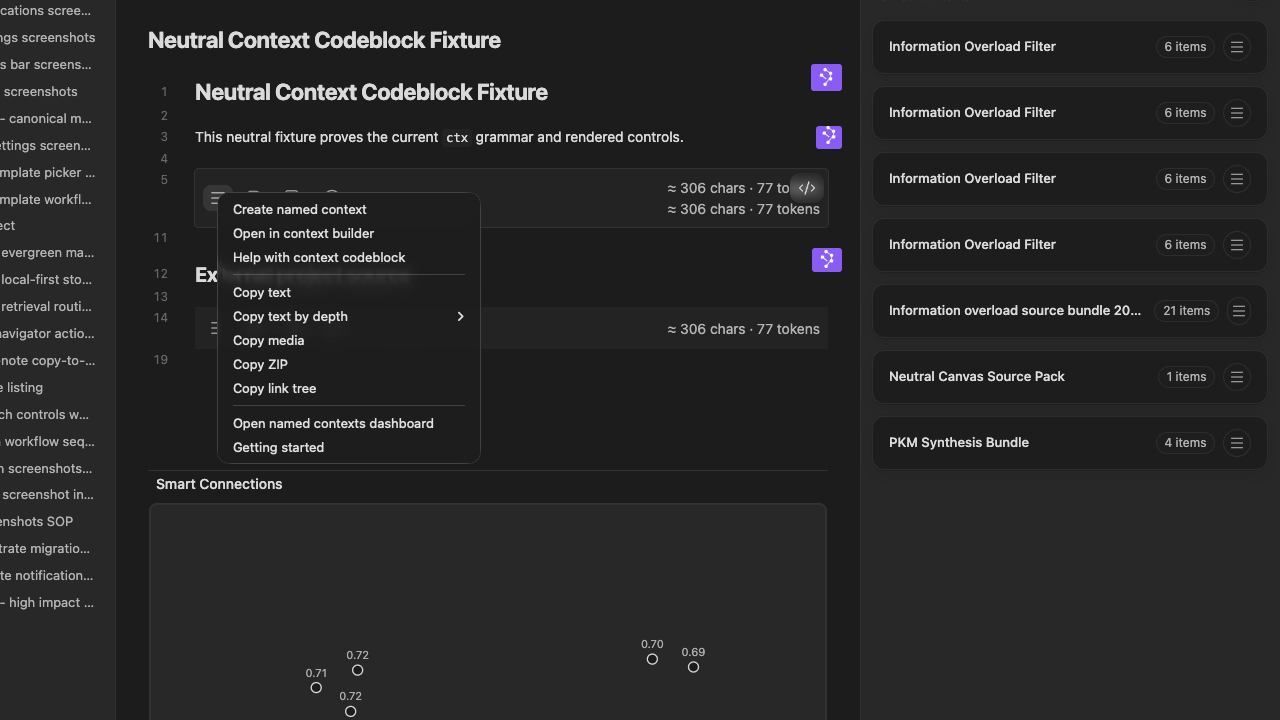
Use a Smart Context codeblock when the note should carry a visible context list.

Use Best object
Reuse the same set across many notes. Named context
Keep context attached to one note. Codeblock

context-codeblock-actions-menu-pro-contextual-hero-1280x720-desktop-2026-07-27

Learn more in Smart Context codeblocks.

Commands worth hotkeying

Use Obsidian Settings -> Hotkeys -> search Smart Context.

Recommended command families:

  • Copy current note with link-depth control - best first workflow.
  • Open Selector for New Context - open Builder for a curated set.
  • Copy selected notes as context - fast direct export from the file navigator.
  • Copy folder contents - fast project-folder snapshot.
  • Show named contexts - browse and reopen saved sets.
  • Help: Show getting started - open a quick reference inside Obsidian.

Templates

Open Settings -> Community plugins -> Smart Context.

Context templates wrap the full export. The default XML template includes {{FILE_TREE}} so the copied text can show a file tree.

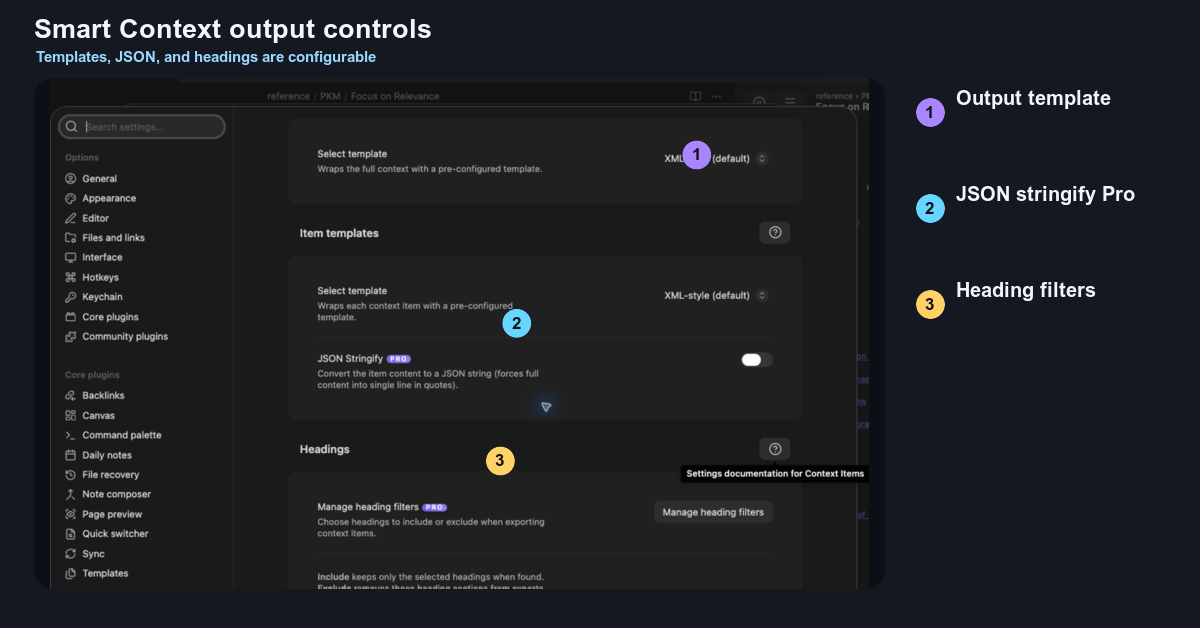
context-settings-context-output-controls-output-settings-highlighted-publication-srgb-e11d676ab2bf-2026-07-29

Item templates wrap each note or item. Useful variables include {{KEY}}, {{TIME_AGO}}, and {{LINK_DEPTH}}.

Templates only change copied/exported text. They do not change your vault files.

Learn more in the context settings reference.

Pro: richer sources and finer control

Core Smart Context is for trusted note-based context.

Context Pro helps when the work needs more than plain notes.

  • Richer sources: media, PDFs, Bases, repos, and external files on supported Pro workflows.
  • Finer control: dynamic groups, exclusions, heading filters, and advanced context workflows on supported Pro workflows.
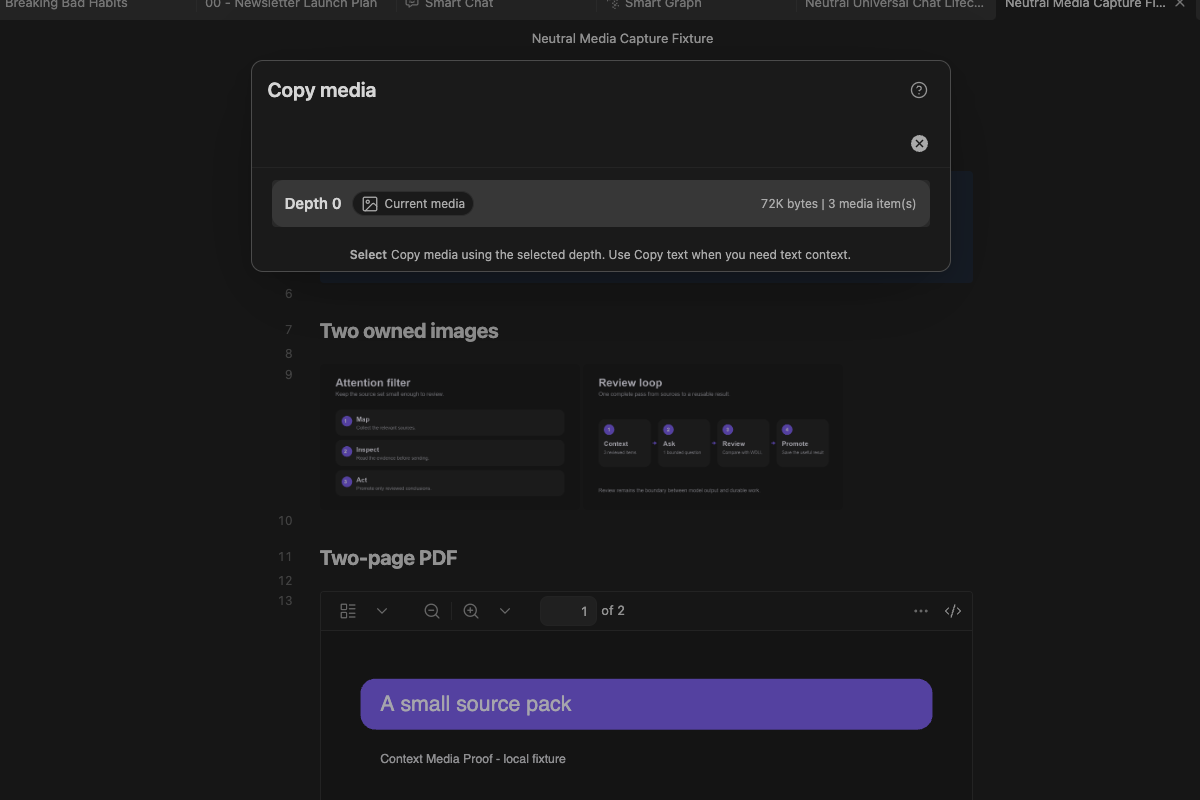
context-media-two-images-two-page-pdf-current-media-documentation-1200x800-desktop-2026-07-30

Use Pro when the assignment needs those sources or controls. Pro is not required for the first win.

Mission-driven

The Obsidian community proved user-aligned software can out-innovate closed platforms. Smart Context follows that spirit: source-available tools that empower individuals, not gatekeepers.

Read about the Smart Principles that guide development.

Private by Design

Smart Context prepares clipboard exports inside Obsidian.

Copied content can leave Obsidian when you paste or send it into another tool, chat provider, or enabled provider workflow. Review the pasted context before sending when your target tool allows.

FAQs

Thanks to the Community

Your feedback and support keep the project alive. Thank you!

Similar Plugins

info
• Similar plugins are suggested based on the common tags between the plugins.
Advanced Copy
2 years ago by leschuster
An Obsidian plugin to copy Markdown and transform it into HTML, Anki, or any custom format. Create custom profiles with versatile templates tailored to your workflow.
AI Assistant
3 years ago by Quentin Grail
AI Assistant Plugin for Obsidian
AI bot
2 years ago by kuzzh
The AI Bot Plugin is a powerful tool designed to enhance your note-editing experience in Obsidian by leveraging the capabilities of AI. This plugin allows you to interact with an AI assistant directly within Obsidian, making it easier to generate, edit, and organize your notes with intelligent suggestions and automated tasks.
AI Chat
2 years ago by arenasys
AI Editor
3 years ago by Zekun Shen
AI for Templater
2 years ago by TfTHacker
Extends Templater with AI Chat commands using the OpenAI Client Library
AI image analyzer
23 days ago by swaggeroo
Analyze images with AI to get keywords of the image.
AI integration Hub
a year ago by Hishmat Salehi
A modular AI integration hub for Obsidian
AI LaTeX Generator
2 years ago by Aayush Shah
An Obsidian plugin that generates latex code from natural language inputs.
AI LLM
2 years ago by Sparky4567
Lets to use local llms in your Obsidian Vaults, extend your stories or create entirely new texts based on your previous input
AI Mentor
3 years ago by clementpoiret
AI Notes Summary
3 years ago by R. Ian Bull (irbull)
An Obsidian plugin that uses ChatGPT to generate a summary of referenced notes
AI Providers
2 years ago by Pavel Frankov
This plugin is a hub for setting AI providers (OpenAI-like, Ollama and more) in one place.
AI Research Assistant
3 years ago by Interweb Alchemy
Prompt Engineering Research Tool for AI APIs
AI Revisionist
2 years ago by Synaptic Labs
AI Summarize
2 years ago by Alp Sariyer
Easy to use AI Summary tool for your notes in Obsidian
AI Tagger
2 years ago by Luca Grippa
Simplify tagging in Obsidian. Instantly analyze and tag your document with one click for efficient note organization.
AI Tagger Universe
a year ago by Hu Nie
An intelligent Obsidian plugin that leverages AI to automatically analyze note content and suggest relevant tags, supporting both local and cloud-based LLM services.
AI Zhipu
2 years ago by Tarslab
AI-zhipu is an Obsidian plugin that helps you utilize the Zhipu API. 智谱AI obsidian 插件
Arcana
3 years ago by A-F-V
Supercharge your Obsidian note-taking through AI-powered insights and suggestions
Ayanite
2 years ago by jemstelos
Blog AI Generator
a year ago by Gareth Ng
Obsidian Plugin: generate blog via AI based on the current note.
BMO Chatbot
3 years ago by Longy2k
Generate and brainstorm ideas while creating your notes using Large Language Models (LLMs) from Ollama, LM Studio, Anthropic, Google Gemini, Mistral AI, OpenAI, and more for Obsidian.
brAIn
3 years ago by lusob
Canvas Conversation
4 years ago by André Baltazar
A plugin for Obsidian that allows you to create a canvas conversation using ChatGPT.
Canvas LLM Extender
3 years ago by Pasi Saarinen
Let the OpenAI LLM add nodes to your Obsidian canvas
Caret
2 years ago by Jake Colling
Caret, an Obsidian Plugin
Chat with Bard
3 years ago by Artel250
An obsidian plugin that enables you to talk to Google Gemnini directly
ChatCBT
3 years ago by Claire Froelich
AI-powered journaling plugin for your Obsidian notes, inspired by cognitive behavioral therapy
ChatGPT Definition
3 years ago by julix14
ChatGPT MD
3 years ago by Bram Adams
A (nearly) seamless integration of ChatGPT into Obsidian.
Claude Sidebar
15 days ago by derek-larson14
Run Claude Code, Codex, and other agent CLIs in Obsidian
Claudian Plus
20 days ago by wuyifan-code
Clipboard Manager
a year ago by Ayush Raj
The clipboard obsidian plugin
Cliplet
10 months ago by namikaze-40p
An Obsidian plugin that serves as a clipboard and snippet manager — your own, separate from the OS clipboard.
CoCo AskAI
2 years ago by Yukee
CoCo-AskAI is an Obsidian plugin that enables AI-powered note assistance, enhancing the writing experience with customizable functions.
Codian
10 days ago by bcs
Open-source Obsidian plugin for local coding agents
Command Line
a year ago by Steven Stallion
Copy command lines from your notes to the clipboard.
Confluence Converter
a year ago by Addo Zhang
An Obsidian Plugin for Confluence
Convert Base64 to PNG
a year ago by Nykko Lin
Converts base64-encoded images to local PNG files for Obsidian.
Copy Contents
25 days ago by Richard Jones
Copy or export file and folder contents - perfect for LLMs
Copy document as HTML
4 years ago by mvdkwast
Obsidian plugin: copy document as HTML, including images
Copy Image
3 years ago by Felipe D.S. Lima
Easily copy image to clipboard by right clicking image.
Copy Inline Code
3 years ago by Ondrej Zavodny
Customizable Menu
5 years ago by kzhovn
This plugin allows you to add every command to Obsidian's right-click context menu and add custom icons.
Daily News Briefing
12 days ago by Adam Chen
Get AI-powered daily news summaries directly in your Obsidian vault. Stay informed about your topics of interest with smart, automated news collection and summarization.
Explain Selection With AI
2 years ago by Ben Wurster
This is my first go at making an Obsidian plugin to elaborate on and describe selected bits of information and their context.
Export to HTML
2 years ago by kalvn
Export a note as HTML in the clipboard or in a file.
Extract Highlights
6 years ago by Alexis Rondeau
Manage your highlights in Obsidian by easily creating, removing and exporting them.
Fix Line Endings on Copy
10 months ago by KiwiJanus
Flashcard Generator
3 years ago by ChloeDia
Obsidian Plug-in to automatically create a set of questions/answers on your notes !
Gemini Assistant
3 years ago by eatgrass
Your AI assistant in obsidian
Gemini Scribe
2 years ago by Allen Hutchison
An obsidian plugin to interact with Google Gemini
Ghost Text
a year ago by lawrencefeng17
Github Copilot
2 years ago by Vasseur Pierre-Adrien
A bridge between Obsidian and Github Copilot
GPT Assistant
3 years ago by M7mdisk
Ask GPT from your notes and get personalized answers based on your knowledge base.
GPT-LiteInquirer
3 years ago by ittuann
💬 Experience OpenAI ChatGPT assistance directly within Obsidian, drafting content without interrupting your creative flow.
Hanko
2 years ago by Telehakke
Obsidian plugin.
HiNote
a year ago by Kai
Add comments to highlighted notes, use AI for thinking, and flashcards for memory.
Image auto upload
5 years ago by renmu123
auto upload image with picgo
Image Context Menus
5 years ago by NomarCub
Image Context Menus - Obsidian.md image context menus: copy, open in default app, show in system explorer, reveal in navigation context menu. Also Open PDF externally context menu.
Image Embedder
a year ago by Natalie Sumbo
Image To Lskypro
3 years ago by NekouTarou
支持直接上传图片到图床Lsky,基于https://github.com/renmu123/obsidian-image-auto-upload-plugin.git改造。
Image Uploader
5 years ago by Creling
Images to Notes
a year ago by Rodolfo Terriquez
Turn photos of your handwritten notes into markdown
InfraNodus AI Graph View
2 years ago by Nodus Labs
Advanced graph view for Obsidian: text analysis, topic modeling, and AI with InfraNodus AI text analysis tool: https://infranodus.com
InlineAI
2 years ago by FBarrca
Intelligence
3 years ago by John Mavrick
JSONifier
6 years ago by Kjell Connelly
Khoj
4 years ago by Debanjum Singh Solanky
Your AI second brain. Self-hostable. Get answers from the web or your docs. Build custom agents, schedule automations, do deep research. Turn any online or local LLM into your personal, autonomous AI (gpt, claude, gemini, llama, qwen, mistral). Get started - free.
Large Language Models
a month ago by eharris128
The LLM plugin gives Obsidian users access to local and web-based, large language models via several chat interfaces: modal, widget, FAB window, and commands.
Links
3 years ago by MiiKey
manipulate & manage obisidian links
LLM Test Generator
a year ago by Aldo E George
LLM workspace
2 years ago by Olivér Falvai
Markpilot
2 years ago by Taichi Maeda
AI-powered inline completions and chat view for Obsidian
Memos AI Sync
a year ago by leoleelxh
obsidian-memos-sync-plugin,将 Memos 内容同步到 Obsidian 的插件,提供无缝集成体验。
Mesh AI
2 years ago by Chasebank87
Metadata Auto Classifier
2 years ago by Beomsu Koh
AI-powered Obsidian plugin that automatically classifies and generates metadata (tags, frontmatter) for your notes.
NanoBanana PRO
5 days ago by reallygood83
Notemd
a year ago by Jacob
A Easy way to create your own Knowledge-base! Notemd enhances your Obsidian workflow by integrating with various Large Language Models (LLMs) to process your notes, automatically generate wiki-links for key concepts, create corresponding concept notes, perform web research, and more.
Nova
6 months ago by Shawn Duggan
Nova - AI plugin for Obsidian that edits your documents directly through natural conversation. Stop copying from chat, start collaborating with AI.
Open Interpreter
2 years ago by Mike Bird
The power of Open Interpreter in your Obsidian vault
Paste as file link
a year ago by Matthias Büge
This plugin is used to paste a text from the clipboard as a link to an existing obsidian note
Paste From History
3 years ago by Daniel Karakka
Obsidian plugin that adds the ability to paste text from Obsidian's clipboard history.
Paste Image Into Property
a year ago by Nito
Paste Image Rename and Convert
a year ago by iaos
An obsidian plugin that renames pasted images and covert formats
Proofreader
a year ago by pseudometa (aka Chris Grieser)
AI-based proofreading and stylistic improvements for your writing. Changes are inserted as suggestions directly in the editor, similar to suggested changes in word processing apps.
Publish URL
3 years ago by Hananoshika Yomaru
copy the publish url to clipboard
Quiz Generator
2 years ago by Edward Cui
Generate interactive flashcards from your notes using models from OpenAI (ChatGPT), Google (Gemini), Ollama (local LLMs), and more. Or manually create your own to use with the quiz UI.
Recursive Copy
2 years ago by datawitch
Relative Find
5 years ago by phibr0
Reverse Prompter
2 years ago by Ryan Halliday
Let AI generate prompts to keep you writing
Show Current File Path
6 years ago by Ravi Mashru
Obsidian plugin to show the file path of the current file in the status bar
Silicon AI
3 years ago by deepfates
Add some intelligence to your notes with Silicon AI for Obsidian
Smart Composer
2 years ago by Heesu Suh
AI chat assistant for Obsidian with contextual awareness, smart writing assistance, and one-click edits. Features vault-aware conversations, semantic search, and local model support.
Smart Connections
4 years ago by Brian Petro
Find related notes and excerpts while writing. Your link building copilot displays relevant content in graph + list view. A local embedding model powers semantic search. Zero setup. No API key.
Smart Second Brain
2 years ago by Leo310, nicobrauchtgit
An Obsidian plugin to interact with your privacy focused AI-Assistant making your second brain even smarter!
Smart Templates
2 years ago by 🌴 Brian Petro
Smart Templates is an AI powered templates for generating structured content in Obsidian. Works with Local Models, Anthropic Claude, Gemini, OpenAI and more.
Sonkil
a year ago by ohyoungpark
Star Gate
15 days ago by starhunter
obsidian gate plugin
Strapi Exporter AI
2 years ago by Cinquin Andy
[prod] - 🚀 Strapi Exporter: Supercharge Your Obsidian-to-Strapi Workflow, export an obsidian notes directly to your Strapi API
Student Repo
a year ago by Feirong.zfr
学生知识库助手(Student Repository Helper)是一个面向学生或学生家长的Obsidian 插件,这款插件旨在解决学生在学习阶段面临的资料管理难题,将学习过程中产生的各类重要资料,如试卷、笔记、关键文档、绘画手工作品等,进行系统性的数字化整合与管理,并利用 AI 助手定期进行学习分析总结。随着时间的推移,它将助力你逐步搭建起一座专属你自己的知识宝库,这座宝库将伴随你一生,成为你知识成长与积累的见证。
Tars
2 years ago by Tarslab
Obsidian tars plugin that supports text generation based on tag suggestions, using services like DeepSeek, Claude, OpenAI, OpenRouter, SiliconFlow, Gemini, Ollama, Kimi, Doubao, Qwen, Zhipu, QianFan & more.
Vault Chat
3 years ago by Exo Ascension
A ChatGPT bot trained on your vault notes. Ask your AI questions about your own thoughts and ideas!
Vision Recall
a year ago by Travis Van Nimwegen
Transform screenshots into searchable Obsidian notes using AI vision and text analysis
WordWise
2 years ago by ckt1031
Writing companion for AI content generation.
YOLO
7 months ago by Lapis0x0
Agent-native AI assistant — chat, write, learning, all in one.
YouTube Video Summarizer
2 years ago by mbramani
Generate AI-powered summaries of YouTube videos directly in Obsidian using Google's Gemini AI.