Tars

by Tarslab
5
4
3
2
1
Score: 70/100

Description

Category: Creative & Writing Tools

The Tars plugin integrates AI-assisted text generation into Obsidian, triggered by user-defined tags. It supports multiple AI providers, including Claude, OpenAI, Gemini, and more, offering a versatile and customizable experience. Users can create conversations, where AI responds based on the provided prompt, and also leverage internal links for richer content creation. The plugin allows exporting conversations as JSONL datasets for further use and fine-tuning. With features like customizable models and API keys, Tars provides flexibility in how AI is utilized in note-taking, content generation, and dialogue-based workflows.

Reviews

No reviews yet.

Stats

324
stars
47,806
downloads
31
forks
804
days
5
days
5
days
44
total PRs
0
open PRs
6
closed PRs
38
merged PRs
85
total issues
2
open issues
83
closed issues
53
commits

Latest Version

6 days ago

Changelog

🆕 3.6.0 New providers

  • MiniMax (#125, #126)
  • LongCat (#120)

🔧 3.6.0 Improvements

  • Model lists now come from the provider. Claude, DeepSeek, Qwen, OpenAI, Doubao, Ollama, Gemini and Zhipu now ask their own API which models exist, rather than offering a list baked into the plugin that goes stale. A model missing from the list can still be set under "Override input parameters". (#119, #121)
  • Thinking appears in a callout for more models, however they send it. A provider reports reasoning either in its own field or wrapped in <think> tags, and some model families use each — Zhipu uses both. Both are handled now, and the blank lines models leave around their thinking are trimmed. (#116)
  • Adding an assistant opens its own settings page, where its tag and API key are.
  • Azure asks for a deployment name, in a text field. It was a dropdown of model names, which can never be right: an Azure deployment is named by whoever created it.

🐛 3.6.0 Fixes

  • ModelScope and other gateways no longer fail CORS. The bundled OpenAI SDK stamps X-Stainless-* telemetry headers onto every request, and a gateway whose allowlist does not name them rejects the request entirely. They are no longer sent. (#108)
  • Kimi and Grok no longer stop an answer part-way. A streamed frame that arrived split across two network reads was parsed in halves, which ended the stream mid-sentence and reported nothing. It only happened when the packets landed that way, which is why it looked random.
  • OpenRouter no longer reports a rejected request as a success. An HTTP error produced no text and no error, and the editor still said the text had been generated.
  • Image generation works on mobile. It used a Node API that mobile does not have, and threw every time.
  • "Override input parameters" reaches Claude, Gemini and image generation. Every key beyond a provider's own settings was being dropped there in silence.
  • A provider's own settings no longer leak into its request body — only declared parameters are sent.
  • Adding a second assistant of the same provider now names it (Qwen2), instead of saving it with no tag — which left it impossible to trigger, while still showing an entry reading # : in the command palette.
  • Clearing an assistant's tag now says so instead of silently keeping the previous one while the field looks empty.
  • Azure says which field is missing when its endpoint is blank, rather than failing obscurely.

🆕 3.6.0 新增服务商

  • MiniMax 海螺 (#125, #126)
  • LongCat 龙猫 (#120)

🔧 3.6.0 改进

  • 模型列表改为向服务商获取。 Claude、DeepSeek、Qwen、OpenAI、Doubao、Ollama、Gemini、Zhipu 现在调用官方接口获取模型列表,不再使用插件里写死、会过期的列表。列表里没有的模型,仍然可以在「覆盖输入参数」里设置。(#119, #121)
  • 更多模型的推理内容会显示为 callout,无论它用哪种方式传出来。 服务商要么用单独的字段返回推理内容,要么用 <think> 标签包裹,有些系列两种都用——智谱就是。现在两种都支持,模型在推理内容前后留下的多余空行也会被去掉。(#116)
  • 新增 AI 助手后直接进入它自己的设置页,标签和 API key 都在那里。
  • Azure 的「模型」改为填部署名称的输入框。 原来是模型名下拉框,那不可能对:Azure 的部署名是创建者自己起的。

🐛 3.6.0 修复

  • ModelScope 等网关不再被 CORS 拦截。 内置的 OpenAI SDK 会给每个请求打上 X-Stainless-* 遥测请求头,而允许列表里没有列出它们的网关会直接拒绝整个请求。现在不再发送这些头。(#108)
  • Kimi 和 Grok 的回答不再中途断掉。 一个流式数据帧如果被拆到两次网络读取里,就会被拆成两半去解析,导致回答从中间中断且不报任何错。它只在数据包恰好那样落下时发生,所以看起来像是随机的。
  • OpenRouter 不再把被拒绝的请求报告成成功。 HTTP 错误既不产生文本也不产生报错,而编辑器仍然提示「文本生成成功」。
  • 图像生成在手机端可用了。 它用了移动端没有的 Node API,此前每次都会抛错。
  • 「覆盖输入参数」对 Claude、Gemini 和图像生成生效了。 此前这三处会静默丢弃服务商自身设置以外的所有键。
  • 服务商自身的设置不再混进请求体——只发送声明过的参数。
  • 给同一个服务商添加第二个助手时会自动命名(如 Qwen2),不再存成空标签——空标签的助手永远无法触发,却仍会在命令面板留下一条 # : 的条目。
  • 清空助手标签时会给出提示,而不是在输入框看起来是空的情况下静默保留原值。
  • Azure 端点为空时会指明缺哪一项,不再以晦涩的方式失败。

README file from

Github

Tars

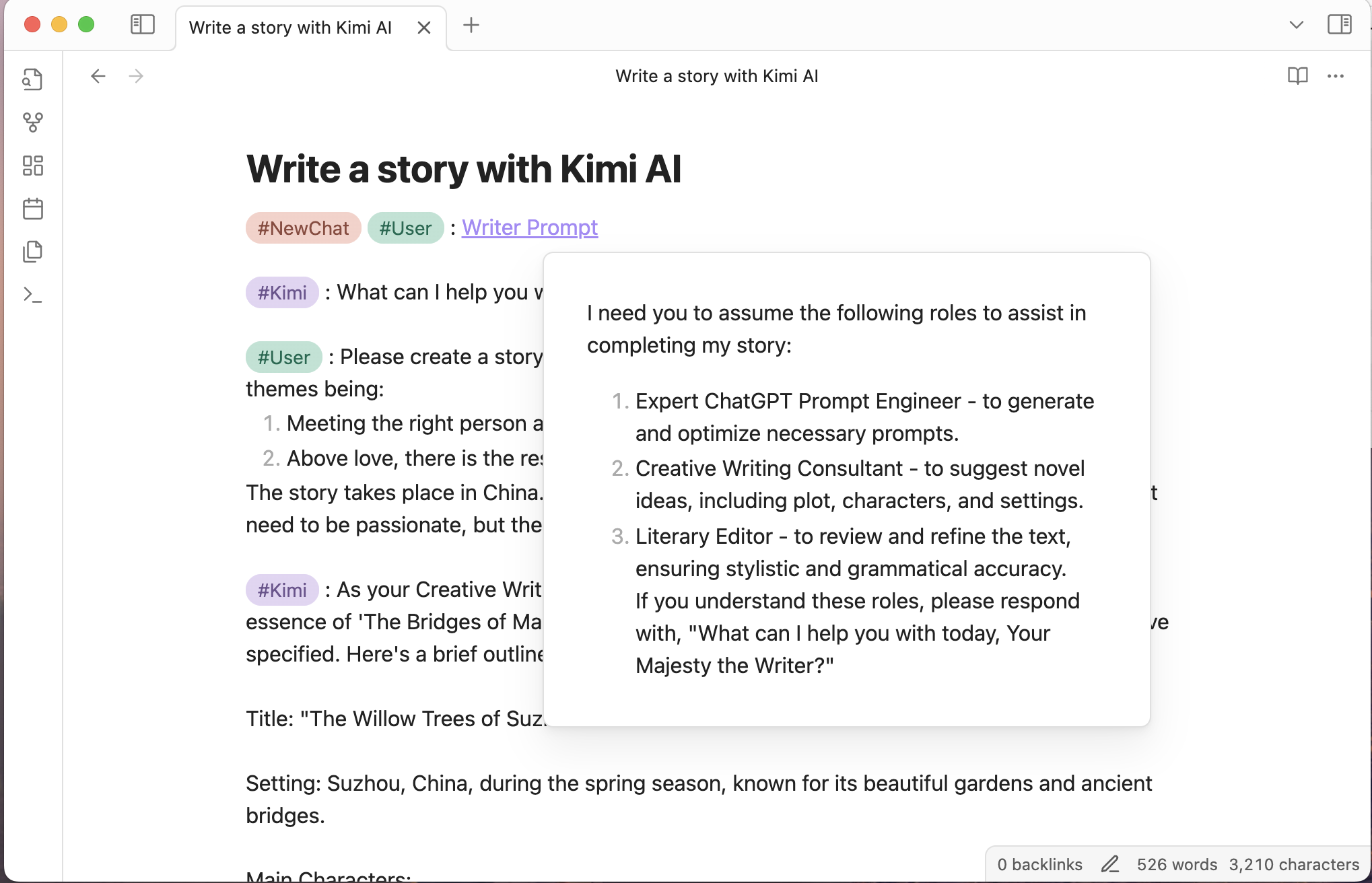
Tars is an Obsidian plugin that supports text generation based on tag suggestions, using services like Claude, OpenAI, Gemini, 🔥DeepSeek, 🔥SiliconFlow, 🔥OpenRouter, 🔥MiniMax, 🔥LongCat, Ollama, Kimi, Doubao, Qwen, Zhipu, QianFan & more. The name Tars comes from the robot Tars in the movie "Interstellar". The plugin supports both desktop and mobile devices.

🌟 3.1 Multimodal

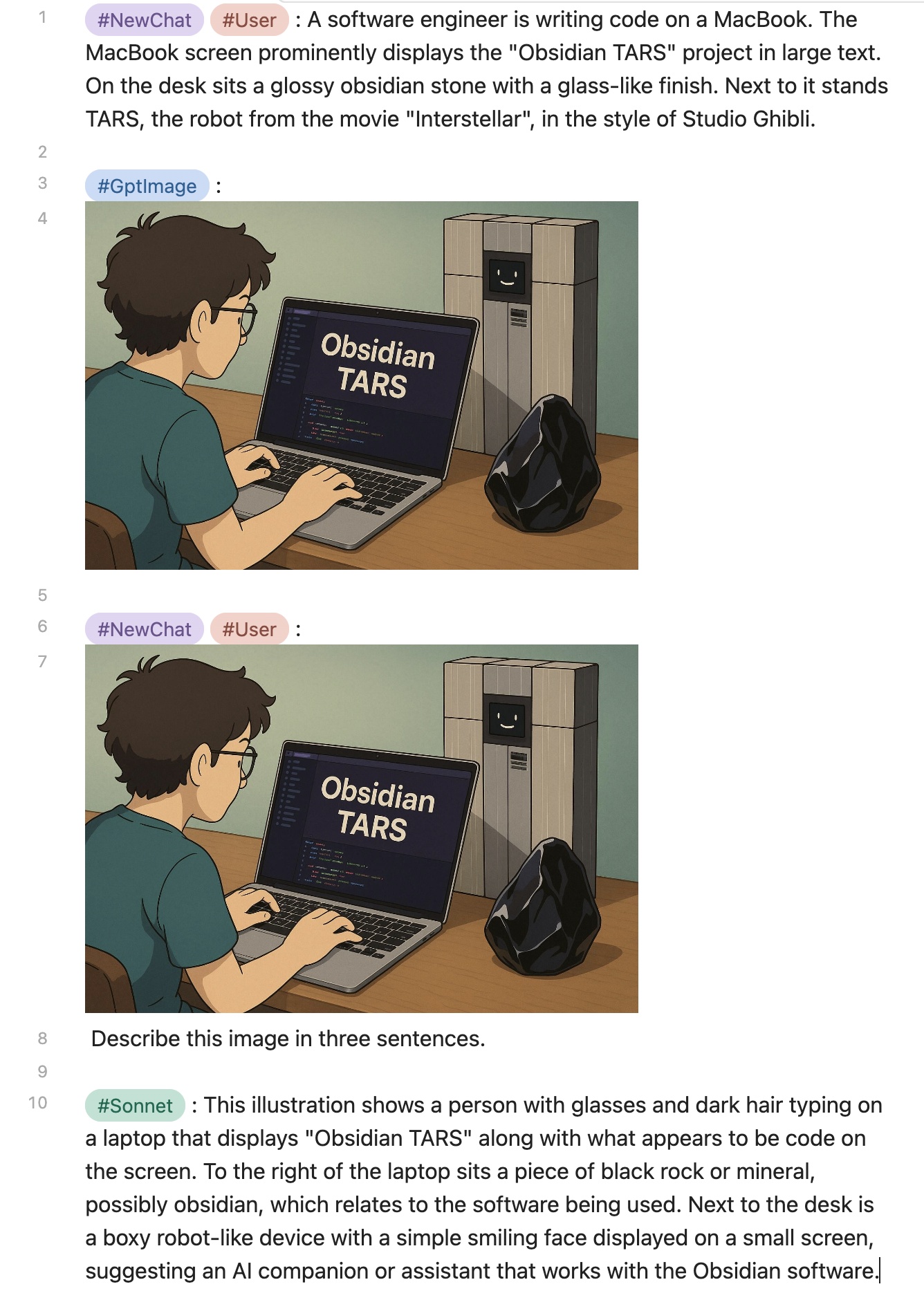
🎨 Image Generation

  • GPT-Image-1: Supports image generation and editing functions

👁️ Visual Understanding

  • Image Analysis: Claude, OpenRouter, SiliconFlow, etc. can interpret images
  • Document Interpretation: Claude and OpenRouter, etc. support PDF file analysis

⚠️ Note: Only embedded files (e.g. ![[example.jpg]]) are supported. External URL links will not work.
Vision

Major Updates in Version 2.x

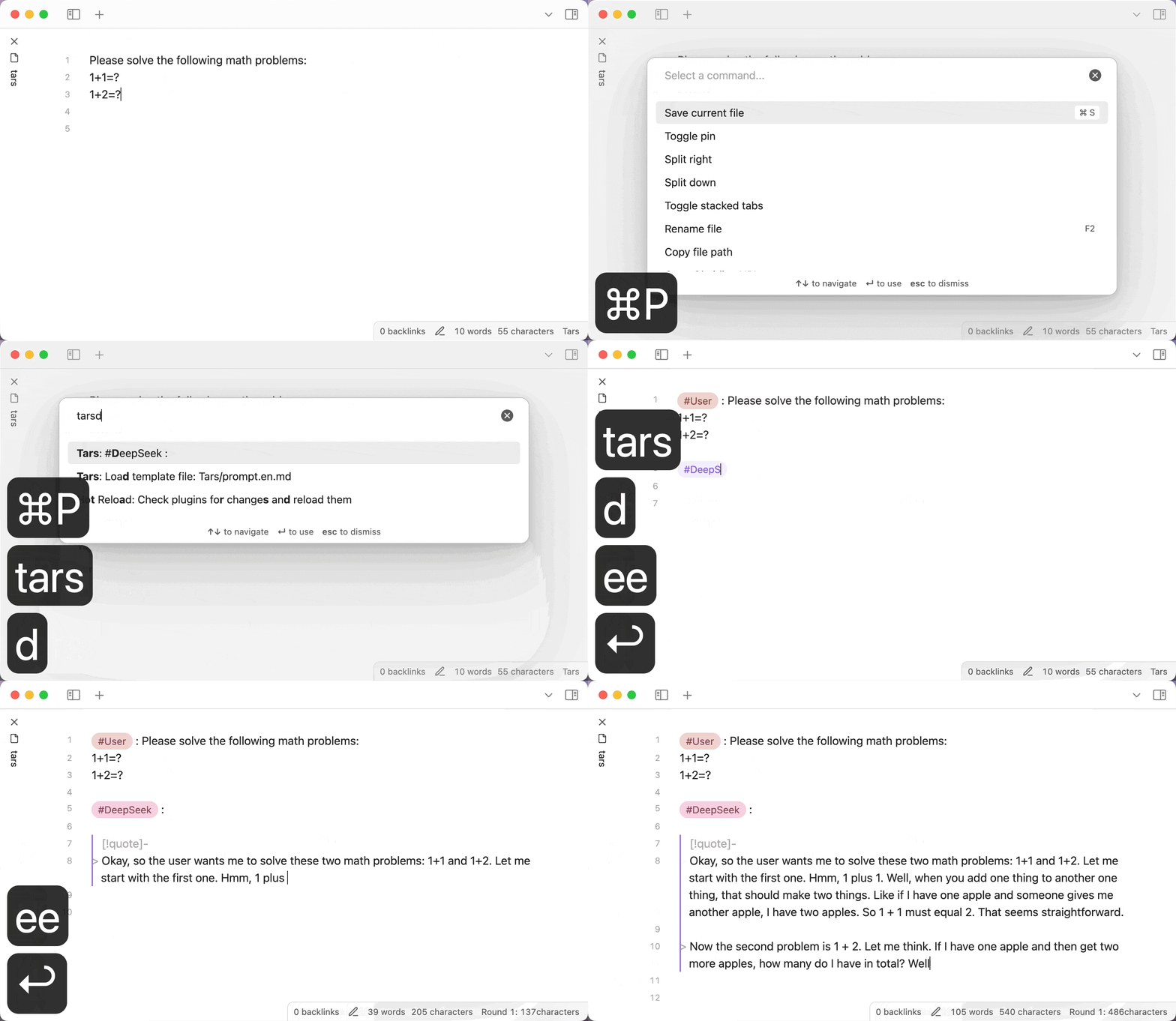
  • 🔥 Added tag commands, all tags are available in the command list. Tag commands insert the appropriate tags based on selected sections or the section at cursor position.
    Quick response: Move the cursor to the line (or select multiple paragraphs), choose an assistant tag (like #DeepSeek :) from the command list to generate a response.
deepseek

  • 🔥 Custom prompt templates, run the "Load template file" command when using for the first time.
  • 🔥 Status bar that displays real-time information about character count, rounds, and time spent.
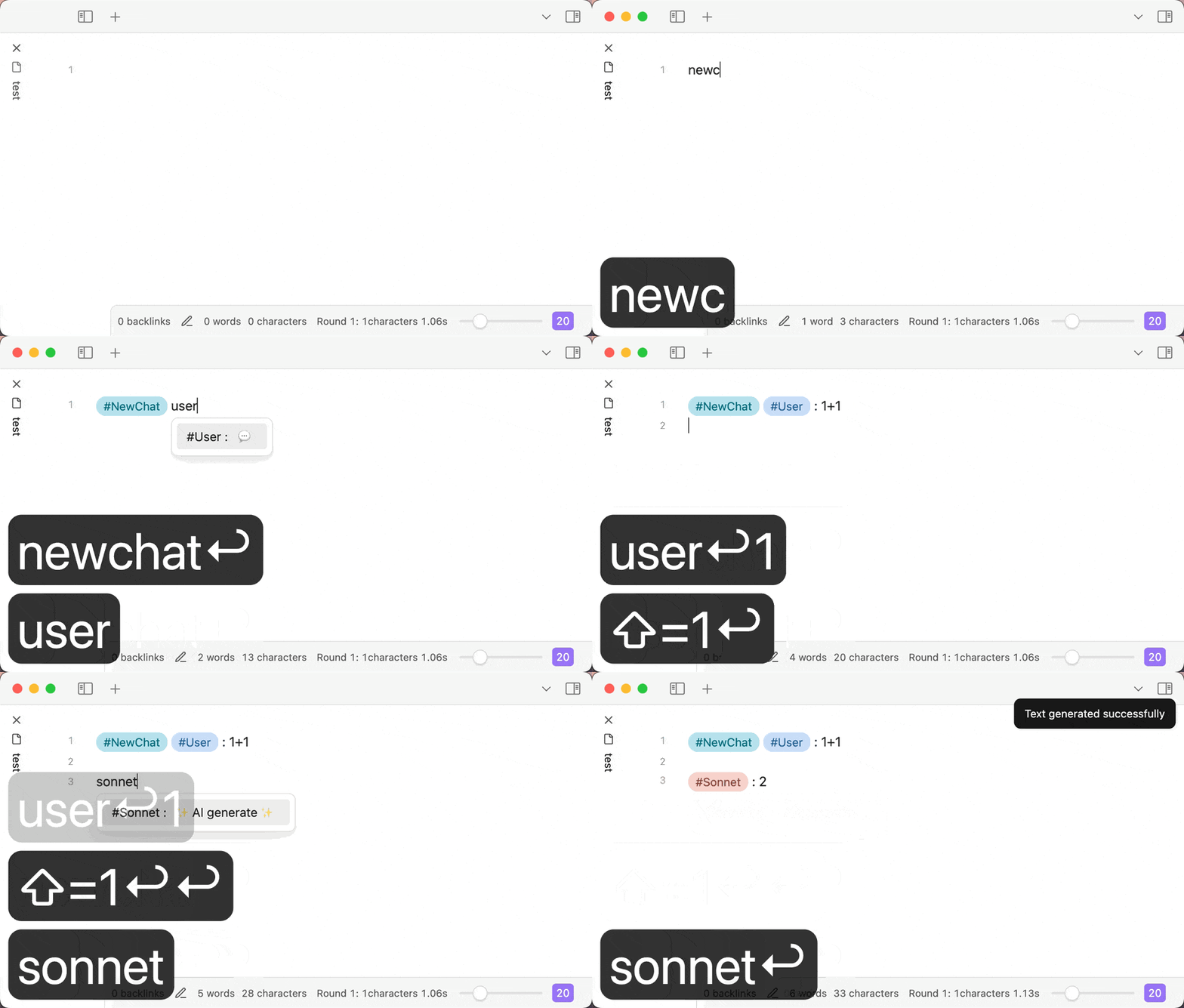
  • 🔥 Tag suggestions with redesigned trigger logic that better aligns with software design principles and significantly improved performance.
    Type #, use Obsidian's native tag completion, then input space to trigger.
    On mobile devices where typing # might be inconvenient, you can type the complete tag (without #) to trigger.
    Assistant tags will generate AI responses when triggered.
tagSuggest

Features

  • Support for internal links

Internal link support

AI providers

If the AI provider you want is not in the list above, you can propose a specific plan in the issue.

Assistant features

  • Azure: the model field holds the deployment name you chose in the portal, not a model id
  • 🔥DeepSeek: the reasoning model's CoT is output in callout format
  • Doubao: Supports bot API, Supports DeepSeek web search plugin and knowledge base plugin
  • 🔥LongCat: Reasoning output in callout format
  • 🔥MiniMax: Reasoning output in callout format
  • 🔥SiliconFlow: Supports many models such as DeepSeek V3/R1
  • 🔥Zhipu: Web search option, and reasoning output in callout format for GLM-4.5 / 4.6 / Z1

How to use

  • Add an AI assistant in the settings page, set the API key, and configure the model.
  • Enter a question, like "1+1=?", then select "#User :" from the command list to transform it into - "#User : 1+1=?"
  • Select an assistant from the command list, like "#Claude :", to trigger the AI assistant to answer the question.
  • You can also directly type #, enter the tag, and then type a space to trigger the AI assistant.
  • Follow the conversation order rules of large language models: system messages always appear first (can be omitted), then user and assistant messages alternate like a ping-pong match.

A simple conversation example:

#User : 1+1=?(user message)
(blank line)
#Claude :(trigger)

Conversation order rules:

graph LR
    A[System message] --> B[User message] --> C[Assistant message] --> B

If you are not satisfied with the AI assistant's answer and want to retry. Use the plugin command "Select the message at the cursor", select and delete the AI assistant's response content, modify your question, and trigger the AI assistant again. Or select the response content and use a command like "#Claude :" to retrigger the AI assistant, which will delete the previous response and generate a new one.

Conversations syntax

A paragraph cannot contain multiple messages. Messages should be separated by blank lines.
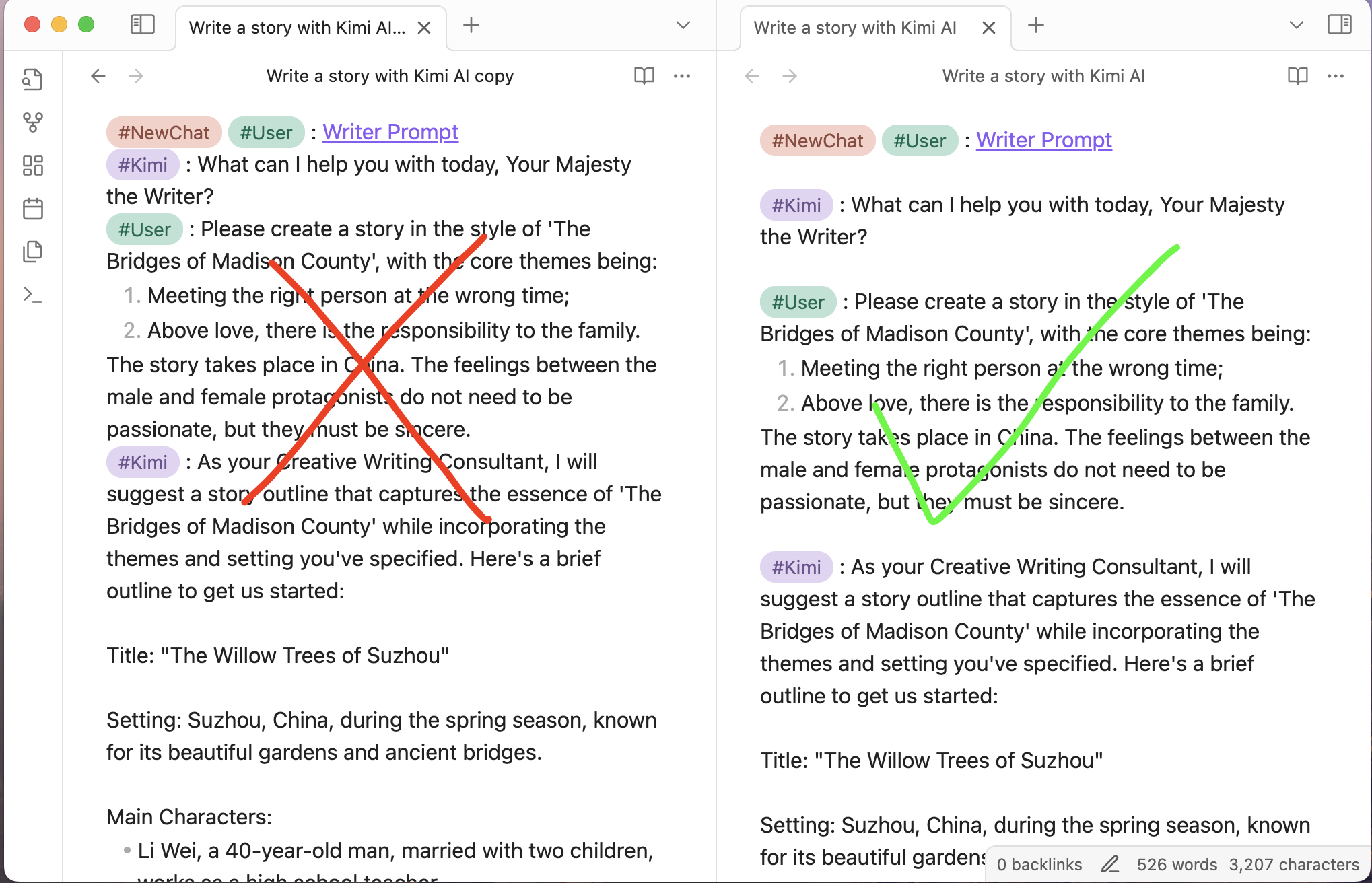
Conversations syntax

  • The conversation messages will send to the configured AI assistant.
  • Callout sections will be ignored. You can write content in the callout without sending it to the AI assistant. Callout is not markdown syntax, it is an obsidian extension syntax.
  • Start a new conversation with NewChat tag.

Tag commands are based on the paragraph at the cursor or in the selection. A Markdown paragraph can be:

  • Multiple lines of plain text not separated by empty lines
  • A code block

With correct syntax, when you input a space after #tag, it will trigger tag completion. For example:

#NewChat

#System :

#User :

#NewChat #System :

#NewChat #User :

#Claude : (AI generate)

Appearance customization

We recommend using the colored tags plugin.
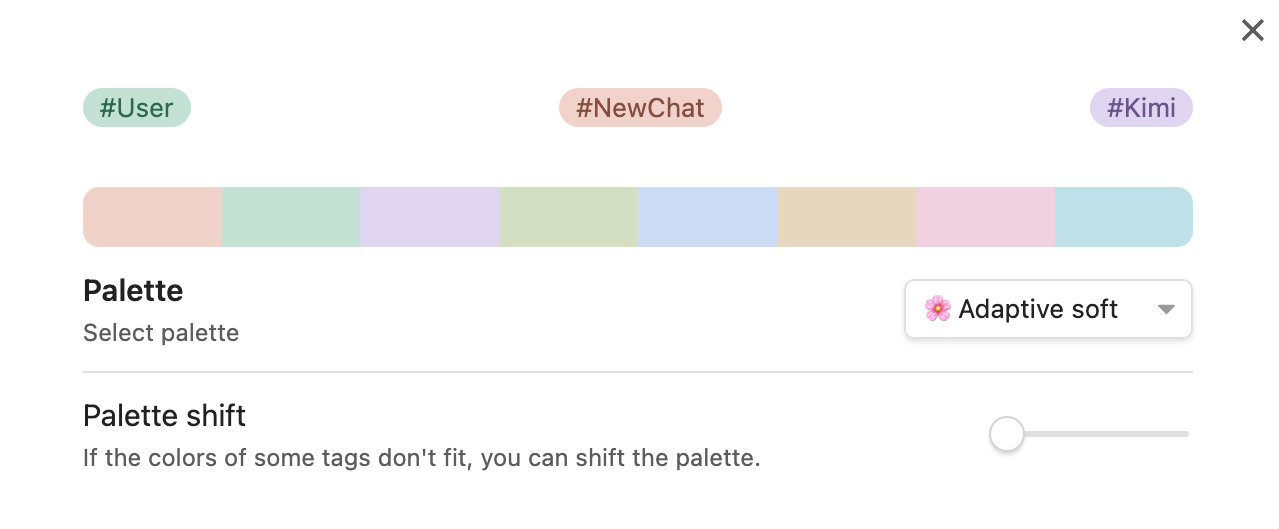
Colored tags plugin

FAQ

How to trigger?

There are several ways:

  • Select tags from the command palette
  • Type # + tag + space
  • Directly type the complete tag (without #)

Can't find the model you want in the settings?

Most providers are asked for their own model list, so the choices come from the API rather than from a list baked into the plugin — a model the provider no longer advertises will not be among them.

Set it under "Override input parameters" as JSON, such as {"model":"your-desired-model"}, which takes precedence over the model chosen in the picker.

If the list cannot be read at all — an account still awaiting verification, a relay that does not implement it — the row turns into a plain text field and the model can be typed in directly.

How to view the developer console?

  • Windows: CTRL + SHIFT + i
  • MacOS: CMD + OPTION + i
  • Linux: CTRL + SHIFT + i

Capture console logs

How to enter the baseUrl when using third-party services?

Modify the baseURL in the settings, copy and paste the corresponding address from the service provider's documentation, and finally check if the URL is complete.

Which assistant type to choose for third-party service providers?

LLM protocols differ significantly between openAI, claude, and gemini. Make sure to select the correct one. The chain of thought in deepseek-r1 is also different from openAI.

What do the 404, 400, 4xx numbers in error messages mean?

These are HTTP status codes:

  • 401 means "Unauthorized", possibly due to an incorrect API key.
  • 402 means "Payment Required".
  • 404 means "Not Found", usually due to incorrect baseURL configuration or model name.
  • 400 means "Bad Request", possibly due to incorrect API key, missing user messages, tag parsing failure - leading to missing messages, model errors, etc.
  • 429 means "Too Many Requests", possibly due to high request frequency or service provider rate limits.

Text generation is very long and complex, causing rendering performance issues or app freezing

  • Try using the default theme. Some third-party themes can negatively impact rendering performance; switch to a more efficient theme.
  • Try using "Source mode" for conversation interaction. When you expect long text output, change the editing mode from "Live preview" to "Source mode" so Obsidian doesn't need to render the content. After the output is complete, switch back to "Live preview" mode.

Related issue

Development

npm install
npm run dev     # watch build
npm run build   # type-check, then production bundle
npm run lint

The settings tab is rendered by Obsidian from getSettingDefinitions(), so neither the build nor the linter can tell you whether it works. See Manual testing against a running Obsidian for driving a live instance with the Obsidian CLI, plus a checklist to run before a release.

Providers fail for reasons that live outside the code — Obsidian calls every API cross-origin from app://obsidian.md, and a CORS rejection is indistinguishable from an unreachable host unless you test for it deliberately. See Testing providers against real networks for the two harnesses that tell them apart, and npm run smoke for the one that runs inside Obsidian.

Similar Plugins

info
• Similar plugins are suggested based on the common tags between the plugins.
Smart Connections
4 years ago by Brian Petro
Find related notes and excerpts while writing. Your link building copilot displays relevant content in graph + list view. A local embedding model powers semantic search. Zero setup. No API key.
Smart Composer
2 years ago by Heesu Suh
AI chat assistant for Obsidian with contextual awareness, smart writing assistance, and one-click edits. Features vault-aware conversations, semantic search, and local model support.
ChatGPT MD
3 years ago by Bram Adams
A (nearly) seamless integration of ChatGPT into Obsidian.
YOLO
7 months ago by Lapis0x0
Agent-native AI assistant — chat, write, learning, all in one.
Claude Sidebar
a month ago by derek-larson14
Run Claude Code, Codex, and other agent CLIs in Obsidian
Gemini Scribe
2 years ago by Allen Hutchison
An obsidian plugin to interact with Google Gemini
Smart Second Brain
3 years ago by Leo310, nicobrauchtgit
An Obsidian plugin to interact with your privacy focused AI-Assistant making your second brain even smarter!
AI Providers
2 years ago by Pavel Frankov
This plugin is a hub for setting AI providers (OpenAI-like, Ollama and more) in one place.
Khoj
4 years ago by Debanjum Singh Solanky
Your AI second brain. Self-hostable. Get answers from the web or your docs. Build custom agents, schedule automations, do deep research. Turn any online or local LLM into your personal, autonomous AI (gpt, claude, gemini, llama, qwen, mistral). Get started - free.
BMO Chatbot
3 years ago by Longy2k
Generate and brainstorm ideas while creating your notes using Large Language Models (LLMs) from Ollama, LM Studio, Anthropic, Google Gemini, Mistral AI, OpenAI, and more for Obsidian.
HiNote
a year ago by Kai
Add comments to highlighted notes, use AI for thinking, and flashcards for memory.
Github Copilot
2 years ago by Vasseur Pierre-Adrien
A bridge between Obsidian and Github Copilot
AI image analyzer
a month ago by swaggeroo
Analyze images with AI to get keywords of the image.
Smart Context
2 years ago by 🌴 Brian
AI Assistant
3 years ago by Quentin Grail
AI Assistant Plugin for Obsidian
InfraNodus AI Graph View
2 years ago by Nodus Labs
Advanced graph view for Obsidian: text analysis, topic modeling, and AI with InfraNodus AI text analysis tool: https://infranodus.com
Ollama
3 years ago by hinterdupfinger
Smart Templates
2 years ago by 🌴 Brian Petro
Smart Templates is an AI powered templates for generating structured content in Obsidian. Works with Local Models, Anthropic Claude, Gemini, OpenAI and more.
Gemini Assistant
3 years ago by eatgrass
Your AI assistant in obsidian
Quiz Generator
3 years ago by Edward Cui
Generate interactive flashcards from your notes using models from OpenAI (ChatGPT), Google (Gemini), Ollama (local LLMs), and more. Or manually create your own to use with the quiz UI.
AI Commander
3 years ago by Simon Yang
Mesh AI
2 years ago by Chasebank87
NanoBanana PRO
20 days ago by reallygood83
AI Tagger
3 years ago by Luca Grippa
Simplify tagging in Obsidian. Instantly analyze and tag your document with one click for efficient note organization.
AI Tagger Universe
a year ago by Hu Nie
An intelligent Obsidian plugin that leverages AI to automatically analyze note content and suggest relevant tags, supporting both local and cloud-based LLM services.
AI for Templater
2 years ago by TfTHacker
Extends Templater with AI Chat commands using the OpenAI Client Library
Large Language Models
2 months ago by eharris128
The LLM plugin gives Obsidian users access to local and web-based, large language models via several chat interfaces: modal, widget, FAB window, and commands.
Chat with Bard
3 years ago by Artel250
An obsidian plugin that enables you to talk to Google Gemnini directly
AI Research Assistant
3 years ago by Interweb Alchemy
Prompt Engineering Research Tool for AI APIs
Vault Chat
3 years ago by Exo Ascension
A ChatGPT bot trained on your vault notes. Ask your AI questions about your own thoughts and ideas!
Caret
2 years ago by Jake Colling
Caret, an Obsidian Plugin
YouTube Video Summarizer
2 years ago by mbramani
Generate AI-powered summaries of YouTube videos directly in Obsidian using Google's Gemini AI.
AI LLM
2 years ago by Sparky4567
Lets to use local llms in your Obsidian Vaults, extend your stories or create entirely new texts based on your previous input
Arcana
3 years ago by A-F-V
Supercharge your Obsidian note-taking through AI-powered insights and suggestions
WordWise
3 years ago by ckt1031
Writing companion for AI content generation.
InlineAI
2 years ago by FBarrca
Metadata Auto Classifier
2 years ago by Beomsu Koh
AI-powered Obsidian plugin that automatically classifies and generates metadata (tags, frontmatter) for your notes.
Canvas Conversation
4 years ago by André Baltazar
A plugin for Obsidian that allows you to create a canvas conversation using ChatGPT.
GPT Assistant
3 years ago by M7mdisk
Ask GPT from your notes and get personalized answers based on your knowledge base.
AI Mentor
3 years ago by clementpoiret
Star Gate
a month ago by starhunter
obsidian gate plugin
AI Editor
3 years ago by Zekun Shen
NAI 4 Obsidian
3 years ago by SGreen
Wouldn't you like little fren who writes with you? A brother in arms? A companion? A friend? An AI? Well, here you go. This is a plugin for Obsidian that allows you to write with the helpf of NovelAI. It's a very simple plugin, but it's a plugin nonetheless.
ChatCBT
3 years ago by Claire Froelich
AI-powered journaling plugin for your Obsidian notes, inspired by cognitive behavioral therapy
Explain Selection With AI
2 years ago by Ben Wurster
This is my first go at making an Obsidian plugin to elaborate on and describe selected bits of information and their context.
Flashcard Generator
3 years ago by ChloeDia
Obsidian Plug-in to automatically create a set of questions/answers on your notes !
AI Notes Summary
3 years ago by R. Ian Bull (irbull)
An Obsidian plugin that uses ChatGPT to generate a summary of referenced notes
Notemd
a year ago by Jacob
A Easy way to create your own Knowledge-base! Notemd enhances your Obsidian workflow by integrating with various Large Language Models (LLMs) to process your notes, automatically generate wiki-links for key concepts, create corresponding concept notes, perform web research, and more.
GPT-LiteInquirer
3 years ago by ittuann
💬 Experience OpenAI ChatGPT assistance directly within Obsidian, drafting content without interrupting your creative flow.
Silicon AI
3 years ago by deepfates
Add some intelligence to your notes with Silicon AI for Obsidian
brAIn
3 years ago by lusob
Nostr Writer
3 years ago by James McGauran
Publish seamlessly from Obsidian to Nostr
LLM Test Generator
a year ago by Aldo E George
ChatGPT Definition
3 years ago by julix14
Strapi Exporter AI
2 years ago by Cinquin Andy
[prod] - 🚀 Strapi Exporter: Supercharge Your Obsidian-to-Strapi Workflow, export an obsidian notes directly to your Strapi API
Canvas LLM Extender
3 years ago by Pasi Saarinen
Let the OpenAI LLM add nodes to your Obsidian canvas
Proofreader
a year ago by pseudometa (aka Chris Grieser)
AI-based proofreading and stylistic improvements for your writing. Changes are inserted as suggestions directly in the editor, similar to suggested changes in word processing apps.
Daily News Briefing
a month ago by Adam Chen
Get AI-powered daily news summaries directly in your Obsidian vault. Stay informed about your topics of interest with smart, automated news collection and summarization.
Intelligence
3 years ago by John Mavrick
Nova
7 months ago by Shawn Duggan
Nova - AI plugin for Obsidian that edits your documents directly through natural conversation. Stop copying from chat, start collaborating with AI.
AI Summarize
2 years ago by Alp Sariyer
Easy to use AI Summary tool for your notes in Obsidian
AI bot
2 years ago by kuzzh
The AI Bot Plugin is a powerful tool designed to enhance your note-editing experience in Obsidian by leveraging the capabilities of AI. This plugin allows you to interact with an AI assistant directly within Obsidian, making it easier to generate, edit, and organize your notes with intelligent suggestions and automated tasks.
Images to Notes
a year ago by Rodolfo Terriquez
Turn photos of your handwritten notes into markdown
AI Zhipu
2 years ago by Tarslab
AI-zhipu is an Obsidian plugin that helps you utilize the Zhipu API. 智谱AI obsidian 插件
Claudian Plus
a month ago by wuyifan-code
Vision Recall
a year ago by Travis Van Nimwegen
Transform screenshots into searchable Obsidian notes using AI vision and text analysis
LLM workspace
2 years ago by Olivér Falvai
AI Chat
2 years ago by arenasys
AI integration Hub
2 years ago by Hishmat Salehi
A modular AI integration hub for Obsidian
CoCo AskAI
2 years ago by Yukee
CoCo-AskAI is an Obsidian plugin that enables AI-powered note assistance, enhancing the writing experience with customizable functions.
Markpilot
2 years ago by Taichi Maeda
AI-powered inline completions and chat view for Obsidian
Reverse Prompter
2 years ago by Ryan Halliday
Let AI generate prompts to keep you writing
AI LaTeX Generator
2 years ago by Aayush Shah
An Obsidian plugin that generates latex code from natural language inputs.
Codian
25 days ago by bcs
Open-source Obsidian plugin for local coding agents
Open Interpreter
2 years ago by Mike Bird
The power of Open Interpreter in your Obsidian vault
AI Revisionist
2 years ago by Synaptic Labs
Memos AI Sync
a year ago by leoleelxh
obsidian-memos-sync-plugin,将 Memos 内容同步到 Obsidian 的插件,提供无缝集成体验。
Ayanite
2 years ago by jemstelos
Mastodon Threading
2 years ago by El Pamplina de Cai
Obsidian plugin to compose and post threads to Mastodon
Student Repo
a year ago by Feirong.zfr
学生知识库助手(Student Repository Helper)是一个面向学生或学生家长的Obsidian 插件,这款插件旨在解决学生在学习阶段面临的资料管理难题,将学习过程中产生的各类重要资料,如试卷、笔记、关键文档、绘画手工作品等,进行系统性的数字化整合与管理,并利用 AI 助手定期进行学习分析总结。随着时间的推移,它将助力你逐步搭建起一座专属你自己的知识宝库,这座宝库将伴随你一生,成为你知识成长与积累的见证。
Blog AI Generator
a year ago by Gareth Ng
Obsidian Plugin: generate blog via AI based on the current note.