GridExplorer

by Devon22
5
4
3
2
1
Score: 65/100

Description

The GridExplorer plugin enhances note browsing in Obsidian by introducing a grid-based view for notes and folders. It offers multiple display modes, including folder view for structured navigation, bookmark mode for quick access to saved notes, and search results mode for visually organizing search queries. Users can customize the grid by adjusting item width and setting default sorting preferences, such as sorting by name, modification time, or randomly.

Reviews

No reviews yet.

Stats

85
stars
50,396
downloads
8
forks
559
days
28
days
28
days
6
total PRs
0
open PRs
1
closed PRs
5
merged PRs
73
total issues
8
open issues
65
closed issues
69
commits

Latest Version

a month ago

Changelog

  • Improved: Changed the top "Open new grid view" button into a hierarchical submenu, allowing direct selection of opening in a new tab, left sidebar, or right sidebar.

README file from

Github

GridExplorer

English | 日本語 | 中文

This is a grid view plugin designed for Obsidian, aimed at providing a more intuitive way to browse and manage your notes and folders.

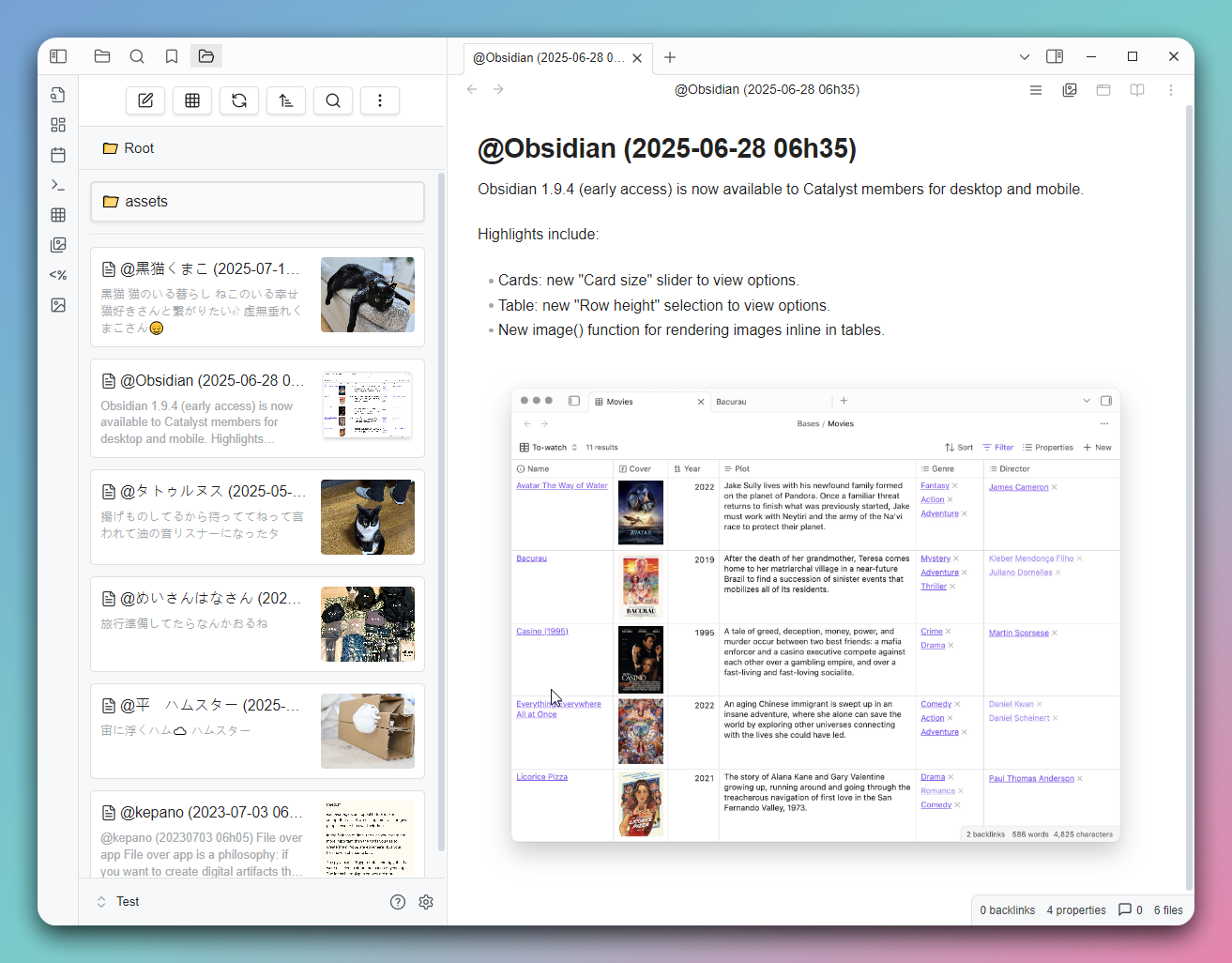
screenshot2 screenshot1

Features

  • Grid View: Displays your notes and folders in a grid format for quick browsing.
  • Folder Mode: Shows notes in a folder structure, supporting entry into subfolders.
  • Bookmark Mode: Allows quick access to notes in your bookmarks.
  • Search Results Mode: Displays Obsidian's search results.
  • Backlinks Mode: Shows notes that link to the current note.
  • Outgoing Links Mode: Shows outgoing links from the current note, including media files.
  • All Files Mode: Lists all files in the vault.
  • Recent Files Mode: Lists the n most recently modified files.
  • Random Files Mode: Randomly lists n files.
  • Custom Mode: Customize the displayed file content using Dataview query syntax.
  • Custom Sorting: Supports various sorting methods, including by name, modification time, random sorting, and per-folder custom sorting.
  • Settings Options: Allows customization of grid item width and default sorting method.
  • Multilingual Support: Currently supports English, Traditional Chinese, Simplified Chinese, and Japanese.

Installation

Find "GridExplorer" in the Community plugins through the Obsidian app.

Usage

  • Click the grid icon in the toolbar to open the grid view.
  • Use the right-click menu to select "Open in Grid View" on a folder.
  • Use command to view the current note in the grid view (If there is no active note currently, open the root directory).
  • In the grid view, you can click on notes to open them or click on folders to enter them.

Supported File Formats

Image Formats

  • jpg / jpeg
  • png
  • gif
  • webp
  • avif
  • bmp
  • svg

Video Formats

  • mp4
  • webm
  • mov
  • avi
  • mkv
  • ogv

Audio Formats

  • flac
  • m4a
  • mp3
  • ogg
  • wav
  • 3gp

Document Formats

  • md (Markdown)
  • pdf
  • canvas
  • base
  • zip

Folder Notes

Create a folder note by using the right-click menu on a folder. After creation, you'll see an icon on the folder, and you can set the folder's sorting method in the note's Metadata.

---
sort: name-desc
color: red
---

Available sorting methods:

  • name-asc
  • name-desc
  • mtime-desc
  • mtime-asc
  • ctime-desc
  • ctime-asc
  • random

Available colors:

  • red
  • orange
  • yellow
  • green
  • cyan
  • blue
  • purple
  • pink

CSS Class

Mode/Feature CSS Class
Custom Mode .ge-mode-custom
Folder Mode .ge-mode-folder
Bookmarks .ge-mode-bookmarks
Search .ge-mode-search
Backlinks .ge-mode-backlinks
Outgoing Links .ge-mode-outgoinglinks
All Files .ge-mode-all-files
Recent Files .ge-mode-recent-files
Random Files .ge-mode-random-note
Tasks .ge-mode-tasks
Folder Notes .ge-foldernote
Pinned Items .ge-pinned

Contribution

If you have any suggestions or encounter issues, feel free to raise issues or submit pull requests.

License

This plugin follows the MIT License.

Similar Plugins

info
• Similar plugins are suggested based on the common tags between the plugins.
Alternative Explorer
a month ago by sk-obsidian
Alternative Explorer is an Apple Notes–style sidebar for browsing folders and notes in Obsidian. Switch between an expandable folder tree and a notes list — a compact alternative to the built-in File Explorer.
Custom File Explorer sorting
4 years ago by SebastianMC
Take full control over the order and sorting of folders and notes in File Explorer in Obsidian
Enhanced tables
3 years ago by pistacchio
A plugin for Obsidian to add advanced controls (like sorting and filtering) to standard markup tables
Feed Bases
4 months ago by edrickleong
Flexplorer
3 months ago by kh4f
🗃️ Obsidian File Explorer Enhancer
Folder Navigator
a year ago by wenlzhang
An Obsidian plugin that allows you to quickly navigate to folders in your vault using fuzzy search.
Gallery Navigator
a month ago by groundfic
Visual vault navigator: folder/tag tree with a cover-image card wall, full-text search (including PDFs), image quick-look, and link preview cards.
Line Arrange
2 years ago by Chitwan Singh
Obsidian Plugin For Arranging Lines.
Power Tables
a month ago by Power Plugins
Color, calculate, and sort Markdown tables in place: cell fills and text colors, live formulas that recalculate, and column sorting, all stored as plain Markdown.
Sort and Permute lines
2 months ago by Vinzent
Sort and Permute lines in whole file or selection.
Sort Frontmatter
3 years ago by Kanzi
Sort frontmatter automatically
Sortable Tables
a year ago by filippov112
A plugin for Obsidian that adds the ability to interactively sort Markdown tables in preview mode.
Tier List
2 years ago by Mox Alehin
Obsidian plugin for visual ranking and organizing content into customizable Tier Lists.
Todo sort
4 years ago by Ryan Gomba
A plugin for Obsidian that sorts todos within a note