
README file from
Github简体中文 | English
一款辅助中文小说作者写作的 Obsidian 插件,提供一系列开箱即用的便捷功能。
注意:所有功能仅支持桌面版,且仅在Win11下充分测试。
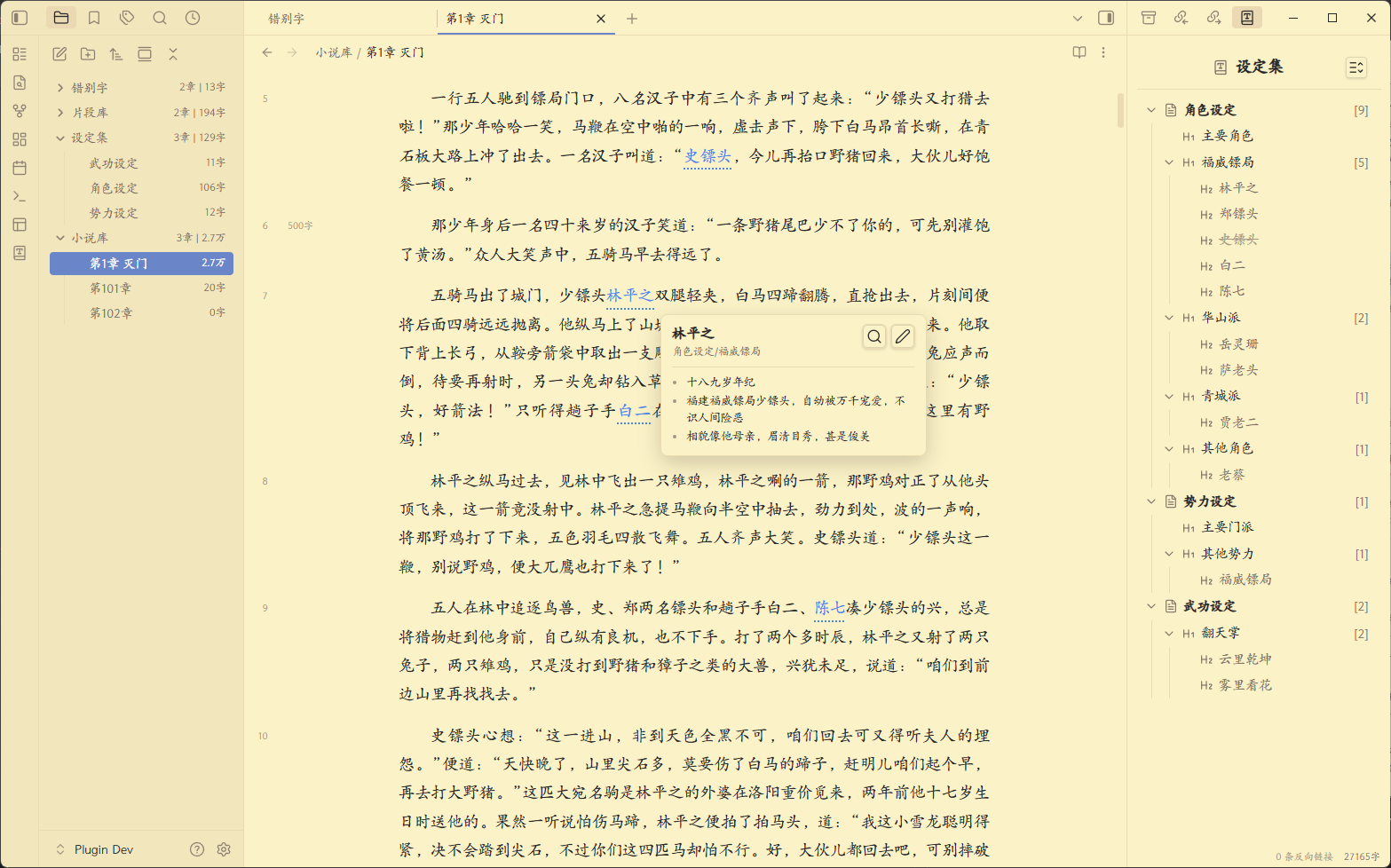
✨设定库及关键字高亮功能
- 灵活、方便地建立自己的小说设定库,并提供右边设定视图,方便进行分类、排序和整理
- 同时提供正文内的设定关键字高亮,鼠标悬停高亮时,显示设定的具体内容,提供写作时的提醒
- 设定库文件本质上只是一个本地的、普通的md文件,也可直接打开编辑
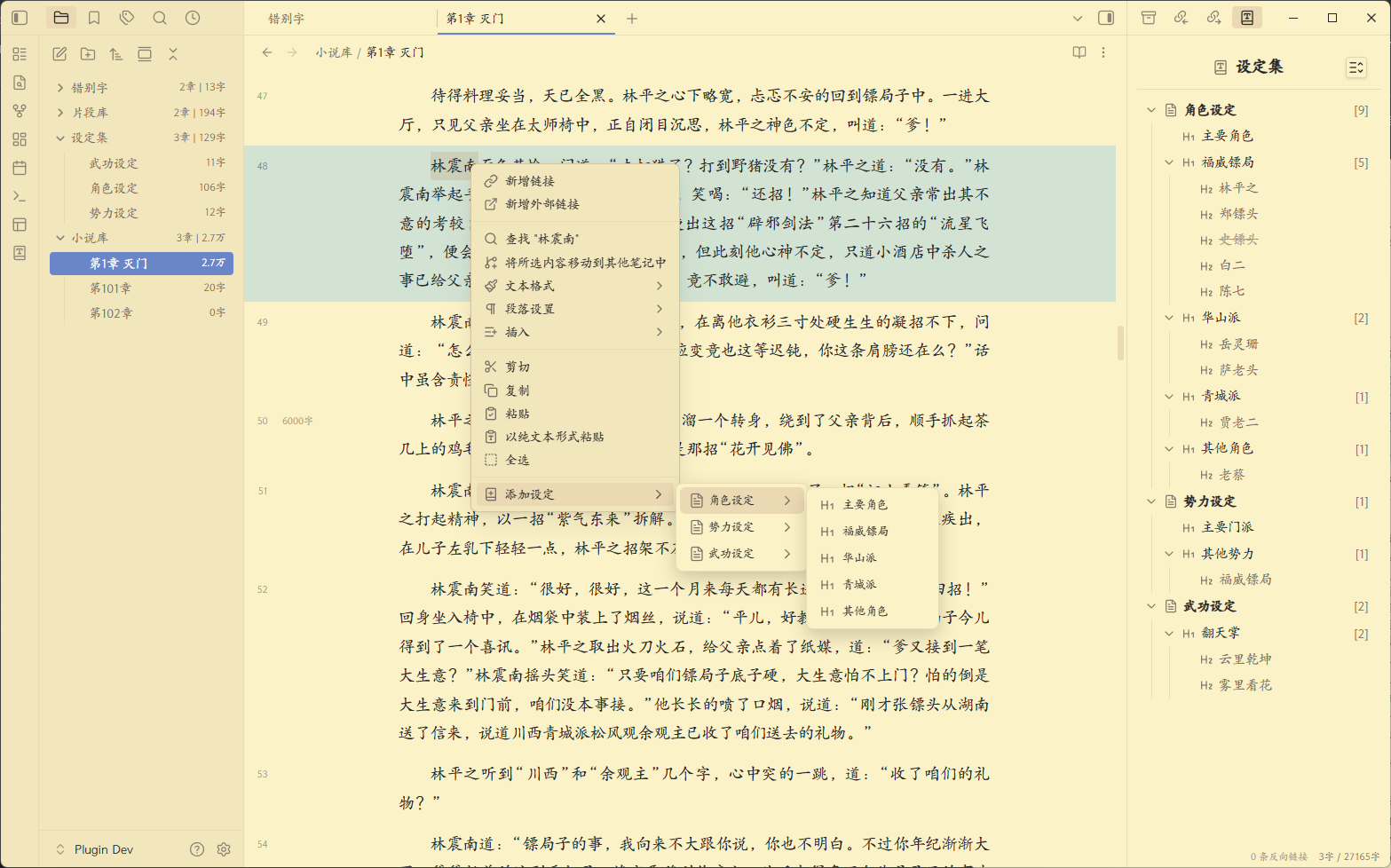
✨右键菜单快速添加设定
- 无需离开当前页面,鼠标选中文本并点击右键菜单即可将其添加入设定库
- 添加时还可以选择现有的设定分类,对其进行预归类
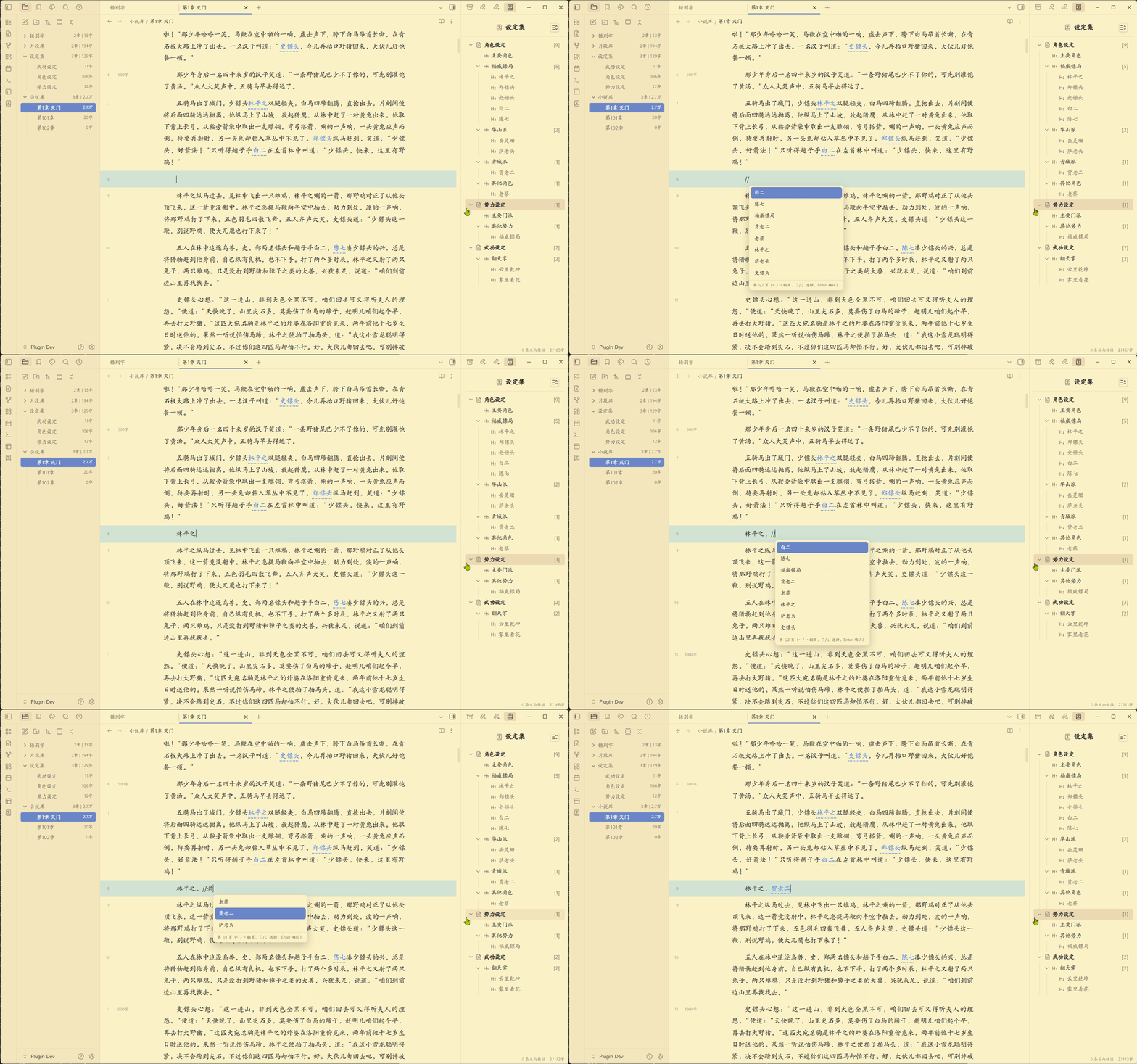
✨正文中快速引用现有设定
- 在正文中输入"//+中文检索词"即可直接引用现有设定,减少前后设定不一致问题
- "中文检索词"支持模糊搜索,并提供类似输入法的下拉预选栏方便进行选择
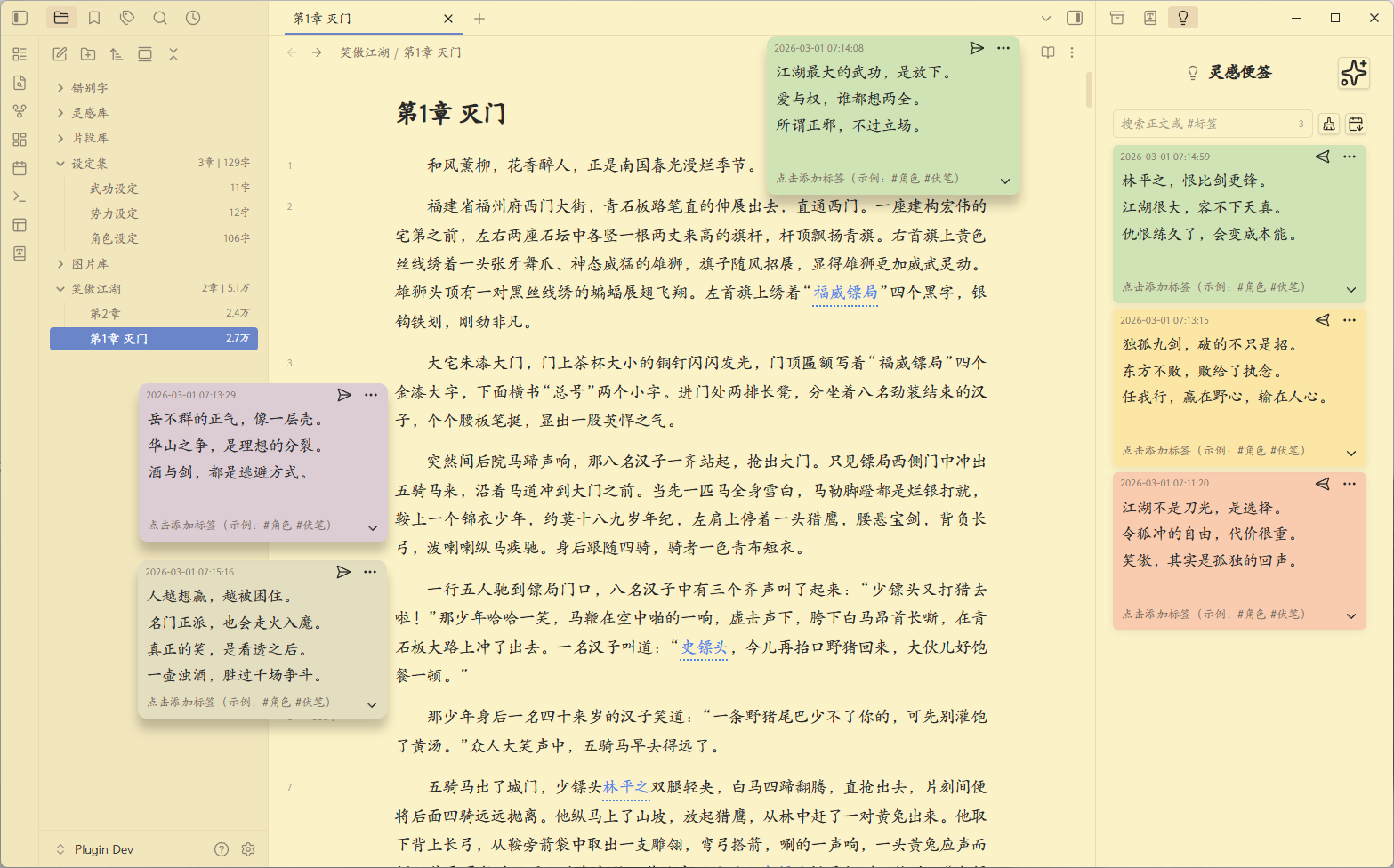
✨灵感便签功能
- 提供命令快速在界面上创建悬浮的灵感便签,方便你记录灵感
- 提供独立的右边栏界面,方便对便签进行归档、整理和搜索
- 每个便签实际上也是独立的md文件,数据完全开放
✨更准确的中文字数统计
- 在按字符(character)统计字数的基础上,针对小说字数统计进行了优化
- 除右下角字数统计外,在左侧文件管理器上,也增加了同步的章节和字数统计
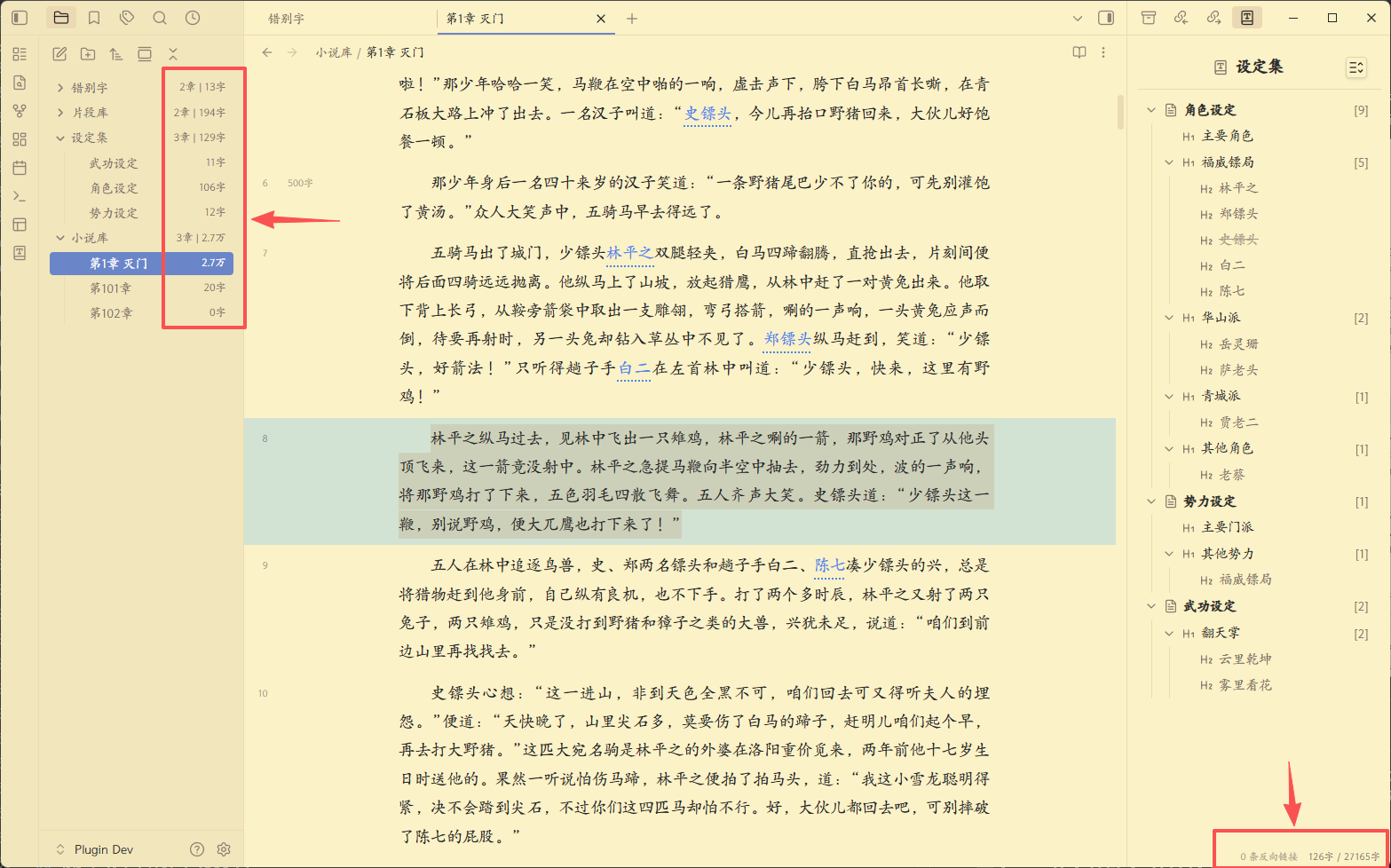
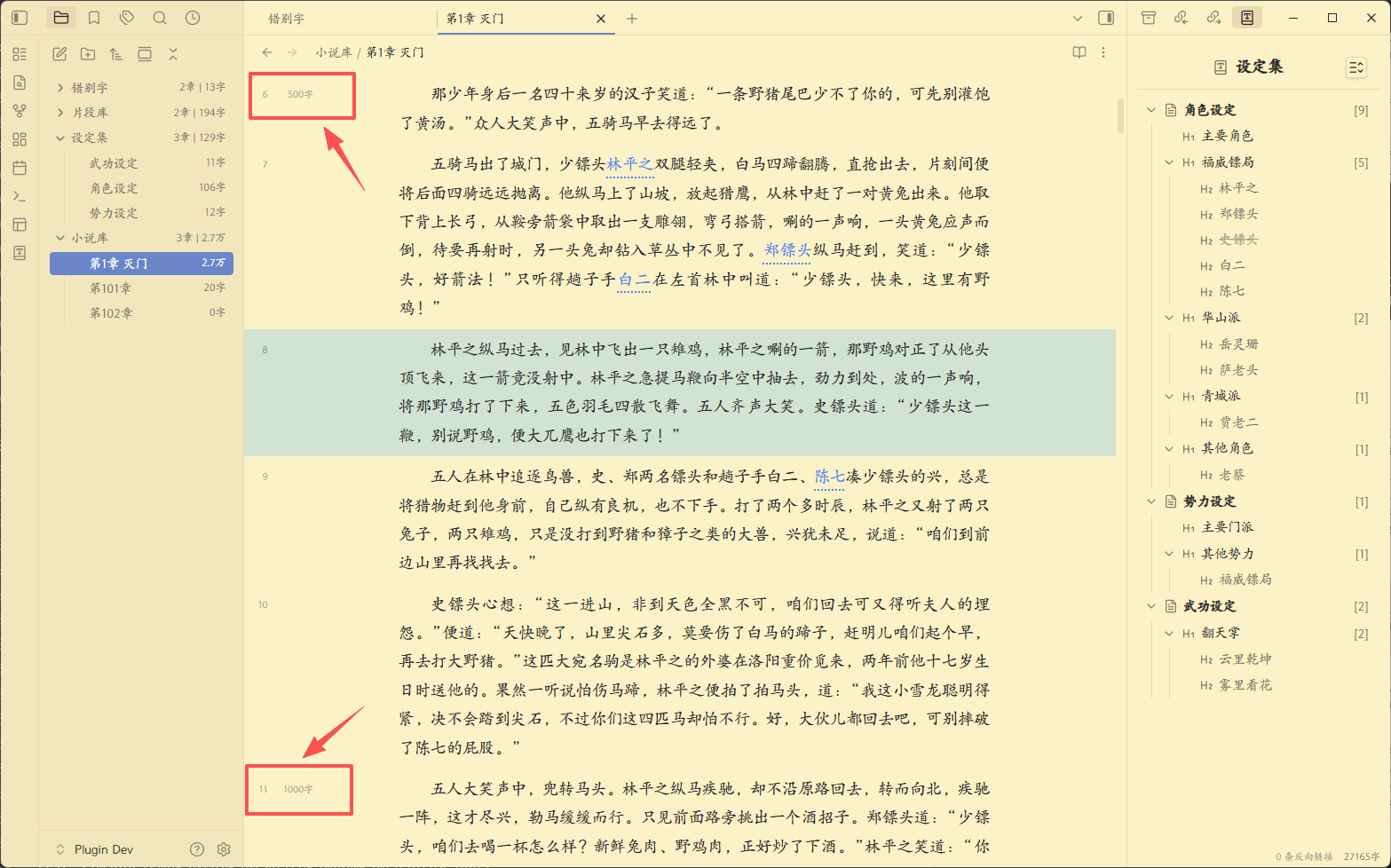
✨侧边栏字数里程碑(每500字)
- 在行号右侧,添加字数里程碑显示,方便了解本章写作进度
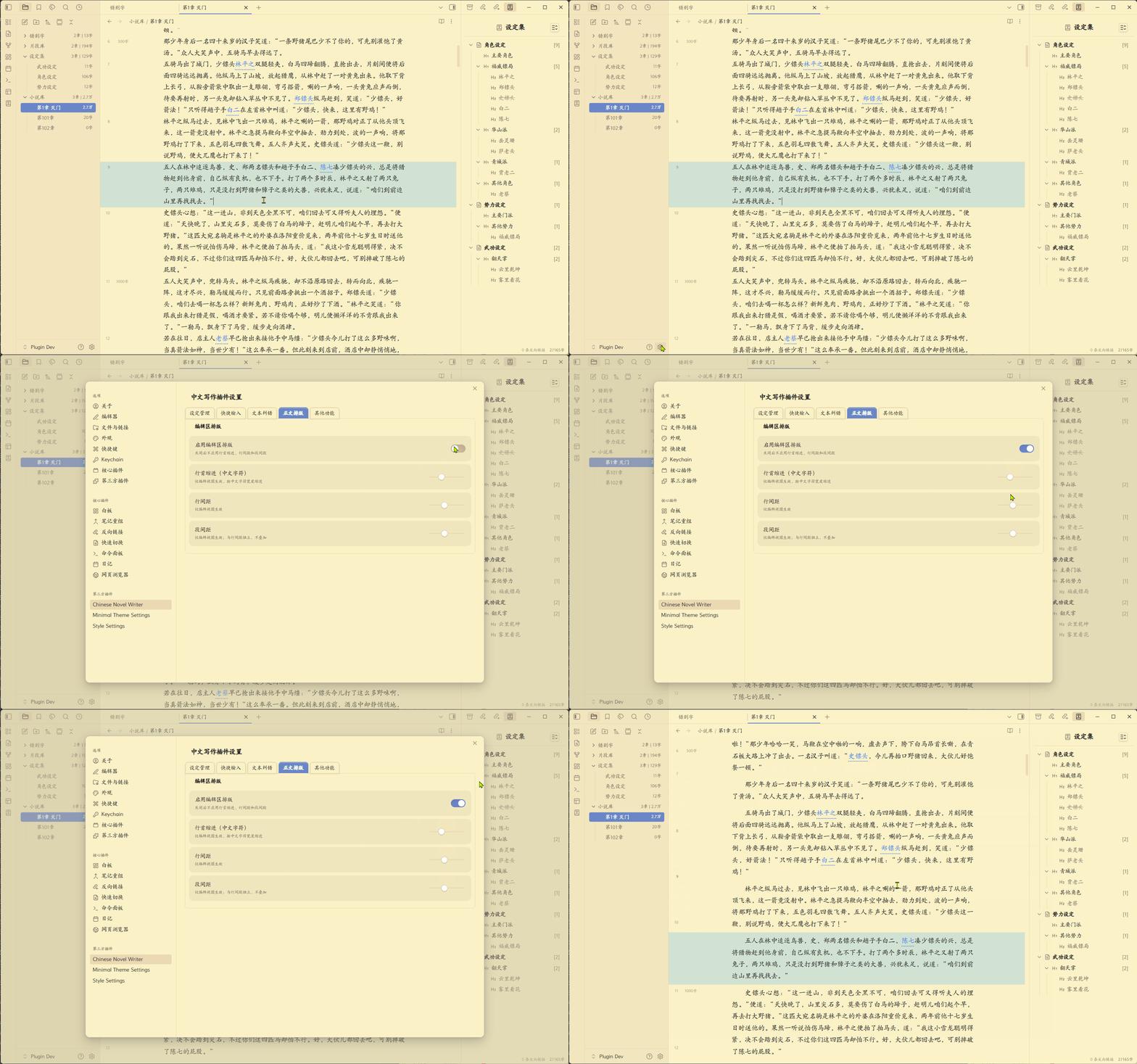
✨编辑区排版功能:行首缩进、行间距、段间距
- 提供行首缩进、行间距、段间距设定,提高阅读、写作时的浏览体验
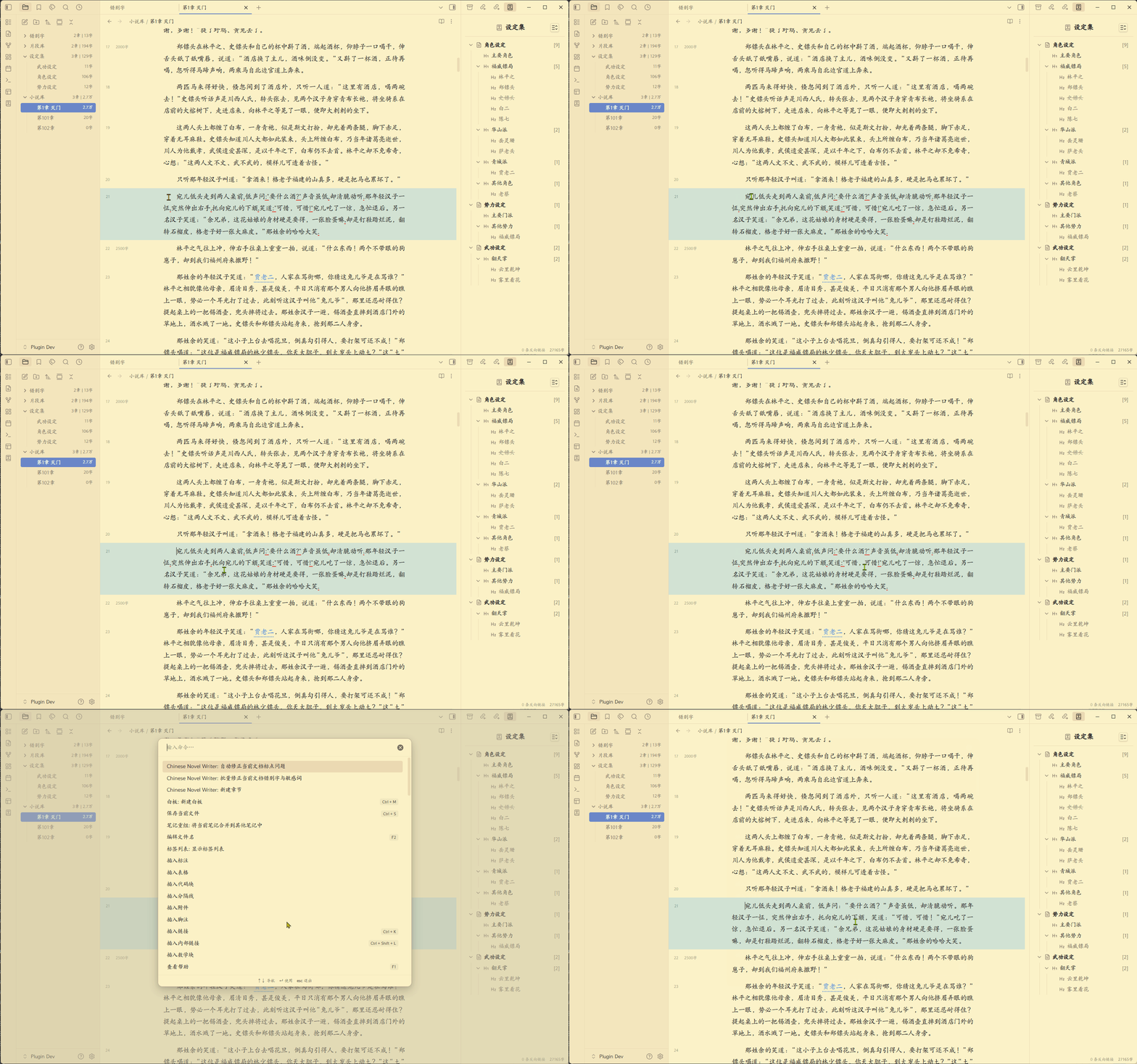
✨常见英文标点检测与修复
- 提供中文文本中,自动检测错误英文标点的功能
- 提供手动修复英文标点错误命令,可批量手动修复检测出的英文标点
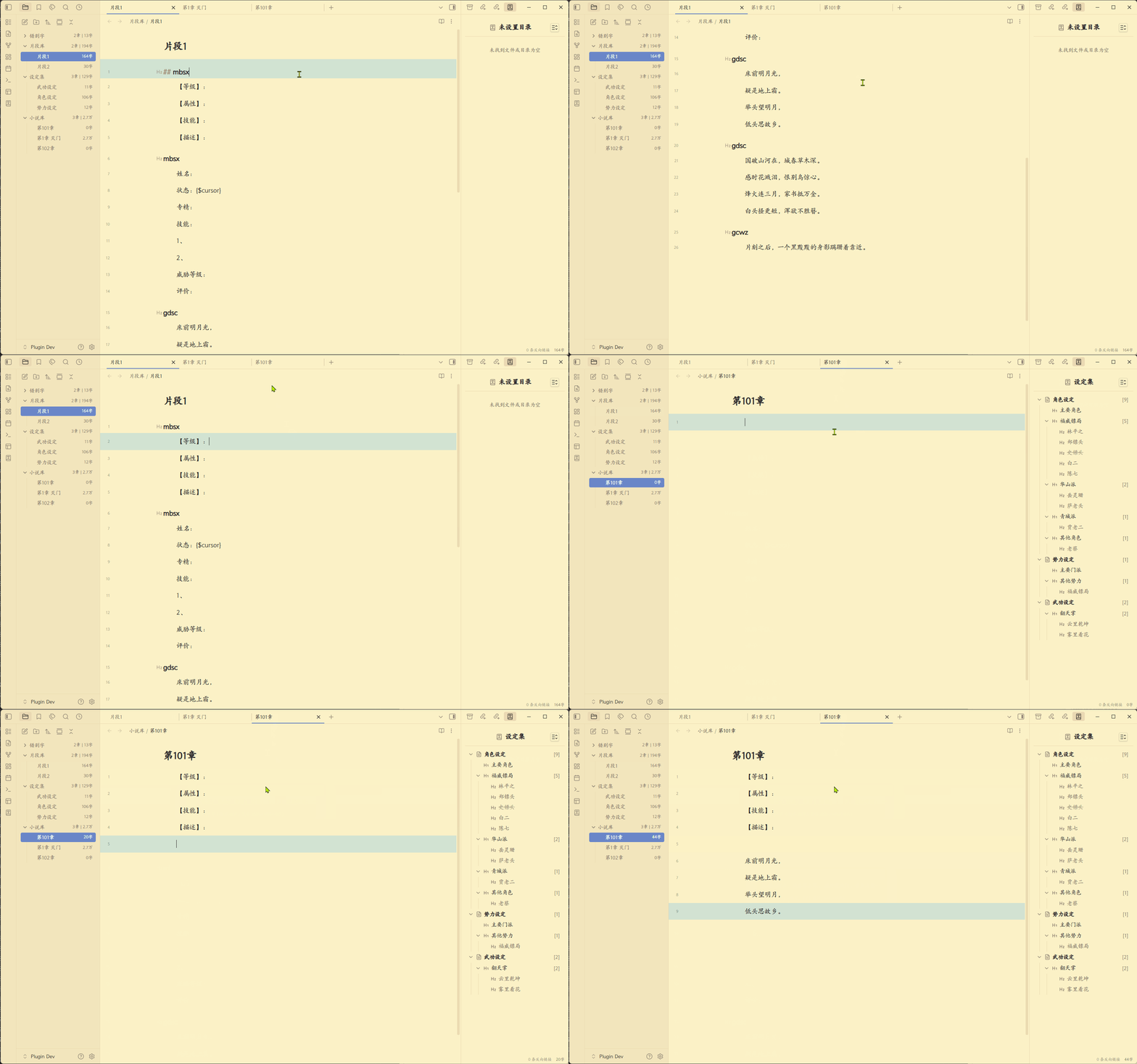
✨正文快速输入自定义文本片段
- 可自定义文本片段,并提供快速输入片段功能
- 文本片段本质上只是本地的md文件,可自己打开编辑
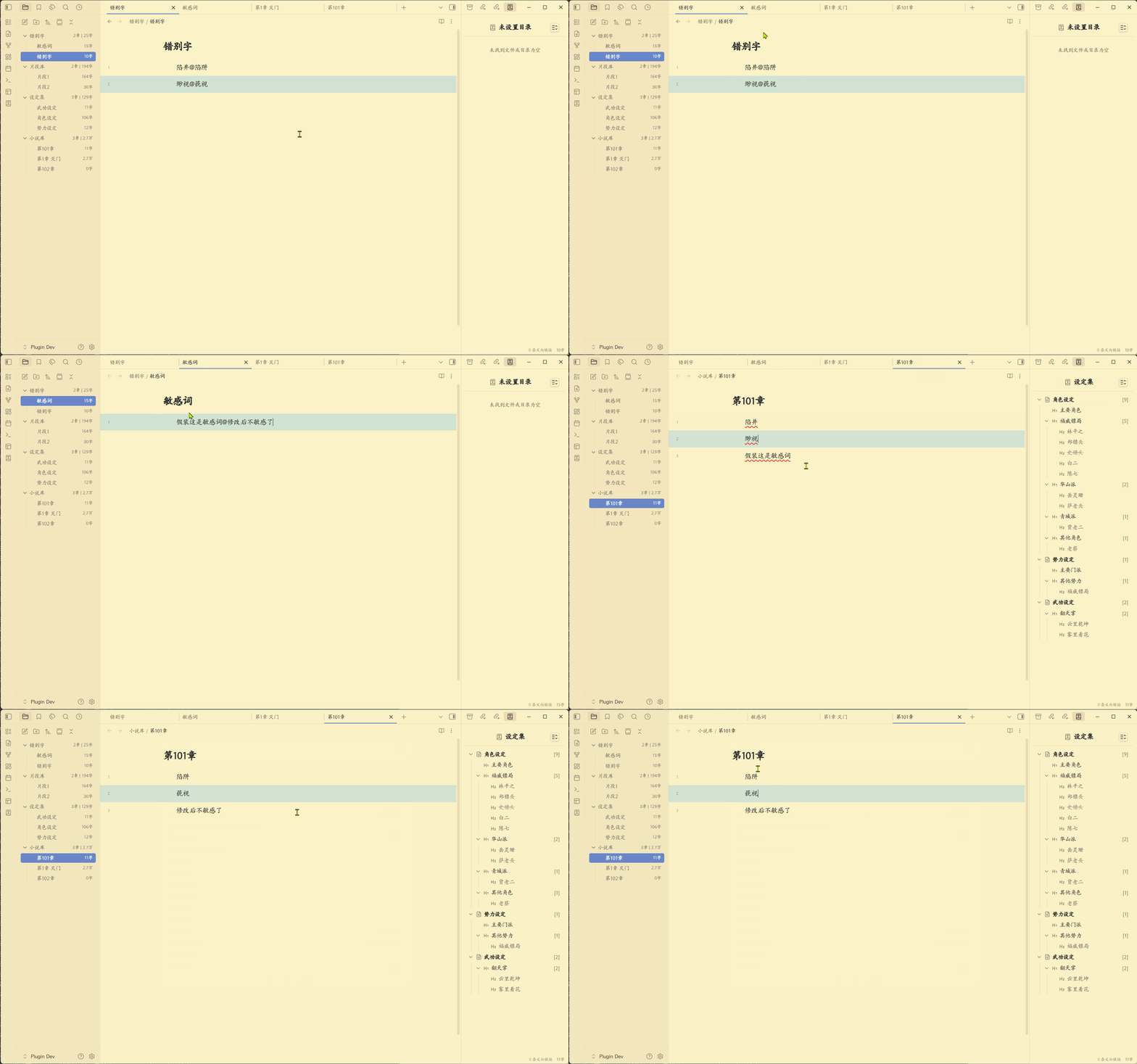
✨自定义错别字和敏感词检测与修复
- 可自定义错别字和敏感词,会在正文对其进行检测和提示
- 提供手动修改错别字和敏感词命令,可批量手动修复检测出的错别字和敏感词
使用方法
安装插件:
- 在官方插件库搜索 chinese novel assistant
- 下载插件并等待安装完成
- 启用插件并进行设置
配置插件
- 在插件设置界面,添加小说库。
- 插件会自动在小说库内添加一系列的"功能库",包括"设定库"、"便签库"、"片段库"和"纠错词库"。
- 设定库就是保存设定文件的目录,里面放各种设定文件(md格式)。
- 便签库就是便签文件的目录,里面放各种便签(md格式)。
- 片段库就是放各种自定义的快捷输入片段的文件目录,里面放各种文本片段(md格式)。
- 纠错词库里面放的是各种纠错词典,里面放各种纠错词典(md格式)。
- 其他功能配置详情见配置界面具体设置说明。
设定库内文件格式约定
设定库内文件需遵守一定的格式约定:
- 每个独立的文件即一组设定集合,文件名即设定集名
- 文件内的每个h1标题(# 标题)即设定分类,标题名即分类名
- h1下的每个h2标题(## 标题)即设定,标题名即设定名
- h2下的内容即设定的具体内容
- 设定中包括"【别名】"字符后的内容,会被处理为该设定的别名,多个别名以","号隔开
- 设定中包括"【状态】"字符后的内容,会被处理为该设定的状态,目前支持"死亡"和"失效"两种状态,这两种状态下,右边栏内的设定,会被灰化并打上删除线
- 注意:h3及以下标题不会被解析为设定,孤立的h2也不会被解析
下面是一个例子:
# 主要角色

## 令狐冲
- 华山派大弟子,性格不羁爱自由,重视情义被正派视为不分正邪。

## 任盈盈
【别名】盈盈,圣姑
- 魔教教主任我行的女儿日月神教教主,任我行之女,东方不败尊其为圣姑,左道群豪奉若神明。
- ...

# 其他角色

## 林震南
- 【状态】死亡
- 威震江南的福威镖局总镖头,虽然武功低微,以高明生意手腕威震江南。他迎娶了洛阳金刀门王元霸之女为妻,即王夫人,两人育有一子林平之,林平之后来又娶了岳灵珊。
文本片段格式约定
如果要使用文本片段功能,需遵守以下约定: 文件内的每个h2的标题名,即该文本片段的关键字(key),注意key只支持英文字符
下面是一个例子:
## mbsx
【等级】:
【属性】:
【技能】:
【描述】:

## gdsc
床前明月光,
疑是地上霜。
举头望明月,
低头思故乡。
自定义错别字与敏感词词典格式约定
如果要使用自定义错别字与敏感词功能,需设置相应词典,词典文件(md文件)需遵守以下约定:
- 文件内的每行是一个有错别字的词及其正确版,格式为"错别词[空格]正确词"
- 错别词在正文内出现时,会被标红提示
- 如果错别词后有"[空格]正确词",当使用插件提供的命令批量修改错别词时,会自动将错别词替换为正确词
下面是词典例子:
陷井 陷阱
缈视 藐视
📝 命令列表
通过 Ctrl/Cmd+P 访问这些命令:
- 自动修正当前文档标点问题 - 自动修正当前文档的英文标点和中文标点不配对问题
- 自动修正当前文档错别字和敏感词 - 自动修正当前文档的错别字和敏感词(错别字和敏感词需自定义)
🤝 支持
如果您觉得 chinese novel assistant 有帮助,请考虑支持其开发:
📄 许可证
MIT License - 可自由使用和修改。
English
简体中文 | English
An Obsidian plugin designed for Chinese fiction authors, with a set of practical features ready to use out of the box.
Note: all features are desktop-only, and have been fully tested mainly on Windows 11.
✨ Worldbuilding library and keyword highlight
- Build and manage your own worldbuilding library flexibly and conveniently, with a right sidebar view for classification, sorting, and organization.
- Highlights worldbuilding keywords inside your manuscript. Hovering over a highlighted keyword shows the detailed entry as a writing reminder.
- Worldbuilding files are essentially local, plain Markdown files, so you can open and edit them directly.
✨ Quick add worldbuilding from right-click menu
- Add selected text to the worldbuilding library directly from the context menu without leaving the current page.
- You can also pre-assign the new entry to an existing category during creation.
✨ Quick reference existing worldbuilding in manuscript
- Type
//+Chinese keywordin your manuscript to quickly reference existing entries and reduce consistency issues. - The Chinese keyword supports fuzzy search and provides an IME-like dropdown candidate panel for quick selection.
✨ Sticky note feature for inspiration
- Use commands to quickly create floating inspiration sticky notes in the workspace.
- Includes a dedicated right sidebar for archiving, organizing, and searching notes.
- Each note is also an independent Markdown file, with fully open data.
✨ More accurate Chinese character count
- Optimized for fiction writing on top of basic character counting.
- In addition to the bottom-right counter, synced chapter/character counts are also shown in the left file explorer.
✨ Sidebar writing milestones (every 500 characters)
- Adds milestone markers near line numbers to help track chapter progress while writing.
✨ Editor typography: first-line indent, line spacing, paragraph spacing
- Configure first-line indentation, line spacing, and paragraph spacing to improve reading and writing experience.
✨ Common English punctuation detection and fix
- Automatically detects incorrect English punctuation in Chinese text.
- Provides manual commands to batch-fix detected punctuation issues.
✨ Quick insert custom text snippets
- Supports custom snippets and fast snippet insertion.
- Snippets are essentially local Markdown files, which you can edit directly.
✨ Custom typo and sensitive-word detection and fix
- Define your own typo/sensitive-word dictionary for detection and highlighting in manuscript text.
- Provides manual commands to batch-fix detected typos and sensitive words.
Usage
Install plugin
- Search for "chinese novel assistant" in the official community plugin market.
- Download the plugin and wait for installation to complete.
- Enable the plugin and configure its settings.
Configure plugin
- Add one or more novel libraries in plugin settings.
- The plugin will automatically create several feature folders in each novel library: worldbuilding library, sticky note library, snippet library, and proofreading dictionary library.
- The worldbuilding library stores worldbuilding files (Markdown).
- The sticky note library stores note files (Markdown).
- The snippet library stores custom quick-insert snippet files (Markdown).
- The proofreading dictionary library stores typo/sensitive-word dictionary files (Markdown).
- See the settings page for detailed options of other features.
Worldbuilding file format conventions
Files in the worldbuilding library should follow these conventions:
- Each file is a worldbuilding collection; file name = collection name.
- Each H1 (
# Heading) in the file is a category; heading text = category name. - Each H2 (
## Heading) under an H1 is an entry; heading text = entry name. - Content under an H2 is the detailed entry content.
- Content after
【别名】is treated as aliases of the entry, separated by,. - Content after
【状态】is treated as entry status. Currently supports死亡(dead) and失效(invalid). Entries in these states are grayed out with strikethrough in the right sidebar. - H3 and lower headings are not parsed as entries. Standalone H2 without a valid H1 hierarchy is also not parsed.
Example:
# 主要角色

## 令狐冲
- 华山派大弟子,性格不羁爱自由,重视情义被正派视为不分正邪。

## 任盈盈
【别名】盈盈,圣姑
- 魔教教主任我行的女儿日月神教教主,任我行之女,东方不败尊其为圣姑,左道群豪奉若神明。
- ...

# 其他角色

## 林震南
- 【状态】死亡
- 威震江南的福威镖局总镖头,虽然武功低微,以高明生意手腕威震江南。他迎娶了洛阳金刀门王元霸之女为妻,即王夫人,两人育有一子林平之,林平之后来又娶了岳灵珊。
Snippet format conventions
To use snippets, follow these conventions: The title text of each H2 is treated as the snippet key. Note that keys currently support English characters only.
Example:
## mbsx
【等级】:
【属性】:
【技能】:
【描述】:

## gdsc
床前明月光,
疑是地上霜。
举头望明月,
低头思故乡。
Custom typo and sensitive-word dictionary format
To use custom typo/sensitive-word detection, configure a dictionary file (Markdown) with the following rules:
- Each line contains one wrong term and its correction, in format:
wrong_term[space]correct_term - When a wrong term appears in manuscript text, it will be highlighted.
- If a correction exists after a space, the plugin's batch-fix command will automatically replace the wrong term with the correction.
Example:
陷井 陷阱
缈视 藐视
📝 Commands
Access these commands with Ctrl/Cmd+P:
- Auto-fix punctuation issues in current document - Auto-fixes English punctuation and unmatched paired Chinese punctuation.
- Auto-fix typos and sensitive words in current document - Auto-fixes typos and sensitive words in current document (requires your custom dictionary).
🤝 Support
If Chinese Novel Assistant helps you, please consider supporting the project:
📄 License
MIT License - free to use and modify.
Made with ❤️ by pingo8888