Today Alias

by tanoshia
5
4
3
2
1
Score: 30/100

Description

The Today Alias plugin changes how date prefixed note titles appear in the file explorer and tab bar without renaming any files. It hides the configured date prefix from regular notes, shows custom labels for notes that match today's or yesterday's date and keeps the underlying filename intact so sort order and links stay unchanged. It uses Moment.js format strings instead of regex, supports ignore patterns with wildcard matching, adds separate prefix rules for pattern matched notes and shows live previews for every format field. The display refreshes on rename, on window focus, during background checks and at midnight, and older {TOKEN} settings are migrated automatically on first load. It remains a visual layer only, restoring plain text titles when the plugin is unloaded.

Reviews

No reviews yet.

Stats

2
stars
245
downloads
0
forks
28
days
27
days
27
days
0
total PRs
0
open PRs
0
closed PRs
0
merged PRs
1
total issues
1
open issues
0
closed issues
36
commits

README file from

Github

Today Alias — Obsidian Plugin

Version 2.0.6

Configure how a title's date prefix appears in the browser/tab name! Shows configurable aliases (e.g. ✘ Today, Mar 10th / ↩ Yesterday, Mar 9th) for today's and yesterday's notes in the file explorer, and hides the leading date prefix from all other notes. Works out of the box with Obsidian's default Daily Notes format (YYYY-MM-DD). This is a purely visual change; no files are ever renamed or modified.

Quick Start

1. Install the Plugin

Via Obsidian Community Plugins

  • Open Settings → Community plugins
  • Search for "Today Alias"
  • Install and enable

Via BRAT (for beta testing) (GitHub page)

  • Install BRAT
  • Add beta plugin: tanoshia/obsidian-today-alias

Features

  • Date prefix hiding — strips the configured date prefix from the displayed title in the file explorer
  • Moment.js format strings — uses the same format system as Obsidian's own Templates and Templater plugins (YYYY, MM, DD, HH, mm, Do, MMMM, etc.); no regex required
  • Sort order preserved — Obsidian browser still sorts by the actual filename; only what you see changes. Ordering by date still applies!
  • "Today" label — a Daily Note whose filename matches today's date is shown with a configurable label (default ✘ Today, Mar 10th), updating automatically when the day rolls over via a window-focus listener, a 60-second background check, and a precise midnight timeout
  • "Yesterday" label — yesterday's bare Daily Note and pattern-matched notes each get their own configurable label/prefix (default ↩ Yesterday, Mar 9th / ↩ Yesterday's ), mirroring the Today feature exactly
  • Ignore patterns — Moment.js format patterns to keep certain filenames fully untouched; bare Daily Notes and Meetings notes are pre-filled by default; * is supported as a wildcard; a live preview of each pattern with today's date updates in real time
  • Custom ignore Today label — ignored-pattern matches that start with today's date get their own configurable label prefix (default ✘ Today's )
  • Live preview — every format field shows a real-time preview of how today's date renders with the current string
  • Live rename support — display updates correctly on every filename rename, no lag or skipped updates
  • Tab title aliasing — open editor tabs (tab strip + header bar) show the same alias or date-stripped title as the file explorer, updating automatically when tabs are opened, switched, or renamed
  • Auto-migration — settings saved with the old {TOKEN} syntax are silently upgraded to Moment.js equivalents on first load
  • Clean unload — all elements are restored to plain text when the plugin is disabled or unloaded

Example
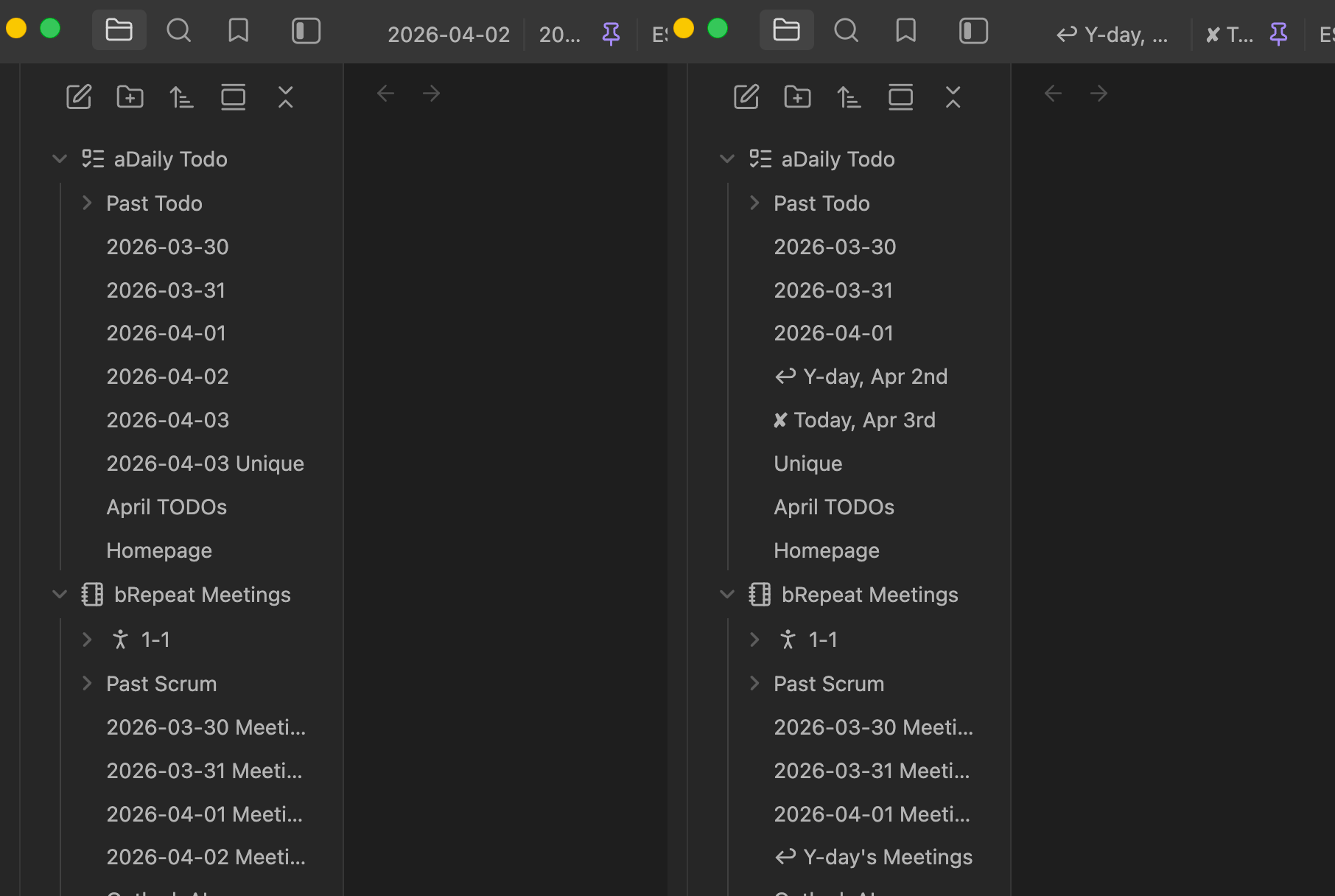
File explorer before and after Today Alias date labels

Filename on disk Shown in explorer
2026-03-10 (today, bare daily note) ✘ Today, Mar 10th
2026-03-10 Meetings (today, ignored pattern) ✘ Today's Meetings
2026-03-09 (yesterday, bare daily note) ↩ Yesterday, Mar 9th
2026-03-09 Meetings (yesterday, pattern-matched) ↩ Yesterday's Meetings
2026-03-08 Meetings (ignored pattern, not today/yesterday) 2026-03-08 Meetings (unchanged)
2026-03-08 M! Alice meeting email planning M! Alice meeting email planning
2026-01-15 Project kickoff Project kickoff
2026-02-03 (bare daily note, ignored) 2026-02-03 (unchanged)

How it works

  1. On load the plugin attaches MutationObservers to file-explorer container(s) and workspace tab titles (main window and popouts), watching for DOM mutations (child additions, text swaps, character data changes).
  2. A vault.on('rename') listener acts as a safety net to catch any edge cases the observers miss.
  3. Whenever a .nav-file-title-content element is painted or updated:
    • If the filename exactly equals today's date and Today bare-note toggle is on → replaced with the configured Today label (e.g. ✘ Today, Mar 10th)
    • If the filename exactly equals yesterday's date and Yesterday bare-note toggle is on → replaced with the configured Yesterday label (e.g. ↩ Yesterday, Mar 9th)
    • If the filename matches any ignore pattern and the Today pattern-prefix toggle is on and it starts with today's date → replaced with the configured prefix + the rest of the filename
    • If the filename matches any ignore pattern and the Yesterday pattern-prefix toggle is on and it starts with yesterday's date → replaced with the configured prefix + the rest of the filename
    • If the filename matches any ignore pattern otherwise → left completely untouched
    • Otherwise the date prefix is wrapped in a hidden <span class="ta-date"> and the rest shown in <span class="ta-rest">
  4. Day-rollover is detected by three complementary triggers: a window focus listener (fires when you switch back to Obsidian or the system wakes from sleep), a 60-second interval (catches windows left open without regaining focus), and a precise midnight timeout (fires at 00:00:05 for fully-awake sessions). Any trigger that detects a date change calls a shared checkDateChange() which prevents duplicate refreshes.
  5. On unload every element is restored to its original plain-text form across all open windows; no trace is left behind.

Format reference

All format fields use Moment.js format strings — the same system Obsidian's own Templates and Templater plugins use.

Token Meaning Example
YYYY 4-digit year 2026
MM 2-digit month 03
DD 2-digit day 04
Do Day with ordinal 4th
MMMM Full month name March
HH 24-hour hour 14
mm Minutes 05
[text] Literal (escaped) text [Today -]

Full reference: momentjs.com/docs/#/displaying/format/

Settings

Wrap literal text in square brackets to prevent it being treated as a token (e.g. [Today -]DD).

Setting Default Description
Enable true Toggle date-prefix hiding without uninstalling.
Date format YYYY-MM-DD Moment.js format of the date prefix at the start of filenames. Matches Obsidian's default Daily Notes format. Example for full datetime: YYYY-MM-DD[T]HH[:]mm[:]ss[Z].
Today (4 inline controls) Bare-note toggle + format, pattern-prefix toggle + format. Bare toggle: shows ✘ Today, Mar 10th for a bare today note. Prefix toggle: prepends ✘ Today's to pattern-matched today notes. Both inputs disabled when their toggle is off.
Yesterday (4 inline controls) Same structure as Today but for yesterday's date. Defaults: [↩ Yesterday, ]MMM Do and [↩ Yesterday's ].
Other pattern matching YYYY-MM-DD / YYYY-MM-DD [Meetings] One Moment.js pattern per line matched against the full filename. Files that match are left untouched. Use * as a wildcard and [...] to escape literal words — e.g. YYYY-MM-DD [Meetings] (without brackets, M would be parsed as a month token). Remove YYYY-MM-DD to let the plugin hide the date on bare daily notes (leaving them blank in the explorer). A live preview of each pattern rendered with today's date is shown beneath the field.

Installation (manual / development)

cd ~/MiscCode/obsidian-today-alias
npm install
npm run build          # produces main.js

Copy main.js, manifest.json, and styles.css into your vault's plugin folder:

<your vault>/.obsidian/plugins/today-alias/

Reload Obsidian (Ctrl/Cmd+R in developer mode, or close and reopen), then go to Settings → Community plugins and enable Today Alias.

Upgrading from v1.3.x

Settings using the old {YYYY}-{MM}-{DD} token syntax are automatically migrated to Moment.js equivalents on first load — no manual action needed.

Why not rename the files?

Renaming would break internal links and require vault reorganisation. This plugin is purely visual — filenames, links, frontmatter and every other Obsidian feature are never touched.

Possible future work

  • Handle future-dated notes differently
  • Option to pin Today/Yesterday notes to the top of their parent folder (and optionally pin folders relatively) — tracked in issue #1

Similar Plugins

info
• Similar plugins are suggested based on the common tags between the plugins.
Pinboard Sync
5 years ago by Mathew Spolin
Obsidian plugin to sync Pinboard.in links to Daily Notes
Novel Word Count
4 years ago by Isaac Lyman
Obsidian plugin. Displays a word count or other statistic for each file, folder and vault in the File Explorer pane.
Daily notes opener
4 years ago by Reorx
Easily open daily notes and periodic notes in new pane; customize periodic notes background; quick append new line to daily notes.
Daily Notes Viewer
4 years ago by Johnson0907
Upcoming
4 years ago by Charlie Chao
Show upcoming daily notes in their own panes.
Repeat
4 years ago by Andre Perunicic
Review notes using periodic or spaced repetition.
Daily Note Outline
4 years ago by iiz
Add a custom view which shows outline of multiple daily notes with headings, links, tags and list items
Dynbedded
4 years ago by Marcus Breiden
Embed snippets, templates and any linkable by delegating the current scope to the embedded file either by using a direct reference or as reference with date naming format relative from today. Also supports Quoth Codeblocks.
Journal Review
3 years ago by Kageetai
Review your daily notes on their anniversaries, like "what happened today last year"
Frontmatter Alias Display
3 years ago by muhammadv-i
A plugin for Obsidian.md to show front-matter aliases as display names in the file menu.
Waka time box
3 years ago by complexzeng
Reflection
3 years ago by Brandon Boswell
An Obsidian Plugin for seeing daily and weekly notes from this day in years past.
Auto Journal
3 years ago by Evan Bonsignori
Opinionated journaling automation like daily notes but with backfills for the days that you didn't open Obsidian.
Daily Note Pinner
3 years ago by LukeMT
Pins the daily note of the day and unpins other daily notes in Obsidian
Single File Daily Notes
3 years ago by Pranav Mangal
An Obsidian plugin to create and manage daily notes in a single file
Nested Daily Todos
3 years ago by Thomas Brezinski
A plugin for Obsidian will parse previous Daily Notes for incomplete todos and add them to today's Daily Note. It supports grouping the todos by section and supports alternative checkbox states and nested todos.
Daily note creator
3 years ago by Mario Holubar
Automatically creates missing daily notes.
Canvas Daily Note
3 years ago by Andrew McGivery
A plugin for Obsidian that allows you to add a daily note node to the canvas that will always show todays note.
Templated daily notes
3 years ago by digitorum
Allow to create templayted daily note in specific folder
Daily Note Navbar
3 years ago by Karsten Finderup Pedersen
Adds a daily note navbar to quickly navigate between sequential daily notes in Obsidian.
Telegram Inbox
2 years ago by icealtria
Receive messages from Telegram bots and add them to Obsidian's daily note.
Foodiary
2 years ago by vkostyanetsky
Food tracker plugin for Obsidian
Daily Prompt
2 years ago by Erl-koenig
Future Dates
2 years ago by Dmitry Manannikov
Memos Sync
2 years ago by RyoJerryYu
Syncing Memos to Obsidian daily note. Fully compatible with official Daily Notes plugin, Calendar plugin and Periodic Notes plugin.
Headings in Explorer
2 years ago by Patrick Chiang
This Obsidian plugin makes headings first class concepts in the file explorer and consolidates navigation to a single panel.
Daily Note Structure
2 years ago by db-developer
This obsidian plugin creates a structure for your daily notes
Everyday Classical Music
2 years ago by the flying markhor
Obsidian Plugin: Enhance your daily notes with the timeless elegance of classical music. Have a great day with the company of beautiful melodies!
Geulo
2 years ago by Junyoung Bang
Geulo — an Obsidian plugin for pulling and syncing your liked YouTube videos to your Obsidian vault.
Daily Note Collector
2 years ago by Adar Butel
An Obsidian plugin that adds links to new notes to your daily note.
Calendar
6 years ago by Liam Cain
Simple calendar widget for Obsidian.
Review
6 years ago by ryanjamurphy
Add the current note to a future daily note to remember to review it.
Rollover Daily Todos
6 years ago by Matt Sessions
An obsidian plugin that rolls over todo items from the previous daily note
Things Logbook
6 years ago by Liam Cain
Sync your Things 3 Logbook with Obsidian
Collapse All
5 years ago by Nathonius
File Explorer Markdown Titles
5 years ago by Dylan Elliott
Obsidian Plugin that adds the the markdown title within your notes to the file explorer
Daily Named Folder
5 years ago by Nemo Andrea
Like daily note, but nested in a daily folder and some more improvements
Prominent Bookmarked Files
5 years ago by Jeremy Valentine
Prominently display starred files in Obsidian.md
Reveal Active File Button
5 years ago by Clare Macrae
Obsidian plugin to add a button to the top of the Obsidian File Explorer, to reveal the active file.
Nav Link Header
2 years ago by ahts4962
Display navigation links at the top of the notes in Obsidian
Open with Natural Language Dates
2 years ago by Charlie Chao
Quickly open a daily note using natural language. Requires "Natural Language Dates" plugin to work.
Daily notes calendar
2 years ago by bartkessels
Quickly navigate your vault using a calendar view, this plugin allows you to create and navigate to periodic notes and notes that are created on a specific date.
Simple Focus
2 years ago by Lin Qing
Allows you to focus on a specific file or folder. 让你可以专注于一个文件或文件夹
Organized daily notes
2 years ago by duchangkim
Automatically organizes your daily notes into customizable folder structures for better organization and easier navigation.
Task Mover
2 years ago by Mariia Nebesnaia
A plugin for obsidian to move unfinished tasks to the daily note automatically
Previous Daily Note
a year ago by Marcos Talau
Plugin for Obsidian that opens the previous daily note
Daily Note Metrics
a year ago by Andre-Diamond
Obsidian Plugin that parses Daily Notes and uses data to create charts
Multiple Daily Notes
a year ago by Vab Kapoor
Obsidian plugin for adding multiple daily notes, with some extra configurations too.
Wordflow Tracker
a year ago by LeCheenaX
Track the changes and stats of your edited note files automatically in Obsidian. Record the modified notes and statistics to your daily note with various customizations!
Pinned Daily Notes
a year ago by Jeremy Neiman
Dynamically update a pinned tab with today's daily note
Hide Index Files
a year ago by d7sd6u
Hides folder notes from the file explorer
Auto Daily Note
a year ago by John Dolittle
Date Range Expander
a year ago by Mil
Obsidian plugin - Date Range Expander
Rainbow Folders Fixer
a year ago by Dee
Stop rainbow folders from changing colors as you scroll through the File Explorer in Obsidian.md
Daily Notes Automater
a year ago by David Pedrero
Reveal Folded
a year ago by d7sd6u
Adds a command that reveals current file while collapsing every other tree item
Limitless Lifelogs
a year ago by Maclean Dunkin
Sync your Limitless AI lifelog entries directly into Obsidian markdown files.
Title-Only Tab
a year ago by tristone13th
a plugin of obsidian for to change showing tab name to short
Mark Open Files
a year ago by Michael Schrauzer
Adds a marker to all the File Explorer items that are currently open in the Obsidian workspace.
Inboxer
a year ago by Eoin Hurrell
Obsidian plugin to add an inbox to notes
Hledger Notes
a year ago by Boburmirzo Khamrakulov
Hledger Notes: Create and manage hledger entries directly in Obsidian Daily notes
Zen Space
a year ago by Aditya Amatya
An enhanced file explorer showing relevant only relevant files for focused work.
Status.lol Publisher
a year ago by Eric Walker
Allows you to post to weblogs.lol, status.lol, some.pics and paste.lol from Obsidian.
Create Note with Date in This Directory
a year ago by Sangrak Choi
Obsidian plugin for creating a note with current date in this directory
Streams
a year ago by Floyd
Streams Obsidian Plugin
Coalesce
a year ago by Floyd
Coalesce is an Obsidian plugin that merges all your linked notes into a single, organized view for a cohesive research and writing experience.
Discrete
a year ago by shkarlsson
Scrolls To Nav Top
a year ago by mario
Simply scrolls to nav top
Google Calendar Importer
a year ago by Fan Li
A simple and light-weighted google calendar importer, allow injecting the events / tasks of a day automatically to your daily notes, or import it to anywhere with a command.
Open or Create File
a year ago by Ilya Paripsa
Set up Obsidian commands that create or open files based on predefined patterns.
Timestamper
10 months ago by René Coignard
Insert the current timestamp into your notes.
Daily Notes Tweaks
10 months ago by René Coignard
Open a random daily note and automatically switch past daily notes to reading mode.
LongtimeDiary
6 months ago by sawamaru
This is Obsidian Plugin to show past DailyNotes on the same day in previous years.
Synaptic View
6 months ago by Yongmini
Obsidian Plugin : Synaptic View that unifies your dashboards, hub notes, quick-entry notes, periodic notes, web shortcuts, and calendar navigation—enable it as the default new-tab experience or summon it with a command.
File Explorer Reload
4 months ago by mnaoumov
Obsidian Plugin that reloads the file explorer files list
Path in tab title
4 months ago by d9k
Tree Modal
4 months ago by krannich
Obsidian plugin: open files from the file explorer in a modal preview
File Explorer++
3 months ago by kelszo
A plugin for https://obsidian.md, which enables the ability to hide and pin specific files and folders in the file explorer by applying custom filters.
Timelines (Revamped)
3 months ago by seanlowe
Create a timeline view of all notes with the specified combination of tags
Hide Folders
3 months ago by jonasdoesthings
Toggle the visibility of folders in the Obsidian.MD file navigator based on name-patterns
Flexplorer
3 months ago by kh4f
🗃️ Obsidian File Explorer Enhancer
Live Life Recording
2 months ago by goryugocast
Operate tasks directly in Markdown with start/finish records, routine insertion, and a lightweight daily summary for Obsidian.
Sidebar Keyboard Navigation
a month ago by denvolok
Obsidian plugin to smoothly navigate File Explorer using keyboard only.
Natural Language Dates
a month ago by obsidian-community
Work with dates in natural language in Obsidian
Day Planner
a month ago by ivan-lednev
An Obsidian plugin for day planning with a clean UI and a simple task format
Browser Note
a month ago by fengshuzi
Obsidian plugin: localhost HTTP API for vault notes with a built-in browser UI.
Journal View
a month ago by RUverse
A Journal View for Obsidian
Thino
a month ago by quorafind
A quick capture plugin for Obsidian, all data from your notes.
Granola Sync
a month ago by tomelliot
Sync Granola notes to your Obsidian vault
Dayframe
a month ago by Ganessh Kumar R P
🖼️ like a picture frame but for your daily notes.
Pinned Tabs
a month ago by NameIsKyro
Chrome-style compact pinned tabs for Obsidian with custom icons, smooth movement, and accidental-close protection.`
Mobile Sidebar Notes
a month ago by ckep1
Open notes & new tabs in the sidebar on the Obsidian mobile app.
Heading View
21 days ago by 菅原ユリア
Rollover Plus
6 days ago by Wren
Move unfinished tasks between daily notes with Rollover Plus.
Weekday Commands
5 days ago by Wren
Simple Meeting Sidebar
5 days ago by Wren
A macOS-only Obsidian plugin that reads Apple Calendar events into a sidebar and turns them into tasks or meeting notes.