
README file from
GithubFast Find 10K
A fast note finder for large vaults (10k+ notes). A Rust search engine compiled to WebAssembly runs in a worker and powers instant fuzzy, field-weighted, frecency-ranked search with optional semantic "similar notes".
I've built my dream search for Obsidian based on fzf/Telescope from Neovim for preview style and fuzzy search, Omnisearch for smarter search, and Smart Connections for similar notes, all based on Rust WASM to be super fast. This is how it looks:
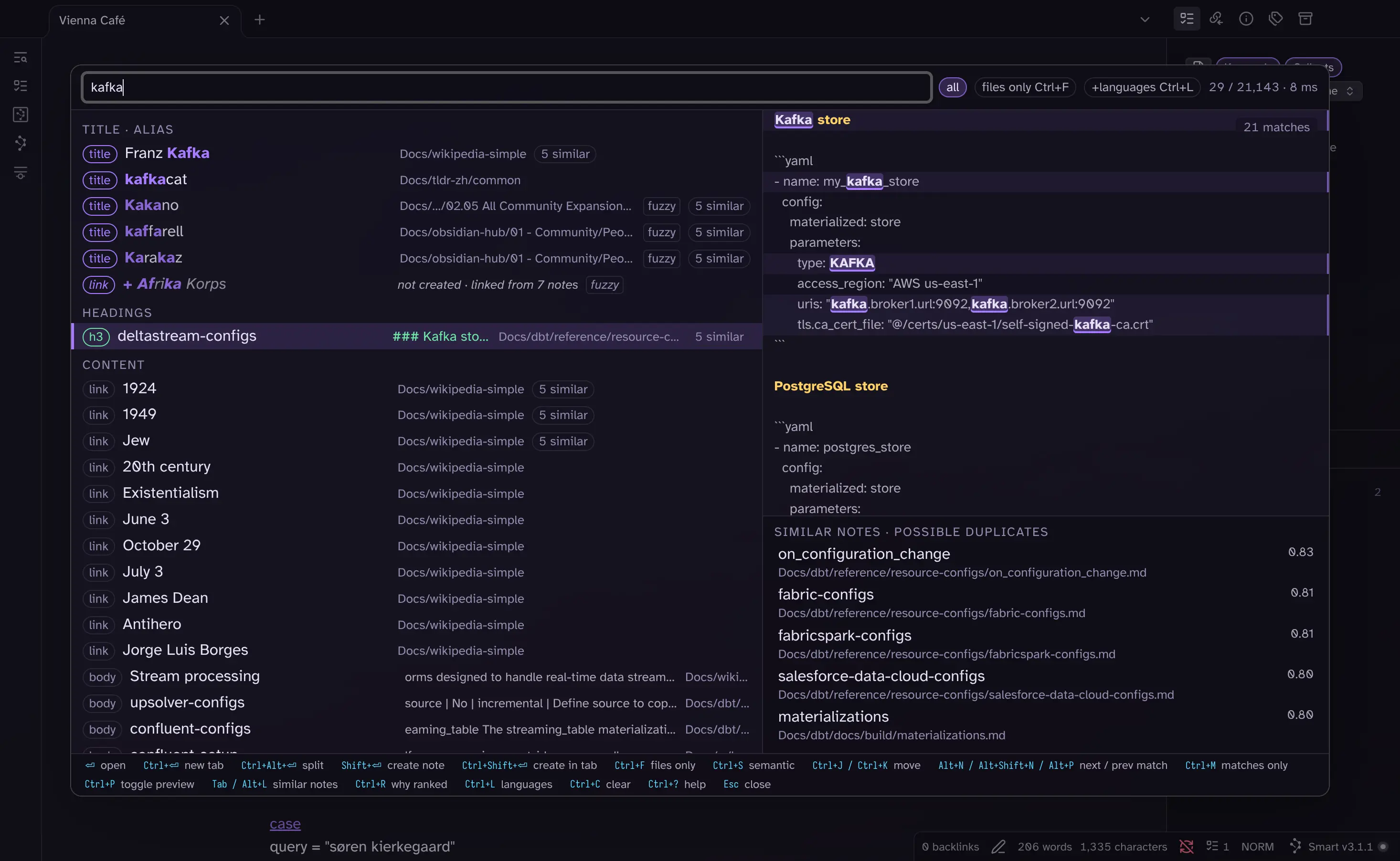
Video showcase:
https://github.com/user-attachments/assets/2a36f06a-0cf9-4156-a0aa-6bbc0249ea34
Also see longer Form YT video (13 min).
Mobile View::
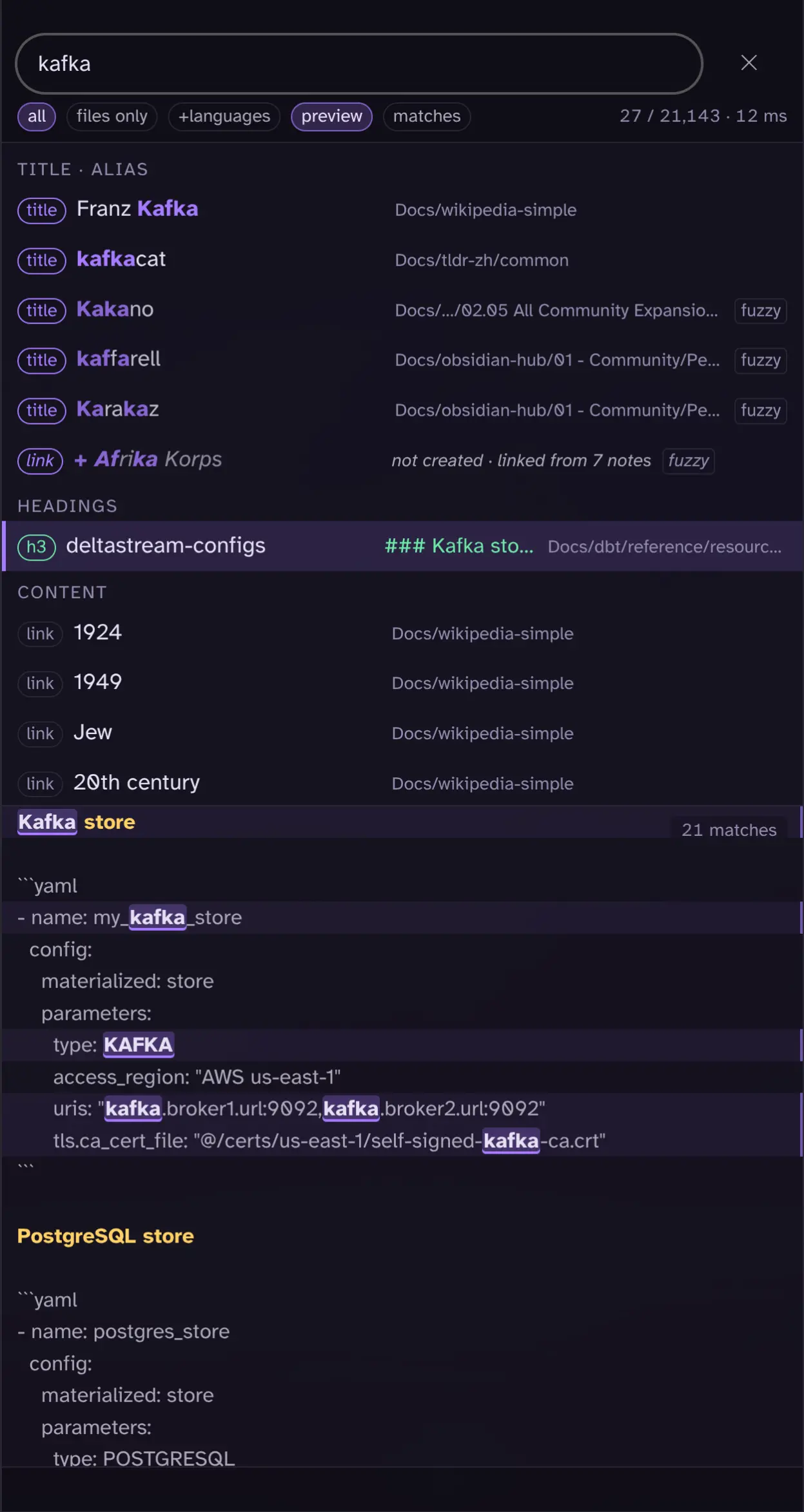
More screenshots, one per feature: docs/showcase.md
[!TIP] Do I need this? Below about 1,000 notes, native search, the Quick Switcher or Omnisearch serve you well. Fast Find 10K earns its place from a few thousand notes up, when an unranked list of 900 hits stops being useful, and from day one if you want the preview, title-first ranking and typo tolerance. See the comparison.
Origin Story
I used Omnisearch for 5+ yearso, plus, and I ran into the 10k limitation of Obsidian. luckly Kepano, the CEO Obsidian quickly solved. The problem was that wikilinks starting with [[ didn't show notes that existed in the vault. I knew it, sometimes they showed, sometimes they didn't, see the video here.
But I also noticed, that Omnisearch sometimes I missed notes, or I had to know the title exactly. It was not as much fuzzy finding as i wanted, plus the configration between searching the title of file (I used quick switcher for taht) or h1-h3 headers, or if inside the body, wasn't that clear. Although, to their credit, you can speicify the weight of each in the settings.
But I also started to use Smart Connection panel on the left, that helped me to find similar notes, as to make sure I don't create a note that already exists.
In this new plugin I created with Claude Code, i integrated Quick Seach, OMniseach and Smart Connections into one Plugin. If you have smart connections installed, we use the embeddings created for similary search. Plus the search is more fuzzy too, so if you type toubleshoot, missing the r, it will still find the troubleshoot note.
It will nicely show the different titles, and h1-3 and body, plus you can toggle why they were found.
And bottom right, there's similar notes to show and avoid creating an existing note twice, which is most important to my obsidian workflow, as i don't relay on folders, but all by seach. So if search does not work anymore, I will create 10 of the same notes over and over again, plus i might not find my notes, usually i remember when I create a note and want to find a spefific, but in case I forgot, then this plusign helps me too.
[!NOTE] The name "Fast Find 10K" comes from finding fast notes, which is the key of this plugin and the 10k is a hint to my personal limitation I got from 10k above. It's not meant to stay like this, or not usable below 10k, it will work peferctly fine too for low files, but that's the reason why I created it, and hence the name.
But it goes way beyond 10k, as a fun exersices, as someone on HN asked me, I tested it with a 100k-note vault (98,892 notes, 584 MB of markdown). Fast Find is searchable 0.6 s after Obsidian loads, and a query returns its ranked list in 20–400 ms, while Obsidian's own search needs 2–57 s to finish the same queries. Numbers, method and screenshots: Performance with 100k notes.
Features
-
Fast on big vaults. The index is a Rust engine compiled to WebAssembly, running in a Web Worker. On the 9,385-note / 27 MB test vault the finder is searchable about 0.3 s after Obsidian loads (fully indexed after 1.2–1.4 s), and a query takes 4–18 ms inside Obsidian (1–8 ms native). There is no input debounce: every keystroke is a query, and the screen is repainted in under 30 ms. Notes are cached in IndexedDB, so a reload re-indexes only what changed; an edit is picked up within half a second.
-
Accurate ranking in tiers. A note that matches every word in its title or an alias always ranks above one that matches only in a heading, which ranks above body-only matches. Within a tier, field weights, prefix and typo quality, how many title words the query left unmatched, word proximity, backlinks and your own opening history (frecency) decide the order. See How ranking works.
-
Fuzzy, but guarded.
troubelshootstill finds "Obsidian Troubleshooting" (one typo for 6–9 letter words, two for 10+, and one typo in titles already at 5 letters:Gitubfinds "GitHub"), while scattered subsequences are rejected, sowritingdoes not match "Airbyte Checkpointing", and a typo never crosses a word boundary, soinvoicedoes not match "Brand Voice" (n+voice) andstrassedoes not match "Star system" (str+sse); a dropped space still works:databasefinds "Data Base Design". Rows that matched only with a typo carry afuzzypill and sort after the exact ones of their tier, so the rows with the typed word stand out; "Minimum fuzzy match quality" in the settings drops the loosest ones. Word order never matters:ai writingandwriting aireturn the same list. -
Why ranked here (Ctrl+R). Every row can show its tier, which field each word hit (exact, prefix or fuzzy, with the quality), and every score component. When a result surprises you, one key shows the reason:
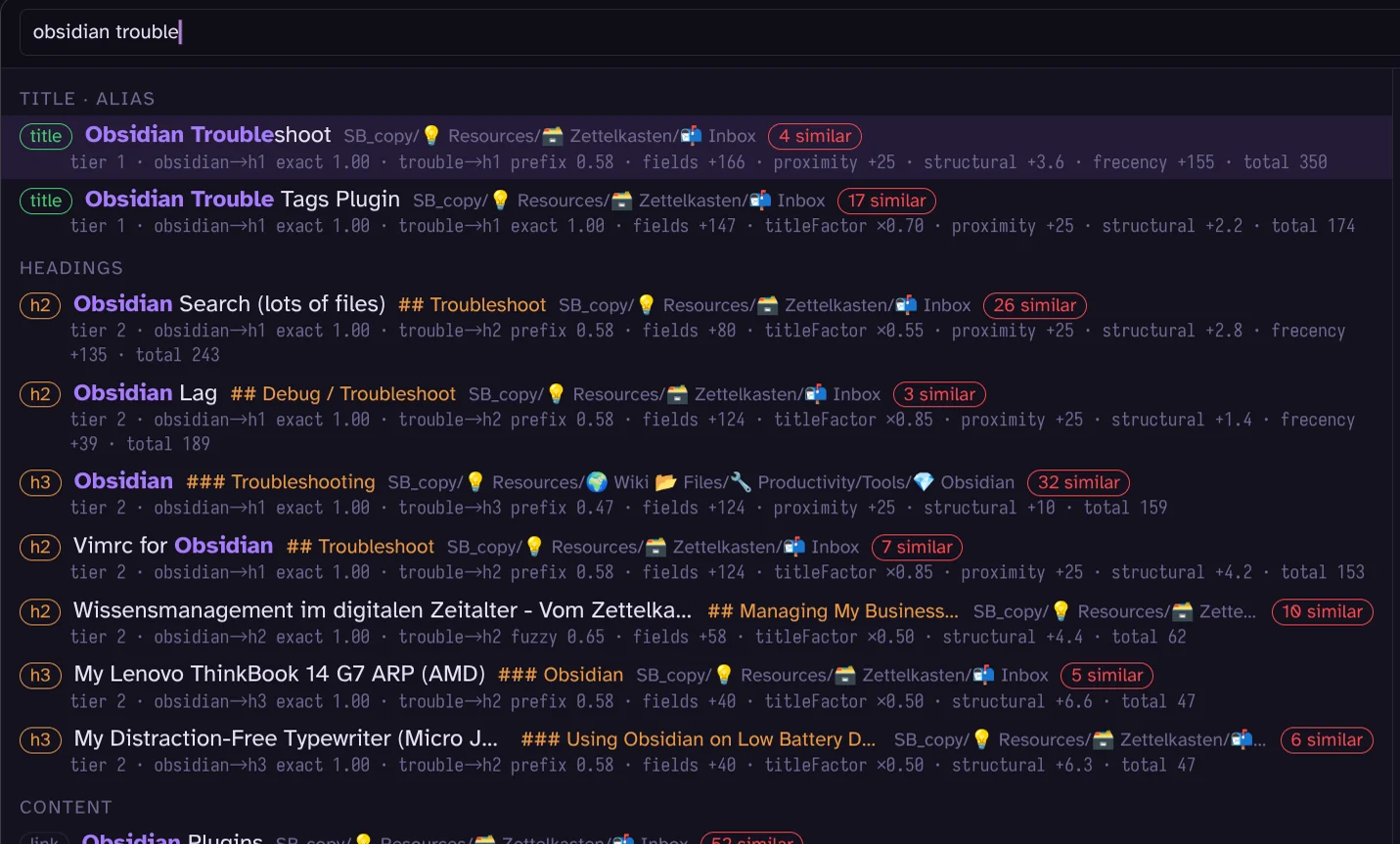
kafka: "Franz Kafka" leads with an exact title hit (exact 1.00,fields +85), "kafkacat" follows as a prefix hit, and "Kakano" or "kaffarell" sit below as fuzzy hits (fuzzy 0.64, thefuzzypill); the ghost "Afrika Korps" carries the ghost penalty (×0.80). A row with an exact hit in a shorter title beats one whose title has extra words (titleFactor ×0.85vs×0.70). -
Similar notes, to avoid creating a note twice. The panel bottom right lists near-duplicates of the selected result, and every row carries an
N similarpill. Similarity comes from title overlap, plus Smart Connections embeddings when that plugin is installed. Before creating a note with Shift+Enter, the create guard shows the closest existing notes first ("Already have?"). This is the feature that stops a vault with no folders from collecting "AI", "AI and Data Engineering" and "AI for Data Engineers" three times over. -
Create when nothing exists. Shift+Enter creates a note named after the query (Mod+Shift+Enter in a new tab). Unresolved
[[links]]show as ghost rows ([ghost x2]= linked from two notes) and can be created the same way. -
Files only (Ctrl+F) switches to titles, aliases and paths, as a Quick Switcher replacement.
-
Telescope layout with preview. Results left, the note preview right with the matches highlighted and counted (
3 / 12 matchesin its header; Alt+N / Alt+Shift+N jump between them, Ctrl+M shows only the lines around the matches; plain text for speed; embedded images are shown as pictures,mermaidblocks are rendered as diagrams a quarter second after the selection settles, a canvas shows its cards as text and embeds, an Excalidraw drawing shows its PNG/SVG export when the plugin wrote one next to it, plus its text elements), vim keys to move (Ctrl+J/K) and to scroll the preview (Alt+J/K). Enter opens, Mod+Enter in a new tab, Mod+Alt+Enter in a split, Alt+Shift+Enter opens all shown results (10 or fewer). -
Properties (frontmatter) are searchable. Every frontmatter key and value except Obsidian's own (
aliases,tags,title,cssclasses,created) is indexed as a property:india espressofinds a coffee note whoseHerkunftslandis India, shown with apropbadge andHerkunftsland: Indiaas context. Filters use Obsidian's syntax:[Herkunftsland:India]keeps notes with that value,[price]notes that have the key. -
Query syntax for narrowing:
"exact phrase",#tag,path:folder,-exclude,[key],[key:value],type:base(ornote,canvas,drawing). Optional words (a an the of to in on iby default) never exclude a note- Set abbreviations that expand (
oss→ "open source"). Both editable in the settings.
- Set abbreviations that expand (
-
Respects your vault setup. Obsidian's "Excluded files" are never indexed, you can add ignored globs, and folders such as an archive can be downranked instead of hidden. Obsidian Bases (
.base), canvases (.canvas) and Excalidraw drawings (.excalidraw,.excalidraw.md) are indexed too, with the title from the file name: a base's description, filters and view names are content; a canvas becomes a small markdown note (group labels as headings, text cards as paragraphs, file cards as links, so a canvas that embeds a note counts as a backlink); a drawing's text elements are content and its compressed drawing blob is skipped. Such results carry a smallcanvas,baseordrawingmarker after the title. -
Semantic results through Smart Connections embeddings, as a separate tier below the text matches: on by default for every query (a query embedding takes a few milliseconds), or on demand with Ctrl+S.
-
Resume and recall. "Search (resume last)" reopens the finder with the previous query; notes you keep opening from the same query get a sticky bonus.
-
Local only. No language model, no network. See LLMs or AI.
Install
From the community plugins (desktop and mobile): in Obsidian open `Settings → Community plugins → Browsey, search for "Fast Find 10K" and install it, or open https://community.obsidian.md/plugins/fast-find and click Install. Then enable it.
From source:
make install VAULT=<vault> # builds wasm + plugin and symlinks plugin/dist into the vault
That needs Rust with the wasm32-unknown-unknown target, wasm-bindgen-cli 0.2.128 and Node. Without make:
bash scripts/build-wasm.sh
cd plugin && npm ci && npm run build        # dist/main.js (wasm and worker embedded), manifest.json, styles.css
V=<vault>/.obsidian/plugins/fast-find
mkdir -p $V && ln -sf $PWD/dist/main.js $PWD/dist/manifest.json $PWD/dist/styles.css $V/
Then enable "Fast Find 10K" under Settings → Community plugins. Requires Obsidian 1.5.7 or newer (1.13 or newer for settings search). The plugin's Obsidian id is fast-find (manifest ids allow only lowercase letters and hyphens, so no 10k); that id names the plugin folder and the commands (fast-find:search). Everything else, from the repo to the package, keeps the name Fast Find 10K.
docs/dev-checklist.md has the reload and verification steps.
Usage
A ribbon icon (the lines-and-magnifier text-search icon, left bar on desktop, the drawer on mobile) opens the search with one click; turn it off under Settings → Behaviour. Commands (bind them to hotkeys in Settings → Hotkeys):
| Command | What it does |
|---|---|
| Search | opens the finder over titles, aliases, headings, tags, links, paths and content |
| Search file names | opens it in files-only mode (titles, aliases, paths) |
| Search (resume last) | reopens it with the last query |
| Rebuild index | drops the note cache and reads every file again |
Query syntax: plain words are AND-ed (all must match; notes that match only some of them appear further down under partial, see How ranking works) and match by prefix and with typo tolerance; there is no OR, which has little value for finding one note fast (search twice, or use the broader word); "exact phrase", #tag, path:folder, -exclude, [key] (notes that have the property), [key:value] (notes whose property has that value; list properties match any element; keys and values are compared case- and accent-insensitively, values must be one word), type:note / type:base / type:canvas / type:drawing (one file kind; several type: words allow several kinds). A #tag no note carries, a [key] no note has, or a -word that would leave nothing, is searched as plain words, so pasting a title such as Newsletter #115 works. No input debounce: every keystroke is a query.
An empty query lists recently opened notes. Rows show which field matched (title, alias, heading, content, link) with highlights, a preview on the right, and an N similar pill when near-duplicates exist: N is the number of rows the similar-notes panel shows for that note (title overlap plus up to five Smart Connections neighbours above the "Minimum similarity shown"); for rows beyond the first ten only the title-overlap part is counted, to keep typing instant.
Keys
Defaults (Mod is Cmd on macOS, Ctrl elsewhere); every binding can be changed in the settings (alternatives separated by |, e.g. Alt+Shift+N | Alt+P), and Ctrl+? shows the current ones in the modal. Saved bindings still on an old default (Shift+J/K/L/H, Ctrl+/) move to the new one on load unless the new key is taken.
| Key | Action |
|---|---|
| ↓ / Ctrl+J | next result |
| ↑ / Ctrl+K | previous result |
| Alt+J / Alt+K | scroll the preview down / up (Alt rather than Shift so every capital letter stays typable, for note names created with Shift+Enter) |
| Alt+N / Alt+P (or Alt+Shift+N) | next / previous highlighted match in the preview (the preview header shows 3 / 12 matches) |
| Ctrl+M | preview shows only the lines around each match, with line numbers, or the whole note again (clicking the preview header does the same; a matches pill on mobile) |
| Tab | focus the similar-notes panel (Tab again or Esc returns) |
| Alt+L / Alt+H | vim-style: move into the similar-notes panel on the right / back to the results on the left |
| Enter | open |
| Mod+Enter | open in a new tab |
| Mod+Alt+Enter | open in a split |
| Alt+Shift+Enter | open all shown results in tabs (10 or fewer) |
| Shift+Enter | create a note named after the query (with the "Already have?" guard) |
| Mod+Shift+Enter | create it in a new tab |
| Ctrl+F | toggle files only |
| Ctrl+S | add semantic results (Smart Connections) |
| Ctrl+P | toggle the preview |
| Ctrl+R | toggle "why ranked here" (tier, per-term field and match, score parts); while the search is open Ctrl+R does not reload Obsidian. A saved binding still on the old default Ctrl+/ moves to Ctrl+R on load (unless Ctrl+R is taken) |
| Ctrl+L | toggle language expansion for this search session (the German word list and the dictionary note join the abbreviations); off at startup unless "German words on at startup" is set. The header pill "+languages" shows the state |
| Ctrl+C | clear the query (the cleared text is kept for "Search (resume last)"); while text is selected in the field, Ctrl+C copies as usual |
| Ctrl+? (Ctrl+Shift+/) | toggle the key help |
| Esc | close (or leave the similar panel / help) |
Settings
- Indexing: ignored folders/globs (never indexed; Obsidian "Excluded files" are always honoured), downranked folders (still searchable, score × 0.3), rebuild index.
- Ranking: field weights (title 100, alias 90, h1 105, h2 65, h3 55, tag 30, property 25, link 20, path 15, body 10; a weight of 0 turns the field off; H1 is usually the note's own title and gets a hair more than the file name, but a note matched only in its H1 still sits in the headings tier below every title match), fuzzy typo tolerance (off: only the typed words and their prefixes / normal: one typo at 6–9 letters, two at 10+ / loose: one more each), minimum fuzzy match quality (0.5–0.9, default 0.58: a row whose word matched only with a typo is dropped below this quality, the number Ctrl+R prints as
fuzzy 0.62; the rows that stay carry afuzzypill), partial-match tier (when few / always / never), optional words that a query never requires (defaulta an the of to in on i; they still add to the score where they match), abbreviations and synonyms (one group per line,oss: open source, open-source software; typing a single-word member also finds the other members, see Examples), German words on at startup (language expansion adds about 400 built-in English ↔ German word pairs and the dictionary note to the abbreviations:schoolfinds "Schule Madretsch",Kinderfinds "children"; off by default, Ctrl+L switches it per session), dictionary note (the path of a note in the vault whoseenglish: german, germanlines join the abbreviations, reloaded when you edit it). - Semantic: use Smart Connections embeddings, minimum similarity shown (similar-notes panel, note to note, default 0.70), minimum similarity for semantic results (the semantic tier and the create guard, query to note, default 0.60: a short query embeds further from a note, typical top hits score 0.65–0.8), semantic tier (always, the default: appended after every query, a few milliseconds / only when fewer than five full matches / on demand with Ctrl+S / never).
- Behaviour: create guard, preview open by default (desktop), preview open by default on mobile (on; a "preview" pill toggles it there; both apply to "resume last" too), ribbon icon (on), similar notes panel (always / desktop only / never; title similarity works without Smart Connections, so the panel is not empty when that plugin is off), key hints in the footer (desktop only / always / never).
- Keys: every modal binding.
- Debug: "why ranked" by default, log engine timings to the console, clear frecency.
Mobile
The plugin runs on phones and tablets (the engine is WebAssembly in a worker, the cache is IndexedDB; the first start reads every note, which takes longer than on a desktop, and the header shows indexing N / total until it is done). The search opens in one column: the input on its own line, the pills (all / files only / +languages / preview) below it as tap targets, the results list scrolling, the preview stacked underneath when the pill turns it on, a ✕ at the end of the search line to close, and no key-hint footer. With the preview on, a tap selects a row and shows it below; a second tap on the selected row opens it (with the preview off, one tap opens). Testing a build without a release: obsidian dev:mobile on in the desktop app emulates the mobile layout; on a real device, sync the vault's .obsidian/plugins/fast-find/ folder (Obsidian Sync with community plugins enabled, or any file sync) after make install, or publish a pre-release and install it through BRAT.
How ranking works
Each query word (and each quoted phrase) must match, except optional words (a an the of to in on i by default), which only add to the score. A note's tier comes from the weakest field its words matched, and a lower tier never ranks above a higher one:
- title · alias: every word in the title or an alias (unresolved link targets, "ghosts", also appear here and can be created with Shift+Enter). A ghost is hidden when a note of that name exists, compared with diacritics and emoji folded:
[[Café]]does not show as a ghost whenCafe.mdexists - headings: every word in a title, alias or H1–H3
- content: every word somewhere, including body, tags, links, path and frontmatter properties
- partial: some words missing but one in the title or an alias (shown when the other tiers have few hits). This is why
party raincan also list a note that only has "party": every full match (tiers 1–3) comes first, and the partial group is labelled so you can tell. Settings → Ranking → "Partial-match tier" shows it only when the full matches are few (default), always, or never.- e.g.
kafka pragueshows the order: "Franz Kafka" and "October 29" mention both words in their body and lead as content; "kafkacat" and "Bubonic plague" carry one word in the title and follow as partial (screenshot).
- e.g.
- semantic: Smart Connections neighbours of the query, when enabled
Within a tier, notes where every word matched exactly or by prefix come before notes where a word matched only with a typo; those rows carry a fuzzy pill (when the query itself has the typo, every hit is fuzzy and the scores decide). Then the score adds the field weights × match quality (exact 1.0, prefix by length ratio, fuzzy below that), shrinks it for title words the query left unmatched, and adds proximity (words close together or in one section), backlinks, a bonus when the title is exactly the query's words, frecency (opens over the last 30 days, decaying) and a sticky bonus for a note opened three times from the same query. Downranked folders and very short notes are multiplied down. Ctrl+R shows every part for each row.
Smart Connections
When Smart Connections (4.7.2) is installed and has embedded the vault, Fast Find 10K reads its note vectors (read-only, through one bridge module) and uses them for the semantic tier, the similar-notes panel and the create guard. Without it everything else works and the similar panel uses title similarity only, and hides itself when it has nothing to show.
How the index and the embeddings stay current
Two separate things, both automatic:
- The note index is built from the markdown text. On start it comes from the plugin's cache and only changed files are re-read (about 1.3 s for 10k notes); afterwards every create, edit, rename or delete in the vault updates it within half a second. "Rebuild index" in the settings drops the cache and reads every file again; you only need it after changing the ignore globs or if something looks off.
- The embeddings are never computed by this plugin. Each time you open the search, the bridge fingerprints Smart Connections' item list (path, content hash and embedding reference per note), at most once per 30 seconds, and reloads all vectors into the engine when that fingerprint changed. So while Smart Connections is still embedding new notes, every search opened after a pause sees what it has finished so far; nothing to run afterwards. With "Log engine timings" on, the console shows a
vectors: N notesline at each reload.
Examples
All results below come from the CLI on the 9,385-note test vault (ff10k query <vault> "<q>"), which is a copy of my own vault; Obsidian shows the same list.
Word order does not matter. ai writing and writing ai give the same list:
1  AI Writing
1  How to detect AI Writing
1  Use Cases of AI Writing (ChatGPT, Lex, etc.)
1  Writing with AI- SSP Data
Typos. obsidian troubelshoot (letters swapped) still puts "Obsidian Troubleshoot" first; the rest are notes with a troubleshooting heading:
1  Obsidian Troubleshoot
2  Obsidian                          ### Troubleshooting
2  Vimrc for Obsidian                ## Troubleshoot
2  Obsidian Lag                      ## Debug / Troubleshoot
Fully covered titles win. obsidian trouble ranks "Obsidian Troubleshoot" above "Obsidian Trouble Tags Plugin", because the second title has two words the query did not mention. Ctrl+R shows it: trouble→title prefix 0.58 · titleFactor ×1.00 versus trouble→title exact 1.00 · titleFactor ×0.70. Type trouble tags and the plugin note comes first.
Phrase, tag, path and exclude. "data engineering" duckdb needs the two words next to each other and duckdb anywhere:
1  Reducing complex Data Engineering Architecture with SQLite and DuckDB
1  What has WebAssembly (WASM) to do with DuckDB and data engineering   [ghost x1]
2  Data Engineering Whitepapers       ## DuckDB
The second row is a ghost: a [[link]] to a note that does not exist yet. Shift+Enter creates it. path:inbox dagster -airflow limits the path to inbox, requires dagster and drops every note that mentions Airflow.
Optional words. should i change finds "Should I Change My Writing because of AI" first, and a note titled "Change Should Happen" also qualifies for the title tier although it has no i, because i is on the optional list. Where an optional word does hit, it still adds to the score. The preview does not highlight optional words (so as no longer lights up all over a note), and a term of up to three letters is marked only as a whole word, never inside a longer one (as in "basic"). An empty box means no optional words at all; the default list is the one above.
Abbreviations. With the setting line oss: open source, open-source software, the query oss matches notes that say OSS, "open source" or "open-source software" in the title, headings or body:
without the group                        with the group
1  Open Source (alias OSS)               1  Open Source
1  dbt (alias)                           1  Supporting Open Source
1  OSS git Analytics and insights        1  Why Open-Source
1  Podcast Bedag - OSS Data Engineering  1  dbt (alias)
                                         1  open-source lock-in
                                         1  The Death of Open Source
German words. With language expansion on (Ctrl+L in the search, or the "German words on at startup" setting), school also finds "Empfangsstruktur (Schule Madretsch)" and "Schulen im Kanton" (prefix: schule → Schulen, umlauts folded), and schule finds the English "School Notes". Notes found through a word from the list or from an abbreviation group show their highlights in a second colour with a "via word list" pill, so you can tell them from direct matches. The list is about 400 everyday pairs (crates/ff10k-core/dict/de.txt); add your own in the abbreviations box, or keep them in a note (Dictionary.md with lines such as invoice: rechnung, faktura) and name it in the "Dictionary note" setting. Everything stays exact or prefix: no translation model, and nothing changes while the toggle is off.
Spanish, French, any other language. The built-in list is German only, but the mechanism is not: put the pairs in the dictionary note (school: escuela, colegio, one line per word) or in the abbreviations box, and Ctrl+L switches them with the German list. A built-in list for another language is a text file in the same format: add crates/ff10k-core/dict/es.txt, one match arm for "es" in dictionary() in crates/ff10k-core/src/rank.rs, and a toggle next to "German words" in the settings tab; pull requests welcome. Keep false friends and words that are also English words out of such a list (the German file's header says which were dropped and why).
Why not a full dictionary: I tried the free Ding German–English dictionary (414k entries, GPL). Every automatic reduction expands a word to all its senses: note becomes Banknote and Hauch, change becomes Kleingeld and Münzen, house becomes Geschlecht, and the strict rules that remove those also remove Kind and Daten. A query expansion needs the one everyday translation, which a general dictionary does not mark, so the built-in list is hand-picked and the dictionary note is yours.
The same for de: data engineering: alone, de is an exact two-letter word and finds "TJ DeVries" and "Elias DeFaria"; with the group it finds the "Data Engineering" hub notes first. Typing a single-word member finds the others in both directions (k8s: kubernetes makes kubernetes find the "K8s Cheatsheet" note too); a several-word member is only found, so open source does not search for oss.
Files only. Ctrl+F with obsidian lag lists "Obsidian Lag" and then partial title matches ("Obsidian", "Using Obsidian with AI"); headings and body are not searched.
Similar notes. Selecting "How to detect AI Writing" shows, from the Smart Connections embeddings:
0.850  AI Writing
0.838  What I Learned Writing with AI
0.836  Originality.ai (detecting AI generated articles)
0.830  Tools to Check Plagiarism and AI-Generated
Without Smart Connections the panel uses title overlap only: "👉🏻 Data Engineering" lists "AI in Data Engineering", "Airflow for Data Engineering", "Data Engineering Glossary" and so on.
Performance
On a 9,385-note / 27 MB vault: warm start about 1.2–1.4 s to fully indexed (searchable after the first 500 notes), engine time per query 4–18 ms in Obsidian, 1–8 ms native. On a 98,892-note / 584 MB vault: searchable after 0.6 s, fully indexed after 38 s, 20–400 ms per query in Obsidian (typically 150–230 ms), worker memory 2.3 GB. Numbers, method and screenshots in docs/performance.md.
Tests with 100K Markdown Files Vaults
Full write-up with screenshots of the search window (engine time at the top right), 15 queries side by side, the native CLI breakdown and how it was measured: docs/performance.md. The short version, measured in Obsidian 1.14.4 on the same machine, Fast Find 10K 0.2.6, no other plugins than Vimrc Support:
| 17,783 notes / 82 MB | 98,892 notes / 584 MB | |
|---|---|---|
| Searchable after start | — | 0.6 s |
| Fully indexed (warm start) | — | 38 s, in the worker |
kafka |
7 ms | 19 ms |
kubernetes |
14 ms | 149 ms |
data engineering |
17 ms | 219 ms |
obsidian troubelshoot (typo) |
25 ms | 221 ms |
sql server (slowest measured) |
20 ms | 401 ms |
| Native search, same queries, until done | — | 2–57 s, streaming |
| Worker memory | — | 2.3 GB |
[!NOTE] What it means at 100k: every query returned its ranked list in under half a second, most in 150–230 ms, against 2–57 s for Obsidian's own search. Query time grows with the amount of text (7× the markdown, 3–20× slower queries), common words that hit much of the vault cost most, and memory grows with it too. At this size Obsidian itself becomes the bottleneck: its first index took many minutes, and renaming a note with link updates took 45 s.
Comparisons to other Searches
Full write-up with screenshots, one query at a time (a two-word topic, two typos, an abbreviation, a tag, a property, a query that needs meaning, a question), timings and what each tool can do that the others cannot: docs/comparison.md. The short version, measured on the 17,780-file test vault:
| Native search | Omnisearch | Fast Find 10K | QMD | |
|---|---|---|---|---|
| Ranking | none (by name or date) | one score | tiers: title → headings → content → partial → semantic | BM25 + embeddings + reranker |
kubernets deploymnet (two typos) |
0 | 0 | the Kubernetes deployment notes | 0 (keyword mode) |
oss |
10,646 matches, alphabetical | substring hits | Open source via the abbreviation group, then oss titles |
oss titles |
| Tags / properties | tag: / ["key":value] |
as words | #tag / [key:value] |
no |
| Preview / similar notes | snippets / no | snippets / no | full note with match jumps / yes | no (CLI) |
| Meaning without shared words | no | no | with Smart Connections vectors | yes, its purpose |
| Query time here | 0.2–2.5 s, streaming | 7–127 ms | 8–75 ms | 0.1–0.3 s keyword, 3–7 s hybrid once warm |
| Mobile | yes | yes | yes | no |
When to use which
[!TIP] Under ~1,000 notes: native search or the Quick Switcher are enough; Omnisearch adds fuzzy matching. Fast Find 10K is a day-one choice only if you want the preview, title-first ranking, typo tolerance or the Smart Connections tie-in. 1,000–5,000: Omnisearch or Fast Find 10K. Above 5,000: Fast Find 10K; this is what it was built for. Questions rather than notes, or feeding an AI agent: QMD next to whichever in-Obsidian search you use.
LLMs or AI
Everything here shown is based locally, no AI model used, no local and also no frontier or online model. Smart Connection creates local embeddings in .smart-env (small local embedding model), and these we use for showing similar notes. Everything else is just local index based on your notes.
Everything runs locally and there is no language model involved. Search is a plain index over your notes: tokens, fields, positions, frecency. No model runs when you type. The one exception is similar notes: if you have Smart Connections installed, FF10K reuses the embeddings it already stored in .smart-env. Those come from a small local embedding model (a few hundred MB, not an LLM), and FF10K does not compute them, but instead read and compresses them from Smart Connctions. If Smart Connections isn't installed, nothing changes except the similar-notes panel falls back to title overlap only.
Development
How the plugin works (worker, Rust engine, IndexedDB cache, incremental updates, Smart Connections vectors), with diagrams: docs/architecture.md.
make build(wasm + plugin),make test(Rust, golden, typo recall, plugin),make install VAULT=…,make recall VAULT=…,make release-notes VERSION=x.y.z(draftsRELEASE_NOTES.mdfrom the commits since the last tag; review and commit),make release VERSION=x.y.z(bumps the version files, builds, commits, tags and pushes; the Release workflow publishes with those notes)- Build:
cargo build --release(CLI binary:target/release/ff10k) - Test:
cargo test --workspace; plugin:cd plugin && npm test - Golden:
cargo test -p ff10k-core --features golden --test golden, orff10k golden <vault> <golden.toml>(exit 1 on failures) - Typo recall:
cargo test -p ff10k-core --features golden --test typo_recall -- --nocapture(one typo in a title word must keep the note in tier 1) - Recall on your own vault:
ff10k recall <vault> [--every 10] [--all-misses]queries every note by its full title, its first two words and its title with one letter deleted, and prints how often the note is the first hit, in the top 5 and in the top 10, with every miss (--sample-out file.jsonwrites the queries for running the same set through another search plugin) - Benches:
cargo bench -p ff10k-core(criterion),ff10k bench <vault>(p50/p95 in microseconds, 200 runs per query),ff10k profile <vault>(ingest time per phase, engine heap)
CLI (ff10k)
ff10k index   <vault>                                   # docs, bytes, index time, RSS
ff10k query   <vault> "<q>" [--files] [--debug] [--limit N] [--smart-env] [--synonym "oss: open source"]...
ff10k similar <vault> <vault-relative-path> [--smart-env]
ff10k golden  <vault> <golden.toml>
ff10k bench   <vault>
ff10k profile <vault>                                   # read / extract / tokenize / insert / keys split, heap
ff10k recall  <vault> [--every K] [--sample-out f.json] [--all-misses]   # title / two-word / one-typo recall @1 @5 @10
The vault walk skips dot-folders and non-.md files and honours Obsidian "Excluded files"
(userIgnoreFilters in .obsidian/app.json: /regex/ entries or path prefixes).
--smart-env loads Smart Connections embeddings from <vault>/.smart-env.
Credits
Ideas and behaviour borrowed from fff, fzf, Telescope, Omnisearch and Smart Connections. Fuzzy matching by neo_frizbee.
See also my other plugins I made, Obsidian Trouble Tags.