Custom Note Width

by 0skater0
5
4
3
2
1
Score: 66/100

Description

Category: Note Enhancements

The Custom Note Width plugin allows users to fine-tune their note-taking experience in Obsidian. With this plugin, you can adjust the width of individual notes to suit your writing style and preferences. This means you can have a wider view for detailed notes or narrower views for focused notes. The plugin also supports different widths for different types of notes, giving you ultimate control over your note layout. Say goodbye to cluttered or cramped notes and hello to a more organized and efficient note-taking experience.

Reviews

No reviews yet.

Stats

33
stars
21,024
downloads
2
forks
1,014
days
18
days
18
days
2
total PRs
0
open PRs
0
closed PRs
2
merged PRs
11
total issues
1
open issues
10
closed issues
10
commits

Latest Version

18 days ago

Changelog

Internal refactor to satisfy the Obsidian Community Directory guidelines (#13). No user-visible feature changes: every setting, command and status-bar behaviour of 2.4.1 works the same way in 3.0.0. Bumped to a major version because the code around the note-width application path was rewritten end-to-end.

Changed

  • Per-leaf width is now driven by CSS variables and shared stylesheet rules. The plugin no longer creates or maintains a <style> element in <head>. Each tagged leaf receives --cnw-note-width inline via setCssProps; styles.css feeds that value into Obsidian's --file-line-width with a scoped [data-cnw-id] selector. The bridge rule keeps !important (this is a deliberate exception to the community guideline) because Obsidian's own defaults for --file-line-width sit on more specific selectors like .markdown-source-view.mod-cm6.is-readable-line-width, and themes may also mark the property !important. Without the marker the plugin would silently lose against those rules.
  • Code block width modes are now body-scoped classes. enableCodeBlockWidth plus the three mode toggles (reading / source / live preview) map to cnw-cb-reading, cnw-cb-source, cnw-cb-livepreview on document.body. One toggle affects every open leaf, same as before, but without regenerating a stylesheet on every change.
  • All inline styles moved to CSS classes or setCssStyles. Modals, the status-bar wrapper, the donation button, the version footer, the reset-overrides list and every other UI surface now style themselves through styles.css classes prefixed with cnw-. Dynamic values (slider width, progress bar) go through setCssStyles / setCssProps.
  • DOM creation goes through Obsidian's helpers. document.createElement is replaced everywhere with createEl / createDiv / createSpan (or the parent-scoped parent.createEl(...) / parent.createDiv(...)) so the plugin works correctly in popout windows.
  • Window-scoped timers. setTimeout, clearTimeout and requestAnimationFrame calls now go through window. so they behave correctly in popout windows.
  • Cross-window-safe DOM type checks. The instanceof HTMLInputElement / instanceof HTMLSpanElement guards on the status-bar text element go through Obsidian's .instanceOf() extension, so the checks stay correct across popout windows.
  • console.log startup / shutdown messages are now console.debug. They are still visible in the developer console at the Verbose log level; other levels stay quiet, matching Obsidian's own logging expectations.
  • onunload is no longer marked async. All cleanup is synchronous. registerEvent also takes care of removing the workspace and vault listeners on unload, so the manual deregistration path was removed.
  • Legacy settings migration is now type-safe. The migration logic in SettingsManager.loadSettings reads its input through a dedicated LoadedSettings type instead of any, so both current and pre-2.0 saved data flow through the same guarded path. Dangerous keys (__proto__, constructor, prototype) are stripped from the loaded object before it is merged with the defaults, so a hand-edited data.json can no longer poison the settings prototype chain.
  • YAML frontmatter key input is now guarded. The settings tab rejects __proto__, constructor and prototype as YAML keys so a batch frontmatter write cannot tamper with the callback's own object.
  • layout-change re-applies the width via requestAnimationFrame. The event fires on split, sidebar toggle and other layout mutations that remount leaf containers; matching the existing active-leaf-change path keeps the plugin's --cnw-note-width the last writer to the container in every layout scenario.
  • Bundler no longer depends on the builtin-modules npm package. esbuild.config.mjs uses Node's built-in module.builtinModules list instead.
  • Release workflow installs from the lockfile. npm ci replaces npm install so the build the attestation is signing is the exact one the lockfile pins.
  • manifest.json.description typo fixed (Let's youLets you).
  • Dev-only dependencies pruned. @eslint/js and typescript-eslint are no longer direct dev-dependencies; both are still pulled in transitively by eslint-plugin-obsidianmd.

Added

  • getSettingDefinitions() on the settings tab. Placeholder implementation returning an empty list so the plugin no longer trips Obsidian 1.13's declarative-settings scanner. Full search integration is deferred to a follow-up.
  • GitHub artifact attestations for release assets. The release workflow now runs actions/attest-build-provenance@v2 against main.js, manifest.json and styles.css, so the community directory can verify the published binaries against the workflow that produced them.

Removed

  • Release ZIP asset. The three release files (main.js, manifest.json, styles.css) are still uploaded individually; the extra custom-note-width.zip upload was dropped to keep the release contents aligned with Obsidian's expected asset set.
  • !important from styles.css. The remaining transition: max-width 0s !important rule was rewritten with a selector chain scoped by data-cnw-id, which is specific enough on its own.

Tests

  • End-to-end test suite under e2e/. Playwright drives an isolated Obsidian instance against a git-tracked reference vault (test-vault-master/), reproducibly, in English + Dark Mode. 112 tests across 57 groups cover every public code path plus a dedicated regression test for every historical bug in the CHANGELOG. Full run ~75 seconds. Details in e2e/README.md.

README file from

Github

Obsidian Custom Note Width

Latest release Downloads License Open issues Last commit

Control the line width of every note in Obsidian — individually, per note, or globally. A small control in the status bar gives you instant access, YAML frontmatter persists widths per note, and a new Pills mode lets you switch between presets with a single click.
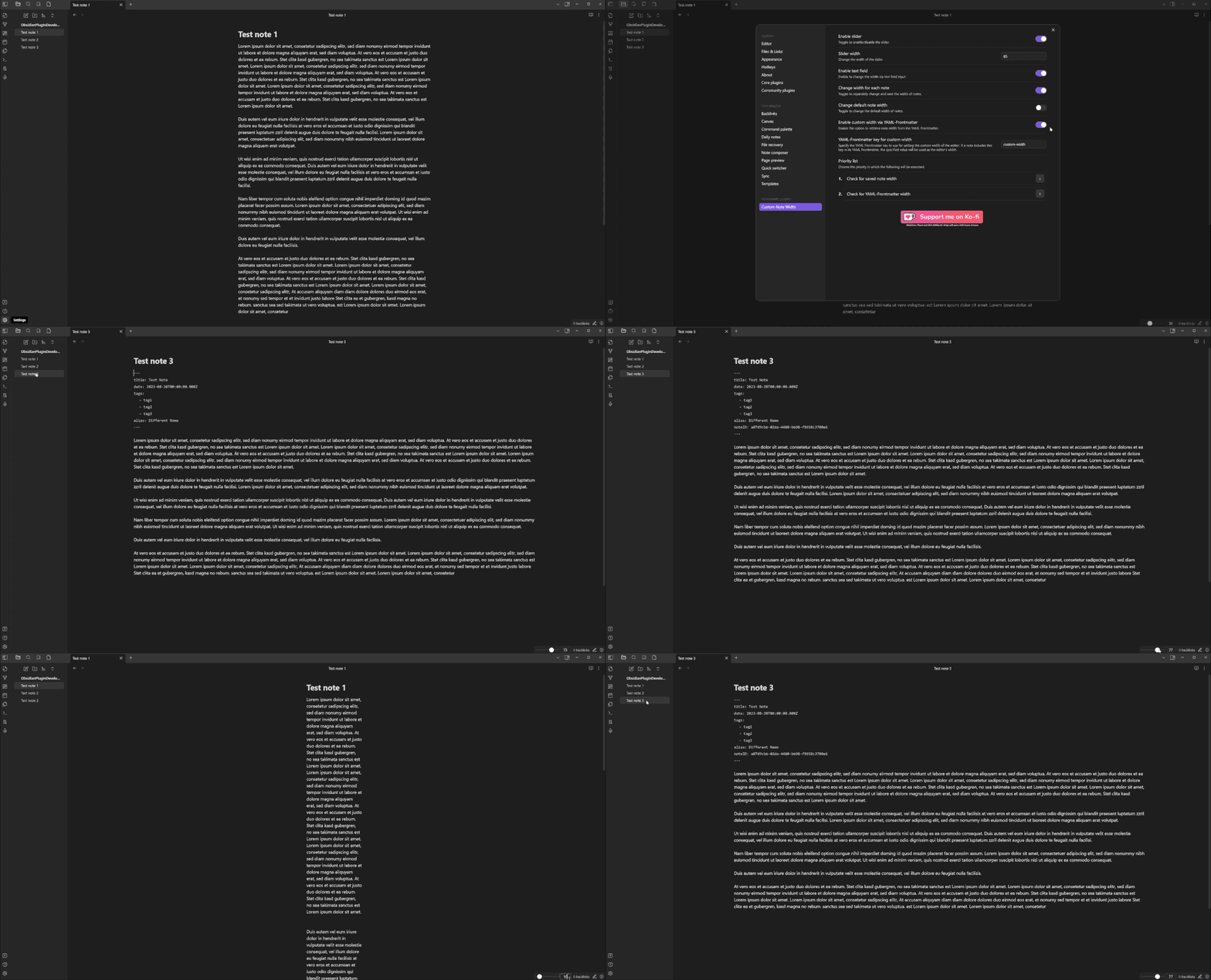
Demo GIF

Features

  • Per-note widths — stored in the note's frontmatter, kept locally on your device, or held only until the note is closed
  • Status-bar controls — choose between a classic slider or Pills (three preset buttons)
  • Three width units%, px, ch
  • Independent code block width — so narrow prose and wide code can coexist
  • Hotkey-ready commands for every width operation
  • Full English, German and Russian UI

Installation

From Community Plugins

  1. Open Settings → Community plugins
  2. Browse → search "Custom Note Width"
  3. Install → Enable

Manual

  1. Download main.js, manifest.json and styles.css from the latest release
  2. Copy them into <vault>/.obsidian/plugins/custom-note-width/
  3. Restart Obsidian and enable the plugin

Requirement: Obsidian's Readable line length setting must be enabled (Settings → Editor → Readable line length).

Usage

The plugin modifies Obsidian's --file-line-width CSS variable. Control it three ways:

Method Best for
Status-bar control (slider or pills) Quick adjustments while reading/editing
YAML frontmatter (custom-width: 60) Persisting a specific width per note
Commands (palette / hotkeys) Power users, keyboard-driven workflows

Width units

  • % — relative to the editor pane (0–100)
  • px — absolute pixels (100–4000)
  • ch — character widths (10–200)

Switch units via the unit label next to the slider/value (slider mode) or inside a preset editor (pills mode).

Pills mode

Enable under Settings → Control mode → Pills. The status bar shows three buttons with your configured preset values. Click to apply. The button matching the currently applied width is highlighted; no button is active when the width is a custom value.

Settings

Setting Description Default
Language Plugin UI language (Auto / English / Deutsch) Auto
Enable slider Shows the width control in the status bar on
Control mode Slider (draggable) or Pills (three preset buttons) Slider
Slider width (Slider mode) Horizontal size of the slider in pixels 85
Pill preset 1–3 (Pills mode) Value and unit per preset 30% / 50% / 100%
Value display in status bar Editable input, read-only text, or hidden for a slider-only status bar Editable
Show unit selector in status bar (slider mode) Show the unit dropdown (%, px, ch) next to the slider; off keeps the unit fixed on
Default width unit Unit used for the global default width %
Default width Width applied when a note has no per-note width 50
% range Min / max for percentage unit 0 / 100
px range Min / max for pixel unit 100 / 4000
ch range Min / max for character unit 10 / 200
Enable per-note width Let notes have their own width instead of the global default on
Where per-note width is stored (per-note mode) Frontmatter (in the note), Local (kept in the plugin, note untouched), or View only (kept until the note is closed) frontmatter
Reset local width overrides (local mode) Removes every per-note width you have stored locally button
YAML front matter key Frontmatter key used to store the per-note width custom-width
Enable code block width Give code blocks an independent width off
Code block width unit Unit for code block width px
Code block width Size applied to code blocks 800
Reading mode Apply code block width in preview on
Source mode Apply code block width in source view on
Live preview mode Apply code block width in live preview on

Commands

All commands appear in the palette and can be bound to hotkeys under Settings → Hotkeys (filter: Custom Note Width):

Command Action
Change the width of the open note Opens a modal, applies width to current note
Change the default note width Opens a modal, updates the global default
Change the width for all notes Opens a modal, rewrites every note's YAML width
Apply pill preset 1 / 2 / 3 Applies the given preset (Pills mode only)

Theme compatibility

Disclaimer: The plugin modifies --file-line-width. Custom themes may override this variable; there is no guarantee the plugin works with every theme.

Theme Status Obsidian Version Notes
Default Works 1.12.4 Fully functional
Things Works 1.12.4 Fully functional

Your theme isn't listed? Open a PR adding a row — see CONTRIBUTING.

Reporting bugs

Please include:

  1. Obsidian version (Settings → General)
  2. Plugin version (Settings → Community plugins)
  3. Theme name (Settings → Appearance → Themes)
  4. Operating system
  5. Console errors — open DevTools (Ctrl+Shift+I / Cmd+Option+I), Console tab, copy anything red referencing custom-note-width
  6. Steps to reproduce and what you expected vs what happened
  7. Screenshots or screen recordings help a lot — tools like LICEcap or ShareX work well

Reports that only say "it doesn't work" can't be investigated — details make the difference.

Backups

Always keep backups of your vault. The plugin writes to YAML frontmatter; bugs are possible. Protect your data.

Contributing

See CONTRIBUTING.md for development setup, code style, and the PR process.

License

MIT — provided as-is, no warranty.

Support

ko-fi

Similar Plugins

info
• Similar plugins are suggested based on the common tags between the plugins.
QuickAdd
5 years ago by Christian B. B. Houmann
QuickAdd for Obsidian
Admonition
5 years ago by Jeremy Valentine
Adds admonition block-styled content to Obsidian.md
Periodic Notes
6 years ago by Liam Cain
Create/manage your daily, weekly, and monthly notes in Obsidian
Zotero Desktop Connector
4 years ago by mgmeyers
Insert and import citations, bibliographies, notes, and PDF annotations from Zotero into Obsidian.
Folder notes
3 years ago by Lost Paul
Create notes within folders that can be accessed without collapsing the folder, similar to the functionality offered in Notion.
Tracker
5 years ago by pyrochlore
A plugin tracks occurrences and numbers in your notes
Note Refactor
6 years ago by James Lynch
Allows for text selections to be copied (refactored) into new notes and notes to be split into other notes.
File Explorer Note Count
5 years ago by Ozan Tellioglu
Obsidian Plugin for viewing the number of elements under each folder within the file explorer
Dice Roller
5 years ago by Jeremy Valentine
Inline dice rolling for Obsidian.md
Book Search
4 years ago by anpigon
Obsidian plugin that automatically creates notes by searching for books
Weread Plugin
4 years ago by hank zhao
Obsidian Weread Plugin is a plugin to sync Weread(微信读书) hightlights and annotations into your Obsidian Vault.
Folder Note
6 years ago by xpgo
Plugin to add description note to a folder for Obsidian.
Auto Note Mover
5 years ago by faru
This is a plugin for Obsidian (https://obsidian.md).
Multi Properties
3 years ago by fez-github
Plugin for Obsidian that allows user to add properties to multiple notes at once.
Icons
6 years ago by Camillo Visini
Add icons to your Obsidian notes – Experimental Obsidian Plugin
Smart Random Note
6 years ago by Eric Hall
A smart random note plugin for Obsidian
Focus Mode
5 years ago by ryanpcmcquen
Add focus mode to Obsidian.
PodNotes
4 years ago by Christian B. B. Houmann
PodNotes is a plugin for Obsidian that helps the user write notes on podcasts.
Print
2 years ago by Marijn Bent
Print your notes directly from Obsidian
Daily Notes Editor
4 years ago by boninall
A plugin for you to edit a bunch of daily notes in one page(inline), which works similar to Roam Research's default daily note view.
Widgets
3 years ago by Rafael Veiga
Add cool widgets to your notes or your dashboard in Obsidian
Wikipedia
5 years ago by Jonathan Miller
Grabs information from Wikipedia for a topic and brings it into Obsidian notes
Audio Notes
4 years ago by Jason Maldonis
Easily take notes on podcasts and other audio files using Obsidian Audio Notes.
Slurp
2 years ago by inhumantsar
Slurps webpages and saves them as clean, uncluttered Markdown. Think Pocket, but better.
Advanced Merger
3 years ago by Anto Keinänen
OZ Calendar
3 years ago by Ozan Tellioglu
Obsidian plugin to display notes on a calendar based on YAML frontmatter or file names
Prettier Format
6 years ago by Andrew Lisowski
Format obsidian.md notes using prettier
Book Reader
24 days ago by EltonLabs
Read EPUB, FB2 and PDF books directly inside Obsidian — a beautiful, distraction-free book reader with text highlighting, notes, and reading progress that syncs into your vault. Works on both desktop and mobile (Windows, macOS, Linux, Android, iOS).
Colorful Note Borders
3 years ago by rusi
Merge Notes
3 years ago by fnya
Merge Notes is Plugin for Obsidian
Smart Rename
3 years ago by mnaoumov
Obsidian Plugin that helps to rename notes keeping previous title in existing links
Create Note in Folder
4 years ago by Mara-Li
Set a folder in settings and get directly a command to create a note in it. Use this with QuickAdd/Button to get more pratical things :D
From Template
5 years ago by mo-seph
Simple plugin to create Notes from a template, and fill in fields defined there
Awesome Reader
4 years ago by AwesomeDog
Make Obsidian a proper Reader.
Xiaohongshu Importer
a year ago by bnchiang96
An Obsidian plugin to import Xiaohongshu (小红书) notes into your vault. Extract titles, content, images, videos, and tags from share links, with customizable categories and optional local media downloads.
Apple Books - Import Highlights
3 years ago by bandantonio
⚡️Fastest Apple Books highlights importer to Obsidian 🗄️ The only one protecting your own reflections across imports 🎨 Fully customizable
Sets
3 years ago by Gabriele Cannata
Ollama Chat
3 years ago by Brumik
A plugin for chatting with you obsidian notes trough local Ollama LLM instead of Chat GTP.
Easy Bake
3 years ago by mgmeyers
Compile many Obsidian notes down to one.
Protected Note
3 years ago by Mikail Gadzhikhanov
Plugin for Obsidian
Timeline View
3 years ago by b.camphart
Obsidian plugin for viewing your notes linearly based on a given property
Sticky Notes
a year ago by NoPoint
Obsidian Sticky Notes Plugin
Journaling
2 years ago by Ordeeper
View daily notes in a journal-like format, similar to Logseq. It enhances note organization and facilitates better reflection by consolidating daily notes into a continuous journaling view.
Podcast Note
5 years ago by Marc Julian Schwarz
A plugin for the note taking app Obsidian that lets you add podcast meta data to your notes.
2Hop Links
5 years ago by Tokuhiro Matsuno
Instapaper
3 years ago by Instapaper
Official Instapaper plugin for Obsidian
Spotify Link
3 years ago by Studio Webux
Obsidian.md Plugin to include the song or episode you're currently listening to in your note.
YouTube Template
3 years ago by sundevista
📺 A plugin that would help you to fetch YouTube videos data into your vault.
Live Variables
2 years ago by Hamza Ben Yazid
Define variables in your note's properties and reuse them throughout your content.
Highlight Public Notes
5 years ago by dennis seidel
Pinned Notes
2 years ago by vasilcoin002
Structured
5 years ago by dobrovolsky
Kindle Highlights Importer
3 years ago by MovingMillennial
Note archiver
3 years ago by thenomadlad
Dynbedded
4 years ago by Marcus Breiden
Embed snippets, templates and any linkable by delegating the current scope to the embedded file either by using a direct reference or as reference with date naming format relative from today. Also supports Quoth Codeblocks.
Notes Sync Share
3 years ago by Alt-er
Sync and share (publish) your notes in your own private service.
Air Quotes
3 years ago by Alan Grainger
Plugin for Obsidian. Search and insert quotes from a source text as you type. This is great for reading a physical book or eReader while taking notes on a separate laptop or phone.
Power Search
5 years ago by Aviral Batra
KOReader Sync
5 years ago by Federico "Edo" Granata
Obsidian.md plugin to sync highlights/notes from koreader
Min Width
4 years ago by doitian
Obsidian Min Width Plugin
ZettelGPT
3 years ago by Overraddit
Turbocharge Your Note-taking with AI Assistance
Old Note Admonitor
4 years ago by tadashi-aikawa
iCloud Contacts
3 years ago by Truls Aagaard
Obsidian plugin that imports contacts from iCloud and manages a note for each contact.
Quick note
3 years ago by James Greenhalgh MBCS
Create New note from right-clicking app icon
BibTeX Manager
2 years ago by Akop Kesheshyan
Create literature notes in Obsidian from BibTeX entries, display formatted reference lists, and instantly generate citations.
New Note Content Pusher
4 years ago by Henry Gustafson
An Obsidian plugin to add (prepend or append) specified content to a note (existing or new) without opening another pane.
Zettelkasten Outliner
3 years ago by Tyler Suzuki Nelson
Desk
3 years ago by David Landry
A desk for obsidian
Source Code Note
3 years ago by Waiting
The obsidian plugin can help you organize source code note easily.
Quickly
3 years ago by Sparsh Yadav
Quick capture to obsidian note
Tolino notes Importer
3 years ago by juergenbr
Obsidian plugin to import notes from a Tolino E-Reader
Note Splitter
2 years ago by Trey Wallis
Split a note into individual notes based on a delimiter
my anime list text exporter
2 years ago by XmoncocoX
a plugin who create an obsidian page for an anime with the data from my anime list.
Asciidoctor editor
2 years ago by dzruyk
Obsidian asciidoc editor plugin
Confluence Sync
3 years ago by Prateek Grover
Obsidian plugin for obsidian confluence sync
iDoRecall
3 years ago by dbhandel
iDoRecall Obsidian plugin
Are.na unofficial
3 years ago by 0xroko
Unofficial Are.na plugin for Obsidian
Create List of Notes
2 years ago by Andrew Heekin
Beautiful Contact Cards
2 years ago by Seth Tenembaum
A plugin for the Obsidian text editor which renders "contact" code blocks with tappable links for phone, social media, etc.
Folder Periodic Notes
2 years ago by Andrew Heekin
Auto Note Importer
a year ago by uppinote
Two-way sync between Obsidian and your databases — Airtable, SeaTable, Supabase, Notion. Multi-config, conflict resolution, computed fields, Notion page-body pull.
Kinopoisk search
2 years ago by Alintor
Obsidian Kinopoisk plugin
Current Folder Notes
2 years ago by Pamela Wang
Shows notes in the current folder, useful for writing novels
Note Companion Folder
3 years ago by Chris Verbree
A Obsidian Plugin providing a way to associate a folder to a note
Title renamer
3 years ago by Peter Strøiman
Obsidian plugin to keep title in markdown synced with tile name
Autogen
3 years ago by Aidan Tilgner
A plugin to use a language model to fill in parts of notes.
Quarto Exporter
2 years ago by Andreas Varotsis
Export Obsidian notes to Quarto-compatible QMD files.
Quick File Name
2 years ago by Wapply
This Obsidian plugin generates a note with an random string as file name.
Share as ZIP
2 years ago by Till Friebe
Daily Summary
2 years ago by Luke
Weread Vault
2 months ago by 茜宁郑
Sync WeRead highlights, import book lists, and connect personal reading notes in Obsidian.
Instant Above Divider
2 years ago by SedationH
Daily Random Note
2 years ago by Alexandre Silva
Daily Random Notes in Obsidian.
MOC Link Helper
2 years ago by Bogdan Codreanu
This obsidian plugins allows you to quickly see which notes you need to include in your MOC.
Session Notes
2 years ago by tabibyte
A plugin for Obsidian to create temporary & session notes that will be deleted when session ends
Sync Cnblog
2 years ago by zhanglei
同步文章到博客园
Abbrlink
2 years ago by Q78KG
create folder notes with dropdown
2 years ago by Sturdy Shawn
Chat clips
2 years ago by sleepingraven
Record chat in ordinary markdown list.
Vault Review
2 years ago by Alexander
This plugin allows you to create a snapshot of your vault and randomly review files from it 1-by-1.
Quick Notes
2 years ago by Sean McOwen
Arweave Uploader
2 years ago by makesimple
random-retrieval
2 years ago by Rachninomav
ICOR for Life - PDF Annotation
9 days ago by Thomas Roedl
Highlight text or draw a box on a PDF and get a note in the vault for it, with a deep link back, a card on any canvas by drag and drop, and a sidebar of every highlight in the open PDF. Part of the ICOR for Life suite.

