Book Reader

by EltonLabs
5
4
3
2
1
Score: 24/100

Description

Category: Productivity Tools

The Book Reader plugin opens EPUB, FB2 and PDF books inside the vault and keeps reading progress, highlights, comments and note exports tied to those files. It supports paged or scrolling reading, one or two columns, adjustable font settings, line spacing, alignment, line width, full text search and a table of contents built from bookmarks, headings or a printed contents page. Highlights come in four colours, can carry comments, and can be turned into notes individually or exported for a whole book with chapter grouping and page numbers. The library view shows covers, progress and categories, while progress files sync through the vault. Optional translation and AI passage breakdown stay off until configured, with local Ollama or LM Studio support.

Reviews

No reviews yet.

Stats

62
stars
26,132
downloads
4
forks
55
days
6
days
6
days
2
total PRs
2
open PRs
0
closed PRs
0
merged PRs
14
total issues
12
open issues
2
closed issues
75
commits

RequirementsExperimental

  • Google Translate for selection translation

  • An AI provider and API key for AI passage breakdown, or a local Ollama or LM Studio setup

Latest Version

7 days ago

Changelog

Заголовок главы над цитатами теперь можно выключить. При выгрузке цитат в заметку плагин подписывал группу названием главы — неудобно, когда главы короткие и совпадают почти у каждой цитаты (issue #13). Настройки → «Заголовок главы над цитатами».

README file from

Github

📖 Book Reader

Read EPUB, FB2 and PDF books inside Obsidian — with highlights, comments, notes and reading progress that syncs with your vault.

Русский · English

Works on desktop and on mobile (Android / iOS).

Feedback goes to the Telegram bot @book_in_obsidian_bot. Found a bug, missing a feature, something awkward on the phone — send it an ordinary message. No GitHub account, no form. Every message is read, and the next versions are built from them.

Book Reader

Library Reading
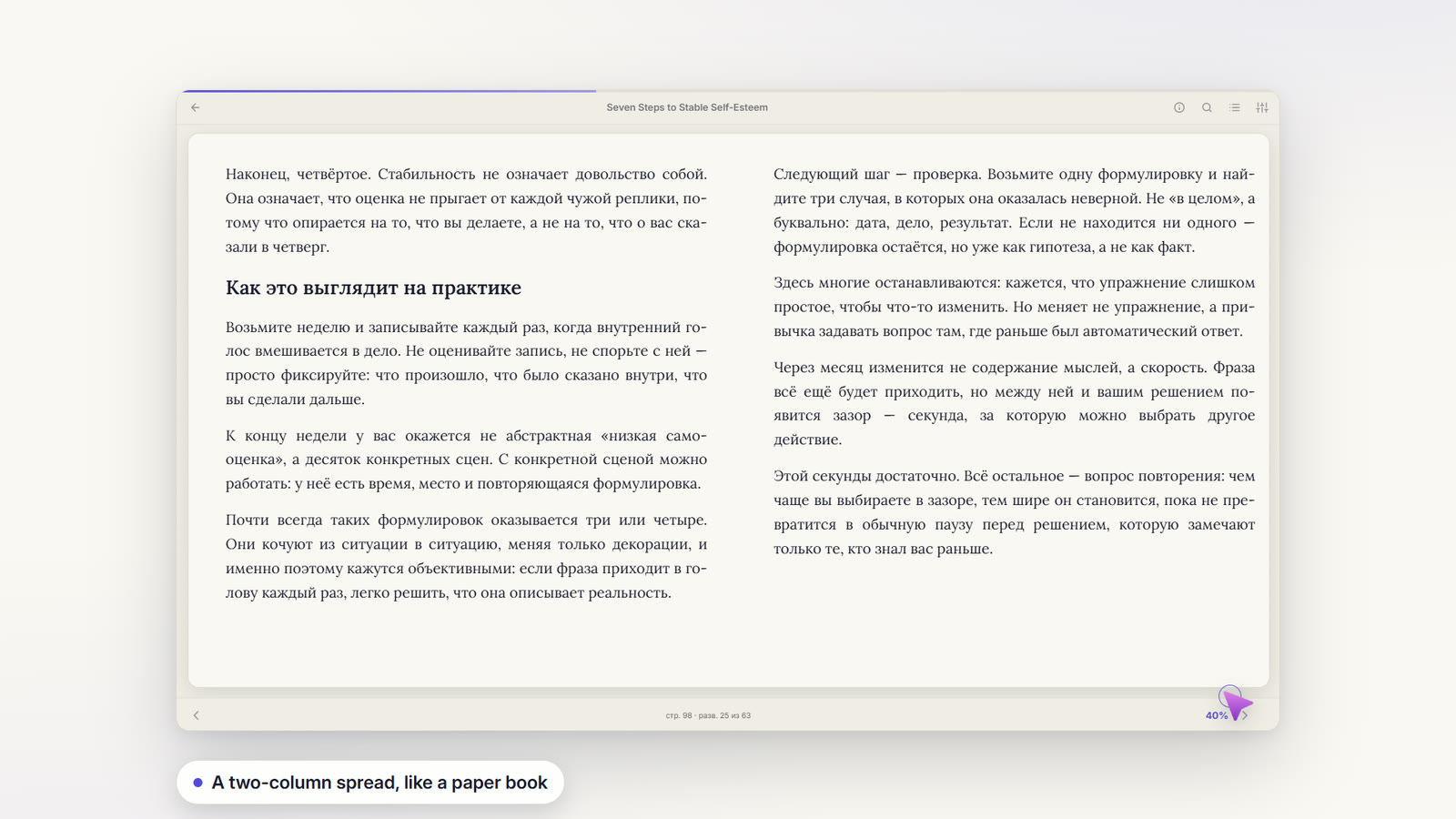
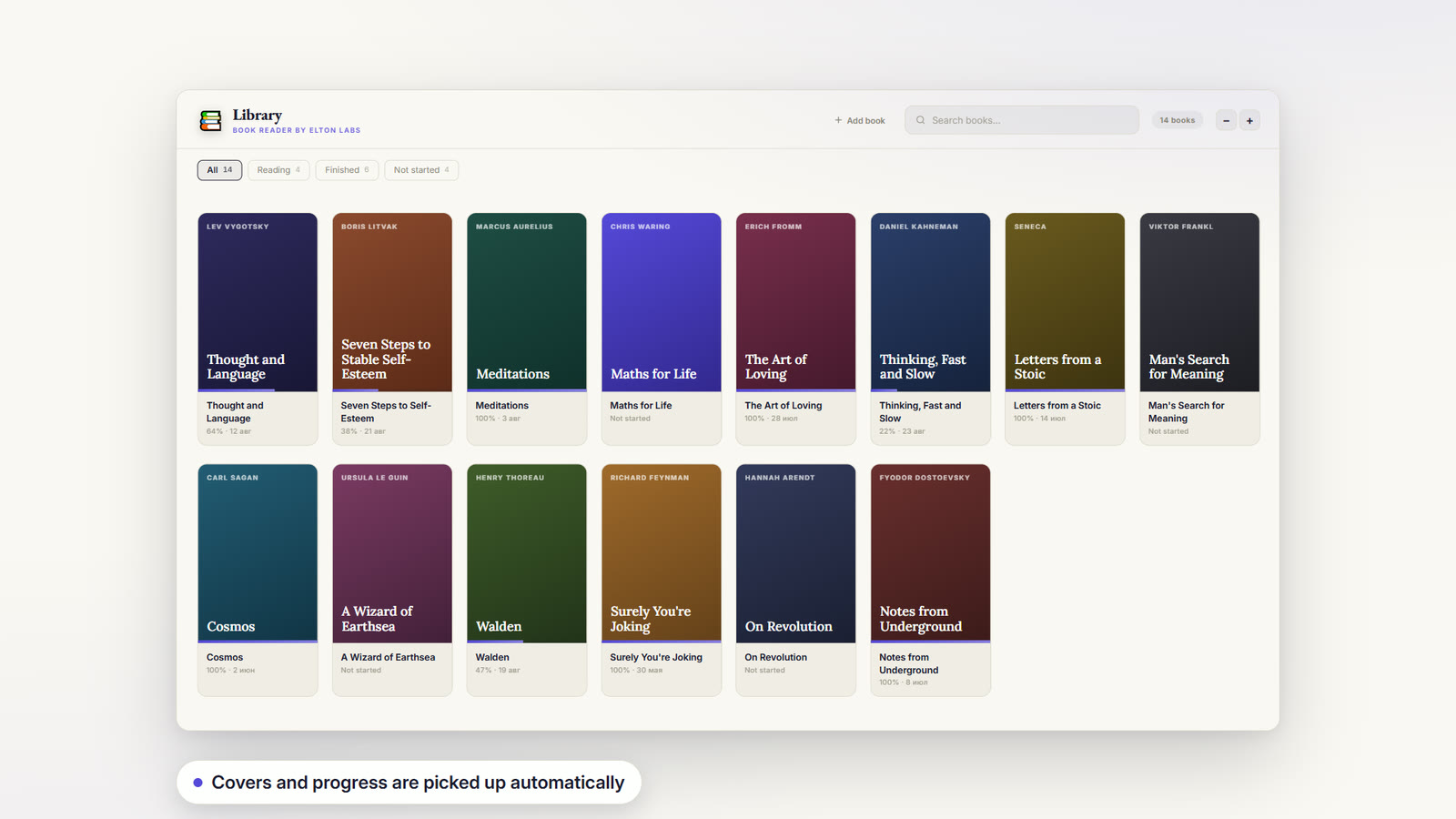
Library — covers, progress and categories for every book. Reading — a two-column spread, your font, size and theme.
Highlights AI
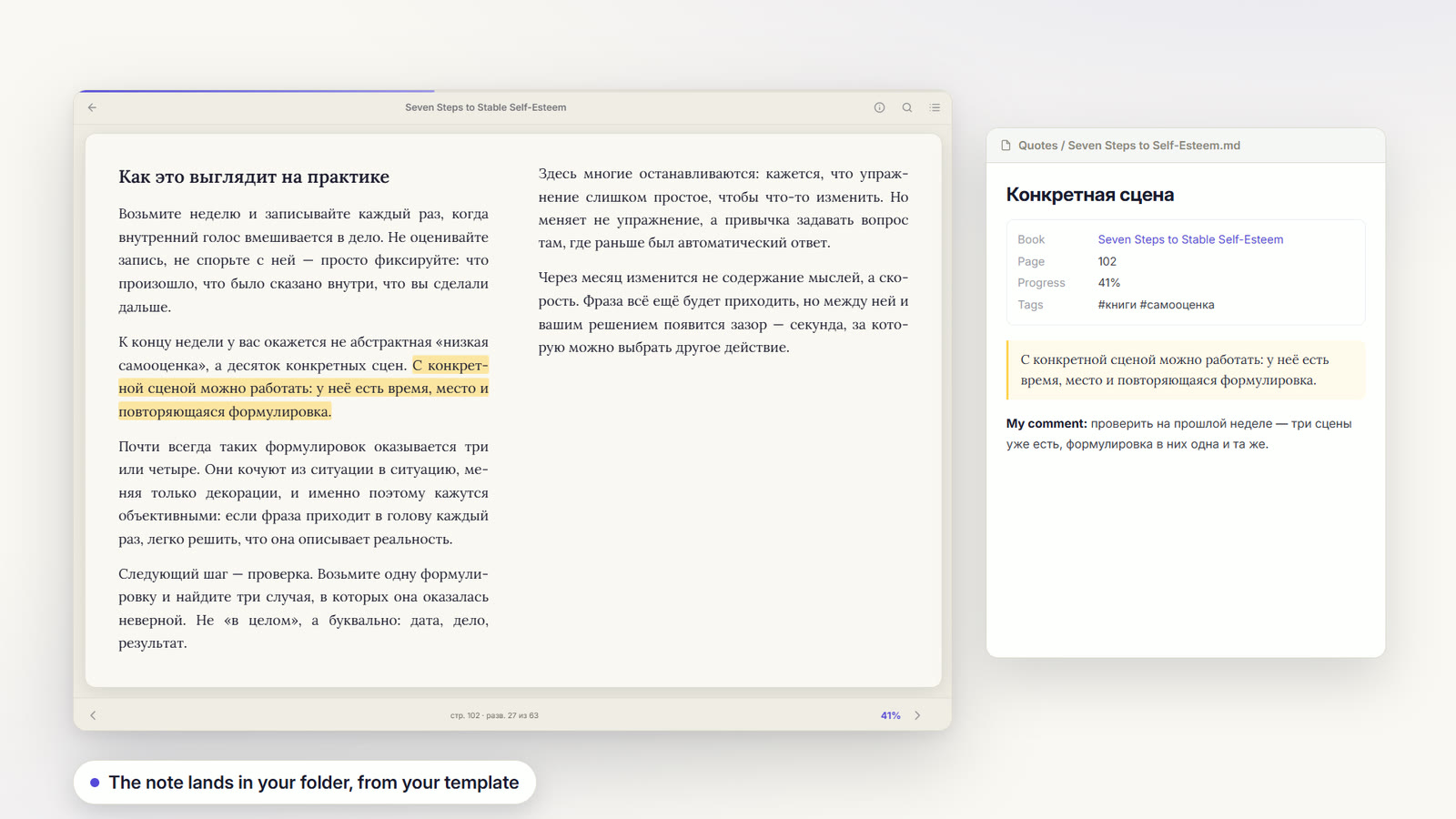
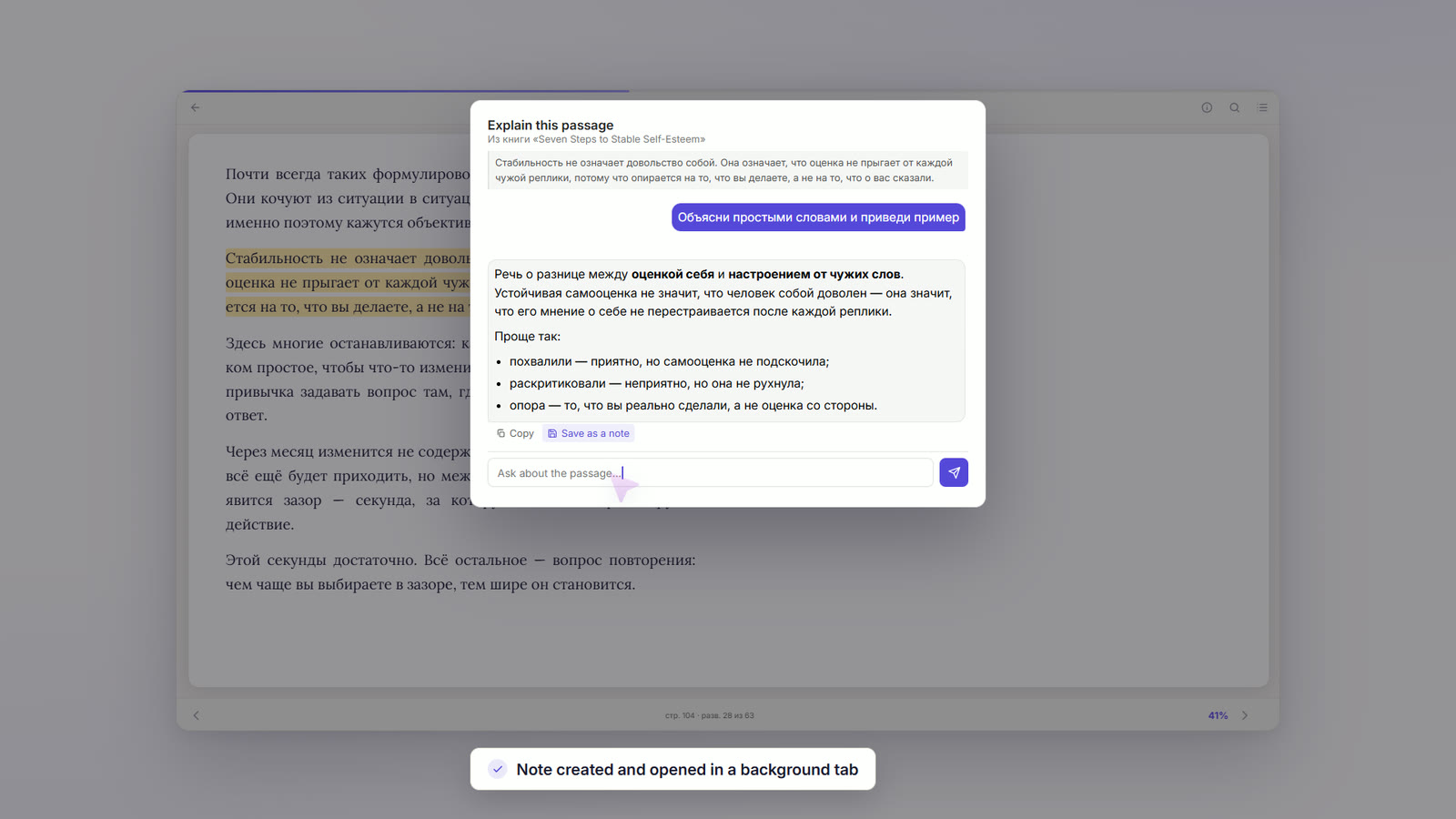
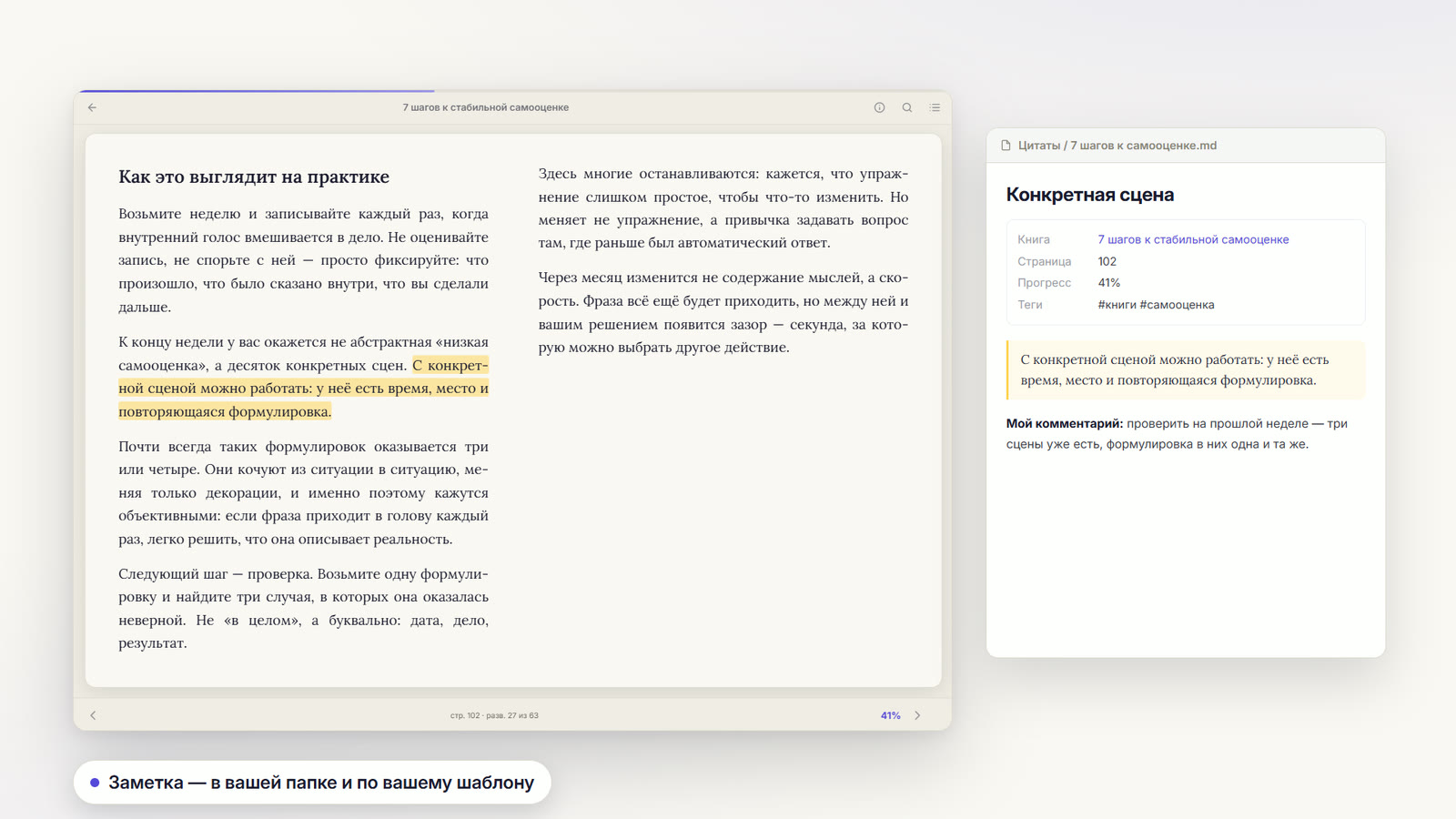
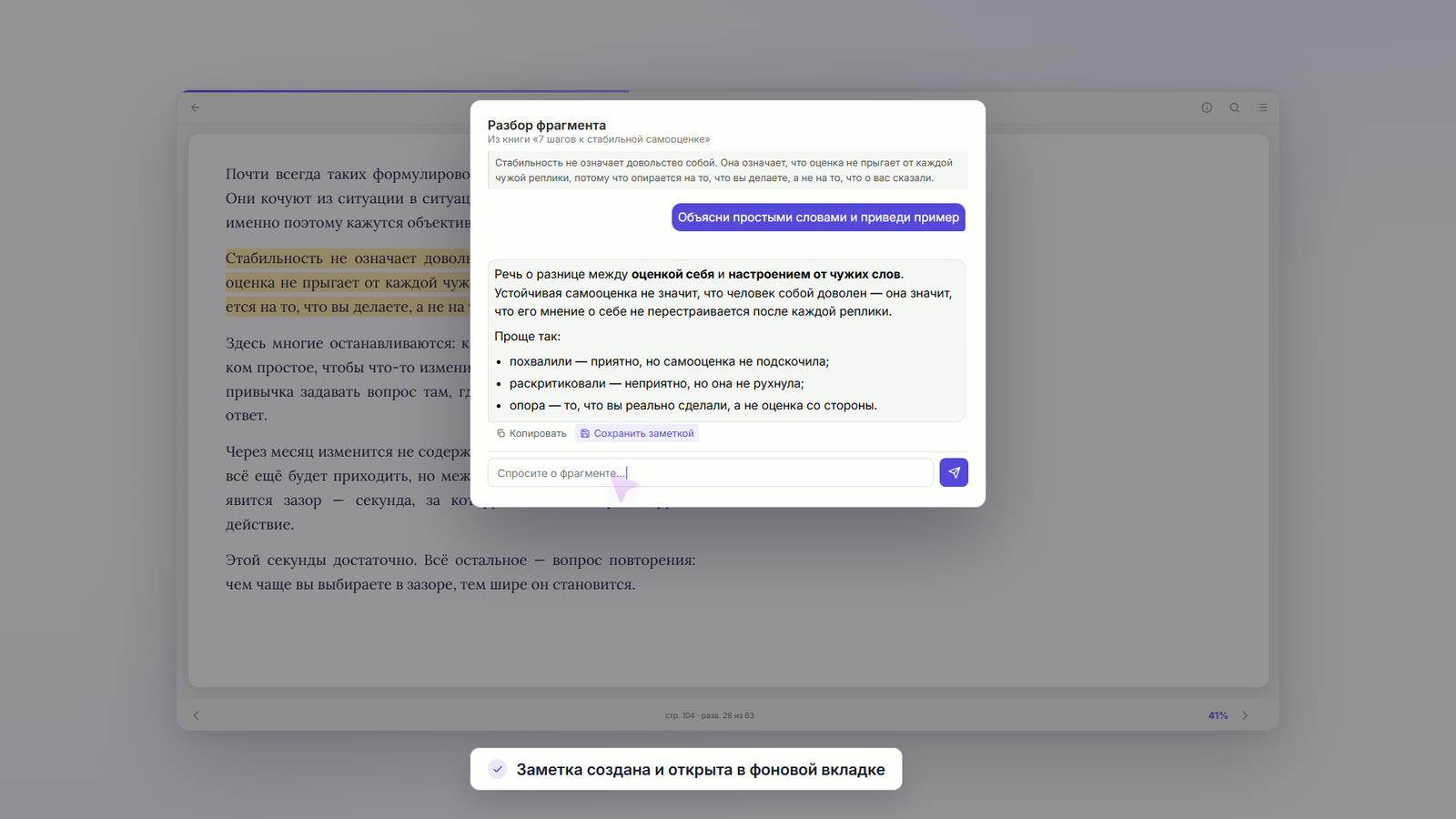
Highlights → notes — four colours, a comment, and a note with the quote, the book link and the page. Explain a passage — a conversation, with the book's title sent as background context.
Mobile Themes
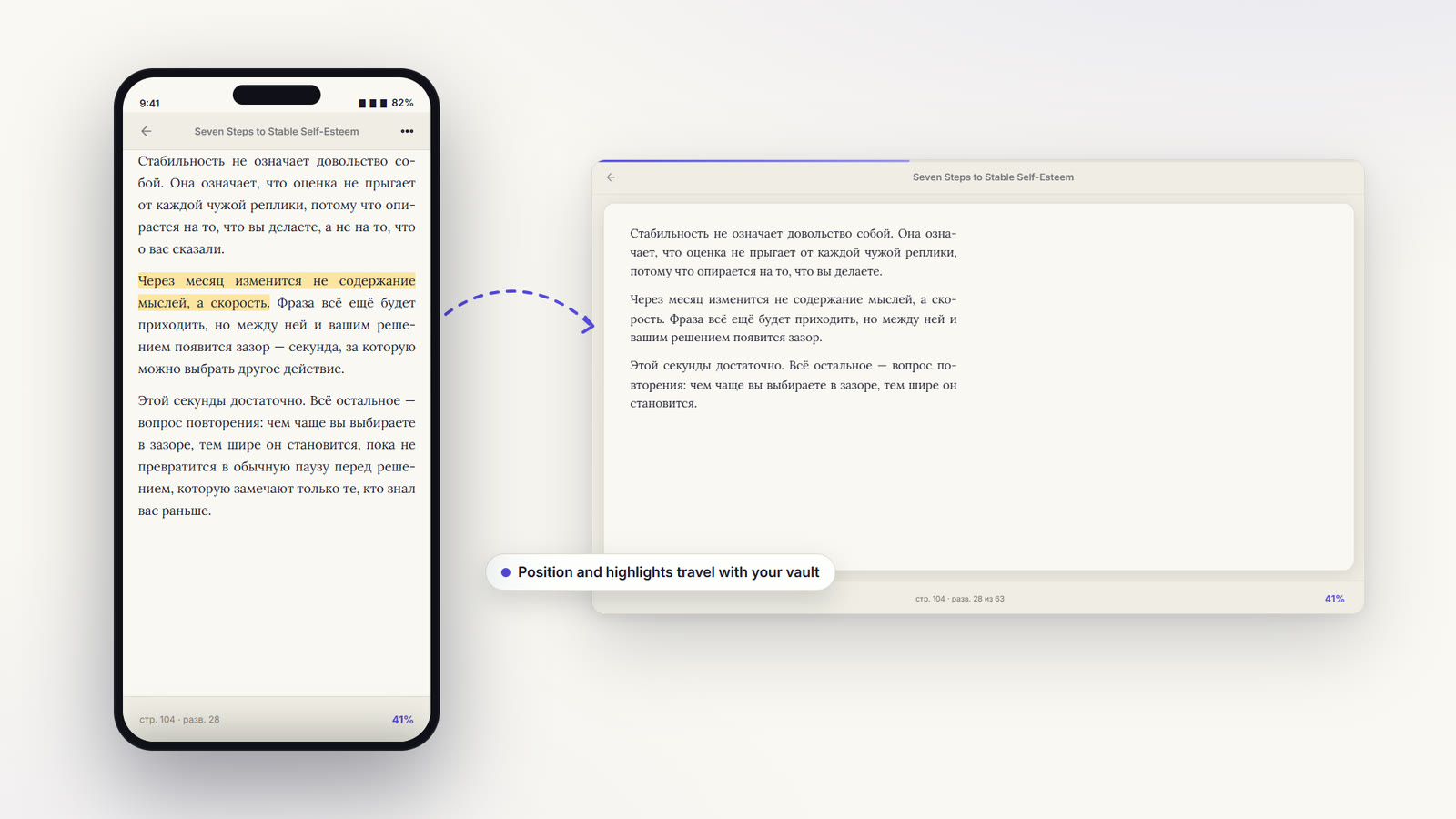
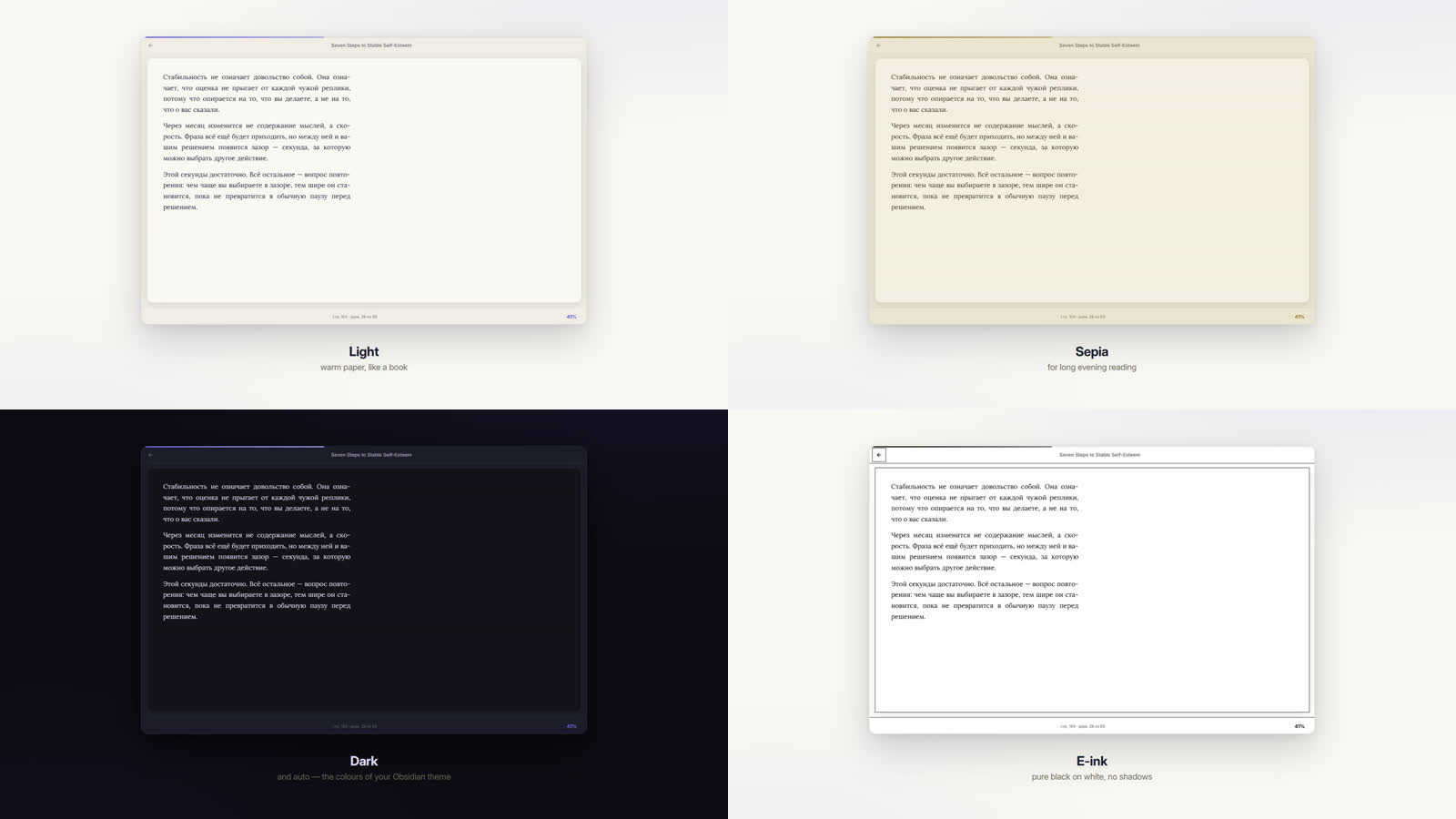
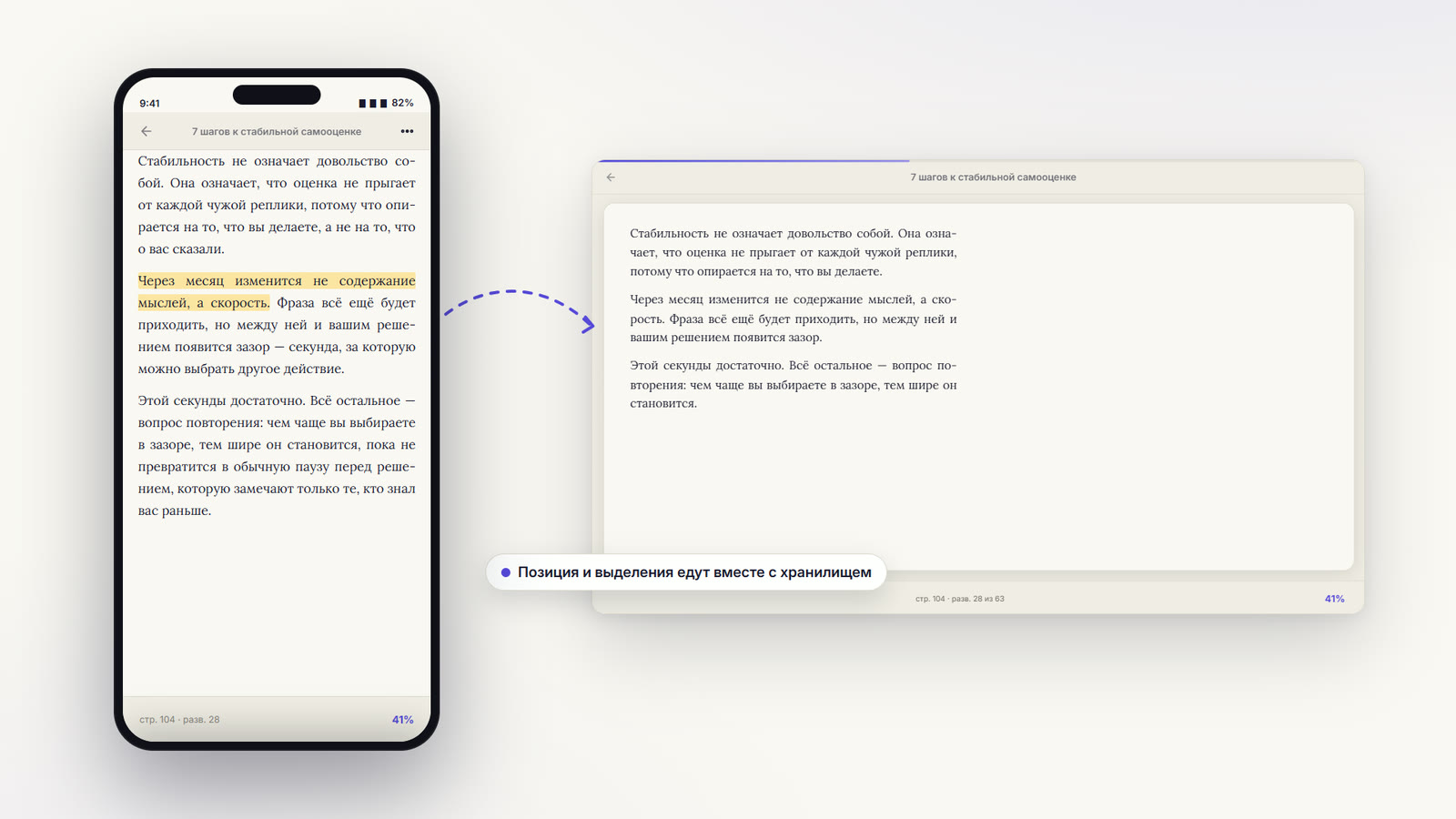
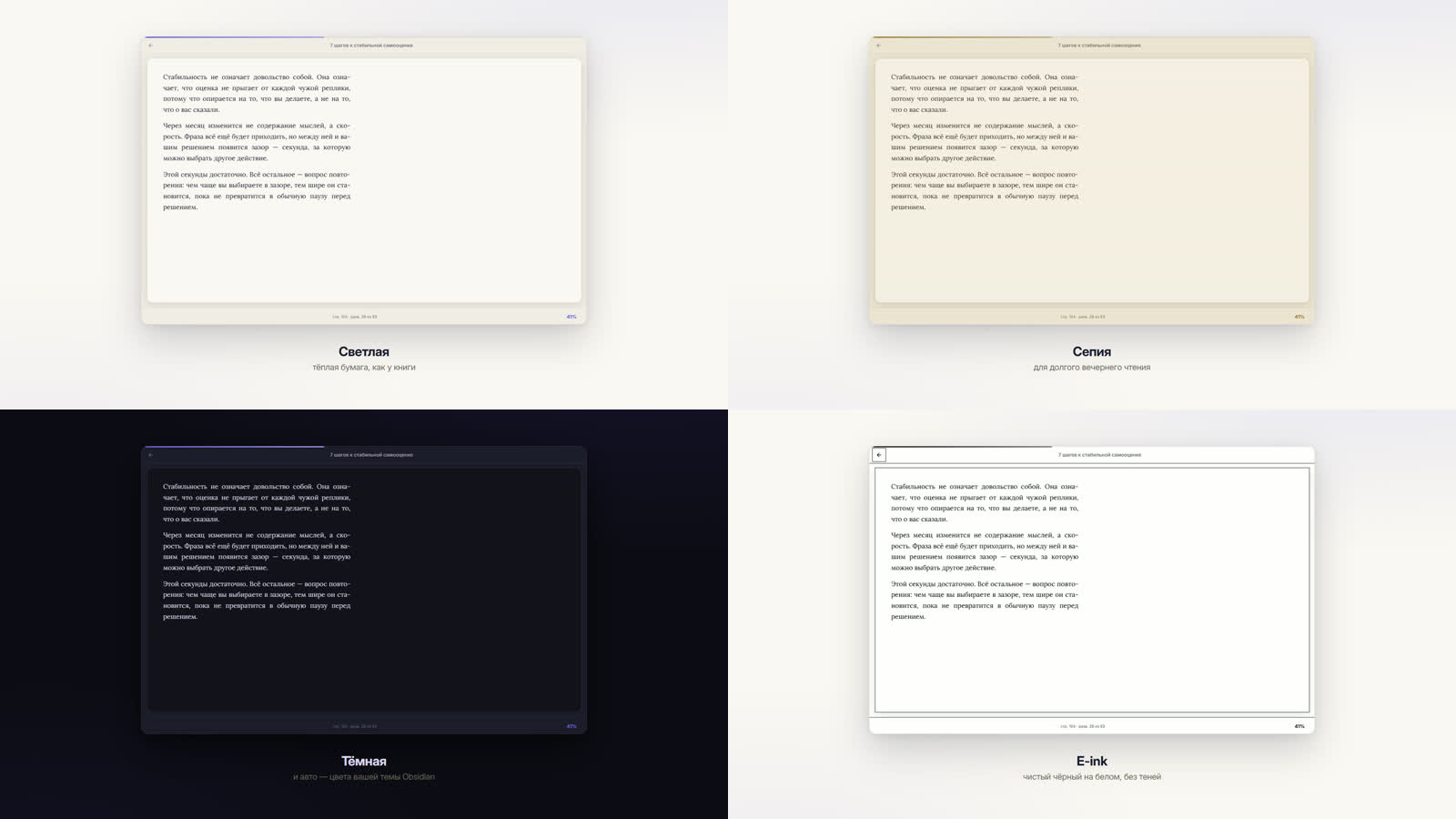
On the phone — its own layout: gestures and «⋯», nothing else. Position and highlights travel with your vault. Four themes — light, sepia, dark and e-ink, plus auto that follows your Obsidian theme.

What it does

Reading. EPUB, FB2 and PDF. Paged layout in one or two columns, like a real book. Dark, light and sepia themes, plus an e-ink mode for Android readers. Adjustable font, size, line spacing, alignment and line width. Table of contents built from PDF bookmarks, headings or the book's own printed contents page. Full-text search across the whole book.

Highlights and notes. Four colours. A comment can be attached to any highlight and travels with it into your notes. Turn a highlight into a note, or export all of a book's highlights at once — grouped by chapter, with page numbers.

Progress. Stored as files in your vault next to the books, so it rides whatever you already use to sync (Obsidian Sync, iCloud, Google Drive, Remotely Save…). The position is anchored by paragraph, so a phone and a desktop find the same spot at any screen size.

Library. A visual grid of every book with covers, progress and categories. Add books by dragging them in.


Install

The listing is under review; until it goes live, install with BRAT or by hand.

With BRAT

  1. Install BRAT from the community plugins list.
  2. BRAT → Add beta plugin → swayinfo/elton-reader
  3. Enable Book Reader in Community plugins.

By hand

Download main.js, manifest.json and styles.css from the latest release into <vault>/.obsidian/plugins/elton-reader-books/, then reload Obsidian.


Privacy and network use

The reader works fully offline. Books, progress, highlights and notes never leave your device — the PDF engine is bundled into the plugin, so not even fonts or workers are fetched from the internet.

There is exactly one feature that makes a network request, and it is off by default:

Feature Service What is sent Default
Translate a selection Google Translate (translate.googleapis.com) Only the passage you selected Off
AI passage breakdown The service you pick — Elton AI (api.eltonlabs.org), OpenRouter, OpenAI, or a local Ollama / LM Studio Only the passage you selected Off

Both are turned on in Settings → Translation, and each says the same thing in its own description before you enable it. The AI breakdown additionally needs a provider and a key before it will do anything.

Choosing Ollama or LM Studio keeps everything on your own machine — the passage never reaches the internet at all.

The API key you enter is stored in the plugin's settings inside your vault. If your vault syncs, the key syncs with it.

No account is required for the plugin itself, and there is no telemetry, no analytics and no ads.


What's new in 3.1

It loads where it used to refuse to. On older Obsidian builds, Huawei tablets and some Windows installs the plugin failed with "Failed to load plugin" — the PDF engine expected a JavaScript feature those browser engines do not have. It is supplied now, so those devices get a working reader.

Quotes can pile up in one book note. The title dialog has an Into the book's note button, and the selection menu an As text into the book's note item — the second and third quote join the first instead of making new files.

The link back to the book is worded by you. Set your own label instead of "↪ to this spot in the book" in the settings.

Fixes. Tapping a highlight in the list now jumps to its place even on pages that have not been drawn yet; the selection bar no longer lands on empty space at the start of a paragraph or across a page break; on Android the top bar keeps clear of the clock, with a manual inset for skins that hide the status-bar height. What's new is also saved as a note in your vault.

What's new in 3.0

Ask an AI about a passage. Select text and press ✨: a translation, a breakdown of the words that are actually hard, why the phrasing is what it is, and the etymology where it helps you remember. Use your own OpenRouter or OpenAI key, the Elton AI proxy, or a local Ollama / LM Studio — with a local model the passage never leaves your machine. Off until you set it up.

Copy a passage as a quote, in one click. The clipboard gets the quote, the book, the page and a link that opens the book at that exact paragraph — ready to paste into any note. The shape is a template you can change.

Quotes link back to the book. Every exported quote carries a link that opens the book at the paragraph it came from, and lands there whatever your font size or column count.

Read by scrolling instead of turning pages, if that suits you better.

Footnotes work in FB2. Tapping a note number takes you to the note, and a "back to the text" pill takes you back where you were.

Highlighting across paragraphs. A selection spanning several paragraphs used to be cut off at the end of the first one.

Nested folders in the library. Picking a folder now includes everything inside it, and opens its subfolders as the next step down.

Reading progress in the book note's properties, so Bases can chart and sort it. Off by default.

Books no longer lose their ending. The reader measured a book's width using only its paragraphs, and cut the page flow off at that point — so a book whose tail was a list, a code listing or a table simply stopped early. Measured in a real browser: a book needing 119 spreads showed 5. Fixed, and the column stride is now exact instead of drifting, which also removed the biggest cause of slow loading in very long books.

PDF text is no longer glued together. Title pages came out as PRO ВластьRobert GREENEThe 48 laws ofPOWER. Lines that wrapped back to the left margin were being joined with nothing between them.

No more phantom headings in PDFs. Ordinary sentences were promoted to bold headings on any page whose average type size was dragged down by small print.

Separate look on each device. Font size, theme, spacing and column count are remembered separately for computer, tablet and phone — a comfortable size on a tablet no longer makes the text enormous on a phone. Folders, templates and reading progress stay shared.

Comments reach your notes. A comment written under a highlight was dropped when that highlight became a note. It now travels with the quote.

Works in a separate window. Selecting text, page keys and the fullscreen image viewer were all broken when the book was dragged out into its own window.

Line width. Cap lines at 60–90 characters so a maximised window stays readable.

Notes open beside the book instead of replacing it, and can be filed in the book's own folder.

Typing a folder path no longer creates a folder per keystroke on Windows.

Book files behave like files. Reveal the open book in the folder tree, rename, move or delete it from the tab menu.

Full history: versions.json and the release notes.


Building from source

npm install
npm run build      # -> main.js
npx eslint src/    # community plugin rules

The plugin's own code is src/main.js. main.js at the repository root is the build output — generated by esbuild, with pdf.js, epub.js, JSZip and localForage bundled in. npm run build on a clean checkout reproduces the released file byte for byte.


Licence

MIT — see LICENSE.

Built by Elton · t.me/eltonlabs · feedback: @book_in_obsidian_bot


📖 Book Reader (по-русски)

Читалка EPUB, FB2 и PDF прямо внутри Obsidian — с выделениями, комментариями, заметками и прогрессом чтения, который синхронизируется вместе с вашим хранилищем.

Работает и на компьютере, и на телефоне (Android / iOS).

Все пожелания собираются в телеграм-боте @book_in_obsidian_bot. Нашли ошибку, не хватает возможности, неудобно на телефоне — просто отправьте боту обычное сообщение. Ни аккаунта на GitHub, ни формы не нужно. Я читаю всё, и следующие версии складываются именно из этих сообщений.

Book Reader

Библиотека Чтение
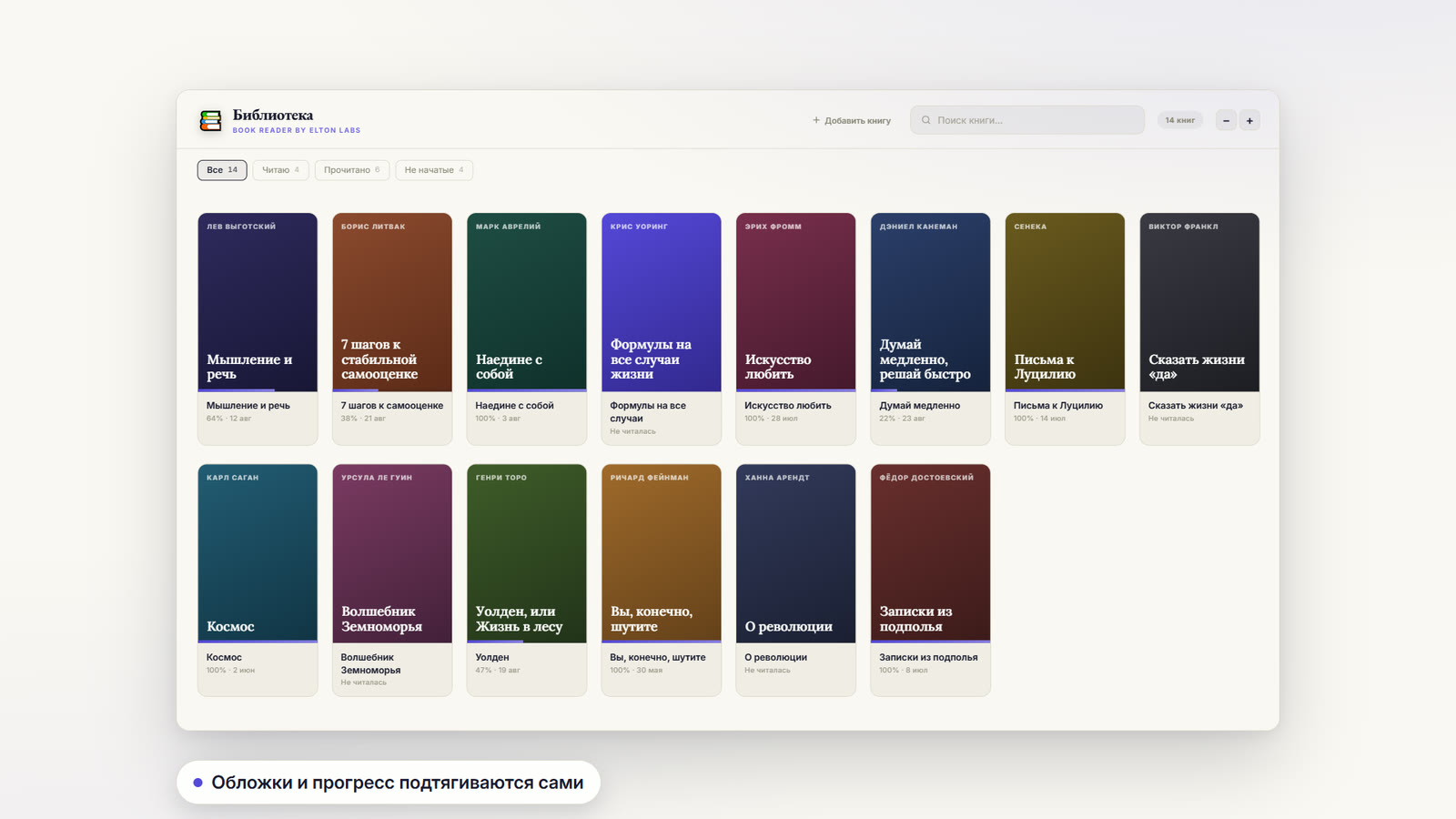
Библиотека — обложки, прогресс и категории у каждой книги. Чтение — разворот в две колонки, свой шрифт, размер и тема.
Выделения ИИ
Выделения → заметки — четыре цвета, комментарий и заметка с цитатой, ссылкой на книгу и страницей. Разбор фрагмента — диалог, название книги уходит фоном.
Телефон Темы
На телефоне — своя раскладка: жесты и «⋯», ничего лишнего. Позиция и выделения едут вместе с хранилищем. Четыре темы — светлая, сепия, тёмная и e-ink, плюс авто — как в вашей теме Obsidian.

Что умеет

Чтение. EPUB, FB2 и PDF. Постраничный режим в одну или две колонки, как в настоящей книге. Тёмная, светлая и сепия темы, отдельный режим для e-ink читалок. Настраиваются шрифт, размер, интервал, выравнивание и ширина строки. Оглавление собирается из закладок PDF, заголовков или печатного содержания самой книги. Поиск по всему тексту.

Выделения и заметки. Четыре цвета. К любому выделению можно написать комментарий — он поедет вместе с цитатой в заметку. Выделение превращается в заметку одной кнопкой, а все выделения книги выгружаются разом: по главам, с номерами страниц.

Прогресс. Хранится файлами в хранилище, рядом с книгами, поэтому едет тем же способом, которым вы синхронизируете само хранилище (Obsidian Sync, iCloud, Google Drive, Remotely Save…). Позиция привязана к номеру абзаца, так что телефон и компьютер находят одно и то же место при любом размере экрана.

Библиотека. Все книги с обложками, прогрессом и категориями. Книги можно просто перетащить в окно.


Установка

Заявка в каталог на рассмотрении; пока ставьте через BRAT или вручную.

Через BRAT

  1. Установите BRAT из каталога плагинов.
  2. BRAT → Add beta plugin → swayinfo/elton-reader
  3. Включите Book Reader в списке плагинов.

Вручную

Скачайте main.js, manifest.json и styles.css из последнего релиза в папку <хранилище>/.obsidian/plugins/elton-reader-books/ и перезапустите Obsidian.


Приватность и интернет

Читалка работает полностью офлайн. Книги, прогресс, выделения и заметки никуда не уходят — движок PDF встроен в плагин, из интернета не подгружается даже он.

Ровно одна функция ходит в сеть, и она выключена по умолчанию:

Функция Сервис Что уходит По умолчанию
Перевод выделенного Google Translate (translate.googleapis.com) Только выделенный вами фрагмент Выключено
Разбор фрагмента через ИИ Тот сервис, который вы выберете — Elton AI (api.eltonlabs.org), OpenRouter, OpenAI или локальный Ollama / LM Studio Только выделенный вами фрагмент Выключено

Обе включаются в Настройки → Перевод, и у каждой то же самое написано в описании до того, как вы её включите. Разбору вдобавок нужен выбранный сервис и ключ — без них он ничего не делает.

Если выбрать Ollama или LM Studio, всё остаётся на вашем компьютере — фрагмент вообще не попадает в интернет.

Ключ хранится в настройках плагина, внутри вашего хранилища. Если хранилище синхронизируется, ключ едет вместе с ним.

Аккаунт для самого плагина не нужен. Ни телеметрии, ни аналитики, ни рекламы.


Что нового в 3.1

Открывается там, где раньше отказывался. На старых сборках Obsidian, на планшетах Huawei и на части Windows плагин писал «Не удалось загрузить»: движку PDF не хватало возможности, которой в этих браузерных движках нет. Теперь она поставляется вместе с плагином — и читалка на этих устройствах работает.

Цитаты складываются в одну заметку книги. В окне названия появилась кнопка «В заметку книги», а в меню выделения — «Текстом в заметку книги»: вторая и третья цитата дописываются к первой, а не плодят файлы.

Подпись ссылки обратно в книгу — своя. Вместо «↪ к месту в книге» можно задать в настройках любое слово.

Починено. Клик по выделению в списке ведёт к месту в книге даже на ещё не отрисованных страницах; панель выделения не убегает на пустое место в начале абзаца и на границе страниц; на Android верхняя панель не заезжает под часы, а для оболочек, которые молчат о высоте шторки, отступ задаётся руками. Список изменений теперь сохраняется заметкой в хранилище.

Что нового в 3.0

Разбор фрагмента через ИИ. Выделяешь текст, жмёшь ✨ — перевод, разбор действительно трудных слов, объяснение оборота и этимология там, где она помогает запомнить. Свой ключ OpenRouter или OpenAI, прокси Elton AI либо локальная Ollama / LM Studio — с локальной моделью фрагмент вообще не покидает компьютер. Выключено, пока не настроите.

Скопировать фрагмент как цитату — одной кнопкой. В буфер попадает цитата, книга, страница и ссылка, открывающая книгу ровно на том абзаце. Вставляйте куда угодно. Формат задаётся шаблоном.

Цитаты ведут обратно в книгу. У каждой выгруженной цитаты есть ссылка на тот абзац, откуда она взята, и она приводит туда при любом размере шрифта и числе колонок.

Чтение прокруткой вместо страниц, если так привычнее.

В FB2 работают сноски. Тап по номеру ведёт к примечанию, а плашка «вернуться к тексту» возвращает обратно.

Выделение через несколько абзацев. Раньше обрезалось по концу первого.

Вложенные папки в библиотеке. Выбор папки включает всё внутри неё и открывает подпапки следующим уровнем.

Прогресс чтения в свойствах заметки книги — чтобы работало в Bases. Выключено по умолчанию.

Книги больше не теряют концовку. Ширина книги мерилась только по абзацам, и по этому же замеру поток обрезался — книга, которая заканчивается списком, кодом или таблицей, просто вставала раньше времени. Замер в настоящем браузере: книга, которой нужно 119 разворотов, показывала 5. Починено. Заодно шаг колонки стал точным вместо плавающего, а это была главная причина тормозов в очень больших книгах.

Текст в PDF больше не слипается. Титульные страницы выходили как PRO ВластьRobert GREENEThe 48 laws ofPOWER: строки, переносившиеся к левому краю, склеивались без пробела.

Больше нет ложных заголовков в PDF. Обычные предложения становились жирными заголовками на страницах, где средний размер шрифта занижен мелким кеглем.

Свой вид на каждом устройстве. Размер шрифта, тема, интервал и число колонок запоминаются отдельно для компьютера, планшета и телефона — удобный размер на планшете больше не делает текст гигантским на телефоне. Папки, шаблоны и прогресс чтения остаются общими.

Комментарии доезжают до заметок. Комментарий под выделением терялся, когда выделение превращалось в заметку. Теперь едет вместе с цитатой.

Работает в отдельном окне. Выделение текста, листание клавишами и просмотр картинок на весь экран не работали, если вынести книгу в своё окно.

Ширина строки. Ограничение в 60–90 символов, чтобы развёрнутое на весь экран окно осталось читаемым.

Заметка открывается рядом с книгой, а не вместо неё, и может создаваться в папке самой книги.

Ввод пути к папке больше не создаёт папку на каждый символ в Windows.

С файлом книги можно работать как с файлом: показать в дереве папок, переименовать, переместить или удалить прямо из меню вкладки.

Полная история — в versions.json и в описаниях релизов.


Сборка из исходников

npm install
npm run build      # -> main.js
npx eslint src/    # правила каталога плагинов

Собственный код плагина — src/main.js. Файл main.js в корне репозитория это результат сборки: его делает esbuild, вкладывая внутрь pdf.js, epub.js, JSZip и localForage. npm run build на чистой копии повторяет опубликованный файл байт в байт.


Лицензия

MIT — см. LICENSE.

Сделано Elton · t.me/eltonlabs · пожелания: @book_in_obsidian_bot

Similar Plugins

info
• Similar plugins are suggested based on the common tags between the plugins.
KOReader Sync
5 years ago by Federico "Edo" Granata
Obsidian.md plugin to sync highlights/notes from koreader
Power Search
5 years ago by Aviral Batra
Auto Note Mover
5 years ago by faru
This is a plugin for Obsidian (https://obsidian.md).
Kobo Highlights Importer
5 years ago by Flavio Cordari
Extract PDF Annotations
5 years ago by Franz Achermann
This is a plugin for https://obsidian.md. It extracts Annotations from PDF Files.
Zotero Desktop Connector
5 years ago by mgmeyers
Insert and import citations, bibliographies, notes, and PDF annotations from Zotero into Obsidian.
Book Search
4 years ago by anpigon
Obsidian plugin that automatically creates notes by searching for books
Obsidian Enhancing Export
4 years ago by YISH
This is an enhancing export plugin base on Pandoc for Obsidian (https://obsidian.md/ ). It's allow you to export to formats like Markdown、Markdown (Hugo https://gohugo.io/ )、Html、docx、Latex etc.
Advanced Codeblock
4 years ago by Lijyze
An obsidian plugin that give additional features to code blocks.
Weread Plugin
4 years ago by hank zhao
Obsidian Weread Plugin is a plugin to sync Weread(微信读书) hightlights and annotations into your Obsidian Vault.
Focus and Highlight
4 years ago by BO YI TSAI
A plugin for obsidian to focus and highlight on a specific heading in Reading mode.
PodNotes
4 years ago by Christian B. B. Houmann
PodNotes is a plugin for Obsidian that helps the user write notes on podcasts.
Raindrop Highlights
4 years ago by kaiiiz
An Obsidian.md plugin that syncs highlights from Raindrop.
Simple Mention
4 years ago by der-tobi
Obsidian plugin for mentioning people
Readavocado Sync
4 years ago by Cyrus Zhang
Readavocado obsidian plugin to sync your favorite highlights.
New Note Content Pusher
4 years ago by Henry Gustafson
An Obsidian plugin to add (prepend or append) specified content to a note (existing or new) without opening another pane.
Old Note Admonitor
4 years ago by tadashi-aikawa
Dynbedded
4 years ago by Marcus Breiden
Embed snippets, templates and any linkable by delegating the current scope to the embedded file either by using a direct reference or as reference with date naming format relative from today. Also supports Quoth Codeblocks.
Daily Notes Editor
4 years ago by boninall
A plugin for you to edit a bunch of daily notes in one page(inline), which works similar to Roam Research's default daily note view.
Text Extractor
4 years ago by Simon Cambier
A (companion) plugin to facilitate the extraction of text from images (OCR) and PDFs.
Audio Notes
4 years ago by Jason Maldonis
Easily take notes on podcasts and other audio files using Obsidian Audio Notes.
Awesome Reader
4 years ago by AwesomeDog
Make Obsidian a proper Reader.
Create Note in Folder
4 years ago by Mara-Li
Set a folder in settings and get directly a command to create a note in it. Use this with QuickAdd/Button to get more pratical things :D
Apple Books Highlights
4 years ago by Atif Afzal
Sync your Apple Books highlights in Obsidian
Floating Highlights
4 years ago by Karthik S Raju
This is a plugin for obsidian which highlights a block of text or a word as you scroll down while reading.
Source Code Note
4 years ago by Waiting
The obsidian plugin can help you organize source code note easily.
OZ Calendar
4 years ago by Ozan Tellioglu
Obsidian plugin to display notes on a calendar based on YAML frontmatter or file names
Advanced Merger
4 years ago by Anto Keinänen
Colorful Note Borders
3 years ago by rusi
WuCai highlights Official
3 years ago by 希果壳五彩
WuCai highlights Official, for Sync highlights into your obsidian notes
Tolino notes Importer
3 years ago by juergenbr
Obsidian plugin to import notes from a Tolino E-Reader
Quickly
3 years ago by Sparsh Yadav
Quick capture to obsidian note
Smart Rename
3 years ago by mnaoumov
Obsidian Plugin that helps to rename notes keeping previous title in existing links
Folder notes
3 years ago by Lost Paul
Create notes within folders that can be accessed without collapsing the folder, similar to the functionality offered in Notion.
Pocketbook Cloud Highlight Importer
3 years ago by Lena Brüder
Imports highlights and notes from books stored in the pocketbook cloud to your obsidian vault
Linked Data Vocabularies
3 years ago by kometenstaub
Add linked data to the YAML of your Obsidian notes.
Slide Note
3 years ago by Jinyan Xu
HamsterBase Official
3 years ago by HamsterBase
Note archiver
3 years ago by thenomadlad
Air Quotes
3 years ago by Alan Grainger
Plugin for Obsidian. Search and insert quotes from a source text as you type. This is great for reading a physical book or eReader while taking notes on a separate laptop or phone.
ZettelGPT
3 years ago by Overraddit
Turbocharge Your Note-taking with AI Assistance
Easy Bake
3 years ago by mgmeyers
Compile many Obsidian notes down to one.
Cloze
3 years ago by Vikki
A plugin for Obsidian which enables converting highlights, underlines, bolded texts, or any selected texts into clozes.
Quick note
3 years ago by James Greenhalgh MBCS
Create New note from right-clicking app icon
Merge Notes
3 years ago by fnya
Merge Notes is Plugin for Obsidian
Notes Sync Share
3 years ago by Alt-er
Sync and share (publish) your notes in your own private service.
iDoRecall
3 years ago by dbhandel
iDoRecall Obsidian plugin
Sets
3 years ago by Gabriele Cannata
Timeline View
3 years ago by b.camphart
Obsidian plugin for viewing your notes linearly based on a given property
Scholar
3 years ago by Shannon Shen
Streamline Research Workflow in Obsidian
Multi Properties
3 years ago by fez-github
Plugin for Obsidian that allows user to add properties to multiple notes at once.
Vocabulary Highlighter
3 years ago by eatgrass
Highlight English words according to the frequency with Obsidian
Zettelkasten Outliner
3 years ago by Tyler Suzuki Nelson
Spotify Link
3 years ago by Studio Webux
Obsidian.md Plugin to include the song or episode you're currently listening to in your note.
Are.na unofficial
3 years ago by 0xroko
Unofficial Are.na plugin for Obsidian
Custom Note Width
3 years ago by 0skater0
Set the line width for each note individually in Obsidian. Works with a slider, pill presets, YAML frontmatter and hotkeys.
Desk
3 years ago by David Landry
A desk for obsidian
Vim Yank Highlight
3 years ago by Aleksey Rowan
Highlight yanked text in Vim mode. Enjoy that subtle animation you've missed so much.
Highlight Helper
3 years ago by Chongmyung Park
Helper to collect highlight in Obsidian
Ollama Chat
3 years ago by Brumik
A plugin for chatting with you obsidian notes trough local Ollama LLM instead of Chat GTP.
YouTube Template
3 years ago by sundevista
📺 A plugin that would help you to fetch YouTube videos data into your vault.
Widgets
3 years ago by Rafael Veiga
Add cool widgets to your notes or your dashboard in Obsidian
Instapaper
3 years ago by Instapaper
Official Instapaper plugin for Obsidian
Apple Books - Import Highlights
3 years ago by bandantonio
⚡️Fastest Apple Books highlights importer to Obsidian 🗄️ The only one protecting your own reflections across imports 🎨 Fully customizable
iCloud Contacts
3 years ago by Truls Aagaard
Obsidian plugin that imports contacts from iCloud and manages a note for each contact.
Protected Note
3 years ago by Mikail Gadzhikhanov
Plugin for Obsidian
Kindle Highlights Importer
3 years ago by MovingMillennial
Autogen
3 years ago by Aidan Tilgner
A plugin to use a language model to fill in parts of notes.
PDF break page
3 years ago by CG
Plugin for obsidian that adding shortcuts to create breakpages for pdf exports.
Enhanced Annotations
3 years ago by ycnmhd
Confluence Sync
3 years ago by Prateek Grover
Obsidian plugin for obsidian confluence sync
Title renamer
3 years ago by Peter Strøiman
Obsidian plugin to keep title in markdown synced with tile name
Note Companion Folder
3 years ago by Chris Verbree
A Obsidian Plugin providing a way to associate a folder to a note
SwiftLaTeX Render
3 years ago by gboyd068
Kinopoisk search
3 years ago by Alintor
Obsidian Kinopoisk plugin
Quick File Name
3 years ago by Wapply
This Obsidian plugin generates a note with an random string as file name.
Slurp
3 years ago by inhumantsar
Slurps webpages and saves them as clean, uncluttered Markdown. Think Pocket, but better.
Current Folder Notes
3 years ago by Pamela Wang
Shows notes in the current folder, useful for writing novels
Create List of Notes
3 years ago by Andrew Heekin
my anime list text exporter
2 years ago by XmoncocoX
a plugin who create an obsidian page for an anime with the data from my anime list.
Note Splitter
2 years ago by Trey Wallis
Split a note into individual notes based on a delimiter
Folder Periodic Notes
2 years ago by Andrew Heekin
BibTeX Manager
2 years ago by Akop Kesheshyan
Create literature notes in Obsidian from BibTeX entries, display formatted reference lists, and instantly generate citations.
Pinned Notes
2 years ago by vasilcoin002
Multiplatform Highlights Importer
2 years ago by wwwkieran
Import and consolidate highlights from different reading sources. Supports reconciling books across reading sources.
Marker PDF to MD
2 years ago by L3N0X
Make use of different AI models to convert your pdfs into markdown with perfect ocr, latex formulas, tables, images and more! Supports Mistral AI OCR (free) and self hosted variants!
Live Variables
2 years ago by Hamza Ben Yazid
Define variables in your note's properties and reuse them throughout your content.
Journaling
2 years ago by Ordeeper
View daily notes in a journal-like format, similar to Logseq. It enhances note organization and facilitates better reflection by consolidating daily notes into a continuous journaling view.
Print
2 years ago by Marijn Bent
Print your notes directly from Obsidian
Note Refactor
6 years ago by James Lynch
Allows for text selections to be copied (refactored) into new notes and notes to be split into other notes.
Extract Highlights
6 years ago by Alexis Rondeau
Manage your highlights in Obsidian by easily creating, removing and exporting them.
Smart Random Note
6 years ago by Eric Hall
A smart random note plugin for Obsidian
PDF Highlights
6 years ago by Alexis Rondeau
Extract highlights, underlines and annotations from your PDFs into Obsidian
Icons
6 years ago by Camillo Visini
Add icons to your Obsidian notes – Experimental Obsidian Plugin
Folder Note
6 years ago by xpgo
Plugin to add description note to a folder for Obsidian.
Better PDF
6 years ago by MSzturc
Goal of this Plugin in to implement a native PDF handling workflow in Obsidian
Periodic Notes
6 years ago by Liam Cain
Create/manage your daily, weekly, and monthly notes in Obsidian
Prettier Format
6 years ago by Andrew Lisowski
Format obsidian.md notes using prettier
Dice Roller
6 years ago by Jeremy Valentine
Inline dice rolling for Obsidian.md
Admonition
6 years ago by Jeremy Valentine
Adds admonition block-styled content to Obsidian.md
Tracker
6 years ago by pyrochlore
A plugin tracks occurrences and numbers in your notes
Highlight Public Notes
6 years ago by dennis seidel
Readwise Community
6 years ago by renehernandez
Sync Readwise highlights into your obsidian vault
Kindle Highlights
4 years ago by Hady Osman
Sync your Kindle notes and highlights directly into your Obsidian vault
Focus Mode
5 years ago by ryanpcmcquen
Add focus mode to Obsidian.
2Hop Links
5 years ago by Tokuhiro Matsuno
File Explorer Note Count
5 years ago by Ozan Tellioglu
Obsidian Plugin for viewing the number of elements under each folder within the file explorer
QuickAdd
5 years ago by Christian B. B. Houmann
QuickAdd for Obsidian
Pandoc
5 years ago by Oliver Balfour
Pandoc document export plugin for Obsidian (https://obsidian.md)
Annotator
5 years ago by Elias Sundqvist
A plugin for reading and annotating PDFs and EPUBs in obsidian.
Podcast Note
5 years ago by Marc Julian Schwarz
A plugin for the note taking app Obsidian that lets you add podcast meta data to your notes.
Markmind
5 years ago by Mark
A mind map, outline for obsidian,It support mobile and desktop
Wikipedia
5 years ago by Jonathan Miller
Grabs information from Wikipedia for a topic and brings it into Obsidian notes
Structured
5 years ago by dobrovolsky
From Template
5 years ago by mo-seph
Simple plugin to create Notes from a template, and fill in fields defined there
LLM Summary
2 years ago by QSun
wip
Quick Notes
2 years ago by Sean McOwen
Quarto Exporter
2 years ago by Andreas Varotsis
Export Obsidian notes to Quarto-compatible QMD files.
Asciidoctor editor
2 years ago by dzruyk
Obsidian asciidoc editor plugin
random-retrieval
2 years ago by Rachninomav
downloadPDF
2 years ago by Frieda
PDF2Image
2 years ago by RasmusAChr
Session Notes
2 years ago by tabibyte
A plugin for Obsidian to create temporary & session notes that will be deleted when session ends
Vault Review
2 years ago by Alexander
This plugin allows you to create a snapshot of your vault and randomly review files from it 1-by-1.
Arweave Uploader
2 years ago by makesimple
MOC Link Helper
2 years ago by Bogdan Codreanu
This obsidian plugins allows you to quickly see which notes you need to include in your MOC.
Daily Random Note
2 years ago by Alexandre Silva
Daily Random Notes in Obsidian.
Daily Summary
2 years ago by Luke
Beautiful Contact Cards
2 years ago by Seth Tenembaum
A plugin for the Obsidian text editor which renders "contact" code blocks with tappable links for phone, social media, etc.
Instant Above Divider
2 years ago by SedationH
Abbrlink
2 years ago by Q78KG
Share as ZIP
2 years ago by Till Friebe
create folder notes with dropdown
2 years ago by Sturdy Shawn
Sync Cnblog
2 years ago by zhanglei
同步文章到博客园
KoReader Highlight Importer
2 years ago by Tahsin Kocaman
Imports highlights and metadata from KoReader into Obsidian notes
Paperless
2 years ago by Talal Abou Haiba
BibDesk Integration
2 years ago by Andrea Alberti
Integration of Obsidian with bibtex files
PDF Paste
2 years ago by Cormac
Chat clips
2 years ago by sleepingraven
Record chat in ordinary markdown list.
InfoFlow
2 years ago by RockieStar Inc.
Obsidian plugin for InfoFlow.app - This plugin integrates InfoFlow with Obsidian, allowing you to sync your saved articles, web pages, notes, and highlights directly into your Obsidian vault.
Bookshelf
2 years ago by Philip Weinke
Your personal bookshelf in Obsidian
Xiaohongshu Importer
2 years ago by bnchiang96
An Obsidian plugin to import Xiaohongshu (小红书) notes into your vault. Extract titles, content, images, videos, and tags from share links, with customizable categories and optional local media downloads.
PDF Folder to Markdowns
2 years ago by CrisHood
Convert a folder of PDFs into a folder of Markdown files with embedded PDFs. This plugin is useful for users who want to migrate their PDF notes from different apps (e.g., Boox) or organize their reference materials inside Obsidian.
Sticky Notes
2 years ago by NoPoint
Obsidian Sticky Notes Plugin
HiNote
2 years ago by Kai
Add comments to highlighted notes, use AI for thinking, and flashcards for memory.
aDHL
a year ago by tine-schreibt
The Dynamic Highlights Plugin, but with hotkeys, more options and sorting; works well with Highlightr.
MatchSyntax
a year ago by Eda
An Obsidian plugin that lets you write "regex-like" syntax to search the contents of a note, including part-of-speech tagging and (limited) fuzzy matching.
TODO Highlighter
a year ago by Nuraly Dyussenov
Obsidian Plugin that formats the exact string TODO, so it can be easily seen in your notes.
Auto Note Importer
a year ago by uppinote
Two-way sync between Obsidian and your databases — Airtable, SeaTable, Supabase, Notion. Multi-config, conflict resolution, computed fields, Notion page-body pull.
Kindle Highlights Import
a year ago by Leon Luttenberger
Plugin for Obsidian that allows users to import Kindle highlights into their Obsidian vault.
Sidebar Highlights
a year ago by trevware
Handwriting OCR
a year ago by ikmolbo
Transform handwritten documents and scanned images into editable text with Handwriting OCR's AI-powered handwriting to text conversion.
Hardcover
8 months ago by aliceinwaterdeep
Sync your Hardcover.app library to your Obsidian notes.
PDF++
5 months ago by ryotaushio
PDF++: the most Obsidian-native PDF annotation & viewing tool ever. Comes with optional Vim keybindings.
PDF++ Exporter
3 months ago by jldiaz
Weread Vault
3 months ago by 茜宁郑
Sync WeRead highlights, import book lists, and connect personal reading notes in Obsidian.
Convert to Markdown
2 months ago by notenerd
Convert PDF, Word, PowerPoint, Excel, and image files in your vault into Markdown notes with images and dropped assets listed alongside the output. Process everything fully offline on your machine — no cloud, service, external binary, or API key required; documents parse deterministically while images use local OCR with confidence reporting.
HandLayers
2 months ago by [email protected]
PDF to Markdown Native
2 months ago by Andres Herle Lang
ICOR for Life - PDF Annotation
a month ago by Thomas Roedl
Highlight text or draw a box on a PDF and get a note in the vault for it, with a deep link back, a card on any canvas by drag and drop, and a sidebar of every highlight in the open PDF. Part of the ICOR for Life suite.
Qiaomu Reader
a month ago by 向阳乔木
已上架 Obsidian 社区插件市场:搜索 Qiaomu Reader 安装。Read EPUB, PDF and MOBI, highlight passages, keep linked notes and ask optional AI.
List Callouts Improved
a month ago by Daniel Yim
Create callouts in lists in Obsidian.
Third Mind Reader
a month ago by Rohan Bell
An opinionated EPUB & PDF reader for Obsidian. Read, annotate, and chat with your books. Every highlight stays in your vault as plain markdown, linked back to where it came from. Desktop and mobile, AI optional.
Pick Me
20 days ago by seanishoo
Annotate and ask questions about what you select — in notes and in PDFs — without leaving the page. Annotations live in their own Markdown files; the original document is never modified.