
README file from
GithubExcalink
Suggests and links the named frames and groups inside your
Excalidraw drawings
as you type [[filename# in the editor.
Demo
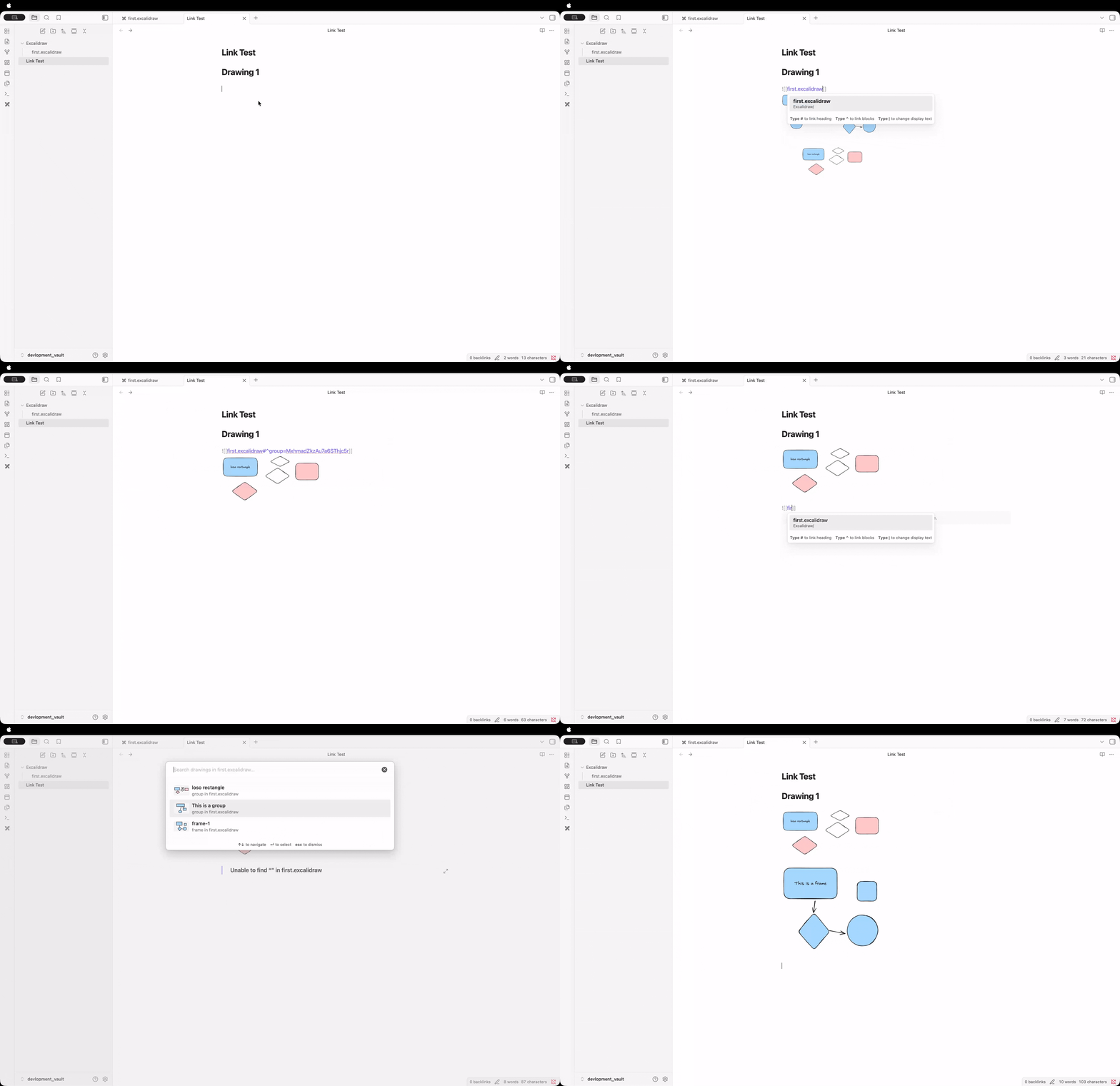
How it works
- Give a frame a name in Excalidraw, or select a few elements and group them (add a text element inside the group if you want it to have a name too).
- In any note, start typing
[[my-drawing#— Excalink detects the pattern and opens a fuzzy-search picker of every frame and group in that drawing. - Filter with fuzzy search, pick one with
↑↓+↵, and Excalink completes the link for you:- Frames:
[[my-drawing#^frame=FrameName]] - Groups:
[[my-drawing#^group=elementId]]
- Frames:
Both formats are the block-reference syntax already understood by the Excalidraw plugin, so the resulting links embed and navigate correctly.
Unnamed groups still show up in the picker — Excalink looks for a text
element inside the group to use as its label, falling back to a generic
Group N name if none is found.
Settings
Available under Settings → Community plugins → Excalink:
- Enable suggestions — turn the picker on or off entirely
- Include frames / Include groups — choose what shows up in the picker
- Show recent first — most recently edited frames/groups appear at the top
- Max suggestions displayed — cap the picker's list size
- Show file context — show the source filename under each suggestion
A Rescan vault action (in settings, or via the command palette) rebuilds the index on demand; it also updates automatically when Excalidraw files change.
Installation
From Obsidian Community Plugins
- Open Settings → Community plugins → Browse
- Search for "Excalink", click Install, then Enable
Manual installation
- Download
main.js,manifest.json, andstyles.cssfrom the latest release - Copy them into
VaultFolder/.obsidian/plugins/excalink/ - Reload plugins in Obsidian and enable Excalink
Development setup
git clone https://github.com/AarambhaAnta/Excalink.git
cd Excalink
npm install
npm run dev    # watch mode
npm run build   # production build
Changelog
1.2.0
- Suggestions now show a small preview of the actual drawing (shapes, colors, rotation) instead of a generic icon, falling back to the icon when there's nothing visual to show (e.g. a text-only group)
- "Show recent first" now sorts by each frame/group's real last-edited timestamp instead of its position in the file
1.1.0
- Added group support: grouped elements are now suggested and linkable alongside frames, with automatic name detection from nearby text
- Reorganized the codebase into
src/ - Trimmed the settings panel to the options people actually use
- General security, styling, and logging cleanup for community plugin review
1.0.x
Initial release: frame detection, fuzzy-search suggestion modal, caching, file watching, and a full settings panel.
License
MIT License — see LICENSE file for details.