
README file from
GithubFixed in v0.1.7: earlier versions could overwrite a drawing when switching files in the same tab. Update to this version, and back up your
.excalidrawfiles before upgrading as a precaution.
Changed in v0.1.8: reopening an already open drawing focuses its existing tab instead of creating a second editor. Obsidian's Split right and Split down commands are native pane actions; when used on a drawing, the temporary duplicate pane closes again to keep a single editor for the file.
New in v0.1.9: Just Simple Excalidraw is available on Obsidian mobile, with the same local-first drawing files and autosave behavior as desktop.
Just Simple Excalidraw
Fixed in v0.1.10: removed an unused upstream Firebase configuration and Google API key from the bundled editor to avoid secret-scanner alerts.
An intentionally small, local-first Excalidraw editor
for Obsidian that preserves the original's brilliant simplicity. It edits
portable .excalidraw JSON files directly in the vault.
Why this plugin exists
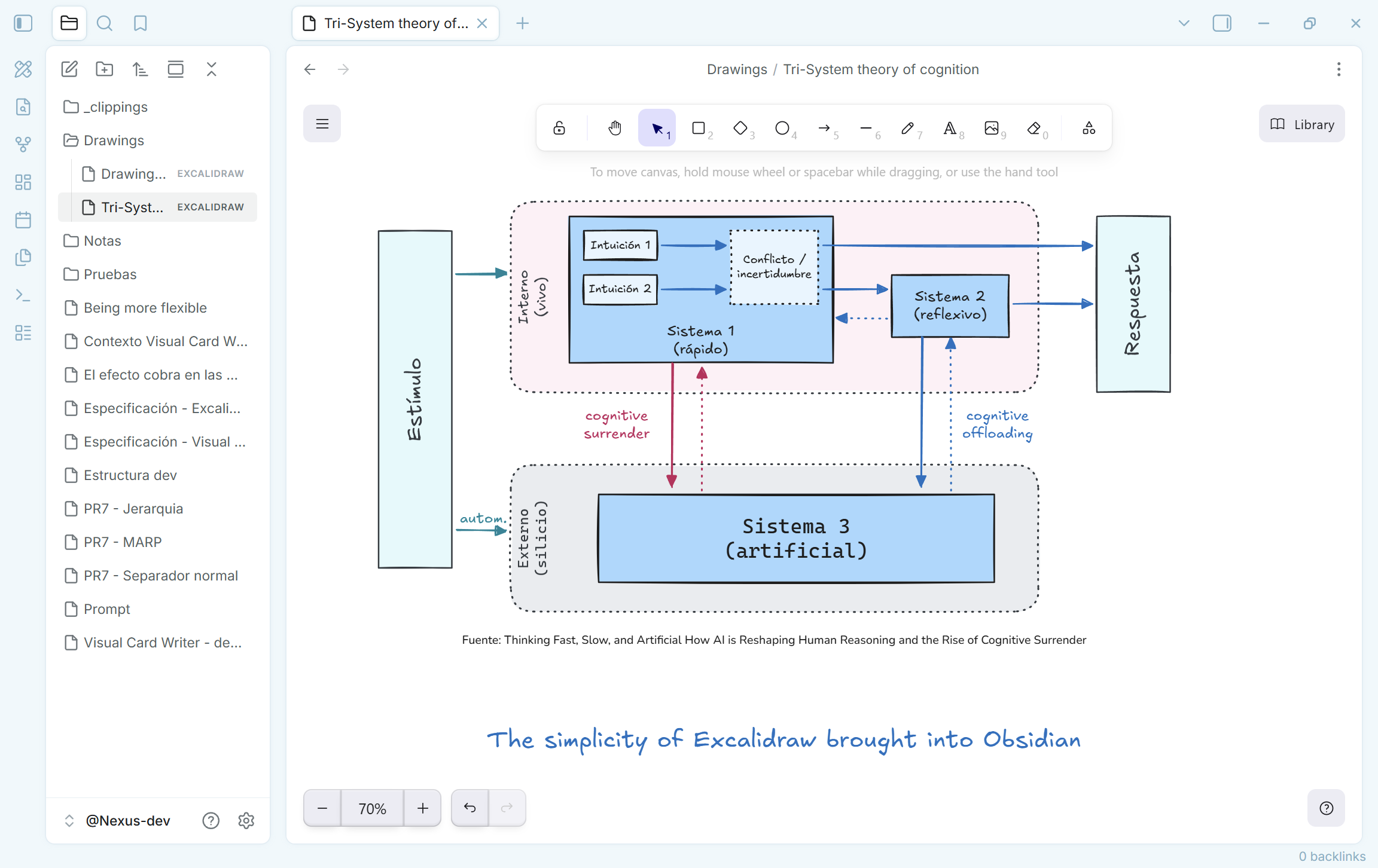
Excalidraw is brilliant because it makes drawing feel immediate. Open a canvas, think with your hands, and get out of the way. Just Simple Excalidraw brings that essential experience to an offline Obsidian vault without turning it into another complex workspace.
The excellent Obsidian Excalidraw plugin by zsviczian offers extensive integrations and a large feature set for people who need them. This plugin has a deliberately different goal: no feature race, no extra workflow layer, and no attempt to reproduce hundreds of options. It is for people who want the original, focused Excalidraw canvas inside Obsidian.
If Excalidraw is an important part of your work, please consider supporting the upstream team with Excalidraw+. This plugin uses the open-source editor locally; Excalidraw+ helps sustain the product and adds online services for users who need them. If you need the advanced features this plugin intentionally leaves out, Excalidraw+ is the better fit—and directly supports the people building Excalidraw.
What it does
- Creates and opens native
.excalidrawdrawings from the command palette or the ribbon. - Runs on Obsidian desktop, phones, and tablets.
- Uses the official Excalidraw editor with its standard drawing tools.
- Saves automatically after a short pause and writes images into the drawing as embedded data, so a drawing stays self-contained.
- Stops autosave if its file changes outside the open editor, avoiding silent overwrites.
- Reports malformed drawings without changing the original file.
- Follows Obsidian's light and dark theme.
It deliberately does not add Markdown embedding, OCR, AI, collaboration, cloud sync, a drawing library, an account, or an export workflow. Those are valuable features in other tools; they are outside this plugin's purpose. The lean build also excludes Mermaid-to-Excalidraw conversion, web embeds, and the related heavy dependency tree.
Lean build and Obsidian Sync
Community Plugins installs main.js, manifest.json, and styles.css from a
GitHub release. Since Obsidian Sync Standard cannot sync a plugin file larger
than 5 MB, this plugin keeps its release main.js below that limit.
That constraint is intentional: Just Simple Excalidraw ships a focused editor, not every optional Excalidraw subsystem. It includes one embedded Excalifont subset covering Latin characters, including Spanish accents. Other scripts and the optional Excalidraw font variants fall back to fonts available on the local system. No font or code is downloaded at runtime.
What this trade-off means
To remain small, local, and Sync-friendly, the plugin does not include Mermaid-to-Excalidraw conversion, online collaboration, cloud services, an account, a library, advanced integrations, or the full set of optional fonts. It is intended for focused, offline drawing inside a vault. If those advanced capabilities matter to your workflow, use Excalidraw+: it provides the online service layer and helps fund ongoing Excalidraw development.
Privacy and permissions
Just Simple Excalidraw is local-first by design.
- Network: it makes no runtime network requests. Its one bundled Latin font subset and all editor code are included in the release.
- Vault files: it reads and writes only the
.excalidrawfile you open or create in the vault. - Clipboard: standard copy and paste actions, including pasting an image, run only after you invoke them. The plugin does not read the clipboard in the background.
- Files outside the vault: only an image explicitly chosen or pasted by you can be read; it is embedded into the active drawing. Images over 10 MiB are rejected.
- Browser storage: the plugin itself does not persist vault data in
localStorageorsessionStorage; the drawing file in your vault is the source of truth. The bundled upstream Excalidraw runtime contains browser storage support for its own optional editor state. - Telemetry, ads, accounts and payments: none.
Installation
Community Plugins
Once accepted into the Obsidian Community directory, install it from Settings → Community plugins and enable it.
Manual installation
Download main.js, manifest.json, and styles.css from the matching GitHub
release. Put those three files in:
<vault>/.obsidian/plugins/just-simple-excalidraw/
Then enable Just Simple Excalidraw in Obsidian.
Use
Run Create new Excalidraw drawing from the command palette, or use the
pencil ruler icon in the ribbon. The new file is created in the vault root
using a timestamped Drawing YYYY-MM-DD HH.MM.SS.excalidraw name.
One drawing, one editor
Each .excalidraw file is editable in one Obsidian tab at a time. Opening a
drawing that is already open activates its existing tab. This prevents two
editors from saving competing versions of the same file.
Obsidian's pane menu also shows Split right and Split down for every tab. Those commands belong to Obsidian, not to this plugin, so they cannot be hidden only for drawings through the supported plugin API. If you use either command on a drawing, Obsidian may briefly create a new pane; the plugin then returns focus to the original drawing and closes the duplicate pane.
Development
Requires Node.js 22.13 or later and npm.
Development note Just Simple Excalidraw was unapologetically vibe-coded: built iteratively with AI assistance, then tested and refined inside a real Obsidian vault.
npm ci
npm run check
npm run check type-checks the plugin, makes a production bundle without
Mermaid, embeds the Latin font subset, installs the built plugin into the local
development vault, and verifies both offline operation and the 5 MB Sync
Standard file limit.
For an editable development build:
npm run dev
Release
Create a Git tag that exactly matches manifest.json's version (for example,
0.1.0). The release workflow builds and attaches exactly main.js,
manifest.json, and styles.css to the GitHub release.
License and acknowledgements
This project is licensed under the MIT License. It bundles Excalidraw, React, and their production dependencies under their respective licenses; see THIRD_PARTY_NOTICES.md.
Excalidraw is an independent open-source project. This plugin is not affiliated with or endorsed by Excalidraw.