
README file from
GithubSift
Search your notes with substring matching, operators, path and date filters, and ranked results in a large overlay.
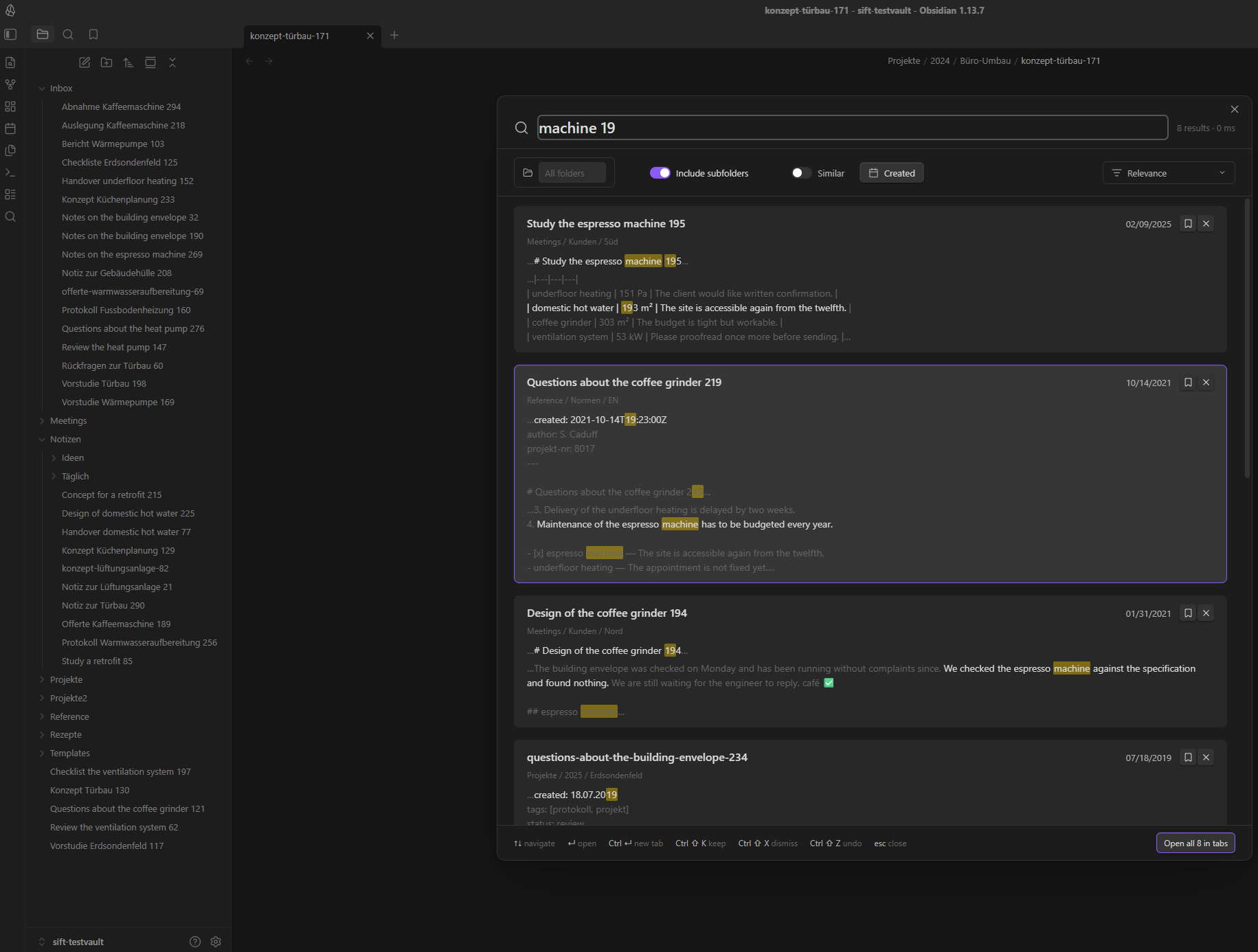
Sift is a community plugin for Obsidian. It keeps a local index of your Markdown notes and matches inside words, not only at their beginning: typing maschine finds a note about the Espressomaschine, and typing kueche finds a note that spells it Küche. Results open in a wide, keyboard-driven overlay with excerpts around every hit.
Everything runs on your device. Sift makes no network requests at all — see Privacy and network use.
Screenshots
The search overlay in a dark theme: the query matches inside words, and every card carries excerpts cut from the note itself, with the hits highlighted.
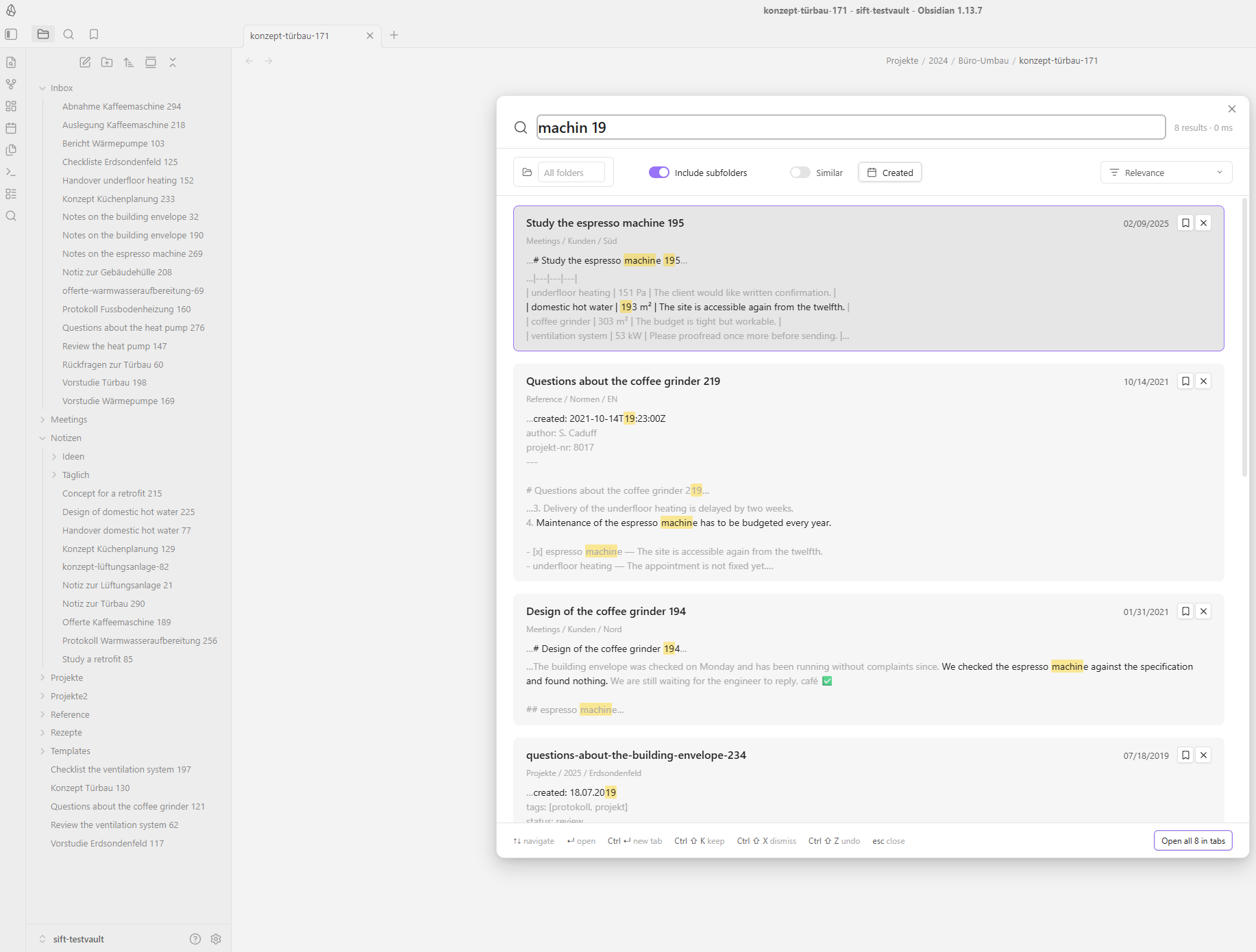
The same overlay in a light theme. Sift hardcodes no colour; every surface, border and highlight comes from the Obsidian theme variables, so it follows whatever theme you use.
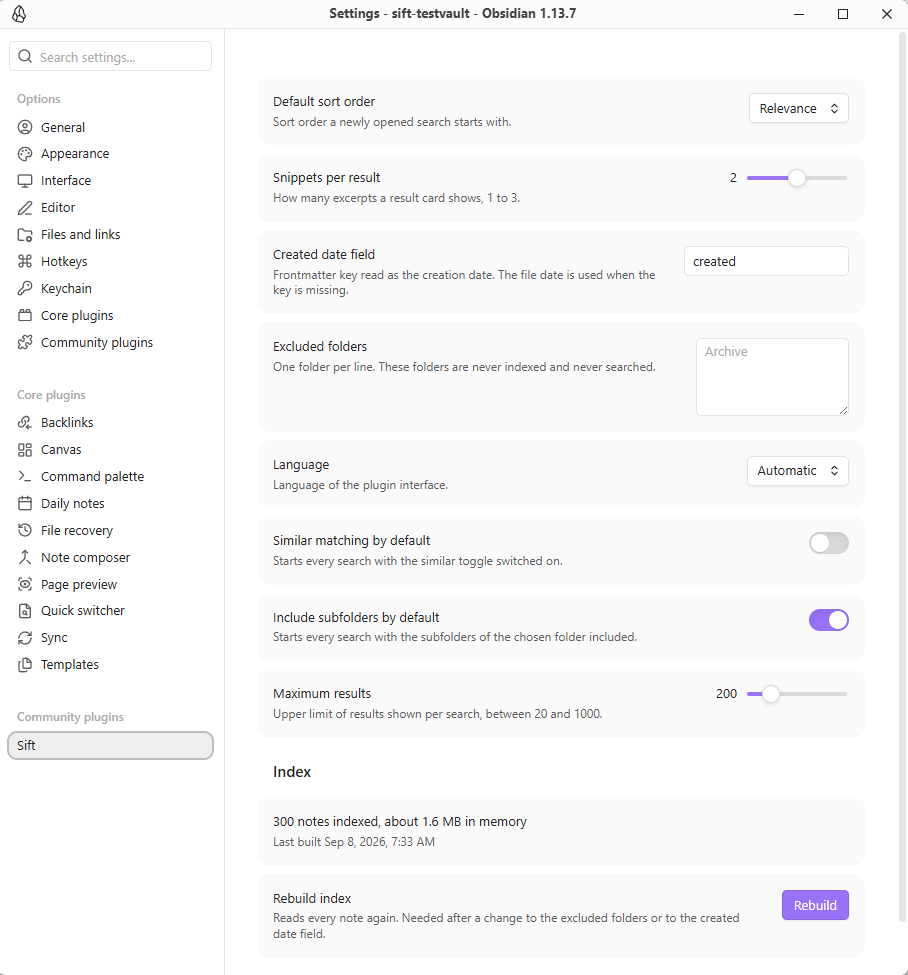
The settings tab. It reports how many notes are indexed and how much memory the index occupies, and rebuilds the index on demand.
What it does
- Substring (infix) matching. The index is built from trigrams, so a term matches anywhere inside a word.
maschinefindsEspressomaschine;sondefindsErdsondenfeld. Prefix-only search engines cannot do this. - Umlaut and ß tolerance in both directions.
kuechefindsKüche,küchefindsKueche,strassefindsStraße. Such a hit is marked as an alias match and ranks just below a literal one. - Operators. Spaces mean AND,
"quoted text"is an exact phrase,-wordexcludes that word,-word*excludes everything beginning with it,a OR baccepts either. - Field prefixes.
path:,tag:,title:andprop:limit a single term to that field.prop:statusfinds every note that has astatusproperty,prop:status=offenonly those whose value containsoffen, and-prop:statusexcludes them. - Path, property and date filters. Restrict a search to one folder, with or without its subfolders; to a note property, either by its presence alone or by a value; and to a created or modified date range, with quick picks for today, the last 7 days, 30 days and year. The property chip completes both the name and the value from the properties your vault actually uses.
- Open todos. One switch narrows the result to the notes that still have something unfinished in them —
- [ ],- [/]and- [?]count as open, a ticked or cancelled box does not. It works on its own, with no search term at all. - Canvases and bases too. A
.canvasis searched by the text on its cards, its group names and the notes it embeds; a.baseby its view names and filters. Both are indexed by default and can be switched off individually, and the "Notes only" switch hides them from a single search without touching the index. - Search inside one note. The "This note" switch confines the run to the note that was open when you called the overlay — the whole query language, filters included, applied to a single file.
- Ranked results. Hits in the title, in frontmatter, in a tag and in a heading count for more than hits in the body; several matching terms close together count for more than the same terms far apart; whole-word matches get a bonus and recently edited notes a small one. The result is shown as a relevance value from 0 to 100. The order can be switched to created, modified, title or path at any time.
- Excerpts with highlighted hits. Every card shows up to three excerpts of about 160 characters, cut from the original note text, so umlauts, casing and Markdown look exactly as you wrote them. The sentence around the hit is rendered in the normal text colour, its surroundings muted.
- Keyboard-first overlay. Open, type, navigate and open a note without touching the mouse. Opening a hit places the cursor on the exact match position in the note.
- Optional typo tolerance. The "Similar" toggle also accepts close spellings —
EspresomaschineandKafeemaschinestill find the espresso machine note. It is off by default, never applies inside a phrase, and a card found this way says which word it actually matched. - English and German interface. The language follows the Obsidian interface language and can be set explicitly.
Keeping and dismissing
While a result list is open you can mark a hit as worth keeping and remove one you do not want to see, either with the two buttons on the card or with the hotkeys below. "Open all" then opens what is left, or only what you kept.
This shapes the run and nothing else. Nothing is written to your notes, no tag and no property is set, and closing the overlay forgets all of it — the next search starts from the full result list again. The footer says so as soon as something is kept or dismissed.
Properties
Sift reads the properties (frontmatter) of every note and can filter on them.
The property chip in the filter bar takes a name and, optionally, a value: with
the value box empty it keeps every note that carries that property, which is
the question a property-driven vault asks most often. Both boxes complete from
what your own notes use. The same constraint is available in the query itself as
prop:name=value, so it can be combined with the other operators — including
-prop:name, which excludes.
Names and values are matched the way the rest of Sift matches: case is ignored,
umlauts fold both ways, and a value is matched as a fragment, so prop:status=off
finds Offen. A list-valued property is matched item by item.
Dates in a property are not calendar-aware here — the date filter reads the created and modified dates of the note. Which frontmatter field supplies the created date is a setting of its own (see below).
How to use
Open the command palette and run Sift: Open search, or click the ribbon icon.
Sift deliberately registers no default hotkey, so it cannot collide with your own bindings or with another plugin. Assign one yourself under Settings → Hotkeys and search for "Sift".
Keyboard
| Key | Action |
|---|---|
| Type | Search runs automatically, about a tenth of a second after you stop typing |
↑ / ↓ |
Move through the results |
Enter |
Open the selected note in the current tab, cursor on the match |
Ctrl + Enter (Cmd + Enter on macOS) |
Open the selected note in a new tab |
Tab |
Move from the search field into the filter bar |
Esc |
Close the overlay |
Search syntax
| Query | Meaning |
|---|---|
wärmepumpe altbau |
Both terms must occur, anywhere in the note |
"wärmepumpe im altbau" |
The exact phrase, spaces included |
wärmepumpe -altbau |
Contains the first term, and not the word altbau |
wärmepumpe -altbau* |
… and no word beginning with altbau, Altbauwohnung included |
wärmepumpe -*bau |
… and no word ending on bau, Neubau included |
wärmepumpe -*bau* |
… and no bau anywhere at all |
wärmepumpe OR erdsonde |
At least one of the two |
path:Projekte kessel |
kessel anywhere, and Projekte in the note's path |
tag:hlks lüftung |
Notes tagged hlks that contain lüftung |
title:küche |
The term has to occur in the note title |
Two details worth knowing, because they follow from substring matching:
- A search term matches inside a word, an exclusion does not.
altbaufindsAltbauwohnung, while-altbauremoves only the notes carryingaltbauas a word of its own — taking out everything that merely contains those letters is rarely what you meant. The*says where you do mean it:-altbau*opens the end,-*bauthe beginning,-*bau*both. In a phrase the star goes inside the quotes,-"alter bau*". On a positive term it is unnecessary and is ignored. - A malformed query never fails. An unclosed quotation mark, a dangling
-or an unknownfoo:prefix is reported next to the search field, and Sift searches the part of the query it could read.
Filter bar
The chip row under the search field holds:
- Folder — pick one folder; the search is limited to it. "Include subfolders" decides whether notes further down count.
- Created and Modified — a date range with quick picks for the last 7 days, 30 days and year. The created date is read from your frontmatter date field where present, otherwise from the file itself.
- Open todos — only notes that still have an unfinished task in them: a list item written
- [ ],- [/]or- [?]. A box that is ticked (- [x]), cancelled (- [-]) or carries any other status does not count, and a checkbox inside a fenced code block is an example rather than a task. - Notes only — hides canvases and bases from the result list. Off means no constraint, not the opposite: there is no "canvases only" position here.
- Similar — the typo tolerance described above.
- Sort — relevance, created, modified, title or path.
- The hit counter on the right shows how many notes matched and how long the search took.
Each chip can be removed individually; nothing is remembered between two searches except what you set in the settings.
Settings
| Setting | What it does |
|---|---|
| Default sort order | Sort order a newly opened search starts with. |
| Snippets per result | How many excerpts a result card shows, 1 to 3. |
| Created date field | Frontmatter key read as the creation date; the file date is used when the key is missing. |
| Excluded folders | One folder per line. These folders are never indexed and never searched. |
| Index canvases | Search the text of canvas cards, group names and the notes a canvas embeds. On by default. |
| Index bases | Search the view names and filters of base files. On by default. |
| Language | Interface language: automatic, English or German. |
| Similar matching by default | Starts every search with the "Similar" toggle switched on. |
| Include subfolders by default | Starts every search with the subfolders of the chosen folder included. |
| Maximum results | Upper limit of results shown per search. |
| Keep hotkey | Combination that marks the selected result as worth keeping. Default Ctrl+Shift+K. |
| Dismiss hotkey | Combination that removes the selected result from the run. Default Ctrl+Shift+X. |
| Rebuild index | Reads every note again. Needed after changing the excluded folders or the created date field; switching a file kind on or off rebuilds by itself. The settings tab also shows how many notes are indexed and roughly how much memory the index uses. |
Changing the two curation hotkeys
Put the cursor in the field and press the combination — the field records it,
the way Obsidian's own hotkey editor does. It reads the physical key rather than
the character it produces, so Alt+D is recorded as Alt+D even on a layout
that turns Option+D into a symbol. Ctrl is stored as Cmd on macOS, so one
setting is right on both platforms, and the button beside the field puts the
default back. The footer of the search overlay always names the combination that
is actually bound.
Two rules apply. At least one modifier is required — the query field owns every
unmodified key. And Ctrl+W, Ctrl+Q, Ctrl+N, Ctrl+T and Ctrl+R are
refused, because the desktop app answers those before the plugin sees them; a
hotkey that closes the window is worse than one that does nothing. Everything
else is free while the overlay is open, including combinations Obsidian uses
elsewhere — but note that binding Ctrl+C, Ctrl+V, Ctrl+X, Ctrl+A or
Ctrl+Z takes that gesture away from the query field for as long as the search
is open.
Sift still registers no hotkey of its own outside the overlay. The command
"Sift: Open search" is bound under Settings → Hotkeys, like any other command.
Privacy and network use
- Sift makes no network requests. There is no
fetch, noXMLHttpRequest, noWebSocket, norequestUrland nosendBeaconanywhere insrc/or in the shippedmain.js. The plugin has no remote counterpart of any kind. (The static mockups underdocs/and the development preview underdev/load a web font when you open them in a browser. Neither is part of the plugin and neither is ever loaded by it.) - Sift collects no telemetry. No analytics, no crash reporting, no usage counters, no ping on startup. Your search terms are never logged — not to a file, not to the developer console.
- Which files Sift looks at. Building an index means knowing which notes exist, so Sift asks Obsidian for the list of Markdown files in the vault and reads each one once. Folders you exclude in the settings are skipped, and non-Markdown files are never opened. Nothing about that list is stored anywhere but the local index, and nothing is sent anywhere.
- Your note content never leaves your device. Reading, indexing, searching and building excerpts all happen inside Obsidian.
- Where the index lives. Sift stores its index in the browser's IndexedDB inside Obsidian's own app storage for that vault, keyed by the vault id, so two vaults on the same machine never share an index. Nothing is written into your vault itself except the plugin's own
data.json, which holds your settings and nothing else. The index is derived data: "Rebuild index" in the settings discards it and reads your notes again, and a stored index is thrown away automatically when it no longer matches the vault or your settings. - Nothing outside the vault is read. Sift uses the Obsidian vault API only, no file-system, Node or Electron API, which is also why it runs on mobile.
Performance
The index is built once per vault and then kept up to date incrementally: creating, editing, renaming or deleting a note re-reads that one note, not the vault. Indexing runs in small slices during idle time, so the interface never freezes, and the search overlay stays usable while it is still running.
Measured with npm run bench against the generated 10 000-note test vault, median of three runs, on one desktop workstation — an Intel Core i9-13900K, 64 GB of memory, Node 22 on Windows 11. Your own machine will differ; a laptop on battery differs a lot.
| What | Measured | Target |
|---|---|---|
| Cold index of 10 000 notes | 2.06 s | under 5 s |
| Warm start from the stored index | 1.27 s | — |
| Index memory for 10 000 notes | 50.9 MB | under 100 MB |
| Re-index one changed note | 111 ms | — |
| Slowest of 35 search shapes | 43.9 ms | under 100 ms |
The search figure is the p95 of the slowest of 35 query shapes the benchmark runs — single terms, infix terms, two- and three-term queries, phrases, exclusions, OR groups, the path:, title: and tag: prefixes, umlaut and ASCII-alias spellings, two-character terms, folder and date filters, filter-only searches and two sort orders. All 35 stay under 62 ms. The slowest is wärmepumpe OR erdsondenfeld OR lüftungsanlage, which matches 6 101 of the 10 000 notes and therefore has to rank most of the vault.
What the other file kinds cost. npm run bench -- --extras adds the generated canvases and bases — 250 and 50 alongside the 10 000 notes, the proportion a real vault carries. Cold index goes from 2.06 s to 2.17 s, index memory from 50.9 MB to 52.0 MB, and the slowest search from 43.9 ms to 47.7 ms. All three stay well inside their budget.
The reason it is that cheap is that a canvas is not stored the way a note is. Four fifths of a .canvas are ids, coordinates and colours; only the fifth that is text enters the index, with a map back to where each word sits in the file so excerpts and jump-to-hit keep working. The "Notes only" switch costs nothing on top: it is tested once per candidate before the expensive verification step, so on a mixed vault it is marginally faster than the same search unfiltered.
Typo tolerance costs more, and is off by default. With "Similar" on, the same 35 shapes range from 1.8 ms to 214 ms, and nine of them pass 100 ms. That mode compares the query against the words of every candidate note, so the work grows with how much of the vault a term can plausibly reach; the budget for it is 500 ms rather than 100 ms, and it is a switch you throw when an exact search came back empty.
The 10 000-note run is the release gate and has to be repeated before a release. Continuous integration runs the same benchmark at 2 000 notes, where a hosted runner can afford it, against budgets loose enough that only an order-of-magnitude regression fails — a shared two-core runner cannot be held to a workstation's numbers, but it can catch a linear scan that turned quadratic.
Compatibility
- Desktop and mobile.
isDesktopOnlyisfalse; there is no platform-specific code. Tested on desktop as well as on Obsidian for Android and for iOS/iPadOS: the overlay goes full screen, the filter bar folds away behind the header button until you tap it, and every control is sized for a finger. - Minimum Obsidian version: 1.8.7 (see
manifest.json). - Themes: Sift uses only Obsidian's own CSS variables, so it follows your theme in both light and dark mode.
Installation
From inside Obsidian, once the plugin is listed: Settings → Community plugins → Browse, search for "Sift", install and enable it.
To install a build manually, copy main.js, manifest.json and styles.css into <your vault>/.obsidian/plugins/sift/ and enable the plugin under Settings → Community plugins.
Development
npm install                            # install the build toolchain
npm run fixtures -- --count 2000       # generate the test vault, once after cloning
npm run dev                            # watch build into main.js
npm run build                          # type-check and production build
npm test                               # unit tests (Vitest)
npm run bench                          # benchmark index build and search against that vault
npm run guard                          # scan the source for store-policy violations
npm run check                          # guard + typecheck + lint + test
Generate the test vault before the first npm test. It is git-ignored, so a fresh clone has none, and the Searcher, fuzzy and filter suites read it. test/fixture-vault.test.ts is the gate in front of them: it fails first and prints the command above. 2 000 notes is what the suite is written for; the generator is seeded, so a larger vault is a superset and works too. Continuous integration generates the same 2 000 notes before it runs the tests.
Run npm run check before every commit. It is the same gate the project uses for a release: the policy scan, the TypeScript type check, ESLint (including eslint-plugin-obsidianmd) and the full test suite. A commit is expected to build and to leave the test suite green.
A few conventions, so a patch does not bounce:
- Code, comments, identifiers and commit messages are written in English, even though the plugin ships a German interface.
- Every user-visible string goes through
src/i18n/and is written in sentence case.en.jsonandde.jsonmust carry exactly the same key set, and no interface file may write text of its own;test/i18n.test.tsenforces the first andtest/i18n-callsites.test.tsthe second. - DOM is built with
createEl(),createDiv()andsetText().innerHTMLand its relatives are not used anywhere. - No hardcoded colours. Every own CSS class starts with
sift-. - Changes to the parser, the searcher or the ranker need a unit test.
main.jsis a build artefact, is git-ignored, and ships only as a release asset.
test/fixtures/vault is generated, never edited by hand: it holds German and English notes with compound words, umlauts, frontmatter dates and nested folders, which is what the offset and folding tests are built on.
Changelog
CHANGELOG.md records what changed in every release, newest first.
Reporting a bug
Please open an issue using the bug report form. It deliberately does not ask for the content of your notes, and you should not paste any: a description of the query shape (for example "a two-word query with an umlaut in the second word") is enough to reproduce almost everything. If you attach console output, remove note titles and paths from it first.
Contributing
Issues and pull requests are welcome. CONTRIBUTING.md has the setup, the house rules and what a patch needs in order to be merged, and CODE_OF_CONDUCT.md applies to every space of this project. For a suspected security problem, do not open an issue — follow SECURITY.md instead.
Licence
MIT — see LICENSE.