FastForwardLink

by Idan Liberman
5
4
3
2
1
Score: 38/100

Description

The FastForwardLink plugin allows users to create shortcut links that redirect to specific target notes within Obsidian. It simplifies navigation by letting users define multiple link variations, such as abbreviations or alternate spellings, to open a single target note. This feature helps users maintain an interconnected and organized vault while reducing navigation friction. The plugin includes options for opening target notes in the same tab, a new tab, or switching to a new tab automatically. Users can create and manage forwarding links with ease, and redirecting notes can be moved to a dedicated folder for better organization. FastForwardLink is ideal for users looking to streamline note access, link concepts, and avoid clutter in their Obsidian workspace.

Reviews

No reviews yet.

Stats

8
stars
327
downloads
0
forks
519
days
9
days
18
days
26
total PRs
0
open PRs
2
closed PRs
24
merged PRs
1
total issues
1
open issues
0
closed issues
62
commits

Latest Version

18 days ago

Changelog

Small doc updates. Updating package.json to correct version.

README file from

Github

Obsidian lets you link notes. Great.

But real people don't always use the same terms consistently:

  • abbreviations
  • acronyms
  • nicknames
  • alternate spellings
  • inside jokes

So you might write:

  • javascript
  • js
  • ecmascript

...while meaning the exact same thing.

By default, Obsidian treats these as separate notes.

Over time, that creates:

  • duplicate notes
  • fragmented knowledge base
  • inconsistent linking
  • friction while writing naturally

FastForwardLink solves this by turning alias notes into lightweight redirects.

Write naturally. Land on the right note — fast.

demo

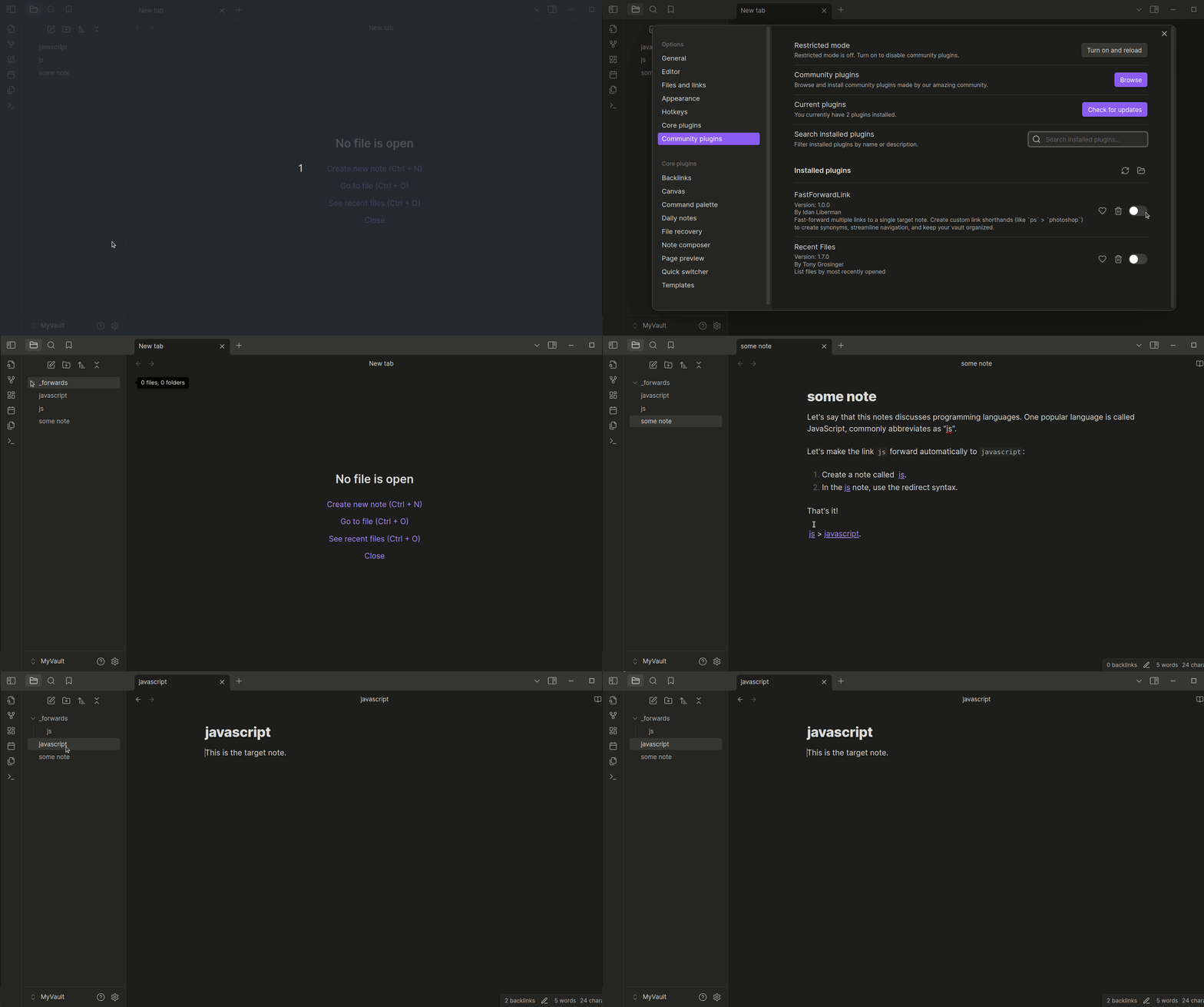
FastForwardLink lets multiple note names point to the same canonical note. Write naturally without fragmenting your vault structure:

  • jsjavascript
  • psphotoshop

How It Works

Suppose you have a note called javascript.

Elsewhere in your vault, you naturally write:

[[js]]

Normally, Obsidian would create a brand-new js note. But with FastForwardLink:

  • Create a note called js
  • Add redirect syntax inside it
  • Opening js automatically forwards to javascript

Here are some examples of how you might set up FastForwardLink:

  • ps > photoshop
  • js > javascript
  • tay tay > taylor swift
  • e=mc2 > Einstein's special theory of relativity
  • favorite film > bill and ted's bogus journey

Features

  • Multiple Links, One Target: Set multiple links to redirect to a single target note for quick navigation between related topics or abbreviations. Organize synonyms or alternate spellings for easier access.

  • Quick-Paste Command: Set target notes on the fly without breaking your writing flow. In the Obsidian command palette, select Paste redirect syntax onto selection to quickly create a forwarding link.

  • Organized Vault: Streamline vault navigation by unifying concepts, perfect for efficient, clutter-free notes.

  • Easy Management: Forwarding notes are automatically moved to a designated folder for easy review, management, or removal.

  • Flexible Forwarding Options:

    • Open the target note in the same tab.
    • Open the target note in a new tab while remaining on the original note.
    • Open the target note in a new tab and switch to it automatically.
  • Remove Forwarding Notes in One Click: Easily delete all redirecting notes with a single click using plugin settings.

Installation

Download the plugin directly from Obsidian's community plugins. Just search for FastForwardLink.

You can also install manually by doing the following:

  1. Download the following plugin files:

    • data.json
    • main.js
    • manifest.json
  2. Copy these files to your vault's plugins folder at {VaultFolder}/.obsidian/plugins/FastForwardLink.

  3. In Obsidian, go to Settings > Community Plugins and enable FastForwardLink.

The plugin is now ready for use.

To create a fast-forwarding link:

  1. Create or open the note you want to fast-forward to a target note. For example, a note titled ps.
  2. In the note, type the target note's title wrapped in the forwarding syntax: ::>[[target-note]]. For example, to forward from ps to photoshop, include ::>[[photoshop]] in the ps note.

Clicking the ps link in any note now opens the photoshop note.

Quick-Paste Syntax

Yup, typing sucks. Fortunately, there's a command to help you quickly paste the redirect syntax into your code:

  1. Press Ctrl + P to open the Obsidian command palette.
  2. Search for and select the command Paste Redirect Syntax onto Selection.

The command wraps the selected text in the fast-forward syntax.

[!TIP] > Add a hotkey to trigger this command! We recommend Ctrl + Alt + R (PC) or Cmd + Opt + R (macOS).

Version Updates

Version 1.1

Some improvements include:

  • You can now temporarily bypass forwarding with a designated command. In Obsidian's command palette, search for "FastForwardLink".
  • Source code refactored and better organized for future contributors.
  • Better robust event and error handling and messaging.

Bugs and Contact

Found a bug? Well, we can't have those!

Please open an issue in the plugin's GitHub repository or contact the developer directly.

Known Bugs

  • When "Open the target note in a new tab" is enabled and the fast-forwarding note has not yet been moved to the _forwards_ folder, some additional tabs are opened. This is likely due to internal timing issues in the Obsidian-OS interaction.

    When the fast-forwarding note is in the _forwards folder, plugin behavior is as expected.

Supporting this plugin

If you enjoy using FastForwardLink, consider supporting its development by buying me a coffee or a cheesy slice!

Similar Plugins

info
• Similar plugins are suggested based on the common tags between the plugins.
Advanced Tables
6 years ago by Tony Grosinger
Improved table navigation, formatting, and manipulation in Obsidian.md
Notebook Navigator
8 months ago by Johan Sanneblad
Replace the default file explorer in Obsidian with a clean two-pane interface featuring folder tree, tag browsing, file previews, keyboard navigation, drag-and-drop, pinned notes, and customizable display options.
Breadcrumbs
5 years ago by SkepticMystic
Add typed-links to your Obsidian notes
Note Toolbar
2 years ago by Chris Gurney
Flexible, context-aware toolbars for your notes in Obsidian.
Pane Relief
5 years ago by PJ Eby
Obsidian plugin for per-pane history, pane movement/navigation hotkeys, and more
Quick Explorer
5 years ago by PJ Eby
Perform file explorer operations (and see your current file path) from the Obsidian.md title bar
Footnote Shortcut
5 years ago by Alexis Rondeau, Micha Brugger
Makes creating footnotes in Obsidian more fun!
Another Quick Switcher
5 years ago by tadashi-aikawa
This is an Obsidian plugin which is another choice of Quick switcher.
obsidian floating toc
4 years ago by curtgrimes modified by Cuman
Vertical Tabs
2 years ago by oxdc
An Obsidian plugin that displays open tabs vertically, allowing users to group and organize tabs for a better navigation experience.
Code Editor Shortcuts
5 years ago by Tim Hor
Obsidian plugin to add keyboard shortcuts commonly found in code editors such as Visual Studio Code (vscode) or Sublime Text
Floating Search
3 years ago by Boninall
A plugin for searching text by using Obsidian default search view.
Better Command Palette
4 years ago by Alex Bieg
A better command palette for obsidian
Core Search Assistant
4 years ago by qawatake
An Obsidian plugin to enhance built-in search: keyboard interface, card preview, bigger preview
Dynamic Outline
a year ago by theopavlove
Adds a customizable GitHub-like floating table of contents to Obsidian.
Automatically reveal active file
5 years ago by Matt Sessions
Obsidian plugin to reveal the active file automatically when you open a file
Open Tab Settings
a year ago by jesse-r-s-hines
Obsidian plugin that adds options to customize how tabs are opened, including open in new tab by default, preventing duplicate tabs, and more
Shortcuts extender
6 years ago by kitchenrunner
Plugin for Obsidian: Use shortcuts for input special symbols and changing level of headings without language switching
Keyboard Analyzer
4 years ago by cogscides
Obsidian plugin to display command hotkeys on a visible keyboard layout
Folder Focus Mode
4 years ago by grochowski
Focus file explorer on chosen folder and its files and subdirectories, while hiding all the other elements.
Reveal Active File Button
4 years ago by Clare Macrae
Obsidian plugin to add a button to the top of the Obsidian File Explorer, to reveal the active file.
Key Promoter
5 years ago by Johannes Theiner
Learn keyboard shortcuts by showing them when using the mouse
Text Expander JS
4 years ago by Jonathan Heard
Obsidian plugin: Type text shortcuts that expand into javascript generated text.
Leader Hotkeys
5 years ago by Tony Grosinger
Use a leader-key (tmux style) for hotkeys in Obsidian.md
No Dupe Leaves
4 years ago by Simon Cambier
Automatically switch the focus to open notes instead of reopening them
Canvas minimap
2 years ago by ifree
Obsidian canvas minimap
Wrap with shortcuts
4 years ago by Manic Chuang
Wrap selected text in custom tags with shortcuts.
Footlinks
5 years ago by Daha
Obsidian plugin that extracts urls from the main text to footer, offering a better reading/editing experience.
Auto pair chinese symbol
5 years ago by renmu123
中文符号自动补齐
Link with alias
3 years ago by Pavel Vojtechovsky
Obsidian plugin for handy creation of links and alias in front matter of target document
Hotkeys for Bookmarks
5 years ago by Vinzent
Quick Preview
2 years ago by Ryota Ushio
An Obsidian plugin to quickly preview a suggestion before selecting it in link suggestions & quick switcher.
Scroll Offset
4 years ago by Lijyze
Scroll Offset for Obsidian
Lumberjack
5 years ago by ryanjamurphy
Log your thoughts! Lumberjack adds URL commands to help you axe inefficiency and get right to writing.
Script Launcher
4 years ago by Alessandro Ruggiero
An Obsidian plugin that allows you to easily run scripts written in any language directly from the app
Card View Switcher
4 years ago by qawatake
An Obsidian plugin to provide a quick switcher with card view
Marjdown shortcuts
4 years ago by Jules Guesnon
🪨 Obsidian plugin that allows to write markdown from commands
Vimium
2 years ago by Karsten Finderup Pedersen
Interact with elements using keyboard shortcuts in the spirit of Vim.
Arrows
2 years ago by artisticat
Draw arrows across different parts of your notes, similar to on paper
Daily Note Navbar
2 years ago by Karsten Finderup Pedersen
Adds a daily note navbar to quickly navigate between sequential daily notes in Obsidian.
Quick snippets and navigation
4 years ago by @aciq
Quick snippets and navigation for Obsidian
Format Hotkeys
5 years ago by Ansel Santosa
Google Docs style formatting hotkeys for Obsidian
Tab Selector
2 years ago by namikaze-40p
This is an Obsidian plugin which can quickly switch tabs in various ways.
Next TOC
4 months ago by RavenHogWarts
Floating TOC panel
macOS Keyboard Navigation
6 years ago by ryanjamurphy
Search Everywhere
4 years ago by Mom0
Obsidian Search Everywhere Plugin
Another Sticky Headings
2 years ago by Zhou Hua
Advanced Random Note
3 years ago by Karsten Finderup Pedersen
Create commands from custom queries to open random notes
Sequence Hotkeys
4 years ago by Ruan Moolman
Obsidian plugin to support a sequenced of keyboard shortcuts to run commands.
Open Plugin Settings
3 years ago by Mara-Li
Create a command that open the settings tabs of a registered plugin (because I was bored to open the parameters).
Autofit Tabs
a year ago by Bradley Wyatt
Obsidian Plugin that automatically adjusts tab header widths in real-time to perfectly fit each tab's title content while maintaining a clean, seamless interface that prevents awkward text truncation and ensures optimal readability of your document titles.
Neighbouring Files
2 years ago by Fabian Untermoser
Obsidian Plugin to navigate to the next and previous file in the current directory
Tab Navigator
2 years ago by o02c
obsidian-tab-switcher
Crumbs
3 years ago by Tony Grosinger
Breadcrumb navigation in Obsidian.md
Cycle In Sidebar
3 years ago by Houcheng
Cycle through tabs of left/ right sidebar panel
Alias from heading
4 years ago by Chris Basham
Obsidian plugin: Implicitly add an alias matching the first heading in a document.
FolderFile Splitter
a year ago by Xu Quan
VirtFolder
2 years ago by mr.grogrig
Creating a hierarchical structure like Luhmann's Zettelkasten
Quick Links
3 years ago by Ian Fisher
Obsidian plugin to create quick link shortcuts
Broken Links
2 years ago by ipshing
Lemons Search
2 years ago by Moritz Jung
An Obsidian plugin that offers a fast fuzzy finder based quick switcher with preview.
Insert Heading Link
4 years ago by Signynt
Add a Link to a Heading.
Go to Line
5 years ago by phibr0
URL Display
3 years ago by Stephanie Lin
Extract and display external URLs of the note in Obsidian.
Link Range
3 years ago by Ryan Mellmer
Add ranged link support to Obsidian
Bookmarks Caller
2 years ago by namikaze-40p
This is an Obsidian plugin which can easily open bookmarks.
Go To Heading
3 years ago by join
Quickly navigate between your document's headings in Obsidian
Highlight active folder section
2 years ago by Lukas Collier
Gives the folder section with the active note a customizable background color and more.
Open Related Url
4 years ago by Dan Pickett
Nav Link Header
2 years ago by ahts4962
Display navigation links at the top of the notes in Obsidian
Floating Headings
3 months ago by k0src
Displays a floating, collapsible outline of a note's headings on the right side of the editor. Expands on hover, click to navigate.
Harpoon
3 years ago by mask(developermask)
Crafty
2 years ago by liolle
Add tooltip to your obsidian canvas's nodes and navigation between nodes
Tag Index
a year ago by wenlzhang
An Obsidian plugin that creates a curated list of important tags to serve as meaningful entry points to your knowledge base.
Potato Indexer
3 years ago by LoyalPotato
Obsidian plugin to generate index based on your selection
Quickly
3 years ago by Sparsh Yadav
Quick capture to obsidian note
SideNote
5 months ago by mofukuru
Obsidian plugin: Add comment on the part of sentence and refer in comment view.
Tab Rotator
3 years ago by Steven Jin
Obsidian Rotate opened tabs with a specified time interval
Next Link
3 years ago by Juan Luque
Note Minimap
8 months ago by Yair Segel
Add a minimap to your Obsidian notes.
Custom Slides
9 months ago by David V. Kimball
Customize Obsidian's Slides core plugin's navigation, styles, and behavior.
Tree Search
2 years ago by catacgc
Cursor Position History
a year ago by Florian Gubler
A Plugin to remember (and make accessible) the cursor history in Obsidian. Both within a file and across files.
Mobile Sidebar Notes
7 months ago by Chris Kephart
Open notes & new tabs in the sidebar on the Obsidian mobile app.
Metafolders
2 years ago by Makary Sharoyan
An Obsidian plugin for multidimensional note navigation
Link Navigation
2 years ago by xRyul
Navigate between incoming links (inlinks), outgoing links (outlinks) N levels deep. Links from Canvas are also supported.
Folder overview
a year ago by Lost Paul
Provides a dynamic overview of your vault or folders in the format of a code block.
Tag Tactician
a year ago by Scott Tomaszewski
Drag To Scroll
8 months ago by Constantine Sazonov
Adds drag-to-scroll functionality to Obsidian. Hold mouse button and drag - now you can scroll like on touch device!
Backlink Full Path
a year ago by mnaoumov
Obsidian plugin that shows the backlink's full path in the backlinks panel.
.url WebView Opener
10 months ago by Kieirra
Obsidian plugin to open .url file in the internal webview of Obsidian
Mouse Navigation
2 years ago by HoBeomJeon
Wheel Tab Switcher
a year ago by 22-2
Switch between Obsidian Tabs using your mouse wheel when hovering over tab headers.
Smart Link Formatter
a year ago by ccmdi
Obsidian plugin that automatically formats links with information from dynamic websites
Cursor Jump
2 years ago by Sangwon Jung
Mark Open Files
a year ago by Michael Schrauzer
Adds a marker to all the File Explorer items that are currently open in the Obsidian workspace.
Rich Text Editor Shortcuts
2 years ago by Joshua Wootonn
Create and toggle checkboxes, paste links wrapping your current selection, and toggle underline without leaving the keyboard.
Vault Name
2 years ago by @gapmiss
An Obsidian.md plugin for customizing and displaying the vault name (title) in the side navigation file explorer, similar to pre 1.6.0 versions of Obsidian.
Anchor Link Display Text
a year ago by Robert C Arsenault
An Obsidian plugin that makes anchor links look nicer by automatically populating display text.
Note Codes
8 months ago by Ezhik
Reference your Obsidian notes from anywhere with simple 4-character codes.
Headings in Explorer
2 years ago by Patrick Chiang
This Obsidian plugin makes headings first class concepts in the file explorer and consolidates navigation to a single panel.
Reveal Folded
a year ago by d7sd6u
Adds a command that reveals current file while collapsing every other tree item
Canvas Link to Group
7 months ago by TGRRRR
Plugin for Obsidian Canvas enabling direct links to specific groups within canvas files for improved navigation
Scrolls To Nav Top
9 months ago by mario
Simply scrolls to nav top
Inline Local Graph
3 months ago by TKOxff
Inline Local Graph of Obsidian
Smooth Navigator
a year ago by Michael Schrauzer
Smoothly cycle through open files and splits in Obsidian via the keyboard.
Expand Selection
a month ago by Alex Tait
Expands the editor selection to lines, sections, or the entire note for convenience on mobile.
BookNav
2 years ago by jemberton
A plugin for ObsidianMD that enables book style navigation links in a note.
Current File Tags
a year ago by Trung Tran
Heading Helper
a year ago by Siddhartha Khuntia
Hotstrings
a year ago by wakywayne
BlazeJump
a year ago by henryco
Plugin for Obsidian that makes text navigation blazingly fast.
LLM Shortcut
9 months ago by Viktor Chernodub
A plugin for Obsidian that provides a way to create shortcuts for commands powered by LLM capabilities.
Recent Tab Switcher
2 years ago by Samuel Ang
Recent Tab Switcher Plugin for Obsidian.
Reading View j/k Scroll
a year ago by Lukas Korotaj
Scroll in preview mode with j/k keys. Scroll to top with gg and to bottom with G.
Smart Link Alias
a year ago by Victor Perez-Cano
Remember Scrollposition
4 months ago by s-blu
A plugin that saves the scroll position for each note to return you to where you left off
External Links View
7 months ago by theamritanair
An Obsidian plugin which collates all external links in one view.
Custom Comments
8 months ago by Jack Chronicle
Adds a method to create custom methods to enclose comments
Folder Tabulation
a year ago by SpeedaRJ
An open source plugin for obsidian that let's you treverse local folder structure via keybindings and commands.
Tab File Path
8 months ago by John Burnett
Edit Link Alias
4 months ago by mnaoumov
Obsidian Plugin that adds edit link alias command.
Better Link Clicker
4 months ago by Eniverz
An Obsidian plugin that modifies the default link click event.
Cursor Position on Title Enter
a year ago by Por Chainarong Tangsurakit
Obsidian Plugin: Set the cursor position after pressing Enter on the note title.
Last Edit Location
5 months ago by Kyoungdeuk
When opening a note, put the cursor at the last edit location.
Yesterday's note
a year ago by Trevor Tyler Lee
Obsidian plugin to open yesterday's daily note
Click Hint
a year ago by kbwo
Code Blocks commands
8 months ago by dragonish
Provide commands to insert code blocks with markup, and support triggering commands with backticks.
Backtick text selector
2 years ago by Ram Rachum
Obsidian plugin for selecting text in backticks
Ghost Text
8 months ago by lawrencefeng17
Previous Daily Note
a year ago by Marcos Talau
Plugin for Obsidian that opens the previous daily note
Quick Nav
a year ago by exoticknight
Enhance your editing experience by unleashing the hidden power of shortcuts.
Hanko
a year ago by Telehakke
Obsidian plugin.
HOME key
8 months ago by shichishima
Obsidian Plugin to move cursor to beginning of text, considering Markdown heading characters.
Daily Notes Tweaks
6 months ago by René Coignard
Open a random daily note and automatically switch past daily notes to reading mode.