PDF++ Exporter

by jldiaz
5
4
3
2
1
Score: 35/100

Description

Category: Collaboration & Sharing

The PDF++ Exporter plugin takes annotations and notes linked from Markdown back into a PDF as standard highlights, rectangles and popup comments, so the file can be shared outside the vault without losing context. It works with text selections and area captures, pulls comments from callouts, paragraphs or list items and lets you control colour filters, opacity, link replacement text and sticky note output for viewer compatibility. The plugin is built for people who review papers, contracts or other documents in notes first and need a final annotated PDF later. It also handles dummy PDFs that point to remote files, using cached or fetched copies when needed, which keeps the export flow usable even when the source is not a local PDF.

Reviews

No reviews yet.

Stats

stars
downloads
0
forks
8
days
NaN
days
NaN
days
0
total PRs
0
open PRs
0
closed PRs
0
merged PRs
0
total issues
0
open issues
0
closed issues
0
commits

Latest Version

Invalid date

Changelog

README file from

Github

PDF++ Exporter for Obsidian

PDF++ Exporter is an Obsidian plugin designed to "burn" (physically write) your annotations and notes taken in Markdown files back into your PDF documents using standard PDF annotations (highlight rectangles and pop-up comments).

It is the perfect companion for the PDF++ plugin, allowing you to share your annotated papers, books, or documents with non-Obsidian users (openable in Adobe Acrobat, macOS Preview, PDF.js, or any standard PDF viewer).


🎯 Purpose

PDF++ enables annotating PDFs without modifying the original files, keeping a pristine copy in your vault and saving all notes, highlights, and comments inside Markdown files.

While this non-destructive approach is ideal inside Obsidian, the connection between your notes and the PDF is lost when you share the document externally. PDF++ Exporter solves this by analyzing Markdown backlinks, extracting the context and comments, and generating a standalone, annotated PDF file with native PDF annotations.


💡 Use Cases

  1. Sharing Annotated Research Papers: Read and highlight papers using PDF++ while writing notes in your vault. Export a final PDF with native color highlights and popup comments to send to colleagues, peer reviewers, or professors.

  2. Document & Contract Review: Annotate contracts or draft documents in Markdown. Export the PDF with your comments as native PDF tooltips/annotations.


⚙️ Key Features

  • Standalone Operation: Generates annotations based on PDF++ links without requiring the PDF++ plugin to be enabled during export.
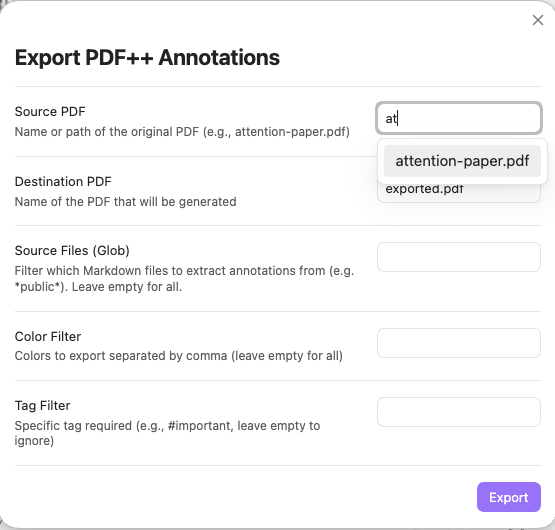
  • Smart Autocomplete: Modal with quick fuzzy-filtering of PDFs in your vault.
  • Support for All Annotation Types: Exports both text highlights (Highlight) and rectangular area selections (Square).
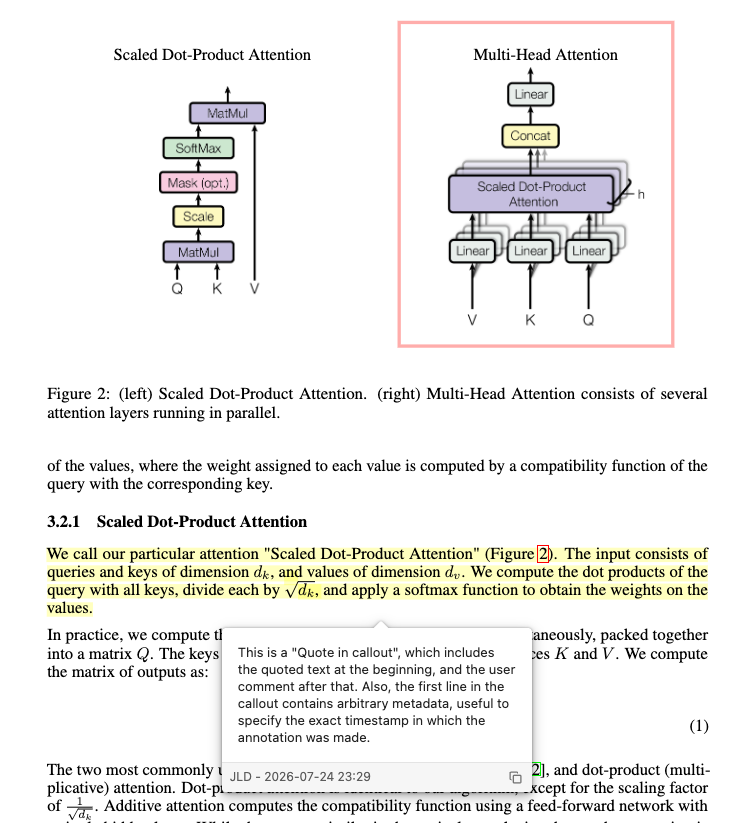
  • Sticky Notes: Option to generate floating sticky notes (Text annotations) with your comments alongside standard highlight popups for maximum compatibility across different PDF viewers (Preview, Edge, Acrobat).
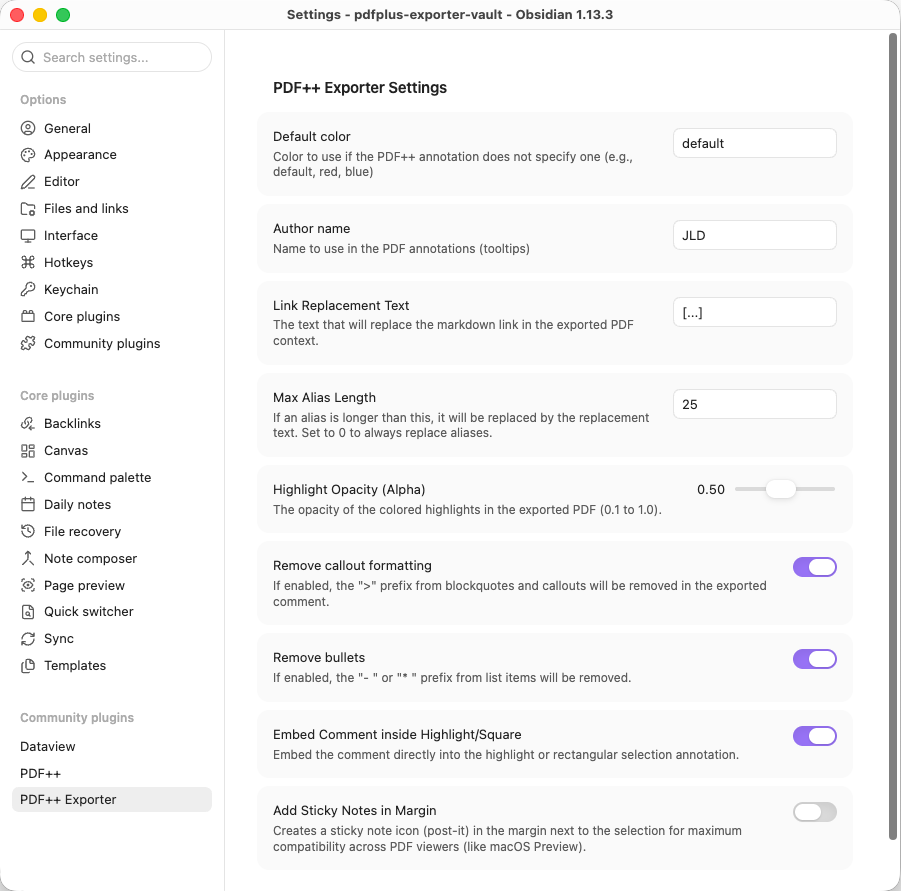
  • Customizable Highlights:
    • Filter by annotation color or note types.
    • Adjustable opacity (Alpha) to prevent overly saturated highlight colors.
    • Option to embed comments inside the highlighted area, as floating sticky notes, or both.
    • Configurable link replacement text (defaults to [...]) to replace Markdown link tags within comment popups.
    • Option to configure a "Max Alias Length". Aliases shorter than this length will be preserved in the comment (useful for manually typed short aliases), while longer auto-generated aliases will be replaced. Set to 0 to always replace.
    • Option to clean up Markdown callouts (> [!info]) and list bullets (- , * ).
  • "Dummy PDF" Support: Complete compatibility with remote/external PDFs referenced via URL.

🖼️ Screenshots

  • Export Modal: Export Modal Placeholder
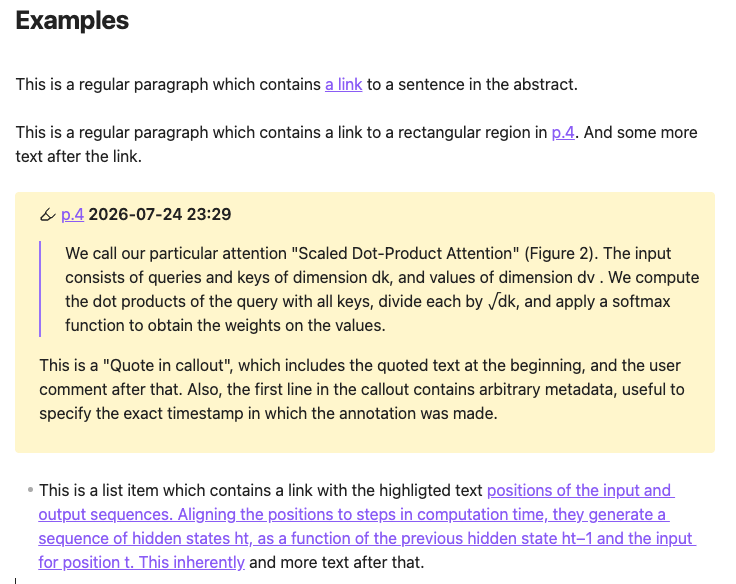
  • Markdown note containing links to other pdfs: Markdown note
  • Exported PDF in External Viewer: PDF Viewer Placeholder
  • Settings Panel: Settings Placeholder

🛠️ Technical Details & Implementation

1. The Comment Extraction Problem (Heuristics & Conventions)

The Problem:

Extracting a "comment" from a Markdown file to embed into a PDF popup annotation is an open-ended, ill-defined problem. PDF++ generates the Markdown wikilink pointing to a selection fragment (handling the visual overlay in Obsidian), but it dictates nothing about how users structure their comments around those links. Markdown grants total freedom.

The Current Solution (Convention-based Heuristics):

PDF++ Exporter resolves this by supporting two common note-taking conventions:

  1. Callout Quotes (> [!PDF|...]): PDF++ can automatically generate callouts containing a quote of the highlighted text followed by user comments.
    • The plugin extracts the body of the callout as the main comment popup content.
    • Text appended to the callout header (e.g., > [!PDF|2026-03-06 14:00]) is parsed as metadata (title/author/timestamp) for the PDF annotation popup header.
  2. Running Text / List Items: Links can be embedded directly within continuous paragraphs or list items (e.g., "- The finding in [[paper.pdf#page=1|this section]] is prohibitive.").
    • The exporter extracts the full paragraph or list item, stripping initial list markers (- , * ).
    • Because raw Markdown wikilinks look cluttered inside standard PDF popups, the plugin replaces the link reference with the user-defined replacement text (defaults to [...]).
    • If the wikilink contains a short alias manually typed by the user (e.g., [[paper.pdf#page=1|here]]), it can be preserved instead of the replacement text by configuring the "Max Alias Length" in settings.

Note: As community adoption grows, additional heuristics and user-defined comment extraction patterns will be supported.

2. The Coordinate Mapping Challenge

The Problem:

PDF++ does not store physical page coordinates ($X, Y$ bounding boxes) inside Markdown links. Instead, it encodes the text selection inside the URL fragment using line and character offsets relative to PDF.js's extracted text stream (e.g., #page=1&selection=10,2,12,5).

The Solution:

To draw native Highlight rectangles and QuadPoints using pdf-lib, PDF++ Exporter includes a custom geometry engine (PDFGeometry) reverse-engineered from PDF++:

  1. Loads the page text content using PDF.js (window.pdfjsLib).
  2. Maps character and line indices from the fragment to glyph containers and text rectangles returned by PDF.js.
  3. Converts and merges those rectangles into physical PDF coordinates (with bottom-left origin).
  4. Constructs native PDF dictionaries (PDFDict / /Subtype /Highlight / /QuadPoints / /Rect) and injects the annotations into the PDF pages using pdf-lib.

3. Handling "Dummy PDFs" (Remote PDFs)

The Problem:

PDF++ supports "Dummy PDFs": local .pdf files containing plain text pointing to an external URL (https://...). Trying to read or clone these files directly as binary PDF buffers causes corrupted PDF errors.

The Solution:

The exporter handles remote PDFs seamlessly through a 3-tier strategy:

  1. Header Detection: Checks the file header upon reading. If it does not start with %PDF- and contains an http(s):// URL, remote mode is activated.
  2. Disk Cache Check (PDF++ Fork Integration): Checks if the remote PDF was already cached locally by checking for its SHA-256 hash at .obsidian/plugins/pdf-plus/dummy-cache/HASH.pdf. If present, it loads directly from disk.
  3. In-Memory Fetching & Caching: If not cached on disk, fetches the PDF using Obsidian's CORS-bypassing requestUrl. The binary is cached in RAM (pdfBufferCache) during the export session to prevent duplicate network downloads.
  4. Detached Buffer Protection: Buffer clones (buffer.slice(0)) are passed to rendering engines, preventing memory detachment errors caused by PDF.js Web Workers.

📜 License

MIT License.

Similar Plugins

info
• Similar plugins are suggested based on the common tags between the plugins.
Kobo Highlights Importer
4 years ago by Flavio Cordari
Kindle Export
4 years ago by Simeon Stanek
A plugin which converts .md files from Obsidian to your Kindle/PocketBook
Extract PDF Annotations
4 years ago by Franz Achermann
This is a plugin for https://obsidian.md. It extracts Annotations from PDF Files.
Screwdriver
4 years ago by vorotamoroz
Obsidian Enhancing Export
4 years ago by YISH
This is an enhancing export plugin base on Pandoc for Obsidian (https://obsidian.md/ ). It's allow you to export to formats like Markdown、Markdown (Hugo https://gohugo.io/ )、Html、docx、Latex etc.
Advanced Codeblock
4 years ago by Lijyze
An obsidian plugin that give additional features to code blocks.
Timestamp Notes
4 years ago by Julian Grunauer
This plugin allows side-by-side notetaking with videos. Annotate your notes with timestamps to directly control the video and remember where each note comes from.
Share as Gist
4 years ago by timrogers
An Obsidian (https://obsidian.md/) plugin for sharing your notes as a GitHub gist - either privately or publicly.
Focus and Highlight
4 years ago by BO YI TSAI
A plugin for obsidian to focus and highlight on a specific heading in Reading mode.
Raindrop Highlights
4 years ago by kaiiiz
An Obsidian.md plugin that syncs highlights from Raindrop.
Simple Mention
4 years ago by der-tobi
Obsidian plugin for mentioning people
Readavocado Sync
4 years ago by Cyrus Zhang
Readavocado obsidian plugin to sync your favorite highlights.
Obsidian markdown export
4 years ago by bingryan
This plugin allows to export directory/single markdown to a folder. support output format(html/markdown/text)
Text Extractor
4 years ago by Simon Cambier
A (companion) plugin to facilitate the extraction of text from images (OCR) and PDFs.
Webpage HTML Export
4 years ago by Nathan George
Export html from single files, canvas pages, or whole vaults. Direct access to the exported HTML files allows you to publish your digital garden anywhere. Focuses on flexibility, features, and style parity.
Quote Share
4 years ago by DuocNV
Generate beautifull image from Obsidian.
Awesome Reader
3 years ago by AwesomeDog
Make Obsidian a proper Reader.
Apple Books Highlights
3 years ago by Atif Afzal
Sync your Apple Books highlights in Obsidian
ibook
3 years ago by bingryan
export mac ibook annotations/hightlights to obsidian vault
Floating Highlights
3 years ago by Karthik S Raju
This is a plugin for obsidian which highlights a block of text or a word as you scroll down while reading.
WuCai highlights Official
3 years ago by 希果壳五彩
WuCai highlights Official, for Sync highlights into your obsidian notes
Pocketbook Cloud Highlight Importer
3 years ago by Lena Brüder
Imports highlights and notes from books stored in the pocketbook cloud to your obsidian vault
Slide Note
3 years ago by Jinyan Xu
Interlinear Glossing
3 years ago by Mijyuoon
An Obsidian plugin for interlinear glosses used in linguistics texts.
HamsterBase Official
3 years ago by HamsterBase
Html Server
3 years ago by Pr0dt0s
Obsidian plugin to serve a vault as an html site.
Cloze
3 years ago by Vikki
A plugin for Obsidian which enables converting highlights, underlines, bolded texts, or any selected texts into clozes.
Pickly PageBlend
3 years ago by Dmitrii Mitrichev
The easiest way to share your Obsidian notes
Vocabulary Highlighter
3 years ago by eatgrass
Highlight English words according to the frequency with Obsidian
Vim Yank Highlight
3 years ago by Aleksey Rowan
Highlight yanked text in Vim mode. Enjoy that subtle animation you've missed so much.
Highlight Helper
3 years ago by Chongmyung Park
Helper to collect highlight in Obsidian
Strip Internal Links
3 years ago by Adi Ron
A simple Obsidian plugin to strip internal links from files
Apple Books - Import Highlights
2 years ago by bandantonio
⚡️Fastest Apple Books highlights importer to Obsidian 🗄️ The only one protecting your own reflections across imports 🎨 Fully customizable
Image Magician
2 years ago by luxmargos
This is a plugin for Obsidian (https://obsidian.md). Supports viewing and exporting various image formats using ImageMagick.
PDF break page
2 years ago by CG
Plugin for obsidian that adding shortcuts to create breakpages for pdf exports.
Enhanced Annotations
2 years ago by ycnmhd
Gitlab Wiki Exporter
2 years ago by Josef Rabmer
BookFusion
2 years ago by BookFusion
BookFusion Obsidian Plugin
SwiftLaTeX Render
2 years ago by gboyd068
Static Site MD Exporter
2 years ago by Yunfi
Export specific notes to general md for static site generation, such as Hexo, Hugo, or Astro
Strapi Exporter AI
2 years ago by Cinquin Andy
[prod] - 🚀 Strapi Exporter: Supercharge Your Obsidian-to-Strapi Workflow, export an obsidian notes directly to your Strapi API
my anime list text exporter
2 years ago by XmoncocoX
a plugin who create an obsidian page for an anime with the data from my anime list.
Stashpad Docs
2 years ago by Stashpad
The Stashpad Docs plugin for Obsidian.
Note Definitions
2 years ago by Dominic Let
Obsidian plugin for seamless viewing of personal definitions
Infostacker Note Publish
2 years ago by Taskscape LTD, Patryk Nowak, Kacper Pabianiak
Infostacker plugin for Obisidian
Plugins Annotations
2 years ago by Andrea Alberti
Obsidian plugin that allows adding personal comments to each installed plugin.
Multiplatform Highlights Importer
2 years ago by wwwkieran
Import and consolidate highlights from different reading sources. Supports reconciling books across reading sources.
Marker PDF to MD
2 years ago by L3N0X
Make use of different AI models to convert your pdfs into markdown with perfect ocr, latex formulas, tables, images and more! Supports Mistral AI OCR (free) and self hosted variants!
Extract Highlights
6 years ago by Alexis Rondeau
Manage your highlights in Obsidian by easily creating, removing and exporting them.
Export To TeX
6 years ago by Zach Raines
export obsidian markdown files in a format that can be pasted into a TeX file
PDF Highlights
6 years ago by Alexis Rondeau
Extract highlights, underlines and annotations from your PDFs into Obsidian
Better PDF
6 years ago by MSzturc
Goal of this Plugin in to implement a native PDF handling workflow in Obsidian
Highlight Public Notes
5 years ago by dennis seidel
Readwise Community
5 years ago by renehernandez
Sync Readwise highlights into your obsidian vault
Excalidraw
5 years ago by Zsolt Viczian
A plugin to edit and view Excalidraw drawings in Obsidian
Kindle Highlights
3 years ago by Hady Osman
Sync your Kindle notes and highlights directly into your Obsidian vault
Pandoc
5 years ago by Oliver Balfour
Pandoc document export plugin for Obsidian (https://obsidian.md)
Annotator
5 years ago by Elias Sundqvist
A plugin for reading and annotating PDFs and EPUBs in obsidian.
Markmind
5 years ago by Mark
A mind map, outline for obsidian,It support mobile and desktop
Metadata Extractor
5 years ago by kometenstaub
Obsidian Plugin that provides metadata export for use with third-party apps.
LLM Summary
2 years ago by QSun
wip
Quarto Exporter
2 years ago by Andreas Varotsis
Export Obsidian notes to Quarto-compatible QMD files.
downloadPDF
2 years ago by Frieda
PDF2Image
2 years ago by RasmusAChr
Quick Share Note to gist
2 years ago by Por Chainarong Tangsurakit
"Quick Share Note to gist" is an Obsidian plugin that lets you publish notes to GitHub gist and upload images to Imgur.
Latex Exporter
2 years ago by Matthew S. Scott
KoReader Highlight Importer
2 years ago by Tahsin Kocaman
Imports highlights and metadata from KoReader into Obsidian notes
Publish to Discourse
2 years ago by woodchen
Obsidian plugin for publishing articles to forums built with Discourse. obsidian插件, 用于把文章发布到使用discourse搭建的论坛.
ShaahMaat-md
2 years ago by Mihail Kovachev
Paperless
2 years ago by Talal Abou Haiba
BibDesk Integration
a year ago by Andrea Alberti
Integration of Obsidian with bibtex files
WhatsApp export note
a year ago by JoaoEmanuell
Obsidian plugin to export notes for whatsapp
Readeck Importer
a year ago by Makebit
Import bookmarks from Readeck to Obsidian
Feedly Annotations Sync
a year ago by Nick Felker
Download my Feedly annotations
PDF Writer
a year ago by Jobelin Kom
Obsidian plugin To write and fill a PDF
PDF Paste
a year ago by Cormac
Export Graph View
a year ago by Sean McGhee
Plugin to export your vault's graph view.
Media Slider
a year ago by Aditya Amatya
An obsidian plugin that helps to make slider for images, audios, videos, pdfs, markdown, etc in obsidian notes.
Copy Local Graph Paths
a year ago by Amy Z
copy-local-graph-paths is a simple Obsidian plugin that copies the paths of notes linked to your current page.
InfoFlow
a year ago by RockieStar Inc.
Obsidian plugin for InfoFlow.app - This plugin integrates InfoFlow with Obsidian, allowing you to sync your saved articles, web pages, notes, and highlights directly into your Obsidian vault.
Annotate Audio
a year ago by VidE
PDF Folder to Markdowns
a year ago by CrisHood
Convert a folder of PDFs into a folder of Markdown files with embedded PDFs. This plugin is useful for users who want to migrate their PDF notes from different apps (e.g., Boox) or organize their reference materials inside Obsidian.
HiNote
a year ago by Kai
Add comments to highlighted notes, use AI for thinking, and flashcards for memory.
Cubox
a year ago by delphi-2015
Cubox Official Obsidian Plugin
aDHL
a year ago by tine-schreibt
The Dynamic Highlights Plugin, but with hotkeys, more options and sorting; works well with Highlightr.
MatchSyntax
a year ago by Eda
An Obsidian plugin that lets you write "regex-like" syntax to search the contents of a note, including part-of-speech tagging and (limited) fuzzy matching.
TODO Highlighter
a year ago by Nuraly Dyussenov
Obsidian Plugin that formats the exact string TODO, so it can be easily seen in your notes.
Kindle Highlights Import
a year ago by Leon Luttenberger
Plugin for Obsidian that allows users to import Kindle highlights into their Obsidian vault.
Yandex Wiki Integration
a year ago by Pavel Sokolov
Sidebar Highlights
a year ago by trevware
Linked Note Exporter
a year ago by the-c0d3r
Obsidian plugin to export a note along with all its attachments and linked notes—cleanly, conveniently, and ready to share.
Handwriting OCR
a year ago by ikmolbo
Transform handwritten documents and scanned images into editable text with Handwriting OCR's AI-powered handwriting to text conversion.
HTTP Link Maker
a year ago by Kenneth Christensen
Create HTTP links for Obsidian notes that work on all your devices
SideNote
8 months ago by mofukuru
Obsidian plugin: Add comment on the part of sentence and refer in comment view.
Nixsync
3 months ago by rowmayne
This plugin has not been manually reviewed by Obsidian staff. Export and import vault settings and plugins as Nix.
Crisp Annotations
3 days ago by letschips
Adds hand-drawn arrows and handwritten notes to inline Markdown highlights. - This plugin has not been manually reviewed by Obsidian staff.