Binders

by Caleb Smith
5
4
3
2
1
Score: 51/100

Description

The Binders plugin turns folders into ordered writing projects, keeping chapters and scenes in your chosen sequence in the file explorer. Each binder offers a corkboard, an outliner with configurable columns, an editable continuous manuscript and a timeline arranged by story date. Scene details stay in note properties, while a separate note stores the binder's order. Labels, saved filters and templates support planning. Word targets, deadlines and progress history track writing, while snapshots and revision tasks sit alongside scene splitting, merging and bookwide find and replace. It imports Scrivener 3 projects and manuscript files, opens Longform projects and exports Word, EPUB, PDF or Scrivener formats. Notes remain plain Markdown when the plugin is disabled. Phone and tablet support is in public beta with limited device testing and PDF creation requires a computer.

Reviews

No reviews yet.

Stats

4
stars
946
downloads
0
forks
11
days
1
days
1
days
4
total PRs
0
open PRs
2
closed PRs
2
merged PRs
33
total issues
0
open issues
33
closed issues
716
commits

Latest Version

2 days ago

Changelog

0.54.0 (2026-10-17)

Added

  • A manuscript export style has a “Header on the first page” choice: set it to “Left off” and the first page of the text has no header, in the Word file and the PDF; the next page still says 2.
  • A note's “title” property is shown in place of its file name in the binder views, the side panes, find and replace, the file explorer and an export's headings; editing a shown name changes the title and leaves the file alone. The property's name can be changed under Property names in settings.
  • Binder settings: one window for what a binder keeps about itself (book details, goal, labels, statuses, the template for new notes and its calendar), from More options, the file explorer's menu on a binder, or the command Open binder settings. A binder can have its own labels and statuses in place of the vault's.

Changed

  • Binders' settings are shorter and grouped like Obsidian's own: labels, statuses, focus mode, export folders and property names each open on a page of their own and say at a glance what is on it; how words are counted is now a dropdown, and Words to write today is under Writing.
  • Book details and the calendar are pages of Binder settings now (Export's Book details... and Edit calendar... open them there), and Edit labels... opens the binder's Labels page. On a phone, Open binder note is in Binder settings, on its Book page.

Fixed

  • Tooltips no longer pop up over the timeline, the word count, the Revision pane, the Export window, dialogs' fields and the settings; icons with no name beside them still say what they are.
  • The progress window no longer flashes as a small empty dialog before the full page: it opens with the record already drawn.
  • A note whose properties begin with many blank or comment lines with Windows line endings no longer freezes Obsidian.
  • A note named "proto" or "constructor", or such a name in another device's history file, is now recorded as a note and no longer upsets Obsidian or other plugins.
  • A Longform project's ignoredFiles pattern with many wildcards no longer freezes Obsidian.
  • Find in a binder no longer freezes Obsidian on a note with a long run of backticks.
  • A style file with a very long run of spaces in a line no longer freezes Obsidian when it is added or read.
  • Importing a document with a very long run of spaces no longer freezes Obsidian.
  • Importing a text or Markdown file with a very long run of spaces inside a line no longer freezes Obsidian.
  • A binder whose calendar has a leap rule that takes days away no longer freezes Obsidian on "Shift story dates"; the rule is reported as one Binders can't read.
  • Links in an imported Word or rich text file are kept only when they go to a web page or an email address, as in the other importers, and an address can no longer break the note's text around it.
  • A comment in the margin of an imported Word, OpenDocument, RTF or Scrivener file that has percent signs at its edges or several in a row now stays one hidden comment, instead of showing part of its text in the note.
  • In the manuscript, the drag handles that plugins such as Dragger draw left of the text are no longer cut off; the text stays where it was.
  • Importing a rich text file with a long run of spaces in a list's number, or a Markdown file whose footnotes move between scenes, no longer freezes Obsidian.
  • Importing a file with a long run of * _ ~ or ` marks inside a line no longer freezes Obsidian.
  • Find in a binder no longer freezes Obsidian on a note with many <!-- comments that never close.
  • A calendar whose years average no days no longer makes "Shift story dates" write a date with no year or day in it; those scenes are left where they are.
  • Find in a binder no longer freezes Obsidian on a long line of square brackets.
  • A note's title now shows in the file explorer whether or not binder order is on, and in the Progress window, the snapshot windows and an exported Scrivener project.
  • Binder settings: no ring on a page you didn't choose, every intro the same small line, a phone's list opens with no page chosen, and the Goal page refuses a target below the book's words; the Scrivener export, the progress record and import use a binder's own labels and statuses.

README file from

Github

Folders in Obsidian list their notes by name. Books don't work that way. Binders turns a folder into a binder, like Scrivener's: its chapters and scenes keep the order you give them, in Obsidian's own file explorer. Open a binder to see the same notes as a corkboard, an outliner, one continuous manuscript you can edit, or a timeline of the story.

Everything stays plain Markdown. A binder is a folder plus one note that holds its order, and everything about a scene is in that scene's own properties. Turn Binders off and your notes are still ordinary notes.

Public beta. Binders is in public beta. Phone and tablet support is new and has had little testing on real devices. Report what you find in the issue tracker.

What it does

  • Order. Notes and folders keep the order you give them, in the file explorer and everywhere else.
  • Four views of one binder. A corkboard of index cards, an outliner with columns you pick, the whole manuscript as one page you can edit (or as its synopses, to read the outline), and a timeline of its scenes by story date, with your own calendar if the book needs one.
  • Plan. Labels and statuses; filters by any property, saved with the binder; your own properties (point of view, characters, a place) pinned to the inspector; new binders and notes from templates.
  • Track. Word count targets for a scene, a chapter or the book; a deadline that says whether you are on pace; a Progress window with the book's words over time and the days you wrote.
  • Revise. Snapshots of a scene, a folder or the whole binder, to compare or bring back; revision tasks tied to their scenes; split, merge, duplicate and group scenes; find and replace across the book; undo and redo of moves, properties, renames, deletes, merges and splits.
  • Export. A submission manuscript in standard manuscript format (Word or PDF), an ebook (EPUB) for Kindle, Apple Books and Kobo, a print-ready paperback PDF, a Scrivener project, or one note. Book styles you can change, with the real pages beside them, and named exports (Submission, Kindle, Paperback 6 × 9) kept with the book.
  • Import. A Scrivener 3 project, or a Word, OpenDocument, rich text, Markdown or text file, as a new binder split at its chapters, with a preview you can put right first. The source stays as it is.
  • Focus mode. The text and nothing else, with typewriter scrolling.
  • Longform. Longform projects open as binders, and convert to them.
  • Phones and tablets. The same views, by touch, on iOS and Android.

The manual covers all of it.

Installation

Binders needs Obsidian 1.13.4 or later, on a computer, a phone or a tablet.

  • From Obsidian: open Settings → Community plugins → Browse, search for Binders, then Install and Enable. Binders is in Obsidian's community plugin directory.
  • With BRAT, to try versions as they come out: install BRAT from Settings → Community plugins → Browse, run its command Plugins: Add a beta plugin for testing, give it fyresmith/binders and choose the newest version. BRAT installs Binders and can keep it up to date.
  • By hand: download main.js, manifest.json and styles.css from the newest release, put them in <your vault>/.obsidian/plugins/binders/, and enable Binders under Settings → Community plugins.
  • From source: npm install, then npm run build; see Development.

More in Installation.

Getting started

  1. Make a folder a binder. Right-click a folder in the file explorer and choose Make this folder a binder. Its notes and subfolders keep the order they show in now.
  2. Arrange its scenes. Click the folder. The binder view opens on it as a corkboard. Drag the cards into the order you want.
  3. Switch to Manuscript and write. Click Corkboard at the top left of the view and choose Manuscript. The whole binder is one page, and each section is the note itself.

The walkthrough goes on from here to a first exported file.

Four views

Corkboard

One index card per note, with its title, synopsis, status, label color and word count. Drag cards to reorder them, or lay them out by label to see how a book's threads take turns. More
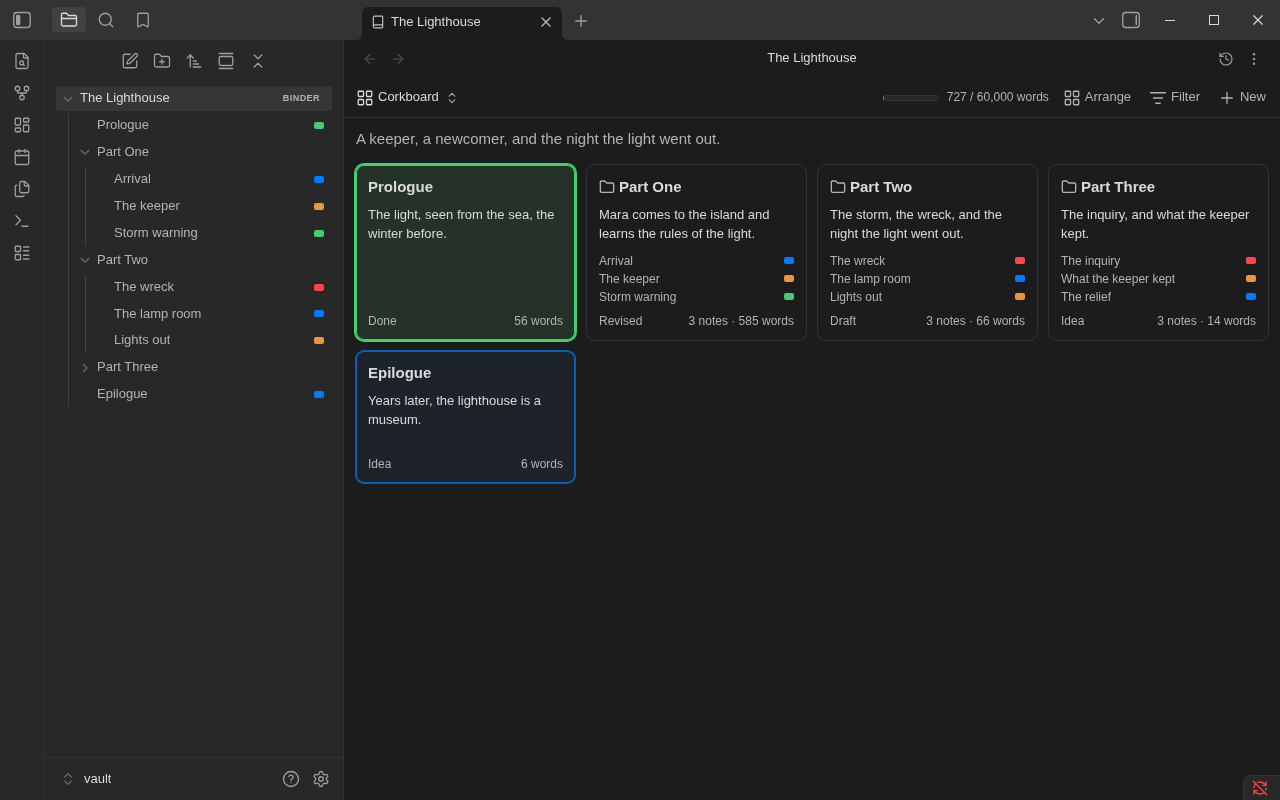
Corkboard

Outliner

The same notes as rows of a table, folders with their notes under them, with columns you pick: label, status, words, target, progress, or any property of your notes. More
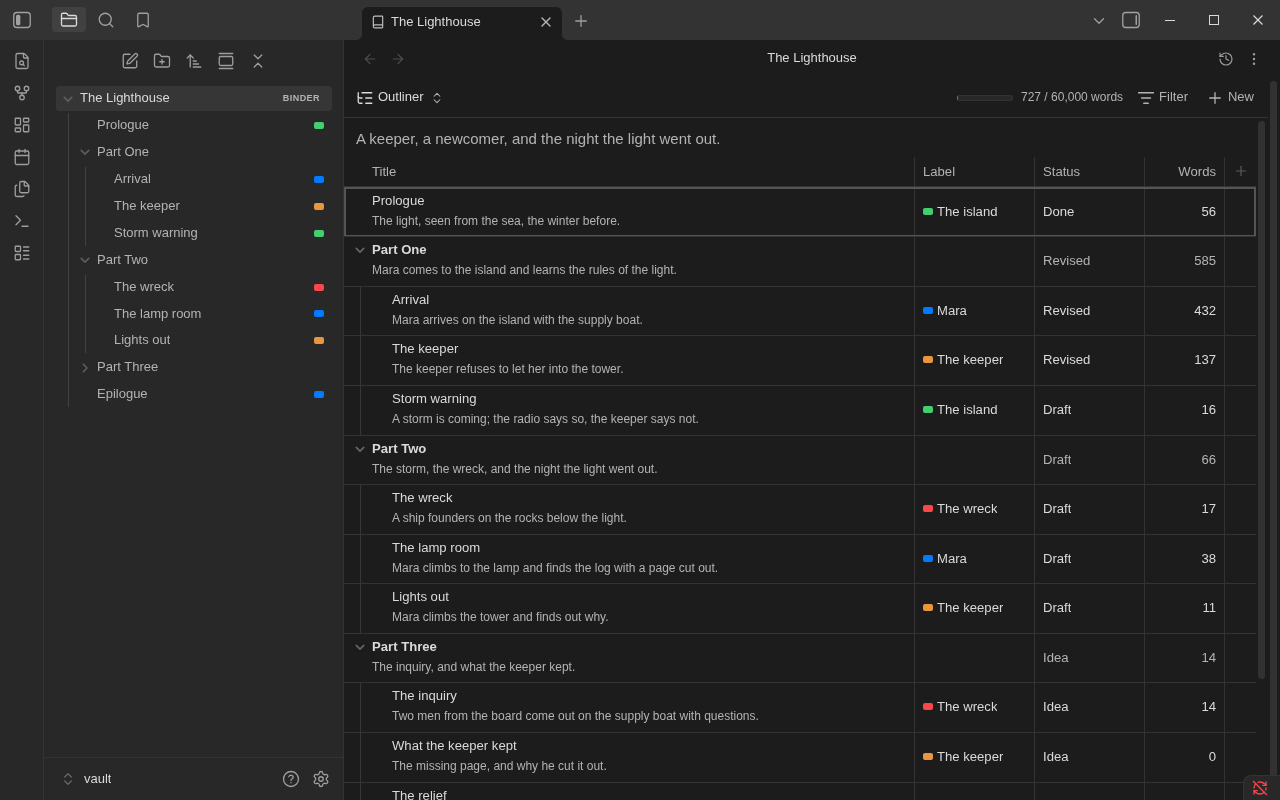
Outliner

Manuscript

Every note in order as one page. Each section is a real Obsidian editor on that note, so typing, undo, links and formatting work as they do in the note itself. More
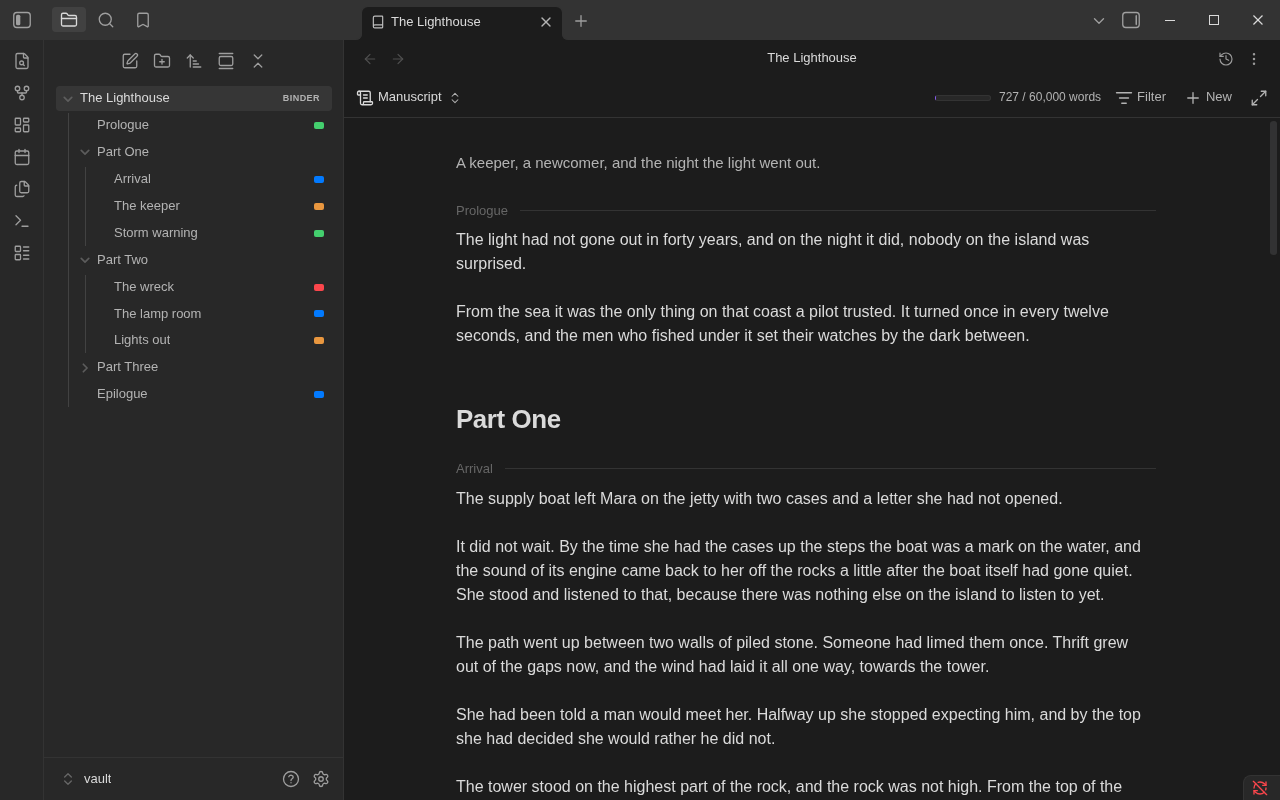
Manuscript

Timeline

Scenes along story time, each at its story date and numbered as the manuscript has it. Long empty stretches are drawn short, and scenes with no date wait in a tray. Time runs down, or across on a computer or tablet. Drag a card to give it another date, or set dates from the menu, outliner or inspector. More
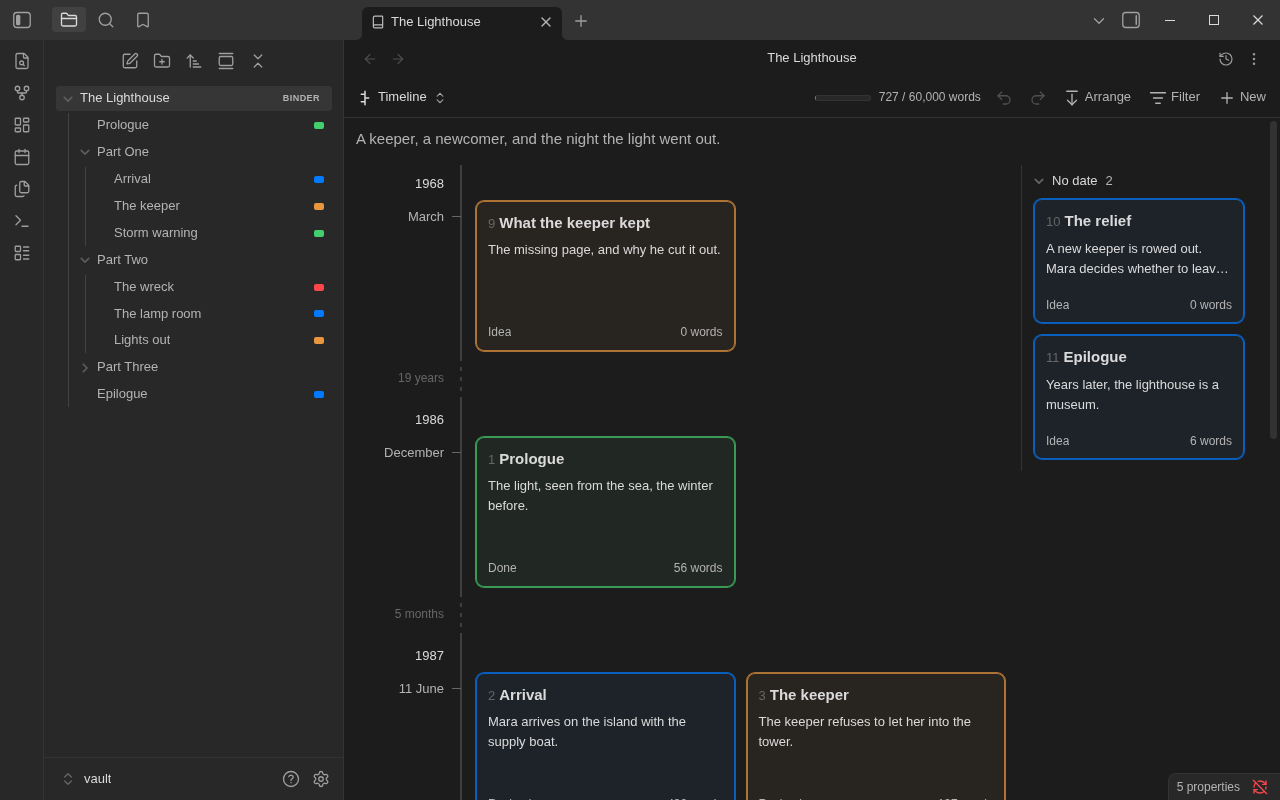
Timeline

Your files

A binder is a folder plus one note that holds its order. Each scene is an ordinary note, and what its card shows (synopsis, status, label, target) are its properties. Binders changes a note's text only where you type or ask it to. How your files look has the whole account.

Limitations

  • Public beta. The maintainer uses an iPhone; iPad and Android coverage is still through desktop emulation. What hasn't been tried is listed in full.
  • Other file explorers. Plugins that replace the file explorer, such as Notebook Navigator, don't show binder order. The binder view works either way.
  • Obsidian internals. Binder order in the file explorer and the editable manuscript rely on parts of Obsidian outside its plugin API. If an update changes one, Binders falls back (name order, a read-only manuscript) and says so.
  • Snapshots, export styles and Obsidian Sync. Sync carries them only with "Sync all other types" turned on.
  • PDF on a computer. A paperback, or a manuscript as a PDF, is made on a computer. A phone or tablet shows its pages.

The full list is in Known limitations.

Privacy

Binders makes no network requests and has no telemetry. Nothing is downloaded: the typefaces and hyphenation patterns export uses are inside the plugin.

It reads and writes outside your vault only through the files and places you choose:

  • Export on a computer writes the file you export (a Word file, an EPUB, a PDF, a Scrivener project, a copy of a style to share) to the place you choose in the save dialog, and to that place again when you export again.
  • Import reads the manuscript or Scrivener project you choose in the file picker or project dialog. It never changes it.

More

Documentation

Manual Everything Binders does, a page per topic
Getting started From an empty folder to a first exported file
The binder view Corkboard, outliner, manuscript, timeline, the inspector
Import a manuscript Word, OpenDocument, rich text, Markdown or plain text as a new binder
Story date · Timeline When scenes happen, a book's own calendar, and how that reads against manuscript order
Filters · Inspector · Templates Showing part of a binder, a scene's details, starting from a pattern
Progress · Revision tasks Targets, deadlines and words over time; what each scene still needs
Undo and redo What can be taken back, and when it is safe to do so
Export · Styles Manuscript, ebook, paperback, Scrivener project, one note
Import from Scrivener A Scrivener 3 project as a new binder
Snapshots · Focus mode Rewriting safely, and writing with nothing else on the screen
Find and replace Searching the binder, and changing a word in every note
Coming from Scrivener · Coming from Longform Where each thing you know is
Commands · Settings Reference
Troubleshooting · Questions and answers When something isn't as you expect
Roadmap · Changelog What's planned, and what changed
Contributing · Design and architecture For contributors
Issues Report a problem or ask for something

License

MIT. The hyphenation patterns, typefaces and libraries inside the plugin are others' work, under their own licences: third-party notices.

Similar Plugins

info
• Similar plugins are suggested based on the common tags between the plugins.
Kindle Export
5 years ago by Simeon Stanek
A plugin which converts .md files from Obsidian to your Kindle/PocketBook
Screwdriver
5 years ago by vorotamoroz
Obsidian Enhancing Export
4 years ago by YISH
This is an enhancing export plugin base on Pandoc for Obsidian (https://obsidian.md/ ). It's allow you to export to formats like Markdown、Markdown (Hugo https://gohugo.io/ )、Html、docx、Latex etc.
Influx
4 years ago by Jens M Gleditsch
An alternative backlinks plugin, which displays relevant and formatted excerpts from notes with linked mentions, based on the position of mentions in the notes' hierarchical structure (bullet level indentation).
Tag Summary
4 years ago by J.D Gauchat
obsidian floating toc
4 years ago by curtgrimes modified by Cuman
Rapid Notes
4 years ago by valteriomon
Obsidian markdown export
4 years ago by bingryan
This plugin allows to export directory/single markdown to a folder. support output format(html/markdown/text)
Webpage HTML Export
4 years ago by Nathan George
Export html from single files, canvas pages, or whole vaults. Direct access to the exported HTML files allows you to publish your digital garden anywhere. Focuses on flexibility, features, and style parity.
Pending notes
4 years ago by Ulises Santana
Obsidian plugin for searching links without notes in your vault.
Link Range
3 years ago by Ryan Mellmer
Add ranged link support to Obsidian
oblogger
3 years ago by loftTech
tag explorer and frontmatter logger plugin for obsidian
Automatic Table Of Contents
3 years ago by Johan Satgé
💠 An Obsidian plugin to create a table of contents in a note, that updates itself when the note changes
Multiple Notes Outline
3 years ago by iiz
Auto Archive
3 years ago by Shane Burke
Auto Archive plugin for Obsidian
Keyword Highlighter
3 years ago by Marcel Goldammer
Automatically highlight specified keywords within your Obsidian notes for enhanced visibility and quick reference.
Subdivider
3 years ago by Tricster
Subdivider converts your notes into nested folders, automatically creating separate files for each subheading.
Object Writer
3 years ago by Iago Grah
Object writing plugin for Obsidian.md (https://obsidian.md).
Image Magician
3 years ago by luxmargos
This is a plugin for Obsidian (https://obsidian.md). Supports viewing and exporting various image formats using ImageMagick.
PDF break page
3 years ago by CG
Plugin for obsidian that adding shortcuts to create breakpages for pdf exports.
Gitlab Wiki Exporter
3 years ago by Josef Rabmer
Mxmind Mindmap
3 years ago by mxmind
mxmind for obsidian plugin
Cards View
3 years ago by Maud Royer
Plugin for Obsidian.md. Displays a card view of your notes.
Static Site MD Exporter
3 years ago by Yunfi
Export specific notes to general md for static site generation, such as Hexo, Hugo, or Astro
Strapi Exporter AI
3 years ago by Cinquin Andy
[prod] - 🚀 Strapi Exporter: Supercharge Your Obsidian-to-Strapi Workflow, export an obsidian notes directly to your Strapi API
Canvas2Document
3 years ago by slnsys
Plugin for Obsidian to convert a complete Canvas to a long form document
my anime list text exporter
3 years ago by XmoncocoX
a plugin who create an obsidian page for an anime with the data from my anime list.
Header Counter
2 years ago by Nancy Lee
Line Arrange
2 years ago by Chitwan Singh
Obsidian Plugin For Arranging Lines.
Header Adjuster
2 years ago by Valentin Pelletier
Header level Reformat Plugin for Obsidian
Note 2 Tag Generator
2 years ago by Augustin
Daily Note Collector
2 years ago by Adar Butel
An Obsidian plugin that adds links to new notes to your daily note.
Workbench
6 years ago by ryanjamurphy
A plugin to help you collect working materials.
Link indexer
6 years ago by Yuliya Bagriy
Footlinks
6 years ago by Daha
Obsidian plugin that extracts urls from the main text to footer, offering a better reading/editing experience.
Export To TeX
6 years ago by Zach Raines
export obsidian markdown files in a format that can be pasted into a TeX file
Page Heading From Links
6 years ago by Mark Beattie
Obsidian plugin to populate page headings
Excalidraw
5 years ago by Zsolt Viczian
A plugin to edit and view Excalidraw drawings in Obsidian
Pandoc
5 years ago by Oliver Balfour
Pandoc document export plugin for Obsidian (https://obsidian.md)
Longform
5 years ago by Kevin Barrett
A plugin for Obsidian that helps you write and edit novels, screenplays, and other long projects.
Carry-Forward
5 years ago by Jacob Levernier
An Obsidian Notes plugin for generating and copying block IDs, and copying lines with a link to the copied line
Metadata Extractor
5 years ago by kometenstaub
Obsidian Plugin that provides metadata export for use with third-party apps.
Title Serial Number
5 years ago by Domenic
This is an obsidian plugin, and it adds serial numbers to your markdown title.
Quarto Exporter
2 years ago by Andreas Varotsis
Export Obsidian notes to Quarto-compatible QMD files.
Header navigation
2 years ago by readwithai
An obsidian plugin to navigate around and toggle folding on headers
Latex Exporter
2 years ago by Matthew S. Scott
WonderBox
2 years ago by Christian HUMBERT
Link Maintainer
2 years ago by wenlzhang
An Obsidian plugin that helps you maintain note links when splitting or reorganizing notes.
Smart Link Alias
2 years ago by Victor Perez-Cano
Inbox Organiser
2 years ago by Jamie Hurst
Obsidian plugin to capture any new notes into an inbox and periodically prompt to organise these into other folders within the vault.
Atomizer
2 years ago by Zac Bagley
An AI-Driven Obsidian plugin designed to turn lengthy text into insightful atomic notes. Perfect for turning source notes into ideas in a Zettelkasten workflow.
Tengwar
2 years ago by mikevetkin
Support Tengwar (The Elvish Letters)
Dataview Autocompletion
2 years ago by Daniel Bauer
WhatsApp export note
2 years ago by JoaoEmanuell
Obsidian plugin to export notes for whatsapp
Note ID
2 years ago by Dominik Mayer
Displays notes by their ID, enabling structured sequences for manuscripts or a Zettelkasten ("Folgezettel")
Automatic Linker
2 years ago by Kodai Nakamura
Export Graph View
2 years ago by Sean McGhee
Plugin to export your vault's graph view.
Copy Local Graph Paths
2 years ago by Amy Z
copy-local-graph-paths is a simple Obsidian plugin that copies the paths of notes linked to your current page.
Multiple Daily Notes
2 years ago by Vab Kapoor
Obsidian plugin for adding multiple daily notes, with some extra configurations too.
Yandex Wiki Integration
a year ago by Pavel Sokolov
Template Folder
a year ago by LucasOe
Obsidian plugin to move notes to a folder when applying a template.
Discrete
a year ago by shkarlsson
Linked Note Exporter
a year ago by the-c0d3r
Obsidian plugin to export a note along with all its attachments and linked notes—cleanly, conveniently, and ready to share.
Japanese Manuscript Counter
9 months ago by Yo Fujii
Nixsync
5 months ago by rowmayne
Obsidian plugin to export and import settings as Nix.
StoryLine
3 months ago by Jan Sandström
StoryLine transforms your Obsidian vault into a complete book planning and writing tool. Organize scenes, build characters, manage locations, track plotlines, and monitor your progress, all inside Obsidian.
PDF++ Exporter
3 months ago by jldiaz
Japanese Novel Tool
2 months ago by nonkuri
Simple Editorial
2 months ago by Beppe
A minimal editorial markup plugin for writers using Obsidian.
Spaces
a month ago by Peter Jamrozinski
A lens for your Obsidian vault
Escrita
9 days ago by Claudio
Write and revise fiction in Obsidian: outline, goals, revision lens, manuscript export (DOCX, EPUB) and a shared universe. English and Português.
Storyteller Comic Drafter
7 days ago by Jimiel Balitayo
Just made your stories and everything in your Obsidian vault and thought, "Huh. Now I gotta go to word or scrivener to make the script." Well, say no more gng. Storyteller makes it so that your vault and your comic stuffs are in the same app!