
README file from
GithubQiaomu Reader
中文 · English · 官方插件页 · 安装 · 问题反馈
不离开书页,读懂一个观点,留下一条真正有用的笔记。 Read, ask, and keep what matters — without leaving your book in Obsidian.
已上架 Obsidian 社区插件市场。 打开 Qiaomu Reader 官方插件页,点击 Add to Obsidian,在 Obsidian 中点击 安装 → 启用。
也可以在 Obsidian 中进入 设置 → 第三方插件 → 浏览,搜索 Qiaomu Reader,选择作者为 向阳乔木 的插件。首次使用第三方插件时,先按提示开启社区插件。完整安装步骤
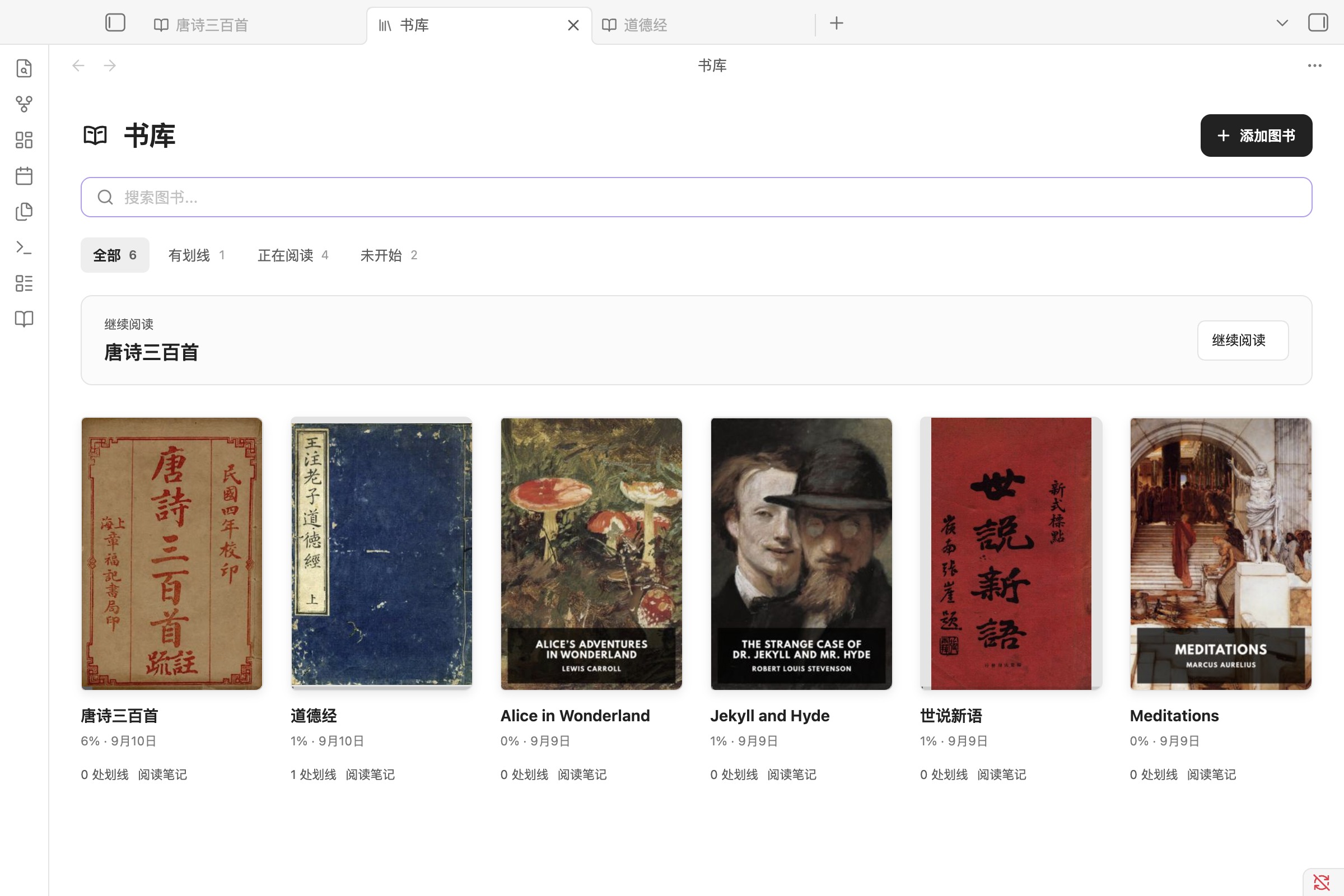
安装后,书架里就有六本书。 从《道德经》《唐诗三百首》《世说新语》或三本英文经典开始,直接体验阅读、划线和做笔记,无需先找书或配置 AI。
Qiaomu Reader 是中文优先的 Obsidian EPUB、PDF、FB2、MOBI、AZW3、CBZ、Markdown、TXT 和 HTML 阅读器。它把舒适阅读 → 就地提问 → 保存笔记 → 返回原文放在同一个工作流里,减少在阅读器、聊天窗口和笔记应用之间来回复制。
阅读本身完全离线,每本书关联一篇 Markdown 阅读笔记;AI 是可选能力,由你选择服务并主动启用。
安装与快速开始 · 功能导览 · 构建验证 · GPL-3.0 许可
截图版本:4.2.4。 以下五张截图均来自安装正式 Release 文件的 Obsidian 1.13.7,展示内置书架、选文操作、划线笔记、AI 伴读和 PDF 原页。使用隔离演示仓库、公版示例书与原创 PDF;AI 对话明确标注为界面演示,未调用模型。详见截图与版本核验。
你会得到什么
| 能力 | 实际效果 |
|---|---|
| 内置阅读器 | EPUB 可重排;PDF 保留原页,独立缩放,图表不被拆散;FB2、MOBI、AZW3、CBZ 由同一引擎渲染 |
| 文本阅读 | 明确导入的 Markdown、TXT、HTML 共用分页、目录、划线和进度;普通笔记继续使用原生编辑器 |
| 语音朗读 | 从当前页读或继续上次位置,自动跨页跨章;播放器直接选择音色和试听,云端与设备本地语音按需配置 |
| 中文排版 | 仅内置朱雀仿宋常用字子集;支持选择本机字体、导入字体文件,缺字使用系统字体回退 |
| 阅读主题 | 纸白、暖纸、青瓷、月白、夜间,以及 RSS 同款明亮、宣纸、竹青、雾蓝、深海、墨黑;支持配色预览 |
| 就近批注 | 选中文字后完成三色划线、复制、评论和创建摘录笔记 |
| 专用阅读笔记 | 每本书自动关联一篇 Markdown 笔记,汇总划线与评论 |
| 精确返回原文 | 笔记中的 ↩ 可跳回原书对应段落 |
| 阅读连续性 | 自动保存位置、可命名位置标记;搜索后能返回原阅读点 |
| 就地 AI 对话 | 阅读和聊天并排;按书管理对话,选文、当前页或文本 PDF 全文作为上下文 |
| 流式 Markdown | 回答边输出边渲染;表格、任务列表、引用、代码块等交给 Obsidian Markdown 渲染器 |
| 回答成为笔记 | 保存完整 AI 回答,本地提取可修改标题;独立保存或追加到本书笔记 |
| 少打断的交互 | 快捷问题直接可见;草稿按书落盘;专注阅读保留右侧 AI,不带回左侧文件树 |
| 自选 AI 服务 | 保留自定义提示词;支持 CLI / ACP、国产模型、OpenAI 兼容接口及本地模型 |
| 起点页接续 | 装了乔木Home时,主页显示在读的书(封面、进度),点击回到上次位置;主页搜索框也能搜书名 |
功能导览
1. 从书架开始,接着上次的位置读
首页主图展示插件内置的六本中英文公版书,每本都有封面。书库提供继续阅读、搜索、阅读状态和“有划线”筛选;书名下方直接显示划线数量与阅读笔记入口。也可以添加自己的 EPUB、PDF、MOBI 等图书。
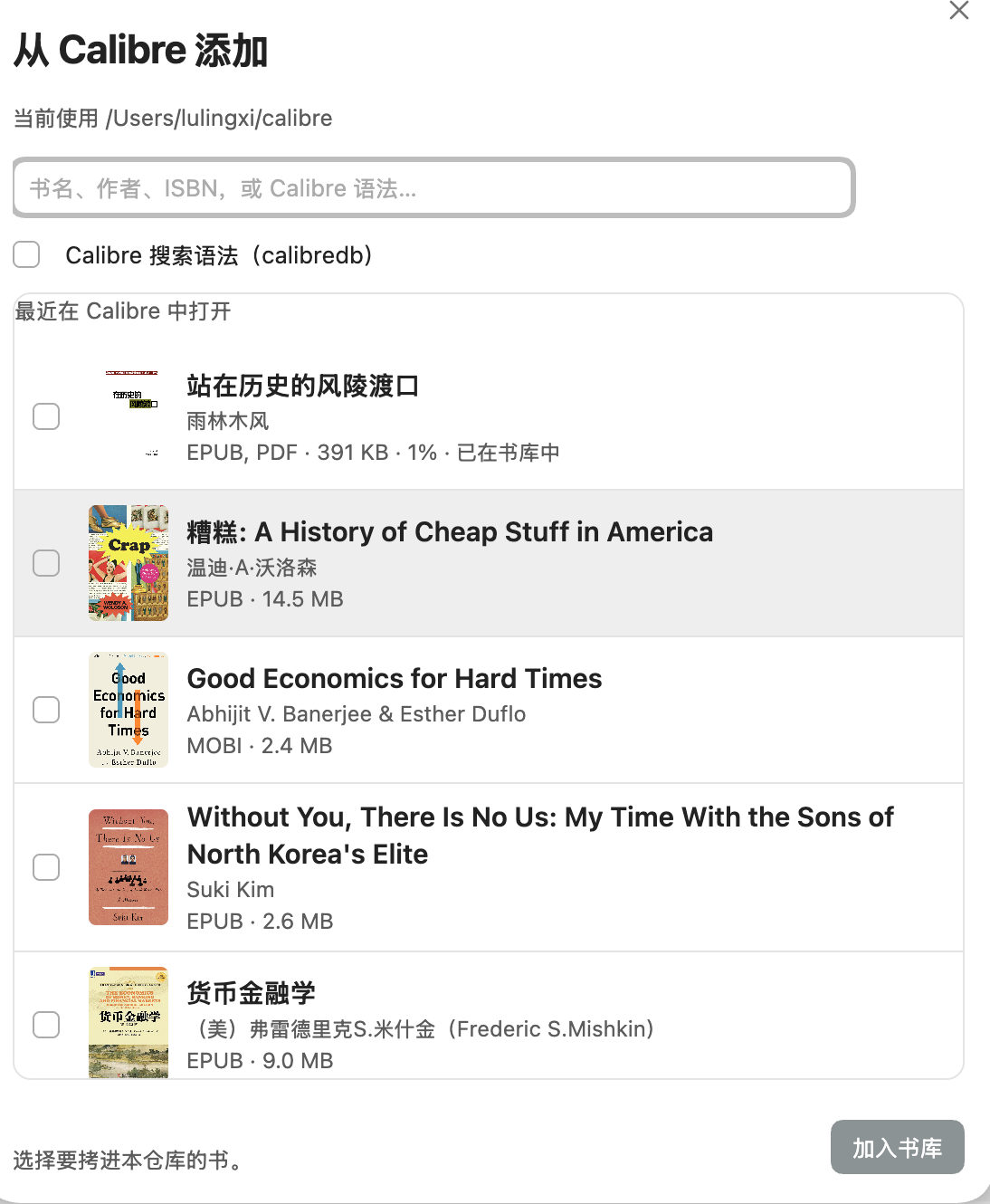
桌面端可以从本机 Calibre 书库按需加入图书。 在书库点击「从 Calibre 添加」,或使用命令面板。默认读取书库里的 metadata.db(需要 Python 3);若没有 Python,则回退到 calibredb。选定的 EPUB / PDF / MOBI 等文件会拷贝进当前仓库,不会把整座 Calibre 书库挂进 Obsidian。移动端不提供此入口。
 书库顶部的 找书 可输入书名或作者。点击 搜索 会在浏览器分别打开 Anna’s Archive 与 Z-Library 的搜索页,同时在插件内搜索 Project Gutenberg 公版书。也可以单独点击各站链接。选择 Gutenberg 结果后,点击 下载并加入书库 才会下载 EPUB 并导入当前仓库。Standard Ebooks 和维基文库提供可下载的 EPUB 书籍,也作为浏览器中的补充入口。下载有权使用的 EPUB、PDF 或 MOBI 后,可通过 添加书籍 导入。外部站点地址可能变化;插件不会抓取或下载外部站点内容。
搜索结果以封面、书名与作者、文件格式和大小分列展示,可按格式筛选;较长的书名可以展开。公开书源从 Project Gutenberg 加载封面;乔木书库通过 Open Library 匹配书目参考封面,并显示书源提供的语言与年份。封面并非下载版本保证,未匹配或加载失败时显示「暂无封面」,不影响下载。
有激活码时,可切换到「乔木书库」。 输入一次激活码,就能直接搜索并下载到当前书架。没有激活码,或乔木服务暂时不可用,仍可照常使用默认的「公开书源」。每个授权可由管理员设置有效期、设备数和每日额度;下载失败返还额度,已完成的下载保留 24 小时,可重新打开后继续导入。额度按 UTC 日期重置(北京时间每日 08:00)。
乔木书库不会读取或上传已有图书。主动激活会发送激活码、随机安装 ID 和仓库名称作为设备备注;主动搜索和下载会发送关键词与所选版本。凭证保存在 Obsidian SecretStorage,总 MCP 密钥不会进入插件。每台设备、每个仓库分别激活;安装 ID 是本地标识,不是不可复制的硬件锁。
2. 选中一句话,就地划线、批注或提问
4.2.7 更新: AI 助读更名为 AI 伴读;宽屏桌面首次打开书时展示侧栏,并记住主动关闭状态。未配置服务可直接在侧栏完成配置。翻译结果可保存到本书笔记、当前打开的笔记、新笔记或今日笔记,同时保留原文和位置链接。
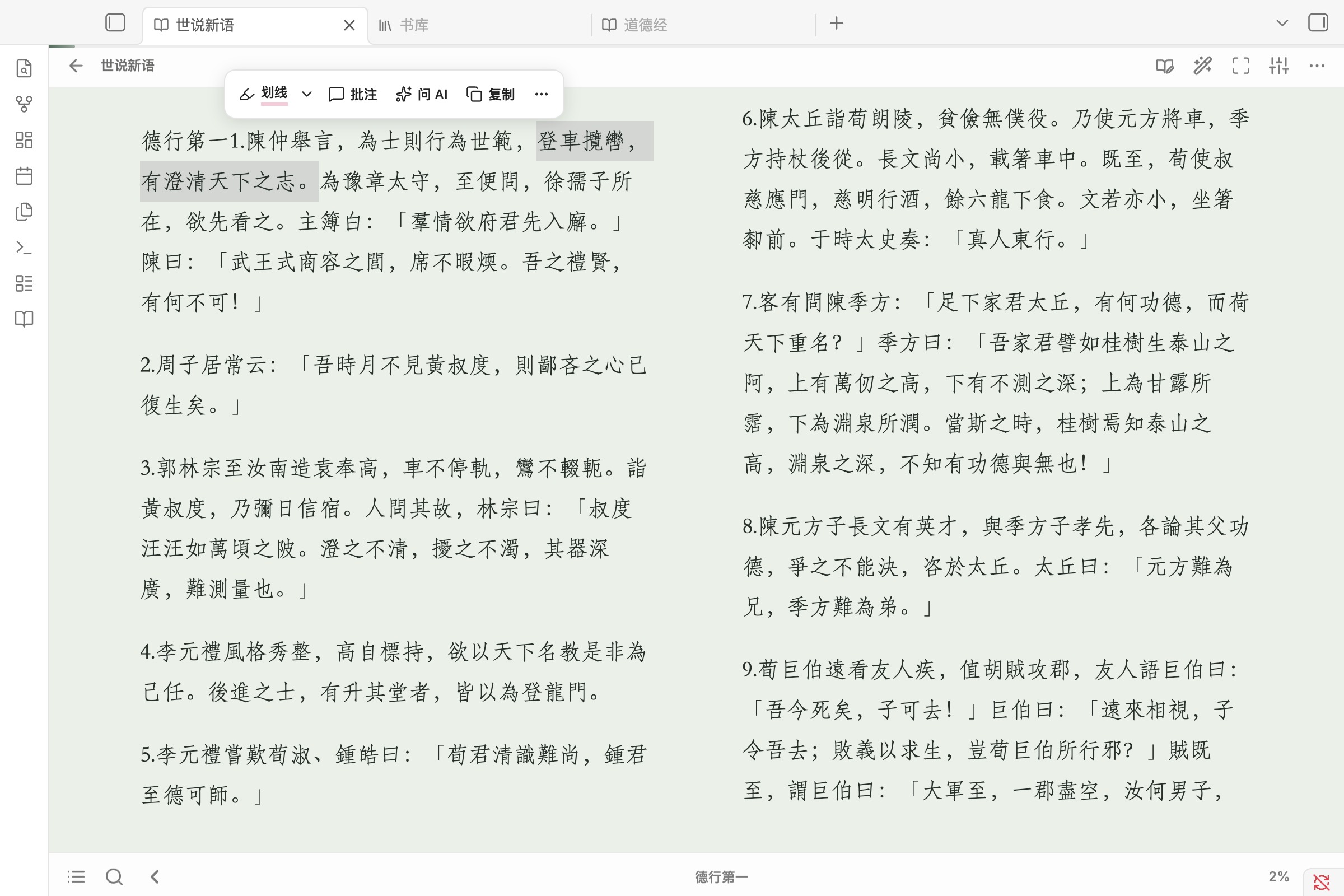
4.2.6 更新: 选文工具栏默认仅显示图标,启用翻译后显示翻译按钮。在「设置 → 翻页操作 → 选文工具栏」可调整按钮显示与顺序、开启文字标签;隐藏功能仍在“更多”和右键菜单中。AI 回复的“查看原文”支持跨章节与重新打开原书定位。
选中文字,常用操作出现在选文旁边;右键也能使用这些功能。划线颜色通过下拉菜单切换,三种颜色使用统一样式。朱雀仿宋随插件离线提供,也可选择本机字体或导入字体文件;主题、字号、行距与单/双页布局可在阅读设置中调整。书页背景覆盖阅读区域,工具栏跟随 Obsidian。
划词翻译、查词和生词本(4.5.0)
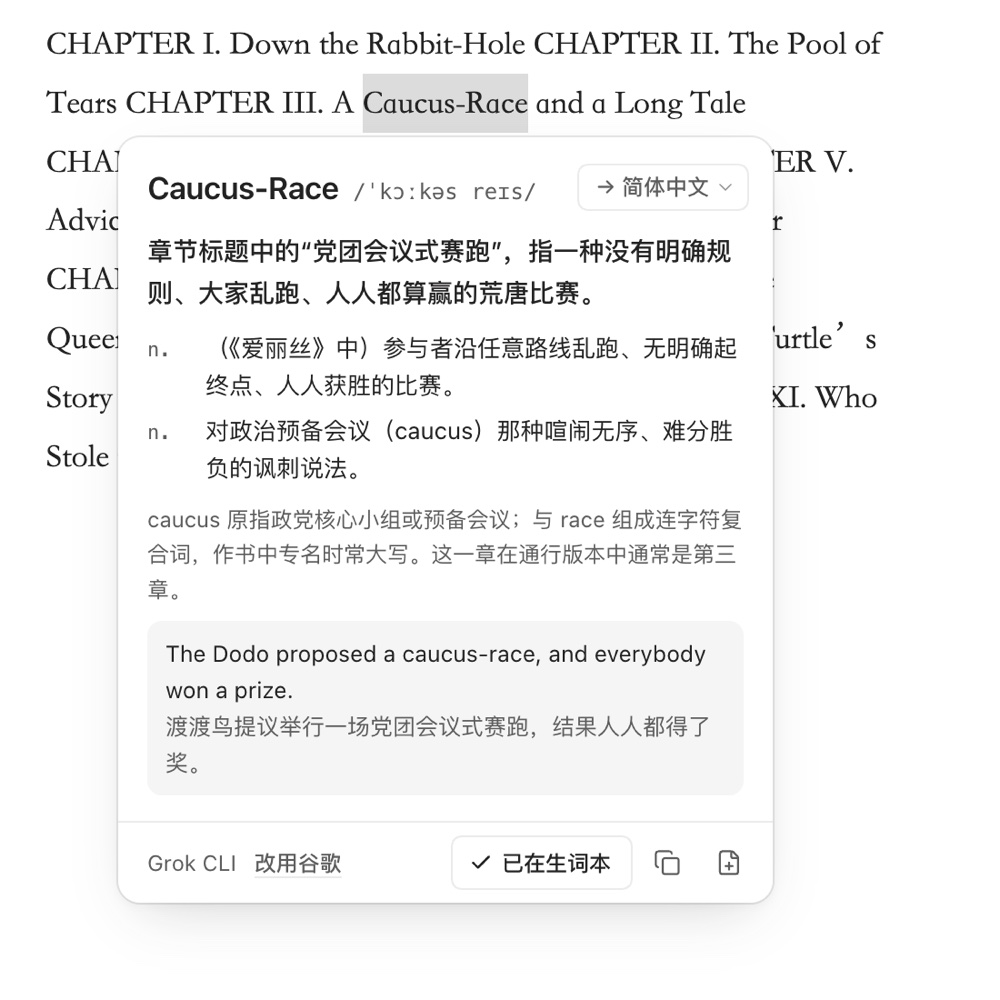
在「设置 → AI 与翻译 → 划线翻译」打开翻译按钮后,选中文字点 翻译:选中一个词或短语会显示查词卡片,选中一句或一段会显示译文。结果就在选文旁边,点别处或按 Esc 关闭。
- 翻译引擎:默认免费的谷歌翻译;也可以改用已经配置好的 AI 服务,包括本机 Codex、Claude、Grok、Kimi 等 CLI。AI 会参考所在句子和书名,让词义贴合上下文。AI 未就绪时自动退回谷歌。
- 语言:原文语言自动识别,只需设一个目标语言;原文已经是目标语言时改译为英文(或中文)。卡片右上角可临时切换目标语言,本次阅读有效,不改默认设置。
- 生词本:查词卡片上点 收录,词条连同原句和回到书中位置的链接存进一篇生词本笔记。默认位于
乔木阅读/生词本.md(设置了新笔记文件夹时放在那里),首次收录时自动创建,可在设置里改位置;同一个词再次收录只补充新例句。 - 复习:生词本直接采用 Spaced Repetition 插件的卡片格式,安装该插件即可复习,复习进度由它写在卡片末尾,插件不会改写。也可以打开「同步到 Anki」,通过 Anki 桌面版的 AnkiConnect 插件(代码 2055492159)把新词加入指定牌组;「同步全部生词」会补上 Anki 里还没有的词。
3. 划线成为笔记,还能回到原文
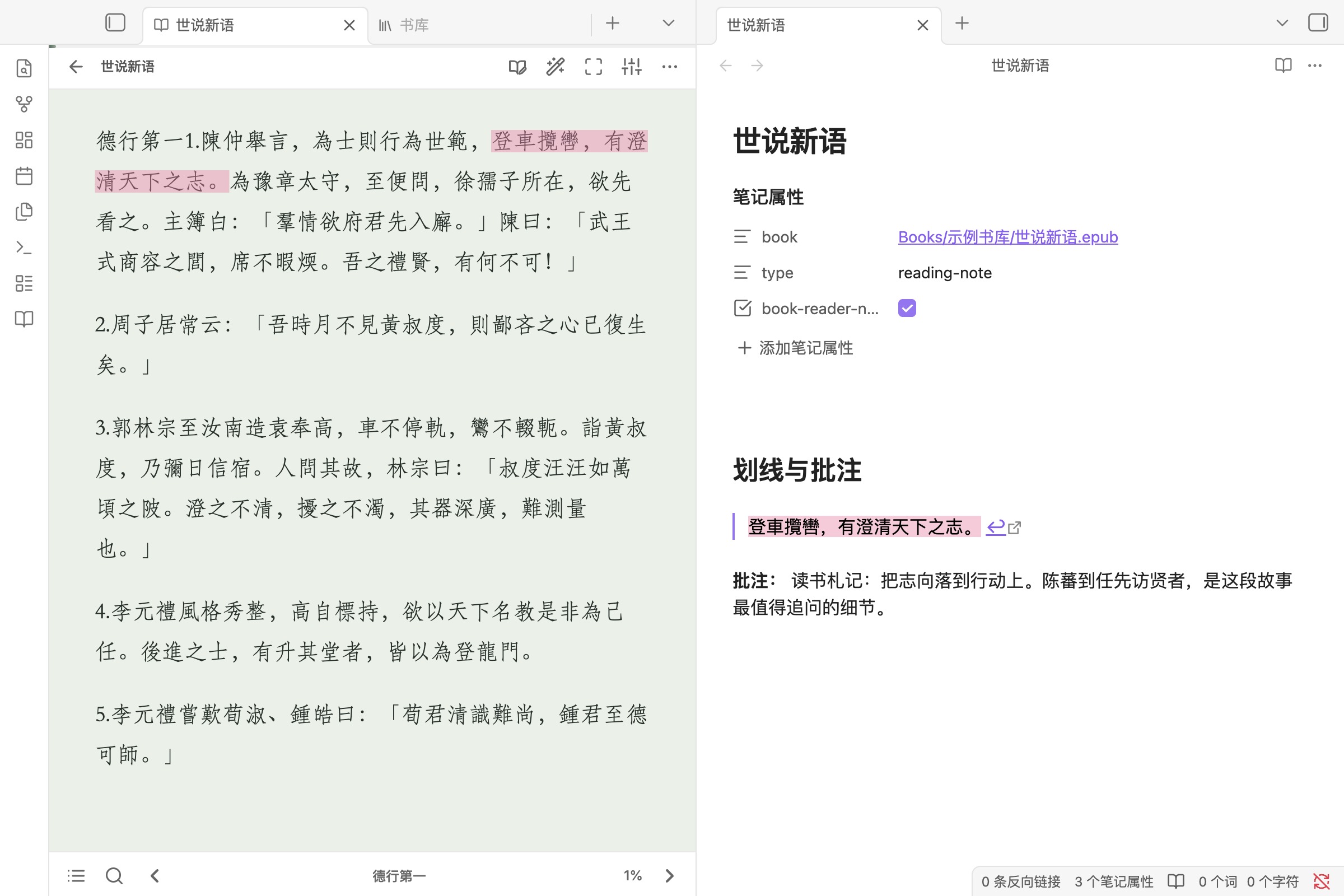
每本书关联一篇 Markdown 阅读笔记。划线与批注自动汇总,引文右侧的 ↩ 链接用于返回书中对应位置。原文、自己的理解和来源留在一起,后续可以继续在 Obsidian 中整理与连接。
4. 需要时,围绕选文和 AI 讨论
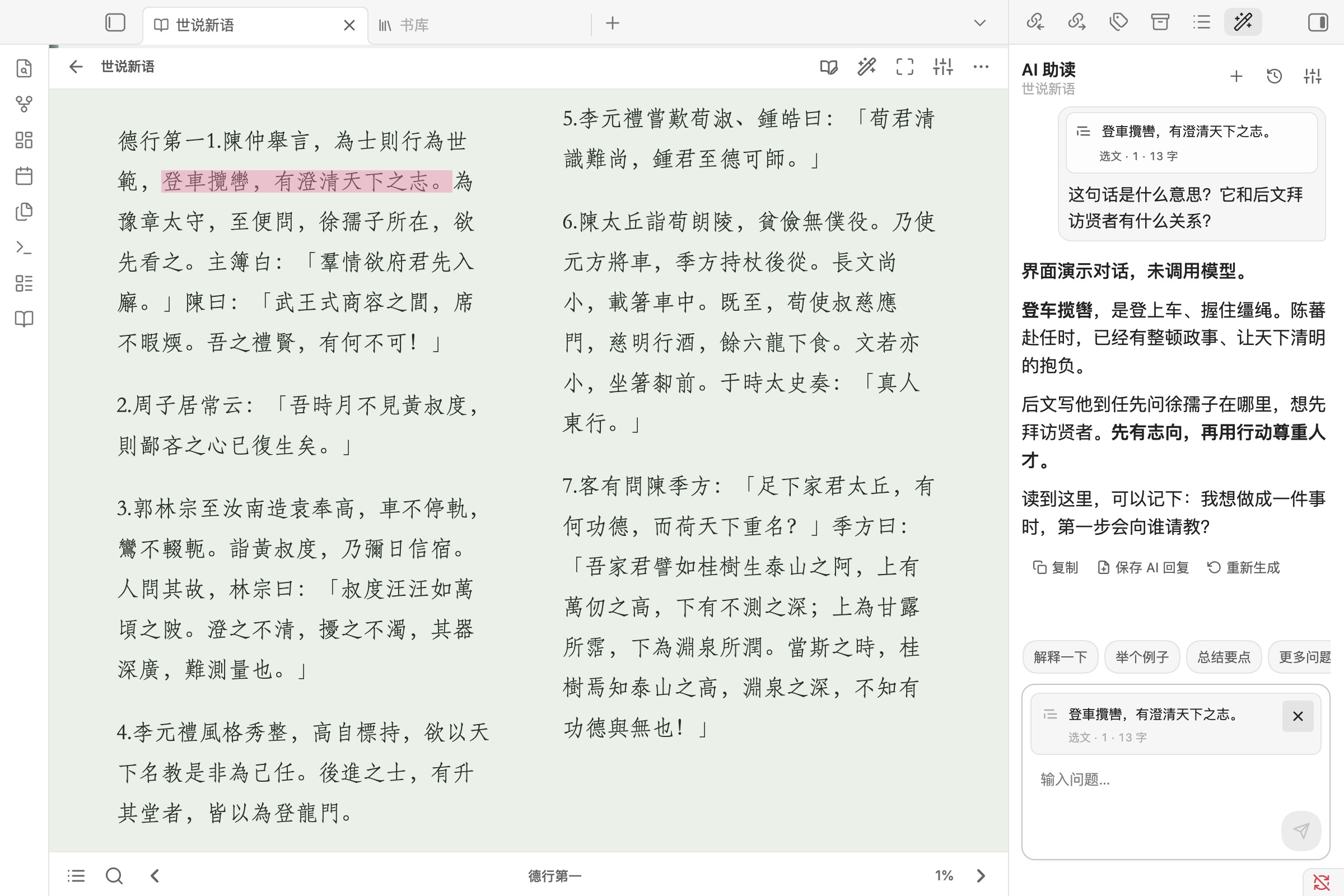
已打开 AI 伴读时,新选文自动更新待提问上下文;选中本身不会发送请求。快捷问题保持可见,非中文选文增加翻译入口。每条已发送问题保留当时的来源,之后翻页或切换选文不会改写旧问题。
回答可以复制,或完整保存为独立 Markdown 笔记、追加到本书笔记;保存前可修改自动提取的标题。AI 是可选功能,配置服务后由你主动发送问题。图中固定示例仅展示交互,不代表模型效果或响应速度。
5. PDF 保留原页面与图表
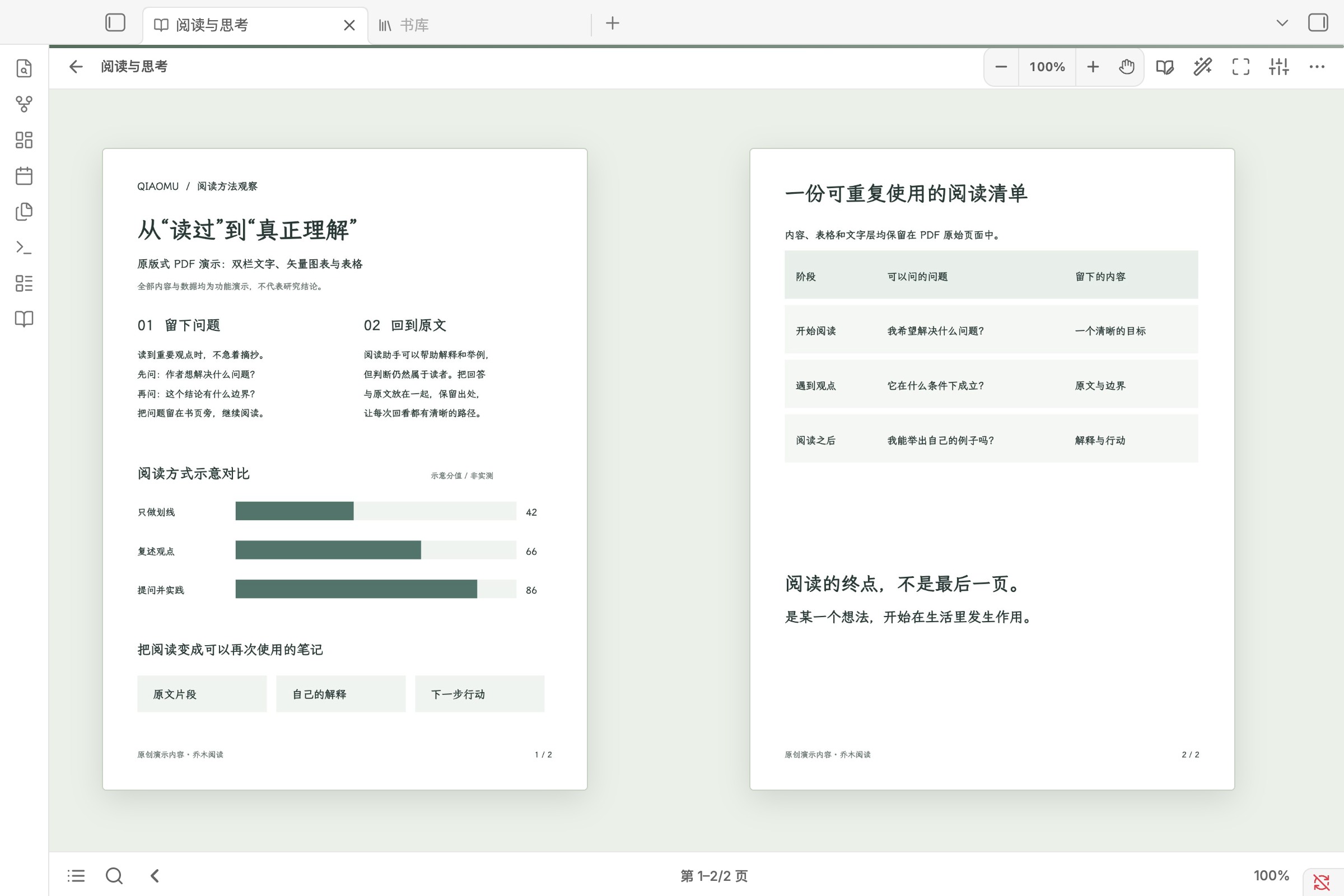
PDF 保留原始版式,支持独立缩放。有可靠文字层时,可选择、复制、搜索、划线、批注和向 AI 提问;扫描页仍能阅读和保存进度,但不提供没有文字层支撑的搜索或文字问答。
目录、书内搜索和位置跳转集中在底栏。搜索支持结果高亮、Enter 下一处、Shift+Enter 上一处、Esc 关闭,并保留返回原阅读位置的入口。
无线发送到 Kindle(桌面端)
在书库或文件菜单中右键电子书,选择「发送到 Kindle」。支持两种阅读方式,连接窗口会记住各自的配对、地址和设备身份:
- KOReader:保留原有流程。Kindle 已越狱并安装 KOReader,退出它后接 USB 配对;再安全弹出、打开 KOReader,连接同一 Wi-Fi 后查找和测试连接。无需 Calibre。
- Kindle 原生:已越狱的 Kindle 通过独立接收端完成一次准备与 USB 配对,在设备上运行一次安装项后,即可保持 KOReader 关闭并传书。EPUB 由插件内置引擎在本机自动转为 AZW3,无需安装 Calibre;PDF、TXT、AZW3、AZW、MOBI 直接发送。此模式需支持 Scriptlet 的现代越狱;其他型号和旧固件需另行验证。
文件上传后完整回读校验,已有同名书不会被覆盖。原生模式会请求 Kindle 刷新书库;“文件送达”“已请求刷新”“图书馆可见并可阅读”是不同状态。Kindle 需要保持唤醒和 Wi-Fi 连通;休眠时不承诺可达。格式转换保留原书,结束后清理临时副本。
独立接收端由用户单独运行安装工具准备;Obsidian 插件不会下载或安装 Calibre、SSH 服务或其他可执行依赖。工具准备时会从 GitHub 原作者下载固定版本的 USBNetLite 包并校验摘要。转换在本机完成,书籍仅通过局域网发送至已配对设备。详见实现与验证边界。
配对私钥保存在 Obsidian SecretStorage;插件仅在你主动连接或发送时访问设备。每本书上传后都会读回校验,再放入 documents,已有同名文件会保留。本功能仅传书,不同步划线和阅读进度;支持的单文件大小上限为 512 MiB。
离线示例书
从 4.2.5 起,首次打开书库会自动加入六本 EPUB 示例书,即使仓库已有书籍或 PDF 附件。此前被旧版自动跳过的安装也会在打开书库时补齐;不会覆盖同名文件,已经成功导入后主动删除的示例书不会再次自动添加。也可在设置 → 存储与同步 → 添加示例书中手动恢复。
六本示例书的正文均无插图,配有封面:道德经、唐诗三百首、世说新语、Jekyll and Hyde、Alice in Wonderland 和 Meditations。英语作品保留英语版本,无现代中文译本。文件随插件打包,运行时不从古腾堡下载;这些版本在美国属于公版,其他地区需按当地版权规则判断。书籍保留 Project Gutenberg 的完整许可,与插件 GPL 许可分开,详见版本、来源与许可。
安装
从 Obsidian 社区插件市场安装(推荐)
- 打开 Obsidian,进入 设置 → 第三方插件(Community plugins)。首次使用时,点击 开启社区插件(Turn on community plugins)。
- 点击 浏览(Browse),搜索 Qiaomu Reader。
- 选择 Qiaomu Reader,确认作者为 向阳乔木,点击 安装(Install)。
- 安装完成后点击 启用(Enable),打开左侧工具栏的书库图标,开始阅读。
也可以打开 官方插件页,点击 Add to Obsidian 并允许浏览器打开 Obsidian,再完成安装与启用。如果浏览器没有唤起应用,使用上面的应用内搜索步骤即可。桌面和移动端都可以从第三方插件市场安装;本机 CLI 助读仅限桌面。
阅读、划线和笔记无需配置 AI;首次打开书库即可体验内置公版书,也可以添加自己的图书。需要 AI 时,再进入插件设置选择服务并测试连接。
**更新插件:**进入 设置 → 第三方插件 → 检查更新(Check for updates),找到 Qiaomu Reader 后点击更新。社区插件不会自动更新。若未发现新版,先确认 Obsidian 为 1.11.4 或更高版本,再检查能否访问 GitHub;也可从下方最新版本链接手动安装。
新版插件 ID 为 qiaomu-reader,请搜索 Qiaomu Reader。先备份仓库并禁用旧版 Qiaomu Book Reader,再启用新版,避免两个阅读器同时注册同一文件类型。书籍与 Markdown 笔记保留在原位置。
需要保留旧设置和阅读数据时,在两个插件均禁用的情况下,将 .obsidian/plugins/qiaomu-book-reader/ 中的 JSON 数据文件复制到 .obsidian/plugins/qiaomu-reader/,不要复制旧版 manifest.json,并保留原件作为备份。旧笔记中的 obsidian://qiaomu-book-reader 回跳链接仍受支持。
- 在 Obsidian 第三方插件市场安装并启用 BRAT。
- 打开 BRAT → Add beta plugin。
- 输入
joeseesun/qiaomu-reader。 - 在“第三方插件”中启用 Qiaomu Reader。
此方式使用 GitHub Releases,后续更新由 BRAT 管理。一般用户使用上面的官方社区安装即可。
从 最新版本 下载 main.js、manifest.json 和 styles.css,放入:
<你的仓库>/.obsidian/plugins/qiaomu-reader/
重新加载 Obsidian 后启用插件。插件 ID 为 qiaomu-reader。
朱雀仿宋常用字子集内置于 styles.css,随三个插件文件安装;新增安装默认使用该字体,已有字体偏好保留。子集来自 v0.212 预览测试版,覆盖 7,554 个码点,未包含的字符使用系统字体回退。选择“自定义字体”后,可浏览本机已安装字体,或导入 TTF、OTF、WOFF、WOFF2 文件。导入字体随仓库同步;手机不能枚举本机字体时可使用文件导入。
其他字体的官方下载入口与安装方法见字体说明。
AI 辅助阅读
“保存 AI 回复”把完整 Markdown 回答作为笔记正文,原文放在后面的来源区。标题在本地根据回答的主题标题、重点短语或内容句自动提取,过滤“总结”“关键概念”等通用小标题;保存前可修改,不额外调用模型。保存成功后按钮变为“已保存 · 打开笔记”,不会关闭对话,也不会自动抢走阅读焦点。
未发送草稿按书保存在独立本地文件中(最多 30 本、每本最多 20,000 字符),关闭面板或重启后可恢复;生成中输入的新问题不会被上一轮完成动作清掉。插件不主动同步草稿,但第三方同步如果包含整个插件目录,仍可能复制它。新建对话保留当前草稿;已发送的来源固定在对应问题下。单条删除与批量清空都需要确认,删除当前对话后不会在关闭面板时重新写回。
AI 默认关闭。启用后,文本型 PDF 会把整份可提取文字作为新对话的默认上下文;如果选中了原文,则本轮改用选文上下文做精读。常规 PDF 发送全文,超过 180,000 字符时按页均匀精简并明确标注,避免只截掉后半本。你可以通俗解释、举例、提炼要点、联系实际、换角度分析或生成测试题,并继续自由追问。书内“阅读设置”新增“AI 伴读”标签,可就近开关 AI、查看当前服务与模型、调节思考模式/强度和回答语言;API 密钥、接口地址等低频敏感配置仍留在插件系统设置。DeepSeek V4 可单独开关思考模式;模型提供思考过程时会单独显示,回答完成后自动折叠,不与正式回答混在一起。
- 本机账号:Codex CLI、Claude Code CLI、Grok CLI、Kimi Code CLI、ZCode CLI。安装并登录一次后,插件可直接复用账号,无需再填 API 密钥。每个 CLI 分别记住自己的模型和思考强度;Grok 的常驻 ACP 会关闭后台自动更新,避免更新进程阻塞首字输出。
- 国产模型:DeepSeek、Kimi、通义千问、智谱 GLM、MiniMax。
- 聚合服务:硅基流动、豆包/火山方舟、OpenRouter。
- 国际服务:OpenAI。
- 本地模型:Ollama、LM Studio。
- 高级配置:任意 OpenAI 兼容接口,可直接新建或选择 Obsidian 密钥;密钥、模型和接口地址按服务分别保存。
API 密钥保存在 Obsidian 的密钥库中,不会写入插件 data.json。设置页可发送一条不含书籍内容的最短消息测试连接。
CLI 模式会自动检测可执行文件和登录状态,在独立临时目录中运行,并拒绝工具、文件和终端权限。Grok 与 Kimi 使用 CLI 自带的 ACP;Codex 使用 codex-acp,Claude 使用 claude-agent-acp,ZCode 目前使用社区 zcode-acp。同一阅读对话复用常驻进程与 ACP session,首轮发送阅读上下文,后续只发送新问题;切换或清空对话会使用新的 session。会话过期或 ACP 进程意外退出且尚未产生回答时,插件会自动重建并安全重试一次;登录、模型、会话和进程故障会分别提示。设置页会区分“原生 ACP”和“需单独安装适配器”,提供手动安装指引,并可分别检测 CLI 与适配器路径。插件不会自行安装或更新 CLI、适配器或其他依赖。CLI 模式仅支持桌面版 Obsidian。
桌面 CLI 模式会检测仓库外的已安装可执行程序,并在独立临时目录运行;CLI 的登录与配置由对应工具管理。字体文件只在用户选择导入后读取并复制到仓库;本机字体枚举仅由点击字体选择按钮触发。
界面语言
支持简体中文、English、Русский、日本語、Español、Français、Deutsch、한국어 和 Português (Brasil)。在插件设置顶部选择语言;语言包随插件提供,切换和使用均不联网,日期按所选语言显示。默认仍为简体中文。
设置页即时切换;已打开的书页和 AI 对话重新打开后使用新语言,原文、笔记和回答内容不会被翻译或改写。新增语言覆盖界面文案,翻译仍欢迎母语使用者反馈;俄语中的部分新增功能继续使用英语回退。
外观与阅读设置
插件设置的“外观”页和书内“阅读设置”使用同一组数据。书内弹窗按任务分为“阅读”和“AI 伴读”两个标签;主题、正文字体、字号和行距直接展示,分设备外观、电子墨水屏、对齐、插图和沉浸阅读等低频选项收在“更多阅读设置”中。弹窗只在竖向滚动,并为滚动条预留空间,不再遮住控件。
阅读笔记如何工作
首次打开一本书时,插件会创建或关联一份带有 type: reading-note 标记的专用 Markdown 笔记。之后的新划线和评论自动汇总到“划线与批注”章节;插件不会仅凭书名误把人物、项目或模板笔记当成阅读笔记。
评论以普通正文显示在引文下方,不使用引用样式。每条引文末尾的 ↩ 是返回原书位置的链接。
语音朗读
阅读工具栏的扬声器打开朗读控制;选中文字后的更多菜单可只读选文。支持暂停、继续、上一段/下一段与倍速。EPUB 随朗读位置自动翻页并跨章继续;文本 PDF 接续后续页面,跳过无可提取文字的页。支持临时高亮和上次朗读位置;扫描 PDF 需先有文字层。
首次朗读从当前页开始。关闭再打开时,仍在原页会从保存的句子继续;翻到别页则默认从当前页读,并在播放器直接提供「继续上次朗读」。听书中翻页查阅会暂停页面跟随,可点「回到朗读处」或「从当前页朗读」。选文朗读不覆盖整书书签。位置按句/片段保存,文件修改后旧书签不再套用。
点击浮条上的音色名称,可在小弹层直接切换系统语音、Edge TTS(桌面)、OpenAI、OpenAI-compatible、通义千问、豆包语音、MiniMax、硅基流动、ElevenLabs 和 Azure Speech,以及对应模型和音色。选择后暂停并保留当前段落;每个音色可独立试听,试听不改变选择和进度。关闭按钮始终可见,关闭后保留朗读位置。系统语音与 Edge 无需密钥;其他服务需要密钥时,可直接点弹层里的「配置并试听」;底部「语音设置」入口始终保留。豆包使用语音控制台 API Key 和匹配的资源 ID;MiniMax 默认国内站,国际站可修改高级设置中的服务地址。硅基流动、MiniMax、ElevenLabs 和 Azure 可更新账号音色列表;豆包按模型版本显示预置音色。其他模型和复刻音色可选「自定义」输入 ID。服务、模型和音色的实际可用性以账号试听结果为准。
云端服务的密钥输入旁提供「获取密钥」和「服务文档」,直达 OpenAI、通义千问、豆包语音、MiniMax、硅基流动、ElevenLabs 或 Azure 的官方入口。MiniMax 国际服务地址会切换到国际站帮助;自定义兼容服务向所用服务商获取密钥。帮助链接不包含保存的密钥,服务可用性仍需实际试听。
桌面「本地模型」只提供 Kokoro 与 MeloTTS,可在播放器中下载、切换音色和试听;模型及运行环境放在本机应用数据目录,不进入插件或笔记库。Kokoro 提供精选中英文音色,MeloTTS 当前只有一个音色,英文限内置词典覆盖范围;不再提供 F5、Spark 或 IndexTTS2 克隆模型。旧本地模型选择迁移到 Kokoro,已下载文件不会自动删除。手机不提供本地模型安装。
Mac 桌面另提供「Mac 本地语音」,枚举本机已安装声音和实际品质,播放器内可搜索、选择及试听。无需额外助手或密钥;增强声音是否可用以本机枚举和试听为准。Windows 不显示此入口;手机不显示 Mac 原生或 Edge 桌面直连,系统朗读接口缺失时可直接配置云端服务。完整平台边界与本地模型设计见 本地语音方案。
音频使用有容量上限的内存缓存;关闭插件即清除。云端及 Mac 原生倍速修改不重新生成音频;Web Speech 系统语音倍速从下一片段生效。Mac 原生、Kokoro、MeloTTS 及 Edge 桌面直连已实测,Edge 无官方稳定性承诺;付费云端协议已测试,真实账号、Windows 与手机真机仍待验证。
隐私与联网
书籍、进度、划线、评论和笔记均在本地工作,无需账号,没有遥测、分析或广告。
| 可选功能 | 发送内容 | 目标服务 |
|---|---|---|
| 找书与下载 | 主动搜索时发送书名或作者关键词;仅在点击下载时请求所选书籍目录和 EPUB | Project Gutenberg |
| 搜索结果封面 | 公开书源请求 Gutenberg 图书封面;乔木书库由服务端以书名、作者匹配参考封面,客户端仅以封面 ID 请求图片,不携带激活码或登录凭证 | Project Gutenberg、Open Library |
| 乔木书库(可选激活) | 激活码、安装 ID、设备备注;主动搜索的关键词与所选下载版本,不上传仓库书籍 | ebook-mcp.qiaomu.ai,由服务端经 Telegram 机器人查询 |
| 外部书源搜索 | 主动搜索时在浏览器打开带有关键词的搜索页;插件不向这些网站发送仓库内容 | Anna’s Archive、Z-Library |
| 外部书源链接 | 点击后在浏览器打开网站;插件不向这些网站发送仓库内容 | Standard Ebooks、维基文库 |
| 翻译与查词 | 当前选中的文字;使用 AI 引擎时还包括所在句子和书名 | Google Translate,或你选择的 AI 服务 |
| 同步到 Anki | 收录的生词、释义和原句 | 本机的 AnkiConnect(默认 127.0.0.1:8765) |
| AI 辅助阅读 | 你主动附加的 PDF 全文、当前页或选中文本、书名和问题 | 你明确选择并配置的模型服务 |
| 本机 CLI 账号 | 你主动附加的 PDF 全文、当前页或选中文本、书名和问题 | Codex、Claude、Grok、Kimi 或 ZCode 的云端服务 |
| 本地模型安装 | 固定运行工具、Python、依赖包和模型;不上传朗读文字 | GitHub 及 PyPI,首次主动安装时联网 |
| 在线朗读 | 当前及预取的后一段文字,或试听短句;不发送整本书 | 用户选择的微软 Edge、OpenAI、阿里云、火山引擎、MiniMax、硅基流动、ElevenLabs、Azure 或自定义语音服务 |
| 本地 AI | 本轮附加的 PDF 全文、当前页或选文、书名与问题,以及必要的对话历史 | 你配置的 Ollama 或 LM Studio 地址;仅在本机地址且服务不转发时留在设备内 |
桌面首次使用默认 Edge 晓晓,无需密钥;首次展开播放器会说明文字发送至微软,并提供「语音设置」。已有服务选择保留;移动端首次使用默认系统语音,部分系统音色也可能联网。只有主动开始朗读或试听才会发送合成请求,打开浮条不会发送正文。语音密钥保存在 Obsidian SecretStorage,不写入插件 data.json。停止会阻止后续请求和播放,但宿主无法取消的在途请求仍可能计费。其他可选联网功能默认关闭。只有在你主动向 AI 提问时,文本型 PDF 才会在该对话首轮发送整书文字上下文;扫描 PDF 不发送页面图片或伪造 OCR 文本。
本机 CLI 模式还会运行你选择的本地 CLI 程序,并使用其库外安装目录、账号登录状态与配置;不会把这些凭据复制到插件配置。CLI 是否联网取决于所选服务。
从源码构建
默认构建和社区验证构建均不包含依赖自动安装器。npm run build:community 输出到 dist/community/,不包含 ACP 自动安装器,保留手动安装指引、检测和常驻对话能力。日常安装使用 Obsidian 官方社区插件页。
npm ci
npm test
npm run check:i18n
npx eslint src/
npm run build
npm run verify:release
npm run build:community
构建产物是仓库根目录的 main.js、styles.css 和 manifest.json;可编辑样式位于 src/styles.css。标准与社区构建的每个安装资产均受 4,800,000 字节预算约束,在严格十进制 5 MB 以下至少留出 200 KB。生产包将九种语言与 44 个繁体中文 PDF CMap 的静态字典共享键名并本地无损压缩;原翻译和资源仍保留,运行时无需网络或额外安装文件。构建同时生成忽略提交的 main.js.json,可用于分析各模块体积;验证记录见 4.9.0 候选体积整合 与 4.8.4 历史验收。唯一内置字体的来源、版本与许可见 fonts/README.md 和 fonts/OFL.txt。
验证与边界
- 当前工作流改造有模块/控制器测试、国际化检查、ESLint、标准及社区候选构建校验;真实桌面 Obsidian 验证覆盖阅读、搜索、回答保存和 PDF 缩放。详见开发与验收记录。
- CLI / ACP 仅限桌面;移动真机触控与软键盘仍待专项验证,桌面窄窗口不等于移动端验收。
- 不内置 OCR,不承诺扫描 PDF 可以文字问答;不提供跨书语义检索,也不授予阅读 Agent 文件/终端工具权限。
- 持久 ACP 会话减少重复启动开销,但首字速度仍受 CLI、模型、网络和上下文长度影响,目前没有可公开比较的性能基准。
- 社区候选版仅供验证;正式安装优先使用 Obsidian 社区插件市场。
作者
Qiaomu Reader 由 向阳乔木 维护:
- X:@vista8
- GitHub:@joeseesun
- 乔木推荐:tuijian.qiaomu.ai
项目含有改编自 Elton Reader 的代码,感谢 Elton Labs 的工作;这些部分保留 MIT 许可。来源、第三方开源软件和版权声明见 NOTICE.md 与 LICENSE;内置字体的来源与许可见 fonts/README.md 与 fonts/OFL.txt。
English
Install from Obsidian Community Plugins
Available in the official directory: open Qiaomu Reader, select Add to Obsidian, then Install → Enable in Obsidian. If your browser does not open the app, install from inside Obsidian:
- Open Settings → Community plugins. Select Turn on community plugins if prompted.
- Select Browse and search for Qiaomu Reader.
- Choose Qiaomu Reader by 向阳乔木, then select Install → Enable.
- Open the library from the left ribbon to try the bundled public-domain books or add your own. AI setup is optional.
On desktop, Add from Calibre copies selected books from a local Calibre library into the vault. Search uses metadata.db (Python 3) and falls back to calibredb. The whole Calibre library is not mounted into Obsidian. This entry is hidden on mobile.
For updates, use Settings → Community plugins → Check for updates, then update Qiaomu Reader. Community plugins do not update automatically. If an update is missing, check that Obsidian is 1.11.4 or newer and GitHub is reachable, or install the latest release manually. If you used Qiaomu Book Reader before, back up your vault and disable it before enabling the new plugin; see the migration instructions.
Read, highlight and keep notes
Qiaomu Reader is a Chinese-first reader for Obsidian supporting EPUB, PDF, FB2, MOBI, AZW3 and CBZ. PDF files retain their original fixed page layout; pages with a reliable text layer support selection, search, highlights, annotations and full-document or selected-text AI context, while scan-only pages provide original-page reading, progress and one book-level note without pretending OCR is available. The plugin keeps one dedicated Markdown reading note per book inside your vault.
Selection translation, word lookup and vocabulary (4.5.0)
Select text and press Translate: a word or short phrase opens a dictionary card, a longer passage opens a translation, right beside the selection. Use free Google Translate or the AI service you already configured (including local CLIs); AI reads the surrounding sentence and the book title. The source language is detected automatically and the target can be switched per session from the card. Add word saves the word, its sentence and a link back to the book into one vocabulary note formatted for the Spaced Repetition plugin, with optional sync to Anki through AnkiConnect.
A reading workflow, not just a chat window
The five screenshots above show the published 4.2.4 release running in Obsidian 1.13.7: the six-book starter library, selection actions, linked highlighting notes, optional AI assistance, and original PDF pages. New users can start with Tao Te Ching, Three Hundred Tang Poems, Shishuo Xinyu, Alice in Wonderland, Jekyll and Hyde, or Meditations without finding a book or configuring AI first. The library includes covers, reading progress, highlight counts and note links.
Since 4.2.5, the first library visit adds all six starter books even when the vault already contains ebooks or PDF attachments. Upgrades also repair installations previously skipped by older versions. Existing same-name files are preserved, and books deliberately deleted after a successful import are not recreated automatically. Use Settings → Storage & sync → Add starter books to restore them manually.
Captures use an isolated demo vault, bundled public-domain books and an original sample PDF. The AI conversation is a visibly labeled fixture with no model call; it demonstrates the interface, not model quality or latency. See capture and release evidence.
- Streamed answers render as Markdown while arriving, including tables, task lists, blockquotes and code blocks through Obsidian's renderer.
- Built-in quick prompts sit above the input, with translation for non-Chinese selections. An open AI panel follows new selections; selection alone does not send a request.
- Named reading bookmarks, bottom navigation, Chinese single-character search and a return point support continuity.
- Focused reading keeps an already-open AI sidebar without reopening the file tree.
- Chats are associated with books, with searchable/renameable history and immutable source context on sent questions.
New installations default to a bundled Zhuque Fangsong reading subset (7,554 codepoints); missing glyphs fall back to system fonts. Select Custom font to browse installed fonts or import TTF, OTF, WOFF or WOFF2 files. Imported files sync with the vault; mobile platforms without font enumeration can use file import. The font is embedded in styles.css and installed with the plugin. Other fonts are user-installed; see font downloads.
The interface supports Simplified Chinese, English, Russian, Japanese, Spanish, French, German, Korean, and Brazilian Portuguese. Select a language at the top of plugin settings; all language packs are bundled for offline use. Reopen existing book tabs and chats to apply the new language there. Book text, notes, and AI responses are not translated by this setting. Some newer Russian UI strings still fall back to English.
BRAT and manual installation remain available as alternative installation methods.
User-selected font files are read only on import and copied into the vault. Enumerating system fonts happens only after pressing the font picker button. Desktop CLI mode detects user-installed executables and runs them in an isolated temporary directory outside the vault; CLI configuration and login are managed by the installed tool.
Reading works fully offline. In-reader settings are split into Reading and AI Assistance tabs, keeping frequent AI controls close to the book while API keys and endpoint URLs remain in Obsidian plugin settings. Optional AI reading assistance includes built-in quick prompts and supports signed-in Codex CLI, Claude Code CLI, Grok CLI, Kimi Code CLI, and ZCode CLI accounts without additional API-key setup, plus DeepSeek, Kimi, Qwen, GLM, MiniMax, SiliconFlow, Doubao, OpenRouter, OpenAI, Ollama, LM Studio, and custom OpenAI-compatible endpoints. Custom endpoints can create or select an Obsidian secret directly, and each provider keeps its own secret, model, and endpoint override. CLI chats use persistent ACP sessions: Grok and Kimi provide ACP natively, while Codex, Claude, and ZCode use separately installed adapters. If an ACP session expires or its process exits before returning any content, the plugin rebuilds it and retries once; authentication, model, session, and process failures are reported separately. Grok ACP is launched with background auto-update disabled so an updater cannot delay the first streamed token. CLI providers are desktop-only and still send the page or selection you explicitly attach to their cloud service. AI is off by default and keys are stored with Obsidian SecretStorage.
New in 4.2.7: The AI companion appears on the first book open on wide desktop windows and remembers when you close it. Configure a service directly in the sidebar. Save translations with their original passage and location link to the book note, an open note, a new note or today’s Daily Note.
New in 4.2.6: Selection actions use icons by default, with translation shown when enabled. Configure labels, visibility and order under Settings → Page turning → Selection toolbar. Hidden actions remain in More and the context menu. AI source links can reopen the correct book and navigate across chapters.
Saving an AI reply preserves its complete Markdown body with the source below it, either in a separate note or appended to the book's reading note. An editable title is extracted locally from the reply's topic, emphasis or content, with no extra model request. Saving keeps the chat open, and the saved action opens the existing note. Unsent drafts are persisted locally for up to 30 books (20,000 characters each) and survive sidebar closure/restarts; third-party syncing of the plugin folder may also copy them. Deleting conversations requires confirmation. Screenshots above were captured with the published 4.2.4 release; see the official listing for installation.
Send books to Kindle (desktop)
Right-click a book and choose Send to Kindle. Choose KOReader or Kindle native reading in the connection dialog; each mode retains its own pairing and device identity. Existing KOReader delivery needs no Calibre. Native delivery uses the separately prepared standalone receiver, works with KOReader closed, and converts EPUB to AZW3 locally with the bundled engine, without requiring Calibre or any conversion software. PDF, TXT, AZW3, AZW and MOBI are transferred directly. Built-in EPUB conversion supports files up to 64 MiB; complex unsupported media/layouts can use KOReader. Native setup requires a modern jailbreak with scriptlet support. The plugin never installs external executables or dependencies. Receiver preparation is a separate user-run tool that downloads checksum-pinned upstream packages from GitHub. Books are converted locally and sent only over the local network. Keep Kindle awake with Wi-Fi connected. Uploads up to 512 MiB are streamed and fully read back before publication; existing files are preserved. A requested native library scan is not proof of indexing or readability. See verification boundaries.
Verification and limits
Use npm ci, npm test, npm run check:i18n, npx eslint src/, npm run build, npm run verify:release, and npm run build:community to reproduce the automated gates. See screenshot evidence and workflow checks. Physical mobile-device validation is pending. There is no built-in OCR or cross-book semantic search. CLI providers are desktop-only; model costs and terms belong to the selected provider. Local-model requests stay on-device only when the configured endpoint is local and does not forward them. Persistent ACP reduces repeated startup work, but no comparative latency benchmark is claimed.
Community build
Both the default build and the community build exclude dependency installation code. CLI adapters must be installed by the user. A separate community-candidate build is available with npm run build:community in dist/community/. It excludes the ACP dependency installer while retaining manual setup guidance, detection, and persistent chat.
Maintained by Qiaomu. Third-party notices and copyright information are preserved in LICENSE; bundled font provenance and license live in fonts/README.md and fonts/OFL.txt.
License
Copyright (c) 2026 向阳乔木.
本项目整体采用 GNU GPL v3.0 only(GPL-3.0-only),完整条款见 LICENSE。除另有明确声明的第三方部分外,自有代码可按 GPL v3.0 使用、修改和分发,不提供任何担保。第三方代码、字体及素材保留各自许可证与版权声明。
GPL 允许免费商业使用;分发时须遵守相应源码、版权和许可证义务。需要 GPL 之外的授权,可联系作者协商商业授权。本次变更不撤销此前已授予的许可证。
The project as a whole is licensed under GNU GPL version 3 only, with no warranty. Third-party components retain their own licenses. Commercial use is permitted under GPL; a separate commercial agreement may be negotiated for rights the author can grant. Previously granted licenses remain valid.