Focus and Highlight

by BO YI TSAI
5
4
3
2
1
Score: 44/100

Description

Category: Note Enhancements

The Focus and Highlight plugin enhances the reading experience in Obsidian by allowing users to focus on specific headings, paragraphs, or their related content in reading mode. Users can click on a heading or paragraph to highlight its scope while dimming the surrounding content, offering a cleaner and more concentrated view. The plugin provides customizable settings, such as focus scope, sensitivity, and clear methods, to adapt to different preferences. It also supports multi-pane functionality, enabling independent focus areas in each pane. For added customization, the plugin integrates with the Style Settings plugin to adjust visual properties like dim opacity and animation speed.

Reviews

No reviews yet.

Stats

34
stars
8,138
downloads
2
forks
1,398
days
1,305
days
1,305
days
6
total PRs
0
open PRs
0
closed PRs
6
merged PRs
11
total issues
5
open issues
6
closed issues
0
commits

Latest Version

4 years ago

Changelog

Fix:

  • Move the toggle to settings to make the feature stateful #12
  • Do not perform actions when clicking on collapse icons #13

README file from

Github

Focus and Highlight

A plugin for obsidian to focus on a specific paragraph in Reading mode.

Features

  • Focus on a specific heading and its children when clicking on them.
    • Start from v1.2.0. You can also focus on a specific paragraph by changing the setting Content Behavior to Only Focus the Element.
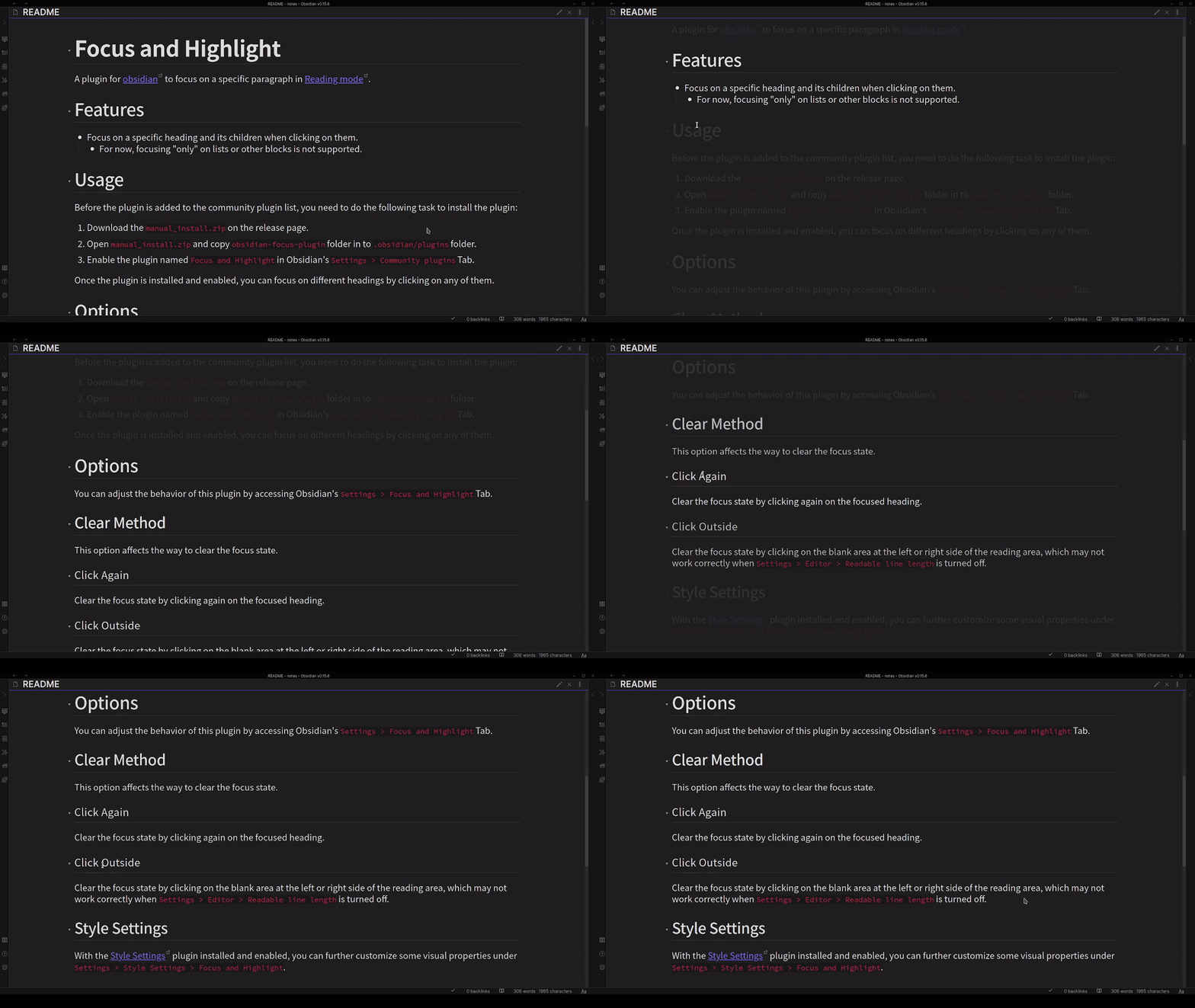
    • Start from v1.2.0. You can focus by clicking the children of a heading.
    • If you don't want to change your focus state when selecting the text, you can make the value of Focus Sensitivity smaller.

Usage

  1. The plugin is now available in the community plugins list! You can download the plugin directly through Obsidian's Settings > Community plugins Tab.
    • You can also install with BRAT, with the repository name nagi1999a/obsidian-focus-plugin.
  2. Enable the plugin named Focus and Highlight in Obsidian's Settings > Community plugins Tab.

Once the plugin is installed and enabled, you can focus on different headings by clicking on any of them.

Options

You can adjust the behavior of this plugin by accessing Obsidian's Settings > Focus and Highlight Tab.

Clear Method

This option affects the way to clear the focus state.

Click Again

Clear the focus state by clicking again on the focused heading.

Click Outside

Clear the focus state by clicking on the blank area at the left or right side of the reading area, which may not work correctly when Settings > Editor > Readable line length is turned off.

Focus Scope

This option affects the scope of the focus state.

Only One Block

Focus only on the block you clicked on.

Also the Content

Focus on the block you clicked on and related content.

Content Behavior

This option affects the behavior when clicking on the content elements, e.g. pure text, and callout block.

Only Focus on the Element

Focus only on the element you clicked on.

Focus on the element you clicked on and related content.

Enable List

Focus on the list item (experimental, only works on the first level list)

Focus Sensitivity

Focus only when the mouse is 'not' still for a while (larger means longer).

Style Settings

With the Style Settings plugin installed and enabled, you can further customize some visual properties under Settings > Style Settings > Focus and Highlight.

Dim Opacity

Set the opacity of dimmed elements. Default is 0.1.

Dim Speed

Set the speed of the animation in seconds. Default is 0.5.

Discussion

Behavior under Multiple Panes

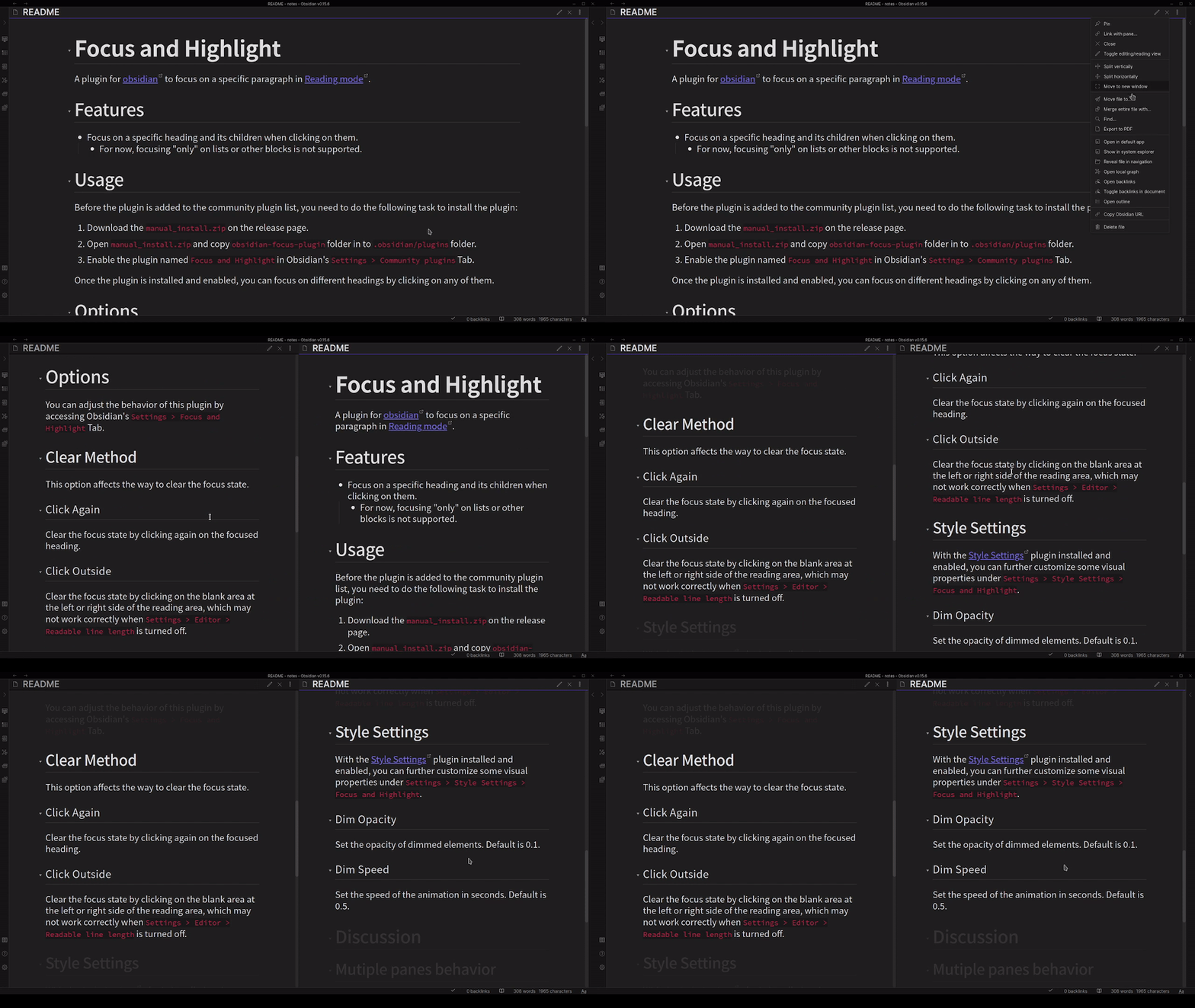
The plugin now supports multi-pane scenarios. Different panes will be able to focus on their headings, as the following GIF shows.
Issues

If you encounter any problems or have suggestions about the plugin, please feel free to open issues.

TODO

  • Add support in edit mode.

Support

[!NOTE] Maintaining a plugin is not an easy task. If you like this plugin, please consider the following methods to support the author:

  1. Please give me a star!
  2. Buy me a coffee!

Similar Plugins

info
• Similar plugins are suggested based on the common tags between the plugins.
Kobo Highlights Importer
4 years ago by Flavio Cordari
Folder Focus Mode
4 years ago by grochowski
Focus file explorer on chosen folder and its files and subdirectories, while hiding all the other elements.
Advanced Codeblock
4 years ago by Lijyze
An obsidian plugin that give additional features to code blocks.
Weread Plugin
4 years ago by hank zhao
Obsidian Weread Plugin is a plugin to sync Weread(微信读书) hightlights and annotations into your Obsidian Vault.
Raindrop Highlights
4 years ago by kaiiiz
An Obsidian.md plugin that syncs highlights from Raindrop.
Simple Mention
4 years ago by der-tobi
Obsidian plugin for mentioning people
Readavocado Sync
4 years ago by Cyrus Zhang
Readavocado obsidian plugin to sync your favorite highlights.
ProZen
3 years ago by Moskvitin
Obsidian plugin for going FULL screen
Apple Books Highlights
3 years ago by Atif Afzal
Sync your Apple Books highlights in Obsidian
Perilous Writing
3 years ago by Sameer Ismail
An Obsidian plugin which demands writing output, at the threat of bludgeoning your in-progress work.
Floating Highlights
3 years ago by Karthik S Raju
This is a plugin for obsidian which highlights a block of text or a word as you scroll down while reading.
Zen
3 years ago by Maxymillion
A focus mode Obsidian plugin. Inspired by "iA Writer".
Focus Active Sentence
3 years ago by artisticat
Highlight the active sentence in Obsidian.md
WuCai highlights Official
3 years ago by 希果壳五彩
WuCai highlights Official, for Sync highlights into your obsidian notes
Pocketbook Cloud Highlight Importer
3 years ago by Lena Brüder
Imports highlights and notes from books stored in the pocketbook cloud to your obsidian vault
Auto Hide Cursor
3 years ago by Mo Ismat
A simple plugin for https://obsidian.md
HamsterBase Official
3 years ago by HamsterBase
Air Quotes
3 years ago by Alan Grainger
Plugin for Obsidian. Search and insert quotes from a source text as you type. This is great for reading a physical book or eReader while taking notes on a separate laptop or phone.
Cloze
3 years ago by Vikki
A plugin for Obsidian which enables converting highlights, underlines, bolded texts, or any selected texts into clozes.
digital paper
3 years ago by Daniel Fernandes
turn off backspace and undo, like writing with a pen on real paper.
Vocabulary Highlighter
3 years ago by eatgrass
Highlight English words according to the frequency with Obsidian
Vim Yank Highlight
2 years ago by Aleksey Rowan
Highlight yanked text in Vim mode. Enjoy that subtle animation you've missed so much.
Highlight Helper
2 years ago by Chongmyung Park
Helper to collect highlight in Obsidian
Full Screen Toggle
2 years ago by Donkey Pacific
Fullscreen toggle plugin across all platforms for Obsidian.
Apple Books - Import Highlights
2 years ago by bandantonio
⚡️Fastest Apple Books highlights importer to Obsidian 🗄️ The only one protecting your own reflections across imports 🎨 Fully customizable
Enhanced Annotations
2 years ago by ycnmhd
Text Focus
2 years ago by usysrc
Focus the text area when opening a new note.
Dialogue Mode
2 years ago by Patrick Chiang
Multiplatform Highlights Importer
2 years ago by wwwkieran
Import and consolidate highlights from different reading sources. Supports reconciling books across reading sources.
Extract Highlights
6 years ago by Alexis Rondeau
Manage your highlights in Obsidian by easily creating, removing and exporting them.
Fullscreen Focus Mode
5 years ago by Razum
PDF Highlights
5 years ago by Alexis Rondeau
Extract highlights, underlines and annotations from your PDFs into Obsidian
Highlight Public Notes
5 years ago by dennis seidel
Readwise Community
5 years ago by renehernandez
Sync Readwise highlights into your obsidian vault
Kindle Highlights
3 years ago by Hady Osman
Sync your Kindle notes and highlights directly into your Obsidian vault
Focus Mode
5 years ago by ryanpcmcquen
Add focus mode to Obsidian.
Ghost Fade Focus
5 years ago by Sami Korpela
Ghost Fade Focus plugin for Obsidian
HackerNews
5 years ago by arpitbbhayani
Displays top stories from Hacker News inside Obsidian.
Stille
5 years ago by Michael Lee
🌗 Stille — An Obsidian plugin that helps you focus on your writing, a section at a time.
Hypothes.is
5 years ago by weichenw
An Obsidian.md plugin that syncs highlights from Hypothesis.
Simple Focus
2 years ago by Lin Qing
Allows you to focus on a specific file or folder. 让你可以专注于一个文件或文件夹
Blur Mode
2 years ago by dangehub
Blur Mode - Blur elements on the obsidian interface for presentations or screenshots|模糊模式 - 对obsidian界面上的元素进行模糊处理以便演示或截图
KoReader Highlight Importer
a year ago by Tahsin Kocaman
Imports highlights and metadata from KoReader into Obsidian notes
Bible sidecar
a year ago by Janis Ringli
This repository contains a plugin for obsidian that lets you view the bible in a sidebar within obsidian.
InfoFlow
a year ago by RockieStar Inc.
Obsidian plugin for InfoFlow.app - This plugin integrates InfoFlow with Obsidian, allowing you to sync your saved articles, web pages, notes, and highlights directly into your Obsidian vault.
Bookshelf
a year ago by Philip Weinke
Your personal bookshelf in Obsidian
PomoBar
a year ago by Miguel Pimentel
PomoBar is a minimalist Pomodoro timer that lives in your Obsidian status bar with optional audio notifications to keep you on track
HiNote
a year ago by Kai
Add comments to highlighted notes, use AI for thinking, and flashcards for memory.
White Noise
a year ago by Zhou Hua
aDHL
a year ago by tine-schreibt
The Dynamic Highlights Plugin, but with hotkeys, more options and sorting; works well with Highlightr.
MatchSyntax
a year ago by Eda
An Obsidian plugin that lets you write "regex-like" syntax to search the contents of a note, including part-of-speech tagging and (limited) fuzzy matching.
TODO Highlighter
a year ago by Nuraly Dyussenov
Obsidian Plugin that formats the exact string TODO, so it can be easily seen in your notes.
Kindle Highlights Import
a year ago by Leon Luttenberger
Plugin for Obsidian that allows users to import Kindle highlights into their Obsidian vault.
Sidebar Highlights
a year ago by trevware
Remaining reading time
7 months ago by ununnamed
Shows the remaining reading time in status bar
My Typewriter Line
6 months ago by dmo-code
Dangerous Mode
6 months ago by Vansh Kumar
most dangerous writing app in obsidian
Book Clipper
6 months ago by Hossein Fardmohammadi
Save book details from websites into your notes
Minidoro
5 months ago by Shakti Sampad Swain
Minidoro is a minimalist Pomodoro timer that lives right in your Obsidian header. It's designed to be simple, unobtrusive, and fully customizable.
Remember Scrollposition
5 months ago by s-blu
A plugin that saves the scroll position for each note to return you to where you left off
Disable Tabs
5 months ago by David V. Kimball
Disables having more than one tab open at a time Obsidian.
Hardcover
4 months ago by aliceinwaterdeep
Role Switch
3 months ago by Zafrem
Switch between different work roles (developer, writer, researcher, etc.) with intentional transitions and session tracking.