List Callouts Improved

by Daniel Yim
5
4
3
2
1
Score: 45/100

Description

The List Callouts, Improved plugin turns list items and inline highlights into configurable callouts by prefixing them with a trigger character and space. Each callout can use its own character, icon, background colour and marker colour and the settings list lets you add, edit, reorder, delete or reset callouts, including the built in set. It renders the full band across wrapped and nested list items in Live Preview and reading view, while source mode stays plain markdown. The same triggers work inside ==highlights==, including across line breaks, inside callout blocks and inside tables. Commands let you step forward, step back or remove a callout on every selected list item, with one undo to revert the batch.

Reviews

No reviews yet.

Stats

7
stars
267
downloads
0
forks
8
days
4
days
4
days
45
total PRs
1
open PRs
0
closed PRs
44
merged PRs
5
total issues
2
open issues
3
closed issues
86
commits

Latest Version

5 days ago

Changelog

What's Changed

Full Changelog: https://github.com/danyim/obsidian-list-callouts-improved/compare/1.6.3...1.6.4

README file from

Github

List Callouts, Improved

Create customized callouts in any list or highlighted text in Obsidian.

[!NOTE] This project is a fork of obsidian-list-callouts by @mgmeyers, who deserves all the credit for the original plugin and its design. Unfortunately that project has seen no activity since September 2024 and appears to be abandoned by the author.

This fork picks up maintenance and feature development so the plugin keeps working with current versions of Obsidian.

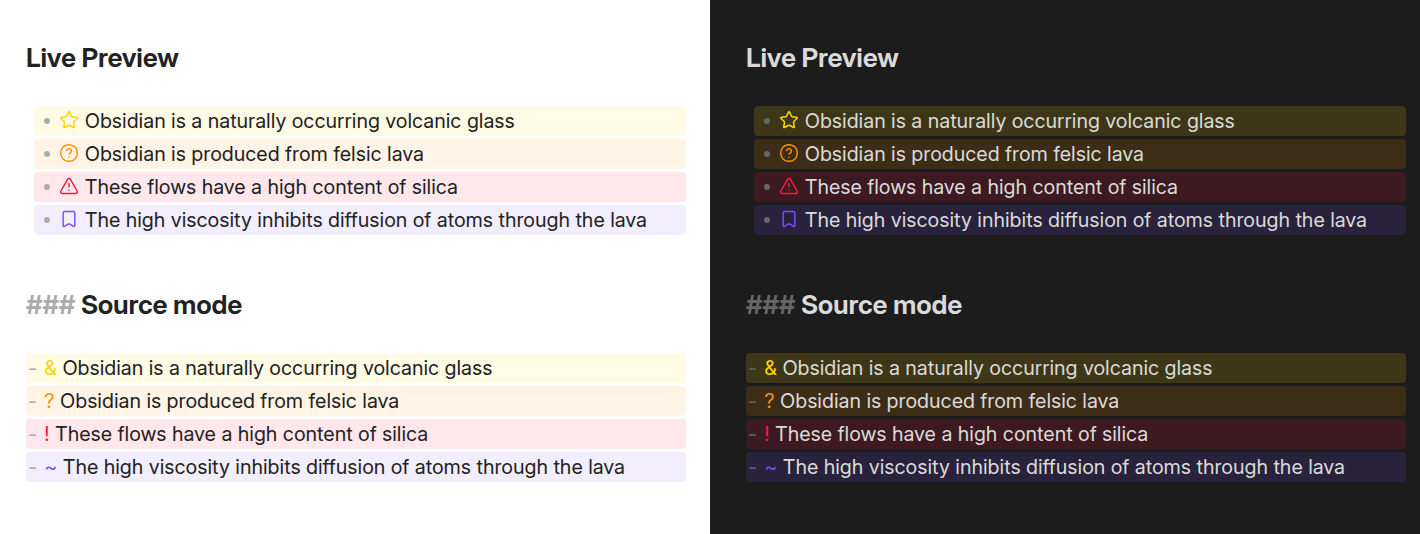
Typing a configurable character at the beginning of a list item turns the item into a highlighted callout:
A note with each built-in callout character applied to a list item, shown in light and dark mode

The characters can be replaced with icons:

The same note with each callout character replaced by an icon, shown in light and dark mode

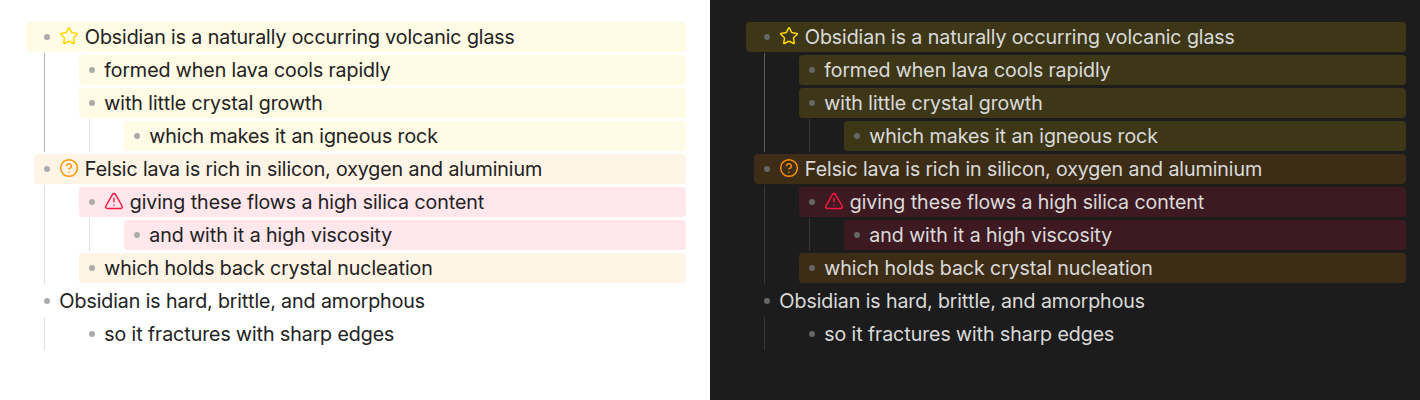
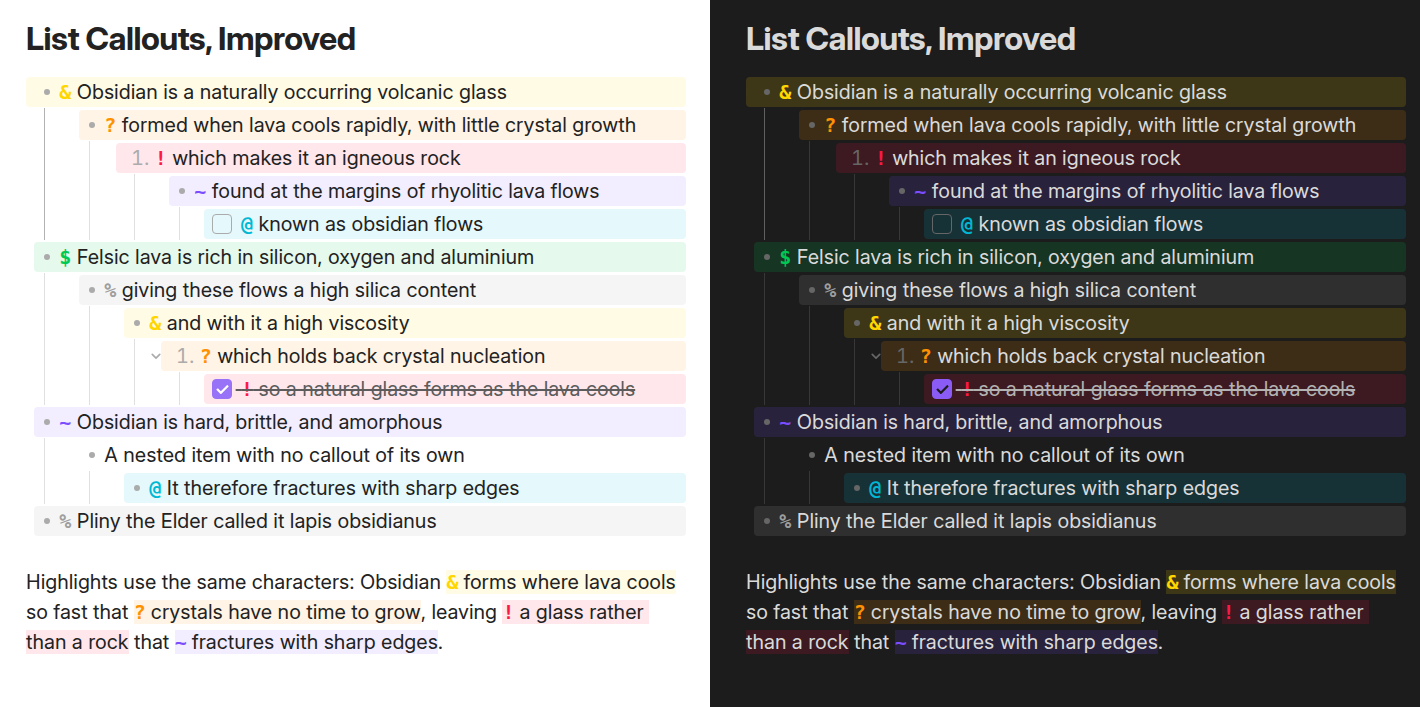
An item whose text runs onto further lines is one callout: the band covers every line of the item, in the editor as in reading view, nested items included:
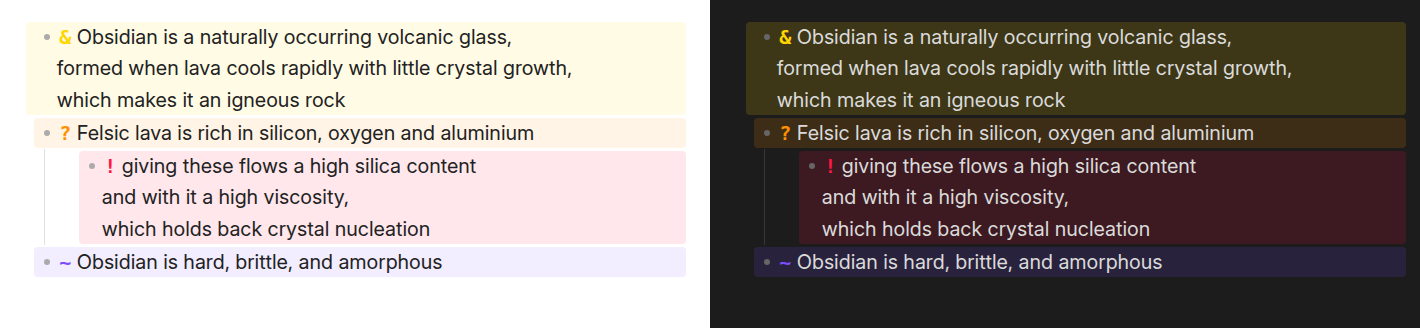
Three list items, two of them running onto further lines and one of those nested, each painted as a single band covering all of its lines, shown in light and dark mode

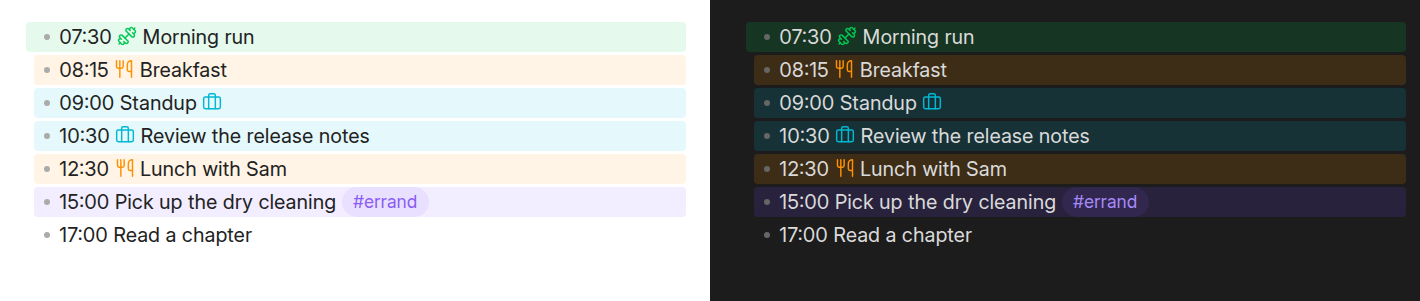
Characters, icons, and colors are all configurable, and you can add your own callouts:
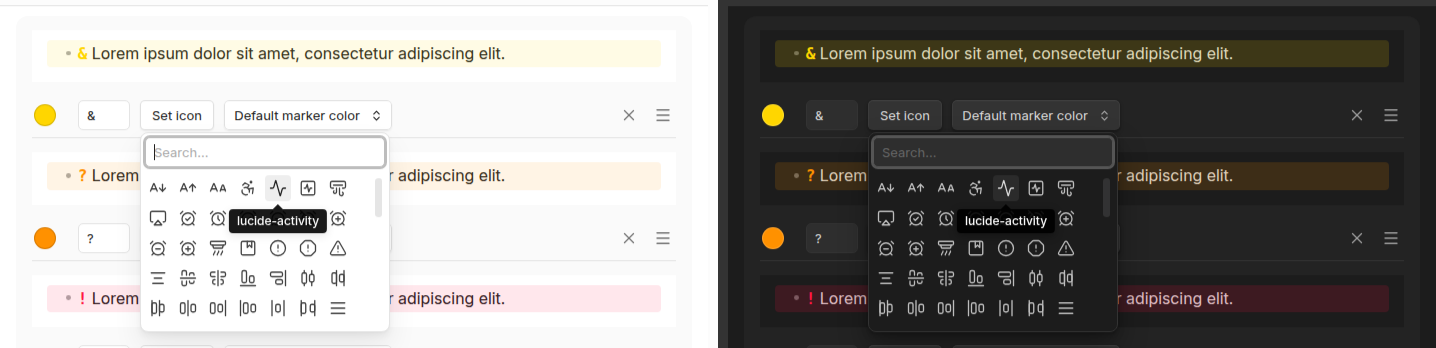
The plugin settings tab with the icon picker open and a tooltip naming the hovered icon, in light and dark mode

A callout's color paints both its marker and its background. If the marker is hard to read against a faint background, switch Default marker color to Custom marker color and pick a color for the marker alone. The background keeps the callout's color, and the marker color also applies to that callout's highlights:
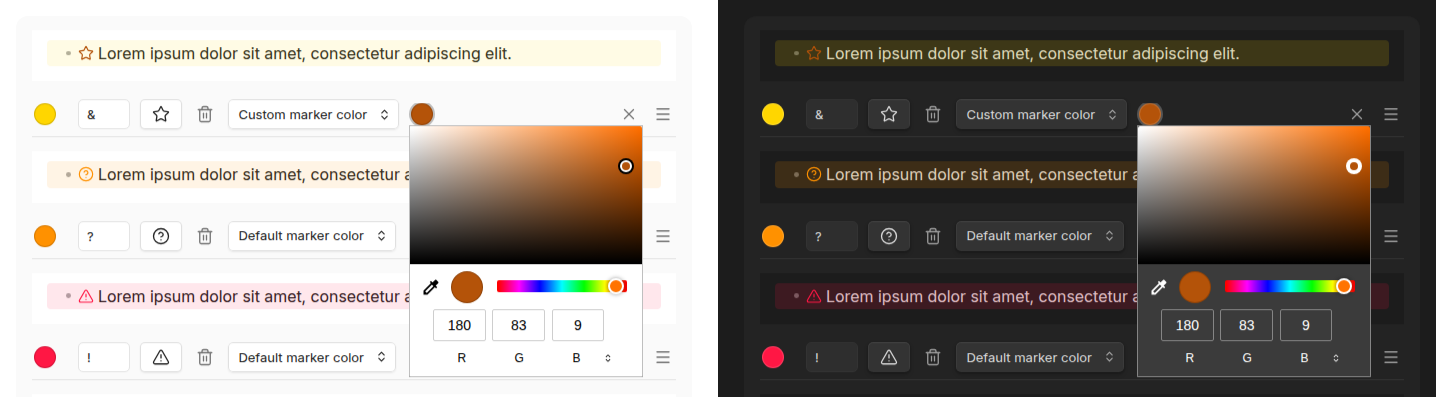
A callout's settings row with the marker color dropdown on "Custom marker color", its preview showing a dark amber star on the callout's yellow background, and the marker color picker open below the second swatch, in light and dark mode

A callout line shows two markers by default: the list's own bullet or number, then the callout's. Turn on Hide bullets and numbers in the settings tab and the callout marker stands in for the bullet, the way a checkbox does. A checkbox stays, since it can be clicked, and plain list items keep their bullets:

Six list items with the setting on: a star callout above a plain bullet item, a question-mark callout above a plain numbered item, and a warning callout keeping its checkbox above a plain task, shown in light and dark mode

The previews in the settings tab follow the toggle, so each callout shows how it will look:
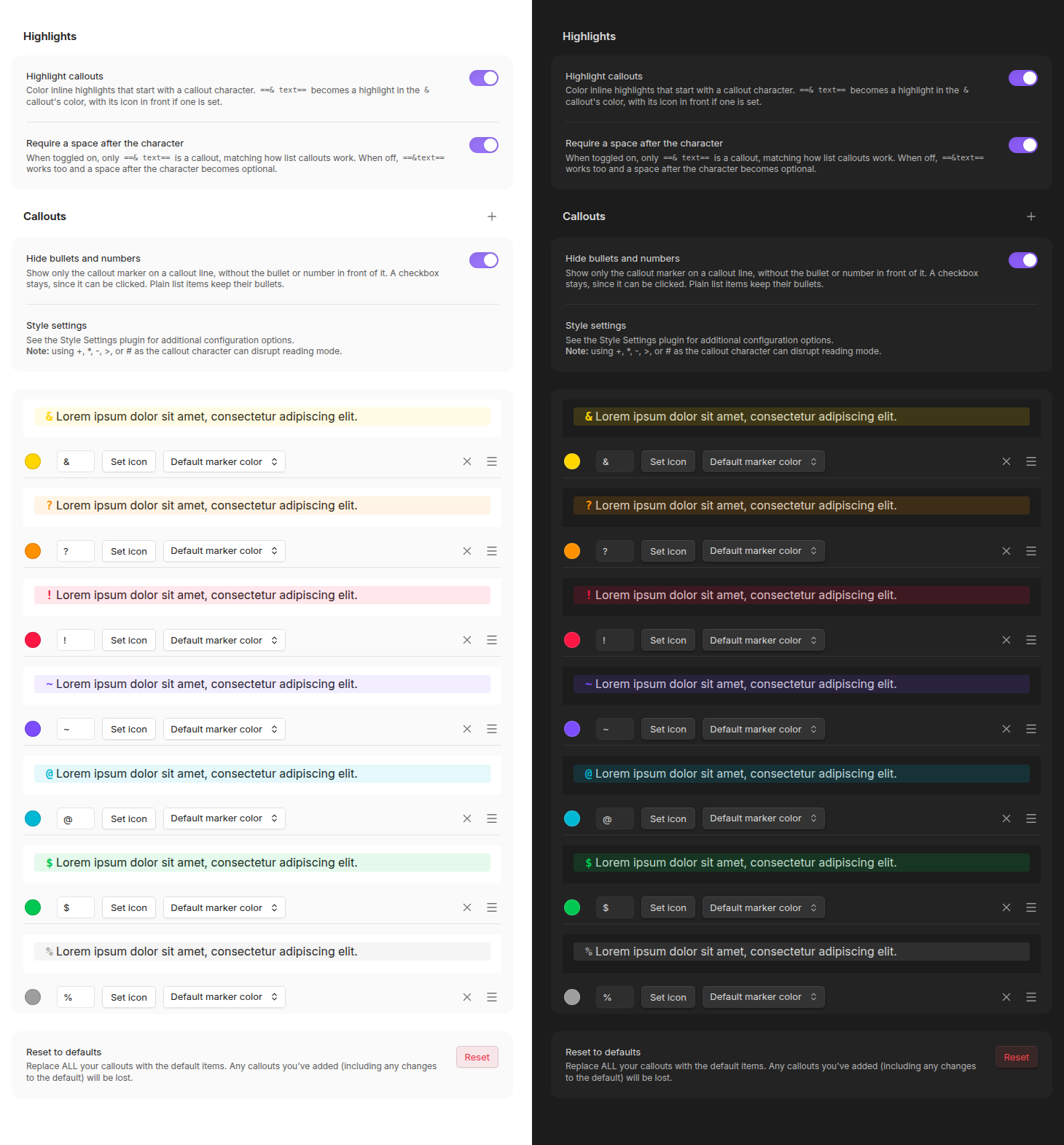
The settings tab with Hide bullets and numbers turned on: every callout's preview line shows its marker in place of the bullet, in light and dark mode

Callouts are drawn in Live Preview and reading view. Source mode shows the raw markdown, - & Important and so on, with no marker, band or highlight color over it, so the callout character is there to see and edit.

Callout padding and background intensity can be adjusted with the Style Settings plugin.

Highlights

The same callout triggers work inside Obsidian's ==highlight== syntax. Start a highlight with a callout trigger and a space ==* Highlighted text==, and it takes that callout's color, led by the character, or by the icon if one is set:
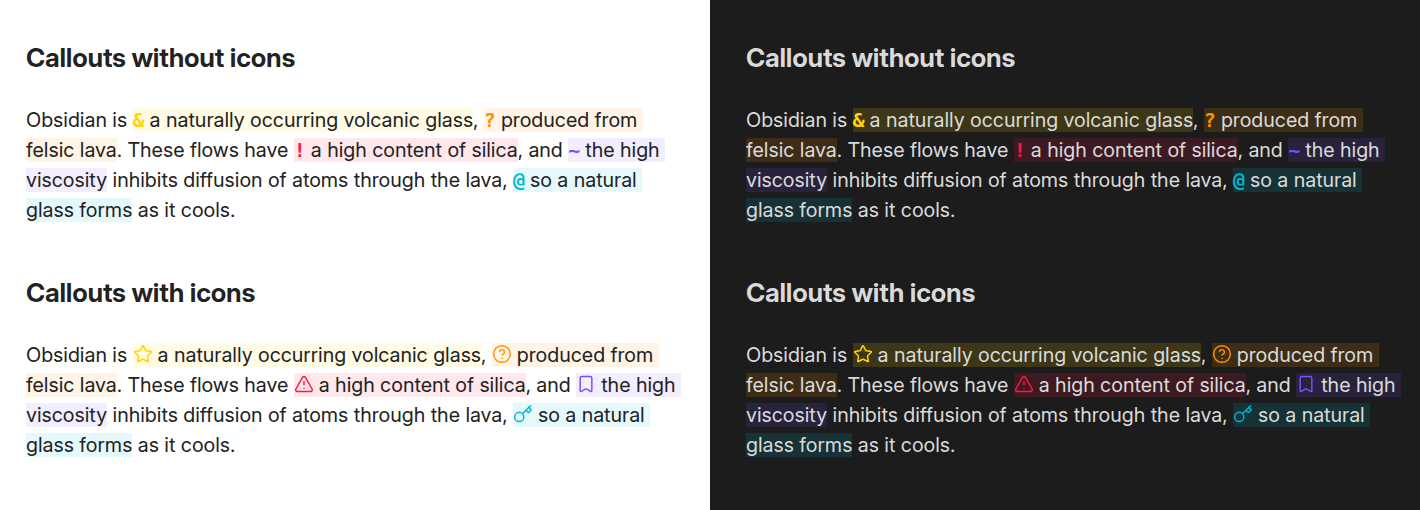
A paragraph with several inline highlights, each in a different callout color, rendered twice: led by the callout characters above, and by the callouts' icons below, each shown in light and dark mode

A highlight that runs across a line break is colored as one in both the editor and reading view, including a list item's continuation line. Highlights inside callout blocks and tables work too:
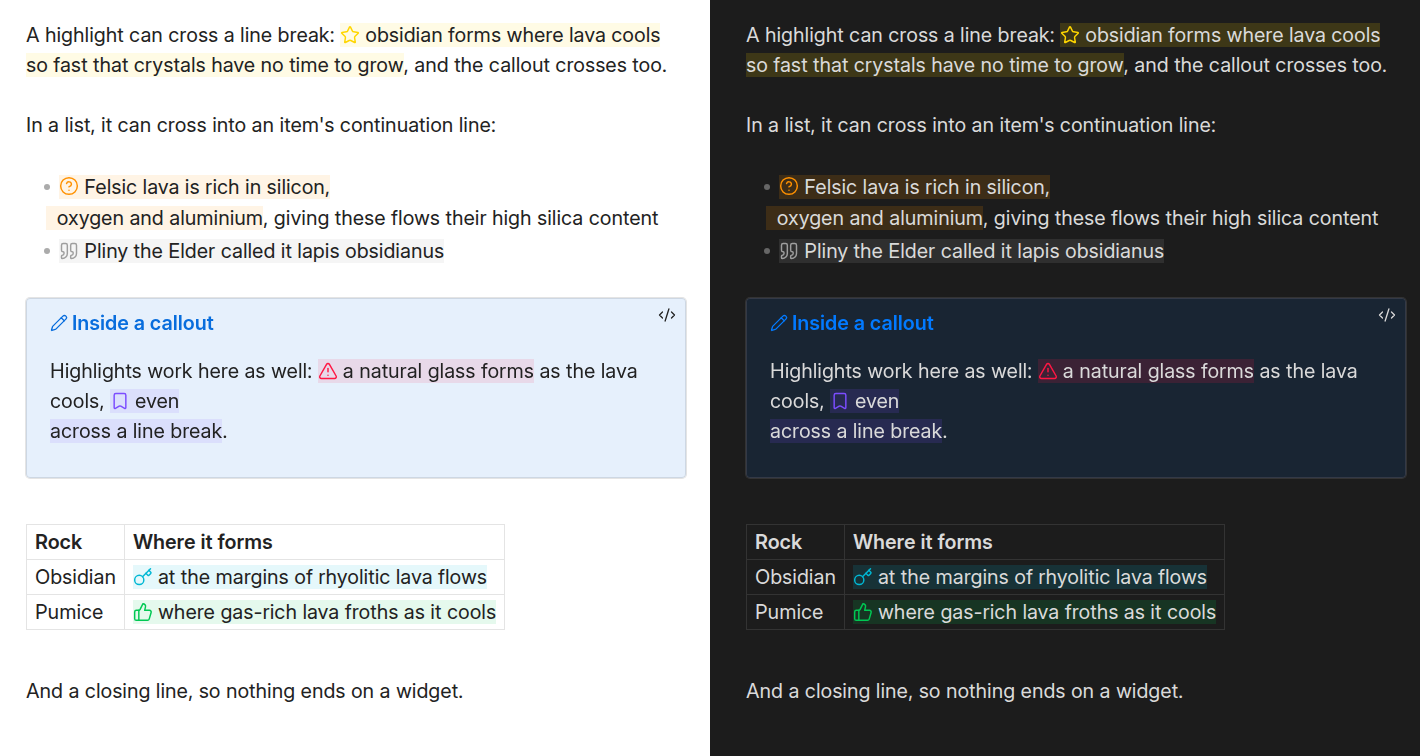
A paragraph, a list, a callout block and a table, each holding highlights in different callout colors, two of them running across a line break, shown in light and dark mode

Managing callouts

Callouts are defined in one list. A new vault starts with the seven shown above, and any of them can be edited, reordered by dragging, or deleted, built-in ones included.
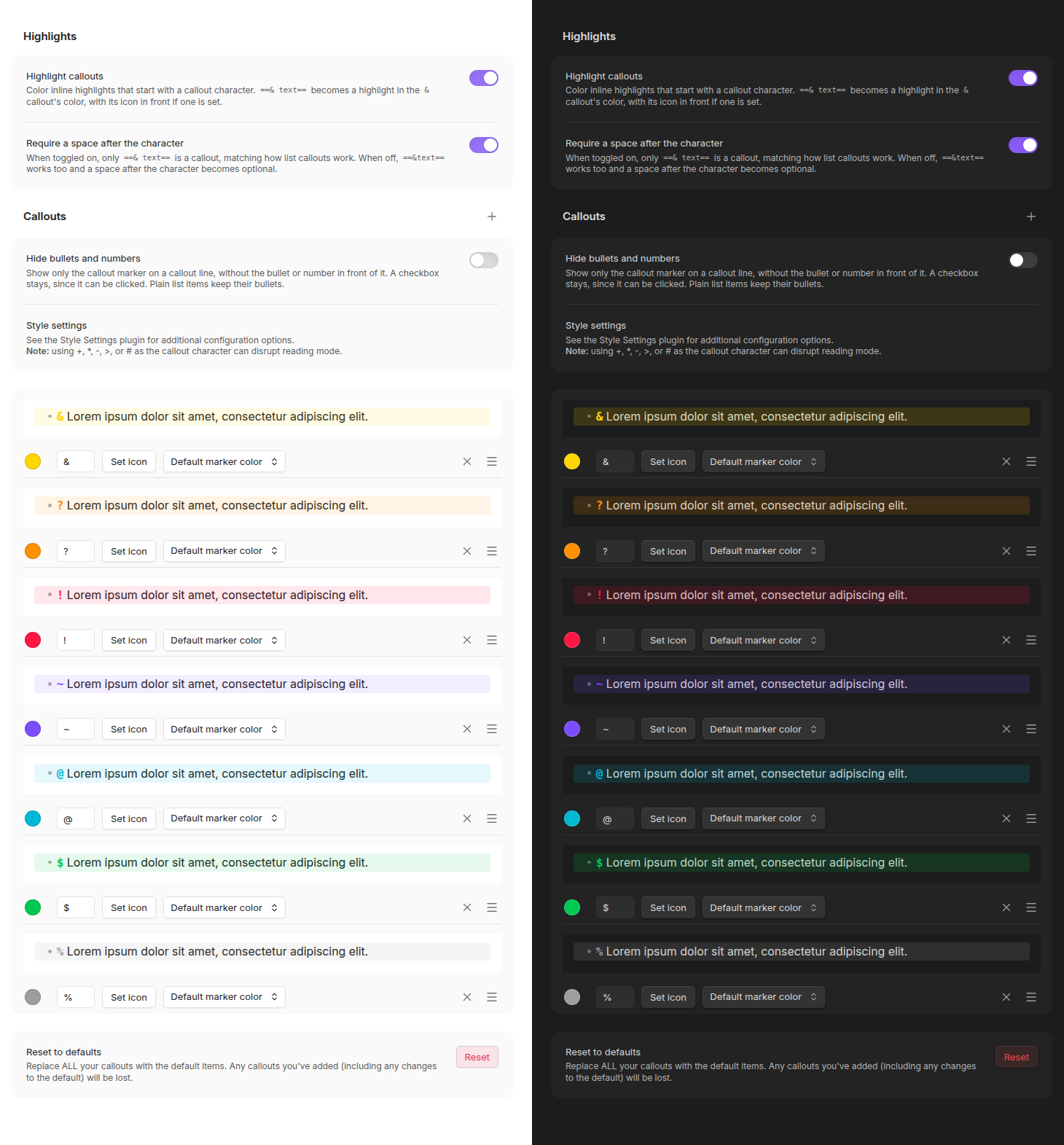
The plugin's settings tab in full: the highlight toggles, then the seven built-in callouts each with a preview, character, icon, color and marker color, and the reset at the bottom, shown in light and dark mode

Reset to defaults, at the bottom of the settings tab, restores the original seven. It replaces everything currently configured, so added callouts and edits to the built-in ones are lost. It asks for confirmation first and can't be undone.

The order matters: it is the order the cycling commands below step through.

Commands

Each command can be given a hotkey from Settings → Hotkeys. All three act on every line a selection touches, skipping lines that aren't list items, and one undo reverts them all.

Command What it does
Next callout / Previous callout Steps the line through the callout list in the order the settings tab shows. A plain list item is part of the cycle: stepping off either end leaves a plain list item, so overshooting wraps around instead of stranding the line, and the two directions are exact inverses.
Remove callout Strips the callout character from the current line, leaving the list item behind.

Support for custom icons

Any SVG in your vault's .obsidian/icons folder is registered as an icon and appears in the picker alongside the ones Obsidian ships. A file named My Fancy Icon.svg gets the icon name my-fancy-icon.

This is the same folder Iconize uses, so a vault already keeping icons there needs no changes.

Icons are read when the plugin loads, so restart Obsidian or toggle the plugin after adding files. A name that an Obsidian icon already uses is skipped rather than replaced, and a file that is not usable SVG is skipped with a note in the console.

Migrating from List Callouts

This fork uses a new plugin id, so Obsidian treats it as a separate plugin and your existing List Callouts settings won't carry over on their own.

If the original plugin's settings are still in your vault, the settings tab offers an Import from List Callouts button that copies them over.

The Import from List Callouts row at the top of the settings tab, shown in light and dark mode

Once migrated, disable or delete the old plugin.

Development

See docs/DEVELOPMENT.md for building the plugin and docs/TESTING.md for running the test suite.

License

GPL-3.0

If this plugin is useful to you, please consider buying me a coffee.

Similar Plugins

info
• Similar plugins are suggested based on the common tags between the plugins.
Additional Icons
3 years ago by Matthew Turk
Add additional iconsets to Obsidian
aDHL
a year ago by tine-schreibt
The Dynamic Highlights Plugin, but with hotkeys, more options and sorting; works well with Highlightr.
Admonition
5 years ago by Jeremy Valentine
Adds admonition block-styled content to Obsidian.md
Advanced Codeblock
4 years ago by Lijyze
An obsidian plugin that give additional features to code blocks.
Apple Books - Import Highlights
3 years ago by bandantonio
⚡️Fastest Apple Books highlights importer to Obsidian 🗄️ The only one protecting your own reflections across imports 🎨 Fully customizable
Apple Books Highlights
4 years ago by Atif Afzal
Sync your Apple Books highlights in Obsidian
Beautitab
3 years ago by Andrew McGivery
A plugin for Obsidian.MD that creates a customizable new tab view with beautiful backgrounds, quotes, search, and more.
Better Live Preview Image
a month ago by Dong Yang
Better Live Preview image editing for Obsidian
Better Order List
3 years ago by Boninall
Blockier
3 years ago by blorbb
An Obsidian.md plugin for easier block editing.
Book Reader
a month ago by EltonLabs
Read EPUB, FB2 and PDF books directly inside Obsidian — a beautiful, distraction-free book reader with text highlighting, notes, and reading progress that syncs into your vault. Works on both desktop and mobile (Windows, macOS, Linux, Android, iOS).
Callout Copy Buttons
2 years ago by Aly Thobani
An Obsidian plugin that adds copy buttons to callout blocks in your notes.
Callout Integrator
4 years ago by
A plugin for Obsidian to allow the integration of long blocks of text into callouts.
Callout Manager
4 years ago by eth-p
An Obsidian.md plugin that makes creating and configuring callouts easy.
Callout menu
2 years ago by Anareaty
Callout Studio
2 months ago by niv20
Callout Studio is the only callout plugin you'll ever need to download. It offers regular callouts, inline callouts, and callout headings. Plus, you can easily design your own custom styles!
Callout Suggestions
2 years ago by Casey Fryer
Obsidian Plugin for autocompleting callouts.
Callout Toggles
2 years ago by Aly Thobani
An Obsidian plugin to quickly add, change, or remove callout wrappers in your notes.
CalloutX
2 years ago by br4in
An Obsidian plugin that allows you to view, manage, and customise callout icons in your vault.
Canvas Daily Note
3 years ago by Andrew McGivery
A plugin for Obsidian that allows you to add a daily note node to the canvas that will always show todays note.
Chronobars
15 days ago by Daniel Hidefjäll
Create time-based progress bars in Obsidian
Citation Callouts
a year ago by Michael Marvive
Obsidian Plugin that formats a quote with a citation in a custom callout
Cloze
3 years ago by Vikki
A plugin for Obsidian which enables converting highlights, underlines, bolded texts, or any selected texts into clozes.
Commander
3 months ago by jsmorabito
Commander - Obsidian Plugin | Add Commands to every part of Obsidian's user interface
Comments
a year ago by Jasper Surmont
Custom Classes
4 years ago by Lila Rest
A minimal Obsidian plugin that allows you to add your own HTML classes to chosen Markdown elements directly from your notes.
Custom Sidebar Icons
2 years ago by RavenHogWarts
Custom Icons
Custom Slides
a year ago by David V. Kimball
Customize Obsidian's Slides core plugin's navigation, styles, and behavior.
Custom Theme Studio
a year ago by @gapmiss
An Obsidian.md plugin to create and tweak custom themes with live CSS editing, element styling, and instant previews. All without leaving Obsidian.
Dragger
3 months ago by ariestar
An Obsidian plugin for dragging and rearranging any block.
Editing Toolbar
4 years ago by Cuman
An obsidian toolbar plugin, modified from the Cmenu plugin
Emoji Magic
4 years ago by simplgy
Makes it easier to add emojis using an improved keyword search
Enhanced Annotations
3 years ago by ycnmhd
Extract Highlights
6 years ago by Alexis Rondeau
Manage your highlights in Obsidian by easily creating, removing and exporting them.
Floating Highlights
4 years ago by Karthik S Raju
This is a plugin for obsidian which highlights a block of text or a word as you scroll down while reading.
Focus and Highlight
4 years ago by BO YI TSAI
A plugin for obsidian to focus and highlight on a specific heading in Reading mode.
HamsterBase Official
3 years ago by HamsterBase
Highlight Helper
3 years ago by Chongmyung Park
Helper to collect highlight in Obsidian
Highlight Public Notes
5 years ago by dennis seidel
HiNote
a year ago by Kai
Add comments to highlighted notes, use AI for thinking, and flashcards for memory.
Icon Shortcodes
5 years ago by AidenLx
Obsidian Plugin: Insert emoji and custom icons with shortcodes
Icon Swapper
5 years ago by mgmeyers
Allows swapping out Obsidian's icons
Iconic
2 years ago by Holo
Customize your icons and colors directly from the Obsidian UI, including tabs, files & folders, bookmarks, tags, properties, and ribbon commands.
Iconize
5 years ago by FlorianWoelki
Simply add icons to anything you want in Obsidian.
Iconoir Icons
3 years ago by @gapmiss
A plugin for creating customized icons in Obsidian.md
Icons
6 years ago by Camillo Visini
Add icons to your Obsidian notes – Experimental Obsidian Plugin
ICOR for Life - PDF Annotation
14 days ago by Thomas Roedl
Highlight text or draw a box on a PDF and get a note in the vault for it, with a deep link back, a card on any canvas by drag and drop, and a sidebar of every highlight in the open PDF. Part of the ICOR for Life suite.
Image Preview on Icon Hover
2 years ago by rama1997
Plugin for Obsidian that add image popups when hovering over various icons in the user interface
InfoFlow
2 years ago by RockieStar Inc.
Obsidian plugin for InfoFlow.app - This plugin integrates InfoFlow with Obsidian, allowing you to sync your saved articles, web pages, notes, and highlights directly into your Obsidian vault.
Inline Admonitions
3 years ago by Scott Tomaszewski
Kindle Highlights
3 years ago by Hady Osman
Sync your Kindle notes and highlights directly into your Obsidian vault
Kindle Highlights Import
a year ago by Leon Luttenberger
Plugin for Obsidian that allows users to import Kindle highlights into their Obsidian vault.
Kobo Highlights Importer
5 years ago by Flavio Cordari
KoReader Highlight Importer
2 years ago by Tahsin Kocaman
Imports highlights and metadata from KoReader into Obsidian notes
List Callouts
4 years ago by mgmeyers
Create callouts in lists in Obsidian.
MantouAI
3 years ago by Morino Pan
MantouAI—— 让Obsidian变身智能助手
MatchSyntax
a year ago by Eda
An Obsidian plugin that lets you write "regex-like" syntax to search the contents of a note, including part-of-speech tagging and (limited) fuzzy matching.
Material Symbols
4 years ago by Cristoph Berane
Mermaid Icons
7 months ago by toshs
Obsidian plugin enabling the use of icons in Mermaid diagrams.
Metadata Icon
3 years ago by Benature
change metadata entry icon
MP Publisher
3 months ago by joeytoday
自定义主题预览,并发布到公众号草稿箱。
Multiplatform Highlights Importer
2 years ago by wwwkieran
Import and consolidate highlights from different reading sources. Supports reconciling books across reading sources.
My SVGs
8 months ago by Omar Badawy
An Obsidian plugin that Registers your own SVGs into Obsidian's global icon library for use with other plugins or however you want.
Natural Language Syntax Highlighting
3 years ago by artisticat
Highlight adjectives, nouns, adverbs, verbs, and conjunctions in Obsidian.md
New 3D Graph
a year ago by Aryan Gupta
Visualize your vault in 3D with a powerful, highly customizable, and filterable graph.
Note Favicon
2 years ago by mdklab
Obsidian plugin – Show Favicon from Metadata
Obsidian Columns
4 years ago by Trevor Nichols
Pathfinder 2E Action Icons
3 years ago by Thiago Coutinho
Obsidian plugin for easily insertind the Pathfinder 2E Action icons
PDF Highlights
6 years ago by Alexis Rondeau
Extract highlights, underlines and annotations from your PDFs into Obsidian
PDF++
4 months ago by ryotaushio
PDF++: the most Obsidian-native PDF annotation & viewing tool ever. Comes with optional Vim keybindings.
PDF++ Exporter
2 months ago by jldiaz
Pinned Tabs
a month ago by NameIsKyro
Chrome-style compact pinned tabs for Obsidian with custom icons, smooth movement, and accidental-close protection.`
Pixel Pets
a year ago by Lucas Jin
Adds cute pixel pets to Obsidian.
Plugin Groups
4 years ago by Mocca101
A plugin that allows you to easily group and manage your other plugins in Obsidian.
Pocketbook Cloud Highlight Importer
3 years ago by Lena Brüder
Imports highlights and notes from books stored in the pocketbook cloud to your obsidian vault
Power Editor
2 months ago by Power Plugins
Format any note from a toolbar, selection bubble, or slash menu: WYSIWYG editing, block drag handles, image resizing, dictation, and AI edits, all staying plain Markdown.
Raindrop Highlights
4 years ago by kaiiiz
An Obsidian.md plugin that syncs highlights from Raindrop.
Readavocado Sync
4 years ago by Cyrus Zhang
Readavocado obsidian plugin to sync your favorite highlights.
Readwise Community
5 years ago by renehernandez
Sync Readwise highlights into your obsidian vault
Root Folder Context Menu
3 years ago by mnaoumov
Obsidian Plugin that enables context menu for vault root folder
Set View Mode per Note
3 years ago by Alex Davies
Use YAML frontmatter to specify a view mode per note.
Sidebar Highlights
a year ago by trevware
Simple Banner
a year ago by Sandro Ducceschi
Visually enhance your Obsidian notes with a customizable banner. Supports icons and time/date display.
Simple Columns
a year ago by Josie
An Obsidian plugin that lets you create easily resizable and customizable columns in your notes.
Simple Mention
4 years ago by der-tobi
Obsidian plugin for mentioning people
Tag Formatter
3 years ago by snsvrno
Configurable Obsidian plugin that hides parent tags.
Text Wrapper
4 years ago by smx0
Plugin for Obsidian
TODO Highlighter
a year ago by Nuraly Dyussenov
Obsidian Plugin that formats the exact string TODO, so it can be easily seen in your notes.
Unicode Search
4 years ago by BambusControl
Simple Unicode character search for Obsidian.md
Vim Yank Highlight
3 years ago by Aleksey Rowan
Highlight yanked text in Vim mode. Enjoy that subtle animation you've missed so much.
Vocabulary Highlighter
3 years ago by eatgrass
Highlight English words according to the frequency with Obsidian
WuCai highlights Official
3 years ago by 希果壳五彩
WuCai highlights Official, for Sync highlights into your obsidian notes