Plugins Annotations

by Andrea Alberti
5
4
3
2
1
Score: 58/100

Description

Category: Note Enhancements

The Plugins Annotations plugin enhances your note-taking experience by allowing you to create and manage annotations for specific parts of your notes. This plugin enables you to highlight important information, make connections between ideas, and organize your thoughts more efficiently. With Plugins Annotations, you can annotate individual lines, sentences, or paragraphs, making it easy to review and revisit your notes. The plugin also supports tagging and linking, allowing you to create a network of related annotations that aid in your research and learning process.

Reviews

No reviews yet.

Stats

30
stars
4,329
downloads
5
forks
686
days
49
days
70
days
1
total PRs
0
open PRs
0
closed PRs
1
merged PRs
23
total issues
6
open issues
17
closed issues
202
commits

Latest Version

2 months ago

Changelog

Change log

Bug fix

  • Correctly identify Obsidian appearance (light/dark theme) for displaying GitHub icon matched to the theme

Full changelog: https://github.com/alberti42/obsidian-plugins-annotations/compare/1.7.10...1.7.11

README file from

Github

Obsidian Plugins Annotations

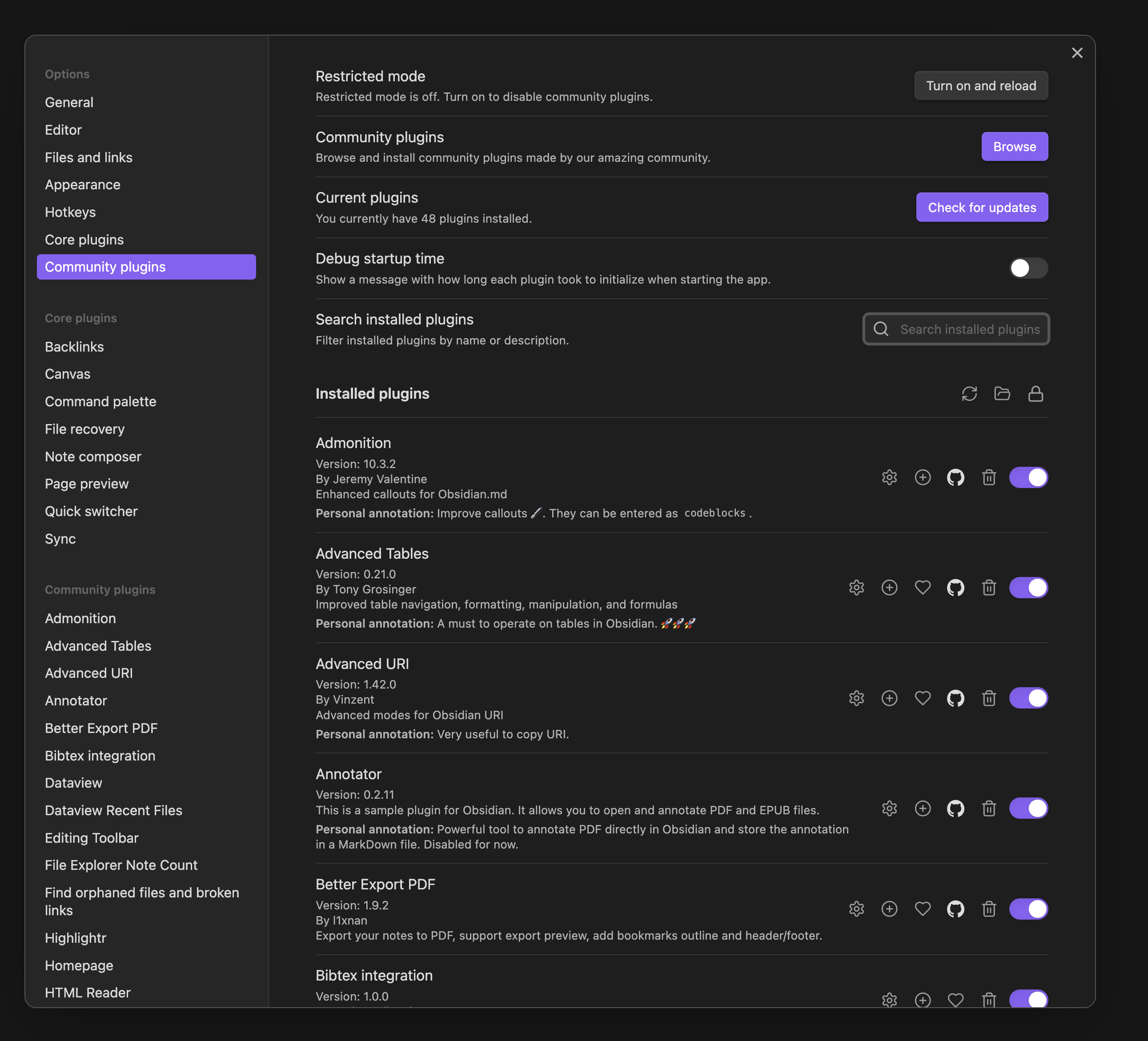
Obsidian Plugins Annotations is a plugin for Obsidian that allows users to add personal annotations to each installed plugin. This is particularly useful for keeping track of why certain plugins are installed and their specific use cases.

Features

  • Add personal annotations to any installed plugin in the settings pane.
  • Annotations can be formatted using Markdown and can include Obsidian links.
  • Annotations are saved persistently and can be edited at any time.
  • Annotations are displayed directly below the plugin information.
  • Detailed instructions how to edit the annotations are provided in the setting pane of the plugin.
  • Possible to lock the annotations with the lock button next to the title "Installed plugins". This feature is useful in combination with the toggle hiding the annotations fields where there is no user annotation yet.

Installation

The preferred method to install the plugin is to use the Community Plugins Preference pane in Obsidian.

Manual installation

  1. Download the latest release from the Releases page.
  2. Extract the downloaded package and copy only the following files to your Obsidian plugins folder: <vault>/.obsidian/plugins/plugins-annotations:
    • main.js
    • styles.css
    • manifest.json
  3. Enable the plugin in the "Community plugins" settings pane.

Usage

  1. Open the "Community plugins" settings pane.
  2. You will see a text area below each installed plugin where you can add your personal annotation.
  3. Annotations are automatically saved and will be displayed whenever you open the settings pane.

Screenshot

Screenshot of the setting pane showing installed plugins with annotations by the user

Development

To contribute to the development of this plugin, follow these steps:

  1. Fork the repository on GitHub.
  2. Clone your forked repository somewhere on your local machine:
    git clone https://github.com/your-username/obsidian-plugins-annotations.git
    
  3. Navigate to the cloned repository directory:
    cd obsidian-plugins-annotations
    
  4. Install the dependencies:
    npm install
    
  5. Build the plugin:
    npm run build
    
  6. Create a plugins-annotations folder in your Obsidian plugins directory:
    mkdir -p <vault>/.obsidian/plugins/plugins-annotations
    
  7. Copy or soft-link the compiled files from the dist folder to the plugins-annotations folder:
    # Copy files
    cp -r dist/* <vault>/.obsidian/plugins/plugins-annotations/
    
    # Or create a soft-link (on Unix-based systems)
    ln -s <path-to-cloned-repo>/dist <vault>/.obsidian/plugins/plugins-annotations
    
  8. Enable the plugin in Obsidian and start developing!

Donations

I would be grateful for any donation to support the development of this plugin.

Author

  • Author: Andrea Alberti
  • GitHub Profile: alberti42
  • Donations: Buy Me a Coffee

Feel free to contribute to the development of this plugin or report any issues in the GitHub repository.

Similar Plugins

info
• Similar plugins are suggested based on the common tags between the plugins.
Annotate Audio
a year ago by VidE
Annotator
5 years ago by Elias Sundqvist
A plugin for reading and annotating PDFs and EPUBs in obsidian.
Better Comment Toggle
3 years ago by Gino Valente
BookFusion
2 years ago by BookFusion
BookFusion Obsidian Plugin
Comments
a year ago by Jasper Surmont
Cubox
a year ago by delphi-2015
Cubox Official Obsidian Plugin
Custom Comments
8 months ago by Jack Chronicle
Adds a method to create custom methods to enclose comments
Enhanced Annotations
2 years ago by ycnmhd
Extract PDF Annotations
4 years ago by Franz Achermann
This is a plugin for https://obsidian.md. It extracts Annotations from PDF Files.
Feedly Annotations Sync
a year ago by Nick Felker
Download my Feedly annotations
HiNote
a year ago by Kai
Add comments to highlighted notes, use AI for thinking, and flashcards for memory.
Hypothes.is
5 years ago by weichenw
An Obsidian.md plugin that syncs highlights from Hypothesis.
ibook
3 years ago by bingryan
export mac ibook annotations/hightlights to obsidian vault
Image Converter
3 years ago by xRyul
⚡️ Convert, compress, resize, annotate, markup, draw, crop, rotate, flip, align images directly in Obsidian. Drag-resize, rename with variables, batch process. WEBP, JPG, PNG, HEIC, TIF.
Interlinear Glossing
3 years ago by Mijyuoon
An Obsidian plugin for interlinear glosses used in linguistics texts.
Markmind
5 years ago by Mark
A mind map, outline for obsidian,It support mobile and desktop
Media Slider
a year ago by Aditya Amatya
An obsidian plugin that helps to make slider for images, audios, videos, pdfs, markdown, etc in obsidian notes.
Note Annotations
a year ago by Jan Beck
Note Definitions
2 years ago by Dominic Let
Obsidian plugin for seamless viewing of personal definitions
Onyx Boox Annotation & Highlight Extractor
4 years ago by Akos Balasko
This tool extracts the highlights and the annotations from OnyxBoox Reading Notes txt files, and converts them to linked zettelkasten literature and permanent notes
PDF Highlights
5 years ago by Alexis Rondeau
Extract highlights, underlines and annotations from your PDFs into Obsidian
PDF Writer
a year ago by Jobelin Kom
Obsidian plugin To write and fill a PDF
PDF++
2 years ago by Ryota Ushio
PDF++: the most Obsidian-native PDF annotation & viewing tool ever. Comes with optional Vim keybindings.
Raindrop Highlights
4 years ago by kaiiiz
An Obsidian.md plugin that syncs highlights from Raindrop.
Readeck Importer
a year ago by Makebit
Import bookmarks from Readeck to Obsidian
Reading comments
3 years ago by BumbrT
Reading comments, for consuming books or large articles in markdown with https://obsidian.md/.
ShaahMaat-md
a year ago by Mihail Kovachev
Sidebar Highlights
10 months ago by trevware
SideNote
5 months ago by mofukuru
Obsidian plugin: Add comment on the part of sentence and refer in comment view.
Slide Note
3 years ago by Jinyan Xu
Timestamp Notes
4 years ago by Julian Grunauer
This plugin allows side-by-side notetaking with videos. Annotate your notes with timestamps to directly control the video and remember where each note comes from.
Xournal++
2 years ago by Jon Jampen
Obsidian plugin that seamlessly integrates Xournal++ for handwritten notes and annotations.