PDF++
4 months ago by ryotaushio
PDF++: the most Obsidian-native PDF annotation & viewing tool ever. Comes with optional Vim keybindings.
Markmind
5 years ago by Mark
A mind map, outline for obsidian,It support mobile and desktop
Annotator
5 years ago by Elias Sundqvist
A plugin for reading and annotating PDFs and EPUBs in obsidian.
Pandoc
5 years ago by Oliver Balfour
Pandoc document export plugin for Obsidian (https://obsidian.md)
Obsidian Enhancing Export
4 years ago by YISH
This is an enhancing export plugin base on Pandoc for Obsidian (https://obsidian.md/ ). It's allow you to export to formats like Markdown、Markdown (Hugo https://gohugo.io/ )、Html、docx、Latex etc.
Image in Editor
5 years ago by Ozan Tellioglu
This Obsidian plugin to view Images, Transclusions, iFrames and PDF Files within the Editor without a necessity to switch to Preview.
Banners
5 years ago by Danny Hernandez
An Obsidian plugin that adds banners to your notes
Text Extractor
4 years ago by Simon Cambier
A (companion) plugin to facilitate the extraction of text from images (OCR) and PDFs.
Pixel Banner
2 years ago by Justin Parker
🚩 Enhance your Obsidian notes with customizable banner images, including AI-generated designs and a curated store of downloadable banners. Transform your workspace with visually stunning headers that add context, improve aesthetics, and take your note-taking beyond the ordinary.
Mousewheel Image zoom
5 years ago by Nico Jeske
An Obsidian plugin that enables you to increase/decrease the size of an image by holding down a configurable key (defaults to left alt), hovering over an image in preview mode and scrolling.
Paste image rename
4 years ago by Reorx
Renames pasted images and all the other attachments added to the vault
Local images plus
4 years ago by catalysm, aleksey-rezvov, Sergei Korneev
This repo is a reincarnation of obsidian-local-images plugin which main aim was downloading images in md notes to local storage.
Clear Unused Images
5 years ago by Ozan Tellioglu
Obsidian plugin to clear the images that are not used in note files anymore
Image auto upload
5 years ago by renmu123
auto upload image with picgo
Image Toolkit
5 years ago by sissilab
An Obsidian plugin for viewing an image.
Docxer
2 years ago by Developer-Mike
🚀 Boost your productivity by previewing and converting Word files easily to markdown.
PDF Highlights
6 years ago by Alexis Rondeau
Extract highlights, underlines and annotations from your PDFs into Obsidian
Image Context Menus
5 years ago by NomarCub
Image Context Menus - Obsidian.md image context menus: copy, open in default app, show in system explorer, reveal in navigation context menu. Also Open PDF externally context menu.
Dynamic Views
25 days ago by churnish
Obsidian plugin that adds elegant grid and masonry card views for Bases.
Better PDF
6 years ago by MSzturc
Goal of this Plugin in to implement a native PDF handling workflow in Obsidian
Image Captions
4 years ago by Alan Grainger
Add captions to images with inline Markdown and link support. The caption format is compatible with the CommonMark spec and other Markdown applications.
Local images
5 years ago by catalysm, aleksey-rezvov
Featured Image
2 years ago by Johan Sanneblad
Obsidian plugin to automatically set a featured image property in your notes based on the first image, YouTube link, or Auto Card Link image found in your document. This allows you to create rich note galleries using Folder Notes and Dataview.
Copy document as HTML
4 years ago by mvdkwast
Obsidian plugin: copy document as HTML, including images
Image Gallery
4 years ago by Luca Orio
A zero setup masonry image gallery for Obsidian
Image Window
5 years ago by Jeremy Valentine
Adds the ability to open images in new Obsidian windows
Image Layouts
4 years ago by Luke Chadwick
Link Converter
5 years ago by Ozan Tellioglu
Obsidian Plugin to scan all your links in your vault and convert them to your desired format.
Imagine
a month ago by albusguo
A comprehensive image management plugin for managing, inserting, resizing, viewing, and batch processing images.
Marker PDF to MD
2 years ago by L3N0X
Make use of different AI models to convert your pdfs into markdown with perfect ocr, latex formulas, tables, images and more! Supports Mistral AI OCR (free) and self hosted variants!
Extract PDF Annotations
5 years ago by Franz Achermann
This is a plugin for https://obsidian.md. It extracts Annotations from PDF Files.
Wikilinks to MDLinks
6 years ago by Agatha Uy
An Obsidian md plugin which allows for the conversion of individually selected wikilinks to markdown links, and vice versa.
Book Reader
a month ago by EltonLabs
Read EPUB, FB2 and PDF books directly inside Obsidian — a beautiful, distraction-free book reader with text highlighting, notes, and reading progress that syncs into your vault. Works on both desktop and mobile (Windows, macOS, Linux, Android, iOS).
PDF break page
3 years ago by CG
Plugin for obsidian that adding shortcuts to create breakpages for pdf exports.
Awesome Image
4 years ago by AwesomeDog
Obsidian image plugin: zoom, pan, rotate and gallery-preview images, then auto-organize them — download remote images, deduplicate by SHA-256 into a content-addressed media folder, fix Markdown image links, convert wikilink embeds, find unused images and export notes with their images.
Awesome Reader
4 years ago by AwesomeDog
Make Obsidian a proper Reader.
Avatar
3 years ago by froehlichA
An obsidian plugin for displaying an avatar image in front of your notes.
Image Inline
3 years ago by Zackary W
convert images into base64 encoded strings and embed them directly within your notes
Media Slider
2 years ago by Aditya Amatya
An obsidian plugin that helps to make slider for images, audios, videos, pdfs, markdown, etc in obsidian notes.
Image Tools
2 years ago by Andrey Serov
Local Media Embedder
2 years ago by seyf1elislam
an obsidian plugin allows you to Embed videos and images and audios from your local device in your notes.
Metadata Icon
3 years ago by Benature
change metadata entry icon
Image OCR
3 years ago by kaffarell
Runs ocr on pasted images and posts result in details box. This allows to search in images.
Media Sync
3 years ago by fnya
Media Sync is Plugin for Obsidian
Image2LaTEX
3 years ago by Hugo Persson
This is a plugin for obsidian that will read your latest copied image from clipboard and generate math latex from it
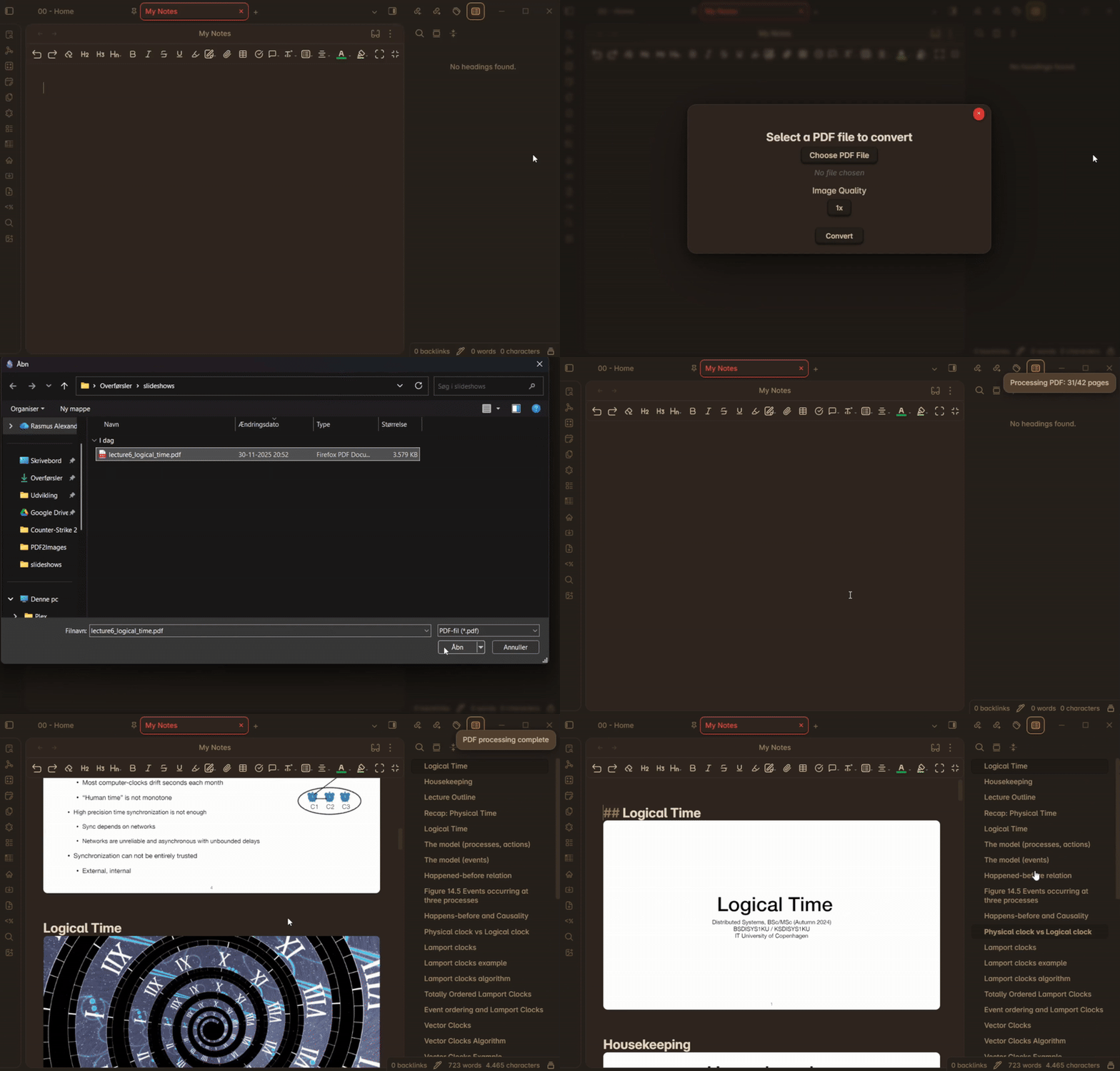
PDF Folder to Markdowns
a year ago by CrisHood
Convert a folder of PDFs into a folder of Markdown files with embedded PDFs. This plugin is useful for users who want to migrate their PDF notes from different apps (e.g., Boox) or organize their reference materials inside Obsidian.
Emo
4 years ago by yaleiyale
Use image/file hosting in Obsidian by clipboard or draging file. Obsidian 图床聚合 & Github上传器
Lite Gallery
2 years ago by Jordan Poles
O2
4 years ago by haril song
Converts obsidian markdown syntax to other platforms.
LaTeX to unicode converter
3 years ago by fjdu
Convert LaTeX commands into unicode sequences
Image To Lskypro
3 years ago by NekouTarou
支持直接上传图片到图床Lsky,基于https://github.com/renmu123/obsidian-image-auto-upload-plugin.git改造。
Image Magician
3 years ago by luxmargos
This is a plugin for Obsidian (https://obsidian.md). Supports viewing and exporting various image formats using ImageMagick.
Cloudinary
3 years ago by Uday Samsani, Jordan Handy
Cloudinary plugin for content uploading and transformation.
Qiniu Image Uploader
3 years ago by Jade Zheng
Uploads images from your clipboard to qiniu.com and embeds uploaded image to your note.
Markdown Image Caption
3 years ago by Hananoshika Yomaru
Generate image caption easily. Completely markdown-based.
Text Conversions
3 years ago by Juan D Frias
Text conversions for Obsidian
Math Indicator Changer
2 years ago by Ori Replication
Image Picker
2 years ago by ari.the.elk
Outline Converter
2 years ago by masaki39
Convert outline to continuous text.
Paperless
2 years ago by Talal Abou Haiba
Image Helper
3 years ago by Chongmyung Park
Context menu to convert a image to another format in reading view in Obsidian.md
Tiff Viewer
3 years ago by Jan Ullmann
An obsidian plugin to easily convert tiff files to png so that they can be displayed in obsidian
Convert to Markdown
a month ago by notenerd
Convert PDF, Word, PowerPoint, Excel, and image files in your vault into Markdown notes with images and dropped assets listed alongside the output. Process everything fully offline on your machine — no cloud, service, external binary, or API key required; documents parse deterministically while images use local OCR with confidence reporting.
Image Metadata
2 years ago by alexeiskachykhin
Adds image metadata editing capabilities to Obsidian
Display Relative Path Img
3 years ago by Dyc
Display the relative path image referenced by <img> in Obsidian without altering the original document
Paste Image Into Property
2 years ago by Nito
Qiaomu Reader
13 days ago by 向阳乔木
已上架 Obsidian 社区插件市场:搜索 Qiaomu Reader 安装。Read EPUB, PDF and MOBI, highlight passages, keep linked notes and ask optional AI.
Memories
8 months ago by DIMFLIX
Plugin to display a gallery directly in a note.
BibDesk Integration
2 years ago by Andrea Alberti
Integration of Obsidian with bibtex files
Image to HTML
a year ago by 0x1DA9430
A plugin for Obsidian that converts pasted images to HTML format instead of Obsidian's wikilink or Markdown format
Enhanced Image
2 years ago by situ2001
Enhance the experience of image in Obsidian, seamlessly.
Image Uploader For Note
2 years ago by Yunfi
Upload images in a note, and if the image is only used in this note, delete it from vault.
Ffmpeg Converter
2 years ago by MrAnyx
Convert your assets into other formats. Convert, Compress and Optimize your vault
HandLayers
a month ago by [email protected]
Handwriting OCR
a year ago by ikmolbo
Transform handwritten documents and scanned images into editable text with Handwriting OCR's AI-powered handwriting to text conversion.
PDF to Markdown Native
a month ago by Andres Herle Lang
Fast Image Auto Uploader
2 years ago by Longtao Wu
upload images from your clipboard by gopic
Arweave Uploader
2 years ago by makesimple
Third Mind Reader
6 days ago by Rohan Bell
An opinionated EPUB & PDF reader for Obsidian. Read, annotate, and chat with your books. Every highlight stays in your vault as plain markdown, linked back to where it came from. Desktop and mobile, AI optional.