Text Finder

by hafuhafu
5
4
3
2
1
Score: 43/100

Description

Category: Note Enhancements

The Obsidian Text Finder plugin is a handy tool for those who want to enhance their search-and-replace capabilities within Obsidian. It brings a feature-rich search and replace window, similar to what users are accustomed to in VSCode, but directly within the Obsidian editor mode. Users can search and replace text in their current Markdown file, with options for case sensitivity and regular expressions, adding flexibility for complex search needs. Additionally, the plugin highlights all matches and shows a count, making it easy to review search results at a glance. Customizable CSS options also allow for personalization, from styling match highlights to adjusting the search window's position. This plugin is ideal for users seeking a powerful, customizable text-finding experience within Obsidian.

Reviews

No reviews yet.

Stats

52
stars
12,152
downloads
2
forks
704
days
1
days
5
days
2
total PRs
1
open PRs
0
closed PRs
1
merged PRs
14
total issues
8
open issues
6
closed issues
34
commits

Latest Version

6 days ago

Changelog

Features

• Search the rendered body in reading mode, with case sensitivity, regular expressions, match highlights and match navigation (replacement is not available in reading mode) • Reading mode now uses the plugin's finder by default; switch back to Obsidian's native search in settings • Customize the find and replace toolbars: choose which actions appear, reorder them by dragging or with the move buttons, and set each action to be inline, under "More", or hidden. Hidden actions still work through commands and hotkeys • Reorganized plugin settings into Find, Replace, Search history and Toolbar tabs

Fixes

• Fixed the finder staying at an enlarged width after the match count shrank or the query was cleared • Fixed "Open search" in reading and preview mode to use the current view's native search, and to read the live preview preference safely

Improvements

• Reading-mode search waits for a full render with a timeout, and offers retry and native-find fallbacks when navigation fails or the environment is unsupported • Waiting and failure messages now appear as a lightweight hint near the search box instead of inside the match count • More robust reading-mode navigation and highlighting, with expanded tests and developer documentation


新功能

• 阅读模式查找:在阅读模式下搜索呈现的正文,支持大小写、正则、匹配高亮和导航(阅读模式不支持替换) • 阅读模式默认使用插件查找,可在设置中切回 Obsidian 原生查找 • 自定义查找与替换工具栏:可选择显示的功能,拖拽或用按钮调整顺序,并设为常驻、收纳到“更多”或隐藏;隐藏后仍可通过命令和快捷键使用 • 设置页按功能分为查找、替换、搜索历史、工具栏四个标签页

修复

• 修正匹配数量变少或清空查询后,搜索框宽度未恢复的问题 • 修正阅读和预览模式下“打开查找”未使用当前视图原生查找的问题,并安全读取实时预览设置

改进

• 阅读模式查找会等待完整渲染,并在超时时提示;导航失败或环境不支持时提供重试与原生查找入口 • 等待和失败提示改为搜索框附近的轻量提示,不再占用匹配数量的位置 • 提升阅读模式导航与高亮的稳定性,并补充测试与开发文档

README file from

Github

Obsidian Text Finder

English
中文说明

This plugin for Obsidian(https://obsidian.md).
Provides a VSCode-like finder: search/replace in editing mode and rendered-text search in reading mode.

Feature

Search or replace the current Markdown file in editing mode, or search its rendered body in reading mode.

  • Search/Replace in current file
  • Highlight matching text
  • Show number of matches
  • Supports regular expressions
  • Supports case sensitivity
  • Input history

To Do

  • Search/Replace in Selection

ScreenShot
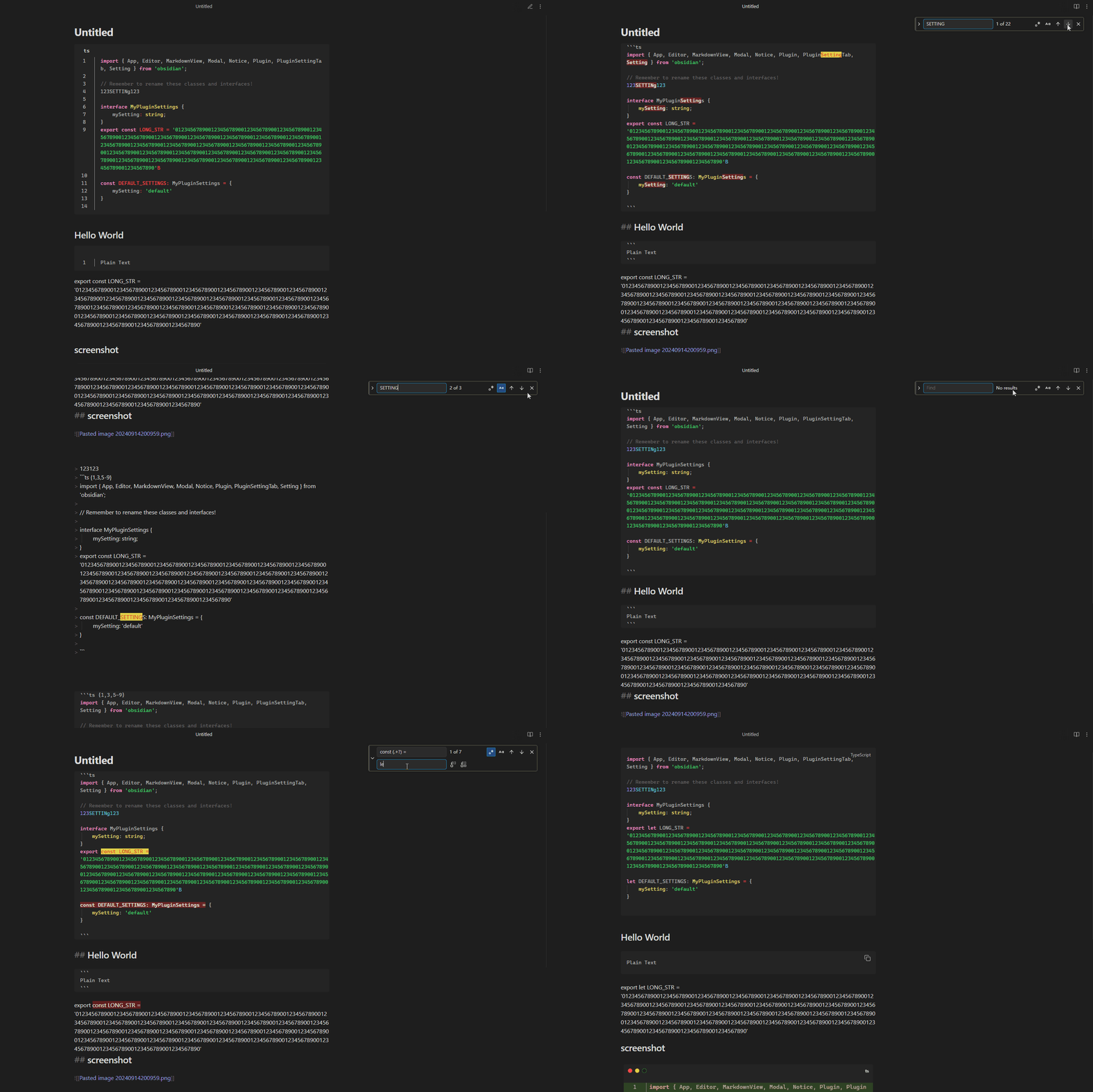
Text Finder

How to use

Install

Community plugins

  • Search for "text finder" in the community plugins and install it.
  • Enable plugin in Obsidian setting.

BRAT

  • Install the BRAT Plugin
  • Execute command Obsidian42 - BRAT: Add a beta plugin for testing
  • Paste the URL of this repository and confirm
  • Enable plugin in Obsidian setting.

Releases

  • Download main.js, styles.css, manifest.json in the latest release
  • Copy over main.js, styles.css, manifest.json to your vault VaultFolder/.obsidian/plugins/text-finder/.
  • Enable plugin in Obsidian setting.

Basic usage

  • Assign shortcuts to Text Finder commands in Obsidian's hotkey settings.
  • Run “Open search in current file”, enter a query, and use the previous/next buttons or Enter to navigate matches.
  • In editing mode, use “Open search & replace in current file” for replacements. Press Escape or the close button to hide the finder.
  • Run “Open search in current file” in reading mode for case-sensitive search, regex, highlights and match navigation. Replacement is not available.
  • Searches rendered body text, not hidden Markdown markers. Embedded notes and some plugin-generated content are not supported.
  • If native find still opens after upgrading, disable “Using Obsidian's native search in reading” in settings.

Regular expression replacement

Enable regular expression mode to use capture groups in replacements: for example, find (foo)(bar) and replace with $2-$1 to produce bar-foo.

  • Use $1, $2, etc. for capture groups, $<name> for named groups, $& for the matched text, and $$ for a literal dollar sign.
  • When the escape-character setting is enabled, \n and \t in regex replacements become a newline and a tab; \\ inserts a literal backslash.
  • In ordinary text mode, replacement text is literal: dollar templates and backslash escapes are not expanded.
  • Zero-width matches, such as ^ on its own, are currently excluded from search and replacement.

Split views

  • Each finder operates on the Markdown view where it was opened. Split views, including two views of the same file, keep their own current match.
  • Opening another file in that view preserves the query and updates the results.
  • Editing updates matches without automatically changing your reading position. Replacement is available only in editing mode.

Search history

  • Run “Show search history” to view, reuse, copy or delete queries. Use Up/Down in the search field to browse history.
  • Leading/trailing spaces, newlines and tabs are preserved. Continuous navigation with the same query counts as one use.
  • Keep 1–200 entries and sort by creation time, last use or usage count. Lowering the limit removes lower-priority entries.
  • Disabling history preserves existing entries but stops recording new queries, updating usage and Up/Down history navigation.
  • Read/save failures display a notice. Follow its instructions; unsaved changes may be lost on exit.

Customize Style

Use CSS snippets or Style Settings Plugin to customize styles.

Example Style Settings configuration file.

Here are some CSS snippets examples.

Match colors (editing and reading modes)

body {
	--nya-match-bgColor: #ea5c0054;
	--nya-match-color: inherit;
	--nya-match-curbgColor: #ffcc00;
	--nya-match-curColor: #000000;
}

Match Highlight and Current Item (editing mode)

.nya-text-finder-match {
	border-radius: 2px;
	box-shadow: 0 0 0 1px rgb(60, 115, 75);
	background-color: inherit;
	color: inherit;
}

.nya-text-finder-match-current {
	box-shadow: 0 0 0 1px rgb(187, 187, 187);
	background-color: rgba(255, 170, 0, 0.8);
	color: black;
}

Change Position

Top Left

.nya-finder {
	right: unset !important;
	left: 376px;
}

Bottom Right

.nya-finder {
	top: unset !important;
	bottom: 72px;
}

Bottom Left

.nya-finder {
	top: unset !important;
	right: unset !important;
	left: 376px;
	bottom: 72px;
}

Change the border color when focused

body {
	--nya-focus-border-color: #39c5bb;
}

Change the color of the collapse button

.nya-toggle {
	border-left: 3px solid red !important;
}

Developer documentation

For source builds, design notes, testing and acceptance, see the developer documentation.

Similar Plugins

info
• Similar plugins are suggested based on the common tags between the plugins.
Another Quick Switcher
5 years ago by tadashi-aikawa
This is an Obsidian plugin which is another choice of Quick switcher.
Arcane Obfuscate
2 years ago by Shusako
Obfuscate text in Obsidian.md with an arcane runic effect.
Blockreffer
2 years ago by tyler.earth
An Obsidian plugin to search and embed blocks with ^block-references (aka ^block-ids)
Book Search
4 years ago by anpigon
Obsidian plugin that automatically creates notes by searching for books
Card View Switcher
5 years ago by qawatake
An Obsidian plugin to provide a quick switcher with card view
Clipboard Manager
a year ago by Ayush Raj
The clipboard obsidian plugin
Clipper Catalog
2 years ago by Greg K.
A catalog view that provides a powerful interface for all your clipped web articles and content. Easily organize, search, and manage your web clippings within your vault.
CmdSearch
2 years ago by SpaceshipCaptain
Colored Tags
3 years ago by Pavel Frankov
Colorizes tags in different colors.
Colored Text
3 years ago by Erinc Ayaz
Colorizelt
2 years ago by Artsem Holub (WiNE-iNEFF)
Easy color and clear selected text
Contacts
4 years ago by vbeskrovnov
With this plugin, you can easily organize and manage your contacts within Obsidian. Simply create a note with contact information and use the plugin's features to quickly search, and sort through your contacts. Contacts plugin also helps you to remember birthdays of your contacts and keeps track of the last time you met them.
Copy Search URL
4 years ago by Carlo Zottmann
A plugin for Obsidian (https://obsidian.md) that adds a menu entry to its search view for copying the Obsidian search URL.
Core Search Assistant
5 years ago by qawatake
An Obsidian plugin to enhance built-in search: keyboard interface, card preview, bigger preview
Dynamic Text Concealer
3 years ago by Matt Cole Anderson
Obsidian.md Plugin to conceal or replace user configured text patterns in Live Preview and Read Mode.
EasyLink
a year ago by isitwho
Select text in your obsidian editor to find the most similar content from other notes and easily create links.
Emoji Magic
4 years ago by simplgy
Makes it easier to add emojis using an improved keyword search
External Link Helper
4 years ago by Jhonghee Park
Obsidian plugin for link suggestion
Find and replace in selection
6 years ago by Dmitry Savosh
Obsidian plugin. Find and replace in selection.
Floating Search
4 years ago by Boninall
A plugin for searching text by using Obsidian default search view.
Fuzzy Chinese Pinyin
3 years ago by lazyloong
Giphy
2 years ago by LuCrypto
Global Search and Replace
4 years ago by Mahmoud Fawzy Khalil
A plugin to do a global search and replace in all your Obsidian vault files.
Image Picker
2 years ago by ari.the.elk
Jelly Snippets
4 years ago by Spencer Gouw
A simple text snippets plugin for Obsidian.md. BACKUP SNIPPETS BEFORE UPDATING.
Journal View
2 months ago by RUverse
A journal view for Obsidian
Khoj
4 years ago by Debanjum Singh Solanky
Your AI second brain. Self-hostable. Get answers from the web or your docs. Build custom agents, schedule automations, do deep research. Turn any online or local LLM into your personal, autonomous AI (gpt, claude, gemini, llama, qwen, mistral). Get started - free.
Lemons Search
2 years ago by Moritz Jung
An Obsidian plugin that offers a fast fuzzy finder based quick switcher with preview.
Local REST API with MCP
5 months ago by Adam Coddington
A secure REST API and Model Context Protocol (MCP) server for your vault.
Media Companion
2 years ago by Nick de Bruin
Mention Autocomplete
3 months ago by Darren Zheng
Type `@` to instantly search and link any note in your vault — with full-text search, rendered preview, and smart sentence extraction.
Moulinette Search for TTRPG
3 years ago by Moulinette
Plugin for Obsidian
NetClip
2 years ago by Elhary
this plugin is for Obsidian that allows you to browse the web and clip webpages directly into your vault.
Note Codes
a year ago by Ezhik
Reference your Obsidian notes from anywhere with simple 4-character codes.
Notebook Navigator
3 months ago by Johan Sanneblad
A better file browser and calendar inspired by Apple Notes, Bear, Evernote and Day One.
Omnisearch
4 years ago by Simon Cambier
A search engine that "just works" for Obsidian.
Oriko
2 months ago by trevware
A pannable, zoomable wall of your web clippings. Sort them into grids, filter by any property, and clip from your phone. Media is downloaded into your vault, so clippings keep their images and videos even if the source page is deleted.
Power Search
5 years ago by Aviral Batra
Quiet Outline
5 years ago by the_tree
Improving experience of outline in Obsidian
Regex Mark
2 years ago by Mara-Li
Relative Find
5 years ago by phibr0
Remove Newlines
2 years ago by Elias Jaffe
A plugin for Obsidian.md which removes newlines and blank lines from selected or pasted text.
Search Everywhere
5 years ago by Mom0
Obsidian Search Everywhere Plugin
Search In Canvas
2 years ago by Boninall
Search Templates Library
3 years ago by Pentchaff
Obsidian plugin that allows to store searches templates for later use, and displays search results both in the search view and graph view.
Segerlab
6 months ago by Semyon Kononchuk
Renders calculator views within Obsidian notes from JSON data copied from the Segerlab app.
Semantic Search
3 years ago by bbawj
Semantic search for Obsidian.md
Settings Navigator
17 days ago by Lawrence Lee
An Obsidian plugin that adds browser-style history navigation, quick plugin management, and quality-of-life improvements to the Settings modal.
Settings Search
5 years ago by Jeremy Valentine
Adds a search bar to Obsidian.md's settings
Sift
a month ago by disasta-g
Search your notes with substring matching, operators, path and date filters, and ranked results in a large overlay.
Simple CanvaSearch
3 years ago by ddalexb
Snippetsaurus
2 years ago by Christian Humbert
Tag Wrangler
6 years ago by PJ Eby
Rename, merge, toggle, and search tags from the Obsidian tag pane
Text Conversions
3 years ago by Juan D Frias
Text conversions for Obsidian
Text Dataset Aid Plugin
4 years ago by Conner Ohnesorge
This is a obsidian plugin to help with the creation of personal jsonl datasets for text generation models.
Text expand
6 years ago by MrJackphil
A simple text expand plugin for Obsidian.md
Text Extractor
4 years ago by Simon Cambier
A (companion) plugin to facilitate the extraction of text from images (OCR) and PDFs.
Text Focus
3 years ago by usysrc
Focus the text area when opening a new note.
Text Format
5 years ago by Benature
Format seleted text in Obsdidian.md
Text Generator
5 years ago by Noureddine Haouari
Text Generator is a versatile plugin for Obsidian that allows you to generate text content using various AI providers, including OpenAI, Anthropic, Google and local models.
Text Snippets
6 years ago by Ariana Khitrova
Snippets plugin for obsidian
Text Transform
3 years ago by ipshing
Text Transporter
5 years ago by TfTHacker
Text Transporter - advanced text management for Obsidian.
Textgrams
2 years ago by Akop Kesheshyan
Create and store ASCII graphics in your Obsidian
TG Emoji Search
2 years ago by MarsBatya
Toggle Case
4 years ago by automattech
Obsidian plugin to toggle between `lowercase` `UPPERCASE` and `Title Case`
Translator
4 years ago by Haifeng Lu
A plugin for Obsidian to translate selected text.
Tree Search
2 years ago by catacgc
Unicode Search
4 years ago by BambusControl
Simple Unicode character search for Obsidian.md
Vantage - Advanced search builder
6 years ago by ryanjamurphy
Vantage helps you build complex queries using Obsidian's native search tools.
Vault Shelf
a month ago by Lukas Proprentner
Your Obsidian vault as a browsable library: shelves of books built from titles, dates, people, tags, folders or any note property. Customizable to make it your own.
Version History Diff (Sync, File Recovery & Git)
5 years ago by kometenstaub
Get a diff view of your Obsidian Sync, File Recovery and Git version history