
README file from
GithubF2 Quick Rename
Obsidian plugin for fast renaming: the current note, embeds under the cursor, and frontmatter properties in one panel.
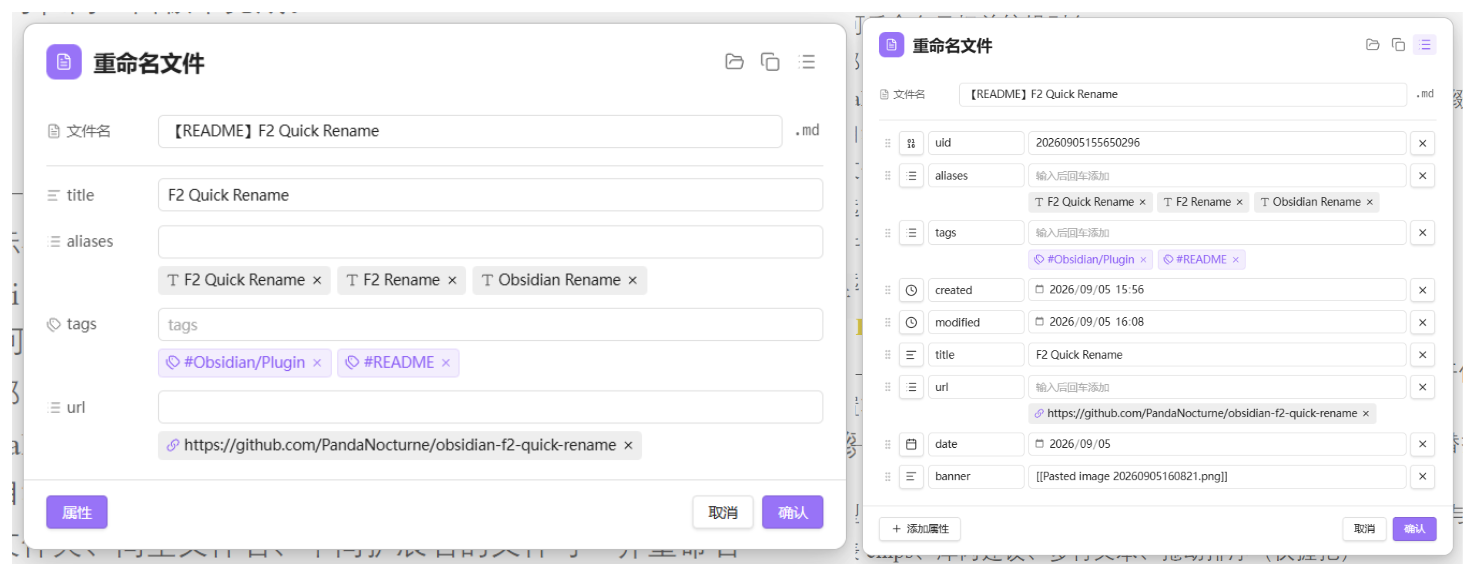
Features
Rename
- F2 — rename the current file, or the embed / link under the cursor
- Cursor on a heading — uses Obsidian’s built-in Rename heading
- Wiki embeds (
![[file|alias]]) and markdown images () — rename the target and edit the alias - External URLs — edit link URL and display title
- Excalidraw — edit the stem without
.excalidraw/.excalidraw.md, restore on save - Companion files (same folder, same basename, different extension) can be renamed together
- Optional: copy the new basename to the clipboard after renaming the active note
- File explorer context menu: F2 Quick rename
- Optional: double-click the extension suffix in the panel to edit it (off by default)
Properties (F2 / F5)
- F2 — show only properties configured in settings; you can add more for this session; the next open shows the configured set again (merge write; other frontmatter keys are kept)
- F5 — full frontmatter panel (add / edit / delete / reorder / change type); replaces the whole frontmatter block
- Types aligned with Obsidian: text, list, number, checkbox, date, date & time
- List chips, vault suggestions, multiline text, drag reorder (grip only)
- Optional auto-save while the panel is open
- Optional Collapse by default for the properties section (F5 still opens expanded)
Header tools
- Show in folder —
app.showInFolder(desktop) - Copy wikilink — shortest
[[wikilink]] - Header icon switches by file kind: note, Canvas, Excalidraw, Bases, attachment, link
Language
Settings → General → Language:
- System default (follows Obsidian)
- 简体中文
- English
Commands
| Command | Suggested hotkey (set manually) |
|---|---|
| Rename file or embed | F2 |
| Rename and edit all properties | F5 |
| Rename attachments | F1 |
| Copy and delete file | Ctrl/Cmd+Shift+X |
No default hotkeys are registered (to avoid conflicts). Bind them under Settings → Hotkeys.
Install
Recommended: install with BRAT (Obsidian42 — BRAT) until the plugin is in the community catalog.
- Install and enable BRAT from Settings → Community plugins → Browse
- Command palette → BRAT: Add a beta plugin for testing
- Paste:
https://github.com/PandaNocturne/obsidian-f2-quick-rename - Enable F2 Quick Rename in Settings → Community plugins
BRAT can also check for updates (or auto-update on startup in BRAT settings).
Manual
- Build or download
main.js,manifest.json, andstyles.css - Copy them to
<Vault>/.obsidian/plugins/ftwo-quick-rename/ - Enable F2 Quick Rename in Settings → Community plugins
Develop
npm install
npm run dev
With Hot Reload, rebuilds apply automatically.
Production build:
npm run build
Settings overview
- General — UI language
- Feature toggles — embeds, aliases, headings, companions, clipboard, properties, auto-save, edit extension
- Document properties — default collapse; configure fields, separators, and side-by-side rows for the F2 panel
Privacy
Runs fully offline. No network requests, telemetry, or vault data uploaded.
License
BSD Zero Clause License (0BSD) — Copyright (C) 2026 by PandaNocturne.