
README file from
GithubObsidian @ Mention Autocomplete
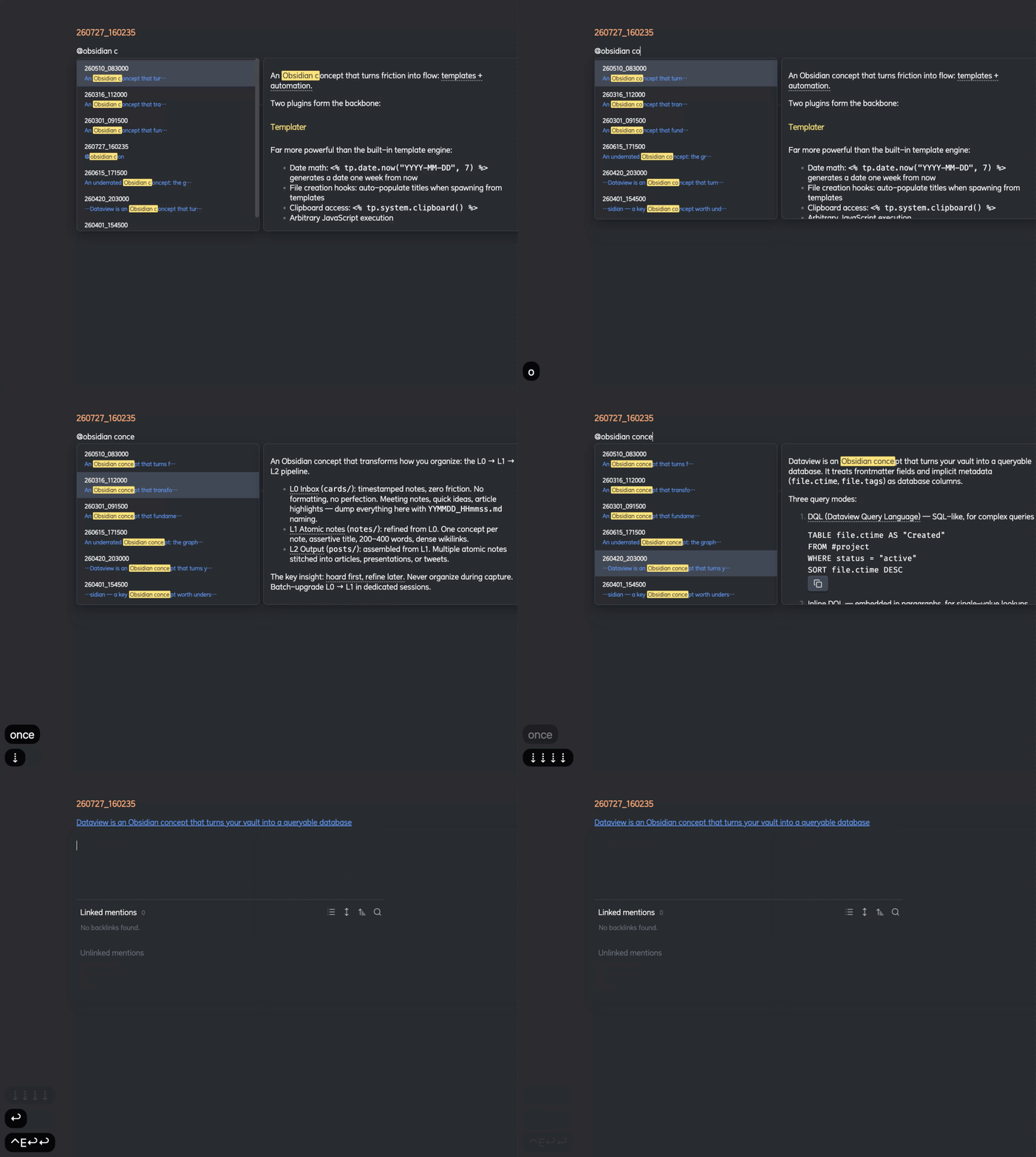
Type @ to instantly search and link any note in your vault — with full-text search, rendered preview, and smart sentence extraction.
Why
Obsidian's built-in [[ autocomplete only matches note titles, and even then only by fuzzy title match. When you have hundreds of timestamped notes (250727_095442.md), finding the right one by title is impossible. You need to search by content — "which note was I talking about 早睡 in?"
@mention lets you type @早睡 and immediately see every note that mentions it, with the exact matching sentence highlighted, and the full note rendered in a side panel.
@ can also fully replace [[ ]] title linking: title matches rank above content matches and are marked with an accent 标题 chip (content matches get a muted 正文 chip). Title matching is fuzzy like the native suggester — @bpe finds Byte Pair Encoding — and picking a title match always inserts a clean [[Title]] (never [[Title|Title]]).
Features
- Full-text search across all markdown files (strips YAML frontmatter, indexes content)
- Title-first fuzzy matching —
@matches file titles like[[ ]](subsequence + multi-word), ranked above content matches: exact > prefix > substring > fuzzy > content-only - Match-type marks — title matches: accent title text + highlighted matched chars + accent
标题chip (file icon); content matches: muted正文chip (search icon) - Clean title links — picking a title match inserts a plain
[[Title]](never[[Title|Title]]), content matches insert[[note#heading|matching sentence]] - Edit-time sorting + relative dates — results tie-break by last edit (descending); every hit shows a natural-language relative time: 今天 / 昨天 / 前天, then
YYYY-MM-DD @trigger — type@keywordanywhere in a note to see matches- Rendered detail panel — hover or keyboard-navigate to see the full note body with markdown rendering
- Keyword highlighting — bright yellow highlights in both the suggestion list and detail panel
- Smart alias extraction — inserts
[[note#heading|matching sentence]]bounded by sentence terminators - IME-aware — correctly handles Chinese pinyin input; Enter confirms characters, then selects
- Keyboard-first —
↑↓/Ctrl+NCtrl+Pto navigate,Enterto select,Escto dismiss - Click outside to dismiss
- Live index — automatically updates as you create, edit, rename, or delete notes
Usage
- Type
@followed by any keyword - Navigate results with arrow keys or mouse
- Press
Enterto insert a wikilink — the alias auto-selects for quick editing
Install
From Obsidian Community Plugins
Search for "Mention Autocomplete" in Settings → Community Plugins → Browse.
Manual
Copy main.js, manifest.json, and styles.css into .obsidian/plugins/at-mention-autocomplete/.
Performance
Indexes are built in-memory at startup. For vaults with 10,000+ notes, initial indexing takes ~1-2 seconds. Subsequent searches are instant (O(n) substring match with scoring). File changes are debounced and incrementally updated.
License
MIT