Password Protection
3 years ago by Qing Li
This is a password plugin for protecting your private notes and diary, no encrypt, no decrypt.
Definition List
2 years ago by shammond42
Obsidian.md plugin to add HTML definition list support.
Spoilers
2 years ago by Jacobtread
Spoiler blocks for Obsidian
NSFW filter
2 years ago by catvatar
Obsidian Plugin adding a button to toggle visiblity of NSFW notes
Harper
2 years ago by Elijah Potter
Garble Text
5 years ago by kurakart
Obsidian plugin for exposing Obsidian's garbleText() function
Peekaboo
2 years ago by Wang Guoshi
An Obsidian plugin protects your privacy by setting a password to hide notes.
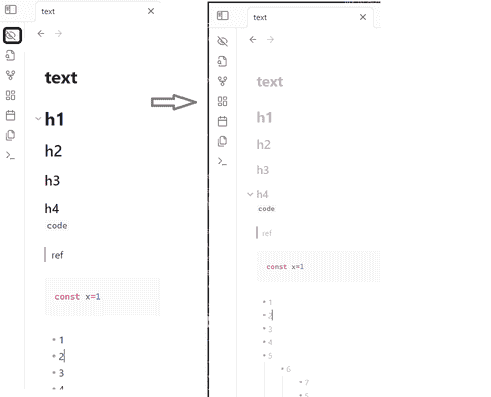
Blur Mode
2 years ago by dangehub
Blur Mode - Blur elements on the obsidian interface for presentations or screenshots|模糊模式 - 对obsidian界面上的元素进行模糊处理以便演示或截图
Age Encrypt
2 years ago by Metin Ur
A plugin for Obsidian that provides age-based encryption for your notes.
Vault Encrypt
10 months ago by Pluppen
Obsidian Plugin that encrypts/decrypts the entire vault.
Nova
8 months ago by Shawn Duggan
Nova - AI plugin for Obsidian that edits your documents directly through natural conversation. Stop copying from chat, start collaborating with AI.
DocFerry
3 months ago by Rosetta Zidian Guo
Publish one Obsidian note to a secure DocFerry share link.
Offline Whisper Transcription
2 months ago by David Manthey
Vaultend
2 months ago by Daewon Hwang
AI-powered vault maintenance for Obsidian — auto-tag, link, and clean up your notes with privacy controls and full undo.
Local LLM Hub
2 months ago by TAKESHI MORITA
All-in-one local AI hub for Obsidian — LLM chat with vault tools, MCP servers, RAG, workflow automation, encryption, and edit history. Fully private, no cloud required.
Sift
23 days ago by disasta-g
Search your notes with substring matching, operators, path and date filters, and ranked results in a large overlay.
Ultra Budget Tracker
12 days ago by Ahmed Hassan
Ultra Budget Tracker — turn bank SMS into structured transaction notes, budgets and balances inside Obsidian. Offline, desktop and mobile.